中文 | English
task-status
Background task status bar: task-progress UI above the chat input area — running count + expandable details + live output tail

A background-task status bar above the chat input box: running-task count + click-to-expand per-task details + **live output tail** (auto-polling, 10-line scrolling area). Registered through the official `conversation.input.dock` slot (same family as queue/todo/goal). Ships as an official **bundle plugin** (`dsh.bundle` + dshClient channel), 0 patches.
## Preview
## Features
**UI** (chat-page dock slot):
| Feature | Description |
|---|---|
| Status bar | Dock card above the chat input box: `⚙ N background tasks running` |
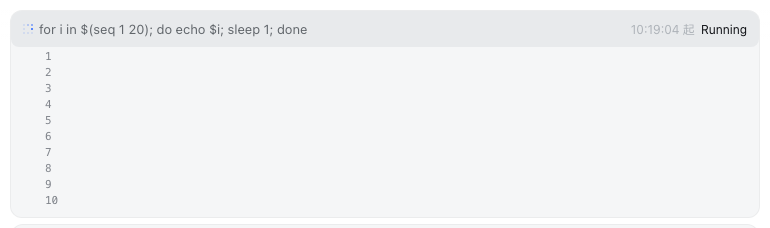
| Expandable details | Click a task row to expand: status / duration / details + output tail |
| Live tail | Polls the output route every 1s while expanded, re-rendering the whole block (the mirror patch guarantees zero contention with the official `task_output` tool and a consistent view) |
| Scrolling area | Output area capped at 10 lines (160px); overflow becomes a scrollbar (tail keeps the end, scrollable to review) |
| Chat page only | Automatically hidden on non-Chat views (trajectory / taskboard, etc.) |
**Routes** (Node half):
| Route | Description |
|---|---|
| `/plugins/dsh-task-status/tasks` | Task list (read-only, filtered by session; owned + unowned union) |
| `/plugins/dsh-task-status/output` | Task output tail (`full:true` accumulates the full text; unknown id → 404) |
**Output tail contention semantics** (official 0809 API constraint): `tasks.read` is a consumptive, incremental read (one shared cursor per task). This plugin applies a **mirror patch** to `ctx.tasks.read` — the official read becomes buffered mirror (increments already read by others, not re-consumed) + direct read of the latest (normal consumption); the plugin's own reads go straight to the underlying rawRead. The official tool and the plugin see the same increment sequence (no duplicates, no loss); only the proactively self-read part can no longer be replayed by the official side alone (official semantics is inherently incremental, so model perception is unaffected).
## Installation
**Recommended: one-line install from a git source** (build artifacts are committed; a git source doesn't trigger a build):
```sh
dsh plugin --profile web add "github:vlln/dsh-task-status#main" # one-line git source (build artifacts committed)
# or npm source: dsh plugin --profile web add @vlln/dsh-task-status@0.3.1
```
Or from a local directory (when you have the source): `git clone`, then `cd dsh-task-status && dsh plugin --profile web add .`.
After installing, **restart web** for it to take effect; you can disable/enable it in the "Plugins" panel on the settings page.
## Usage
Run a background task and the status bar appears (e.g. the model-side `bash` tool with `run_in_background: true`):
```
⚙ 1 background task running
● bash-1 for i in $(seq 1 20)… started 21:30:15 running
```
Click a task row to expand → the output tail scrolls live (a scrollbar appears once it exceeds 10 lines). The status bar disappears automatically when the task finishes.
## Development
```sh
pnpm install
pnpm run build # tsdown: Node half (lib/index.mjs) + client bundle (lib/client.js)
```
- Node half: `src/index.mjs` (mirror patch + `/tasks` `/output` routes)
- client: `src/client/task-status.tsx` (dock-slot status bar)
## License
MIT License (example plugin in the DSH ecosystem).