plugin-registry
中文 | English
DSH 插件生态基建:薄控制台 + 官方插件开发引导
浏览器面板管理 profile 插件安装态(bundle 层栈 + insert 行 + 启停),零补丁;
`make-dsh-plugin` skill 引导开发者按官方格式写插件。


---
> **转向(2026-08)**:官方 0809 推出仓库插件机制(`.dsh-plugin`)覆盖旧独立机制 ~95%,本仓库收敛为
> **薄控制台 + 插件开发规范和引导**(旧 patch/CLI/面板已移除)。**0811 起官方删除
> repository-plugins 机制**(`vendor/loader/src/repository.ts`),外部插件统一经 web profile 安装:
> bundle 插件(`dsh.bundle` 包)进 `dsh.profile.bundles` 层栈;非 bundle 插件(纯 cordis 包)经
> profile `cordis.patch.yml` insert 行挂载(配置 HMR 实时生效)。完整评估见 [官方 0809 覆盖度](docs/official-0809-coverage.md)。
## 定位
DeepSeek Harness 官方机制管「插件是什么、怎么跑」;本仓库补两件事(面板结构见 [console README](packages/plugin/console/README.md),开发引导见下文):
1. **薄控制台**(`packages/plugin/console`)——管理 profile 插件安装态的浏览器面板 + 4 个 agent 工具
2. **开发规范和引导**——`make-dsh-plugin` skill + cookbook,指导创建官方 bundle / cordis 插件
## 生态关系(谁能干什么)
```
官方 DSH(DeepSeek Harness) 插件运行时 + profile bundle 机制(0811 起无 repository 机制)
│
├── 官方插件(bundle) loop / task-status / navbar 等——`dsh plugin --profile web add` 装进 profile 层栈
├── 第三方插件(bundle/纯插件)独立 GitHub 仓库或 npm 包——bundle 进层栈;纯插件走 insert 行(实时)
│
└── 本仓库(plugin-registry) ① 薄控制台:管理安装态的浏览器面板 + agent 工具
② make-dsh-plugin skill + cookbook:引导开发第三方插件
```
插件形态与安装路径说明见 [插件类型对比](docs/plugin-types.md);现有插件的安装示例见 [examples](examples/README.md)。
## 薄控制台
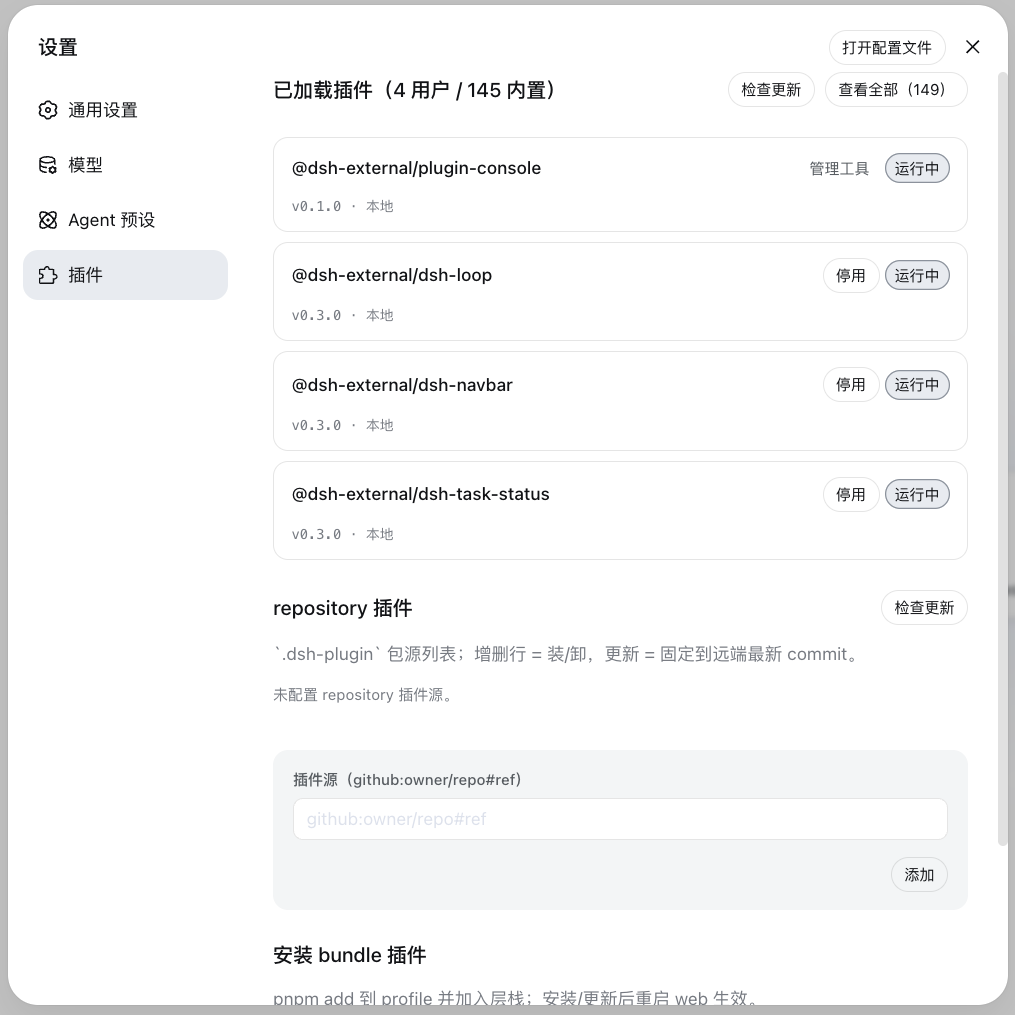
设置页「插件管理」面板管理 profile 插件安装态:**安装插件区**(统一入口——输入 npm 包名或 GitHub 项目:`https://github.com/o/r` / `github.com/o/r` / `github:o/r`,URL 自动规范化——自动 pnpm add,bundle 插件进层栈、非 bundle 写 insert 行)+ **已加载插件区**(版本检查/更新、`disabled` 启停持久化、bundle 卸载)。
## 安装
**方式一:git 源直接安装(推荐,真一行)**
```sh
dsh plugin --profile web add "github:vlln/plugin-registry#main&path:/packages/plugin/console"
```
构建产物已入库(git 源安装不触发构建),一行命令直接装(实测约 15 秒)。
**方式二:npm 源**
```sh
dsh plugin --profile web add @vlln/plugin-console@0.1.0
```
**方式三:本地目录(有源码时)**
```sh
git clone https://github.com/vlln/plugin-registry
cd plugin-registry/packages/plugin/console
dsh plugin --profile web add . # 产物已入库,无需构建;当前目录即 bundle 包子目录(dsh 锚定 . 为绝对路径)
```
挂载后刷新 Web 页面,设置页出现「插件管理」面板。
## Agent Skills
| Skill | 作用 |
|---|---|
| [make-dsh-plugin](skills/make-dsh-plugin/SKILL.md) | 创建官方 bundle / cordis 插件:先选形态(skill 包 / MCP / Node 工具 / 带 UI)→ 声明 `dsh.bundle` 或纯 apply → 安装验证纪律。详情分置 `references/`;仓库内参考实现 `packages/plugin/console` |
## 开发前须知(踩过的坑)
关键坑(官方包未发布、Node half 改动需重启、宿主 CSS 覆盖等)与完整清单见 [skill references/gotchas](skills/make-dsh-plugin/references/gotchas.md)——**开发前先读**。
## 文档
- [插件类型对比](docs/plugin-types.md) — bundle 插件 vs 纯 cordis 插件:开发/分发/安装/管理四维 + 选型
- [官方 0809 覆盖度评估](docs/official-0809-coverage.md) — 官方机制覆盖度、转向决策(含 0811 repository 移除说明见 CHANGELOG)
- [薄控制台设计](docs/console-ui-plugin-management.md) — 统一管理安装态的设计
- 历史机制文档(已转向,仅存档):[架构(旧)](docs/architecture.md)、[创建插件(旧)](docs/cookbook/creating-a-plugin.md)、[清单格式(旧)](docs/manifest-format.md)、[创建 repository-plugin(旧)](docs/cookbook/creating-a-repository-plugin.md) 等
- [变更记录](CHANGELOG.md) / [路线图](ROADMAP.md)
## 版权
MIT License。见 [LICENSE](LICENSE)。