plugin-console
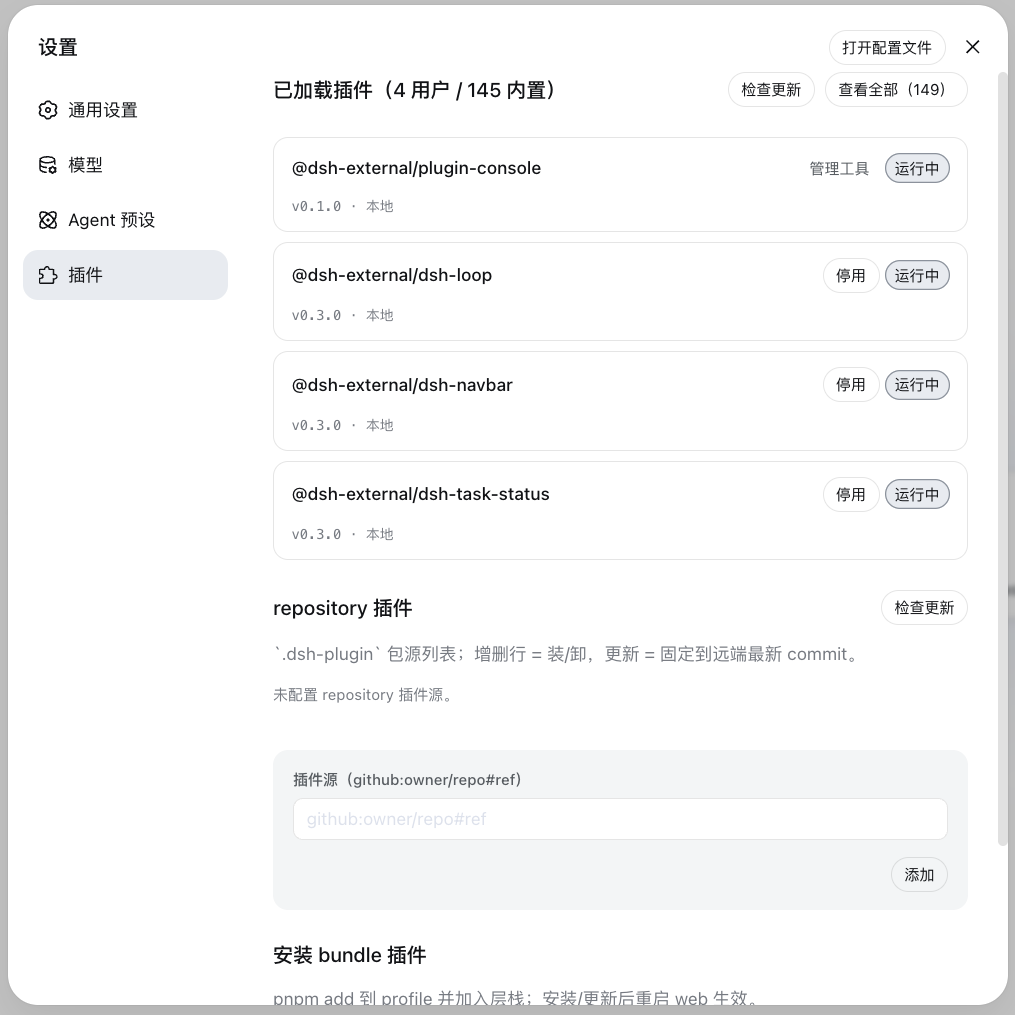
薄控制台——DSH Web 设置页内的插件管理面板
0 patch 管理 profile 插件安装态:bundle 层栈 + insert 行 + 启停,
读写 profile 安装态,无需手改配置、不引入任何补丁。


---
## 这是什么
官方 **bundle 插件**(`dsh.bundle` + `dsh.client` 声明):Node half 注册
`/api/plugin-console` 路由,client half 在设置页注册「插件」面板。面板三个管理区:
| 管理区 | 职责 | 操作 | 写入位置 |
|---|---|---|---|
| **insert 插件** | 非 bundle 插件(纯 cordis 包)的安装态 | 包名输入挂载/移除(**配置 HMR 实时生效,零重启**) | profile `$DSH_HOME/profiles/web/cordis.patch.yml` 的 insert 行 |
| **已加载插件** | 查看所有已加载插件(bundle + 内置)状态 | 更新(用户 bundle)、停用/启用(用户 bundle)、卸载(用户 bundle) | profile `cordis.patch.yml` 的 `disabled` 标记(持久化) |
| **安装 bundle 插件** | bundle 安装入口(pnpm add 到 profile 层栈) | 安装/更新/卸载(重启生效) | profile `package.json` 依赖 + `dsh.profile.bundles` 层栈 |
**0811 背景**:官方移除 repository-plugins 机制(`vendor/loader/src/repository.ts` 删除),外部插件
统一经 web profile 安装。0811 保留配置级 HMR(web-app 禁用模块级 hmr 时 profile-boot 主动挂载
watch-only 实例)——profile `cordis.patch.yml` 编辑实时生效,insert 行写入**无需重启即挂载**(已实测)。
## 安装
安装命令与方式(git 源真一行 / 本地目录)见仓库根 [README「安装」章节](../../../README.md)。构建产物已入库,git 源一行命令直接装(实测约 15 秒):
```sh
dsh plugin --profile web add "github:vlln/plugin-registry#main&path:/packages/plugin/console"
```
挂载后刷新 Web 页面,设置页出现「插件」面板(`settings.section` 插槽)。
## 使用
- **insert 插件区**:输入 npm 包名挂载——写 profile patch insert 行 → 配置 HMR 实时挂载(包需先在 profile 可解析,如 `dsh plugin --profile web add <包>`);移除行实时卸载
- **已加载插件区**:统一行渲染(来源 Pill:内置 / 管理工具),启停即时生效并持久化到 profile patch
- **bundle 安装区**:pnpm add 到 profile 层栈,重启 web 生效
## AI 插件管理工具(agent 面)
面板之外,Node half 注册 4 个 agent 工具(`defineTool`,与面板写同一安装态):
| 工具 | 参数 | 行为 |
|---|---|---|
| `plugin_search` | `query?`, `source?`, `refresh?` | 搜源集合(缓存枚举);默认 hub catalog(`dsh-external/hub` 的 catalog.json);`source` 给定新索引 JSON 文件/URL → 懒加载探测并记住 |
| `plugin_install` | `source` | npm 包直装:声明 `dsh.bundle` → pnpm add + 层栈(重启生效);纯 cordis 包 → pnpm add + insert 行(**实时挂载**) |
| `plugin_uninstall` | `id` | 删 insert 行(实时)或 bundle 依赖(重启生效);清单保留可再装 |
| `plugin_status` | `id?` | 无参 list 已装;有参单查(含 TOFU resolved ref) |
发现层存储(协议见 [plugin-discovery-design](../../../docs/plugin-discovery-design.md)):
```
$DSH_HOME/plugin-sources/
├── sources.yml # 索引源集合(hub catalog;用户可编辑 + trust 层级)
├── lock.yml # TOFU:canonical → resolved ref + 内容哈希
└── cache/<源id>/ # 每源枚举快照(TTL 6h)
```
index 源支持本地文件(`file://…/catalog.json`)——私有 hub 仓库匿名 raw 不可达时读本地 clone。
web 面板刷新即见 agent 写入结果(同文件,不实时推送)。
## 生效方式
- **insert 插件(非 bundle)**:写行/删行后 **配置 HMR 实时生效**(无需重启——0811 profile-boot 挂载 watch-only HMR)
- **bundle 插件**:安装/更新/卸载需**重启 web**(层栈在 boot 合成);已挂载 bundle 的运行时启停即时生效并持久化
- **Node half 改动**需重启 web(ESM 缓存);**client 面板改动**重装 + 刷新页面即可
## 开发插件(引导)
创建官方 bundle 插件 / 纯 cordis 插件的契约见
[make-dsh-plugin skill](../../../skills/make-dsh-plugin/SKILL.md)。仓库内参考实现:本包(bundle + 自渲染 client 的完整例子)。