
vlmbench
Single-file, drop-in VLM benchmark CLI for your agents.





Single-file, drop-in VLM benchmark CLI for your agents.
 ## Quick Start
No install needed — just run with [`uvx`](https://docs.astral.sh/uv/):
```bash
# Local images/PDFs (macOS Ollama)
uvx vlmbench run -m qwen3-vl:2b -i ./images/
# Linux + vLLM Docker (auto-starts with --gpus all)
uvx vlmbench run -m Qwen/Qwen3-VL-2B-Instruct -i ./images/
# HuggingFace dataset (images)
uvx vlmbench run -m Qwen/Qwen3-VL-2B-Instruct \
-d hf://vlm-run/FineVision-vlmbench-mini --max-samples 64
# HuggingFace dataset (text-only — use a column as the prompt)
uvx vlmbench run -m meta-llama/Llama-3.1-8B-Instruct \
-d hf://my-org/my-prompts --dataset-text-col prompt --prompt ""
# Concurrency sweep
uvx vlmbench run -m Qwen/Qwen3-VL-8B-Instruct -i ./images/ \
--concurrency 4,8,16,32,64
# Use a model profile (custom serve args + setup)
uvx vlmbench run --profile deepseek-ocr -i ./images/
# Cloud / remote API (model auto-detected from server)
uvx vlmbench run -i ./images/ \
--base-url https://my-server.example.com/v1 --api-key $API_KEY
# Cloud API with explicit model
uvx vlmbench run -m Qwen/Qwen3-VL-2B-Instruct -i ./images/ \
--base-url https://api.openai.com/v1 --api-key $OPENAI_API_KEY
```
Or install it: `pip install vlmbench`
## Example Run
```bash
uvx vlmbench run -m Qwen/Qwen3-VL-2B-Instruct \
-d hf://vlm-run/FineVision-vlmbench-mini --max-samples 64 \
--prompt "Describe this image in 80 words or less" \
--concurrency 4,8,16 --backend vllm
```
```
╭─ Configuration ──────────────────────────────────────────────────────────────╮
│ │
│ model Qwen/Qwen3-VL-2B-Instruct │
│ revision main │
│ backend vLLM 0.11.2 │
│ endpoint http://localhost:8000/v1 │
│ │
│ gpu NVIDIA RTX PRO 6000 Blackwell Workstation Edition │
│ vram 97,887 MiB │
│ driver 580.126.09 │
│ │
│ dataset hf://vlm-run/FineVision-vlmbench-mini │
│ images 64 (mixed) │
│ │
│ max_tokens 2048 │
│ runs 3 │
│ concurrency 8 │
│ │
│ monitor tmux attach -t vlmbench-vllm │
│ │
╰──────────────────────────────────────────────────────────────────────────────╯
╭─ Results ────────────────────────────────────────────────────────────────────╮
│ │
│ Metric Value p50 p95 p99 │
│ Throughput 13.33 img/s — — — │
│ Tokens/sec 1168 tok/s — — — │
│ Workers 8 — — — │
│ TTFT 58 ms 51 ms 114 ms 140 ms │
│ TPOT 5.3 ms 5.0 ms 7.3 ms 7.4 ms │
│ Latency (per worker) 0.54 s/img 0.46 s 0.92 s 1.36 s │
│ │
│ Tokens (avg) prompt 2,077 • completion 88 │
│ Token ranges prompt 180–8,545 • completion 55–190 │
│ Images 144 • avg 964×867 (0.93 MP) │
│ Resolution min 338×266 • median 1024×768 • max 2048×1755 │
│ VRAM peak 69.7 GB │
│ Reliability 192/192 ok • 14.4s total │
│ │
╰──────────────────────────────────────────────────────────────────────────────╯
```
## Leaderboard
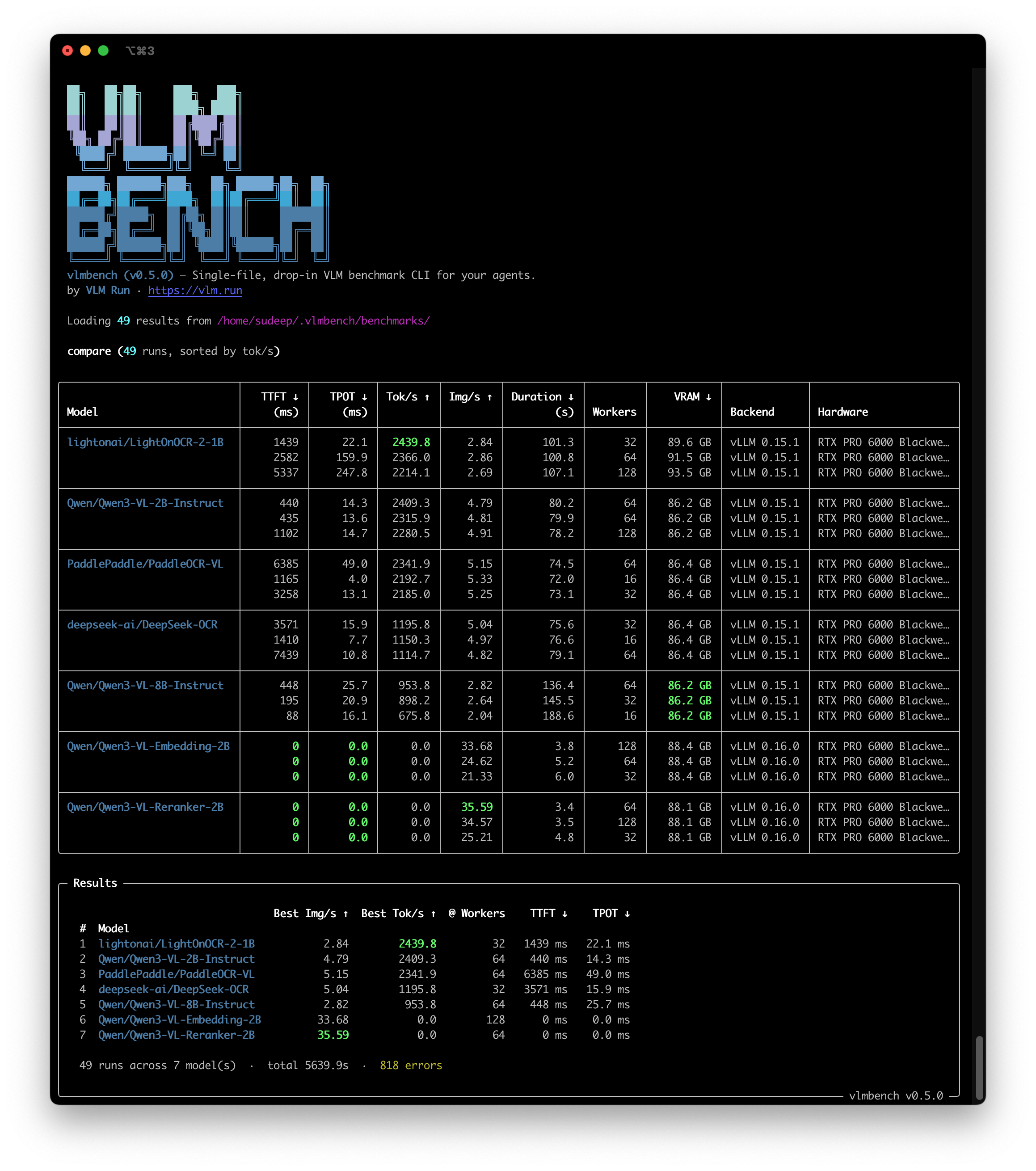
Best peak throughput per model on NVIDIA RTX PRO 6000 Blackwell (vLLM v0.15.1, 39 runs across concurrency sweeps):
| # | Model | Best Tok/s | Workers | TTFT | TPOT |
|---|-------|-----------|---------|------|------|
| 1 | `lightonai/LightOnOCR-2-1B` | **2,439.8** | 32 | 1,439 ms | 22.1 ms |
| 2 | `Qwen/Qwen3-VL-2B-Instruct` | 2,409.3 | 64 | 440 ms | 14.3 ms |
| 3 | `PaddlePaddle/PaddleOCR-VL` | 2,341.9 | 64 | 6,385 ms | 49.0 ms |
| 4 | `deepseek-ai/DeepSeek-OCR` | 1,195.8 | 32 | 3,571 ms | 15.9 ms |
| 5 | `Qwen/Qwen3-VL-8B-Instruct` | 953.8 | 64 | 448 ms | 25.7 ms |
Compare your own results:
```bash
uvx vlmbench compare # auto-discovers ~/.vlmbench/benchmarks/
uvx vlmbench compare results/*.json # or pass files explicitly
```
See [MODELS.md](.claude/skills/vlmbench/MODELS.md) for all tested models and their required `--serve-args`.
## Profiles
Some models need custom Docker images, extra pip installs, or special serve args. Profiles bundle all of this into a single YAML file — just pass `--profile` and vlmbench handles the rest.
```bash
uvx vlmbench profiles # list available profiles
uvx vlmbench run --profile deepseek-ocr -i ./images/ # run with a profile
```
When you use `--profile`, it sets `--model`, `--prompt`, `--serve-args`, and (for Docker builds) the base image and setup commands. You can still override any flag explicitly.
| Profile | Model | Base Image | Custom Setup |
|---------|-------|------------|--------------|
| `glm-ocr` | `zai-org/GLM-OCR` | `vllm/vllm-openai:nightly` | vLLM nightly + transformers >= 5.1.0, MTP speculative decoding |
| `deepseek-ocr` | `deepseek-ai/DeepSeek-OCR` | `vllm/vllm-openai:v0.15.1` | Custom logits processor, no prefix caching |
| `paddleocr-vl` | `PaddlePaddle/PaddleOCR-VL` | `vllm/vllm-openai:v0.15.1` | Trust remote code, no prefix caching |
| `qwen3-vl-2b` | `Qwen/Qwen3-VL-2B-Instruct` | `vllm/vllm-openai:v0.15.1` | — |
| `qwen3-vl-8b` | `Qwen/Qwen3-VL-8B-Instruct` | `vllm/vllm-openai:v0.15.1` | — |
Profiles live in `vlmbench/profiles/*.yaml` and ship with the package. For local Docker workflows:
```bash
make build PROFILE=glm-ocr # generates Dockerfile + docker build
make serve PROFILE=glm-ocr # start server in tmux
make benchmark PROFILE=glm-ocr # run benchmark against the server
```
## CLI Reference
| Flag | Default | Description |
|---|---|---|
| `--model` / `-m` | auto-detect | Model ID. Auto-detected from server if omitted; required only with `--serve`. |
| `--profile` | none | Model profile (e.g. `glm-ocr`). Sets model, prompt, serve-args. See `vlmbench profiles`. |
| `--input` / `-i` | sample URL | File, directory, or URL (images, PDFs, videos) |
| `--dataset` / `-d` | none | HuggingFace dataset (e.g. `hf://vlm-run/FineVision-vlmbench-mini`) |
| `--dataset-image-col` | auto-detect | Image column name in HF dataset |
| `--dataset-text-col` | none | Text column name in HF dataset to use as prompt/document input |
| `--dataset-split` | `train` | Dataset split to load |
| `--base-url` | auto-detect | OpenAI-compatible base URL |
| `--api-key` | `no-key` | API key (also reads `OPENAI_API_KEY` env) |
| `--prompt` | `"Extract all text..."` | Prompt/instruction sent with each input. Pass `""` to use the text column as the full message. |
| `--max-tokens` | `2048` | Max completion tokens |
| `--runs` | `3` | Timed runs per input |
| `--warmup` | `1` | Warmup runs (not recorded, fail-fast on errors) |
| `--concurrency` | `8` | Single value or comma-separated sweep (e.g. `4,8,16,32,64`) |
| `--max-samples` | all | Limit number of input samples (useful for dry-runs) |
| `--output-directory` | `~/.vlmbench/benchmarks/` | Output directory |
| `--tag` | none | Custom label (used in result filename and metadata) |
| `--upload` | off | Upload results to HuggingFace (requires `HF_TOKEN`) |
| `--upload-repo` | `vlm-run/vlmbench-results` | HuggingFace dataset repo for uploads |
| `--backend` | `auto` | `auto`, `ollama`, `vllm`, `vllm-openai:
## Quick Start
No install needed — just run with [`uvx`](https://docs.astral.sh/uv/):
```bash
# Local images/PDFs (macOS Ollama)
uvx vlmbench run -m qwen3-vl:2b -i ./images/
# Linux + vLLM Docker (auto-starts with --gpus all)
uvx vlmbench run -m Qwen/Qwen3-VL-2B-Instruct -i ./images/
# HuggingFace dataset (images)
uvx vlmbench run -m Qwen/Qwen3-VL-2B-Instruct \
-d hf://vlm-run/FineVision-vlmbench-mini --max-samples 64
# HuggingFace dataset (text-only — use a column as the prompt)
uvx vlmbench run -m meta-llama/Llama-3.1-8B-Instruct \
-d hf://my-org/my-prompts --dataset-text-col prompt --prompt ""
# Concurrency sweep
uvx vlmbench run -m Qwen/Qwen3-VL-8B-Instruct -i ./images/ \
--concurrency 4,8,16,32,64
# Use a model profile (custom serve args + setup)
uvx vlmbench run --profile deepseek-ocr -i ./images/
# Cloud / remote API (model auto-detected from server)
uvx vlmbench run -i ./images/ \
--base-url https://my-server.example.com/v1 --api-key $API_KEY
# Cloud API with explicit model
uvx vlmbench run -m Qwen/Qwen3-VL-2B-Instruct -i ./images/ \
--base-url https://api.openai.com/v1 --api-key $OPENAI_API_KEY
```
Or install it: `pip install vlmbench`
## Example Run
```bash
uvx vlmbench run -m Qwen/Qwen3-VL-2B-Instruct \
-d hf://vlm-run/FineVision-vlmbench-mini --max-samples 64 \
--prompt "Describe this image in 80 words or less" \
--concurrency 4,8,16 --backend vllm
```
```
╭─ Configuration ──────────────────────────────────────────────────────────────╮
│ │
│ model Qwen/Qwen3-VL-2B-Instruct │
│ revision main │
│ backend vLLM 0.11.2 │
│ endpoint http://localhost:8000/v1 │
│ │
│ gpu NVIDIA RTX PRO 6000 Blackwell Workstation Edition │
│ vram 97,887 MiB │
│ driver 580.126.09 │
│ │
│ dataset hf://vlm-run/FineVision-vlmbench-mini │
│ images 64 (mixed) │
│ │
│ max_tokens 2048 │
│ runs 3 │
│ concurrency 8 │
│ │
│ monitor tmux attach -t vlmbench-vllm │
│ │
╰──────────────────────────────────────────────────────────────────────────────╯
╭─ Results ────────────────────────────────────────────────────────────────────╮
│ │
│ Metric Value p50 p95 p99 │
│ Throughput 13.33 img/s — — — │
│ Tokens/sec 1168 tok/s — — — │
│ Workers 8 — — — │
│ TTFT 58 ms 51 ms 114 ms 140 ms │
│ TPOT 5.3 ms 5.0 ms 7.3 ms 7.4 ms │
│ Latency (per worker) 0.54 s/img 0.46 s 0.92 s 1.36 s │
│ │
│ Tokens (avg) prompt 2,077 • completion 88 │
│ Token ranges prompt 180–8,545 • completion 55–190 │
│ Images 144 • avg 964×867 (0.93 MP) │
│ Resolution min 338×266 • median 1024×768 • max 2048×1755 │
│ VRAM peak 69.7 GB │
│ Reliability 192/192 ok • 14.4s total │
│ │
╰──────────────────────────────────────────────────────────────────────────────╯
```
## Leaderboard
Best peak throughput per model on NVIDIA RTX PRO 6000 Blackwell (vLLM v0.15.1, 39 runs across concurrency sweeps):
| # | Model | Best Tok/s | Workers | TTFT | TPOT |
|---|-------|-----------|---------|------|------|
| 1 | `lightonai/LightOnOCR-2-1B` | **2,439.8** | 32 | 1,439 ms | 22.1 ms |
| 2 | `Qwen/Qwen3-VL-2B-Instruct` | 2,409.3 | 64 | 440 ms | 14.3 ms |
| 3 | `PaddlePaddle/PaddleOCR-VL` | 2,341.9 | 64 | 6,385 ms | 49.0 ms |
| 4 | `deepseek-ai/DeepSeek-OCR` | 1,195.8 | 32 | 3,571 ms | 15.9 ms |
| 5 | `Qwen/Qwen3-VL-8B-Instruct` | 953.8 | 64 | 448 ms | 25.7 ms |
Compare your own results:
```bash
uvx vlmbench compare # auto-discovers ~/.vlmbench/benchmarks/
uvx vlmbench compare results/*.json # or pass files explicitly
```
See [MODELS.md](.claude/skills/vlmbench/MODELS.md) for all tested models and their required `--serve-args`.
## Profiles
Some models need custom Docker images, extra pip installs, or special serve args. Profiles bundle all of this into a single YAML file — just pass `--profile` and vlmbench handles the rest.
```bash
uvx vlmbench profiles # list available profiles
uvx vlmbench run --profile deepseek-ocr -i ./images/ # run with a profile
```
When you use `--profile`, it sets `--model`, `--prompt`, `--serve-args`, and (for Docker builds) the base image and setup commands. You can still override any flag explicitly.
| Profile | Model | Base Image | Custom Setup |
|---------|-------|------------|--------------|
| `glm-ocr` | `zai-org/GLM-OCR` | `vllm/vllm-openai:nightly` | vLLM nightly + transformers >= 5.1.0, MTP speculative decoding |
| `deepseek-ocr` | `deepseek-ai/DeepSeek-OCR` | `vllm/vllm-openai:v0.15.1` | Custom logits processor, no prefix caching |
| `paddleocr-vl` | `PaddlePaddle/PaddleOCR-VL` | `vllm/vllm-openai:v0.15.1` | Trust remote code, no prefix caching |
| `qwen3-vl-2b` | `Qwen/Qwen3-VL-2B-Instruct` | `vllm/vllm-openai:v0.15.1` | — |
| `qwen3-vl-8b` | `Qwen/Qwen3-VL-8B-Instruct` | `vllm/vllm-openai:v0.15.1` | — |
Profiles live in `vlmbench/profiles/*.yaml` and ship with the package. For local Docker workflows:
```bash
make build PROFILE=glm-ocr # generates Dockerfile + docker build
make serve PROFILE=glm-ocr # start server in tmux
make benchmark PROFILE=glm-ocr # run benchmark against the server
```
## CLI Reference
| Flag | Default | Description |
|---|---|---|
| `--model` / `-m` | auto-detect | Model ID. Auto-detected from server if omitted; required only with `--serve`. |
| `--profile` | none | Model profile (e.g. `glm-ocr`). Sets model, prompt, serve-args. See `vlmbench profiles`. |
| `--input` / `-i` | sample URL | File, directory, or URL (images, PDFs, videos) |
| `--dataset` / `-d` | none | HuggingFace dataset (e.g. `hf://vlm-run/FineVision-vlmbench-mini`) |
| `--dataset-image-col` | auto-detect | Image column name in HF dataset |
| `--dataset-text-col` | none | Text column name in HF dataset to use as prompt/document input |
| `--dataset-split` | `train` | Dataset split to load |
| `--base-url` | auto-detect | OpenAI-compatible base URL |
| `--api-key` | `no-key` | API key (also reads `OPENAI_API_KEY` env) |
| `--prompt` | `"Extract all text..."` | Prompt/instruction sent with each input. Pass `""` to use the text column as the full message. |
| `--max-tokens` | `2048` | Max completion tokens |
| `--runs` | `3` | Timed runs per input |
| `--warmup` | `1` | Warmup runs (not recorded, fail-fast on errors) |
| `--concurrency` | `8` | Single value or comma-separated sweep (e.g. `4,8,16,32,64`) |
| `--max-samples` | all | Limit number of input samples (useful for dry-runs) |
| `--output-directory` | `~/.vlmbench/benchmarks/` | Output directory |
| `--tag` | none | Custom label (used in result filename and metadata) |
| `--upload` | off | Upload results to HuggingFace (requires `HF_TOKEN`) |
| `--upload-repo` | `vlm-run/vlmbench-results` | HuggingFace dataset repo for uploads |
| `--backend` | `auto` | `auto`, `ollama`, `vllm`, `vllm-openai: