# Secure Remote Authentication Setup Scripts Suite
This repository provides a suite of scripts, designed to bolster the security\
of remote authentication systems on Linux servers, which can be invoked\
directly from the terminal ***without the need for local copying or installation***.
Here’s an example terminal command to use the primary script,\
[`setup_secure_remote_auth.bash`](setup_secure_remote_auth.bash) which configuring more\
secure SSH server (tested on Ubuntu 22.04):
- Set vars for pre-configure setup
```bash
$ NEW_USERNAME='testuser'
$ CUSTOM_PORT_NUM='2222'
$ PUBLIC_SSH_KEY_URL='https://raw.githubusercontent.com/voiduin/keys/main/public-white-ed25519.pub' # Optional
# Optional (not use in script, but use in host post init)
$ NEW_HOSTNAME='myhost'
```
- Run command
```bash
$ BASEURL='https://raw.githubusercontent.com/voiduin/linux-host-setup/main' && \
curl -Ls "${BASEURL}/setup_secure_remote_auth.bash" | \
sudo bash -s -- --username "${NEW_USERNAME}" --port "${CUSTOM_PORT_NUM}" --ssh-public-key-url "${PUBLIC_SSH_KEY_URL}" --restart-sshd
```
After that command, you will get the following terminal\
output as an example - remember the credentials!
```bash
...
REMEMBER: User creation successful:
- Username: testuser
- Password: WTPxcJ9JLgxCtK0S (randomly generated)
...
```
Then, you can change your random password to your\
chosen secret password (if needed):
```bash
$ passwd "${NEW_USERNAME}"
# Enter your new password at this prompt
```
You may also want to change the hostname:
```bash
$ hostname "${NEW_HOSTNAME}"
```
To finish, you need to re-login to your new user account and go to its home directory:
```bash
$ su - "${NEW_USERNAME}"
```
This example demonstrates how to use the setup_secure_remote_auth\
script to perform the following actions:
1. Create a new user named **"testuser"**
2. Change the SSH server settings:\
By default, these changes are made, but in the end, the user must manually\
restart the SSH server:
- Change the port number to a non-standard port **"2222"** (sshd setting: **Port ${new_sshd_port}**)
- Disable root login (sshd setting: **PermitRootLogin no**)
- Reduce the time for unauthorized sessions (sshd setting: **LoginGraceTime 50**)
3. Install **"fail2ban"** with standard settings (not configurable in this script)
4. Require a restart of the SSH server **"sshd"** to apply the new setting
The primary script, [`setup_secure_remote_auth.bash`](setup_secure_remote_auth.bash),\
integrates functionalities from three other utility scripts to establish\
a robust and secure remote authentication environment. Each script can also\
be executed independently depending on specific needs.
## Scripts Overview
1. **setup_secure_remote_auth.bash**\
This master script configures the entire secure remote authentication setup,\
utilizing the other three scripts listed below to perform specific tasks.
2. **fail2ban_install.bash**\
Installs and configures Fail2Ban to protect SSH access.
3. **sshd_configure.bash**\
Configures various SSHD settings like port, root login permission,\
and password authentication.
4. **create_user.bash**\
Creates a new user with an optional password; if no password is specified,\
a random one will be generated.
### 1. `setup_secure_remote_auth.bash`
This script is the main orchestrator that sets up secure remote authentication\
by configuring SSH settings, installing and configuring Fail2Ban, and managing\
user creation with enhanced security protocols.
#### Features:
- Modifies SSH configuration to secure settings.
- Installs and configures Fail2Ban to protect SSH.
- Provides the capability to add a new user with secure parameters.
#### Usage:
```bash
curl -Ls https://raw.githubusercontent.com/voiduin/linux-host-setup/main/setup_secure_remote_auth.bash | \
sudo bash -s [new_username] [new_sshd_port] [--restart-sshd]
```
or
```bash
wget -qO - https://raw.githubusercontent.com/voiduin/linux-host-setup/main/setup_secure_remote_auth.bash | \
sudo bash -s [new_username] [new_sshd_port] [--restart-sshd]
```
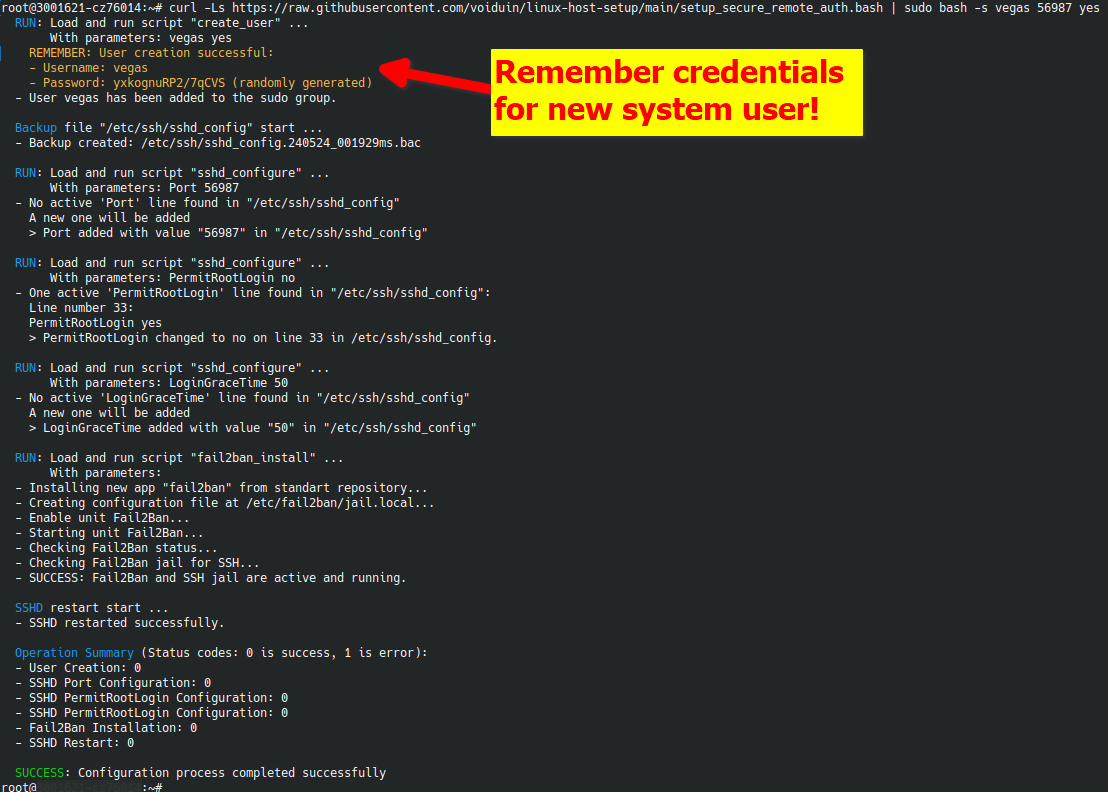
Example output below:
### 2. `fail2ban_install.bash`
Installs and configures Fail2Ban to enhance the security of the server by monitoring log files and banning IPs that show malicious signs.
#### Features:
- Automatically installs Fail2Ban.
- Configures Fail2Ban to protect SSH access.
#### Usage:
```bash
$ SCRIPT_URL='https://raw.githubusercontent.com/voiduin/linux-host-setup/main/fail2ban_install.bash';\
curl -Ls "${SCRIPT_URL}" | sudo bash -s
```
or
```bash
$ SCRIPT_URL='https://raw.githubusercontent.com/voiduin/linux-host-setup/main/fail2ban_install.bash';\
wget -qO - "${SCRIPT_URL}" | sudo bash -s
```
### 3. `sshd_configure.bash`
Modifies SSHD configuration settings securely to apply best security practices like changing the default port, disabling root login, and enforcing key-based authentication.
#### Features:
- Can change any SSHD configuration parameter.
- Validates changes to avoid common configuration errors.
#### Usage:
```bash
$ SCRIPT_URL='https://raw.githubusercontent.com/voiduin/linux-host-setup/main/sshd_configure.bash';\
curl -Ls "${SCRIPT_URL}" | sudo bash -s [setting_name] [value]
```
or
```bash
$ SCRIPT_URL='https://raw.githubusercontent.com/voiduin/linux-host-setup/main/sshd_configure.bash';\
wget -qO - "${SCRIPT_URL}" | sudo bash -s [setting_name] [value]
```
### 4. `create_user.bash`
Handles the creation of new users with an option to set a secure password or generate a random one.
After running the command, you will receive the following output, which includes a new, randomly generated password that you can change later:
```bash
$ ./create_user.bash new_username
User creation successful:
- Username: new_username
- Password: xhG71Ct94Vth4j7M (randomly generated)
```
#### Features:
- Creates a new user with a specified or random password.
- Ensures that the user does not already exist.
#### Usage:
```bash
$ SCRIPT_URL='https://raw.githubusercontent.com/voiduin/linux-host-setup/main/create_user.bash';\
curl -Ls "${SCRIPT_URL}" | sudo bash -s username [--add-to-sudo] [password]
```
or
```bash
$ SCRIPT_URL='https://raw.githubusercontent.com/voiduin/linux-host-setup/main/create_user.bash';\
wget -qO - "${SCRIPT_URL}" | sudo bash -s username [--add-to-sudo] [password]
```
## General Instructions
Each script can be run directly from the command line interface (CLI) or executed remotely via `curl` or `wget`. It is highly recommended to review the help section of each script (`show_usage` function within each script) for detailed information on the parameters and the expected behavior.
For security and functionality, ensure that you run these scripts with root privileges. Each script contains error handling to guide you through proper usage and to prevent common mistakes.
## Contributing
Contributions to improve the scripts or documentation are welcome. Please refer to the project's GitHub page to submit issues or pull requests.
## License
This project is licensed under the MIT License - see the [LICENSE.md](LICENSE.md) file for details.