# NVIDIA GPU MPS and MIG dynamic slice plugin
## Special Thanks
This feature will not be implemented without the help of @sailorvii.
## Introduction
The NVIDIA GPU build-in sharing method includes: time-slice, MPS and MIG. The context switch for time slice sharing would waste some time, so we chose the MPS and MIG. The GPU MIG profile is variable, the user could acquire the MIG device in the profile definition, but current implementation only defines the dedicated profile before the user requirement. That limits the usage of MIG. We want to develop an automatic slice plugin and create the slice when the user require it.
For the scheduling method, node-level binpack and spread will be supported. Referring to the binpack plugin, we consider the CPU, Mem, GPU memory and other user-defined resource.
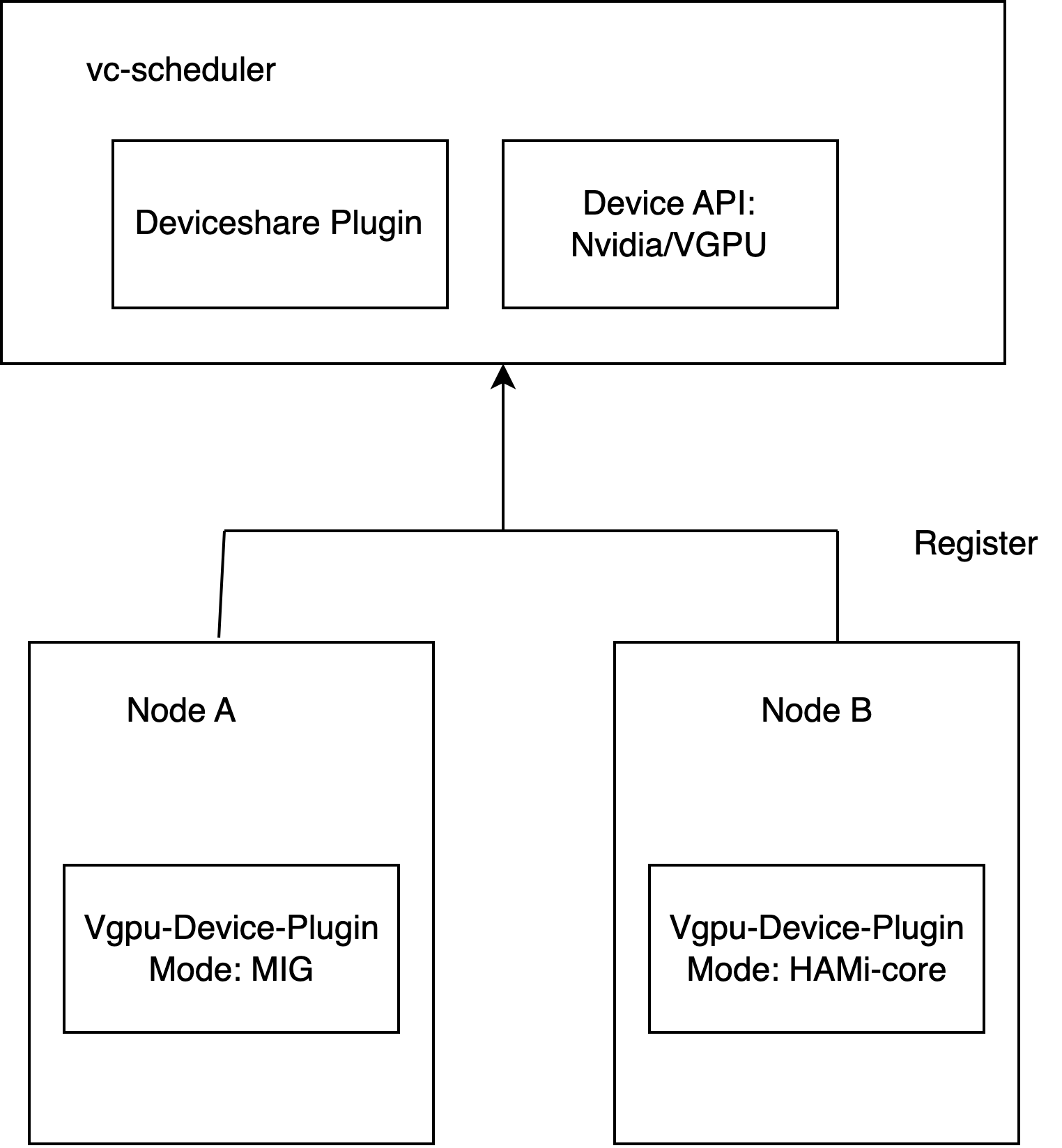
Volcano already have a [vgpu feature](https://github.com/Project-HAMi/volcano-vgpu-device-plugin) for NVIDIA devices after v1.9, it is done by using [hami-core](https://github.com/Project-HAMi/HAMi-core), which is a cuda-hacking library. It can dynamically share GPUs and ensure both quality of service and resource isolation. But considering MIG is also widely used across the world. Supporting MIG mode along with 'hami-core' in volcano-vgpu can be helpful. A unified API for dynamic-MIG and hami-core for volcano-vgpu is needed.
## Targets
- CPU, Mem, and GPU combined scheduling
- GPU dynamic slice: Hami-core and MIG
- Support node-level binpack and spread by GPU memory, CPU and Mem
- A unified vGPU Pool different virtualization technics
- Tasks can choose to use MIG, use HAMi-core, or use both.
### Config maps
- volcano-device-configMap
This configmap defines the plugin configurations including resourceName, and MIG geometries, and node-level configurations.
```yaml
apiVersion: v1
data:
volcano-device-share.conf: |
nvidia:
resourceCountName: volcano.sh/vgpu-number
resourceMemoryName: volcano.sh/vgpu-memory
resourceCoreName: volcano.sh/vgpu-cores
knownMigGeometries:
- models: [ "A30" ]
allowedGeometries:
- group: group1
geometries:
- name: 1g.6gb
memory: 6144
count: 4
- group: group2
geometries:
- name: 2g.12gb
memory: 12288
count: 2
- group: group3
geometries:
- name: 4g.24gb
memory: 24576
count: 1
- models: [ "A100-SXM4-40GB", "A100-40GB-PCIe", "A100-PCIE-40GB", "A100-SXM4-40GB" ]
allowedGeometries:
- group: group1
geometries:
- name: 1g.5gb
memory: 5120
count: 7
- group: group2
geometries:
- name: 2g.10gb
memory: 10240
count: 3
- name: 1g.5gb
memory: 5120
count: 1
- group: group3
geometries:
- name: 3g.20gb
memory: 20480
count: 2
- group: group4
geometries:
- name: 7g.40gb
memory: 40960
count: 1
- models: [ "A100-SXM4-80GB", "A100-80GB-PCIe", "A100-PCIE-80GB"]
allowedGeometries:
- group: group1
geometries:
- name: 1g.10gb
memory: 10240
count: 7
- group: group2
geometries:
- name: 2g.20gb
memory: 20480
count: 3
- name: 1g.10gb
memory: 10240
count: 1
- group: group3
geometries:
- name: 3g.40gb
memory: 40960
count: 2
- group: group4
geometries:
- name: 7g.79gb
memory: 80896
count: 1
```
## Structure
 ## Examples
Dynamic mig is compatible with volcano-vgpu tasks, as the example below:
Just Setting `volcano.sh/vgpu-number` and `volcano.sh/vgpu-memory`.
```yaml
apiVersion: v1
kind: Pod
metadata:
name: gpu-pod1
spec:
containers:
- name: ubuntu-container1
image: ubuntu:20.04
command: ["bash", "-c", "sleep 86400"]
resources:
limits:
volcano.sh/vgpu-number: 2 # requesting 2 vGPUs
volcano.sh/vgpu-memory: 8000 # Each vGPU contains 8000m device memory (Optional,Integer
```
A task can decide only to use `mig` or `hami-core` by setting `annotations.volcano.sh/vgpu-mode` to corresponding value, as the example below shows:
```yaml
apiVersion: v1
kind: Pod
metadata:
name: gpu-pod1
annotations:
volcano.sh/vgpu-mode: "mig"
spec:
containers:
- name: ubuntu-container1
image: ubuntu:20.04
command: ["bash", "-c", "sleep 86400"]
resources:
limits:
volcano.sh/vgpu-number: 2 # requesting 2 vGPUs
volcano.sh/vgpu-memory: 8000 # Each vGPU contains 8000m device memory (Optional,Integer)
```
## Procedures
The Procedure of a vGPU task which uses dynamic-mig is shown below:
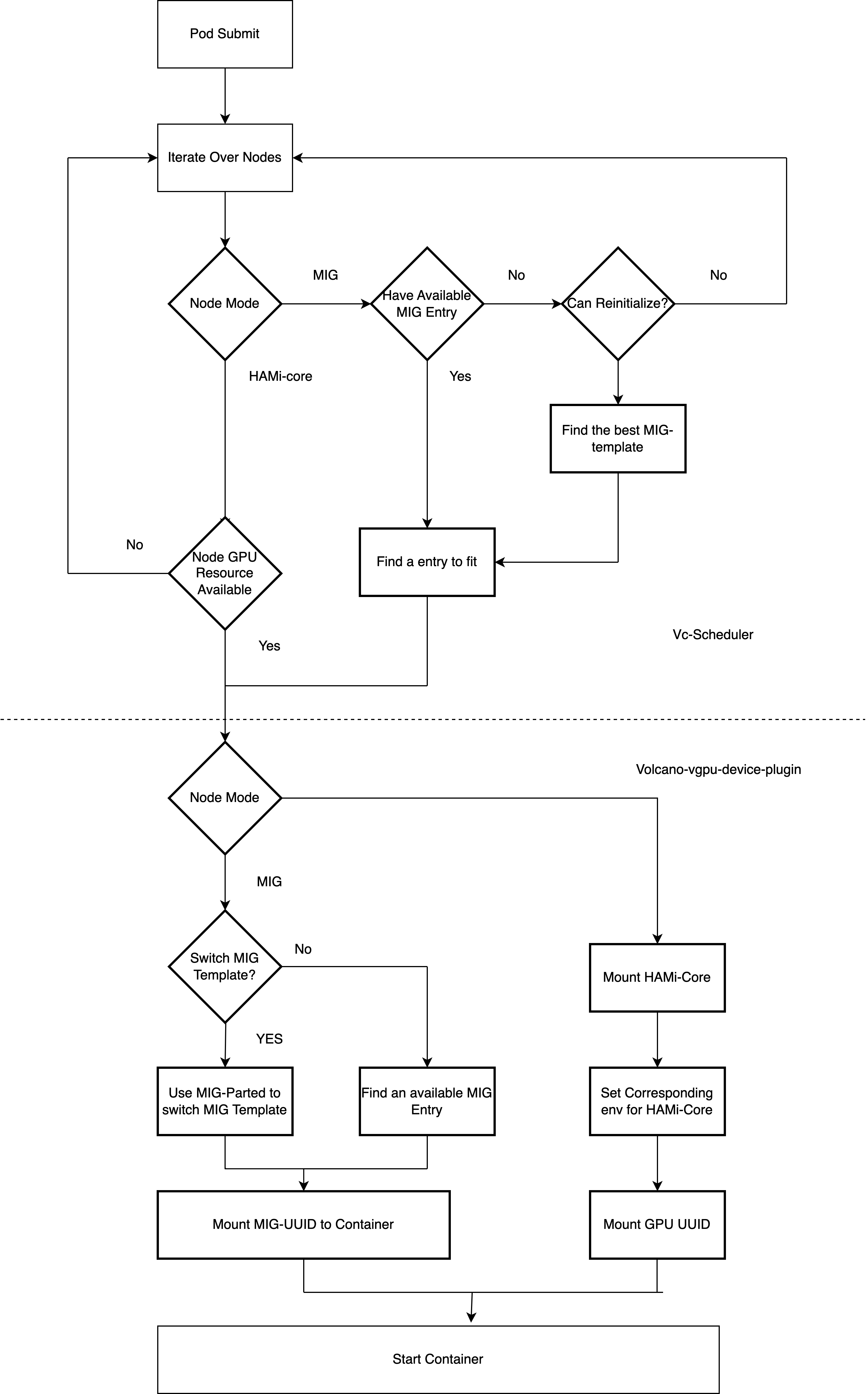 Note that after submitted a task, deviceshare plugin will iterate over templates defined in configMap `volcano-device-share`, and find the first available template to fit. You can always change the content of that configMap, and restart vc-scheduler to customize.
If you submit the example above(a pod requests 2 * 8G GPUs) to a cluster, which has an empty A100-PCIE-40GB node, then it will follow the procedure below:
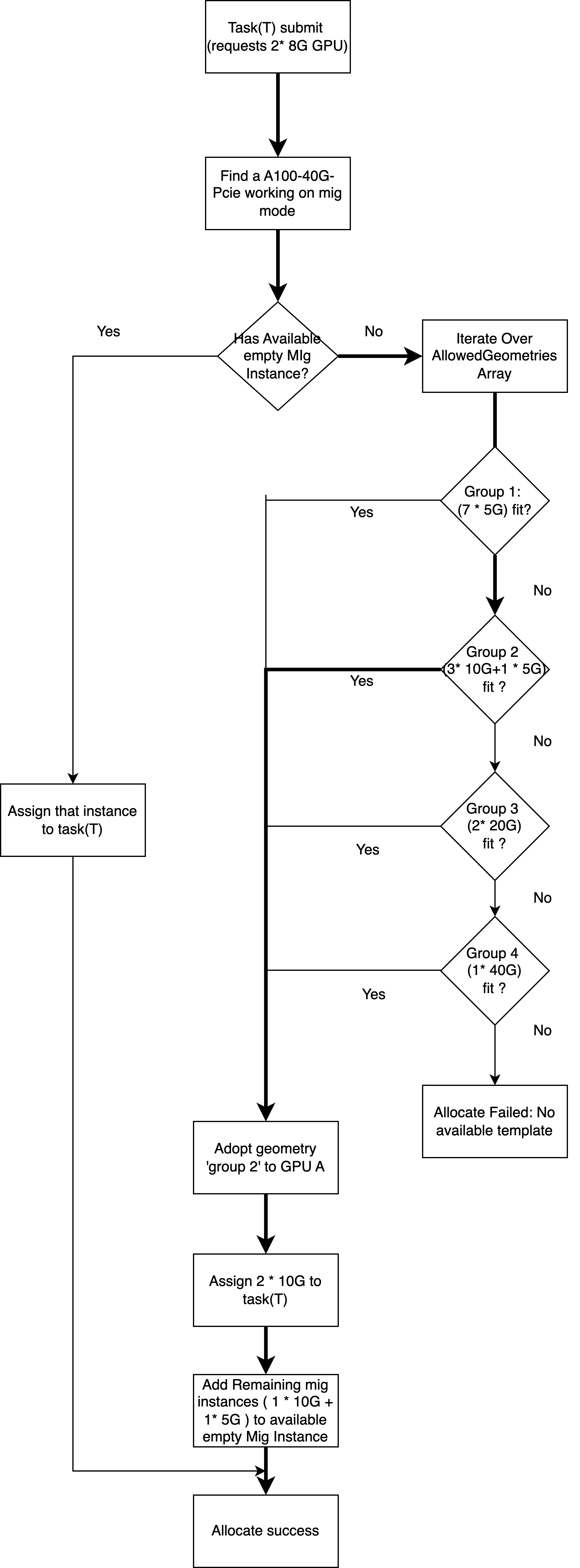 The walkthrough will be shown in bold line
As the figure shows, after the procedure, it will adopt geometry 'group2' to that GPU with the definition below:
```yaml
group2:
2g.10gb : 3
1g.5gb : 1
```
There are four mig instances in total, vc-scheduler will return 2 '2g.10gb' instances to the task, and add the remaining instances (1 '2g.10gb' + 1 '1g.5gb' ) to the available empty mig instances, for future usage.
In the end, start the container with 2g.10gb instances * 2