OpenFlowKit logo

OpenFlowKit

Architecture diagrams you draw, write as code, or hand to your agent.
Free, open source and local-first. Paste a GitHub repo and get its map, every arrow cited to a line of code.

Open the app  ·  Docs  ·  MCP setup  ·  Discussions  ·  Issues

CI status MIT license MCP server version on npm CLI version on npm

OpenFlowKit: #4 Product of the Week in Design Tools on Product Hunt

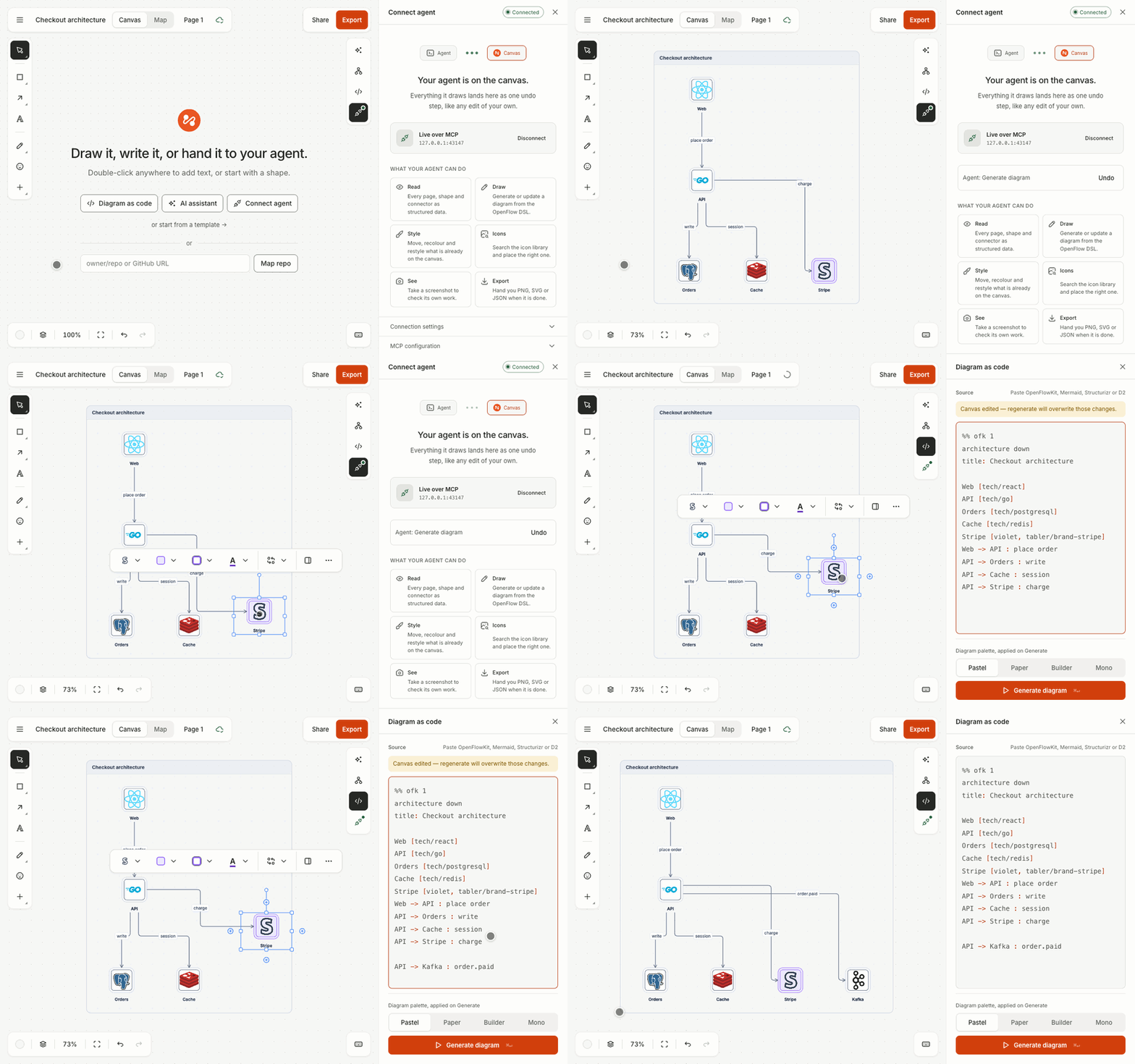
An agent draws an architecture diagram on the OpenFlowKit canvas, live; the user drags a box, edits one line of text and regenerates

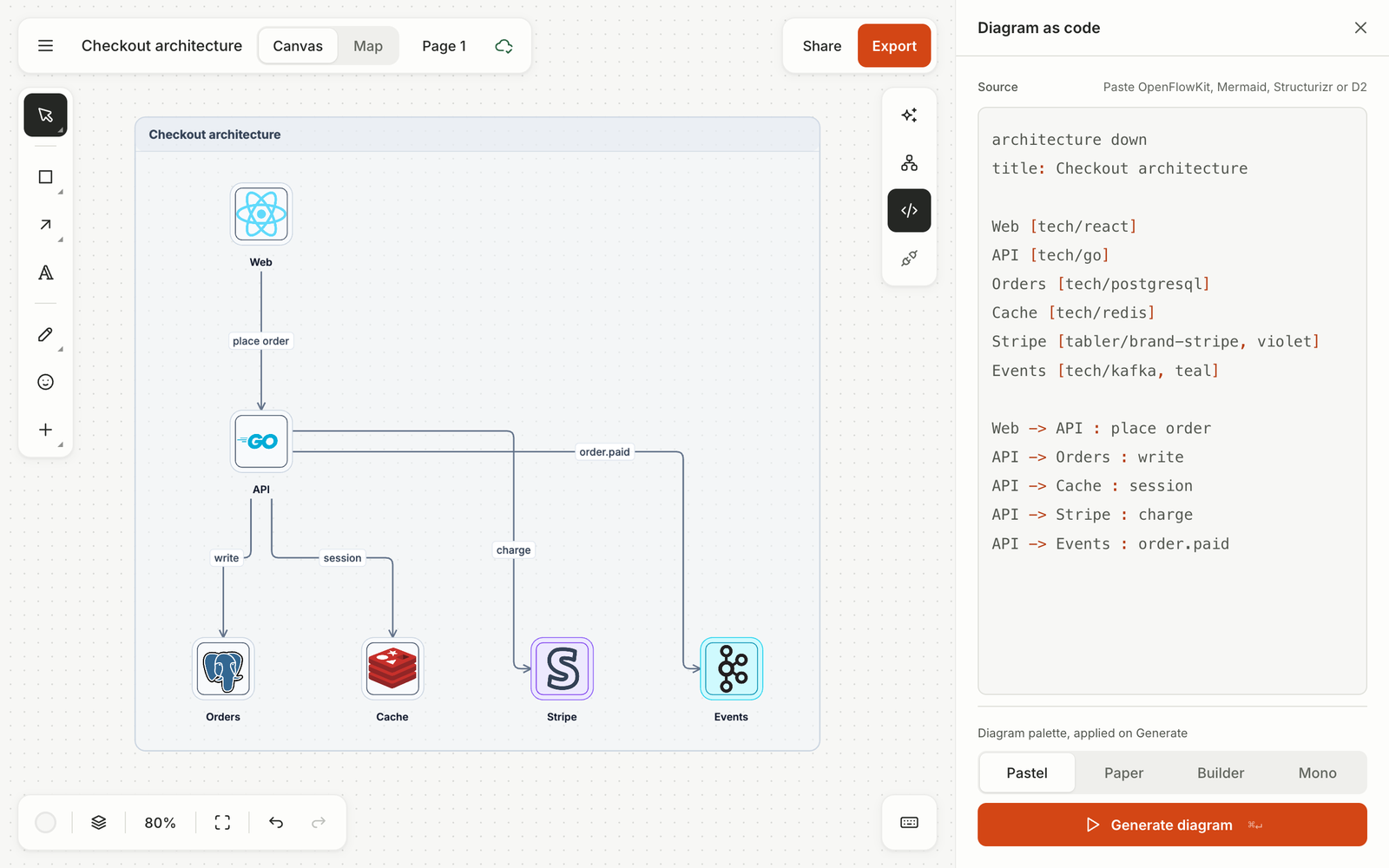
## Why OpenFlowKit ### 1. Your agent draws on your canvas, live Connect Claude Code, Cursor or any MCP client and ask for a diagram. The agent reads the page, draws, restyles and takes a screenshot to check its own work while you watch. Every change it makes is one undo step, like your own. [Connect your agent ↓](#connect-your-agent) ### 2. Text and canvas are the same diagram ``` flowchart right Client [blue] -> "API Gateway" [emerald] : HTTPS "API Gateway" -> Queue [queue, amber] Queue -> Worker Worker -> Store [cylinder, red, bold] ``` Open the code panel (⌥C), paste this into it and press ⌘↵. Drag things around on the canvas or edit the text; ⌘↵ regenerates the frame from the text as one undo step. Paste Mermaid, Structurizr or D2 and it converts.

The code panel beside the canvas: the same diagram as text and as shapes

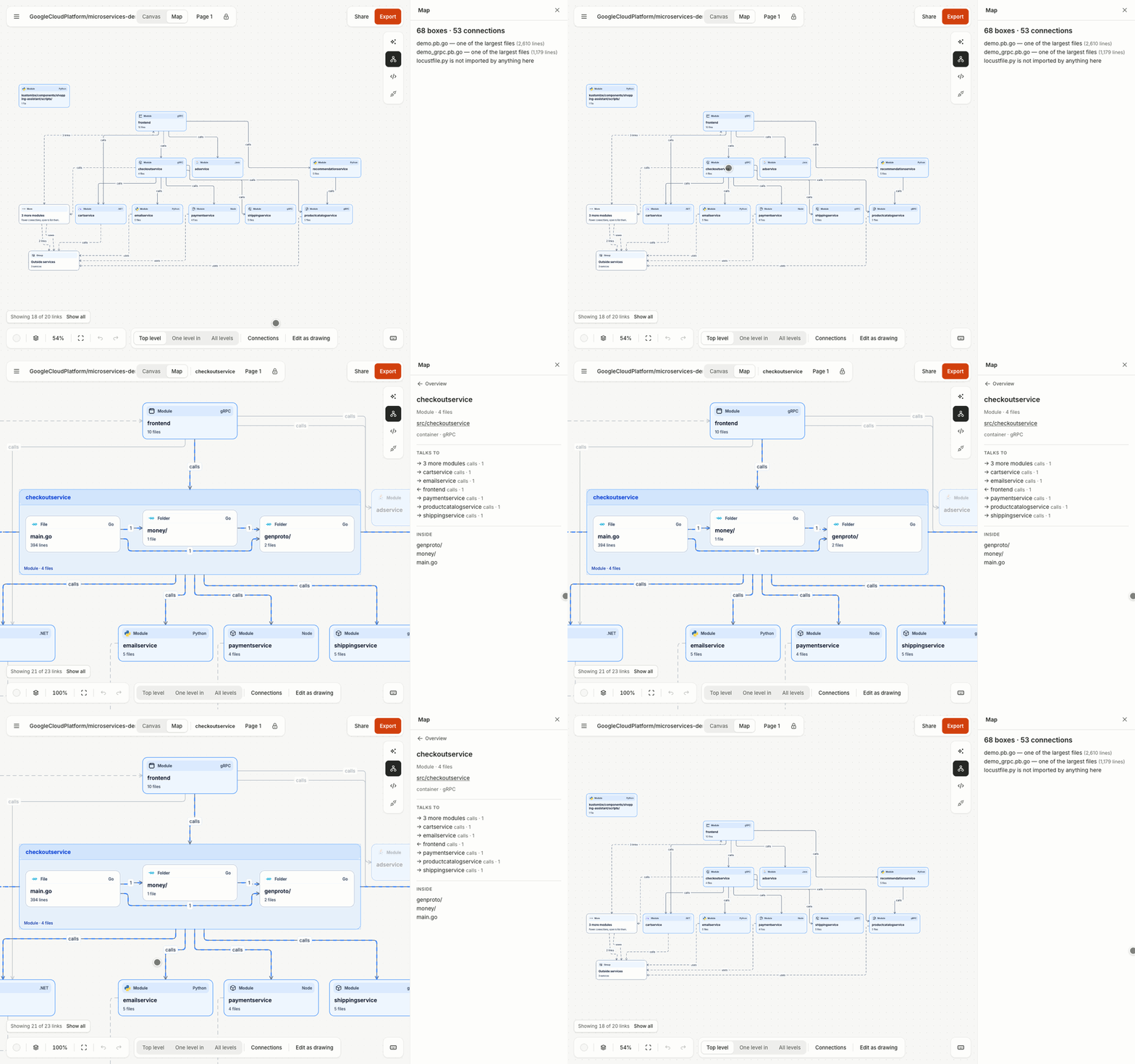
### 3. Paste a GitHub repo, get its map Type `owner/repo` into the box on an empty canvas and press **Map repo**, or open `app.openflowkit.com/#/map/github//` ([try a sample](https://app.openflowkit.com/#/map/github/dockersamples/example-voting-app)). Your browser reads the repo from GitHub and draws its parts. Boxes open in place, and every arrow lists the `file:line` behind it, linked to the code. No key and no install. For a private repo, add a read-only GitHub token on the page, or map a checkout: `npx openflowkit map . --html map.html` ([private repos](https://docs.openflowkit.com/map-mode/#private-repos)).

The map of GoogleCloudPlatform/microservices-demo: a click on checkoutservice opens it in place, showing the files inside, while the side panel lists what it talks to

### 4. Export it, including the animation PNG, SVG, PDF, JSON, or **Copy as Mermaid** for a README. Add an `animate` block to the text above to name the steps, and the export renders animated SVG, GIF, MP4 or WebM in your browser. ``` animate build 6s loop { step Client step Client -> "API Gateway" : HTTPS step Queue, Worker step Store hold 2s } ```

The diagram above building step by step, exported as an animated SVG

That animation is the two snippets above, exported by the app as an animated SVG. GitHub plays it like an image. ## Ten diagram types, one language Every type is the same short, forgiving text, with per-line errors that say how to fix them. Each picture below is the first example on its docs page, rendered by the `openflowkit` CLI.
Architecture diagram with Node.js and AWS Lambda icons
Architecture · cloud icons, groups, a C4 model with views
Sequence diagram of a login
Sequence · alt / opt / loop, notes, activations
Flowchart
Flowchart · shapes, decisions, groups
Entity-relationship diagram
ERD · columns, keys, crow's-foot cardinality
State machine
State · start and end, composite states
Class diagram
Class · members, stereotypes, relations
Mind map
Mind map · indentation is the tree
Git graph
Git graph · branches, merges, tags
Bar chart
Chart · data written as text, editable in a table
Phone wireframe
Wireframe · 35 controls on phone, tablet or desktop screens
The language is versioned and written down in one file: **[src/dsl/grammar.md](src/dsl/grammar.md)** ([docs](https://docs.openflowkit.com/openflow-dsl/)). The same text powers the code panel, the assistant, the MCP tools and the CLI. ## Quick start **In the browser:** [app.openflowkit.com](https://app.openflowkit.com). Nothing to install, no account. **In a terminal:** `npx openflowkit` (Node 20.11+). **Run it locally** (Node 22.22+): ```bash git clone https://github.com/openflowkit/openflowkit.git cd openflowkit npm install && npm run dev # http://localhost:3000 ``` ### Connect your agent OpenFlowKit has one set of agent tools. Pick the row for where your agent runs: | Your agent runs… | How to connect | What it can do | | --- | --- | --- | | **On your computer**: Claude Code, Cursor, VS Code, Claude Desktop, Windsurf | The MCP server, below | Everything: draws on your open canvas (one undo step per change), edits `.openflow.json` files in your repo, maps a codebase, takes screenshots | | **In a chat app**: claude.ai, Claude Desktop, ChatGPT | Add a custom connector: `https://mcp.openflowkit.com/mcp`, choose **No sign-in** | Draws a diagram in the chat as a card, with **Open in OpenFlowKit**. Not on your open canvas | | **In your browser** (experimental) | Nothing to install: open a diagram in a browser whose agent supports [WebMCP](https://docs.openflowkit.com/webmcp/) | Reads and edits the diagram you have open | Add OpenFlowKit to Cursor Install OpenFlowKit in VS Code For Claude Code, one line: ```bash claude mcp add -s user openflowkit -- npx -y openflowkit mcp ``` For Codex: `codex mcp add openflowkit -- npx -y openflowkit mcp`. For Claude Desktop, Windsurf and any other MCP client: ```json { "mcpServers": { "openflowkit": { "command": "npx", "args": ["-y", "openflowkit", "mcp"] } } } ``` Restart the agent, then click **Connect agent** in the app, or open [app.openflowkit.com/#/connect](https://app.openflowkit.com/#/connect). That panel has the steps for each client and copies the same config with a pairing token. With no app open, the same tools edit `.openflow.json` files in your repo. Every client, step by step, with fixes: [Connect your agent](https://docs.openflowkit.com/connect-your-agent/).
Plugins: Claude Code and Codex (server and skill in one install) ```bash # Claude Code claude plugin marketplace add openflowkit/openflowkit claude plugin install openflowkit@openflowkit # Codex: add the marketplace, then install OpenFlowKit from the Plugins Directory codex plugin marketplace add openflowkit/openflowkit ``` The skill ([`skills/openflowkit/SKILL.md`](skills/openflowkit/SKILL.md)) tells an agent when a diagram helps, how to write it, and to save it beside the code. Agents that read the web get the same text at `https://app.openflowkit.com/llms.txt`.
## Working with agents The MCP server gives your agent the operations you have, on the live canvas or on files. | It can | With | |---|---| | **Draw** a diagram from text or Mermaid, then change it | `create_diagram`, `update_diagram`, `add_shape` | | **Read** every page, the text behind a diagram, and what you selected | `get_document`, `get_diagram`, `list_pages` | | **Restyle and move** what is already there | `style`, `move`, `delete` | | **See** its own result | `screenshot` returns a real image the model can look at | | **Hand you files** | `export`: SVG, PNG, PDF, JSON or an animated SVG | | **Read your repo** | `discover_architecture`, `drift_report`, `explain_element` | Things to ask for: - *"Draw the architecture of this repository."* - *"Make the boxes I selected red and add a cache in front of the API."* - *"Turn the Mermaid in our README into a diagram I can edit."* - *"Compare architecture.ofk with the code and tell me what drifted."* Your canvas edits are safe: if you moved, restyled or renamed something and the agent regenerates from text, `get_diagram` hands it the text that keeps each edit, and `update_diagram` reports anything it had to drop. Every agent change is one undo step, and the Connect panel shows the last one with an **Undo** button.
All 29 tools Sixteen editor operations, which also work on files: `create_diagram`, `update_diagram`, `get_diagram`, `list_diagrams`, `get_syntax`, `search_icons`, `find_icons_for`, `move`, `style`, `delete`, `add_shape`, `export`, `screenshot`, `fit_view`, `get_document`, `list_pages`. Thirteen for files and repositories: `openflow_create`, `openflow_open`, `openflow_save`, `whoami`, `server_info`, `validate_openflow_dsl`, `list_diagram_node_types`, `list_starter_templates`, `get_starter_template`, `analyze_codebase`, `discover_architecture`, `drift_report`, `explain_element`. Arguments and examples: [MCP server docs](https://docs.openflowkit.com/mcp-server/). The op manifest is [`src/agent/manifest.ts`](src/agent/manifest.ts). Requires Node 20.11+.
**Bring your own key instead:** ⌘J opens the assistant. Pick Claude, OpenAI, Gemini, Groq, Mistral, Cerebras, NVIDIA, OpenRouter, Ollama or any OpenAI-compatible endpoint (LM Studio…) and paste a key. The key stays in this browser, and the reply arrives as a proposal you apply or dismiss. ## Bring the diagrams you already have Paste into the code panel and it converts, with an honest list of anything it couldn't carry. Mermaid pasted straight onto the canvas draws in place. | From | What converts | |---|---| | **Mermaid** | flowchart / graph, sequenceDiagram, stateDiagram, erDiagram, classDiagram, mindmap, architecture, gitGraph | | **Structurizr DSL** | the model, views and styles, as a C4 workspace with one page per view | | **D2** | shapes, connections and containers | Going back out, **Copy as Mermaid** writes a flowchart or sequence diagram as Mermaid text for a README or wiki. [Mermaid](https://docs.openflowkit.com/mermaid-import/) · [coming from Structurizr](https://docs.openflowkit.com/coming-from-structurizr/) ## In your repo and CI The `openflowkit` CLI runs the same engine as the app, from any terminal or CI job: ```bash npx openflowkit render diagram.ofk -o diagram.svg # Mermaid, D2, Structurizr or DSL → SVG npx openflowkit validate diagram.ofk --strict # exit 1 on an error npx openflowkit convert flow.mmd -o flow.openflow.json npx openflowkit discover . --out architecture.ofk # draft a C4 model of this repo npx openflowkit drift . # exit 1 when the code moved on ```

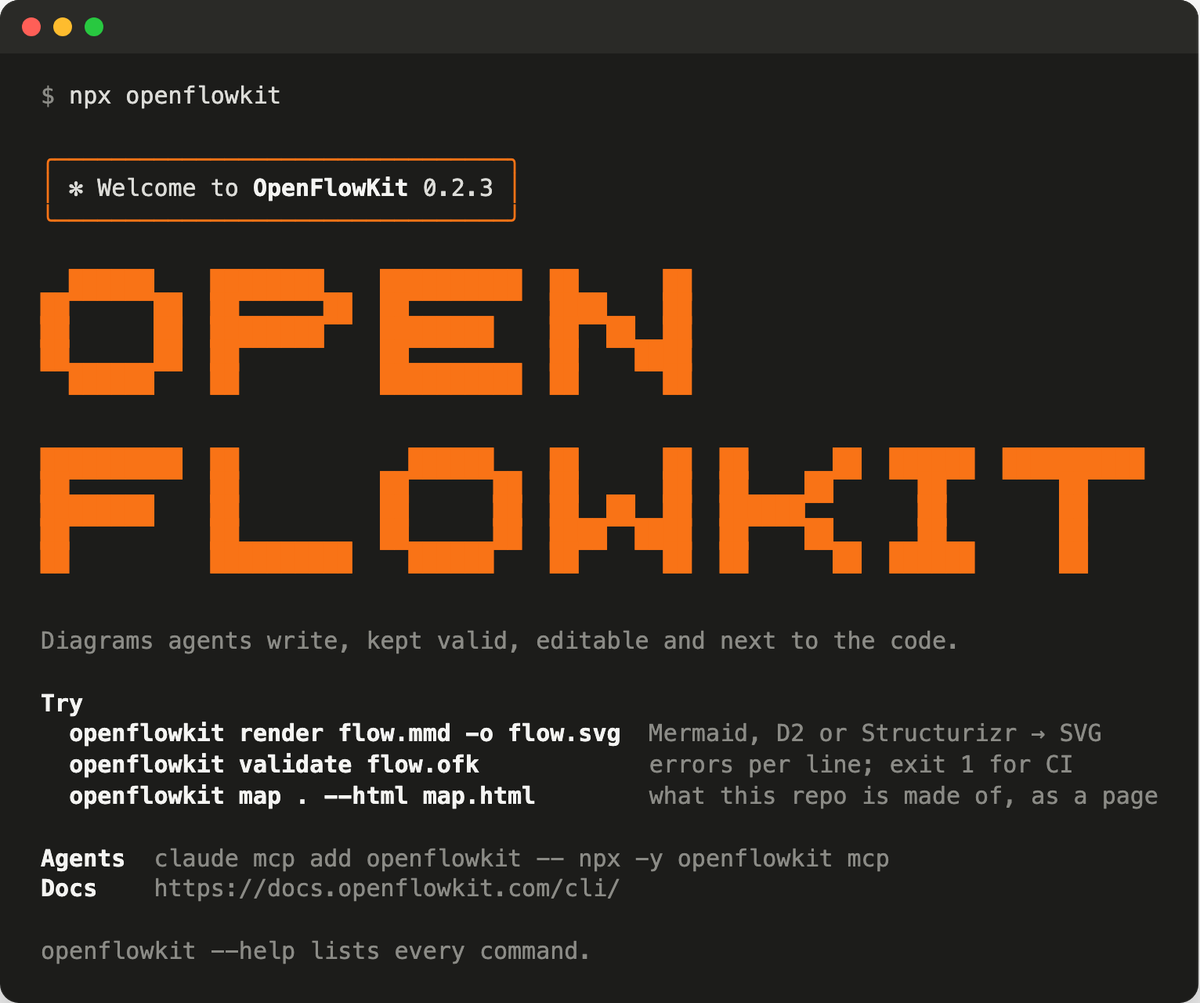
Running npx openflowkit: a welcome box, OPEN FLOWKIT in orange block letters, and three commands to try

Commit `architecture.ofk` next to the code and `drift` keeps it honest in CI. The **PR diagrams Action** comments on a pull request with how its diagrams changed: node and connector counts, the text diff, and drift for `.ofk` models. [CLI](https://docs.openflowkit.com/cli/) · [GitHub Action](https://docs.openflowkit.com/github-action/) ## Exports and sharing | Format | Notes | |---|---| | PNG | 1× or 2×; light, dark or print theme; transparent background optional | | SVG, PDF | vector, with icons and the Inter font embedded | | JSON | the whole document, every page; opens in any browser | | Animated SVG, GIF, MP4, WebM | made in your browser from the `animate` block or the connector order | | Copy as Mermaid | flowchart and sequence | | Share links | a view-only link, encrypted in your browser; or an editable copy, the code inside the link, nothing uploaded | ## Keyboard Every action has a key, and ? lists them all in the app.
The ones you'll use first | Key | Action | |---|---| | V R O T A | select, rectangle, ellipse, text, connector | | ⌥C · ⌘↵ | code panel · generate from text | | ⌘J | AI assistant | | M | switch Canvas and Map | | ⌘F | find on the canvas | | ⇧1 · ⇧2 | fit everything · zoom to selection | | ⌘G · ⌘D | group · duplicate | | Enter | edit the selected shape's label | On Windows and Linux, Ctrl and Alt replace ⌘ and ⌥.
## How it works

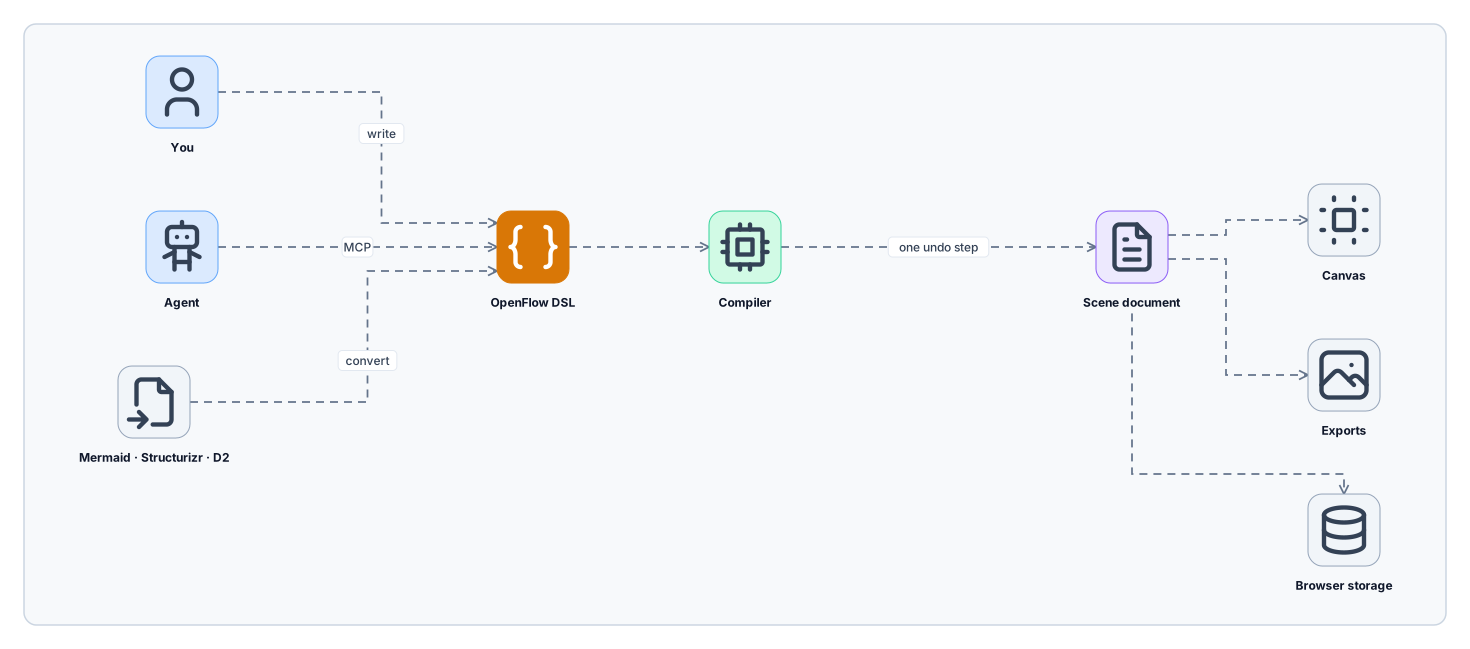
You, your agent and imported Mermaid, Structurizr or D2 all become OpenFlow DSL; the compiler turns it into one undo step on the scene document, which feeds the canvas, the exports and browser storage

This diagram is OpenFlowKit text too: how-it-works.ofk, exported as an animated SVG with the pulse preset. You and your agent can also draw straight on the canvas; every edit, from text or by hand, is a command on the same document. Any frame on the canvas writes back out as canonical text, and `format(format(x)) == format(x)` holds in the tests. The language and document code is plain TypeScript with no React, Pixi or DOM, which is why the same compiler runs in the browser, the MCP server and the CLI. The full tour: **[ARCHITECTURE.md](ARCHITECTURE.md)**.
Repository layout | Path | What | |---|---| | `src/dsl/` | the language: grammar, parser, diagram families, compile and serialize, repo discovery | | `src/opencanvas/` | the editor: document model and commands, Pixi renderer, exporters, React UI | | `src/agent/` | the operations agents call, the bridge protocol, the op manifest | | `mcp-server/` | the published MCP server and `openflowkit` CLI | | `cli/` | `openflowkit` on npm: the short name for the CLI | | `plugin/`, `skills/` | the Claude Code and Codex plugins, and the agent skill | | `action/` | the PR diagrams GitHub Action | | `worker/` | the share-link Worker (stores ciphertext only) | | `stats/` | the private usage dashboard Worker | | `docs-site/` | the docs site |
## Self-host ```bash docker build -t openflowkit . && docker run --rm -p 3045:3045 openflowkit # http://localhost:3045 ``` The image is the static build behind nginx, with the same headers as the hosted app. Content security policy, AI providers on your own network, and share links: [self-hosting](https://docs.openflowkit.com/self-hosting/). ## Privacy Your diagrams stay in your browser. Something leaves it only when you choose: AI with your own key goes to that provider, a share link uploads an encrypted copy, a repo map reads from GitHub. No account needed. We collect basic usage stats to improve OpenFlowKit; turn them off in Settings. Back up everything at once with **Download all diagrams** on Home; **Import** restores it in any browser.
FAQ **Is it free?** Yes: MIT licensed, free to use and to self-host. A Pro plan for teams is planned; the waitlist is in the app. **Does it work offline?** Once the page is open, drawing, the code panel and exports run in the page. AI, share links and repo maps need the network. For no internet at all, self-host it. **Which browsers?** A current desktop browser with WebGL. The automated tests run in Chromium. **Can my team edit together?** Not in real time. A view-only link is a snapshot, an editable link hands each person their own copy, and `.openflow.json` and `.ofk` files live happily in git. More: [FAQ](https://docs.openflowkit.com/faq/).
## Contributing Issues, ideas and PRs are welcome. Start with [CONTRIBUTING.md](CONTRIBUTING.md) for setup and the checks, and [ARCHITECTURE.md](ARCHITECTURE.md) for how the code fits together. Questions go to [Discussions](https://github.com/openflowkit/openflowkit/discussions). What changed in each version: [CHANGELOG.md](CHANGELOG.md). Report security issues privately, as [SECURITY.md](SECURITY.md) describes. MIT licensed, see [LICENSE](LICENSE). Contributors ---

OpenFlowKit logo

If OpenFlowKit saved you a diagram, give it a ⭐ on GitHub.
It's how other people find it.

Open the app  ·  Docs  ·  Contribute  ·  Discussions  ·  Report a bug