---
meta:
title: SASS variables
description: Customize Vuetify's internal styles by modifying SASS variables.
keywords: sass variables, scss variables, modifying Vuetify styles
related:
- /styles/colors/
- /features/theme/
- /features/treeshaking/
features:
label: 'sass'
report: true
---
# SASS variables
Vuetify uses **SASS/SCSS** to craft the style and appearance of all aspects of the framework.
::: info
It is recommended to familiarize yourself with the [Treeshaking](/features/treeshaking/) guide before continuing.
:::
## Installation
Vuetify works out of the box without any additional compilers needing to be installed but does support advanced use-cases such as modifying the underlying variables of the framework. Vite provides built-in support for sass, less and stylus files without the need to install Vite-specific plugins for them; just the corresponding pre-processor itself.
To begin modifying Vuetify's internal variables, install the [sass](https://sass-lang.com/) pre-processor:
::: tabs
```bash [pnpm]
pnpm install -D sass-loader sass
```
```bash [yarn]
yarn add -D sass
```
```bash [npm]
npm install -D sass-loader sass
```
```bash [bun]
bun add -D sass-loader sass
```
:::
For additional details about css-pre-processors, please refer to the official vite page at: or official vue-cli-page at:
## Usage
There are many SASS variables such as **font size**, **font family**, and **line height** that can be configured globally. An extensive list of configurable global SASS variables can be found [here](/api/globals/). To start, follow the plugin setup guide from [treeshaking](/features/treeshaking/) then add `styles.configFile` to the plugin options:
```js { resource="vite.config.js" }
vuetify({
styles: {
configFile: 'src/styles/settings.scss',
},
})
```
`configFile` will be resolved relative to the project root, and loaded before each of vuetify's stylesheets. Next, create a **settings.scss** file in your **src/styles** directory:
```scss { resource="src/styles/settings.scss" }
@use 'vuetify/settings' with (
// variables go here
);
```
Within your style file, specify the variables you want to override, and that's it.
::: info
`'@use 'vuetify'` should only be used for the [`$utilities`](/features/sass-variables/#disabling-utility-classes), [`$color-pack`](/features/sass-variables/#disabling-color-packs), and [`$reset`](/styles/css-reset/#css-reset) settings.
:::
::: warning
`'vuetify/styles'` should not be used in sass files as it resolves to precompiled css ([vitejs/vite#7809](https://github.com/vitejs/vite/issues/7809)). `'vuetify'` and `'vuetify/settings'` are valid and safe to use
:::
::: warning
If your values contain commas, such as if you are setting `$body-font-family` with multiple fonts, you must surround the value with parentheses, like this: `$body-font-family: ('Roboto', sans-serif)`. Otherwise the commas will be reported as a syntax error.
:::
## Variable API
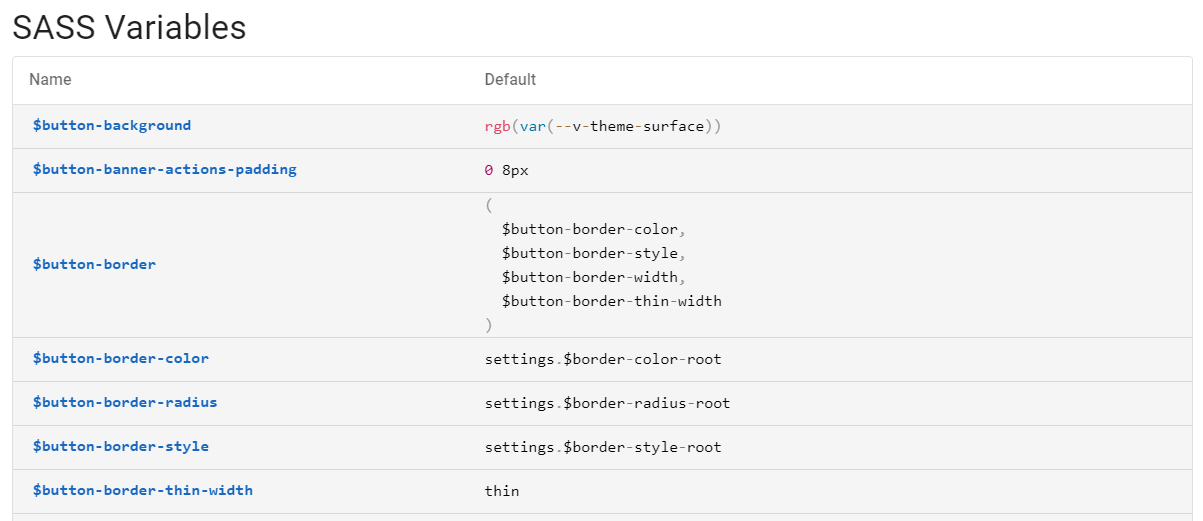
There are many SASS/SCSS variables that can be customized across the entire Vuetify framework. You can browse all the variables using the tool below:
Available SASS variables are located on each component's API page.
## Usage in templates
You can access [global](/api/globals/) and per-component variables in Vue templates simply by importing the settings file:
```html { resource="Comp1.vue" }
```
Keep in mind that to obtain settings from Vuetify, you must forward its variables from within your local stylesheet. In the following example we modify `settings.scss` to **forward** instead of **use**:
```diff { resource="src/styles/settings.scss" }
- @use 'vuetify/settings' with (
+ @forward 'vuetify/settings' with (
```
## Disabling utility classes
Utility classes are a powerful feature of Vuetify, but they can also be unnecessary for some projects. You can either disable them all at once or selectively keep only what you plan to use. To disable all utility classes, set the entire `$utilities` variable to `false`:
```scss { resource="src/styles/main.scss" }
@use 'vuetify' with (
$utilities: false,
);
```
Each utility class is generated with a set of options that are defined [here](https://github.com/vuetifyjs/vuetify/blob/master/packages/vuetify/src/styles/settings/_utilities.scss). Disable individual classes by setting their corresponding variable to `false`.
::: info
Vuetify includes several utility classes that are not covered by the `$utilities` map: `elevation`, `hidden`, `sr-only`, and `pointer-events`. If you want to disable these styles while keeping some utilities enabled, you can use the `$misc` variable. See the example at the end of the snippet below.
:::
```scss { resource="src/styles/main.scss" }
@use 'vuetify' with (
$utilities: (
"align-content": false,
"align-items": false,
"align-self": false,
"border-bottom": false,
"border-current": false,
"border-end": false,
"border-opacity": false,
"border-start": false,
"border-style": false,
"border-top": false,
"border": false,
"bottom": false,
"cursor": false,
"display": false,
"fill-height": false,
"flex-direction": false,
"flex-grow": false,
"flex-shrink": false,
"flex-wrap": false,
"flex": false,
"float:ltr": false,
"float:rtl": false,
"float": false,
"font-italic": false,
"font-weight": false,
"gap-column": false,
"gap-row": false,
"gap": false,
"height": false,
"justify-content": false,
"justify-items": false,
"left": false,
"margin-bottom": false,
"margin-end": false,
"margin-left": false,
"margin-right": false,
"margin-start": false,
"margin-top": false,
"margin-x": false,
"margin-y": false,
"margin": false,
"negative-margin-bottom": false,
"negative-margin-end": false,
"negative-margin-left": false,
"negative-margin-right": false,
"negative-margin-start": false,
"negative-margin-top": false,
"negative-margin-x": false,
"negative-margin-y": false,
"negative-margin": false,
"opacity": false,
"order": false,
"overflow-wrap": false,
"overflow-x": false,
"overflow-y": false,
"overflow": false,
"padding-bottom": false,
"padding-end": false,
"padding-left": false,
"padding-right": false,
"padding-start": false,
"padding-top": false,
"padding-x": false,
"padding-y": false,
"padding": false,
"position": false,
"right": false,
"rounded-bottom-end": false,
"rounded-bottom-start": false,
"rounded-bottom": false,
"rounded-end": false,
"rounded-start": false,
"rounded-top-end": false,
"rounded-top-start": false,
"rounded-top": false,
"rounded": false,
"text-align": false,
"text-decoration": false,
"text-mono": false,
"text-opacity": false,
"text-overflow": false,
"text-transform": false,
"top": false,
"typography": false,
"white-space": false,
"width": false,
),
$misc: (
'pointer-events': false,
'sr-only': false,
"elevation": false,
"hidden": false,
),
);
```
This is useful when you want to use your own implementation of these styles. For example, if your design system uses standardized shadow levels instead of Vuetify's elevation classes, you can disable the built-in elevation styles and define your own.
## Disabling color packs
Color packs are handy for quickly applying a color to a component but mostly unused in production. To disable them, set the `$color-pack` variable to `false`:
```scss { resource="src/styles/main.scss" }
@use 'vuetify' with (
$color-pack: false,
);
```
## Caveats
When using sass variables, there are a few considerations to be aware of.
### Duplicated CSS
Placing actual styles or importing a regular stylesheet into the settings file will cause them to be duplicated everywhere the file is imported.
Only put variables, mixins, and functions in the settings file, styles should be placed in the main stylesheet or loaded another way.
### Build performance
Vuetify loads precompiled CSS by default, enabling variable customization will switch to the base SASS files instead which must be recompiled with your project.
This can be a performance hit if you're using more than a few vuetify components, and also forces you to use the same SASS compiler version as us.
Performance can be improved with Vite by using the modern sass compiler. Replace your `sass` dependency with `sass-embedded`, update vite to 5.4 or later, and set [`css.preprocessorOptions.sass.api`](https://vite.dev/config/shared-options#css-preprocessoroptions) to `'modern-compiler'` in the vite config.
### Symlinks
PNPM and Yarn 2+ create symlinks to library files instead of copying them to node_modules, sass doesn't seem to like this and sometimes doesn't apply the configuration.
### sass-loader with `api: 'modern'`
You might have to write a custom importer plugin to load the settings file.