Note: :warning: [As of version 2.0.0, `moar` has been renamed to
`moor`](https://github.com/walles/moor/releases/tag/v2.0.0), but is otherwise
the same tool.
[](https://github.com/walles/moor/actions/workflows/linux-ci.yml?query=branch%3Amaster)
[](https://github.com/walles/moor/actions/workflows/windows-ci.yml?query=branch%3Amaster)
Moor is a pager. It reads and displays UTF-8 encoded text from files or pipes.
`moor` is designed to just do the right thing without any configuration:
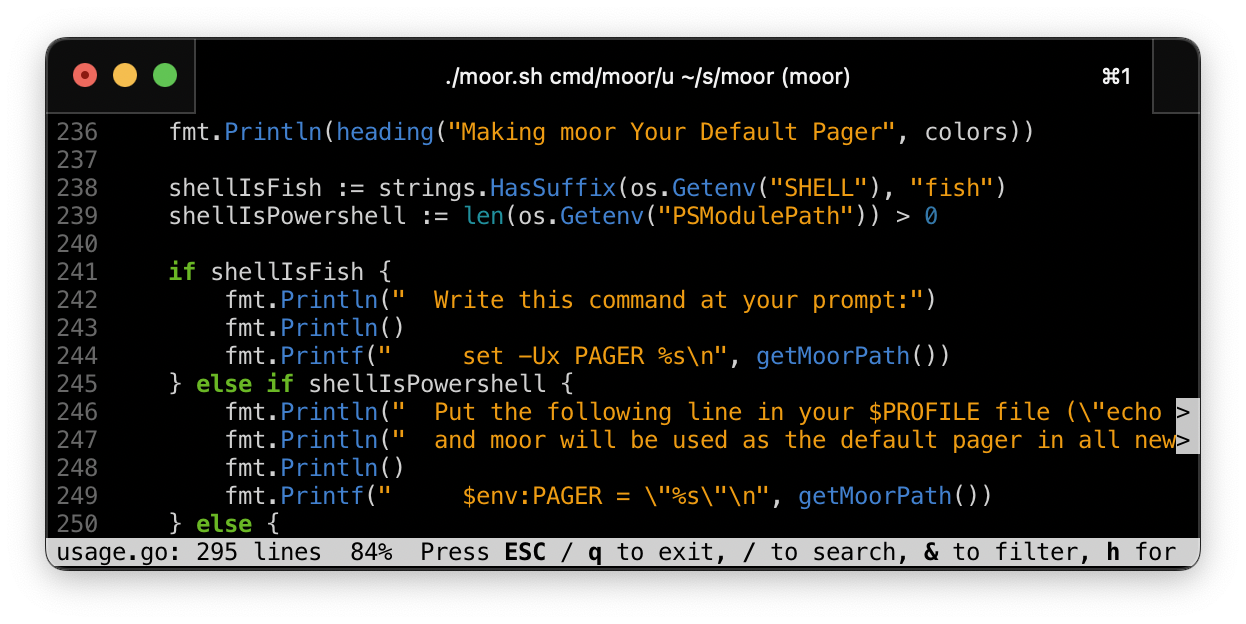
The intention is that Moor should be trivial to get into if you have previously
been using [Less](http://www.greenwoodsoftware.com/less/). If you come from Less
and find Moor confusing or hard to migrate to, [please report
it](https://github.com/walles/moor/issues)!
Doing the right thing includes:
- **Syntax highlight** source code by default using
[Chroma](https://github.com/alecthomas/chroma)
- **Search is incremental** / find-as-you-type just like in
[Chrome](http://www.google.com/chrome) or
[Emacs](http://www.gnu.org/software/emacs/)
- **Filtering is incremental**: Press & to filter the input
interactively
- Search becomes case sensitive if you add any UPPER CASE characters
to your search terms, just like in Emacs
- [Regexp](http://en.wikipedia.org/wiki/Regular_expression#Basic_concepts)
search if your search string is a valid regexp
- Deduplicated search history persists across `moor` invocations
- **Snappy UI** even on slow / large input by reading input in the background
and using multi-threaded search
- Supports displaying ANSI color coded texts (like the output from
`git diff` [| `riff`](https://github.com/walles/riff) for example)
- Supports UTF-8 input and output
- **Transparent decompression** when viewing [compressed text
files](https://github.com/walles/moor/issues/97#issuecomment-1191415680)
(`.gz`, `.bz2`, `.xz`, `.zst`, `.zstd`) or [streams](https://github.com/walles/moor/issues/261)
- The position in the file is always shown
- Supports **word wrapping** (on actual word boundaries) if requested using
`--wrap` or by pressing w
- [**Follows output** as long as you are on the last line](https://github.com/walles/moor/issues/108#issuecomment-1331743242),
just like `tail -f`
- Renders [terminal
hyperlinks](https://gist.github.com/egmontkob/eb114294efbcd5adb1944c9f3cb5feda)
properly
- **Mouse Scrolling** works out of the box (but
[look here for tradeoffs](https://github.com/walles/moor/blob/master/MOUSE.md))
[For compatibility reasons](https://github.com/walles/moor/issues/14), `moor`
uses the formats declared in these environment variables if present:
- `LESS_TERMCAP_md`: Man page bold
- `LESS_TERMCAP_us`: Man page underline
- `LESS_TERMCAP_so`: [Status bar and search hits](https://github.com/walles/moor/issues/114)
In `LESS_TERMCAP_*` values, both actual escape characters and the word `ESC` in
caps are interpreted as escape characters. Example value: `ESC[1m`.
Setting `LESSSECURE` to `1` will prevent `moor` from launching external programs
or opening new files [as required by `systemctl(1)`][systemctlLessSecure]. In
secure mode, the v command for opening the current file in an editor
is disabled.
For configurability reasons, `moor` reads extra command line options from the
`MOOR` environment variable.
Moor is used as the default pager by:
- [`riff`](https://github.com/walles/riff), a diff filter highlighting which line parts have changed
- [`px` / `ptop`](https://github.com/walles/px), `ps` and `top` for human beings
- [`ftop`](https://github.com/walles/ftop), a `top` implementation which actually [embeds
`moor`](https://github.com/walles/ftop/blob/3786217a5923d8248f54bb747ff6bea55bd1354f/internal/ftop/pageprocessinfo.go#L93)
using [the embedding API](#embedding-moor-in-your-app)
# Installing
## Using [Homebrew](https://brew.sh/)
**Both macOS and Linux** users can use Homebrew to install. See below for distro
specific instructions.
```sh
brew install moor
```
Then whenever you want to upgrade to the latest release:
```sh
brew upgrade
```
## Using Debian
On [Debian Forky](https://www.debian.org/releases/forky/) and newer, as well as
on [Ubuntu 26.04 Resolute](https://packages.ubuntu.com/resolute/moor) and newer:
```sh
sudo apt install moor
```
## Using [MacPorts](https://www.macports.org/)
```sh
sudo port install moor
```
More info [here](https://ports.macports.org/port/moor/).
## Using [Gentoo](https://gentoo.org/)
```sh
emerge --ask --verbose sys-apps/moor
```
More info [here](https://packages.gentoo.org/packages/sys-apps/moor).
## Using [Arch Linux](https://archlinux.org/)
```sh
pacman -S moor
```
More info [here](https://archlinux.org/packages/extra/x86_64/moor/).
## Manual Install
### Using `go`
This will [install
`moor` into `$GOPATH/bin`](<(https://manpages.debian.org/testing/golang-go/go-install.1.en.html)>)
:
```sh
go install github.com/walles/moor/v2/cmd/moor@latest
```
NOTE: If you got here because there is no binary for your platform,
[please consider packaging `moor`](#packaging).
### Downloading binaries
1. Download `moor` for your platform from
1. `chmod a+x moor-*-*-*`
1. `sudo mv moor-*-*-* /usr/local/bin/moor`
And now you can just invoke `moor` from the prompt!
Try `moor --help` to see options.
# Configuring
Do `moor --help` for an up to date list of options.
Environment variable `MOOR` can be used to set default options.
For example:
```bash
export MOOR='--statusbar=bold --no-linenumbers'
```
## Setting `moor` as your default pager
Set it as your default pager by adding...
```bash
export PAGER=/usr/local/bin/moor
```
... to your `.bashrc`.
# Issues
Issues are tracked [here](https://github.com/walles/moor/issues), or
you can send questions to .
# Packaging
If you package `moor`, do include [the man page](moor.1) in your package.
# Comparison with `bat`
`moor` and `bat` do different things. `moor` is a pager. `bat` is a file
preprocessor that sometimes pipes to a pager (like `moor`). So comparing them
directly is not possible.
What `bat` does is:
1. Looks at its input and preprocesses it or not
1. Pipes to a pager or not. This pager can be `moor` or something else.
Some of `bat`'s preprocessing overlaps with what `moor` provides internally
(like syntax highlighting and JSON formatting).
But some `moor` features like fast interactive search is `moor` specific and not
something `bat` can simulate through preprocessing.
To use `moor` as your `bat` pager, set `BAT_PAGER=moor` in your environment.
Or, to use `moor` instead of `bat`, set `PAGER=moor`.
# Embedding `moor` in your app
API Reference: https://pkg.go.dev/github.com/walles/moor/v2/pkg/moor
For a quick start, first fetch your dependency:
```
go get github.com/walles/moor/v2
```
Then, here's how you can use the API:
```go
package main
import (
"github.com/walles/moor/v2/pkg/moor"
)
func main() {
err := moor.PageFromString("Hello, world!", moor.Options{})
if err != nil {
// Handle paging problems
panic(err)
}
}
```
After both `go get` is done and you have calls to `moor` in your code, you may
have to:
```
go mod tidy
```
You can also `PageFromStream()` or `PageFromFile()`.
# Developing
You need the [go tools](https://golang.org/doc/install).
Run tests:
```bash
./test.sh
```
Launch the manual test suite:
```bash
./manual-test.sh
```
To run tests in 32 bit mode, either do `GOARCH=386 ./test.sh` if you're on
Linux, or `docker build . -f Dockerfile-test-386` (tested on macOS).
Run microbenchmarks:
```bash
go test -benchmem -run='^$' -bench=. ./...
```
Profiling `BenchmarkPlainTextSearch()`. Try replacing `-alloc_objects` with
`-alloc_space` or change the `-focus` function:
```bash
go test -memprofilerate=1 -memprofile=profile.out -benchmem -run='^$' -bench '^BenchmarkPlainTextSearch$' ./internal && go tool pprof -alloc_objects -focus findFirstHit -relative_percentages -web profile.out
```
Or to get a CPU profile:
```bash
go test -cpuprofile=profile.out -benchmem -run='^$' -bench '^BenchmarkRenderLines$' ./internal && go tool pprof -focus renderLines -relative_percentages -web profile.out
```
Build + run:
```bash
./moor.sh ...
```
Install (into `/usr/local/bin`) from source:
```bash
./install.sh
```
# Making a new Release
Make sure that [screenshot.png](screenshot.png) matches moor's current UI.
If it doesn't, scale a window to 81x16 characters and make a new one.
Execute `release.sh` and follow instructions.
# TODO
- Enable exiting using ^c (without restoring the screen).
- Enable suspending using ^z, followed by resuming using `fg`.
- Underline the file name in the status bar while viewing. The point is to make
it more obvious where this name ends in case it contains whitespace.
- Retain the search string when pressing / to search a second time.
## Done
- Add `>` markers at the end of lines being cut because they are too long
- Doing moor on an arbitrary binary (like `/bin/ls`) should put all
line-continuation markers at the rightmost column. This really means our
truncation code must work even with things like tabs and various control
characters.
- Make sure search hits are highlighted even when we have to scroll right
to see them
- Change out-of-file visualization to writing `---` after the end of the file
and leaving the rest of the screen blank.
- Exit search on pressing up / down / pageup / pagedown keys and
scroll. I attempted to do that spontaneously, so it's probably a
good idea.
- Remedy all FIXMEs in this README file
- Release the `go` version as the new `moor`, replacing the previous Ruby
implementation
- Add licensing information (same as for the Ruby branch)
- Make sure `git grep` output gets highlighted properly.
- Handle all kinds of line endings.
- Make sure version information is printed if there are warnings.
- Add spinners while file is still loading
- Make `tail -f /dev/null` exit properly, fix
.
- Showing unicode search hits should highlight the correct chars
- [Word wrap text rather than character wrap it](m/linewrapper.go).
- Arrow keys up / down while in line wrapping mode should scroll by screen line,
not by input file line.
- Define 'g' to prompt for a line number to go to.
- Handle search hits to the right of the right screen edge when searching
forwards. Searching forwards now moves first right, then to the left edge
and down.
- Handle search hits to the right of the right screen edge when searching
backwards. Searching backwards should move first left, then up and to the
rightmost hit.
[systemctlLessSecure]: https://github.com/systemd/systemd/blob/ee3cd7890d81744efa9513b739e5ff03c9e7649b/man/common-variables.xml#L193-L194