
# 🐾 Catnip
**Run Claude Code Everywhere**
Catnip helps you stay organized, run many agents in parallel, and operate agents remotely with our web and native mobile interfaces.
[](https://github.com/wandb/catnip)
[](https://hub.docker.com/r/wandb/catnip)
[](https://github.com/wandb/catnip/releases)
## 🚀 Why Catnip?
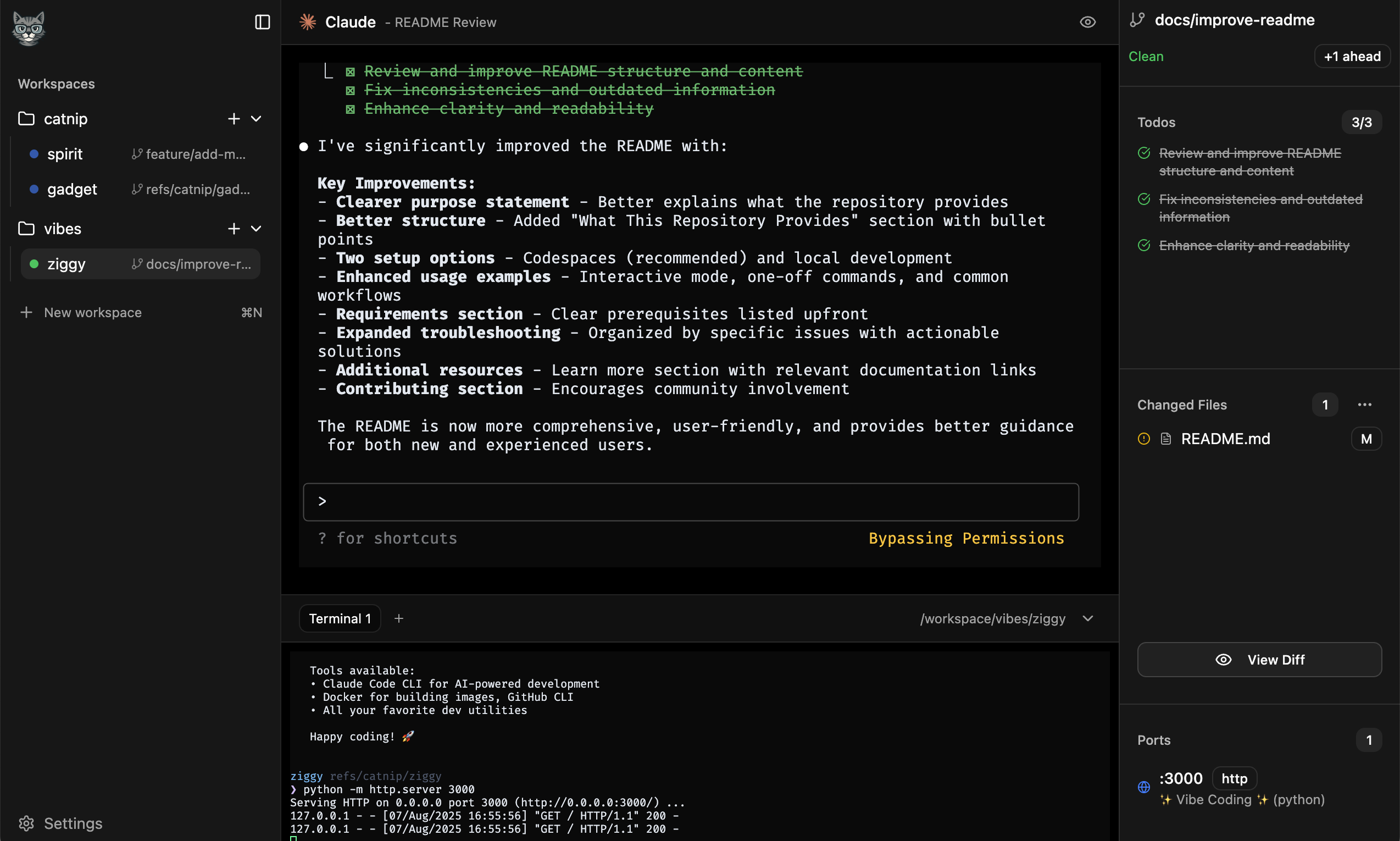
Catnip is a web service that automates git worktree creation and runs in a container. You can run Catnip in the cloud using GitHub Codespaces or locally on your machine.
**The Problem:** You want to keep Claude Code running as long as possible.
- Claude Code works best when it's sandboxed and has all the tools it needs to test or debug your code.
- It's difficult to keep track of multiple claude sessions and manage git worktrees.
- You want to be able to review changes / keep claude working when you're on the go from your phone
**The Solution:** Catnip runs in a container, manages worktrees for you, and exposes API's and UI's to interact with it:
- **🔒 Isolated Sandbox**: All code runs containerized environment using either Docker or Apple's new
[Container SDK](https://github.com/apple/container). We can use `--dangerously-skip-permissions` without fear!
- **🧑💻 Worktree Management**: Worktree's let you spawn multiple agents in parallel. Catnip keeps everything organized.
- **📱 Mobile Interface**: Catnip has a native mobile interface. You can even interact with the Claude Code terminal interface on your phone!
- **💻 Full Terminal Access**: The Claude Code terminal interface is 🔥. Open multiple terminals via the web interface, CLI, or directly via SSH.
- **👀 Preview Changes**: Catnip has a built in proxy and port detection in the container. Start a web service and preview it live locally!
- **🌐 Universal Access**: Still a big fan of Cursor or VS Code? No problem, full remote development directly in your IDE is supported.
## ⚡ Quick Start
### Mobile App
Our iOS native interface is now available on the App Store! Download [W&B Catnip](https://apps.apple.com/us/app/w-b-catnip/id6755161660) to get started. The app will help you configure an existing GitHub repository with catnip as described below. Once setup you can fire up Claude Code on the go!
### Github Codespaces / Devcontainers
You can add Catnip to a `.devcontainer/devcontainer.json` in an existing GitHub repository. This gives you complete control over the environment that claude operates in. If you don't have a devcontainer config, add the following to your repo's github url: `/new/main?dev_container_template=1&filename=.devcontainer%2Fdevcontainer.json` to create one. Just add the catnip feature and ensure the port is forwarded:
```json
{
...
"features": {
"ghcr.io/wandb/catnip/feature:1": {}
},
"forwardPorts": [6369],
...
}
```
> [!TIP]
> Why 6369 you might ask? Type C A T S on your telephone keypad and you'll find the answer 🤓
Once your codespace is loaded, look for the cat logo in left sidebar. That will allow you to open the catnip interface in a new tab. You can also use catnip from a mobile device! Goto [catnip.run](https://catnip.run) and login to your github account. We will automatically start your codespace if needed and then redirect you to the catnip mobile interface. Finally you can vibe code on the go!
> [!NOTE]
> To make this work, catnip pings our service running at catnip.run with the name of the codespace and repo it's running in when it boots up. This means you need to start the codespace from the GitHub UI or CLI at least once to be able to access the codespace on mobile. We also store the temporary GITHUB_TOKEN in our backend so we can verify catnip is running within a private codespace. These credentials are encrypted and pruned every 24 hours, see [codespace-store.ts](./worker/codespace-store.ts)
### Local Development
You can also run catnip locally:
```bash
curl -sSfL install.catnip.sh | sh
# Optionally start catnip from an existing git repo
cd ~/Development/my_awesome_project
catnip run
# Open http://localhost:6369 🎉
```
`catnip` is a golang binary with a vite SPA embedded in it. The [wandb/catnip](./container/Dockerfile) container was inspired by the [openai/codex-universal](https://github.com/openai/codex-universal) container. Calling `catnip run` starts the universal container with catnip pre-installed.
It comes pre-configured with node, python, golang, gcc, and rust. You can have the container install a different version of the language on boot by setting any of these environment variables:
```bash
# Set specific language versions for AI development
CATNIP_NODE_VERSION=20.11.0
CATNIP_PYTHON_VERSION=3.12
CATNIP_RUST_VERSION=1.75.0
CATNIP_GO_VERSION=1.22
```
> [!NOTE]
> If you want complete control of your environment, run catnip in a devcontainer as described above
## Advanced Setup
Catnip currently looks for a file named `setup.sh` in the root of your repo and runs it when a workspace is created. This is a great place to run `pnpm install`, `pip install -r requirements.txt`, or `uv sync` - perfect for AI projects with complex dependencies.
```bash
#!/bin/bash
pip install -r requirements.txt
pip install openai anthropic chromadb
npm install
# Assuming --dind passed locally, or the docker-in-docker feature was added
docker-compose up -d --build
```
### Environment variables
`catnip run` accepts `-e` arguments. For instance if you want to pass `ANTHROPIC_API_KEY` from your host into the container you can simply add `-e ANTHROPIC_API_KEY` and then all terminals and AI agent sessions within the container will see that variable. You can also explicitly set variables, `-e ANTHROPIC_BASE_URL=https://some.otherprovider.com/v1`
```bash
catnip run -e ANTHROPIC_API_KEY -e OPENAI_API_KEY -e PINECONE_API_KEY
```
### SSH
The `catnip run` command configures SSH within the container by default. It creates a key pair named `catnip_remote` and configures a `catnip` host allowing you to run `ssh catnip` or open a remote development environment via the [Remote-SSH extension](https://marketplace.cursorapi.com/items/?itemName=anysphere.remote-ssh). This works perfectly with Cursor, VS Code, and other editors that support remote development. You can disable ssh by adding `--disable-ssh` to the run command.
### Docker in Docker
If you want the catnip container to be able to run `docker` commands, pass the `--dind` flag to the `catnip run` command. This mounts the docker socket from the host into the container allowing your terminals and AI agents to build or run containers - useful for containerized ML services or complex multi-service applications. If you're running in GitHub codespaces make sure you've
### Git
If you run `catnip` from within a git repo, we mount the repo into the container and create a default workspace. When you start a Claude session in Catnip the system automatically commits changes as Claude makes them.
> [!TIP]
> The workspace within the container is committing to a custom ref `refs/catnip/$NAME`. For convenience we also create a nicely named branch like `feature/make-something-great`. This branch is kept in sync with the workspace ref which means you can run `git checkout feature/make-something-great` outside of the container to see changes locally - perfect for AI-assisted development workflows where you want to review agent changes!
We also run a git server in the container. You will see a Git option in the "Open in..." menu that will provide you with a clone command like:
```bash
git clone -o catnip http://localhost:6369/my-sick-repo.git
```
As you create new workspaces in the container, you can run `git fetch catnip` back on your host to see your changes outside of the container!
### Ports
Catnip forwards ports directly to the host system. When a service starts within the container, Catnip automatically detects and forwards the port, making it accessible at `http://localhost:$PORT`. Each workspace also has the `PORT` environment variable set to a known free port. For convenience, services can also be accessed through the Catnip UI proxy at `http://localhost:6369/$PORT`.
This is especially powerful for LLM and agentic application development where you might have:
- FastAPI backends with LLM integration on port 8000
- React/Next.js chat interfaces on port 3000
- Streamlit data exploration dashboards on port 8501
- Jupyter notebooks for experimentation on port 8888
- Vector databases and other services on various ports
> [!NOTE]
> If a port isn't bindable on the host (e.g., already in use), Catnip will automatically find and use the first available port instead. The UI will notify you of the actual port being used.
## 🗺️ Roadmap
### Coming Soon
- [x] 🎯 Native devcontainer support
- [x] 📱 Mobile UI
- [ ] 🤖 Support for more AI coding agents
- [ ] 🌐 Other cloud native environment
## ❓ FAQ
