






LeeGo is a lightweight Swift framework that helps you decouple & modularise your UI component into small pieces of LEGO style's bricks, to make UI development declarative, configurable and highly reusable.
## Rational behind
We all know that MVC pattern has some serious problems when dealing with a complex iOS project. Fortunately there are also a bunch of approaches that aim to fix the problems, most of them mainly address the `Controller` part, such as MVP, MVVM, MVSM or VIPER. But there is barely a thing which addresses the `View` part. Does that mean we just run out of all the problems in the `View` part ? I think the answer is NO, especially when we need our app to be fully responsive.
I’ve talked this idea on a [dotSwift’s talk](http://www.thedotpost.com/2016/01/victor-wang-build-ios-ui-in-the-way-of-lego-bricks), and also on my blog posts:
- [Build UI without UIView](http://allblue.me/swift/2016/05/12/reuse-everything-of-your-UI-components/)
- [Put your whole UI into struct & enum with LeeGo](http://allblue.me/swift/2016/05/25/LeeGo-UI-developpment/)
Please checkout through for more details.
LeeGo, replaces the `View` part of MVC by `Brick`.

## Features
**What may LeeGo helps you:**
- **Describe** your whole UI in small pieces of Lego style’s bricks. Let you configure your view as a `brick` whenever & wherever you want.
- No longer need to deal with a bunch of custom UIView’s subclasses. Instead, you only need to deal with different `Brick`s which is **lightweight** and **pure value type**.
- Designed to be **UIKit friendly** and **non-intrusive**. There is no need to inherit from other base class at all.
- Capable to **update remotely** almost everything via your JSON payload.
- Built-in convenience methods to make **UIStackView like layout** hassle-free.
- Built-in **self-sizing mechanism** to calculate cell’s height automatically.
- Method chaining syntax sugar.
- Benefits from Swift’s enum, let you put the whole UI in a single enum file.
**Compare with Facebook ComponentKit**
Both:
- Brings declarative, configurable & reusable UI development for iOS.
Pros:
- Written in Swift, built for Swift. No more Obj-C++ stuff.
- Lightweight and UIKit friendly. No inheritance, dealing with standard UIView and Auto Layout directly.
- Totally smooth to begin with integrating only a small part, also free to drop all without any side effect.
- Possible to update any part of UI which powered by LeeGo remotely via JSON payload.
- Powered by standard auto layout which you probably familiar with already.
Cons:
- Lack of high level features for the moment. Such as support of built-in configurable view controller, view animation, auto layout animation or UIControl component’s action.
- Powered by standard auto layout which may have some [potential performance issues](http://floriankugler.com/2013/04/22/auto-layout-performance-on-ios/) in some circumstances.
- Still requires the basic knowledge of standard auto layout and [Visual Format Language](https://developer.apple.com/library/ios/documentation/UserExperience/Conceptual/AutolayoutPG/VisualFormatLanguage.html).
## Full Documentation
- [Full Documentation](http://cocoadocs.org/docsets/LeeGo/0.6.0/)
- [Native UI powered by server side](Docs/Remote.md)
- [Configurable appearance](Docs/Appearance.md)
- [Built-in convenience methods for layout](Docs/Layout.md)
- [Dynamic cell height](Docs/Cell.md)
## Usages
#### Basic bricks
Create a `Brick` instance which named "title" as UILabel, with default text "Showcase" and gray background color
```swift
import LeeGo
let titleBrick: Brick = "title".build(UILabel).style([.text("Showcase"), .backgroundColor(.lightGrayColor())])
```
Configure an `UILabel` instance just as title brick
```swift
let titleLabel = UILabel()
titleLabel.lg_configureAs(titleBrick)
```

#### More complex bricks
Create the bricks inside a cell brick
```swift
let titleBrick = "title".build(UILabel).style([.numberOfLines(0), .text("title")])
let subtitleBrick = "subtitle".build(UILabel).style([.textColor(.lightGrayColor()), .numberOfLines(0), .font(.systemFontOfSize(14)), .text("subtitle")])
let imageBrick = "image".build(UIImageView).style([.ratio(1.5), .backgroundColor(.blueColor())]).width(68)
/// Create a brick stand for `UIView` which contains a `title`,
/// a `subtitle` and an `image` inside, layout them with
/// standard auto layout VFL.
let brickName = "cell"
let cellBrick = brickName.build().bricks(titleBrick, subtitleBrick, imageBrick) {
title, subtitle, image in
return Layout([
"H:|-left-[\(image)]-spaceH-[\(title)]-right-|",
"H:[\(image)]-spaceH-[\(subtitle)]-right-|",
"V:|-top-[\(title)]-spaceV-[\(subtitle)]-(>=bottom)-|",
"V:|-top-[\(image)]-(>=bottom)-|"], metrics: LayoutMetrics(20, 20, 20, 20, 10, 10))
}
```
Dequeue a standard `UICollectionViewCell` instance, then configure it as cell brick with `element` as data source
```swift
let cell = collectionView.dequeueCell…
cell.lg_configureAs(cellBrick, dataSource: element[indexPath.item])
```

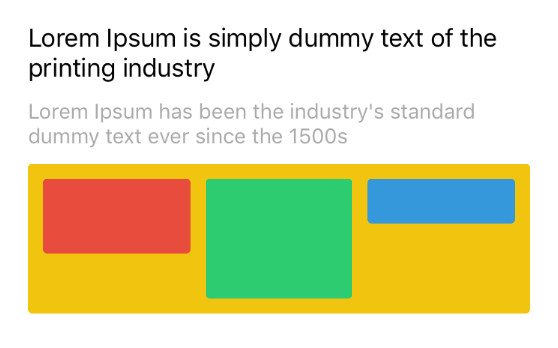
#### UIStackView inspired layout
Create a brick stand for `UIView` which contains the 3 bricks (red, green & blue block), then lay them out with the `UIStackView` inspired layout helper method.
```swift
let bricks = ["red".build().style(Style.redBlockStyle).height(50),
"green".build().style(Style.greenBlockStyle).height(80),
"blue".build().style(Style.blueBlockStyle).height(30)]
let layout = Layout(bricks: bricks, axis: .Horizontal, align: .Top, distribution: .FillEqually, metrics: LayoutMetrics(10, 10, 10, 10, 10, 10))
let viewBrick = "view".build().style(Style.blocksStyle).bricks(bricks, layout: layout).height(100)
```
Configure a `UIView` instance just as the brick
```swift
view.lg_configureAs(viewBrick)
```

#### Union different bricks
Union different bricks to a new brick with `UIStackView` style’s layout.
```swift
let viewBrick = Brick.union("brickName", bricks: [
title,
subtitle,
Brick.union("blocks", bricks: [
redBlock.height(50),
greenBlock.height(80),
blueBlock.height(30)], axis: .Horizontal, align: .Top, distribution: .FillEqually, metrics: LayoutMetrics(10, 10, 10, 10, 10, 10)).style([.backgroundColor(.yellowColor())])
], axis: .Vertical, align: .Fill, distribution: .Flow(3), metrics: LayoutMetrics(20, 20, 20, 20, 10, 10))
```
Configure a `UIView` instance just as the brick
```swift
view.lg_configureAs(viewBrick)
```
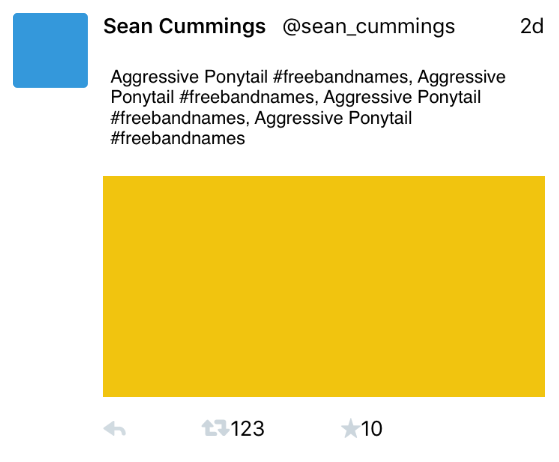
#### More complex brick and build with an enum
An enum which implements `BrickBuilderType`, used to centralize all `brick` designs in a single enum file.
```swift
import LeeGo
enum TwitterBrickSet: BrickBuilderType {
// leaf bricks
case username, account, avatar, tweetText, tweetImage, date, replyButton, retweetButton, retweetCount, likeButton, likeCount
// complex bricks
case retweetView, likeView
case accountHeader, toolbarFooter, retweetHeader
// root bricks
case standardTweet
static let brickClass: [Twitter: AnyClass] = [username: UILabel.self, account: UILabel.self, avatar: UIImageView.self, tweetText: UITextView.self]
func brick() -> Brick {
switch self {
case .username:
return build().style([.font(.boldSystemFontOfSize(14))])
case .account:
return build().style([.font(.systemFontOfSize(14))])
case .avatar:
return build().style([.ratio(1), .backgroundColor(.lightGrayColor()), .cornerRadius(3)]).width(50)
case .tweetText:
return build().style([.scrollEnabled(false)])
…
case .standardTweet:
return build().style([.backgroundColor(.whiteColor())])
.bricks(
avatar.brick(),
accountHeader.brick(),
tweetText.brick(),
tweetImage.brick(),
toolbarFooter.brick()
) { (avatar, accountHeader, tweetText, image, toolbarFooter) in
Layout(["H:|-10-[\(avatar)]-10-[\(tweetText)]-10-|",
"H:[\(avatar)]-10-[\(accountHeader)]-10-|",
"H:[\(avatar)]-10-[\(image)]-10-|",
"H:[\(avatar)]-10-[\(toolbarFooter)]-10-|",
"V:|-10-[\(avatar)]-(>=10)-|",
"V:|-10-[\(accountHeader)]-10-[\(tweetText)]-10-[\(image)]-10-[\(toolbarFooter)]-(>=10)-|"])
}
}
}
}
/// Configure your cell
let cell = collectionView.dequeueCell…
cell.lg_configureAs(TwitterBrickSet.standardTweet.brick(), dataSource: element[indexPath.item])
```
## Update UI remotely
`Brick` is designed to be JSON convertible, which makes possible that you can control your app’s interface, from tweak some UIKit appearances to create view/cell with brand new design **remotely** via JSON payload. Please check out ["JSON encodable & decodable"](Docs/Remote.md) for more details.
## Best practices
For best practices and more design details, please checkout [more design details](Docs/Design.md)
## Installation
#### CocoaPods
LeeGo is available through [CocoaPods](http://cocoapods.org). To install it, simply add the following line to your Podfile:
```ruby
source 'https://github.com/CocoaPods/Specs.git'
platform :ios, '8.0'
use_frameworks!
pod "LeeGo"
```
#### Carthage
To integrate LeeGo into your Xcode project using Carthage, specify it in your Cartfile:
```
github "wangshengjia/LeeGo"
```
Then, run the following command to build the LeeGo framework:
```
$ carthage update
```
At last, you need to set up your Xcode project manually to add the LeeGo framework.
## Contributing
If you like LeeGo and willing to make it better, you are more than welcomed to send pull request for:
- Proposing new features.
- Answering questions on issues.
- Improving documentation.
- Reviewing pull requests.
- Finding, reporting or fixing bugs.
Please note that this project is released with a Contributor Code of Conduct. By participating in this project you agree to abide by [its terms](Docs/Code of Conduct.md).
## Well...
If you have any thing want to tell me, please ping me on [Twitter](http://twitter.com/wangshengjia), on [Weibo](http://www.weibo.com/1739447693) or just fire the issue.
I'd like to thank every one who helped me, inspired me and encouraged me. Also thank to my team at [Le Monde](http://lemonde.fr/), especially [Vincent](https://twitter.com/vipom) & [Blaise](https://github.com/bsarr007).
Enjoy~ 🎉 🎉 🍻 🍻