[中文版](./README.md) | [日本語版](./README_JA.md) | [🏢 Corporate Edition: Become CEO](https://github.com/wanikua/become-ceo) | [📚 Full Docs](./docs/README.md)
> **⚠️ Originality Notice:** This project was first published on **Feb 22, 2025** (promotional posts on Xiaohongshu as early as Feb 20). It is the original creator of the "Three Departments & Six Ministries × AI Multi-Agent" concept. A copycat project was created 21 hours later with 15/15 core design decisions identical, without any attribution. Full evidence: [GitHub Issue](https://github.com/cft0808/edict/issues/55). We welcome forks and derivatives — just give credit where it's due.

# 🏛️ Three Departments & Six Ministries ✖️ OpenClaw
### One Command to Build a Dynasty. Six Ministries, All AI. Rule from Afar, Never Lift a Finger.
> **Modeled after the Ming Dynasty's Three Departments and Six Ministries (三省六部制), built on the [OpenClaw](https://github.com/openclaw/openclaw) framework.**
> One server + OpenClaw = A 24/7 AI imperial court at your command.





### 👑 Become Emperor in One Click
```bash
bash <(curl -fsSL https://raw.githubusercontent.com/wanikua/danghuangshang/main/install.sh)
```
**One command. 5 minutes. You are the Emperor.** [→ Quick Start](#quick-start-three-steps-to-the-throne)
🏥 **Having issues?** `bash <(curl -fsSL https://raw.githubusercontent.com/wanikua/danghuangshang/main/doctor.sh)` — [Doctor Tool Docs](./docs/doctor.md)
🤖 **Don't want to read docs?** Give [this Prompt](./docs/install-prompt.md) to your AI assistant (Claude / ChatGPT / DeepSeek) and let it guide you step by step.
---
## 📜 What Is This?
**AI Court** is a ready-to-use multi-AI-agent collaboration system that maps China's ancient **Three Departments and Six Ministries** (中书省 Zhongshu · 门下省 Menxia · 尚书省 Shangshu → 吏部 Personnel · 户部 Revenue · 礼部 Rites · 兵部 War · 刑部 Justice · 工部 Works) onto a modern AI agent organization.
**In plain terms:** You are the Emperor 👑, and AI agents are your ministers. Each minister has a clear role — one writes code, one manages finances, one handles marketing, one runs DevOps — all you do is issue an "imperial decree" (@mention an agent in Discord), and they execute immediately.
### 🤔 Why an Ancient Court Architecture?
The Three Departments and Six Ministries system was one of the longest-running organizational frameworks in human history (Sui/Tang to Qing dynasty, over 1,300 years). Its core design principles:
- **🏛️ Clear Separation of Duties** — Each ministry handles its own domain, no overstepping (= each AI Agent has its specialty)
- **📋 Standardized Processes** — Memorial submission and imperial review systems (= Prompt templates + SOUL.md persona injection)
- **🔄 Checks and Balances** — Three Departments cross-verify (= Agent cross-review, multi-step confirmation)
- **📜 Record Keeping** — Court diaries and historical records (= Memory persistence, Notion auto-archival)
These concepts map perfectly to modern multi-agent system design needs. **Ancient governance wisdom is the best practice for modern AI team management.**
### 🎯 Core Capabilities at a Glance
| Capability | Description |
|-----------|-------------|
| 🤖 **Multi-Agent Collaboration** | 18+ independent AI Agents, each specialized, working in concert |
| 🧠 **Independent Memory** | Each agent has its own workspace and memory files — the more you use it, the better it knows you |
| 🛠️ **60+ Built-in Skills** | GitHub, Notion, Browser, Cron, TTS and more, ready out of the box |
| ⏰ **Automated Tasks** | Cron scheduling + heartbeat self-checks, 24/7 unattended operation |
| 🔒 **Sandbox Isolation** | Docker container isolation, agent code runs independently |
| 💬 **Multi-Platform** | Discord / Feishu (Lark) / Slack / Telegram / Pure WebUI |
| 🖥️ **Web Dashboard** | React + TypeScript dashboard for visual management |
| 🌐 **OpenClaw Ecosystem** | Built on [OpenClaw](https://github.com/openclaw/openclaw), access the [OpenClaw Hub](https://github.com/openclaw/openclaw) Skill ecosystem |
> 📖 **Deep dive** → [Architecture](./docs/architecture.md)
### 🏢 Prefer a Corporate Edition?
If you're more familiar with modern corporate management concepts, we have an **English corporate version**:
👉 **[Become CEO](https://github.com/wanikua/become-ceo)** — Same architecture, using CEO / CTO / CFO / CMO roles instead of imperial ministries
| 🏛️ Court Role | 🏢 Corporate Role | Responsibility |
|:---:|:---:|:---:|
| Emperor 👑 | CEO | Ultimate decision maker |
| 司礼监 Chief Steward | COO | Daily coordination, task delegation |
| 兵部 War Ministry | CTO / VP Engineering | Software engineering, architecture |
| 户部 Revenue Ministry | CFO / VP Finance | Financial analysis, cost management |
| 礼部 Rites Ministry | CMO / VP Marketing | Brand marketing, content strategy |
| 工部 Works Ministry | VP Infra / SRE | DevOps, infrastructure |
| 吏部 Personnel Ministry | VP Product / PMO | Project management, team coordination |
| 刑部 Justice Ministry | General Counsel | Legal compliance, contract review |
> 💡 Both projects are built on the same [OpenClaw](https://github.com/openclaw/openclaw) framework with identical architecture — only the role names and cultural context differ. Pick the style you prefer!
---
> 📌 **About Originality** — This project was first committed on **2025-02-22** ([commit history](https://github.com/wanikua/danghuangshang/commits/main)) and represents the original implementation of the concept "modeling AI multi-agent collaboration after China's imperial court system." We noticed that [cft0808/edict](https://github.com/cft0808/edict) (first committed 2025-02-23, approximately 21 hours later) shares striking similarities with this project in framework selection, SOUL.md persona files, install.sh deployment approach, and competitor comparison tables — see [Issue #55](https://github.com/cft0808/edict/issues/55) for details.
>
> **Reposts welcome — please credit the source.**
>
> 📕 Original Xiaohongshu series: [Day 3 of Being an AI Emperor — I'm Already Hooked](https://www.xiaohongshu.com/discovery/item/6998638f000000000d0092fe) | [Life of a Cyber Emperor: Give Orders Before Bed, AI Cranks Out Code Overnight](https://www.xiaohongshu.com/discovery/item/69a95dc3000000002801e886)
---
## Why This Setup?
| | ChatGPT & Web UIs | AutoGPT / CrewAI / MetaGPT | **AI Court (This Project)** |
|---|---|---|---|
| Multi-agent collaboration | ❌ Single generalist | ✅ Requires Python orchestration | ✅ Config files only, zero code |
| Persistent memory | ⚠️ Single shared memory | ⚠️ BYO vector database | ✅ Each agent has its own workspace + memory files |
| Tool integrations | ⚠️ Limited plugins | ⚠️ Build your own | ✅ 60+ built-in Skills (GitHub / Notion / Browser / Cron …) |
| Interface | Web | CLI / Self-hosted UI | ✅ Native Discord (works on phone & desktop) |
| Deployment difficulty | No deployment needed | Docker + coding required | ✅ One-line script, up in 5 minutes |
| 24h availability | ❌ Manual conversations only | ✅ | ✅ Cron jobs + heartbeat self-checks |
| Organizational metaphor | ❌ None | ❌ None | ✅ Six Ministries system, clear separation of duties |
| Framework ecosystem | Closed | Build your own | ✅ OpenClaw Hub Skill ecosystem |
**The key advantage: it's not a framework — it's a finished product.** Run a script, start chatting in Discord by @mentioning your agents.
---
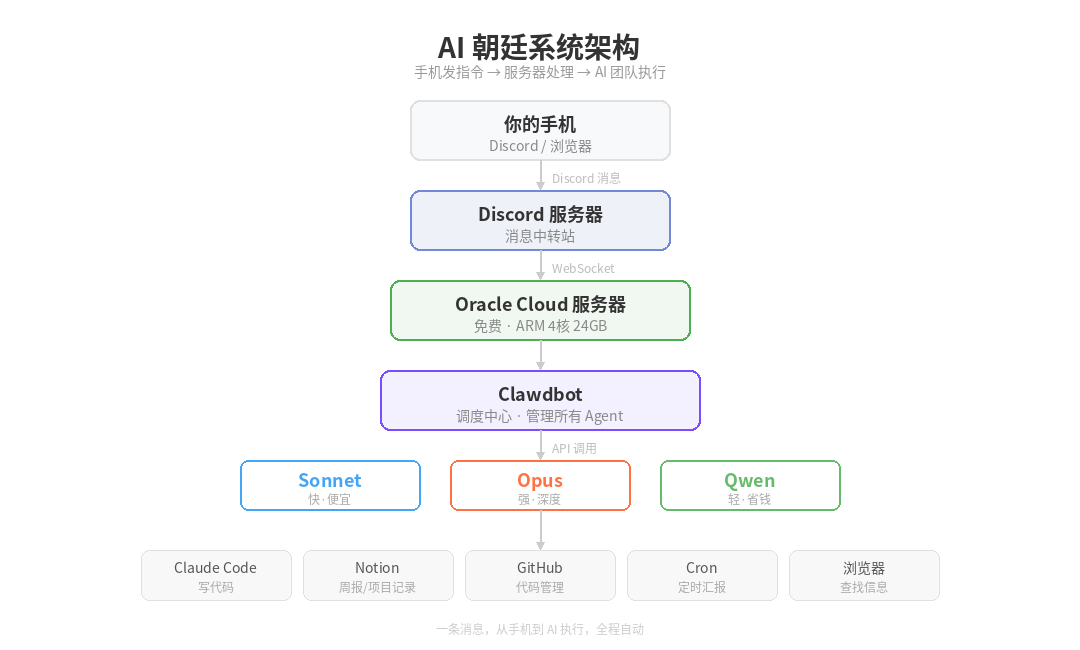
## Architecture
```
┌───────────────────────────┐
│ 👑 Emperor (You) │
│ Discord / Web UI │
└─────────────┬─────────────┘
│ Imperial Decree (@mention)
▼
┌──────────────────────────────────────┐
│ OpenClaw Gateway (Zhongshu Province)│
│ Node.js Daemon │
│ ┌────────────────────────────────┐ │
│ │ 📨 Message Routing (Menxia) │ │
│ │ @mention → match → dispatch │ │
│ │ Session isolation · Auto-Thread │ │
│ │ Cron scheduling · Heartbeat │ │
│ └────────────────────────────────┘ │
└───┬────┬────┬────┬────┬────┬─────────┘
│ │ │ │ │ │
┌────────────┘ │ │ │ │ └────────────┐
▼ ▼ ▼ ▼ ▼ ▼
┌──────────┐ ┌──────┐ ┌────┐ ┌────┐ ┌──────┐ ┌──────────┐
│ Steward │ │ War │ │Rev.│ │Rite│ │Works │ │ Justice │
│ 司礼监 │ │ 兵部 │ │户部│ │礼部│ │ 工部 │ │ 刑部 │
│Scheduler │ │Code │ │$$$│ │Mktg│ │DevOps│ │ Legal │
└──────────┘ └──────┘ └────┘ └────┘ └──────┘ └──────────┘
│ │ │ │ │ │
└──────────┴───────┴──────┴───────┴────────────┘
│
┌──────────────┴──────────────┐
│ Shangshu Province (Exec) │
│ 60+ Built-in Skills │
│ GitHub · Notion · Browser │
│ Cron · TTS · Screenshot │
│ OpenClaw Hub Extensions │
└──────────────────────────────┘
```
Each agent is a standalone Discord Bot bound to its own AI identity:
- **Independent memory**: Every agent has its own `memory/` directory — the more you use it, the better it knows your projects
- **Independent models**: Use power models for heavy lifting, fast models for light work — save money without sacrificing quality
- **Sandboxed execution**: Agent code runs in isolation, no cross-contamination
- **Identity injection**: OpenClaw automatically assembles SOUL.md + IDENTITY.md + workspace files into the system prompt
---
## 🎬 Demo: Discord Conversations
```
👑 Emperor: @bingbu Write me a user login REST API with Node.js + Express
🏛️ 兵部 bingbu: As Your Majesty commands. I'll get to work immediately.
📁 Created auth-api/ project structure
✅ POST /api/login — JWT authentication
✅ POST /api/register — User registration
✅ middleware/auth.js — Token verification middleware
✅ Pushed to GitHub: wanikua/auth-api#1
The work is complete. Please review, Your Majesty.
👑 Emperor: @hubu How much did we spend on APIs this month?
🏛️ 户部 hubu: Your Majesty, here is this month's API expenditure:
💰 Total: $23.47
├── 兵部 bingbu (Power Model): $15.20 (142 coding tasks)
├── 礼部 libu (Fast Model): $3.80 (89 copywriting tasks)
├── 司礼监 silijian (Fast Model): $2.12 (203 daily conversations)
└── Others: $2.35
📊 Down 12% month-over-month, mainly due to bingbu optimizing prompt length.
👑 Emperor: @libu Write a Xiaohongshu post recommending AI tool setups
🏛️ 礼部 libu: As you wish! Here's the copy:
📝 Title: "Regular People Can Be AI Emperors? I Manage My Whole Team with 6 AIs"
Body: Still chatting with AI one conversation at a time? I built an entire AI court...
🏷️ #AITools #Productivity #MultiAgent #AICourt #SixMinistries
👑 Emperor: @everyone Meeting tomorrow at 3 PM — all departments prepare weekly reports
🏛️ 司礼监: As commanded. Meeting scheduled.
🏛️ 兵部: Acknowledged. Will compile this week's code output.
🏛️ 户部: Acknowledged. Will prepare financial statements.
🏛️ 礼部: Acknowledged. Will summarize marketing metrics.
🏛️ 工部: Acknowledged. Will prepare server status report.
```
---
## Quick Start (Three Steps to the Throne)
> 🔴 **Beginners: use a cloud server, not your personal computer.** See [Security Guide](./docs/security.md).
### 📍 Step 0: Already Have OpenClaw?
> Already running OpenClaw? No need to reinstall. Use the lite script to initialize the court workspace and config template:
> ```bash
> bash <(curl -fsSL https://raw.githubusercontent.com/wanikua/danghuangshang/main/install-lite.sh)
> ```
> Then skip to Step 3 to fill in your keys. **New users: ignore this, start from Step 1.**
### 📍 Step 1: Got a Server?
| Situation | Action |
|-----------|--------|
| ✅ Have a Linux server | Go to Step 2 |
| ✅ Have a Mac | Go to Step 2 |
| ❌ No server | → [**Get a free server**](./docs/server-setup.md) (Oracle Cloud: free 4-core 24GB) |
### 📍 Step 2: Choose Your Platform
| Path | Platform | Best For | Deploy Method | Docs |
|:---:|----------|----------|---------------|------|
| **A** | Discord | Global users / Beginners | Linux one-line script | [→ Path A](./docs/setup-linux-discord.md) |
| **B** | Any | Docker experienced | Docker container | [→ Path B](./docs/setup-docker.md) |
| **C** | Any | Mac users | macOS Homebrew | [→ Path C](./docs/setup-macos.md) |
| **D** | Feishu (Lark) | China users | Linux one-line script | [→ Path D](./docs/setup-feishu.md) |
| **E** | Pure WebUI | No Bot needed | Just API Key | [→ Path E](./docs/setup-webui.md) |
| **W** | Any | Windows users | WSL2 | [→ WSL2 Guide](./docs/windows-wsl.md) |
> 💡 **Not sure?** China users → **D** (Feishu). Global users → **A** (Discord).
### 📍 Step 3: Install → Add Keys → Start
```bash
# 1️⃣ One-line install (Linux example)
bash <(curl -fsSL https://raw.githubusercontent.com/wanikua/danghuangshang/main/install-lite.sh)
# 2️⃣ Add API Key and Bot Token
nano ~/.openclaw/openclaw.json
# 3️⃣ Start
systemctl --user start openclaw-gateway
```
@mention your Bot, get a reply = you're on the throne! 🎉
> 📖 **Full step-by-step tutorial** → [Basics Tutorial](./docs/tutorial-basics.md) (Chinese)
### 🔧 Troubleshooting Installation Issues?
If you encounter any problems during installation:
- **npm install fails?** → Script now checks for `package.json` and skips if missing
- **Permission errors?** → Use `sudo npm install -g openclaw@latest`
- **Network issues?** → Use Git clone method or check [Troubleshooting Guide](./docs/install-troubleshooting.md)
- **Missing personas?** → Ensure you cloned the full repository with `configs/*/agents/` directory
👉 **[Complete Installation Troubleshooting Guide](./docs/install-troubleshooting.md)**
---
### 📍 Optional Enhancements (Add anytime after install)
| Enhancement | Description | Required? | Docs |
|-------------|-------------|-----------|------|
| 📝 Notion | Auto daily/weekly reports | Optional | [→ Notion Guide](./docs/notion-setup.md) |
| 🖥️ Web GUI | Visual management dashboard | Optional | [→ GUI Docs](./docs/gui.md) |
| ⏰ Cron Tasks | Automated scheduling | Optional | [→ Advanced Tutorial](./docs/tutorial-advanced.md) |
| 🛡️ Security | Sandbox configuration | Recommended | [→ Security Guide](./docs/security.md) |
| 🏥 Diagnostics | One-click troubleshooting | When needed | [→ Doctor Tool](./docs/doctor.md) |
---
### Hanlin Academy OpenViking Integration
OpenViking is now an **optional plugin** for enhanced 3D persistent memory. The default memory system is file-based, provided by the `novel-memory` skill. To install OpenViking as an optional upgrade:
```bash
openclaw plugins install ./extensions/novel-openviking
```
Once installed, OpenViking provides the following MCP server modules:
| OpenViking Module | Function | Use Case |
|------------------|----------|----------|
| Memories | Static knowledge + dynamic logs | Chapter summaries, character states, foreshadowing tracking |
| Resources | Reference material library | Reference novels, style samples |
| Skills | Structured knowledge graph | Character relationships, world settings |
> Without the OpenViking plugin, all memory operations use the built-in file-based `novel-memory` skill, which stores data in the agent's `memory/` directory. OpenViking is recommended for large-scale novels (100+ chapters) where structured graph queries become beneficial.
---
## Core Capabilities
### 🤖 Multi-Agent Collaboration
Each department is its own Bot. @mention one and it responds; @everyone triggers all of them. Large tasks automatically spawn Threads to keep channels tidy.
> ⚠️ To enable Bot-to-Bot interactions (e.g., word chain games, multi-Bot discussions), add `"allowBots": "mentions"` in the `channels.discord` section of `openclaw.json`. This ensures Bots only respond when @mentioned by other Bots, preventing infinite reply loops. Without this, Bots ignore messages from other Bots by default. Each account also needs `"groupPolicy": "open"`, otherwise group messages will be silently dropped.
### 🧠 Independent Memory System
Each agent has its own workspace and `memory/` directory. Project knowledge accumulated through conversations is persisted to files and retained across sessions. The more you use an agent, the better it understands your project.
### 🛠️ 60+ Built-in Skills (Powered by OpenClaw Ecosystem)
It's not just a chatbot — the built-in toolset covers the entire development lifecycle, and you can extend with more Skills from [OpenClaw Hub](https://github.com/openclaw/openclaw):
| Category | Skills |
|----------|--------|
| Development | GitHub (Issues/PRs/CI), Coding Agent |
| Documentation | Notion (databases/pages/automated reporting) |
| Information | Browser automation, Web search, Web scraping |
| Automation | Cron scheduled tasks, Heartbeat self-checks |
| Media | TTS voice, Screenshots, Video frame extraction |
| Operations | tmux remote control, Shell command execution |
| Communication | Discord, Slack, Lark (Feishu), Telegram, WhatsApp, Signal… |
| Extensions | OpenClaw Hub community Skills, Custom Skills |
### ⏰ Scheduled Tasks (Cron)
Built-in Cron scheduler lets agents run tasks on autopilot:
- Auto-generate daily reports, post to Discord + save to Notion
- Weekly summary roll-ups
- Scheduled health checks and code backups
- Any custom recurring task you can think of
### 👥 Team Collaboration
Invite friends to your Discord server — everyone can @mention department Bots to issue commands. No interference between users, and results are visible to all.
### 🔒 Sandbox Isolation
Agents can run inside Docker sandboxes with isolated code execution. Supports configurable isolation levels for networking, filesystem, and environment variables.
---
## 🖥️ GUI Management Interface
Beyond Discord command-line interaction, the AI Court also offers multiple graphical interface (GUI) management options:
### Web Dashboard (Boluo Dynasty Dashboard)
This project includes a built-in Web management dashboard (in the `gui/` directory), built with React + TypeScript + Vite:
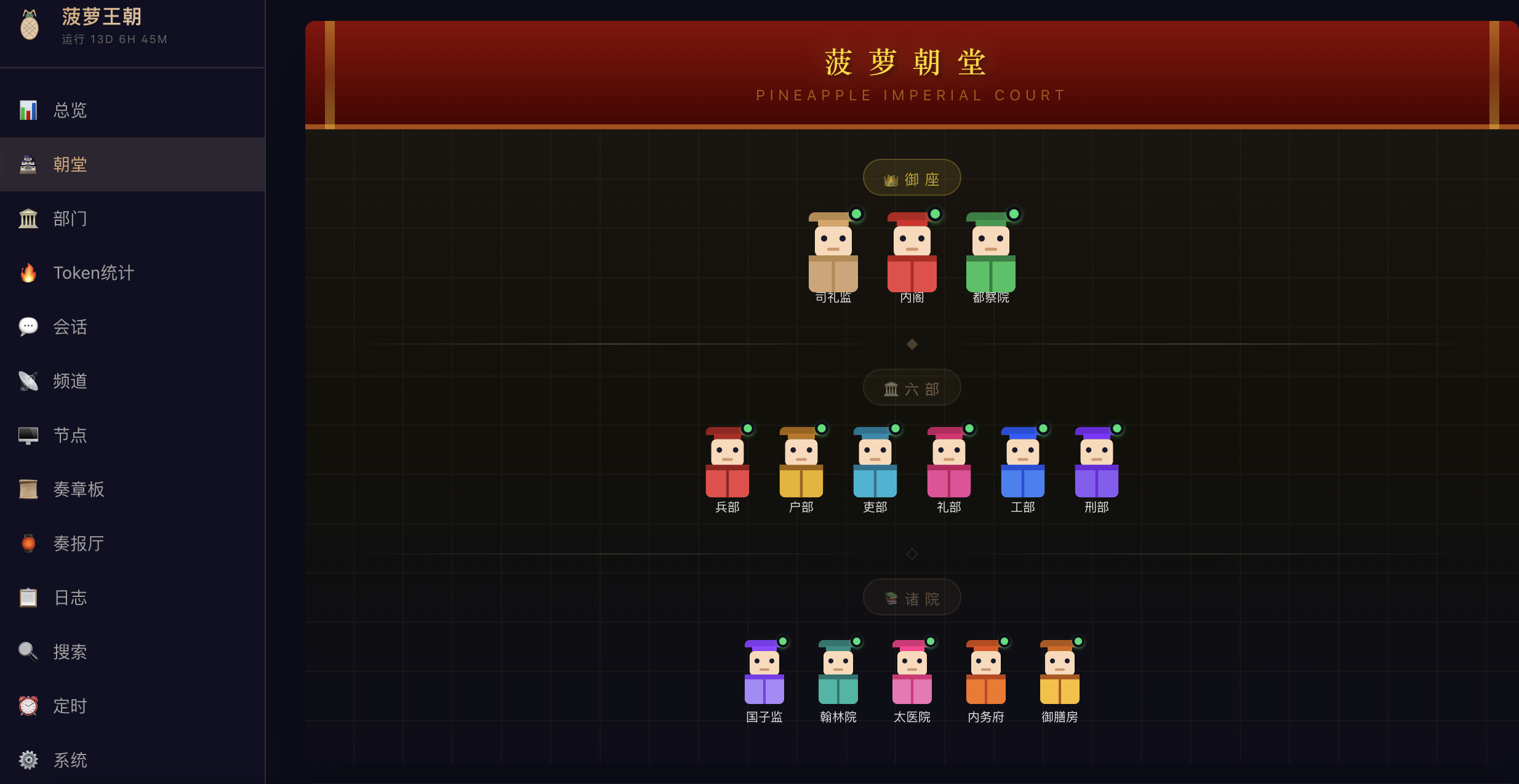
Court Overview — Throne, Six Ministries, and Auxiliary Offices with live status
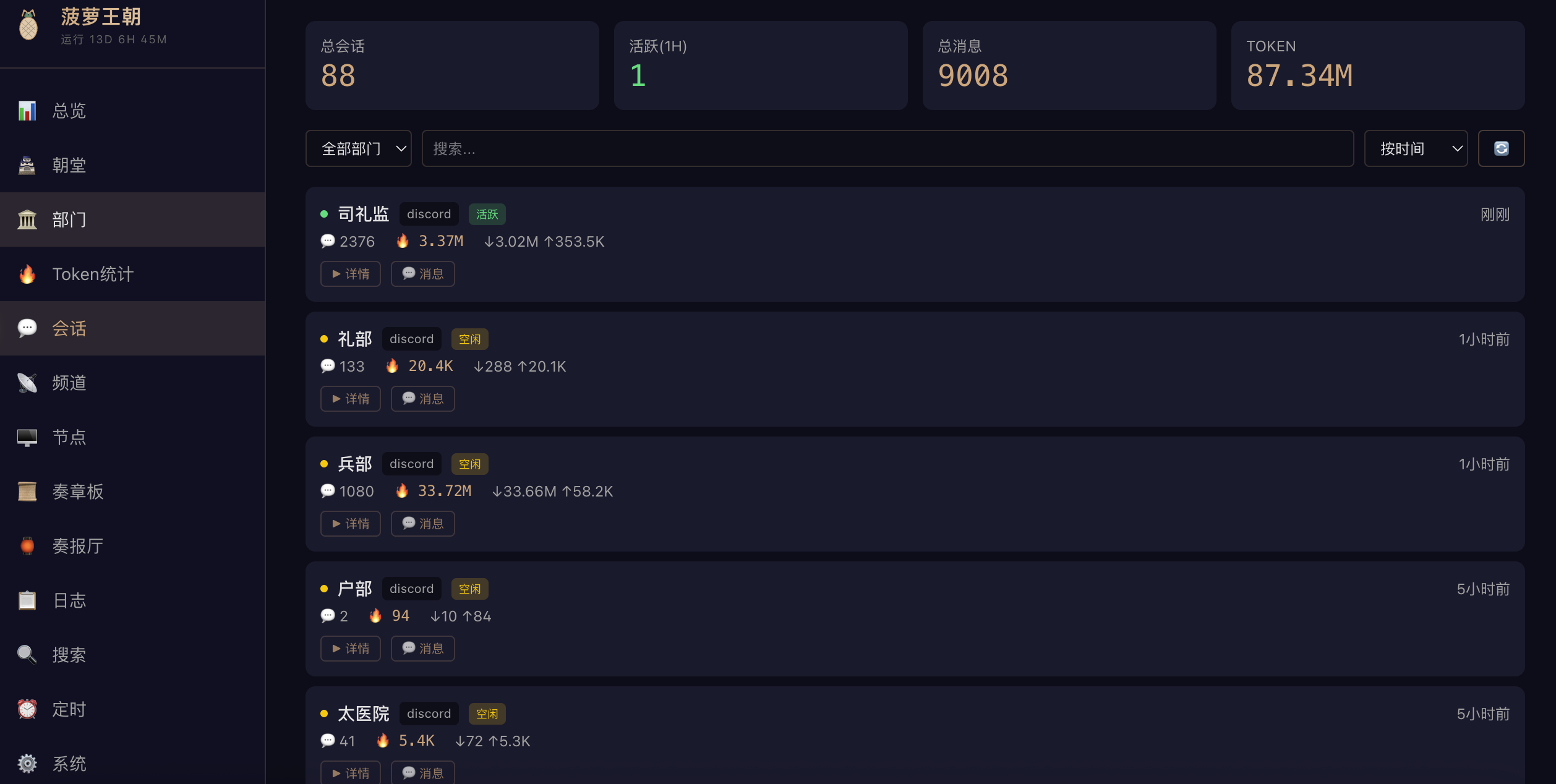
Session Management — 88 sessions, 9008 messages, 87.34M tokens tracked in real-time
Features include:
- **Dashboard**: Real-time view of department status, token consumption, system load
- **Court Hall**: Chat directly with department Bots from the web interface
- **Session Management**: Browse all historical sessions, message details, token stats
- **Cron Jobs**: Visual management of scheduled tasks (enable/disable/manual trigger)
- **Token Analytics**: Token consumption breakdown by department and date
- **System Health**: CPU/memory/disk monitoring, Gateway status
**How to start:**
```bash
# Build the frontend
cd gui && npm install && npm run build
# Start the backend API server (default port 18795)
cd server && npm install && node index.js
```
Access at: `http://your-server-ip:18795`
> 💡 For production, use Nginx reverse proxy + HTTPS instead of exposing the port directly.
### Discord as GUI
Discord itself is the best GUI management interface:
- **Phone + Desktop** sync — manage from anywhere
- **Channel categories** naturally map to departments (兵部, 户部, 礼部…)
- **Message history** permanently saved with built-in search
- **Permission management** with fine-grained control over who sees and does what
- **@mention** any agent to invoke it — zero learning curve
### Notion as Data Visualization
Through OpenClaw's Notion Skill integration, court data auto-syncs to Notion:
- **Daily Reports** and **Weekly Summaries** auto-generated
- **Finance Tracking** automatically records API consumption
- **Project Archives** track progress across all projects
- Notion's kanban, calendar, and table views provide rich data visualization
> 💡 Three-tier GUI: **Web Dashboard** for system status → **Discord** for issuing commands → **Notion** for reports and historical data.
---
## Detailed Tutorials
For the basics (server provisioning → installation → configuration → first run) and advanced topics (tmux, GitHub, Notion, Cron, Discord, prompt engineering tips), check out the Xiaohongshu tutorial series.
---
## FAQ
**Q: Do I need to know how to code?**
→ No. One-line script installs everything. Natural language interaction in Discord.
**Q: How is this different from ChatGPT?**
→ ChatGPT = one generalist, forgets everything. This = multiple specialists with persistent memory, tools, and automation.
**Q: Can I use other models?**
→ Yes. OpenClaw supports Anthropic, OpenAI, Google Gemini, and any OpenAI API-compatible provider. Different departments can use different models.
**Q: Monthly API cost?**
→ Light: $10-15. Moderate: $20-30. Use power models for heavy tasks, fast models for light tasks (5× savings).
**Q: What's the relationship with Become CEO?**
→ Same OpenClaw framework and architecture, but with modern corporate roles (CTO, CFO, etc.) instead of imperial court titles.
**Q: @everyone doesn't trigger responses?**
**Q: Bot replies ping @everyone?** → Server Settings → Roles → @everyone → disable "Mention @everyone, @here, and All Roles" (Server Owner is unaffected)
→ Enable Message Content Intent + Server Members Intent for each Bot. See [Diagnostics](./docs/doctor.md).
**Q: Agent reports permission errors after enabling sandbox?**
→ Sandbox mode `all` uses a Docker container with restricted defaults. Set `workspaceAccess: "rw"`, `docker.network: "bridge"`, and pass API keys via `docker.env`.
**Q: Will multiple users @mentioning the same agent cause conflicts?**
→ No. OpenClaw maintains independent sessions per user × agent combination.
**Q: Can agents call each other?**
→ Yes. Use `sessions_spawn` to delegate sub-tasks or `sessions_send` to message another agent's session.
**Q: How do I create custom Skills?**
→ Each Skill is a directory with `SKILL.md` + scripts. Place it in `skills/` and agents can use it immediately. Community Skills available on [OpenClaw Hub](https://github.com/openclaw/openclaw).
**Q: How do I connect private models (Ollama, etc.)?**
→ Add an OpenAI API-compatible provider in `models.providers` of `openclaw.json`, pointing `baseUrl` to your Ollama address.
**Q: How do I troubleshoot Gateway startup failures?**
→ Run `journalctl --user -u openclaw-gateway --since today --no-pager` or `openclaw doctor`. Common causes: missing API Key, malformed JSON, invalid Bot Token.
> 📖 **Full FAQ** → [FAQ](./docs/faq.md)
---
## 🏛️ Join the Court
| Xiaohongshu (小红书) | WeChat Official: 菠言菠语 | WeChat Group: OpenClaw Emperors |
|:---:|:---:|:---:|
|  |
|  |
|  |
| [@菠萝菠菠🍍](https://www.xiaohongshu.com/user/profile/5a169df34eacab2bc9a7a22d) | Follow for tutorials & updates | If QR expired, follow the official account for latest link |
## 🤝 Recommendations
- 🎁 [MiniMax Coding Plan](https://platform.minimaxi.com/subscribe/coding-plan?code=CIeSxc2iq2&source=link) — Exclusive 12% discount + Builder benefits
## Related Links
- 🏢 [Become CEO — Corporate Edition](https://github.com/wanikua/become-ceo) — Same architecture, modern corporate roles
- 🎭 [AI Court Skill — Chinese](https://github.com/wanikua/ai-court-skill)
- 🔧 [OpenClaw Framework](https://github.com/openclaw/openclaw) — The underlying framework for this project
- 📖 [OpenClaw Official Documentation](https://docs.openclaw.ai)
- 📚 [Full Documentation Index](./docs/README.md)
---
## ⚠️ Originality & Rights Notice
This project was first published on **February 22, 2025**. Full evidence: [GitHub Issue](https://github.com/cft0808/edict/issues/55) | [Rights Article](https://mp.weixin.qq.com/s/erVkoANrpZQFawMCNn6p9g). Forks welcome — please credit the source.
---
## 🛡️ Security Guide
> Full details → [Security Guide](./docs/security.md)
- 🔴 **Don't install on personal computers** — use a cloud server
- 🔴 **Set workspace to a dedicated directory** (e.g., `/home/ubuntu/clawd`)
- 🔴 **Never commit API keys to public repos**
- 💡 Non-coding departments: sandbox `"off"`. Coding departments: sandbox `"all"`
---
## 🔄 Already Installed? One-Click Update
> 💡 Safe to run — won't overwrite your SOUL.md, USER.md, IDENTITY.md, or openclaw.json.
```bash
# Re-run install script (auto-preserves your config)
bash <(curl -fsSL https://raw.githubusercontent.com/wanikua/danghuangshang/main/install.sh)
# Docker users
docker pull boluobobo/ai-court:latest && docker compose up -d
# Manual update
npm update -g openclaw && systemctl --user restart openclaw-gateway
```
---
## Disclaimer
This project is provided "as is" without any warranties. AI-generated content is for reference only — review before production use. Human review required for financial/security-sensitive operations.
---
v3.5.3 | MIT License
> 📜 Licensed under MIT. Derivative works please credit: [danghuangshang](https://github.com/wanikua/danghuangshang) by [@wanikua](https://github.com/wanikua)
|
| [@菠萝菠菠🍍](https://www.xiaohongshu.com/user/profile/5a169df34eacab2bc9a7a22d) | Follow for tutorials & updates | If QR expired, follow the official account for latest link |
## 🤝 Recommendations
- 🎁 [MiniMax Coding Plan](https://platform.minimaxi.com/subscribe/coding-plan?code=CIeSxc2iq2&source=link) — Exclusive 12% discount + Builder benefits
## Related Links
- 🏢 [Become CEO — Corporate Edition](https://github.com/wanikua/become-ceo) — Same architecture, modern corporate roles
- 🎭 [AI Court Skill — Chinese](https://github.com/wanikua/ai-court-skill)
- 🔧 [OpenClaw Framework](https://github.com/openclaw/openclaw) — The underlying framework for this project
- 📖 [OpenClaw Official Documentation](https://docs.openclaw.ai)
- 📚 [Full Documentation Index](./docs/README.md)
---
## ⚠️ Originality & Rights Notice
This project was first published on **February 22, 2025**. Full evidence: [GitHub Issue](https://github.com/cft0808/edict/issues/55) | [Rights Article](https://mp.weixin.qq.com/s/erVkoANrpZQFawMCNn6p9g). Forks welcome — please credit the source.
---
## 🛡️ Security Guide
> Full details → [Security Guide](./docs/security.md)
- 🔴 **Don't install on personal computers** — use a cloud server
- 🔴 **Set workspace to a dedicated directory** (e.g., `/home/ubuntu/clawd`)
- 🔴 **Never commit API keys to public repos**
- 💡 Non-coding departments: sandbox `"off"`. Coding departments: sandbox `"all"`
---
## 🔄 Already Installed? One-Click Update
> 💡 Safe to run — won't overwrite your SOUL.md, USER.md, IDENTITY.md, or openclaw.json.
```bash
# Re-run install script (auto-preserves your config)
bash <(curl -fsSL https://raw.githubusercontent.com/wanikua/danghuangshang/main/install.sh)
# Docker users
docker pull boluobobo/ai-court:latest && docker compose up -d
# Manual update
npm update -g openclaw && systemctl --user restart openclaw-gateway
```
---
## Disclaimer
This project is provided "as is" without any warranties. AI-generated content is for reference only — review before production use. Human review required for financial/security-sensitive operations.
---
v3.5.3 | MIT License
> 📜 Licensed under MIT. Derivative works please credit: [danghuangshang](https://github.com/wanikua/danghuangshang) by [@wanikua](https://github.com/wanikua)