# heretek
[ ](https://github.com/wcampbell0x2a/heretek)
[
](https://github.com/wcampbell0x2a/heretek)
[ ](https://crates.io/crates/heretek)
[
](https://crates.io/crates/heretek)
[ ](https://github.com/wcampbell0x2a/heretek/actions?query=branch%3Amaster)
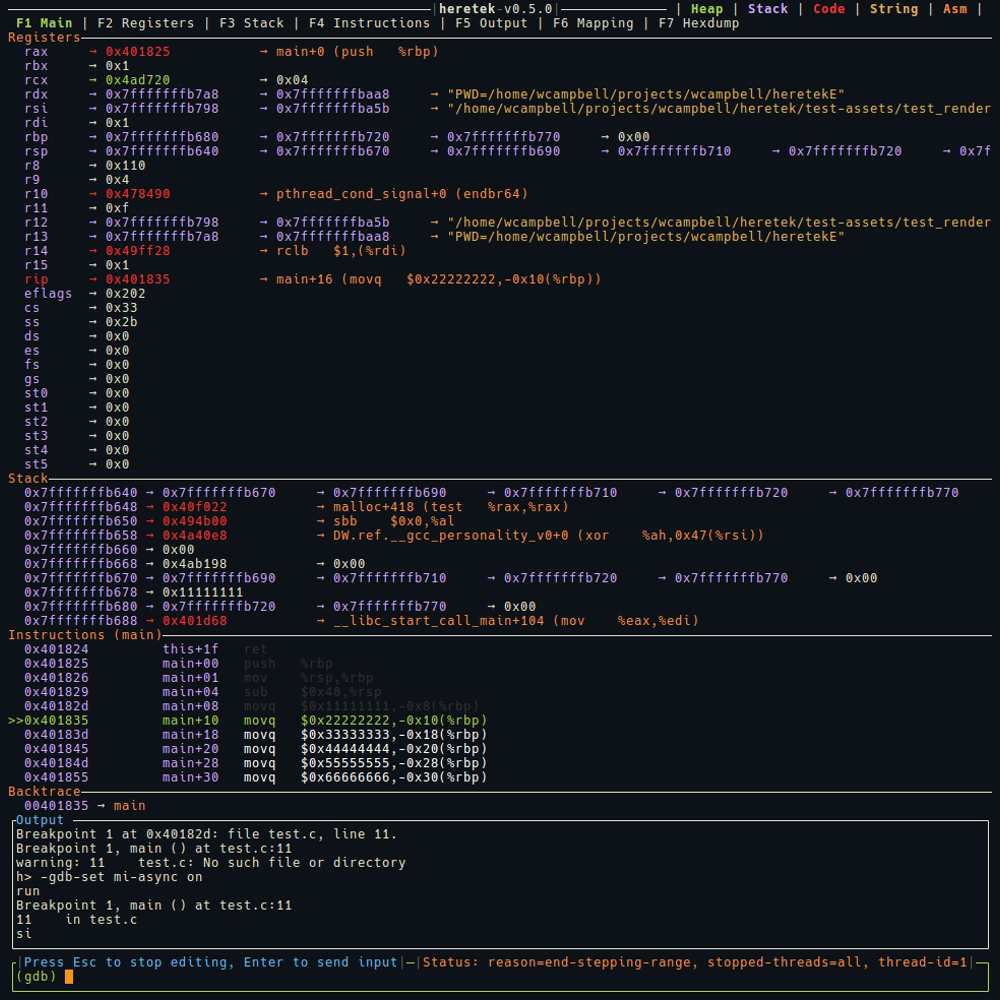
GDB TUI Dashboard inspired by `gef`, designed to seamlessly connect to remote targets even without a functioning `gdbserver`.
* **No python requirements**: Many vendors ship `gdb` without python support, we ship a single statically-linked musl binary.
* **Architecture agnostic**: `heretek` only uses information given by `gdb`, no extra code required!
* **No gdbserver requirements**: Many vendors ship invalid `gdbserver` binaries, this works on remote targets with just `gdb`, `nc`, `cat`, and `mkfifo`. No more wrestling with invalid or missing `gdbserver` binaries.
* See [features](./docs/features.md) for `heretek` demos.
* See [commands](./docs/commands.md) for internal `heretek` commands.
## Installation
Either build from published source in crates.io.
```
$ cargo install heretek --locked
```
Or download from [github releases](https://github.com/wcampbell0x2a/heretek/releases).
Arch Linux users can also install from the [official repositories](https://archlinux.org/packages/extra/x86_64/heretek/) via running `pacman -S heretek`
## Usage
```console
GDB TUI Dashboard for the understanding of vast knowledge
Usage: heretek [OPTIONS]
Options:
--gdb-path
Override gdb executable path
-r, --remote
Connect to nc session
`mkfifo gdb_pipe; cat gdb_pipe | gdb --interpreter=mi | nc -l -p 12345 > gdb_pipe`
--32
Switch into 32-bit mode
-c, --cmds
Execute GDB commands
lines starting with # are ignored
--log-path
Path to write log
Set env `RUST_LOG` to change log level
-h, --help
Print help (see a summary with '-h')
-V, --version
Print version
```
> "To every problem, a solution lies in the application of tech-lore" - Ferrarch Asklepian, Warhammer 40,000: Mechanicus
](https://github.com/wcampbell0x2a/heretek/actions?query=branch%3Amaster)
GDB TUI Dashboard inspired by `gef`, designed to seamlessly connect to remote targets even without a functioning `gdbserver`.
* **No python requirements**: Many vendors ship `gdb` without python support, we ship a single statically-linked musl binary.
* **Architecture agnostic**: `heretek` only uses information given by `gdb`, no extra code required!
* **No gdbserver requirements**: Many vendors ship invalid `gdbserver` binaries, this works on remote targets with just `gdb`, `nc`, `cat`, and `mkfifo`. No more wrestling with invalid or missing `gdbserver` binaries.
* See [features](./docs/features.md) for `heretek` demos.
* See [commands](./docs/commands.md) for internal `heretek` commands.

## Installation
Either build from published source in crates.io.
```
$ cargo install heretek --locked
```
Or download from [github releases](https://github.com/wcampbell0x2a/heretek/releases).
Arch Linux users can also install from the [official repositories](https://archlinux.org/packages/extra/x86_64/heretek/) via running `pacman -S heretek`
## Usage
```console
GDB TUI Dashboard for the understanding of vast knowledge
Usage: heretek [OPTIONS]
Options:
--gdb-path
Override gdb executable path
-r, --remote
Connect to nc session
`mkfifo gdb_pipe; cat gdb_pipe | gdb --interpreter=mi | nc -l -p 12345 > gdb_pipe`
--32
Switch into 32-bit mode
-c, --cmds
Execute GDB commands
lines starting with # are ignored
--log-path
Path to write log
Set env `RUST_LOG` to change log level
-h, --help
Print help (see a summary with '-h')
-V, --version
Print version
```
> "To every problem, a solution lies in the application of tech-lore" - Ferrarch Asklepian, Warhammer 40,000: Mechanicus