---
title: 'BlockMax WAND: How Weaviate Achieved 10x Faster Keyword Search'
slug: blockmax-wand
authors: [amourao, jp]
date: 2025-02-26
tags: ['search', 'concepts', 'engineering']
image: ./img/hero.png
description: "How Weaviate achieved 10x Faster Keyword Search and 90% index compression"
---
Keyword search is an integral part of Weaviate’s [hybrid search](/blog/hybrid-search-explained), designed to return [best of both](/blog/hybrid-search-fusion-algorithms) vector and keyword search.
Hybrid search as a tool for [RAG](/blog/introduction-to-rag) and [Agentic AI](/blog/ai-agents) increases the breadth and depth of information that can be retrieved from a dataset, but it comes with its own challenges.
As the text corpora size becomes larger and larger, keyword searches can take long times to execute compared to vector searches.
In this blog post, you will learn how we improved Weaviate’s inverted index, how we avoid scoring all documents that have the query terms, how we compress the inverted index, and more about the improvements from using BlockMax WAND in Weaviate.
:::caution 🚧 Technical Preview
BlockMax WAND algorithm is available in `v1.29` as a **technical preview**. This means that the feature is still under development and may change in future releases, including potential breaking changes. **We do not recommend using this feature in production environments at this time.**
[Instructions on how to enable it are available here.](https://docs.weaviate.io/weaviate/concepts/indexing#blockmax-wand-algorithm)
:::
## Inverted Index and Tokenization
Keyword search works by comparing the terms in your queries to the terms in your database documents, giving higher scores to rarer terms and terms that show up more often in your documents.
In keyword search context, these `terms` are called `tokens`, but we'll use the terms interchangeably in this blog post.
Keyword search requires us to first define what terms we want to search.
A big part of this process is [tokenization](https://docs.weaviate.io/academy/py/tokenization/basics). It splits the input documents into [tokens](https://en.wikipedia.org/wiki/Lexical_analysis#Token) (i.e. terms, numbers or anything else one would consider important to be searched individually).
In this simple example, consider a dataset made of three documents with a single property, title, composed of a single sentence and a *whitespace* tokenizer that lowercases the documents and splits them by whitespace.
| Doc Id | Document Title | Tokenized Title |
| :---- | :---- | :---- |
| 1 | A Web Developer's Guide to Hybrid Search | \[“a”, “web”, “developer", "s”, “guide”, “to”, “hybrid”, “search”\] |
| 2 | Unlocking the Power of Hybrid Search | \[“unlocking”, “the”, “power”, “of”, “hybrid”, “search”\] |
| 3 | Vector Library versus Vector Database | \[“vector”, “library”, “versus”, “vector”, “database”\] |
**Table**: Example dataset with tokenized titles.
Now we have turned documents into a [bag-of-words](https://en.wikipedia.org/wiki/Bag-of-words_model) model, where we can find for individual query terms in the sentences. But having to go through all documents to find the ones that have query terms isn't efficient.
This is where the *inverted* part of the [inverted index](https://en.wikipedia.org/wiki/Inverted_index) comes from: instead of going document \-\> term, create an index that does from term \-\> documents.
It works like the indexes at the end of books, but instead of mapping terms to book pages, we map terms to documents using posting lists.
A posting list is a list of "postings", which contain the information needed to score documents:
* doc id: to identify which documents have the term.
* [term frequency (tf)](https://en.wikipedia.org/wiki/Tf%E2%80%93idf), which represents the number of times the term is part of the property. For example, `tf("vector")` for doc 3 is 2, as it shows up twice.
| Term | Posting List |
| :---- | :---- |
| hybrid | (Doc 1, tf: 1); (Doc 2, tf: 1) |
| search | (Doc 1, tf: 1); (Doc 2, tf: 1) |
| vector | (Doc 3, tf: 2) |
**Table**: Posting lists for terms `hybrid`, `search`, and `vector` in the example dataset.
When a user searches for a query, we tokenize the query in the same way we tokenized the documents.
Thus, if you want to search for `"Hybrid search or Vector search"`, we get the tokens `["hybrid", "search", "or", "vector"]`.
Inspecting the posting lists for each token, we can see that documents 1, 2, and 3 have at least one of the query tokens.
But we still need to score them to see which ones are the most relevant to the query.
## tf-idf and BM25
Not all terms are created equal. In our examples, words like "hybrid," "vector," and "database" are more informative than "a," "to," or "the." To rank results meaningfully, we need to score documents based on:
[idf (Inverse Document Frequency)](https://en.wikipedia.org/wiki/Tf%E2%80%93idf) is a measure of this importance, based on the number of documents a term appears in compared to the total number of documents. Higher values mean rarer terms that will contribute more to the score of a document. Combined with the tf, it becomes the cornerstone of keyword search, [tf-idf](https://en.wikipedia.org/wiki/Tf%E2%80%93idf).
[BM25](/blog/hybrid-search-explained#bm25) further refines tf-idf by applying property length and frequency saturation normalization.
## Exhaustive Search
The exhaustive way of computing the [BM25](/blog/hybrid-search-explained#bm25) scores would be to check all the documents that have at least one of the query terms and score them.
But this is quite resource intensive; most searches are for the top 10-100 results, and even with pagination, at most, only about 100 documents end up being shown to the user for each search.
This means that if 100 000 documents have at least one of the query terms (normal for queries with common words in databases with 1 million documents), this is 0.1% of the documents, many of which are completely irrelevant to the query, wasting a lot of CPU and I/O resources.
## WAND
[WAND (Weak AND)](https://dl.acm.org/doi/abs/10.1145/956863.956944) takes the inverted index and idf to greatly reduce the number of documents we need to inspect when searching for the top-*k* documents that match a query.
It relies on two step search, to avoid ranking all documents for top-k search.
* Approximate evaluation over query term postings in parallel to identify candidate docs with max impact heuristics (based on idf);
* Promising candidates are fully evaluated, their exact scores are computed and they are added to the top-*k* results if the scores are higher than the lowest score.
Max impact is the maximum score a term can contribute to the score.
Its upper bound is the idf, e.g. a document with only the term *vector* will have a max impact equal to vector’s idf.
* As we start to rank, we add enough documents to fill the top-*k* list;
* When we get *k* candidates, the list is full and we have a **lower bound** to beat, which is the score of the lowest ranked document;
* As we move forward, we can then start skipping documents where the sum of the max impacts of its terms, is lower than the lower bound.
WAND is what currently powers keyword search at Weaviate.
The following section will show why we are excited to introduce BlockMax WAND.
## BlockMax WAND
While WAND works well and is already able to greatly reduce the number of documents that we need to inspect, it still has some limitations: it relies on a single global value of idf for all documents in a term, which relies on the assumption that there may be a single document that just has that term.
[BlockMax WAND (BMW)](https://dl.acm.org/doi/10.1145/2009916.2010048) is WAND on steroids:
* Divides posting lists into blocks with local max impact;
* Skips and avoids decoding doc ids in blocks.
BMW can be viewed as a *meta*-WAND, where we perform document skips at block level using max impact (shallow advances), and use the combination of max doc ids from blocks to even avoid loading whole blocks from disk.
This table shows an example posting, as output by BlockMax WAND. You may notice that this includes some additional elements compared to postings for WAND shown above.
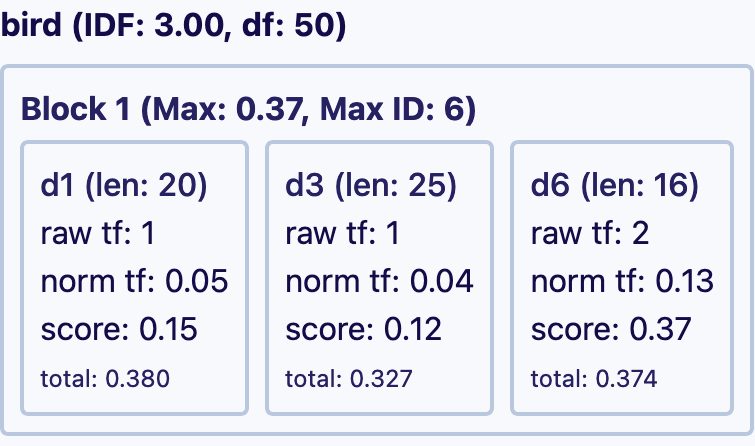
A block is a mini posting list (list of doc ids and tfs) with its own metadata:
* **Max doc id**: highest doc id that shows up in the block;
* **Max impact**: maximum possible score for a document in the block; for tf-idf, this represents the maximum tf of a document within the block (norm tf equals tf/prop length).
| Dataset | WAND | BlockMax WAND |
| :---- | -----: | ----: |
| MS Marco (8.6M docs) | 15.1% | 6.7% (-56%) |
| Fever (5.4M docs) | 20.8% | 8.4% (-60%) |
| Climate Fever (5.4M docs) | 29.3% | 12.2% (-58%) |
**Table**: Average % of doc query terms scored Weaviate `v1.29.0` on standard [beir datasets](https://github.com/beir-cellar/beir) without stopword removal.
Exhaustive search always needs to examine **100%** of the document query terms with at least one query term.
The experimental results show that BlockMax WAND is able to further halve the number of documents inspected from the already remarkable **15-30%** number of terms scored to **5-15%**.
But how does BlockMax WAND work in practice?
### BlockMax WAND Demo
At Weaviate, we like to show, not just tell. That's why we've created a **demo** to show you exactly how BlockMax WAND works in practice!
* **Input your documents, queries, and search parameters** and see exactly how Exhaustive search, WAND, and BlockMax WAND work;
* **Get the metrics on the number of documents and blocks scored**, and see the improvements of BlockMax WAND vs. WAND and Exhaustive search;
* **Share your dataset and queries** with others to show the improvements!
## Varenc Doc ID and Term Frequency Compression
For scoring using tf-idf or BM25, we need to load the term frequencies and doc ids for each term in the query.
This is a lot of information to store and decode for each query:
* For 1 million documents with 100 terms each, we would need to store and decode 100 million term frequencies and doc ids;
* Term frequencies are usually in the 1-100 range, with no hard ceiling. Assume they may grow all the way to `2^32`. Storing them as-is would take 32 bits * number of documents for each term;
* Doc ids are 64 bit unsigned integers, and we need to store them for each document that has the term.
At 4 and 8 bytes each respectively, `100 000 000 * 12 = 1.2 GB` of data, without considering the overhead of the inverted index structure.
Can we compress this data?
Consider this set of four term frequencies: 12, 3, 100, 1\. The largest number on this posting list is 100, which can be represented in binary as `floor(log2(100)) + 1 = 7 bits`, instead of the full 32 bits. What if we just store the values as 7 bits instead of 32 bits, keeping an extra 6 bits (enough to store all possible bit counts) to store the per value bit count? This process can be described as a type of [variable-length coding](https://en.wikipedia.org/wiki/Variable-length_code) we’ll call varenc.
| 32 bit term freqs | Compressed data |
| :---- | :---- |
| 12, 3, 100, 1 | (7), 12, 3, 1, 3 |
| `4 * 32 bits = 128 bits` | `6 + 4 * 7 bits = 79 bits` |
**Table**: Example of term frequency compression.
Even with the extra 6 bits to store the bit count, we are still able to reduce the number of bits needed from 128 to 79 bits. The compression gains translate directly to larger lists, but one needs to be mindful, as a single high value will increase the bit count
What if we apply the same logic to doc ids? At Weaviate, doc ids are implemented as 64 bit unsigned integers that uniquely identify documents. They are associated with the external facing doc UUID, and simplify internal data management.
Doc ids are monotonically increasing; so they are in the same order of magnitude of the size of your data.
Consider the following set of doc ids from a million scale index: `1000000`, `1000003`, `1000004`, `1000007`.
Using the same logic as with tfs, `floor(log2(1000000)) + 1 = 20`, meaning that we’ll need 20 bits to store the ids. Following the previous process, `6 + 4 * 20 = 86 bits`.
Better than the full `4 * 64 = 256 bits` needed to store them uncompressed, but there are some properties we can take advantage of to improve compression efficiency.
Doc ids are always stored in ascending order for WAND and BlockMax WAND to work. This property means that we can use [delta encoding](https://en.wikipedia.org/wiki/Delta_encoding) and store the differences between consecutive ids, instead of the ids themselves.
| Raw data (64 bit doc ids) | Delta encoding |
| :---- | :---- |
| 1000000, 1000003, 1000004, 1000007 | 1000000, (1000003-1000000), (1000004-1000003), (1000007-1000004) = 1000000, 3, 1, 3 |
**Table**: Example of doc id delta encoding.
1000000, 3, 1, 3 looks more compressible, but the first value of the list will still be larger than the differences. So, we store the first value uncompressed as 64 bit, and compress only the diffs values with the same process as before.
| Delta encoded | Compressed data |
| :---- | :---- |
| 1000000, 3, 1, 3 | **1000000**, (*2\)*, 3, 1, 3 |
| - Encode all as 64 bit
- `64 * 4 = 256 bits`
| - 64 bits: encode 1000000 fully
- 6 bits: number of bits needed to represent deltas (2 in this example)
- 2 bits: delta encoded values
- `64 + 6 + 2*3 = 76 bits`
|
**Table**: Example of doc id compression.
Even with the extra 6 bits to store the bit count and encoding the full value of the first value, we are still able to reduce the number of bits needed from 256 to 76 bits, which is better than doing without delta encoding at 86 bits.
Larger lists will have a better compression ratio, as the proportion of the bits needed to store the first value is already taken into account, and we’ll only need to store the compressed deltas.
The last efficiency gain comes from the block index: as posting lists are sorted and divided into blocks of documents, we will avoid most scenarios where we would have to encode document 1 and document 1000000 together and save a lot of bits in the process.
At Weaviate, this is done for blocks of 128 documents:
* **doc ids** are packed together using delta encoding \+ varenc compression;
* **tfs** are packed together using varenc compression;
* **block metadata** (max impact \+ max doc ids) is stored in a separate structure. During BlockMax WAND, we use this separate metadata to check if we even need to load a block from disk by checking the max impact and id. If not, we avoid expensive disk reads and provide a more memory, CPU and I/O effective keyword search.
Combined with a new way of representing deleted documents and more efficient property length storage, we are able to reduce the size of the inverted indices on disk by **between** **50 and 90%** (2-10x smaller files), depending on the data distribution (longer properties with fewer unique terms will compress better).
| Dataset | WAND | BlockMax WAND |
|:--------|------:|--------------:|
| MS Marco (8.6M docs) | 10531 MB | 941 MB (-91%) |
| Fever/Climate Fever (5.4M docs) | 9326 MB | 1175 MB (-87%) |
**Table**: Comparing the size of `searchable` folders of Weaviate `v1.29.0` on standard [beir datasets](https://github.com/beir-cellar/beir).
These auxiliary structures and compression techniques mean that we cannot use BlockMax WAND to its full potential without changing the way data is represented. Thus, as of `v1.29.0`, Weaviate only supports BlockMax WAND search for new collections and with the proper env vars enabled. We are working on a way to transparently migrate existing databases.
## Results
The compression ratios and reduced number of documents scored look impressive, but how does it translate into performance?
Our experiments show that average p50 (median) query time was reduced to 10-20% of the original query time.
| Dataset | WAND | BlockMax WAND |
|:--------|------:|--------------:|
| MS Marco (8.6M docs) | 136 ms | 27 ms (-80%) |
| Fever (5.4M docs) | 517 ms | 33 ms (-94%) |
| Climate Fever (5.4M docs) | 712 ms | 87 ms (-88%) |
**Table**: Average p50 query time in ms for Weaviate `v1.29.0` on standard [beir datasets](https://github.com/beir-cellar/beir) using the test queries without stopword removal. Experiments performed on a Apple M3 Max 36 GB. Similar gains observed on x86-64 cloud machines
On internal tests with 100M documents, we were able to increase from 1 to 50 QPS, while maintaining a p50 between 100-200 ms and p99 at 1000 ms.
## Glossary of Terms
* **Inverted Index:** [Data structure mapping terms to documents](https://en.wikipedia.org/wiki/Inverted_index)
* **Posting List:** [List of documents containing a specific term with metadata like frequency](https://en.wikipedia.org/wiki/Inverted_index#Inverted_file)
* **Term Frequency (tf):** [How often a term appears in a document](https://en.wikipedia.org/wiki/Tf%E2%80%93idf)
* **Inverse Document Frequency (idf):** [Measure of term rarity across the document collection](https://en.wikipedia.org/wiki/Tf%E2%80%93idf)
* **BM25:** [Scoring algorithm that enhances tf-idf with document length normalization](https://en.wikipedia.org/wiki/Okapi_BM25)
* **WAND:** [Algorithm that optimizes top-k retrieval using upper bound score estimates](https://dl.acm.org/doi/abs/10.1145/956863.956944)
* **BlockMax WAND:** [Enhanced WAND that organizes posting lists into blocks for more efficient scoring](https://dl.acm.org/doi/10.1145/2009916.2010048)
* **Delta Encoding:** [Storing differences between consecutive values rather than absolute values](https://en.wikipedia.org/wiki/Delta_encoding)
* **Variable-length Encoding:** [Using only the minimum number of bits needed to represent a value](https://en.wikipedia.org/wiki/Variable-length_code)
## Summary
BlockMax WAND significantly improves Weaviate's document scoring speed by optimizing the inverted index and using advanced compression techniques. It reduces the number of documents inspected during keyword searches, leading to faster query times and reduced disk space usage.
Key improvements include:
* **BlockMax WAND:** Divides posting lists into blocks with local max impact, enabling more efficient skipping and avoiding unnecessary data loading;
* **varenc Compression:** Compresses term frequencies and doc IDs, reducing storage requirements by **50-90%**. Delta encoding further enhances doc ID compression;
* **Performance Gains:** Reduces p50 query times to **10-20%** of the original, and significantly increases Queries Per Second (QPS).
This is the first set of steps towards making Weaviate's hybrid search billion scale ready. Stay tuned for more improvements in the future!
These optimizations make keyword searches in Weaviate faster and more resource-efficient.
:::caution 🚧 Technical Preview
BlockMax WAND algorithm is available in `v1.29` as a **technical preview**. This means that the feature is still under development and may change in future releases, including potential breaking changes. **We do not recommend using this feature in production environments at this time.**
[Instructions on how to enable it are available here.](https://docs.weaviate.io/weaviate/concepts/indexing#blockmax-wand-algorithm)
:::
import WhatsNext from '/_includes/what-next.mdx'