## TransDETR: End-to-end Video Text Spotting with Transformer
[](https://opensource.org/licenses/MIT)
## Introduction
[End-to-end Video Text Spotting with Transformer](https://arxiv.org/abs/2203.10539) | [Youtube Demo](https://www.youtube.com/watch?v=MOYJGqkyWDA)
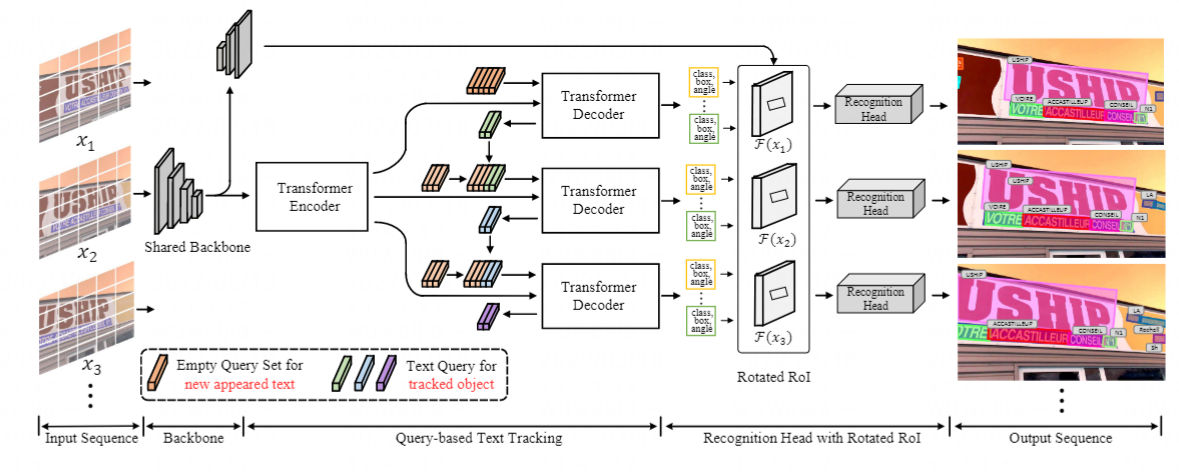
Video text spotting(VTS) is the task that requires simultaneously detecting, tracking and recognizing text instances
in video. Recent methods typically develop sophisticated pipelines based on Intersection over Union (IoU)
or appearance similarity in adjacent frames to tackle this task. In this paper, rooted in Transformer sequence modeling,
we propose a novel video text **D**Etection, **T**racking, and **R**ecognition framework (TransDETR), which views the VTS task as a direct long-sequence temporal modeling problem.
Link to our new benchmark [BOVText: A Large-Scale, Bilingual Open World Dataset for Video Text Spotting](https://github.com/weijiawu/BOVText-Benchmark)
## Updates
- (28/03/2024) This paper has been accepted by IJCV.
- (15/07/2023) Support Chinese Recognition, Add NMS (Non-Maximum Suppression) and optimized [post-processing,RuntimeTrackerBase](https://github.com/weijiawu/TransDETR/blob/main/models/TransDETR_ignored.py).
- (10/02/2023) Training and Inference for [DSText](https://rrc.cvc.uab.es/?ch=22&com=downloads) is updated.
- (09/02/2023) Script(visualization and frame extraction) for [DSText](https://rrc.cvc.uab.es/?ch=22&com=downloads) is provided.
- (08/07/2022) TransDETR remain under review.
- (29/05/2022) Update unmatched pretrained and finetune weight.
- (12/05/2022) Rotated_ROIAlig has been refined.
- (08/04/2022) Refactoring the code.
- (1/1/2022) The complete code has been released .
## Performance
### [ICDAR2015(video) Tracking challenge](https://rrc.cvc.uab.es/?ch=3&com=evaluation&task=1)
Methods | MOTA | MOTP | IDF1 | Mostly Matched | Partially Matched | Mostly Lost
:---:|:---:|:---:|:---:|:---:|:---:|:---:
TransDETR | 47.5 |74.2 |65.5 |832 |484 |600
Models are also available in [Google Drive](https://drive.google.com/file/d/1tXWAy3Fjf-55Q40WHGvlotukrsvB5KKn/view?usp=sharing).
### [ICDAR2015(video) Video Text Spotting challenge](https://rrc.cvc.uab.es/?ch=3&com=evaluation&task=1)
Methods | MOTA | MOTP | IDF1 | Mostly Matched | Partially Matched | Mostly Lost
:---:|:---:|:---:|:---:|:---:|:---:|:---:
TransDETR | 58.4 |75.2 |70.4 |614 |326 |427
TransDETR(aug) | 60.9 |74.6 |72.8 |644 |323 |400
Models are also available in [Google Drive](https://drive.google.com/file/d/1tXWAy3Fjf-55Q40WHGvlotukrsvB5KKn/view?usp=sharing).
#### Notes
- The training time is on 8 NVIDIA V100 GPUs with batchsize 16.
- We use the models pre-trained on COCOTextV2.
- We do not release the recognition code due to the company's regulations.
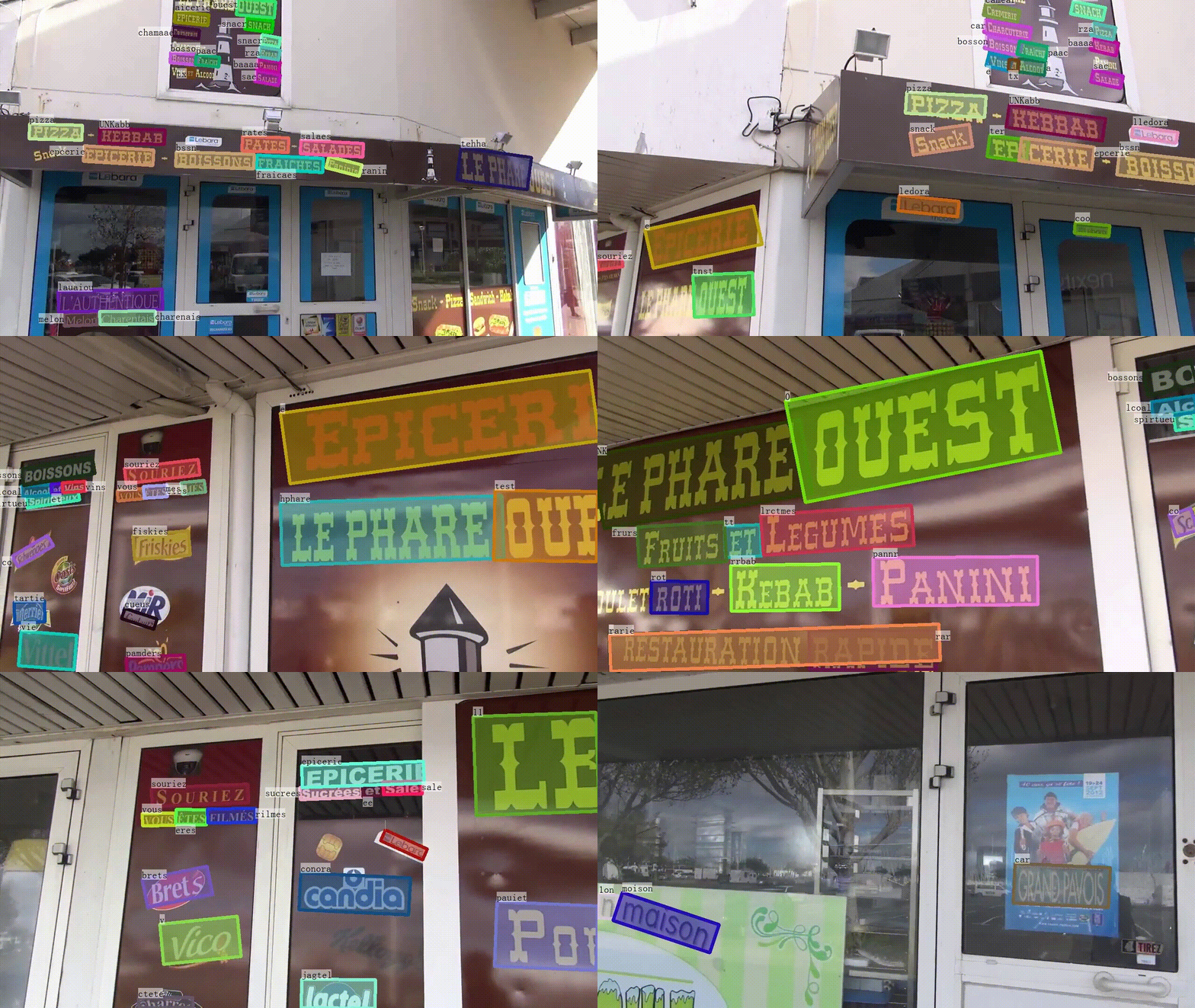
## Demo
 ## Installation
The codebases are built on top of [Deformable DETR](https://github.com/fundamentalvision/Deformable-DETR) and [MOTR](https://github.com/megvii-model/MOTR).
* Linux, CUDA>=9.2, GCC>=5.4
* Python>=3.7
We recommend you to use Anaconda to create a conda environment:
```bash
conda create -n TransDETR python=3.7 pip
```
Then, activate the environment:
```bash
conda activate TransDETR
```
* PyTorch>=1.5.1, torchvision>=0.6.1 (following instructions [here](https://pytorch.org/))
For example, if your CUDA version is 9.2, you could install pytorch and torchvision as following:
```bash
conda install pytorch=1.5.1 torchvision=0.6.1 cudatoolkit=9.2 -c pytorch
```
* Other requirements
```bash
pip install -r requirements.txt
```
* Build MultiScaleDeformableAttention and Rotated ROIAlign
```bash
cd ./models/ops
sh ./make.sh
cd ./models/Rotated_ROIAlign
python setup.py build_ext --inplace
```
## Usage
### Dataset preparation
1. Please download [ICDAR2015](https://rrc.cvc.uab.es/?ch=3&com=evaluation&task=4), [COCOTextV2 dataset](https://bgshih.github.io/cocotext/), DSText](https://rrc.cvc.uab.es/?ch=22&com=downloads) and organize them like [FairMOT](https://github.com/ifzhang/FairMOT) as following:
Firstly, after downloading the video data, you can use [ExtractFrame_FromVideo.py](https://github.com/weijiawu/TransDETR/blob/main/tools/DSText/ExtractFrame_FromVideo.py) to extract frames, and copy the frames to images path. ```labels_with_ids``` path is automatically generated by the generation script in ```tools/gen_labels```.
```
./Data
├── COCOText
│ ├── images
│ └── labels_with_ids
├── ICDAR15
│ ├── images
│ ├── track
│ ├── train
├──Video_10_1_1
├──1.jpg
├──2.jpg
├──Video_13_4_1
│ ├── val
├──Video_11_4_1
│ ├── labels
│ ├── track
│ ├── train
│ ├── val
├── DSText
│ ├── images
│ ├── train
│ ├── Activity
│ ├── Driving
│ ├── Game
│ ├── ....
│ ├── test
│ ├── Activity
│ ├── Driving
│ ├── Game
│ ├── ....
│ ├── labels_with_ids
│ ├── train
│ ├── Activity
│ ├── Driving
│ ├── Game
│ ├── ....
```
2. You also can use the following script to generate txt file:
```bash
cd tools/gen_labels
python3 gen_labels_COCOTextV2.py
python3 gen_labels_15.py
python3 gen_labels_YVT.py
cd ../../
```
(These scripts are mainly intended to accomplish two tasks: 1) Generate the ground truth in the ```labels_with_ids``` path. 2) Generate the corresponding training image list (*.txt) for each dataset's training set in the ```./datasets/data_path```.)
Note: Before running the corresponding script, you need to modify the paths in the .py file to your own paths. Specifically, you should modify the following paths:
- ```from_label_root```: the path of the original ground truth data (e.g., the path to the .xml files for ICDAR15).
- ```seq_root```: the path of the video frames.
- ```label_root```: the path to generate the annotations.
Finally, when running the gen_data_path function to generate the training image list (*.txt), modify the ```path``` accordingly.
### Training and Evaluation
#### Training on single node
Before training, you need to modify the following paths in the .sh file: ```mot_path```: your data path (e.g., ./Data). ```data_txt_path_train```: the training image list file (.txt) that was generated during the data preparation. Please update these paths to match your specific setup.
You can download COCOTextV2 pretrained weights for Pretrained TransDETR [Google Drive](https://drive.google.com/file/d/1PvOvBVpJLewN5uMnSeiJddmDGh3rKcyv/view?usp=sharing). Or training by youself:
```bash
sh configs/r50_TransDETR_pretrain_COCOText.sh
```
Then training on ICDAR2015 with 8 GPUs as following:
```bash
sh configs/r50_TransDETR_train_ICDAR15video.sh
```
Or training on DSText with 8 GPUs as following:
```bash
sh configs/r50_TransDETR_train_DSText.sh
```
#### Evaluation on ICDAR13 and ICDAR15
You can download the pretrained model of TransDETR (the link is in "Main Results" session), then run following command to evaluate it on ICDAR2015 dataset:
```bash
sh configs/r50_TransDETR_eval_ICDAR2015.sh
```
evaluate on ICDAR13
```
python tools/Evaluation_ICDAR13/evaluation.py --groundtruths "./tools/Evaluation_ICDAR13/gt" --tests "./exps/e2e_TransVTS_r50_ICDAR15/jons"
```
evaluate on ICDAR15
```
cd exps/e2e_TransVTS_r50_ICDAR15
zip -r preds.zip ./preds/*
```
then submit to the [ICDAR2015 online metric](https://rrc.cvc.uab.es/?ch=3&com=evaluation&task=4)
#### Evaluation on DSText
Inference , we also provide the trained weight on [Google drive](https://drive.google.com/file/d/1eHlfNwOet-g4KOQZwt0IMERY4G_nlKW-/view?usp=sharing)
```bash
sh configs/r50_TransDETR_eval_BOVText.sh
```
Then zip the result file and submit to the [DSText online metric](https://rrc.cvc.uab.es/?ch=22&com=mymethods&task=1)
```
cd exps/e2e_TransVTS_r50_DSText/preds
zip -r ../preds.zip ./*
```
#### Visualization
For visual in demo video, you can enable 'vis=True' in eval.py like:
```bash
--show
```
then run the script:
```bash
python tools/vis.py
```
## License
TransDETR is released under MIT License.
## Citing
If you use TransDETR in your research or wish to refer to the baseline results published here, please use the following BibTeX entries:
```
@article{wu2022transdetr,
title={End-to-End Video Text Spotting with Transformer},
author={Weijia Wu, Chunhua Shen, Yuanqiang Cai, Debing Zhang, Ying Fu, Ping Luo, Hong Zhou},
journal={arxiv},
year={2022}
}
```
If you have any questions, please contact me at: weijiawu@zju.edu.cn
This code uses codes from MOTR, TransVTSpotter and EAST. Many thanks to their wonderful work. Consider citing them as well:
```
@inproceedings{zeng2021motr,
title={MOTR: End-to-End Multiple-Object Tracking with TRansformer},
author={Zeng, Fangao and Dong, Bin and Zhang, Yuang and Wang, Tiancai and Zhang, Xiangyu and Wei, Yichen},
booktitle={European Conference on Computer Vision (ECCV)},
year={2022}
}
@article{wu2021bilingual,
title={A bilingual, OpenWorld video text dataset and end-to-end video text spotter with transformer},
author={Wu, Weijia and Cai, Yuanqiang and Zhang, Debing and Wang, Sibo and Li, Zhuang and Li, Jiahong and Tang, Yejun and Zhou, Hong},
journal={arXiv preprint arXiv:2112.04888},
year={2021}
}
@inproceedings{zhou2017east,
title={East: an efficient and accurate scene text detector},
author={Zhou, Xinyu and Yao, Cong and Wen, He and Wang, Yuzhi and Zhou, Shuchang and He, Weiran and Liang, Jiajun},
booktitle={Proceedings of the IEEE conference on Computer Vision and Pattern Recognition},
pages={5551--5560},
year={2017}
}
```