# CSharp 12 In a Nutshell
> [!NOTE]
>
> This note is not done
C# is a general-purpose, type-safe, object-oriented, platform-neutral programming language. Its goal is to boost programmer productivity.
- Unified type system, all types share the same base class.
- Class and interfaces
- Properties, methods and events
- functions are values
- events are function members, simplify acting on state changes
- support patterns for purity
- Automatic memory management
- does not eliminate pointers, just make it unnecessary most of the time.
- Supports windows 7+, macOS, Linux, Android & IOS, windows 10 devices.
- Browser through *Blazor* technology
## CLRs, BCLs & Runtimes
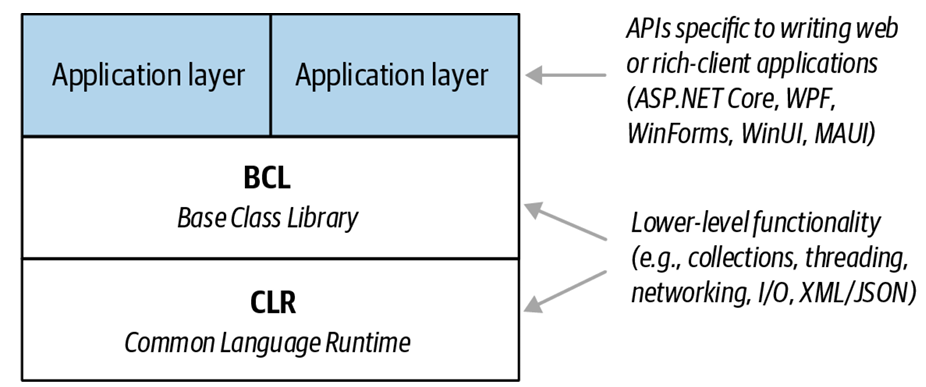
- **.NET** .NET 8 is Microsoft's flagship open-source runtime, its update history as follows: .NET Core 1.x → NET Core 2.x → .NET Core 3.x → .NET 5 → .NET 6 → .NET 7 → .NET 8. After .NET Core 3, Microsoft removed “Core” from the name and skipped version 4 to avoid confusion with .NET Framework 4.x. .NET framework 4.x is something comes before .NET Core 1.x but it is still supported and in popular use.
- **Windows Desktop and WinUI 3** Both are intended for writing client-rich application that runs on Windows 10 and above. WinUI 3 is a successor of Universal Windows Platform (UWP), and was released in 2022. Windows Desktop APIs existed since 2006 and has huge third party library and community support.
- **MAUI** Multi-platform App UI, for developing mobile application on android and iOS, can be used for desktop apps via Mac Catalyst and WinUI 3. It is an evolution of Xamarin.
- For cross-platform desktop application, a third-party library called Avalonia offers an alternative to MAUI, which is simpler than MAUI with almost complete WPF compatibility.
- **.NET Framework** .NET Framework is Microsoft’s original Windows-only runtime for writing web and rich-client applications that run (only) on Windows desktop/server. No major new releases planned, but the latest release will continue to be supported and maintained due to wealth of existing applications.
- readonly function modifier means it does not modify properties, but not itself cant be modified. It can be used on struct to enforce all fields are readonly.
- use @prefix `@using` to use reserved word as identifier.
- use `using var reader = File.OpenText(...)` to close file when out of scope
- use `checked` to explicitly check for arithmetic overflow exception (vice versa `unchecked`)
- string interpolation `$"number is: {x}"`
- collection expression: `char[] vowels = ['a','e','i','o','u'];`, declare collection with square bracket
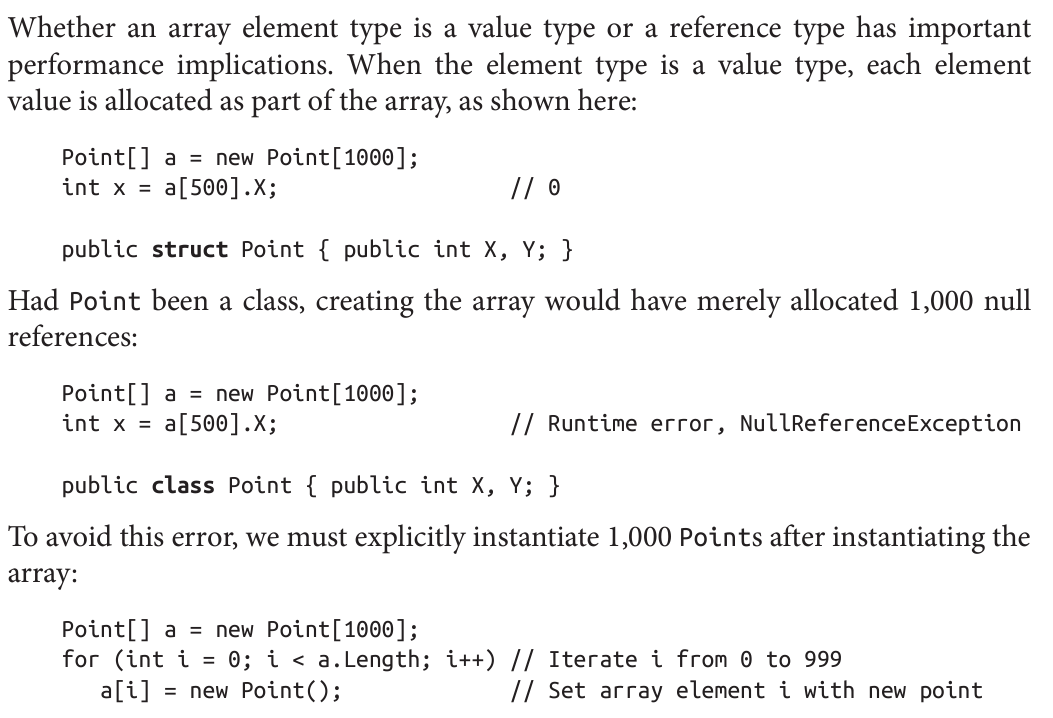
- value type like `struct` is initialized with bitwise zero, otherwise it is null
- The design principle here is that **users expect the lexical structure of the brackets and commas to be consistent across declaration, initialization and dereferencing**.
- about 2d array https://ericlippert.com/2009/08/17/arrays-of-arrays/
- array bound check is necessary, but optimization can prevent necessary checks, e.g. in a loop and c# provide unsafe code to bypass it.
- prepend `ref` keyword function parameter to accept value by reference into a function
- `string` is value type
- use `out` to return values back from method.
- use `_` when you dont care about a variable
- for backward compatibility purpose, it will not work if you have an underscore variable in scope.
- use `in` like a `const ref` method argument, useful for reducing overhead for copying large value type.
- both caller and callee must use the `in` keyword
- last param as varargs `int Sum (params int[] ints)`
- optional params `void Foo (int x = 23) { Console.WriteLine (x); }`
- named arguments
```
Foo (x:1, y:2); // 1, 2
void Foo (int x, int y) { Console.WriteLine (x + ", " + y); }
```
- you can mix named and positional arguments
- When calling ref function, you can call without assigning result to `ref` variable, this fallback to ordinary value: `string localX = GetXRef();`
- You can also prevent a ref from being modified: `static ref readonly string Prop => ref x;`
- `var` implicit typed local variable
- use `new()` when the class can be inferenced from left hand side
- multi initialize: `a = b = c = d = 0`
- assignment in expression: `y = 5 * (x = 2)`
- binary operators, except for assignment, lambda and null-coalescing operators are left-associative
- null-coalescing operator: `string s2 = s1 ?? "nothing"`
- null conditional
```c#
int x = sb?.ToString().Length; // Illegal: int cant be null]
int? x = sb?.ToString().Length; // ok, int? can be null
```
- you can open a scope anytime with curly brackets `{}`
- imports
- ```c#
using System;
System.Console.Writeline("x");
```
- ```c#
using static System.Console;
Writeline("x");
```
- ```c#
global using System;
```
- All type names are converted to fully qualified names
- you can call `using xxx` within some namespace
- using alias: `using R = System.Reflection; class Program { R.PropertyInfo p; }`
- `::` namespace qualification, e.g. `global::A.B()`, useful for referring to hidden namespace.
- naming
- private: camel-cased with underscore `_firstName`
- local variable: camel-cased `firstName`
- public: Cap case: `FirstName`
- multi-field declare
```c#
static readonly int legs = 8,
eyes = 2;
```
- const `public const string Message = "Hello World"`
- `static readonly` maybe different each time the program runs (e.g. `DateTime.Now`), but `const` will always be the same (e.g. `PI`).
- adding `static` modifier to a local method prevent it from seeing other local variables.
- `this` refers to instance itself, invalid when static
- property's `get` and `set` method can be overridden
- internally, they are compiled to `get_XXX` and `set_XXX`
- custom indexer
```c#
public string this[int wordNum] // indexer
{
get { return words[wordNum]; }
set { words[wordNum] = value; }
}
```
- static field initializer runs in order they are declared
```c#
class Foo {
public static int X = Y; // 0
public static int Y = 3; // 3
}
```
- finalizer / destructor `~ClassName() { ... }`
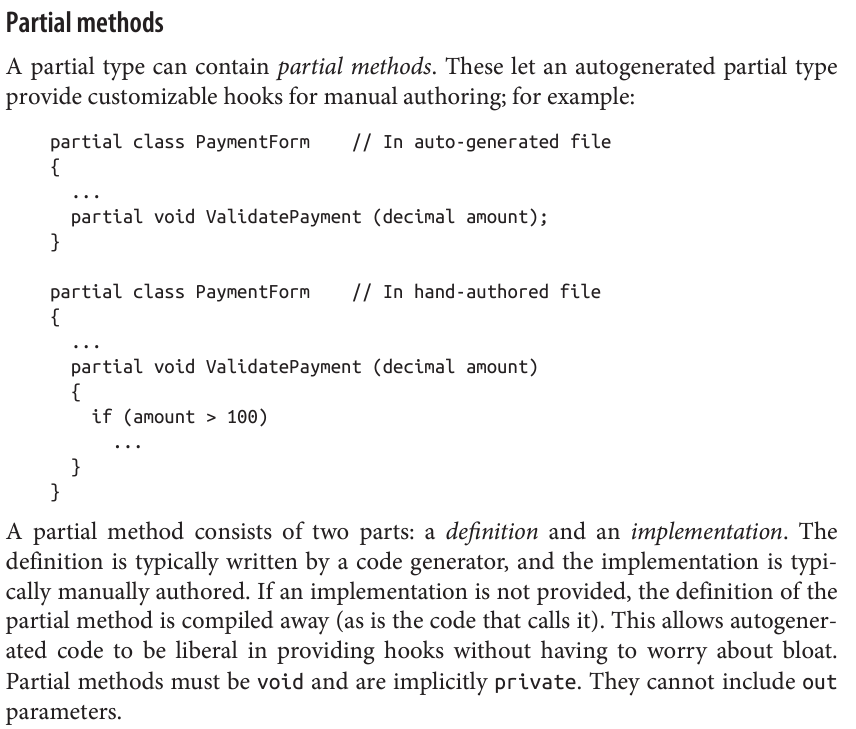
- partial methods
- `nameof` operator returns the name of the symbol
```c#
nameof(count); // count
nameof(StringBuilder.Length); // Length
```
- use `as` to downcast and evaluate to `null` if fails. `Stock s = a as Stock`
- pattern variable `x`: `if (x is Stock s) { ... }`
- use `virtual` to declare unimplemented method, and `override` to implement it in subclass
- you can call parent implementation with `base` keyword
- calling virtual method in constructor is dangerous, because the overriding method may not know it is working on a partially initialized object
- from c# 9, overriding method can return a subclass type
- `abstract` is like `virtual`, but without default implementation
- when you hide a parent class member, use `new` keyword to tell compiler it is intended behaviour to avoid a compiler warning
```c#
public class A { public int Counter = 1; }
public class B : A { public new int Counter = 2; }
```
- you can also `hide` a method instead of `override` it, the difference is, when you call that method using a parent type (which instance is actually a subtype), it will use the parent implementation instead of child implementation, unlike `override`, where you get polymorphism.
- subclass must declare its own constructor, but it can call any base class constructor using the `base` keyword
```c#
public class Subclass : Baseclass {
public Subclass (int x) : base (x) {
...
}
}
```
- if `base` keyword is missing, the base type's parameter-less constructor is implicitly called
- if no such constructor exists in base class, subclass must use the `base` keyword
- `required` member must be populated via object initializer when constructed
- `object` is the base class for all types
- boxing and unboxing
```c#
int x = 9;
object obj = x; // boxing
int y = (int)obj; // unboxing
```
- array variance only works with reference convertion, not boxing convertion
```c#
object[] a1 = new string[3]; // Legal
object[] a2 = new int[3]; // Error
```
- ```c#
Point p = new Point(); Console.WriteLine (p.GetType().Name); // Point
Console.WriteLine (typeof (Point).Name); // Point
Console.WriteLine (p.GetType() == typeof(Point)); // True
Console.WriteLine (p.X.GetType().Name); // Int32
Console.WriteLine (p.Y.GetType().FullName); // System.Int32
public class Point { public int X, Y; }
```
- `ToString()` returns type name if you don't override it
- `struct`
- is a value type
- no inheritance (other than derived from `System.ValueType`)
- no finalizer
- before c# 10, it is further restricted with no initializer and parameter-less constructors, it is relaxed primarily for benefits of record struct
- even if you define a constructor, a bitwise zero initialization is still possible with `default` keyword: `Point p = default`. A good strategy is giving valid value for `default` state
- `ref struct` is a niche feature introduced in c# 7.2
- when you inherit two interfaces with same function, you can implement them by ` int I2.Foo()` and ` int I1.Foo()`, the only way to call it is by casting the instance to the corresponding interface and then call the method `((I1)w).Foo();` and `((I2)w).Foo();`.
- enums
```c#
public enum BorderSide { Left, Right, Top, Bottom }
public enum BorderSide : byte { Left=1, Right=2, Top=10, Bottom=11 }
```
- you can convert it to underlying type by explicit cast
- because enum cast be cast from and to other type, enums' actual value can fall outside of range, e.g. `BorderSide b = (BorderSide)12345; b++; // no error`
- you can use `Enum.IsDefined` to check if an enum actually have valid values
- generics
- you can use value type: `Stack`
- generics does not exists in runtime, only compilation. However, you can have a `Type` that holds unbounded generic type
```c#
Type a1 = typeof (A<>); // Unbound type (notice no type arguments).
Type a2 = typeof (A<,>); // Use commas to indicate multiple type args.
```
It is used in conjunction with reflection apis
- use `default` keyword to get the default value for a generic parameter, for reference type, it is null, and bitwise zero for value type.
- you can omit type parameter when the compiler is able to infer it
- you can specify type constraints
| Constraint | Description |
| ---------------------- | ------------------------------------------------------------ |
| `where T : base-class` | Base-class constraint |
| `where T : interface` | Interface constraint |
| `where T : class` | Reference-type constraint |
| `where T : class?` | Nullable Reference Types (see Chapter 4) |
| `where T : struct` | Value-type constraint (excludes Nullable types) |
| `where T : unmanaged` | Unmanaged constraint. ( T must be a simple value type or a struct that is (recursively) free of any reference types.) |
| `where T : new()` | Parameterless constructor constraint |
| `where U : T` | Naked type constraint |
| `where T : notnull` | Non-nullable value type, or (from C# 8) a non-nullable reference type |
-
Runtime type check is possible because every object on heap internally stores a little type token, you can retrieve it by calling `GetType` method of `object`.
historically speaking, relying on constructors for object initialization could be advantageous in that it allowed us to create fields with read-only access, but this also means we abandoned object initializer (caller side initialization). To solve this problem, c# 9 introduced `init` keyword to only allow a property to be set either in constructor or object initializer.
Optional parameters have two drawbacks:
- It does not easily allow *non-destructive mutation* (`obj with { ... }`).
- when used in library, it hinders backward compatibility, because adding an optional parameters breaks assembly's binary compatibility with existing consumers
- When application code compiles with library code, library's optional parameter values are copied to the application code, effective making `library.Test()` becomes `library.Test(optionalBool=True)` in the application's binary code. If later library decided to change `optionalBool` to be something else, the application code is not updated automatically. Furthermore, because there is no optional parameter in the binary, if library decided to add a new optional parameters, it breaks application code because now the signature has changed, and application cant find library's new method. It does not just use the default value like python.
- Covariance
- if A convertible to B, T has covariance parameter if T\ is convertible to T\. This means,
- e.g. `IEnumerable`
- typical class cant be covariant,
```c#
Stack bears = new Stack();
Stack animals = bears; // Compile-time error
animals.Push (new Camel()); // Prevent adding Camel to bears
```
- For historical reason, array supports covariance, the above code only fails in compile time
- declare a covariant parameter
```c#
public interface IPoppable { T Pop(); }
```
- this means `T` can only be at output position, i.e. return type, there is no way to make it as a input parameter and accidentally adding it to the wrong collection
- due to limitation in CLR, method parameter with `out` is not eligible for covariance
- contravariant is similar concept where you cast upwards, converting from `T` to `T`
- you declare such parameter with `in` keyword `public interface IPushable { void Push (T obj); }`
- this means you can only use `T` in input position
```c#
public interface IComparer { // Returns a value indicating the relative ordering of a and b
int Compare (T a, T b);
}
var objectComparer = Comparer
 - **.NET** .NET 8 is Microsoft's flagship open-source runtime, its update history as follows: .NET Core 1.x → NET Core 2.x → .NET Core 3.x → .NET 5 → .NET 6 → .NET 7 → .NET 8. After .NET Core 3, Microsoft removed “Core” from the name and skipped version 4 to avoid confusion with .NET Framework 4.x. .NET framework 4.x is something comes before .NET Core 1.x but it is still supported and in popular use.
- **Windows Desktop and WinUI 3** Both are intended for writing client-rich application that runs on Windows 10 and above. WinUI 3 is a successor of Universal Windows Platform (UWP), and was released in 2022. Windows Desktop APIs existed since 2006 and has huge third party library and community support.
- **MAUI** Multi-platform App UI, for developing mobile application on android and iOS, can be used for desktop apps via Mac Catalyst and WinUI 3. It is an evolution of Xamarin.
- For cross-platform desktop application, a third-party library called Avalonia offers an alternative to MAUI, which is simpler than MAUI with almost complete WPF compatibility.
- **.NET Framework** .NET Framework is Microsoft’s original Windows-only runtime for writing web and rich-client applications that run (only) on Windows desktop/server. No major new releases planned, but the latest release will continue to be supported and maintained due to wealth of existing applications.
- readonly function modifier means it does not modify properties, but not itself cant be modified. It can be used on struct to enforce all fields are readonly.
- use @prefix `@using` to use reserved word as identifier.
- use `using var reader = File.OpenText(...)` to close file when out of scope
- use `checked` to explicitly check for arithmetic overflow exception (vice versa `unchecked`)
- string interpolation `$"number is: {x}"`
- collection expression: `char[] vowels = ['a','e','i','o','u'];`, declare collection with square bracket
- value type like `struct` is initialized with bitwise zero, otherwise it is null
- **.NET** .NET 8 is Microsoft's flagship open-source runtime, its update history as follows: .NET Core 1.x → NET Core 2.x → .NET Core 3.x → .NET 5 → .NET 6 → .NET 7 → .NET 8. After .NET Core 3, Microsoft removed “Core” from the name and skipped version 4 to avoid confusion with .NET Framework 4.x. .NET framework 4.x is something comes before .NET Core 1.x but it is still supported and in popular use.
- **Windows Desktop and WinUI 3** Both are intended for writing client-rich application that runs on Windows 10 and above. WinUI 3 is a successor of Universal Windows Platform (UWP), and was released in 2022. Windows Desktop APIs existed since 2006 and has huge third party library and community support.
- **MAUI** Multi-platform App UI, for developing mobile application on android and iOS, can be used for desktop apps via Mac Catalyst and WinUI 3. It is an evolution of Xamarin.
- For cross-platform desktop application, a third-party library called Avalonia offers an alternative to MAUI, which is simpler than MAUI with almost complete WPF compatibility.
- **.NET Framework** .NET Framework is Microsoft’s original Windows-only runtime for writing web and rich-client applications that run (only) on Windows desktop/server. No major new releases planned, but the latest release will continue to be supported and maintained due to wealth of existing applications.
- readonly function modifier means it does not modify properties, but not itself cant be modified. It can be used on struct to enforce all fields are readonly.
- use @prefix `@using` to use reserved word as identifier.
- use `using var reader = File.OpenText(...)` to close file when out of scope
- use `checked` to explicitly check for arithmetic overflow exception (vice versa `unchecked`)
- string interpolation `$"number is: {x}"`
- collection expression: `char[] vowels = ['a','e','i','o','u'];`, declare collection with square bracket
- value type like `struct` is initialized with bitwise zero, otherwise it is null
 - The design principle here is that **users expect the lexical structure of the brackets and commas to be consistent across declaration, initialization and dereferencing**.
- about 2d array https://ericlippert.com/2009/08/17/arrays-of-arrays/
- array bound check is necessary, but optimization can prevent necessary checks, e.g. in a loop and c# provide unsafe code to bypass it.
- prepend `ref` keyword function parameter to accept value by reference into a function
- `string` is value type
- use `out` to return values back from method.
- use `_` when you dont care about a variable
- for backward compatibility purpose, it will not work if you have an underscore variable in scope.
- use `in` like a `const ref` method argument, useful for reducing overhead for copying large value type.
- both caller and callee must use the `in` keyword
- last param as varargs `int Sum (params int[] ints)`
- optional params `void Foo (int x = 23) { Console.WriteLine (x); }`
- named arguments
```
Foo (x:1, y:2); // 1, 2
void Foo (int x, int y) { Console.WriteLine (x + ", " + y); }
```
- you can mix named and positional arguments
- When calling ref function, you can call without assigning result to `ref` variable, this fallback to ordinary value: `string localX = GetXRef();`
- You can also prevent a ref from being modified: `static ref readonly string Prop => ref x;`
- `var` implicit typed local variable
- use `new()` when the class can be inferenced from left hand side
- multi initialize: `a = b = c = d = 0`
- assignment in expression: `y = 5 * (x = 2)`
- binary operators, except for assignment, lambda and null-coalescing operators are left-associative
- null-coalescing operator: `string s2 = s1 ?? "nothing"`
- null conditional
```c#
int x = sb?.ToString().Length; // Illegal: int cant be null]
int? x = sb?.ToString().Length; // ok, int? can be null
```
- you can open a scope anytime with curly brackets `{}`
- imports
- ```c#
using System;
System.Console.Writeline("x");
```
- ```c#
using static System.Console;
Writeline("x");
```
- ```c#
global using System;
```
- All type names are converted to fully qualified names
- you can call `using xxx` within some namespace
- using alias: `using R = System.Reflection; class Program { R.PropertyInfo p; }`
- `::` namespace qualification, e.g. `global::A.B()`, useful for referring to hidden namespace.
- naming
- private: camel-cased with underscore `_firstName`
- local variable: camel-cased `firstName`
- public: Cap case: `FirstName`
- multi-field declare
```c#
static readonly int legs = 8,
eyes = 2;
```
- const `public const string Message = "Hello World"`
- `static readonly` maybe different each time the program runs (e.g. `DateTime.Now`), but `const` will always be the same (e.g. `PI`).
- adding `static` modifier to a local method prevent it from seeing other local variables.
- `this` refers to instance itself, invalid when static
- property's `get` and `set` method can be overridden
- internally, they are compiled to `get_XXX` and `set_XXX`
- custom indexer
```c#
public string this[int wordNum] // indexer
{
get { return words[wordNum]; }
set { words[wordNum] = value; }
}
```
- static field initializer runs in order they are declared
```c#
class Foo {
public static int X = Y; // 0
public static int Y = 3; // 3
}
```
- finalizer / destructor `~ClassName() { ... }`
- partial methods
- The design principle here is that **users expect the lexical structure of the brackets and commas to be consistent across declaration, initialization and dereferencing**.
- about 2d array https://ericlippert.com/2009/08/17/arrays-of-arrays/
- array bound check is necessary, but optimization can prevent necessary checks, e.g. in a loop and c# provide unsafe code to bypass it.
- prepend `ref` keyword function parameter to accept value by reference into a function
- `string` is value type
- use `out` to return values back from method.
- use `_` when you dont care about a variable
- for backward compatibility purpose, it will not work if you have an underscore variable in scope.
- use `in` like a `const ref` method argument, useful for reducing overhead for copying large value type.
- both caller and callee must use the `in` keyword
- last param as varargs `int Sum (params int[] ints)`
- optional params `void Foo (int x = 23) { Console.WriteLine (x); }`
- named arguments
```
Foo (x:1, y:2); // 1, 2
void Foo (int x, int y) { Console.WriteLine (x + ", " + y); }
```
- you can mix named and positional arguments
- When calling ref function, you can call without assigning result to `ref` variable, this fallback to ordinary value: `string localX = GetXRef();`
- You can also prevent a ref from being modified: `static ref readonly string Prop => ref x;`
- `var` implicit typed local variable
- use `new()` when the class can be inferenced from left hand side
- multi initialize: `a = b = c = d = 0`
- assignment in expression: `y = 5 * (x = 2)`
- binary operators, except for assignment, lambda and null-coalescing operators are left-associative
- null-coalescing operator: `string s2 = s1 ?? "nothing"`
- null conditional
```c#
int x = sb?.ToString().Length; // Illegal: int cant be null]
int? x = sb?.ToString().Length; // ok, int? can be null
```
- you can open a scope anytime with curly brackets `{}`
- imports
- ```c#
using System;
System.Console.Writeline("x");
```
- ```c#
using static System.Console;
Writeline("x");
```
- ```c#
global using System;
```
- All type names are converted to fully qualified names
- you can call `using xxx` within some namespace
- using alias: `using R = System.Reflection; class Program { R.PropertyInfo p; }`
- `::` namespace qualification, e.g. `global::A.B()`, useful for referring to hidden namespace.
- naming
- private: camel-cased with underscore `_firstName`
- local variable: camel-cased `firstName`
- public: Cap case: `FirstName`
- multi-field declare
```c#
static readonly int legs = 8,
eyes = 2;
```
- const `public const string Message = "Hello World"`
- `static readonly` maybe different each time the program runs (e.g. `DateTime.Now`), but `const` will always be the same (e.g. `PI`).
- adding `static` modifier to a local method prevent it from seeing other local variables.
- `this` refers to instance itself, invalid when static
- property's `get` and `set` method can be overridden
- internally, they are compiled to `get_XXX` and `set_XXX`
- custom indexer
```c#
public string this[int wordNum] // indexer
{
get { return words[wordNum]; }
set { words[wordNum] = value; }
}
```
- static field initializer runs in order they are declared
```c#
class Foo {
public static int X = Y; // 0
public static int Y = 3; // 3
}
```
- finalizer / destructor `~ClassName() { ... }`
- partial methods
 - `nameof` operator returns the name of the symbol
```c#
nameof(count); // count
nameof(StringBuilder.Length); // Length
```
- use `as` to downcast and evaluate to `null` if fails. `Stock s = a as Stock`
- pattern variable `x`: `if (x is Stock s) { ... }`
- use `virtual` to declare unimplemented method, and `override` to implement it in subclass
- you can call parent implementation with `base` keyword
- calling virtual method in constructor is dangerous, because the overriding method may not know it is working on a partially initialized object
- from c# 9, overriding method can return a subclass type
- `abstract` is like `virtual`, but without default implementation
- when you hide a parent class member, use `new` keyword to tell compiler it is intended behaviour to avoid a compiler warning
```c#
public class A { public int Counter = 1; }
public class B : A { public new int Counter = 2; }
```
- you can also `hide` a method instead of `override` it, the difference is, when you call that method using a parent type (which instance is actually a subtype), it will use the parent implementation instead of child implementation, unlike `override`, where you get polymorphism.
- subclass must declare its own constructor, but it can call any base class constructor using the `base` keyword
```c#
public class Subclass : Baseclass {
public Subclass (int x) : base (x) {
...
}
}
```
- if `base` keyword is missing, the base type's parameter-less constructor is implicitly called
- if no such constructor exists in base class, subclass must use the `base` keyword
- `required` member must be populated via object initializer when constructed
- `object` is the base class for all types
- boxing and unboxing
```c#
int x = 9;
object obj = x; // boxing
int y = (int)obj; // unboxing
```
- array variance only works with reference convertion, not boxing convertion
```c#
object[] a1 = new string[3]; // Legal
object[] a2 = new int[3]; // Error
```
- ```c#
Point p = new Point(); Console.WriteLine (p.GetType().Name); // Point
Console.WriteLine (typeof (Point).Name); // Point
Console.WriteLine (p.GetType() == typeof(Point)); // True
Console.WriteLine (p.X.GetType().Name); // Int32
Console.WriteLine (p.Y.GetType().FullName); // System.Int32
public class Point { public int X, Y; }
```
- `ToString()` returns type name if you don't override it
- `struct`
- is a value type
- no inheritance (other than derived from `System.ValueType`)
- no finalizer
- before c# 10, it is further restricted with no initializer and parameter-less constructors, it is relaxed primarily for benefits of record struct
- even if you define a constructor, a bitwise zero initialization is still possible with `default` keyword: `Point p = default`. A good strategy is giving valid value for `default` state
- `ref struct` is a niche feature introduced in c# 7.2
- when you inherit two interfaces with same function, you can implement them by ` int I2.Foo()` and ` int I1.Foo()`, the only way to call it is by casting the instance to the corresponding interface and then call the method `((I1)w).Foo();` and `((I2)w).Foo();`.
- enums
```c#
public enum BorderSide { Left, Right, Top, Bottom }
public enum BorderSide : byte { Left=1, Right=2, Top=10, Bottom=11 }
```
- you can convert it to underlying type by explicit cast
- because enum cast be cast from and to other type, enums' actual value can fall outside of range, e.g. `BorderSide b = (BorderSide)12345; b++; // no error`
- you can use `Enum.IsDefined` to check if an enum actually have valid values
- generics
- you can use value type: `Stack
- `nameof` operator returns the name of the symbol
```c#
nameof(count); // count
nameof(StringBuilder.Length); // Length
```
- use `as` to downcast and evaluate to `null` if fails. `Stock s = a as Stock`
- pattern variable `x`: `if (x is Stock s) { ... }`
- use `virtual` to declare unimplemented method, and `override` to implement it in subclass
- you can call parent implementation with `base` keyword
- calling virtual method in constructor is dangerous, because the overriding method may not know it is working on a partially initialized object
- from c# 9, overriding method can return a subclass type
- `abstract` is like `virtual`, but without default implementation
- when you hide a parent class member, use `new` keyword to tell compiler it is intended behaviour to avoid a compiler warning
```c#
public class A { public int Counter = 1; }
public class B : A { public new int Counter = 2; }
```
- you can also `hide` a method instead of `override` it, the difference is, when you call that method using a parent type (which instance is actually a subtype), it will use the parent implementation instead of child implementation, unlike `override`, where you get polymorphism.
- subclass must declare its own constructor, but it can call any base class constructor using the `base` keyword
```c#
public class Subclass : Baseclass {
public Subclass (int x) : base (x) {
...
}
}
```
- if `base` keyword is missing, the base type's parameter-less constructor is implicitly called
- if no such constructor exists in base class, subclass must use the `base` keyword
- `required` member must be populated via object initializer when constructed
- `object` is the base class for all types
- boxing and unboxing
```c#
int x = 9;
object obj = x; // boxing
int y = (int)obj; // unboxing
```
- array variance only works with reference convertion, not boxing convertion
```c#
object[] a1 = new string[3]; // Legal
object[] a2 = new int[3]; // Error
```
- ```c#
Point p = new Point(); Console.WriteLine (p.GetType().Name); // Point
Console.WriteLine (typeof (Point).Name); // Point
Console.WriteLine (p.GetType() == typeof(Point)); // True
Console.WriteLine (p.X.GetType().Name); // Int32
Console.WriteLine (p.Y.GetType().FullName); // System.Int32
public class Point { public int X, Y; }
```
- `ToString()` returns type name if you don't override it
- `struct`
- is a value type
- no inheritance (other than derived from `System.ValueType`)
- no finalizer
- before c# 10, it is further restricted with no initializer and parameter-less constructors, it is relaxed primarily for benefits of record struct
- even if you define a constructor, a bitwise zero initialization is still possible with `default` keyword: `Point p = default`. A good strategy is giving valid value for `default` state
- `ref struct` is a niche feature introduced in c# 7.2
- when you inherit two interfaces with same function, you can implement them by ` int I2.Foo()` and ` int I1.Foo()`, the only way to call it is by casting the instance to the corresponding interface and then call the method `((I1)w).Foo();` and `((I2)w).Foo();`.
- enums
```c#
public enum BorderSide { Left, Right, Top, Bottom }
public enum BorderSide : byte { Left=1, Right=2, Top=10, Bottom=11 }
```
- you can convert it to underlying type by explicit cast
- because enum cast be cast from and to other type, enums' actual value can fall outside of range, e.g. `BorderSide b = (BorderSide)12345; b++; // no error`
- you can use `Enum.IsDefined` to check if an enum actually have valid values
- generics
- you can use value type: `Stack