# ait-native
**[English](README.md)** · [简体中文](README_CN.md) · [繁體中文](README_ZH.md)
**Turn parallel coding-agent sessions into verified, traceable Tasks.**
AIT is a local-first CLI for individual developers and maintainers who delegate
code changes to agents and own the result. Connect each request to its isolated
worktree, the revision that passed checks, and the history you need when a
regression appears. Bring your own coding agent; keep intent and acceptance in
your hands.
[](https://github.com/weita2026/ait-native/releases)
[](https://ait-native.dev/)
[](#license-map)
**[Try your first Task](https://ait-native.dev/local-quickstart/#first-task)** ·
[Watch the demo](https://ait-native.dev/demo/#in-action) ·
[Documentation](https://ait-native.dev/technical/) ·
[Get help](https://github.com/weita2026/ait-native/discussions)
[简体中文入门](https://ait-native.dev/zh-cn/local-quickstart/#first-task) ·
[繁體中文入門](https://ait-native.dev/zh-tw/local-quickstart/#first-task)
## Follow an AIT Task
[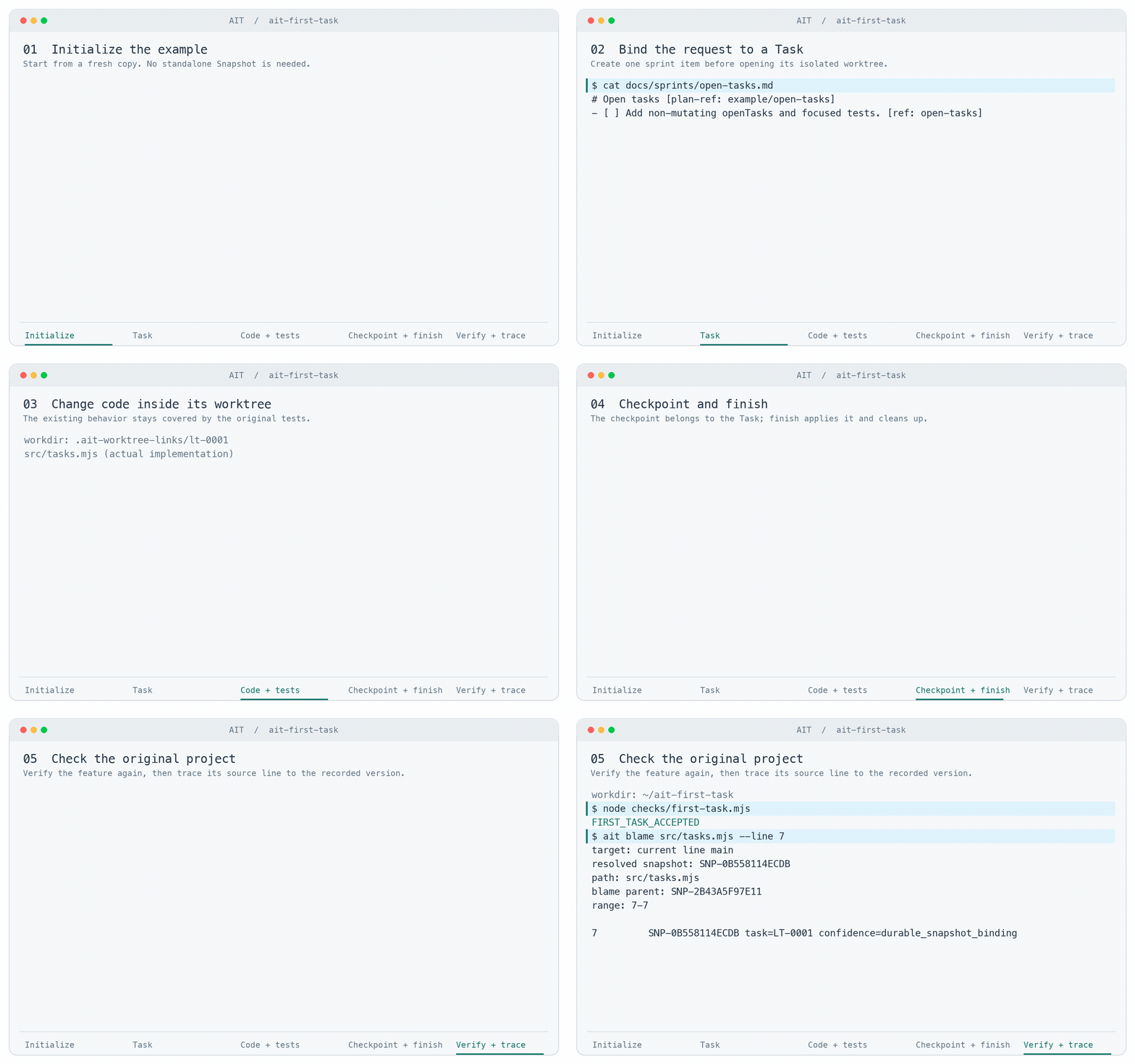](https://ait-native.dev/demo/#in-action)
Actual AIT command output recorded on 2026-09-07, edited into a 33-second replay. It shows one
Task completing the same downloadable example below. Paths are shortened;
playback duration is not a performance measurement.
[Watch with captions and the full transcript](https://ait-native.dev/demo/#in-action).
For multiple Tasks, explore the separate
[illustrated parallel-work and regression scenarios](https://ait-native.dev/demo/#demo-scene)
or the [workflow diagram, with Traditional Chinese labels](https://ait-native.dev/public/tour/ait-workflow-zh-tw.png).
## Try your first Task
Start in a fresh example folder. You need your own coding agent and Node.js 22+
for this small example; Node.js is not an AIT repository requirement.
**1. Install AIT.**
```sh
python -m pip install ait-native==1.1.3
ait --version
```
Other package channels are in the [install guide](https://ait-native.dev/local-quickstart/).
**2. Prepare the example.**
[Download the example ZIP](https://ait-native.dev/downloads/ait-first-task.zip)
and [its SHA-256](https://ait-native.dev/downloads/ait-first-task.sha256).
Extract it, then open a terminal in the extracted `ait-first-task` folder.
Replace `your-name` with the name to record for local review.
```sh
node --test tests/baseline.test.mjs
ait init
ait config set --user-name "your-name"
```
The three baseline tests should pass. Task start records the initial baseline
through its initialization workflow. Create checkpoints only inside the returned
Task worktree, using its Task ID. For an existing project, use the
[getting-started guide](https://ait-native.dev/technical/getting-started/) instead.
**3. Open the example in your coding agent and give it this request.**
> Read AGENTS.md and follow this repository's AIT workflow. Add openTasks(tasks)
> to src/tasks.mjs: return a new array of tasks whose done property is not true,
> preserving order, task objects and input data. Keep taskTitles working. Add
> focused tests. Do not edit checks/, remove existing tests or add dependencies.
> Run the existing tests and node checks/first-task.mjs before finishing the Task.
The agent records the sprint item, works in the returned Task worktree, implements
the change and runs the checks. The generated `AGENTS.md` block supplies the exact
commands and completion requirements for that repository.
**4. Check the result in the original example folder.**
```sh
node --test tests/*.test.mjs
node checks/first-task.mjs
```
The feature check prints `FIRST_TASK_ACCEPTED`. Also inspect the actual Task finish
result: the Task completed, its worktree was cleaned, and the bound sprint item
closed where applicable. Feature acceptance and workflow completion are separate
checks. Review the change, then try one small task in your own project.
## What you gain
- **Keep the request attached to the work.** A precise Markdown sprint item and
its Plan revision stay bound to the Task. After context compression, generated
instructions require the agent to reread that item.
- **Finish against the current project.** Independent Tasks have separate
worktrees. AIT rechecks the target, rebases compatible work or stops at a real
conflict, and cleans up after successful Task finish.
- **Find the context when something breaks.** `ait blame` links affected code or
Plan text to recorded revisions and available workflow history. The agent uses
that evidence to diagnose a problem, make a bounded repair and verify it.
## Why AIT beyond worktrees?
A worktree gives a task its own files. AIT manages the request, revision,
applicable checks and completion as one Task lifecycle. Evaluate it against the
agent, Git, issue tracker, CI and scripts you already use:
| Question you need to answer | What AIT records or coordinates |
| --- | --- |
| Which request and acceptance conditions belong to this change? | The exact Plan item and revision bound to the Task. |
| Which result passed, and can it finish against today's target? | Revision identity, applicable evidence, target checks and recoverable finish state. |
| Where did this later regression come from? | Recorded revision and workflow context available through blame. Unknown provenance stays unknown. |
Authoring and validation can run in parallel; admission to a shared target Line
is revalidated and serialized. A clean rebase still needs relevant validation.
Worktree instructions are a workflow constraint, not an operating-system sandbox;
blame supplies provenance, not automatic diagnosis or repair.
Try the [same workflow scenarios](https://ait-native.dev/demo/) and compare the
time you spend confirming intent, reviewing, integrating and investigating.
## Measured against Git worktrees
Two separately published 200-session campaigns used GPT-5.6 Sol at max
reasoning on the same five frozen game-development fixtures, with 20 admitted
paired attempts per workload. Each effective view contains 100 fresh AIT
sessions and 100 fresh Git sessions, with 100/100 functional acceptance in
each treatment.
| Campaign | Workflow | Effective sessions | Workload-median token saving (95% CI) | Workload-median elapsed saving |
| --- | --- | ---: | ---: | ---: |
| Released 1.1.0 baseline | Sprint off | 100 AIT + 100 Git | **34.95%** (27.85%-39.77%) | **21.04%** |
| Natural-inspection replication | Sprint on | 100 AIT + 100 Git | **36.28%** (28.26%-41.83%) | **15.22%** |
These workload-median provider-token results apply to the named model and frozen
fixtures. The sessions ran sequentially; they do not measure parallel throughput
or guarantee savings on your repository.
Methods, exclusions and the incomplete Claude Fable campaign
The released baseline used 46,300,272 AIT tokens versus 70,140,925 Git tokens
(33.99% lower); its evidence history contains 201 executed sessions and one
excluded functional result. The sprint-on replication used 45,432,262 versus
71,238,660 (36.23% lower); its evidence history contains 203 executed sessions
and three disclosed exclusions. The workload-balanced figures in the table
are the primary metrics; pooled totals are descriptive.
The campaigns share fixture bytes, workload matrix, model pin, and symmetric
read-only inspection allowances. They differ in workflow mode, prompts, AIT
subject binary, seed, date, and recovery history. They are convergent
replications, not pooled observations or a causal sprint-on/off A/B test, so
the 1.33 percentage-point difference is not attributed to sprint mode. Results
remain scoped to these fixtures and linear fresh sessions; they are not a
promise for every workload and do not measure high-concurrency execution.
[Released baseline evidence](https://github.com/weita2026/ait-native/tree/v1.1.0/ait-core/release/benchmarks/game-v1-g56s-max-complete200-fx27-20260826) ·
[Sprint-on replication evidence](https://github.com/weita2026/ait-native/tree/benchmark-sprint-on-20260829/ait-core/release/benchmarks/game-v1-g56s-max-sprint-on-natural-complete200-20260828)
### Claude Fable benchmark — still running
We are running a frozen 200-session benchmark comparing AIT's task-oriented
workflow with an agent-managed local Git-worktree treatment across the same
five game-development workloads.
**Progress: 22 / 200 sessions**
All 22 observed runs are currently valid and accepted, with no model fallback.
The campaign is still incomplete and remains `claim_eligible=false`. We will
continue to all 200 sessions regardless of whether the remaining results favor
AIT or Git.
The latest balanced checkpoint is 20/200, with two complete AIT/Git pairs for
each workload:
| Workload | Valid pairs | AIT token saving | Bootstrap CI95 |
| --- | ---: | ---: | ---: |
| GD-01 | 2 | 20.32% | 9.13% to 32.72% |
| GD-02 | 2 | -4.35% | -18.16% to 14.35% |
| GD-03 | 2 | 37.56% | 6.57% to 52.02% |
| GD-04 | 2 | 23.77% | 23.50% to 23.97% |
| GD-05 | 2 | 2.13% | -26.89% to 25.93% |
The workload-median token saving is **20.32%**, with an aggregate bootstrap
CI95 of **6.57% to 25.93%**. All 20 checkpoint runs were valid and accepted,
with no statistical exclusions or model fallback. With only two pairs per
workload, several intervals remain broad or cross zero, so these interim
numbers are published for transparency, not as a product claim.
## Why I Built AIT
The six problems behind AIT
1. **AI agents often produce one giant commit that means very little.**
An agent can change dozens of files and dump everything into one commit. The
commit shows what changed, but it does not clearly explain what job the agent
was trying to finish. I wanted history to be organized around meaningful
tasks, not around the moment an agent happened to save its work.
2. **A sprint card should become real engineering work.**
I wanted a Jira-like workflow where opening a sprint card starts a real,
isolated task, and finishing that task means the issue was actually
resolved. The ticket, the agent, the code, the validation, and the final
result should belong to the same lifecycle.
3. **Traditional Git workflow is built around human behavior.**
A person usually makes a small change, reviews it, stages it, commits it,
rebases it, and moves on. In the vibe-coding era, agents produce task-sized
changes much faster. Repeating all that manual Git choreography for every
agent starts getting in the way.
4. **Markdown should be more than another file in the repository.**
Markdown is probably the best shared language between humans and agents.
Git can store Markdown, but it does not understand that a checklist item
represents a plan, a task, or an acceptance condition. I wanted the intent
written in Markdown to stay connected to the code that implements it.
5. **When an agent breaks something, I want answers quickly.**
I do not want to search through old chats, random commits, and disconnected
tickets to understand a regression. AIT keeps the task, revision,
validation, agent context, and Task finish history connected, so `ait blame`
can lead from a bad line back to the work that introduced it.
6. **The commands are designed for agents first.**
The CLI is not designed around what is pleasant for a human to type
repeatedly. It is designed around what is difficult for an agent to
misunderstand: stable commands, explicit state, structured results, exact
workspaces, clear failures, and a clear next action. Humans still decide the
intent, review the result, and own the consequences.
## Work with your existing tools
AIT doesn't care what language your repository is in. It never tries to
detect a project type: build, test and ignore rules come from your repository.
Your coding agent performs the implementation and chosen checks; AIT manages
the task lifecycle and enforces the applicable workflow conditions.
`ait init` establishes the local `.ait` authority and generates the repository's
`AGENTS.md` workflow block. The generated block is the source of truth for the
effective commands; local work never needs a running `ait-server`.
AIT has two workflow presets: `solo_local` keeps work and Task finish local;
`solo_remote` adds an explicitly selected server and reviewed completion.
The agent follows the generated instructions for `ait task start`, intermediate
`ait snapshot create` checkpoints, Markdown lineage through `ait plan sync`, and
the applicable `ait task finish` or `ait workflow finish` closeout.
- [Git import, export and exit](https://ait-native.dev/technical/cli/reference/git/)
- [Feature workflow](https://ait-native.dev/technical/workflows/feature/) and [regression repair](https://ait-native.dev/technical/workflows/regression/)
- [Components](https://ait-native.dev/components/) and [release status](https://ait-native.dev/proof/)
Current public release: **v1.1.3**. Use the immutable release tag for
its exact source; `ait-monorepo-source.json` records the component Snapshot
mapping. Documentation on `main` can advance between releases.
## What each install route gives you
Package contents and historical version differences
| Route | Installed surface |
| --- | --- |
| PyPI `ait-native` | `ait`, an inactive-by-default `ait-server`, and the direct `ait-python` binding. |
| npm `@wa120/ait-native` | `ait` and the direct in-process Node-API binding; it does not install `ait-server`. |
| Homebrew and WinGet | The 1.1.1 product bundle contains native `ait`, `ait-server` and `ait-runner`. Installation starts neither background process. Check release status for channel availability. |
| APT | In 1.1.1, `ait-native` owns all three commands; `ait-runner` is a dependency-only transition alias. The packaged service remains server-only. |
| OCI | Separate `ait-server` and `ait-runner` images. |
| GitHub Release | Checksum-bound native archives and the package assets used by the declared routes. |
The immutable 1.1.0 Homebrew, apt and WinGet product packages contain the
`ait`/`ait-server` pair; apt offered the runner separately. That historical
exception is preserved. See the [install guide](https://ait-native.dev/local-quickstart/)
for current channel instructions and the [release page](https://github.com/weita2026/ait-native/releases)
for exact assets.
## Upgrading from 0.x
There is no `ait install` command in 1.x. Upgrade through your package manager
and check `ait --version`. Preserve an existing `.ait` authority and consult
the transition instructions for the exact version before migration. New-authority
setup and an upgrade of existing history are different operations.
See the [transition contract](ait-core/docs/distribution.md#public-0x-to-10-transition)
and [Git exit reference](https://ait-native.dev/technical/cli/reference/git/).
## Build this source tree
Native source builds and language bindings
From a clean checkout on macOS or Linux:
```sh
./build-release.sh
```
On Windows PowerShell:
```powershell
.\build-release.ps1
```
The build produces the local native commands, a direct PyO3 Python wheel,
the portable JS/TS package, and the current host's direct Node-API addon
under `dist/source-build/`. These source-build outputs and their receipts
are explicitly non-publishable; protected release CI promotes only
separately admitted family artifacts.
For Node.js, `import { NativeRuntime, AgentClient } from
"@wa120/ait-native"` loads the package-owned `native/ait_napi.node` in the
current process. The npm `ait` command calls the same Rust binding through
`NativeRuntime.runCli()`; it does not locate or launch a child executable.
## Share a result or get help
[Ask a question or share a workflow](https://github.com/weita2026/ait-native/discussions)
or [report a bug](https://github.com/weita2026/ait-native/issues/new/choose).
Tell us whether your first Task completed, where you needed help, and whether
you could repeat the workflow on another task. Share only information you can
publish; a private repository is not required for feedback.
## License map
The root [`LICENSE`](LICENSE) is explicit: root release controls,
documentation, `ait-core/**`, `ait-runner/**`, `ait-python/**`, and
`ait-node/**` are Apache-2.0. The sole component exception is
`ait-server/**`, which is AGPL-3.0-only. Each component subtree keeps its
exact `LICENSE` and `NOTICE`; bundling does not relicense either component.
No commercial or proprietary license applies to a public 1.0 source path.
The detailed package, source, build, and license contract lives in
[`docs/distribution.md`](docs/distribution.md).