# UltraGameStudio
किसी game engine में code काम का बहुत छोटा हिस्सा होता है। बाकी सब assets और pipeline है — materials, blueprints, terrain, sky, UI, skeletal animation, packaging, performance. UltraGameStudio एक Claude Code / Codex / Gemini जैसा coding agent है जिसे इसी हकीकत के इर्द-गिर्द दोबारा बनाया गया है: यह game-engine concepts समझता है, game के लिए ज़रूरी हर तरह के assets (images, 3D models, 2D sprite animation, atlases, audio, rigging, video) बनाता है, और routine काम को free या low-cost channels पर route करता है ताकि premium quota वहीं लगे जहाँ ज़रूरी हो।
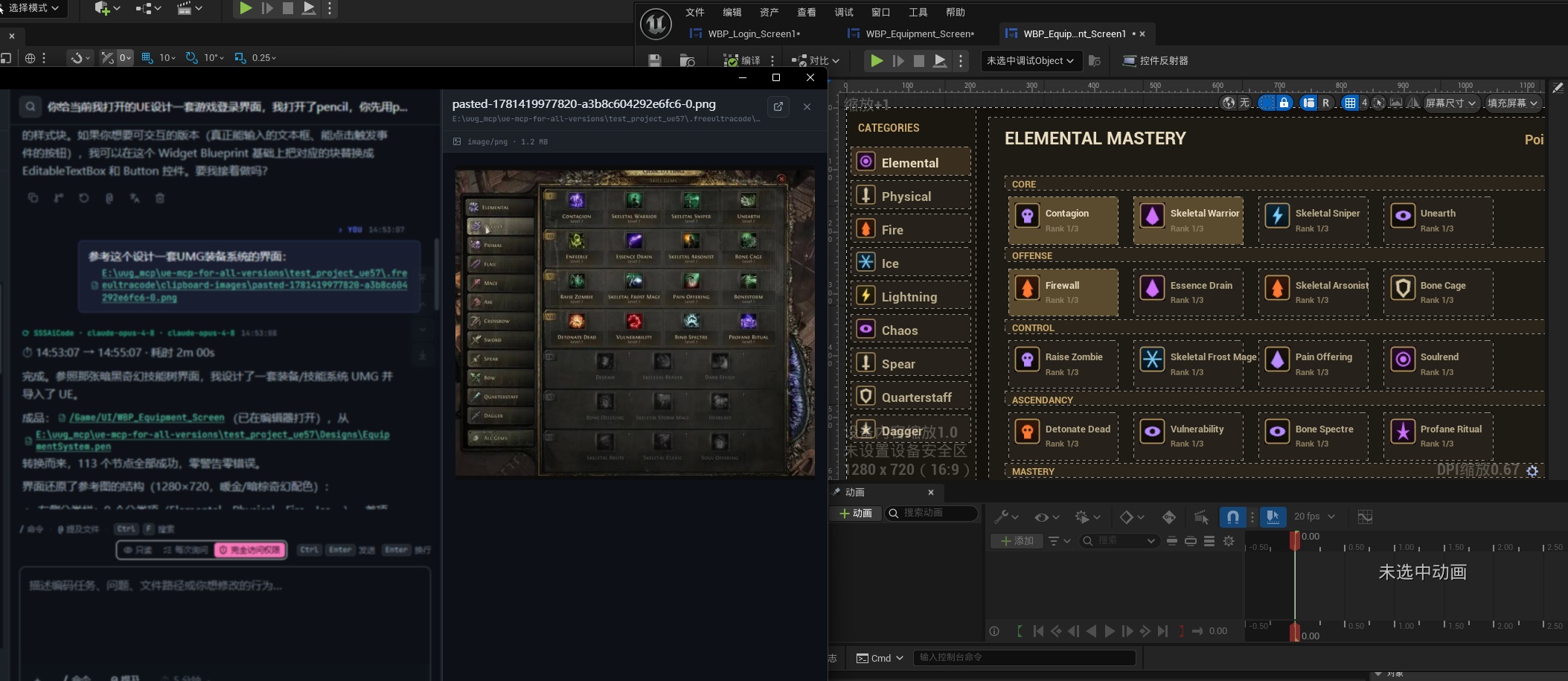
एक क्लिक में Unreal Engine UMG interface
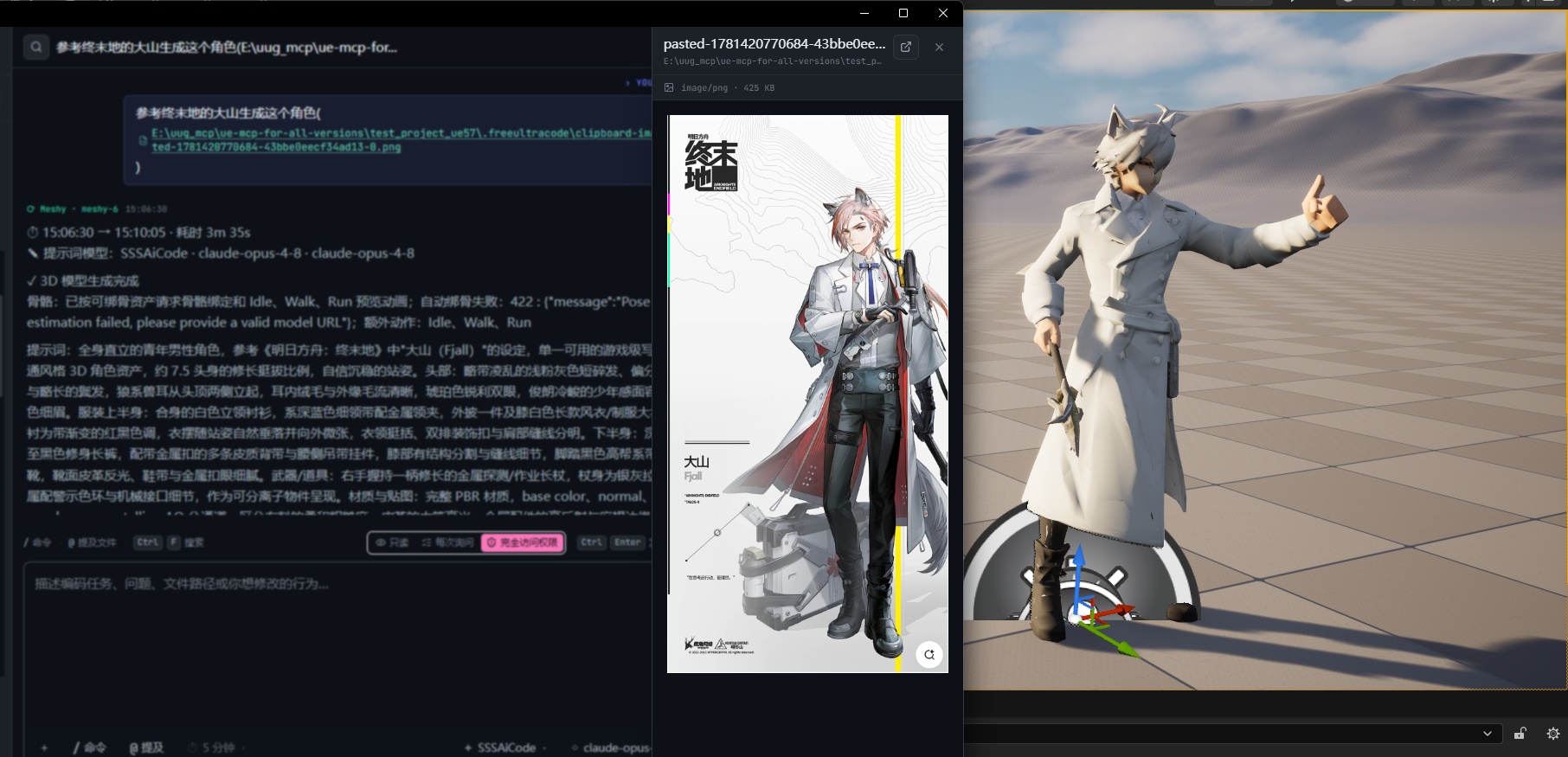
एक क्लिक में 3D model generation
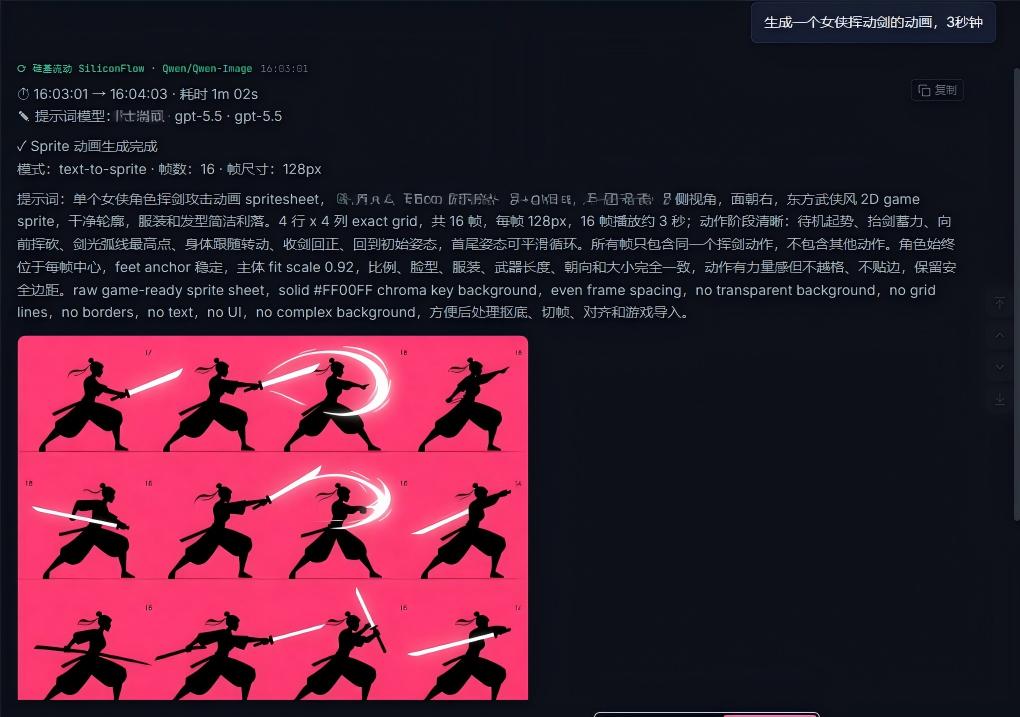
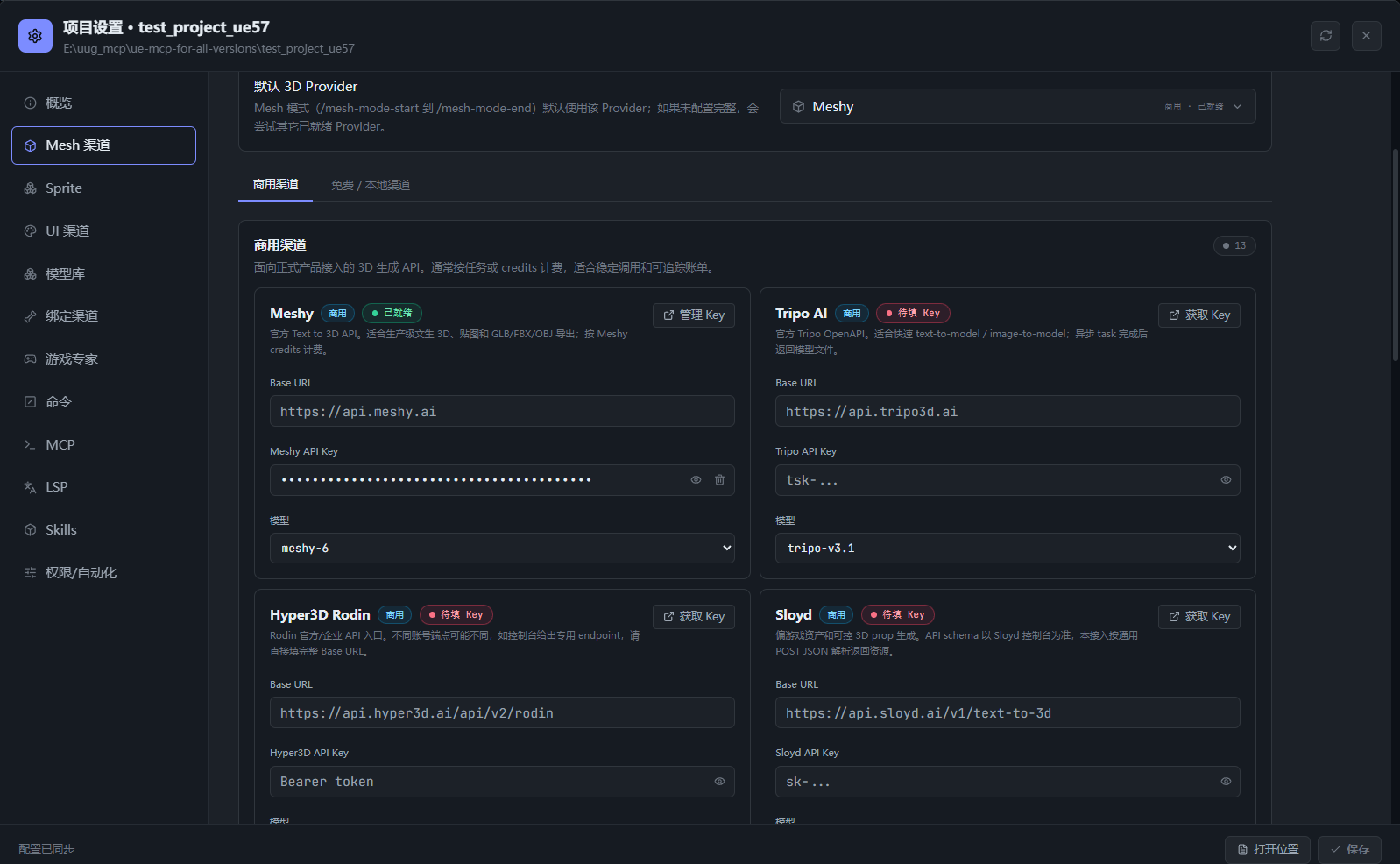
Images, sprites, meshes, audio, rigging और video — सब एक ही coding agent से manage
## UltraGameStudio क्यों
अब AI इतना अच्छा है कि ज़्यादातर code खुद लिख सकता है। programmer की भूमिका intent बताने, output verify करने और agents को orchestrate करने की ओर बढ़ रही है। पर game सिर्फ code नहीं है। एक game engine materials, blueprints, terrain, sky, UI, skeletal animation, packaging और performance tuning से भरी होती है — और ज़्यादातर सामान्य coding agents इनमें से कुछ नहीं समझते।
UltraGameStudio एक Claude Code / Codex / Gemini जैसा agent लेकर उसे game development के लिए गहराई से customize करता है:
- **game-engine की भाषा बोलता है।** agent game-development concepts के साथ तैयार है, इसलिए materials, blueprints, terrain, lighting, UI (UMG आदि), skeletal animation, build/packaging और performance optimization पर reason कर सकता है।
- **game के लिए ज़रूरी हर asset type बनाता है।** images, 3D models, 2D sprite animation, sprite atlases, audio, skeletal rigging और video सब एक ही surface से बनते हैं और एक ही agent workflow से manage होते हैं।
- **built-in game-dev expert roster.** 40+ specialist roles (technical director, gameplay/AI/network/tools programmer, level/economy designer, art व audio directors, QA, release manager आदि) जो Unity, Unreal, Godot और Web को कवर करते हैं।
- **premium quota ज़रूरी काम के लिए बचाता है।** routine काम free, trial-credit या low-cost channels पर भेजें, और keys, settings व history local रखें।
## क्या कर सकता है
### Game-dev Chat
- gameplay code, engine integration, shader/material logic, build scripts, bug investigation, refactor, tests और release notes के लिए पूछें।
- Unity, Unreal, Godot या Web engine projects पर काम करें — agent सिर्फ files नहीं, engine concepts पर reason करता है।
- file paths जोड़ें या files को composer में drag करें।
- streamed output, command logs, file references और summaries एक ही chat surface में देखें।
- उसी session में follow-up requests जारी रखें।
### Game asset generation
game के लिए ज़रूरी हर asset type को उसी surface से बना सकते हैं, project में apply कर सकते हैं, और फिर programming model को वापस सौंप सकते हैं — सब उसी history में। हर generator आपके configured provider से होकर चलता है।
| Asset | क्या बनाता है | Mode |
| --- | --- | --- |
| Images | concept art, UI mockups, icons, posters, textures, references | `/image`, `/img`, `/draw`, `/生图` या `/image-mode-start` |
| ComfyUI graphs | node-based, editable image pipelines | `/comfyui-mode-start` |
| 2D sprites | game sprites, sequence frames, spritesheets | `/sprite` या `/sprite-mode-start` |
| 3D models | props, characters, scene meshes, blockouts | `/mesh-mode-start` (`/mesh-search` से library खोजें) |
| Music | BGM, score, music clips | `/music` या `/music-mode-start` |
| Speech | voice lines और narration | `/speech-mode-start` |
| Video | video clips और motion assets | `/video` या `/video-mode-start` |
agent पहले आपका prompt निखारता है, उसे configured provider को भेजता है, और परिणाम को prompt व provider details के साथ chat stream में दिखाता है। किसी भी mode से उसके `*-mode-end` command से बाहर निकलें।
### Game-dev expert roster
UltraGameStudio में 40+ game-development specialists built-in हैं, जिन्हें agent task के अनुसार अपने आप बुलाता है:
- **engine specialists**: Unity, Unreal, Godot (GDScript / C# / GDExtension / shaders) और Web.
- **Programming**: technical director, lead/engine/gameplay/AI/network/tools/UI programmers.
- **Design**: gameplay, level, economy, live-ops और narrative designers.
- **Art व audio**: directors व specialists, VFX, sound design, audio direction.
- **Production, quality व release**: producer, QA lead/tester, devops, security, localization, release manager.
active engine, council mode और कौन-से experts enabled हों, यह **Settings** में सेट करें।
### Free-model routing
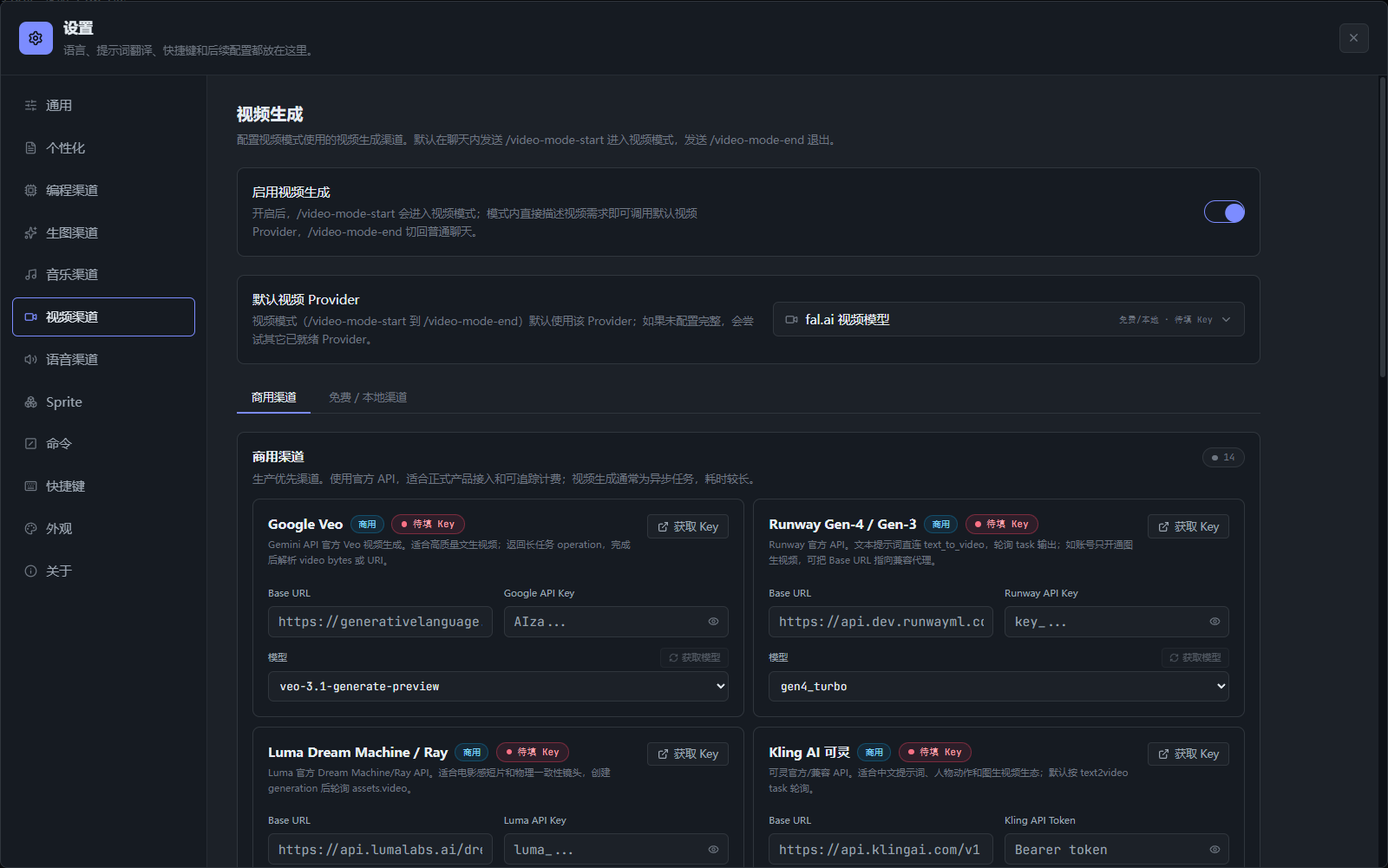
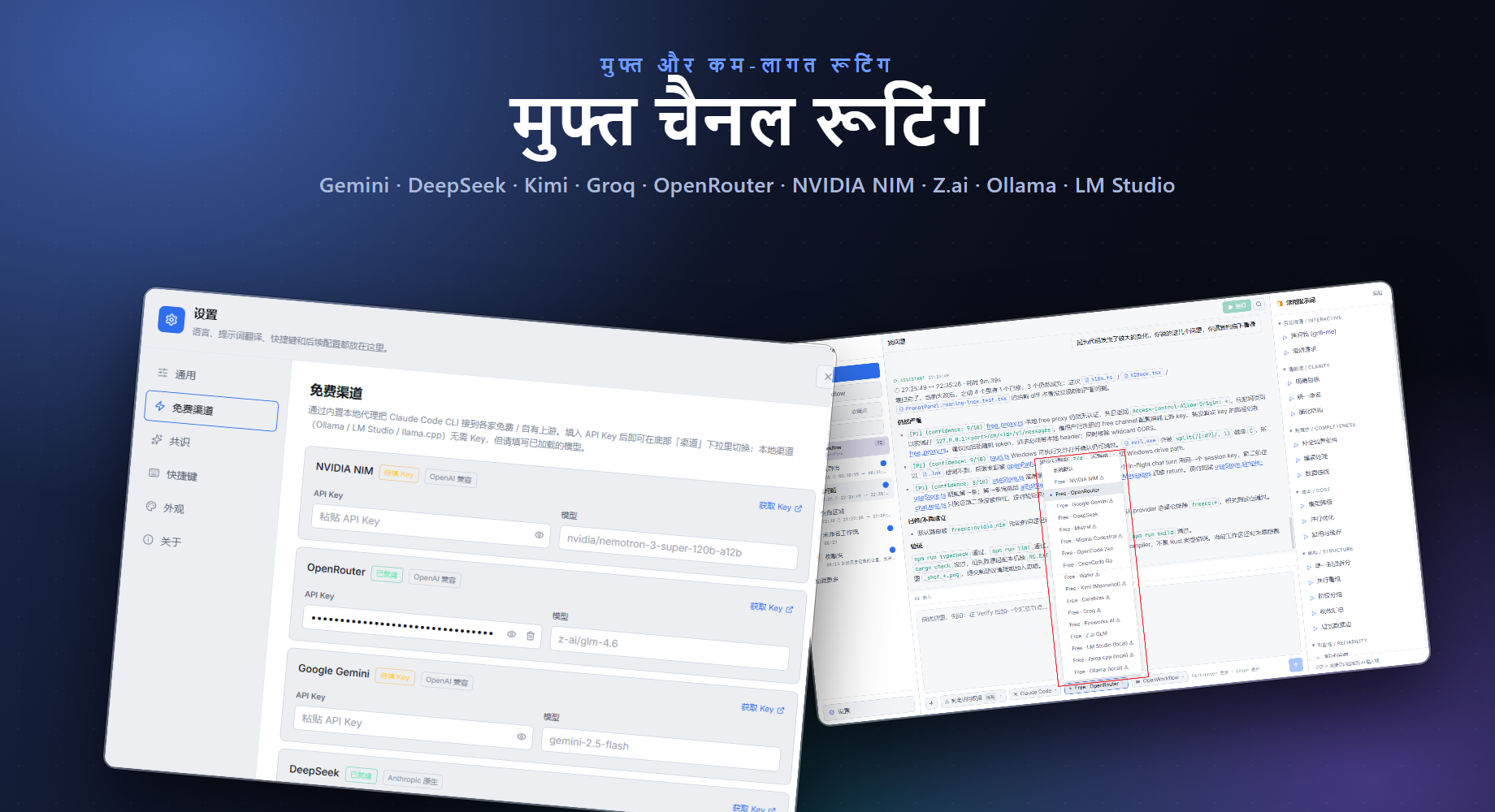
- **20+ remote channels और local runtimes**: NVIDIA NIM, OpenRouter, GitHub Models, Hugging Face Router, SambaNova Cloud, Together AI, Google Gemini, DeepSeek, Mistral, Mistral Codestral, OpenCode, Wafer, Kimi, Cerebras, Groq, Fireworks, Z.ai, LLM7, Kilo Gateway, साथ में Ollama, LM Studio और llama.cpp।
- **Keyless experimental routes**: LLM7 और Kilo Gateway बिना API key के test हो सकते हैं, लेकिन इन्हें non-sensitive coding prompts के लिए ही इस्तेमाल करें।
- **Official free/trial-credit routes**: provider keys app में local रूप से stored रहती हैं।
- Local Rust proxy Anthropic और OpenAI-compatible protocols के बीच translate करता है।
- Claude Code configured free channels के जरिए चल सकता है, chat UI बदले बिना।
- keys, model overrides और local model settings app settings में manage होते हैं।
Free channel routing
Current coding-oriented default models:
| Channel | Default model |
| --- | --- |
| GitHub Models | `openai/gpt-4.1-mini` |
| Hugging Face Router | `deepseek-ai/DeepSeek-V4-Pro` |
| SambaNova Cloud | `DeepSeek-V3.1` |
| Together AI | `Qwen/Qwen3-Coder-480B-A35B-Instruct-FP8` |
| Kilo Gateway | `poolside/laguna-xs.2:free` |
| LLM7 | `codestral-latest` |
### डायनेमिक वर्कफ़्लो (/studio)
जटिल बहु-चरणीय प्रोग्रामिंग कार्यों के लिए, `/studio <कार्य>` तुरंत एक विशेष एक्ज़ीक्यूशन हार्नेस उत्पन्न करता है और उसे तुरंत चलाता है। विज़ुअल कैनवास की आवश्यकता नहीं है।
- कार्य को प्राकृतिक भाषा में बताएं — प्लानर समानांतर सब-एजेंट, प्रतिकूल सत्यापन और स्वीकृति द्वार के साथ हार्नेस बनाता है।
- छह आंतरिक रणनीतियाँ स्वचालित रूप से चुनी जाती हैं: वर्गीकृत करें और कार्य करें, फैलाएँ और संश्लेषित करें, प्रतिकूल सत्यापन, उत्पन्न करें और फ़िल्टर करें, टूर्नामेंट, पूरा होने तक लूप।
- हर रन `.ugs-run//` के अंतर्गत पूरी तरह लॉग होता है जिसमें कार्य बही, घटनाएँ, निर्णय और अंतिम परिणाम शामिल हैं।
- डेस्कटॉप ऐप या CLI से चलाएँ: `ugs studio "<कार्य>" --json --interactive --cwd `।
- शून्य कॉन्फ़िगरेशन — स्थानीय `claude` CLI लॉगिन क्रेडेंशियल का पुन: उपयोग करता है।
#### Free Auto — मल्टी-चैनल ऑटो-स्विचिंग
**Auto** चैनल (Channel मेनू में `freecc:auto`) हर अनुरोध को उपलब्ध सर्वोत्तम मुफ़्त चैनल के माध्यम से स्वचालित रूप से रूट करता है, बिना मैन्युअल स्विचिंग के।
- सभी कॉन्फ़िगर किए गए मुफ़्त चैनलों के माध्यम से घूमता है, दर सीमा (429) या अपस्ट्रीम त्रुटियों (5xx) वाले चैनलों को स्वचालित रूप से छोड़ देता है।
- बैकऑफ़ के साथ प्रति-चैनल कूलडाउन ट्रैक करता है: त्रुटि पर चैनल पुनः प्रयास से पहले रुकता है।
- वैकल्पिक मॉडल ओवरराइड का समर्थन करता है ताकि सभी ऑटो-रूट अनुरोध एक ही मॉडल का उपयोग करें।
- सभी चैनल समाप्त होने पर विफलता लॉग के साथ 503 लौटाता है।
#### मल्टी-प्रोवाइडर चेन: DeepSeek → CodeX
`/studio` के साथ, हार्नेस योजना चरणों में कई प्रदाताओं को स्वचालित रूप से जोड़ सकता है। सामान्य पैटर्न: DeepSeek कम लागत पर ड्राफ्ट तैयार करता है, CodeX अंतिम गुणवत्ता तक परिष्कृत करता है।
- **डायनेमिक हार्नेस योजना** प्रति-चरण `model` ओवरराइड का समर्थन करती है — विचार-मंथन/वर्गीकरण के लिए DeepSeek, कार्यान्वयन/सत्यापन के लिए CodeX/Gemini असाइन करें।
- **cc-switch संगतता**: UltraGameStudio `cc-switch` CLI कॉन्फ़िगरेशन पढ़ता है; Claude Code रूटिंग के लिए कॉन्फ़िगर किया गया कोई भी प्रदाता studio चरणों के लिए तुरंत उपलब्ध है।
- **फैलाएँ और संश्लेषित करें** रणनीति DeepSeek वर्कर्स को स्वतंत्र उप-कार्यों में समानांतर करती है, फिर सहमति द्वार (CodeX) परिणामों को संश्लेषित और सत्यापित करता है।
#### गति-जागरूक चैनल चयन
मुफ़्त प्रॉक्सी का Auto चैनल रीयल-टाइम उपलब्धता संकेतों के आधार पर चैनलों को प्राथमिकता देता है:
- **दर-सीमा जागरूकता**: 429 लौटाने वाले चैनल पुनः प्रयास से पहले 30+ सेकंड के लिए ठंडे किए जाते हैं।
- **त्रुटियों पर तेज़ विफलता**: गैर-पुनर्प्रयास योग्य त्रुटियों (4xx प्रमाणीकरण, 5xx अपस्ट्रीम डाउन) को कूलडाउन के साथ ट्रैक किया जाता है; Auto राउटर उन्हें छोड़ देता है।
- **कनेक्शन समय बजट**: प्रत्येक चैनल प्रयास अपस्ट्रीम टाइमआउट के अधीन है; Auto राउटर एक धीमे अपस्ट्रीम पर ब्लॉक नहीं होता।
- **प्रतिक्रिया गति द्वारा प्राकृतिक क्रम**: सफल चैनल पहले आज़माए जाते हैं; त्रुटि वाले चैनल सूची के अंत में चले जाते हैं।
ये सुविधाएँ `/studio` हार्नेस रन को तब भी लचीला बनाए रखती हैं जब व्यक्तिगत मुफ़्त प्रदाता धीमे, दर-सीमित, या अस्थायी रूप से अनुपलब्ध हों।
## Quick Start
```bash
cd app
npm install
npm run dev
```
Desktop app चलाने के लिए:
```bash
cd app
npm run desktop
```
Production package बनाने के लिए:
```bash
cd app
npm run package
```
## Basic Usage
### Free channel register करें
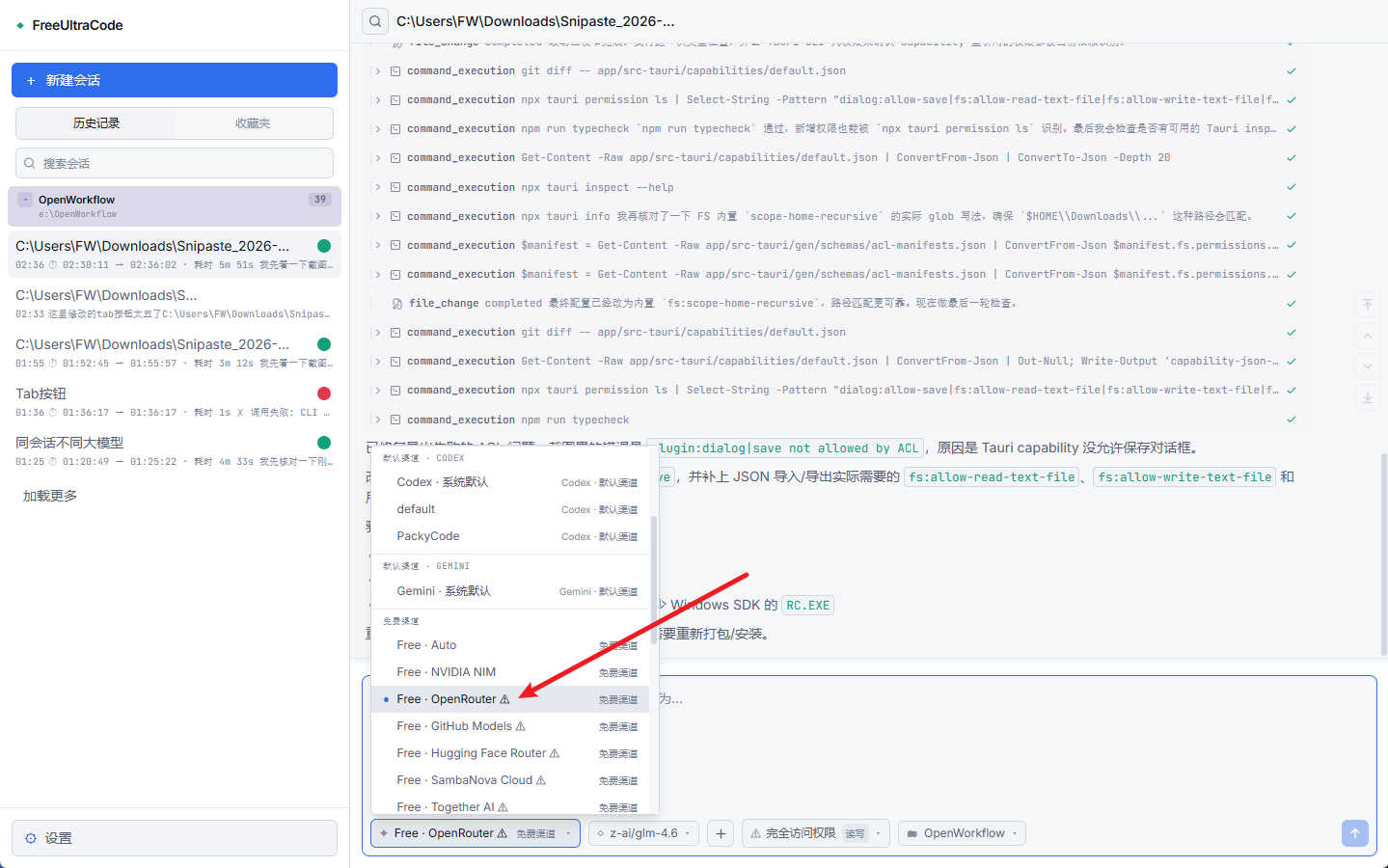
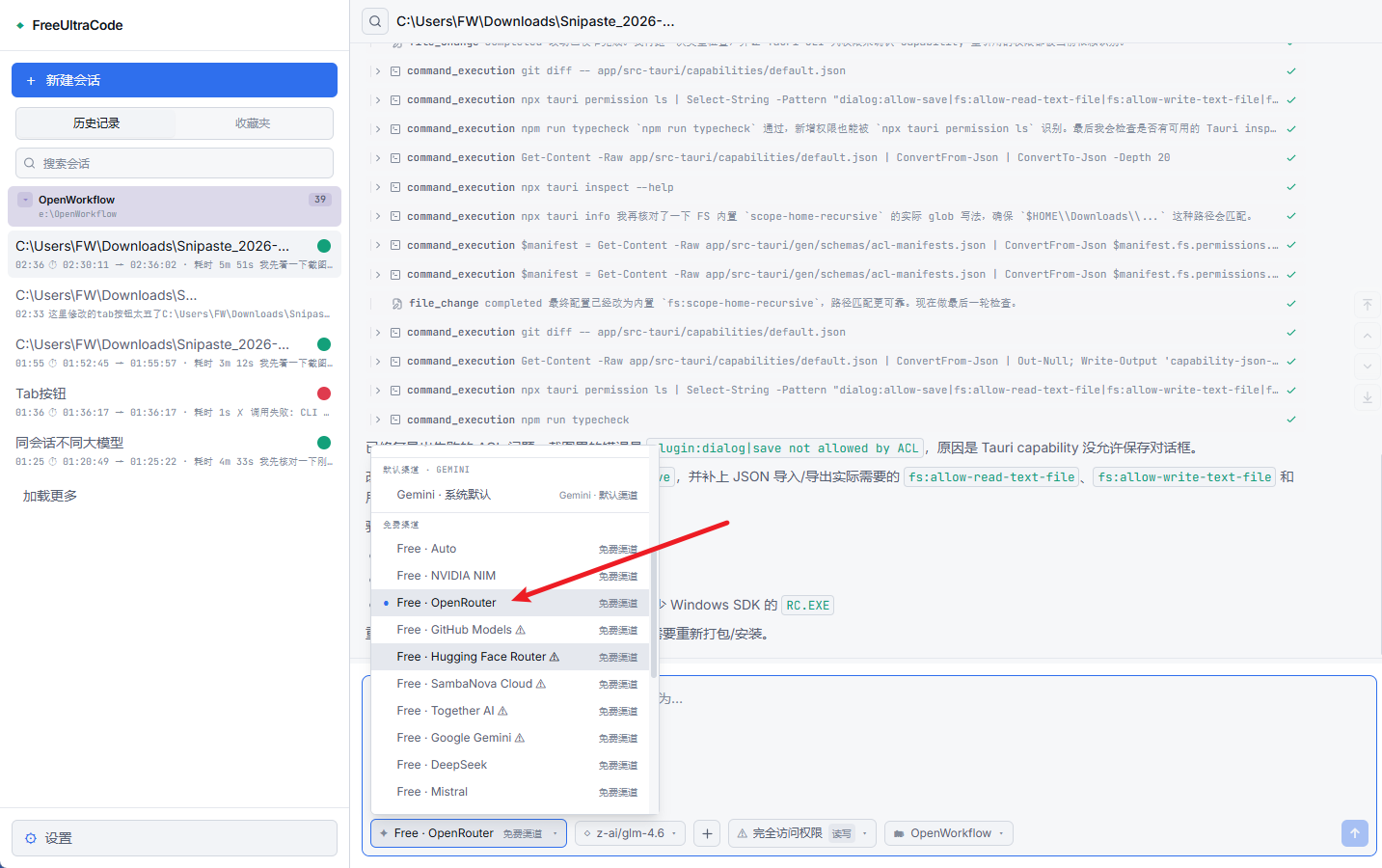
1. नीचे वाला **Channel** menu खोलें और warning mark वाला free channel चुनें, जैसे **Free · OpenRouter**।
2. API key dialog में **Open registration site** पर click करें।
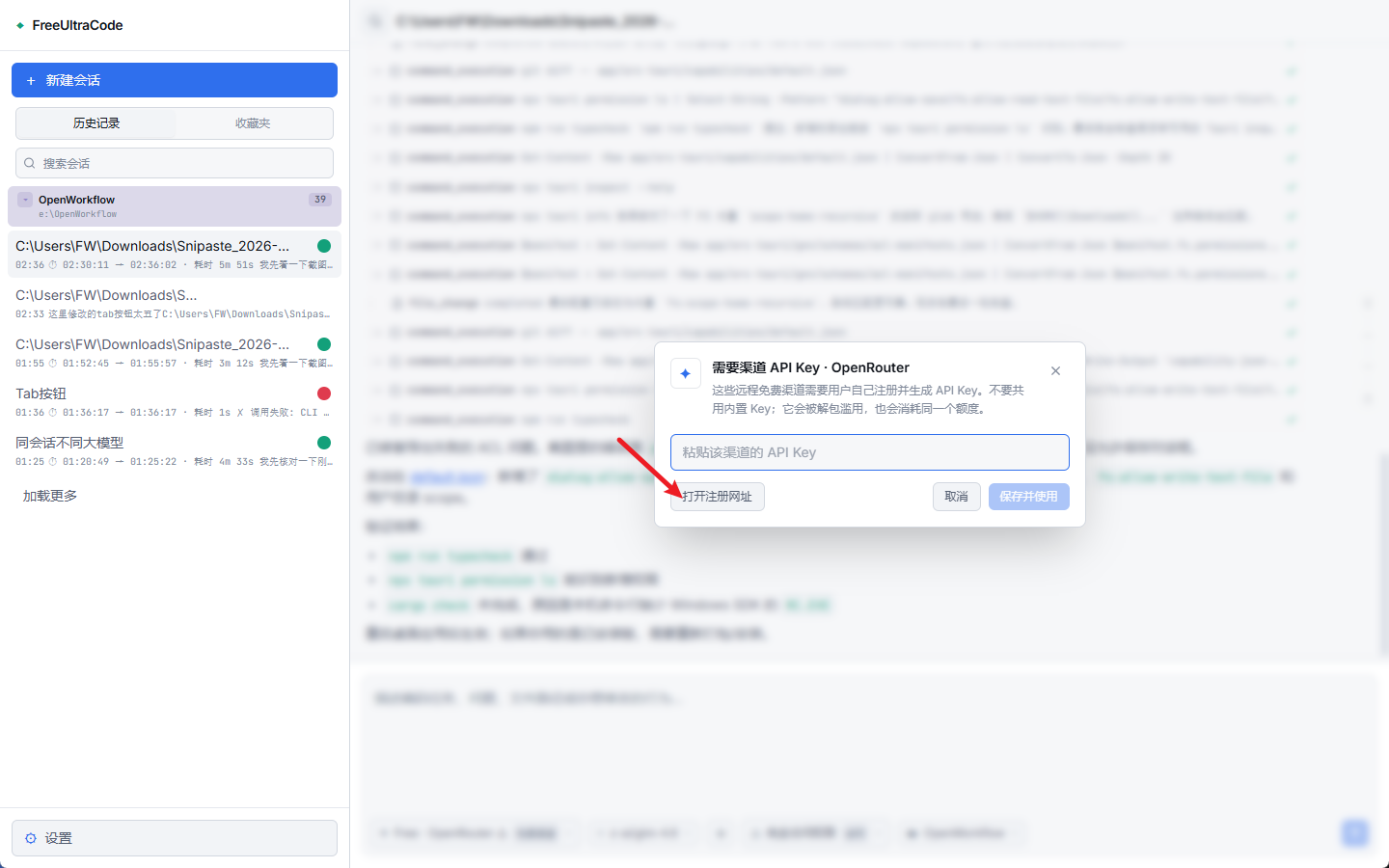
3. provider page पर नई API key बनाएं और copy करें।
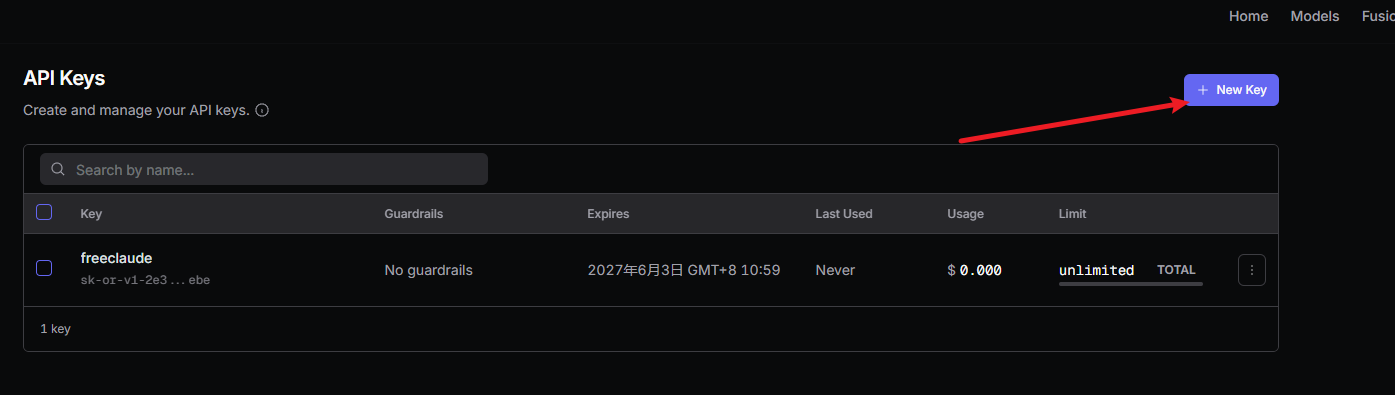
4. key को UltraGameStudio में paste करें और **Save and Use** पर click करें। save होने के बाद warning mark हट जाएगा।
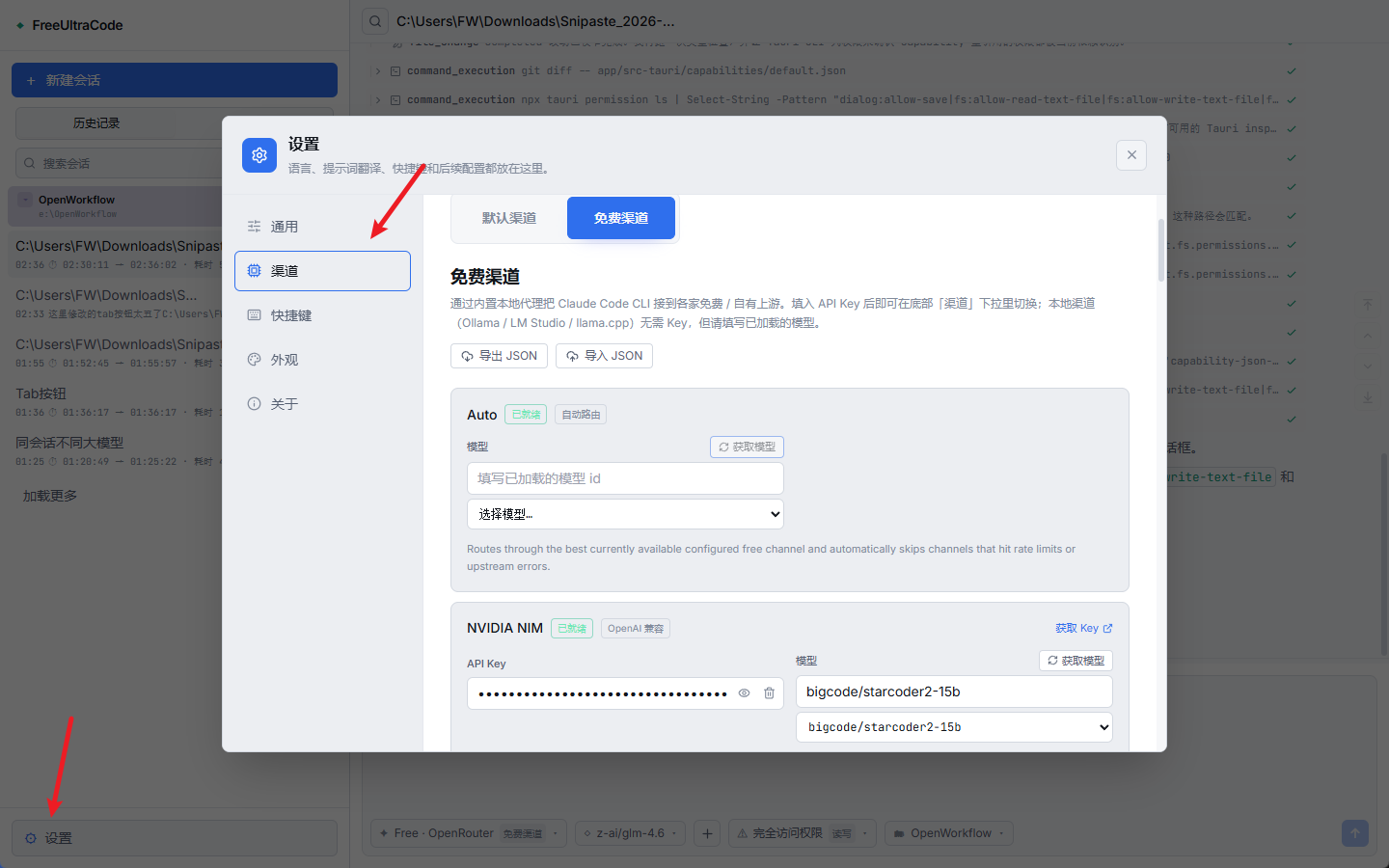
5. सभी channels को **Settings** -> **Channels** -> **Free Channels** से भी manage किया जा सकता है।
Channel ready होने के बाद नीचे के input से उसी route पर chat करें।
### Game assets generate करें
Asset modes chat composer को asset-generation surface में बदल देते हैं और वही session history रखते हैं। UI mockups, icons, textures, sprites, 3D models, audio और video बनाने के बाद code work पर लौटने के लिए उपयोगी हैं। नीचे image mode का उदाहरण है; sprite, mesh, music, speech और video modes अपने `*-mode-start` commands के साथ इसी तरह काम करते हैं।
1. **Settings** -> **Images** (या संबंधित asset section) खोलें, default provider चुनें, और required API key, Account ID, Base URL या local ComfyUI endpoint भरें।
2. chat session में `/image-mode-start` लिखें। mode शुरू करके उसी message में generate भी कर सकते हैं:
```text
/image-mode-start fantasy dungeon के लिए stylized stone-wall texture, tileable, 1024x1024
```
3. mode on रहने पर normal messages code edits की जगह assets generate करते हैं। **Channel** selector asset providers पर switch हो जाता है।
4. desired asset describe करें। UltraGameStudio पहले programming model से prompt polish करवाता है, फिर configured provider को भेजता है।
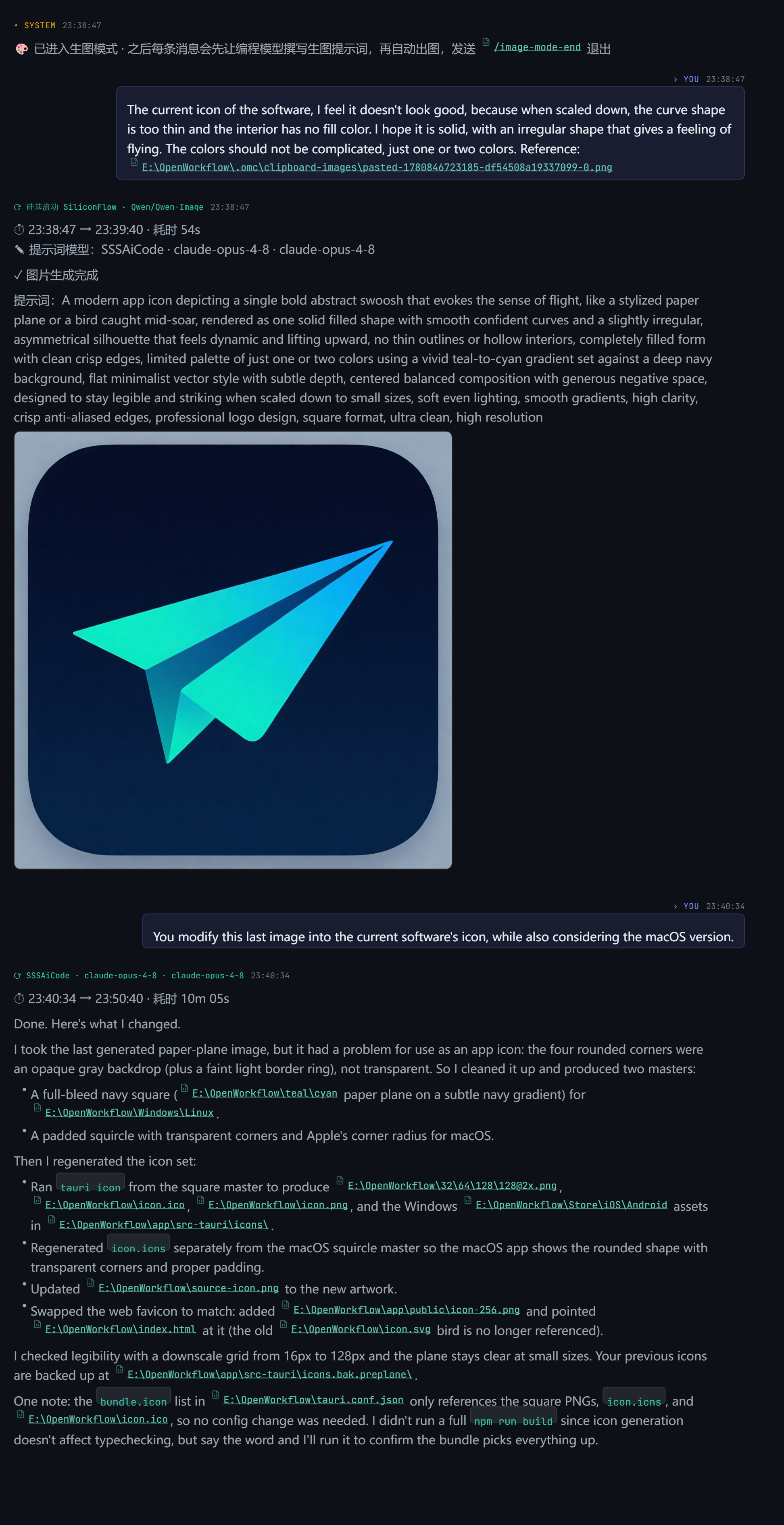
5. programming channel और model पर लौटने के लिए `/image-mode-end` भेजें। Persistent mode के बिना एक asset चाहिए तो `/image`, `/img`, `/draw`, `/生图`, `/sprite`, `/music` या `/video` के बाद prompt लिखें।
## कैसे काम करता है
```text
User request
|
v
Chat composer
|
+--> selected runtime / channel / permission / workspace
|
+--> provider API, local CLI, or local free-channel proxy
|
+--> streamed output, tool log, and chat history
```
## Technology Stack
| Area | Technology |
| --- | --- |
| Desktop shell | Tauri 2, Rust |
| Frontend | React 18, Vite 5, TypeScript 5 |
| State | Zustand |
| Styling | Tailwind CSS, CSS variables |
| Icons | lucide-react |
| Provider routing | Claude Code, Codex, Gemini, extensible provider settings |
| Free-channel proxy | Rust `tiny_http` + `ureq`, Anthropic/OpenAI protocol translation |
## Project Structure
```text
app/
src/
components/ Shared UI components
lib/ Provider settings, free-channel routing, asset generation (image/sprite/3D/music/speech/video/ComfyUI), game-dev expert roster, persistence
panels/ Sidebar, chat dock, settings, scheduling UI
store/ Zustand state and local history
src-tauri/
src/
free_proxy.rs Rust reverse proxy + Anthropic/OpenAI translation
lib.rs Tauri commands, filesystem/history bridge
doc/ Tutorials, localized READMEs, screenshots
```
## Documentation
- [Free channel registration guide in Chinese](register-free-channel.md)
- [English README](../../README.md)
## Development
```bash
npm run dev
npm run typecheck
npm run lint
npm run test
npm run desktop
npm run package
```
## Community
- Discord:
- QQ Group: `149523963`
- Issues:
## License
License अभी specified नहीं है।