# Omastorm
Live weather radar in your Omarchy bar. Beta.
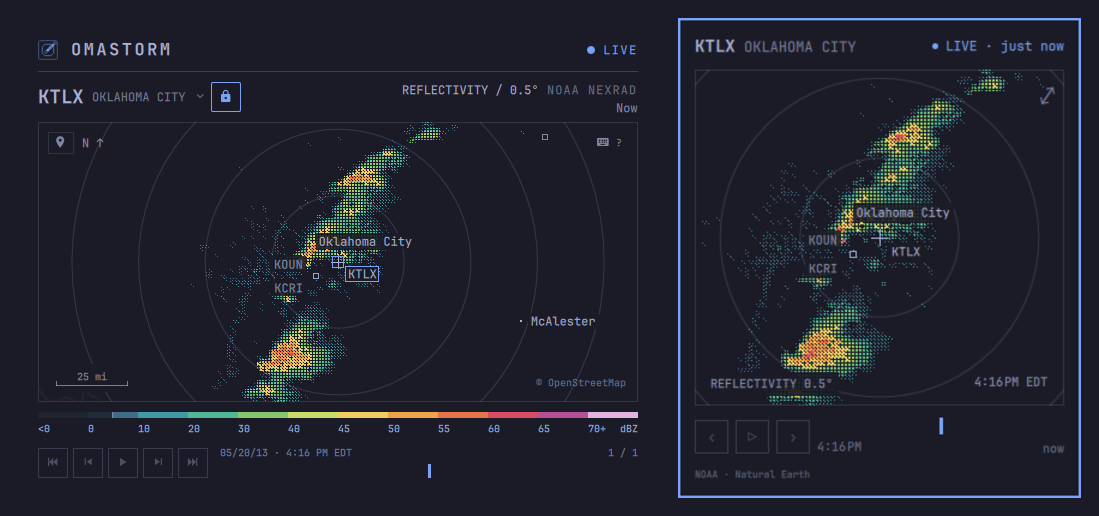
A radar that lives next to the clock. The popover shows your selected radar
and its actual scan time. Click the map (or press Enter) for the full
window: individual NOAA NEXRAD sweeps, the NOAA MRMS contiguous-U.S.
mosaic, and the EUMETNET OPERA European mosaic, drawn in your Omarchy theme.
This page is the user guide: install, first run, and everyday use. How the
code is built lives in [CONTRIBUTING.md](CONTRIBUTING.md).
## Install
Omarchy 4 on x86_64 and aarch64.
```sh
omarchy plugin add https://github.com/wesleygrimes/omastorm.git --enable
```
That clones the plugin, asks which bar section to use, and on first open
downloads the pinned engine from GitHub Releases, checks its sha256, and
installs it under `~/.local/share/omastorm/bin`. Configuration, remembered
view, and cached scans stay in Omastorm's own directories.
Optional: a Hyprland key to toggle the window. Add one line to
`~/.config/hypr/bindings.lua`. Omastorm never writes that file:
```lua
o.bind("SUPER + SHIFT + R", "Omastorm", "omarchy shell shell toggle com.omastorm.radar '{}'")
```
Optional: list it in the app launcher:
```sh
bash ~/.config/omarchy/plugins/com.omastorm.radar/scripts/write-desktop-entry.sh
```
## First run
Open the popover from the bar. If Omarchy weather already has a city, the
map opens there. If not, you get a choice: pick a place, or use an
approximate location.
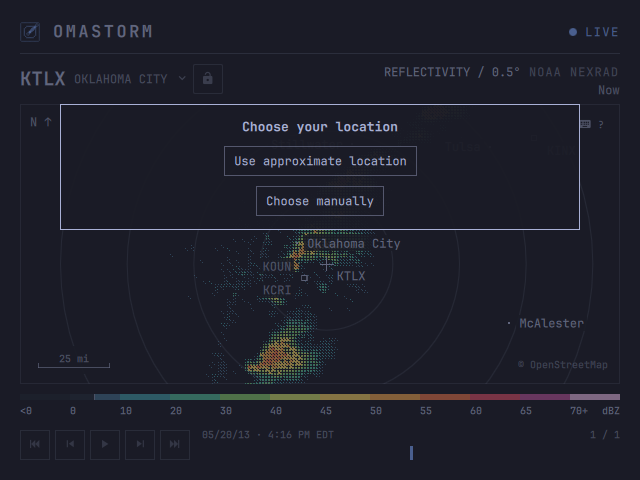
**Use approximate location** is one click. It asks [wttr.in](https://wttr.in)
to guess your city from the public IP of that request. Nothing is sent until
you click; there is no GPS and no background tracking. A VPN or CGNAT may
land you at the ISP instead of your house. Choose manually if the guess is
wrong.
The view is remembered. Next time you open the popover, you are back where
you left off.
## Coverage
U.S. radar comes from NOAA NEXRAD, and `Shift+N` switches to the NOAA MRMS
mosaic for the contiguous U.S. European radar comes from EUMETNET OPERA.
Coverage depends on radar range and the data available from each provider. Some areas have no radar data, even when their cities appear in
search.
[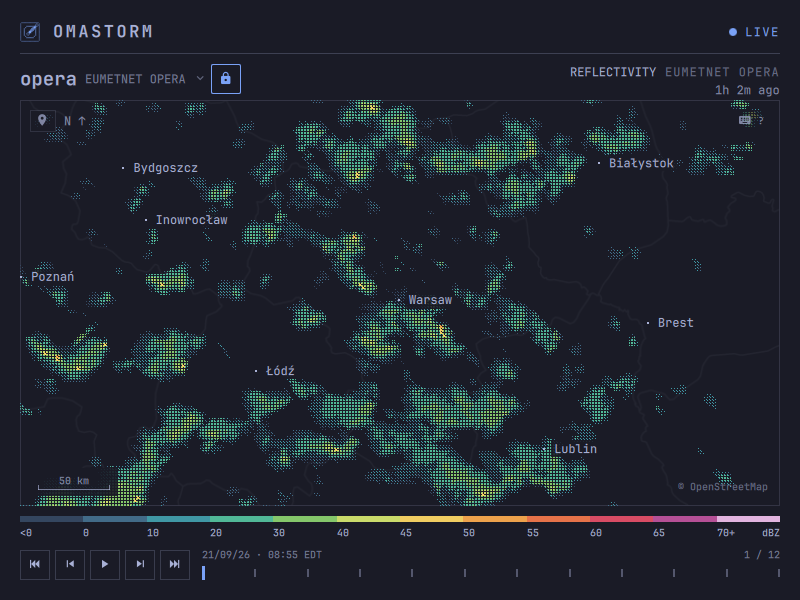](https://github.com/wesleygrimes/omastorm/releases/download/v0.1.14/omastorm-europe.mp4)
[Watch the 24-second Europe demo](https://github.com/wesleygrimes/omastorm/releases/download/v0.1.14/omastorm-europe.mp4).
## What you are looking at
Omastorm uses three radar products. In the U.S., NOAA NEXRAD provides
individual radar volumes: each dish spins, sends a pulse, and measures how
much bounced back. In Europe, EUMETNET OPERA provides a mosaic
combining the strongest radar returns at each location.
Press `Shift+N` for NOAA's MRMS mosaic: every U.S. radar merged into one
image, covering the contiguous U.S. Press it again, or `n`, to go back to the
nearest station. You can also search **mrms**. It never turns on by itself,
and looping its hour of history uses more CPU than a single station.
For NEXRAD, Omastorm shows **reflectivity** on the lowest tilt: the beam that
stays closest to the ground. OPERA combines multiple radars and elevations into one image.
Color is **dBZ**, not a rain rate and not a warning. Stronger return, warmer
color. The legend under the map is that scale.
A bright blob is often rain or snow. Radar can also detect:
- insects, birds, and bats (especially on clear evenings)
- dust, smoke, and sea spray
- ground clutter and buildings near the dish
- anomalous propagation, when the beam bends and paints the ground far away
- wind farms, towers, and military chaff
Measured returns under 5 dBZ (the usual biological clutter and haze) are
hidden by default; the legend says so. Press `w` to show them.
These are observations, not forecasts or weather warnings. Each frame shows
its observation time on the stamp.
## The window
Drag to pan, scroll to zoom. The map and the radar are independent: panning
moves the camera; the active source is whichever covering radar Omastorm is
following, unless you lock it.
Click the source name for covering mosaics and nearby dishes. The padlock pins
that source so panning will not hand off; it turns yellow when the camera sits
outside the source's coverage. `n` resumes automatic selection for the current
map centre and leaves the camera where it is.
The number under the product line is how stale the frame on screen is. The
stamp above the timeline is when that frame was observed. **LIVE** is the
feed; the light beside it goes yellow when data is stale (ten minutes) and
red when the feed is unreachable. Cached frames stay.
A scale bar on the map is ground distance, in kilometres or miles from your
locale.
## Aviation observations
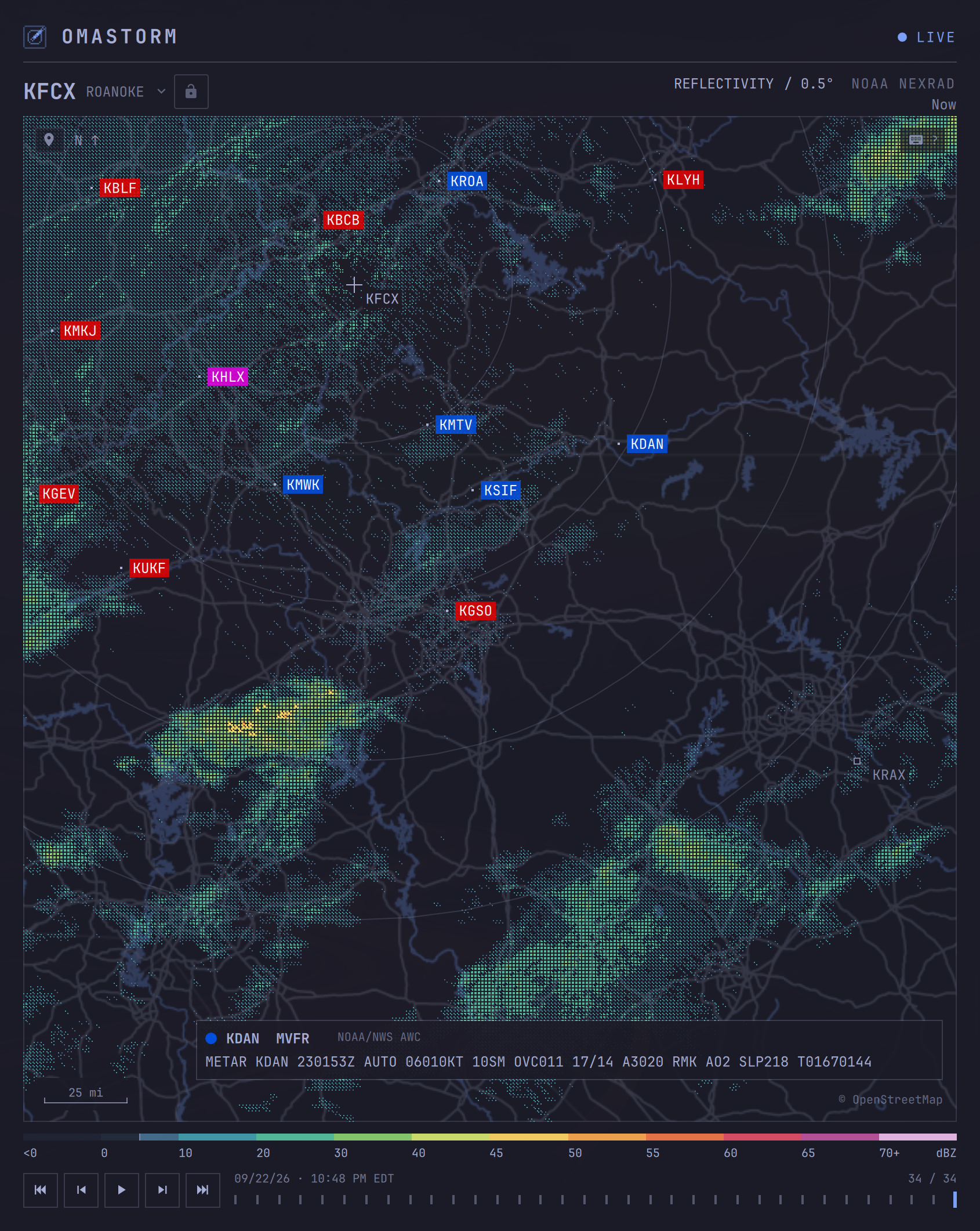
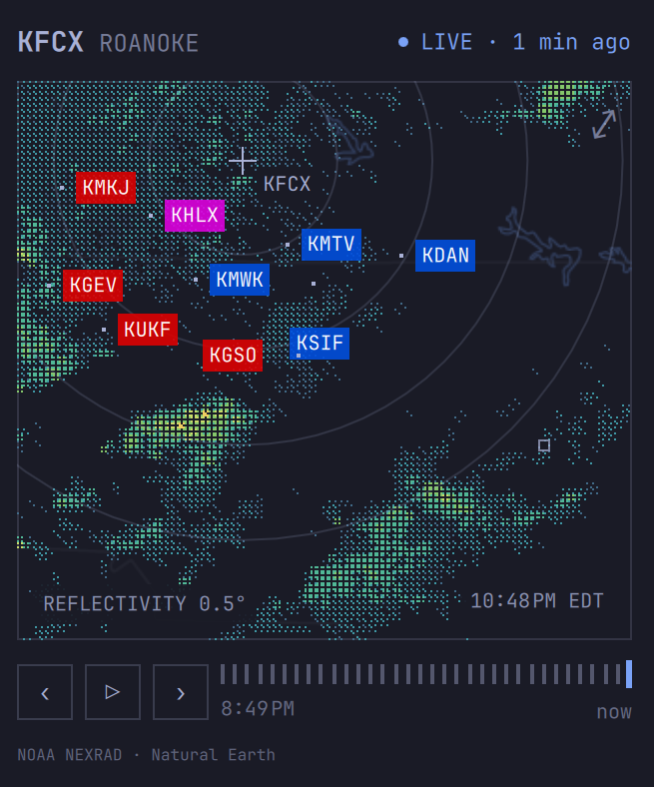
Press `a` in the window or popover to show nearby airport weather reports on
the map. Airport codes replace city labels; their colors show the reported
flight category: green VFR, blue MVFR, red IFR, and magenta LIFR. Click an
airport code to read its raw METAR. These are current observations, not
forecasts or flight guidance.
The overlay is off by default and works with live NEXRAD radar in the U.S. and
Canada. It is unavailable on MRMS and OPERA mosaics. To start with it on,
set `[metar] show = true` in your configuration. With no config file, or when
`[metar] mark` is omitted, each airport is a pin. The pictures below use the
filled chip (`mark = "chip"`). You can also choose how many airports appear
and how they are selected; see [configuration](docs/configuration.md#display-and-keyboard-preferences).
## Search
`/` (or `s`) is one field. Type a city, a radar site or mosaic name, or paste coordinates.
Search accepts up to 256 characters. Keyboard and middle-click paste use
`wl-paste` from wl-clipboard. Failed, oversized, or timed-out pastes leave
the query unchanged and show an error.
A **city** centres the map there, unlocks, and selects a covering source. Type
a region or country qualifier when needed, such as `London, UK`.
Cities come from the bundled GeoNames database. A configured radar override
still applies when choosing a place.
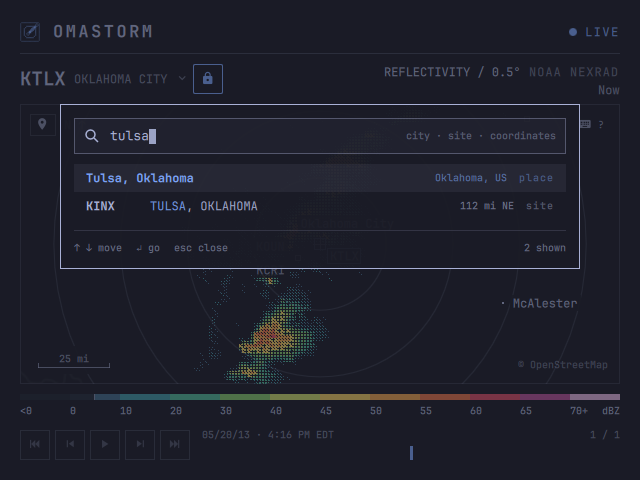
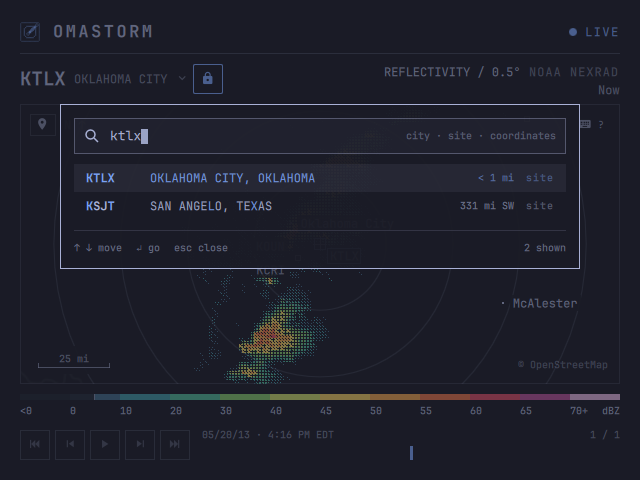
A **site** (`KTLX`, `tlx`) locks that dish and centres on it. Clicking the
source title opens the same card on covering mosaics and nearby dishes.
A **mosaic** (`opera` or `mrms-conus`) locks that source and centres the map on its coverage.
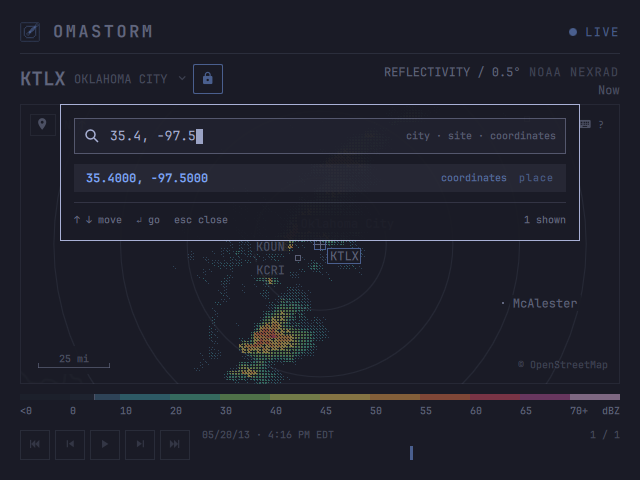
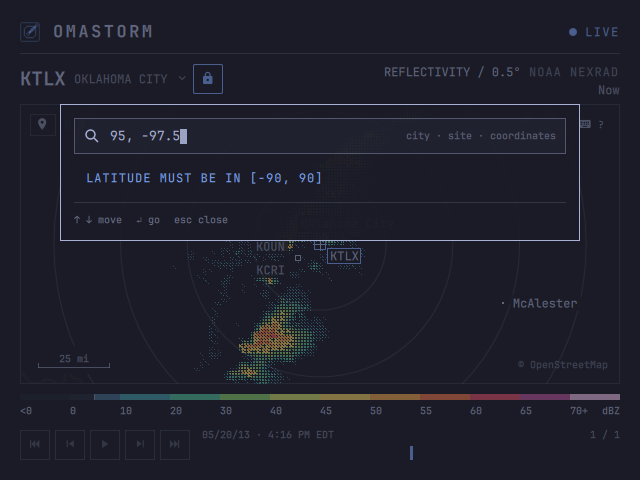
**Coordinates** are latitude then longitude, decimal degrees, comma or space,
the way a maps link looks. Invalid range is named on the card; the layout
does not jump.
## My location
The map-marker at the top-left of the map, or `m`, jumps to the same
approximate IP location as first run. Zoom stays. The radar unlocks and
follows. Archived sessions never locate.
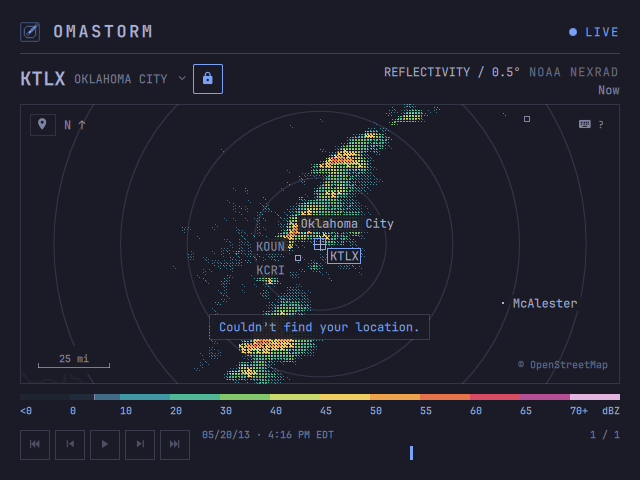
If the lookup fails, the camera stays put and a short overlay appears on the
map. It is not a new row of chrome.
## The loop
Selecting a radar loads its recent scans for playback. NEXRAD history grows
toward **60 frames / two hours**;
OPERA retains up to **12 mosaic frames**; MRMS retains up to **30 frames / one hour**.
Older scans drop out.
Space and the Play button loop from the selected completed frame through the
newest completed scan, returning to the selection each time. Starting from
the newest completed frame or a sweep still painting loops the full history;
Home then Play also selects the full history. Space or the button pauses
while playing, and the next Play captures the current selection as its start.
`[` `]` steps; Home and End jump to the oldest or newest frame.
NOAA publishes NEXRAD Level II via the [Open Data program on AWS](https://registry.opendata.aws/noaa-nexrad/).
A full volume takes about four to seven minutes (faster in severe weather,
slower in clear air). While a volume is in progress the engine reads live
chunks, so the sweep can paint as the antenna turns. If no new chunk arrives
for 90 seconds it rediscovers the latest volume; cached frames stay. OPERA
polls its public 24-hour cache and loads complete mosaic frames.
MRMS checks for new data every 30 seconds while selected. If the feed drops,
the loop you have keeps playing. There's no METAR overlay or weak-return
filtering on MRMS.
## Look
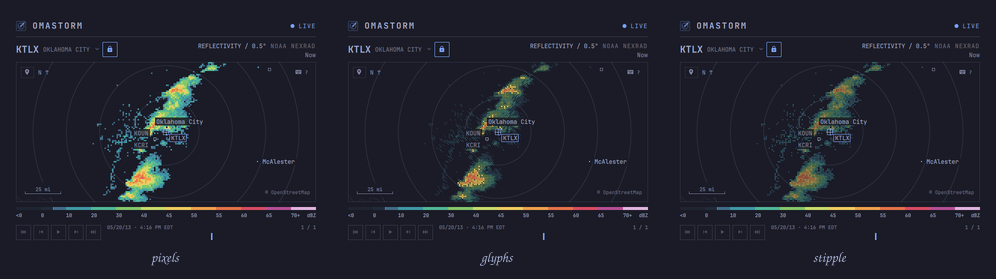
Three treatments sample the same radar data and palette. They only change how each
3 px cell is painted. Glyphs is the default; `1` `2` `3` switch.
| Key | Treatment | Look |
| --- | --- | --- |
| `1` | Pixels | Solid blocks. The most literal picture of each radar cell. |
| `2` | Glyphs | A denser mark as the return strengthens. |
| `3` | Stipple | Soft squares that grow with intensity; more map shows through. |
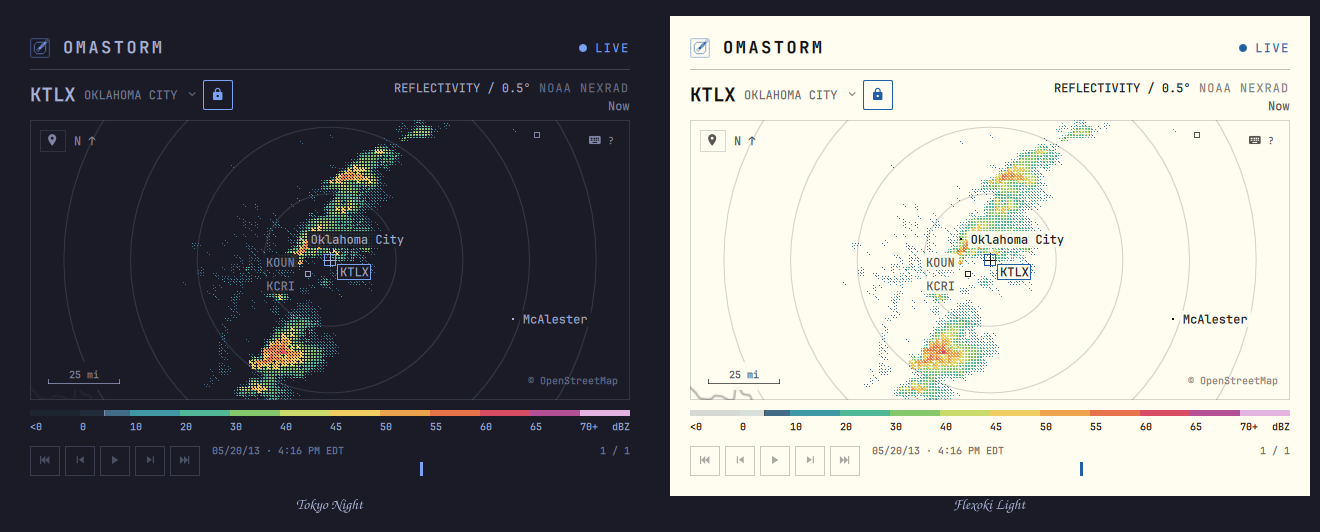
Chrome follows the Omarchy theme. Radar color comes from the measured reflectivity.
`?` lists every key. They are all rebindable.
| Key | Action |
| --- | --- |
| `h` `j` `k` `l` or arrows | Pan |
| `+` `-` | Zoom |
| `0` | Reset to the configured or weather location |
| `/` or `s` | Search |
| `n` | Follow the covering radar (camera stays) |
| `Shift+N` | All radars: the mosaic covering the map, on or off (camera stays) |
| `Shift+L` | Lock the radar |
| `m` | My location |
| Space | Loop from the selected frame / pause |
| `[` `]` | Step a frame |
| Home / End | Oldest or newest frame |
| `1` `2` `3` | Pixels, Glyphs, Stipple |
| `w` | Show weak returns |
| `a` | Show or hide aviation observations |
| `f` | Focus mode: the map alone |
| `?` | This map |
| Esc | Close |
## Preferences
`~/.config/omastorm/config.toml` is what you mean to keep. The last map
center, zoom, and UI radar lock are saved separately in
`~/.local/state/omastorm/state.json`. Panning never rewrites config.
```toml
# Optional: always open here. Omit both to remember the last map position.
center_lat = 36.23708
center_lon = -79.97948
# locked_radar = "KFCX" # optional; coordinates do not lock a radar
treatment = "GLYPHS" # PIXELS, GLYPHS, or STIPPLE at launch
weak_floor = 5 # dBZ; false draws every measured return
focus_mode = false # true opens on the map alone
[metar]
show = true # optional; start with airport reports on the map
[keys]
pan_left = "h Left"
zoom_in = "+ ="
```
A bad value is named in the status slot and that setting stays on its
default. Keys are Qt sequences; an empty string unbinds. `1` `2` `3` change
treatment, `w` changes the weak-return floor, `a` toggles aviation mode, and
`f` toggles focus mode for the session without writing the file.
The window drops the brand row and the legend when it is too small for
them, and gets them back when it grows.
## Update
```sh
omarchy plugin update com.omastorm.radar
omarchy restart shell
```
Until the restart, the shell keeps running what it loaded at login, old
engine pin included. Omastorm notices the new files and says so; clicking
that notice in the popover restarts the shell.
## If something is wrong
If expand or the keybind does nothing after an update, restart the shell.
If a mosaic reports that your GPU cannot display its native image size, choose
another radar source. MRMS needs a native 7000×3500 texture. Omastorm checks the
uploaded image before displaying it and also reports if that check cannot run.
The engine is one daemon per login. Its log is
`$XDG_RUNTIME_DIR/omastorm/engine.log` (usually `/run/user//omastorm/`).
If the engine could not be installed, the reason is `bootstrap.log` in the
same directory; opening the popover again retries.
```sh
~/.local/share/omastorm/bin/omastorm-engine stop
```
The next popover or window starts it again.
This is a beta. Bugs, rough edges, and ideas go to
[GitHub issues](https://github.com/wesleygrimes/omastorm/issues). For a
failure, use the
[bug report template](https://github.com/wesleygrimes/omastorm/issues/new?template=bug-report.md)
and attach the last screenful of `engine.log` (and `bootstrap.log` if the
engine never installed). Include Omarchy version, plugin commit, and GPU as
the template asks.
## Remove
```sh
omarchy plugin remove com.omastorm.radar
~/.local/share/omastorm/bin/omastorm-engine stop
rm -rf ~/.local/share/omastorm ~/.cache/omastorm ~/.local/state/omastorm
rm -rf ~/.config/omastorm # keep this to reinstall later
rm -f ~/.local/share/applications/omastorm.desktop # if you added the launcher entry
```
Then delete the `o.bind` line if you added one.
## Data
Radar: NOAA NEXRAD Level II via the NOAA Open Data program on AWS;
NOAA/NSSL MRMS QC base reflectivity via its public S3 archive; Europe
mosaic from [EUMETNET OPERA](https://www.eumetnet.eu/) COMP DBZH via the
[Open Radar Data](https://eumetnet.github.io/openradardata-documentation/1-ORD-API-overview/)
24-hour cache ([CC BY 4.0](https://creativecommons.org/licenses/by/4.0/)). Basemap: ©
OpenStreetMap contributors, [ODbL](https://opendatacommons.org/licenses/odbl/1-0/),
tiles by [OpenFreeMap](https://openfreemap.org); Natural Earth, public domain.
Location search: [GeoNames](https://www.geonames.org/),
[CC BY 4.0](https://creativecommons.org/licenses/by/4.0/).
Approximate location: [wttr.in](https://wttr.in).
METAR: NOAA/NWS [Aviation Weather Center](https://aviationweather.gov/).
Code: MIT, see [LICENSE](LICENSE).
## Contributing
Setup, checks, and pull requests are in [CONTRIBUTING.md](CONTRIBUTING.md).
Read [DESIGN.md](DESIGN.md) before proposing a product change. Open work
that is ready for a first patch is labeled
[`good first issue`](https://github.com/wesleygrimes/omastorm/issues?q=is%3Aissue+is%3Aopen+label%3A%22good+first+issue%22)
and [`help wanted`](https://github.com/wesleygrimes/omastorm/issues?q=is%3Aissue+is%3Aopen+label%3A%22help+wanted%22).
## Contributors
Thanks to these people
([emoji key](https://allcontributors.org/docs/en/emoji-key)):
This project follows the [all-contributors](https://allcontributors.org) specification.


