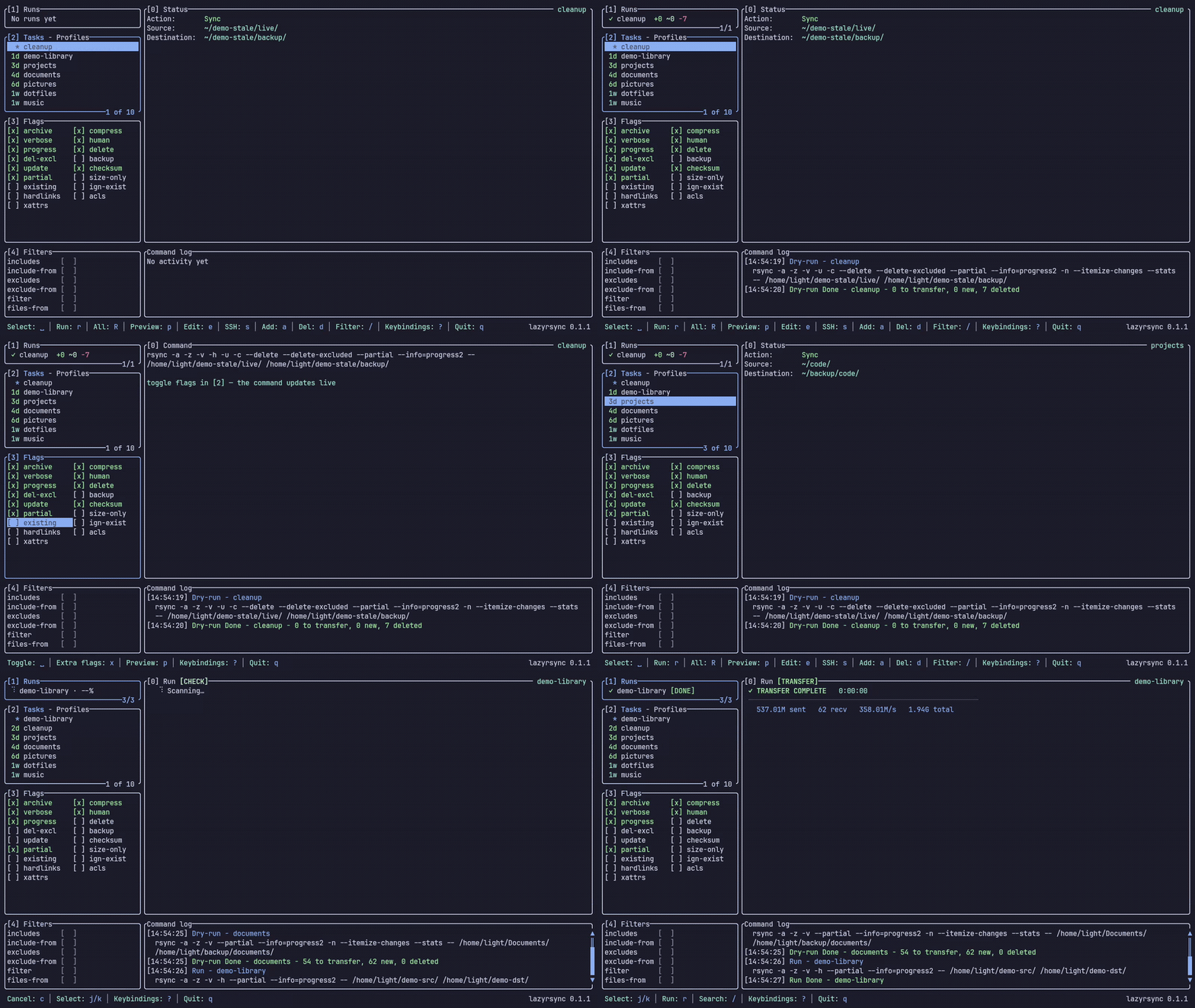
lazyrsync A terminal UI for rsync ๐Ÿ”„ lazyrsync demo [![Built With Ratatui](https://img.shields.io/badge/Built_With-Ratatui-000?logo=ratatui&logoColor=FF6B6B&labelColor=222322&color=E23636)](https://ratatui.rs) [![crates.io](https://img.shields.io/crates/v/lazyrsync.svg?color=E23636&labelColor=222322)](https://crates.io/crates/lazyrsync) [![License](https://img.shields.io/badge/license-MIT-E23636.svg?labelColor=222322)](LICENSE) [![Docs](https://img.shields.io/badge/docs-lazyrsync.westpoint.io-E23636?labelColor=222322)](https://lazyrsync.westpoint.io) Terminal Trove Tool of The Week
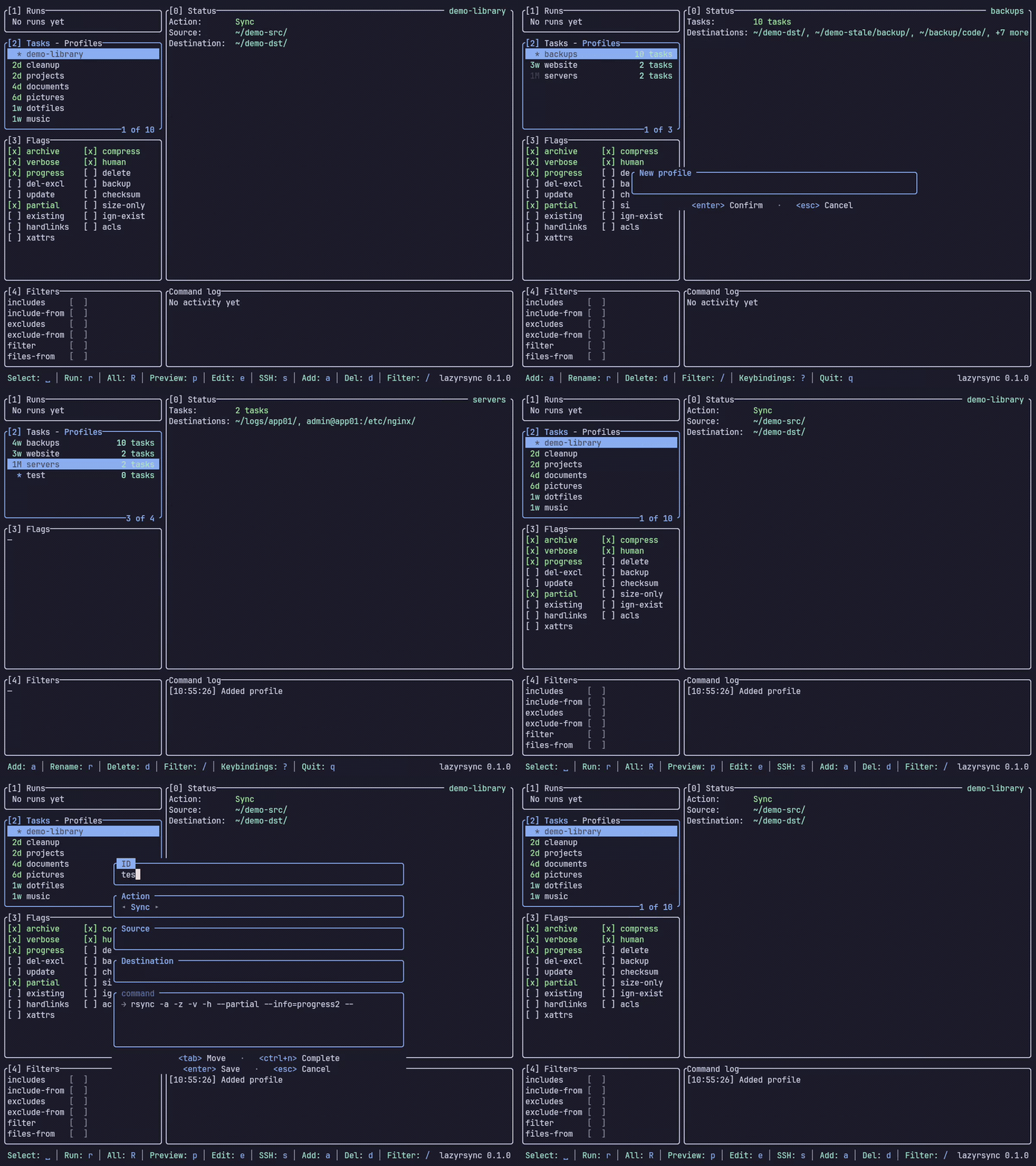
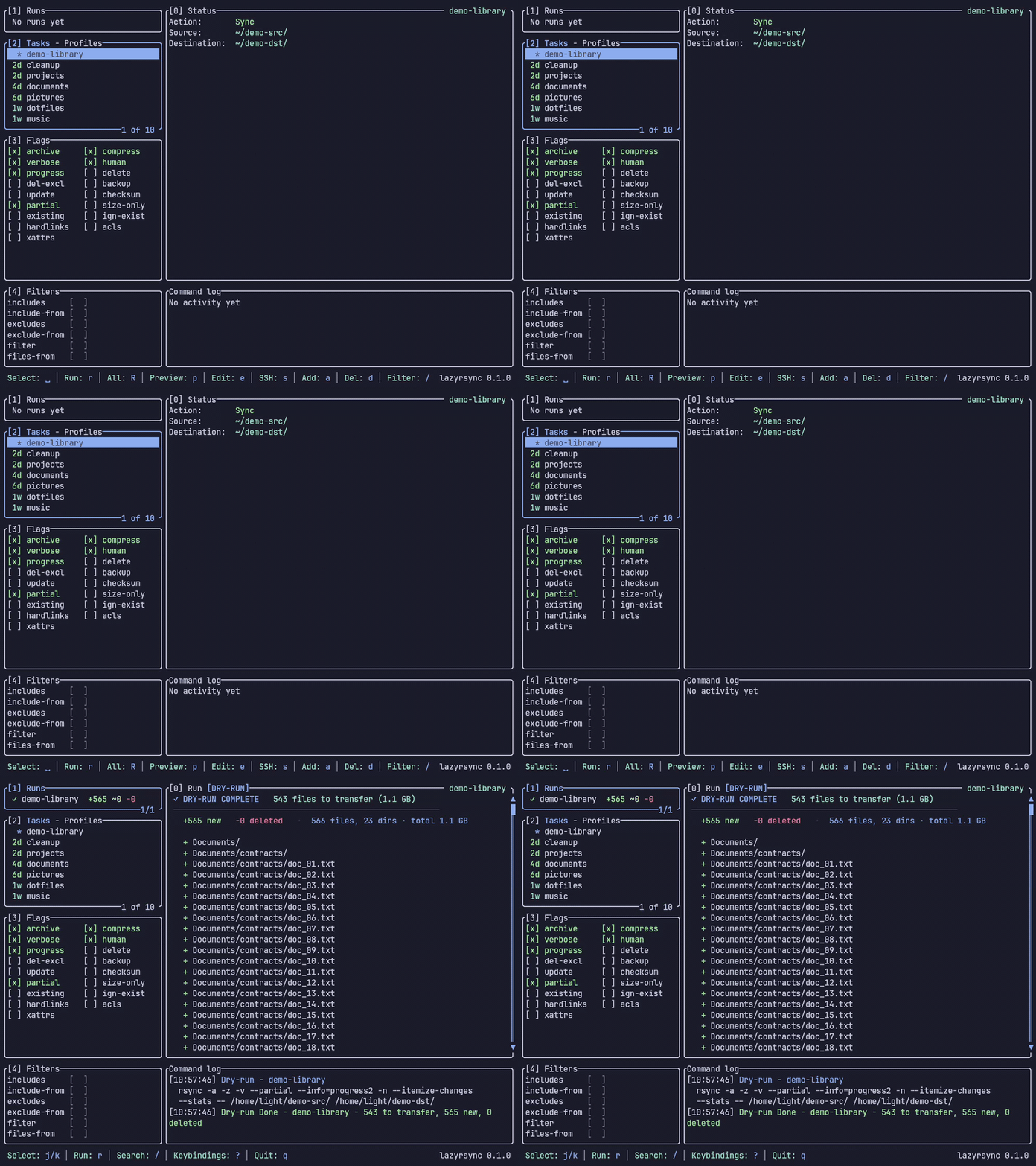
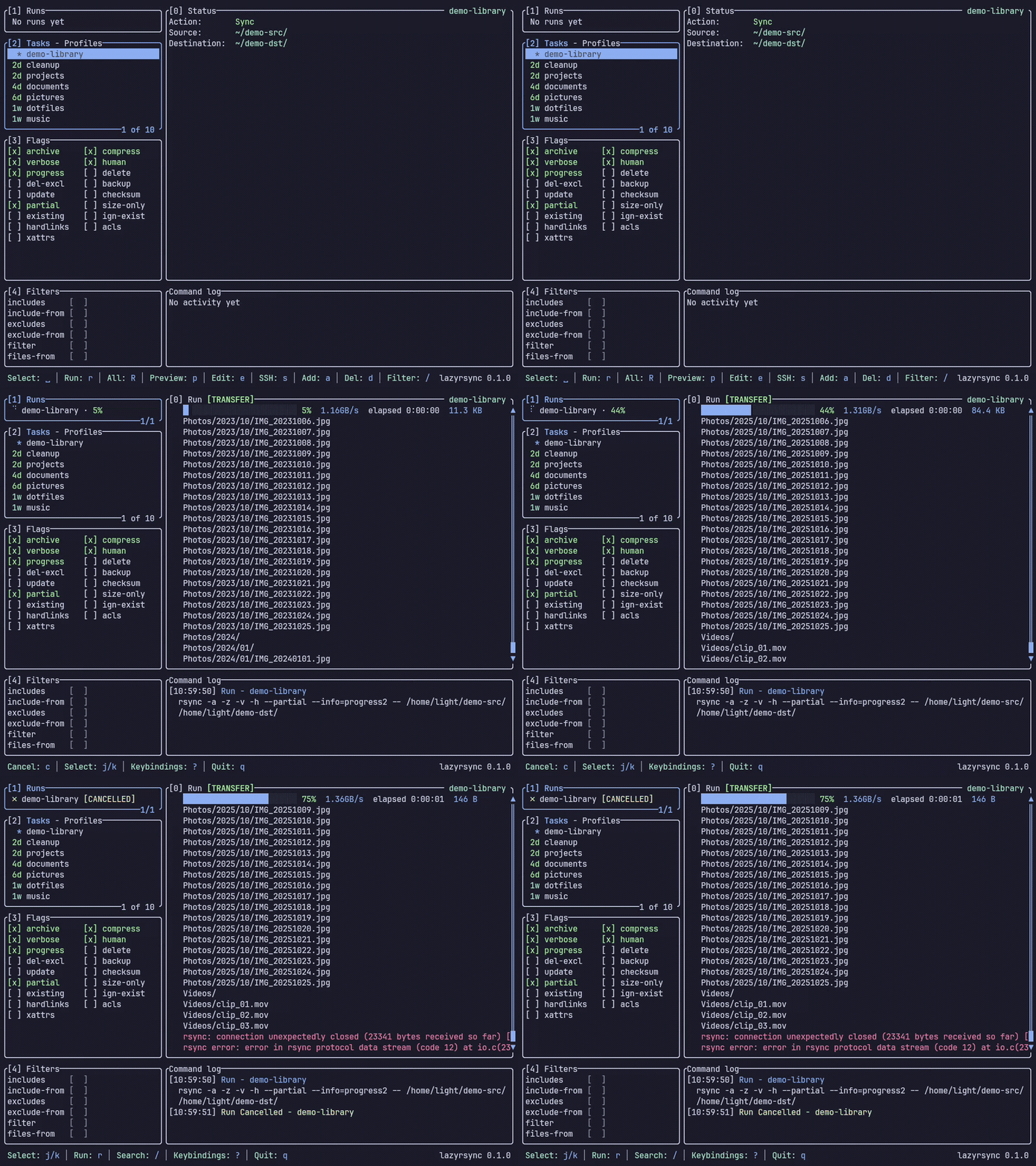
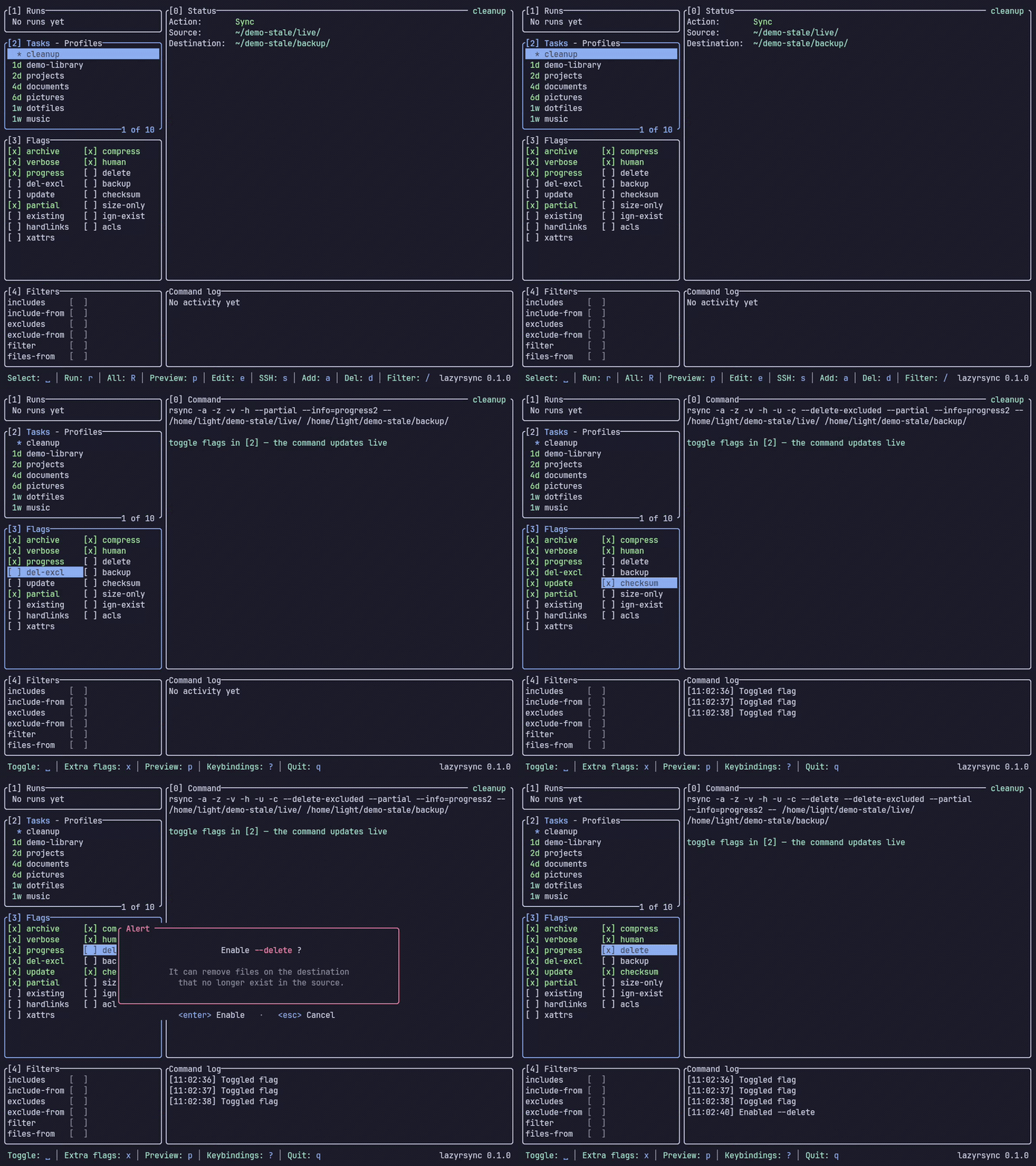
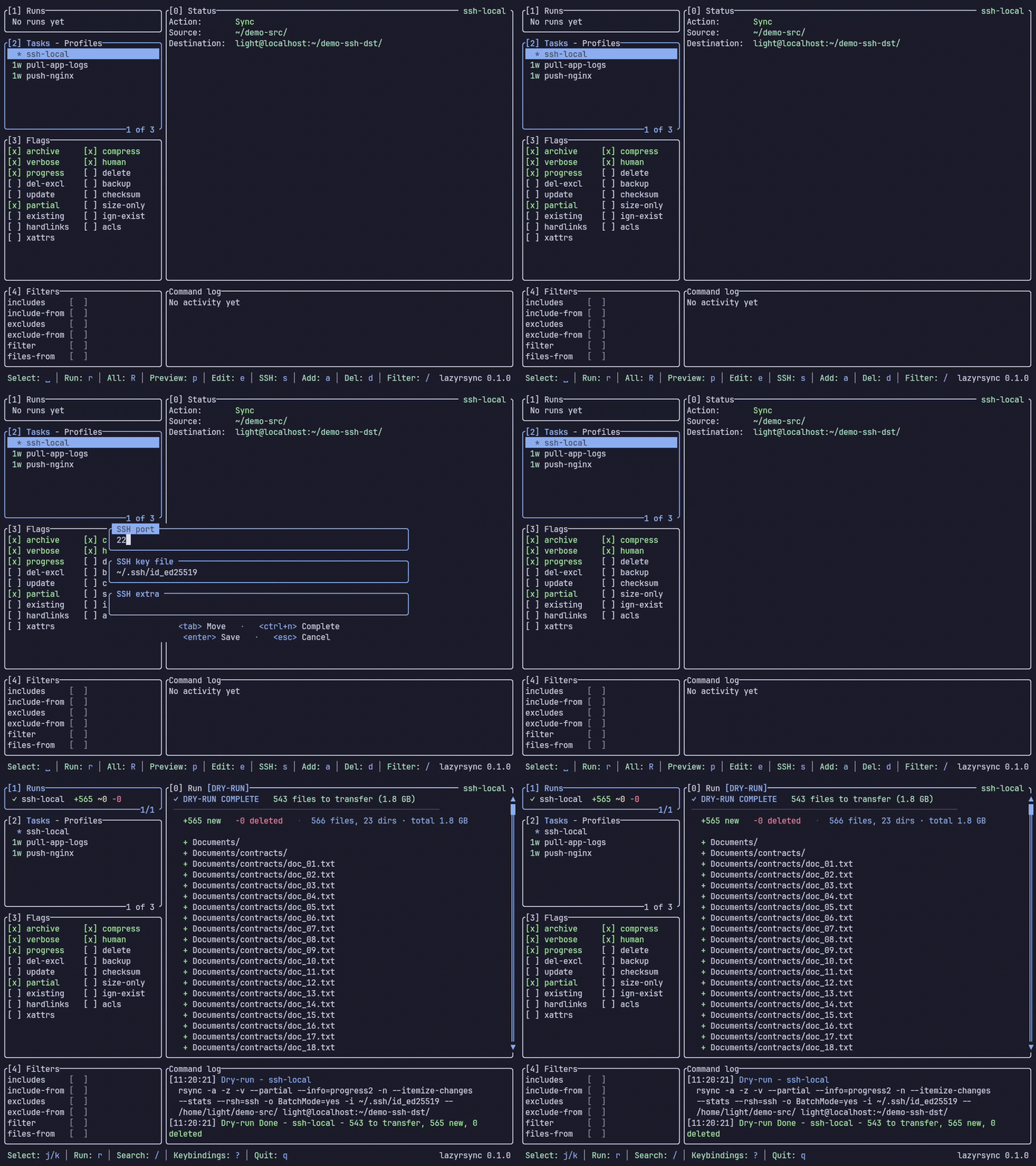
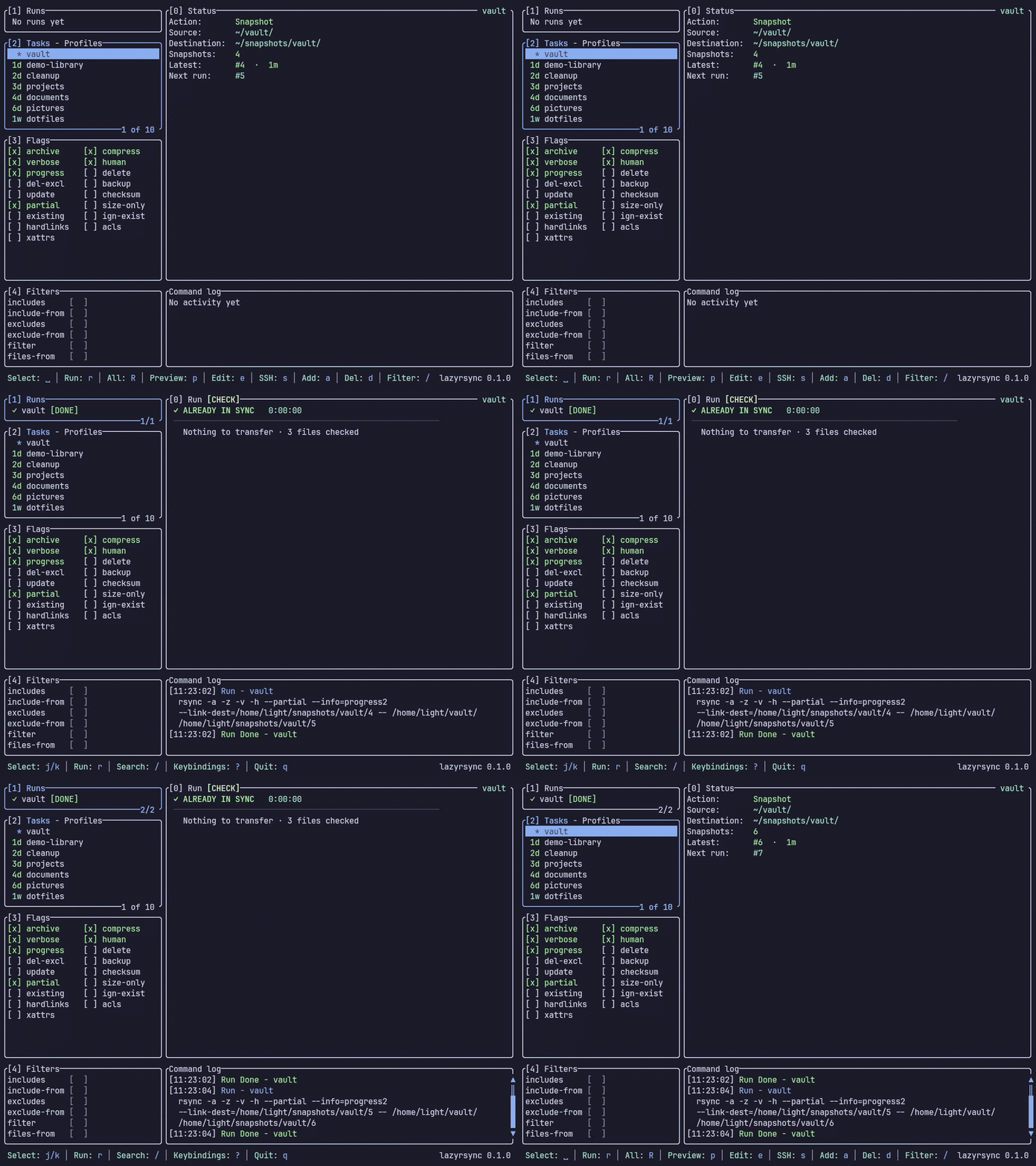
A terminal UI for `rsync` โ€” manage reusable profiles, preview a transfer as a structured diff **before** running it, and watch a live run with progress and cancellation. All from the terminal, including over SSH where a desktop GUI can't reach. ## Contents - [Why](#why) - [Features](#features) - [Install](#install) - [Quickstart](#quickstart) - [Headless & scheduling](#headless--scheduling) - [Keybindings](#keybindings) - [Configuration](#configuration) - [Contributing](#contributing) - [Acknowledgements](#acknowledgements) - [License](#license) ## Why `rsync` is the right tool for backups and syncs, but its flags are easy to get wrong and a single mistake can delete data. lazyrsync keeps you in the terminal while giving you the safety of a GUI: save your transfers once, see exactly what a run will change before it runs, and keep destructive flags behind a gate. ## Features ### Profiles & tasks Save a Source โ†’ Destination pair once and rerun it with a keystroke. ![Profiles & tasks](assets/profiles.gif) ### Dry-run preview Press `p` and watch the transfer resolve into a `+`/`~`/`-` diff with stats. Nothing is written until you say so. ![Dry-run preview](assets/preview.gif) ### Live run & cancel `r` runs it โ€” a progress bar fills with byte and file counts. Press `c` to stop mid-transfer. ![Live run & cancel](assets/run.gif) ### Flags & `--delete` gating Toggle rsync's options as checkboxes. Flip on `--delete` and it makes you confirm before anything can be removed. ![Flags & --delete gating](assets/flags.gif) ### Over SSH Put a `user@host:/path` on either side of a task and it runs over SSH โ€” remote source downloads, remote destination uploads. ![Over SSH](assets/ssh.gif) ### Snapshots Keep numbered, hardlinked versions with `--link-dest` โ€” each run writes the next directory (`1/`, `2/`, โ€ฆ). ![Snapshots](assets/snapshot.gif) ## Install **rsync 3.1 or later** must be on your `$PATH` โ€” the preview needs `--itemize-changes`, the progress bar needs `--info=progress2` (added in 3.1.0) and snapshots need `--link-dest`. The Homebrew and AUR packages pull rsync in; `cargo install` and `cargo binstall` do not. On macOS 15.4 and later `/usr/bin/rsync` is openrsync, which has no `--itemize-changes` and no `--info` at all, and accepts `--link-dest` without reliably hardlinking. `brew install rsync`, then either put it ahead of `/usr/bin` on `$PATH` or set `rsync_path` (see [Choosing which rsync runs](#choosing-which-rsync-runs)). lazyrsync warns at startup when the rsync it finds is older than 3.1. ```bash cargo install lazyrsync # crates.io cargo binstall lazyrsync # prebuilt release binary brew install lazyrsync # Homebrew yay -S lazyrsync # AUR (Arch) ``` Or build from source: ```bash cargo install --path . ``` ## Quickstart ```bash lazyrsync # launch the TUI ``` 1. Press `]` to switch to the **Profiles** sub-tab, then `a` to add a profile. 2. Back on **Tasks** (`]`), press `a` to add a task: an **ID**, an **Action** (Sync โ‡„ Snapshot with `โ†/โ†’`), a **Source**, and a **Destination**. Either path may be local or a remote `user@host:/path`. 3. Press `p` to **preview** (dry-run) โ€” you'll see the exact `+`/`~`/`-` changes and stats, and nothing is written. 4. Press `r` to **run** it. Watch progress in the **Runs** panel; press `c` to cancel. A task is just **Source โ†’ Destination**, exactly like the rsync command line โ€” no push/pull, no separate "remote" field. A trailing `/` on the Source copies its _contents_; without it, the folder itself is copied. ## Headless & scheduling Every profile you build in the TUI also runs without it, so the transfer you verified by hand is the exact one your scheduler runs at 2am. ```bash lazyrsync list # profiles, task ids, resolved rsync commands lazyrsync run backups # every task in the profile lazyrsync run backups/photos-3f2a # a single task, by id from `list` lazyrsync run backups -n # real dry run, changes nothing lazyrsync run backups --yes # required if any task uses --delete lazyrsync run backups -v # add rsync's own output for each task ``` Flags compose freely โ€” `lazyrsync run backups/photos-3f2a -n --yes` is valid. (`list` prints the command with the TUI's `--info=progress2` flag; a headless run drops it, since there's no progress bar to feed. A headless `-n` also drops `--stats`, which only the TUI's preview parser reads โ€” you get rsync's itemized diff without the fourteen-line statistics block after every task.) A real run passes rsync `-q`, so you get **one line per task** and nothing else โ€” rsync still prints its errors, which is the only chatter worth mailing. `-v`/`--verbose` opts back into the full log per task. A dry run is **never** quiet: the itemized diff is the whole point of `-n`, so `-n` shows it with or without `-v`. Why not just point cron at `rsync` directly? For a plain Sync you could. A **Snapshot** you can't: the numbered destination directory and the `--link-dest` chain are computed at run time by scanning the destination, so the command differs on every run โ€” `1/` links against nothing, `2/` links against `1/`, and so on. No static crontab line can express that. `lazyrsync run` resolves it fresh each time. ### Ordering Tasks run in the order `lazyrsync list` shows them, which is **not** the order they appear in `profiles.toml` โ€” the loader sorts by recency. Check `list` before you schedule anything that assumes an order. A failing task doesn't stop the rest. Every task gets its turn, then you get a summary and a non-zero exit code โ€” so one broken source leaves less data unprotected than aborting the batch would. ### Exit codes | Exit | Meaning | |------|---------| | 0 | every task succeeded โ€” or the profile has no tasks, which says so on stderr | | 1 | refused: a task uses `--delete` and `--yes` was absent; nothing ran | | 2 | no such profile or task id, or the config is missing or failed to load | | 3 | a task couldn't be started, or was killed by a signal | | _n_ | the first failing task's own rsync exit code | rsync's exit 24 โ€” source files vanished mid-transfer โ€” counts as success. rsync's own exit codes 1, 2 and 3 overlap these, so the status alone isn't always conclusive; read the message. A refusal always says `nothing ran` explicitly, and a task that never started ends its line with `exit 3`. ### Output streams Successful task lines and the success summary go to **stdout**. Failed task lines and the summary-when-something-failed go to **stderr**. So: ```bash lazyrsync run backups >/dev/null ``` is completely silent when every task succeeds, and produces output only when something needs your attention โ€” which is what makes cron's mail-on-output behaviour useful instead of noisy. Each task gets one styled line: a counter, `โœ”`/`โœ—`, the task's label, and then elapsed time if it worked or the exit code and the **task id** if it didn't โ€” the id being what you paste back into `lazyrsync run backups/` to retry just that one. Colour is dropped when the stream isn't a terminal, or when `NO_COLOR` is set โ€” cron mail and journald get plain text. A run where one task fails looks like this: ``` [1/3] โœ” Documents 1.5s rsync: [sender] change_dir "/mnt/camera" failed: No such file or directory (2) rsync error: some files/attrs were not transferred (see previous errors) (code 23) at main.c(1347) [sender=3.4.3] [2/3] โœ— Photos exit 23 photos-3f2a [3/3] โœ” Music 0.0s 3 tasks: 2 ok, 1 failed ``` and like this under `>/dev/null` โ€” which is exactly what cron mails you: ``` rsync: [sender] change_dir "/mnt/camera" failed: No such file or directory (2) rsync error: some files/attrs were not transferred (see previous errors) (code 23) at main.c(1347) [sender=3.4.3] [2/3] โœ— Photos exit 23 photos-3f2a 3 tasks: 2 ok, 1 failed ``` ### Dry runs are never refused `lazyrsync run backups -n` works on a profile containing `--delete` tasks without `--yes`, because `--dry-run` changes nothing and no destination directories are created. Preview first, then add `--yes` only to the command you actually schedule. The `--delete` gate reads a task's `--delete` and `--delete-excluded` toggles. It does **not** parse the Advanced raw-args field, so a `--delete` written by hand there gets past the gate โ€” the same caveat the TUI carries. ### crontab ```cron 30 2 * * * /usr/bin/lazyrsync run backups >/dev/null ``` Add `--yes` only if the profile contains a `--delete` task. ### systemd timer Prefer this over cron: `Persistent=true` catches up a run missed while the machine was off, and journald keeps the output. ```ini # ~/.config/systemd/user/lazyrsync-backups.service [Service] Type=oneshot ExecStart=/usr/bin/lazyrsync run backups # ~/.config/systemd/user/lazyrsync-backups.timer [Timer] OnCalendar=daily Persistent=true [Install] WantedBy=timers.target ``` ```bash systemctl --user enable --now lazyrsync-backups.timer journalctl --user -u lazyrsync-backups # what the last run did ``` ### Per-task schedules Because a task has its own address, each one can run on its own clock: ```cron 0 * * * * /usr/bin/lazyrsync run backups/docs-a91c >/dev/null 30 2 * * 0 /usr/bin/lazyrsync run backups/photos-3f2a >/dev/null ``` ### Three things that break scheduled runs - **Use the absolute path.** cron's `PATH` is minimal and won't find a binary in `~/.cargo/bin`. `command -v lazyrsync` tells you what to write. - **SSH keys must be passwordless.** Remote tasks run under `ssh -o BatchMode=yes`, so ssh fails fast instead of hanging on a prompt โ€” but there's no ssh-agent under cron. Use a passwordless key, or set the task's SSH key file. - **Don't expect a scheduled run to tell you what moved.** It prints one line per task and nothing else, so the exit code is the signal, and cron mails you on failure by itself. Add `-v` when you rerun by hand to debug. Dated destinations need no extra flags โ€” path fields expand `{now:%Y-%m-%d}`, `{utcnow:โ€ฆ}`, `{hostname}`, `{user}`, `$VAR` and `~` on every run, headless included. See [Dynamic paths](#dynamic-paths). ## Keybindings Press `?` in the app for the full, context-aware list. The essentials: | Key | Action | |-----|--------| | `1`โ€“`4`, `Tab` | Focus a rail panel (Runs / Tasks ยท Profiles / Flags / Filters) | | `]` | Toggle the Tasks / Profiles sub-tab | | `j`/`k`, `โ†‘`/`โ†“` | Move the cursor | | `space` / `enter` | Select the task (or toggle the highlighted flag) | | `a` | Add a task (or profile, on the Profiles sub-tab) | | `p` | Preview (dry-run) the selected task | | `r` / `R` | Run the selected task / run every task in the profile | | `e` / `s` / `i` / `x` | Edit Basics / SSH / Filters / Advanced | | `d` | Delete (confirm first) | | `V` | Visual range (multi-select), then `r`/`d` acts on the block | | `c` | Cancel the running job | | `/` | Filter the list, or search the run output | | `q` / `Esc` | Quit | ## Configuration Profiles and settings live under `$XDG_CONFIG_HOME/lazyrsync/` (typically `~/.config/lazyrsync/`): - `profiles.toml` โ€” your profiles and tasks - `settings.toml` โ€” preferences (theme, hints, confirmation prompts) If `XDG_CONFIG_HOME` is unset, the path falls back to `~/.config/lazyrsync/profiles.toml`. ### `profiles.toml` The TUI writes this file for you, but it is a supported hand-editable format โ€” useful for provisioning with Ansible or a dotfiles repo alongside [headless runs](#headless--scheduling). Every key below is shown with its default: ```toml [[profile]] name = "backups" # required description = "nightly" # "" [[profile.task]] label = "photos" # required source = "/home/me/Pictures/" # required dest = "/mnt/nas/pics/{now:%Y-%m-%d}/" id = "photos-3f2a" # auto-generated from label + source/dest action = "sync" # sync | snapshot [profile.task.flags] archive = true compress = true verbose = true human = true progress = true partial = true delete = false # destructive โ€” mirrors deletions to dest delete_excluded = false # destructive โ€” deletes excluded files at dest backup = false update = false checksum = false size_only = false existing = false ignore_existing = false bwlimit_kbps = 0 # 0 = unlimited hardlinks = false acls = false xattrs = false [profile.task.filters] excludes = [] includes = [] exclude_from = "" include_from = "" files_from = "" filter = [] [profile.task.ssh] port = 22 keyfile = "" extra = "" [profile.task.advanced] raw_args = "" ``` A profile holds one or more tasks; every section except `[[profile]]`, `label` and `source` may be omitted. lazyrsync also writes `created` and `last_files` bookkeeping keys, which you can leave out. `source` and `dest` accept the placeholders described under [Dynamic paths](#dynamic-paths) โ€” `{now:%Y-%m-%d}`, `{utcnow:โ€ฆ}`, `{hostname}`, `{user}`, `$VAR`, `${VAR}` and `~` โ€” resolved on every run. With `action = "snapshot"`, `dest` is the parent directory: lazyrsync picks the next numbered subdirectory and builds the `--link-dest` chain to the previous one at run time, so each run keeps a hardlinked version. See [Snapshots](#snapshots). **Unknown keys are an error, not a warning.** A misspelled key would otherwise be dropped in silence and its default used in place โ€” for `excludes` that means running with no exclusions at all, which on a `delete = true` task mirrors away everything you meant to skip. lazyrsync instead refuses to load the file and names the offending key: ```console $ lazyrsync run backups error: parsing /home/me/.config/lazyrsync/profiles.toml: TOML parse error at line 13, column 1 | 13 | exclude = ["node_modules/"] | ^^^^^^^ unknown field `exclude`, expected one of `excludes`, `includes`, `exclude_from`, `include_from`, `files_from`, `filter` ``` `settings.toml` is parsed under the same rule. One consequence for both: a file written by a newer lazyrsync may fail to load on an older binary rather than being partially ignored. ### Confirmation prompts Every prompt has its own opt-out in `settings.toml`, all `false` by default: | Key | Silences | |-----|----------| | `skip_delete_warning` | the alert shown when you enable a task's `delete` flag | | `skip_run_confirm` | the confirmation shown before a run starts | | `skip_remove_confirm` | the confirmation shown before removing a profile or task | `skip_run_confirm` removes the last prompt before a transfer, including for tasks that use `--delete`. ### Choosing which rsync runs By default lazyrsync runs the first `rsync` on your `$PATH`. Point `rsync_path` in `settings.toml` at a specific binary to override that: ```toml rsync_path = "/opt/homebrew/bin/rsync" ``` Useful on macOS 15.4+, where `/usr/bin/rsync` is openrsync and comes ahead of Homebrew's rsync on `$PATH` โ€” and in any launch context with a minimal `$PATH`, such as cron. The configured binary is what the resolved command shown in the TUI and `lazyrsync list` reports. ### Dynamic paths Source and destination paths can contain placeholders, resolved every time the task runs โ€” so one saved task can write to a new dated folder each night: | Placeholder | Expands to | |-------------|------------| | `{now}` | today's date, `2026-07-27` | | `{now:FORMAT}` | any [strftime](https://docs.rs/chrono/latest/chrono/format/strftime/index.html) format, e.g. `{now:%Y/%m/%d}` or `{now:%H%M}` | | `{utcnow}`, `{utcnow:FORMAT}` | the same in UTC | | `{hostname}` | this machine's hostname | | `{user}` | the current user | | `$VAR`, `${VAR}` | an environment variable | | `~` | your home directory | ```toml dest = "~/backups/{hostname}/{now:%Y-%m-%d}/" ``` Unknown placeholders, unset variables and a bare `%` are left exactly as typed, and the dry-run preview always shows the resolved path before anything runs. Braces and `$` are escaped by doubling them โ€” `{{now}}` is a folder literally named `{now}`, and `$$HOME` a folder named `$HOME`. ## Contributing See [CONTRIBUTING.md](CONTRIBUTING.md) for the build/test/lint commands, the module map, and the code + UI conventions. ## Acknowledgements - [lazygit](https://github.com/jesseduffield/lazygit) โ€” the TUI whose keyboard-driven, panel-based workflow inspired this one. - [ratatui](https://ratatui.rs) โ€” the Rust TUI library lazyrsync is built on. ## License [MIT](LICENSE).