💤 forgit
Utility tool for using git interactively. Powered by junegunn/fzf.






This tool is designed to help you use git more efficiently.
It's **lightweight** and **easy to use**.
📝 Features
------------
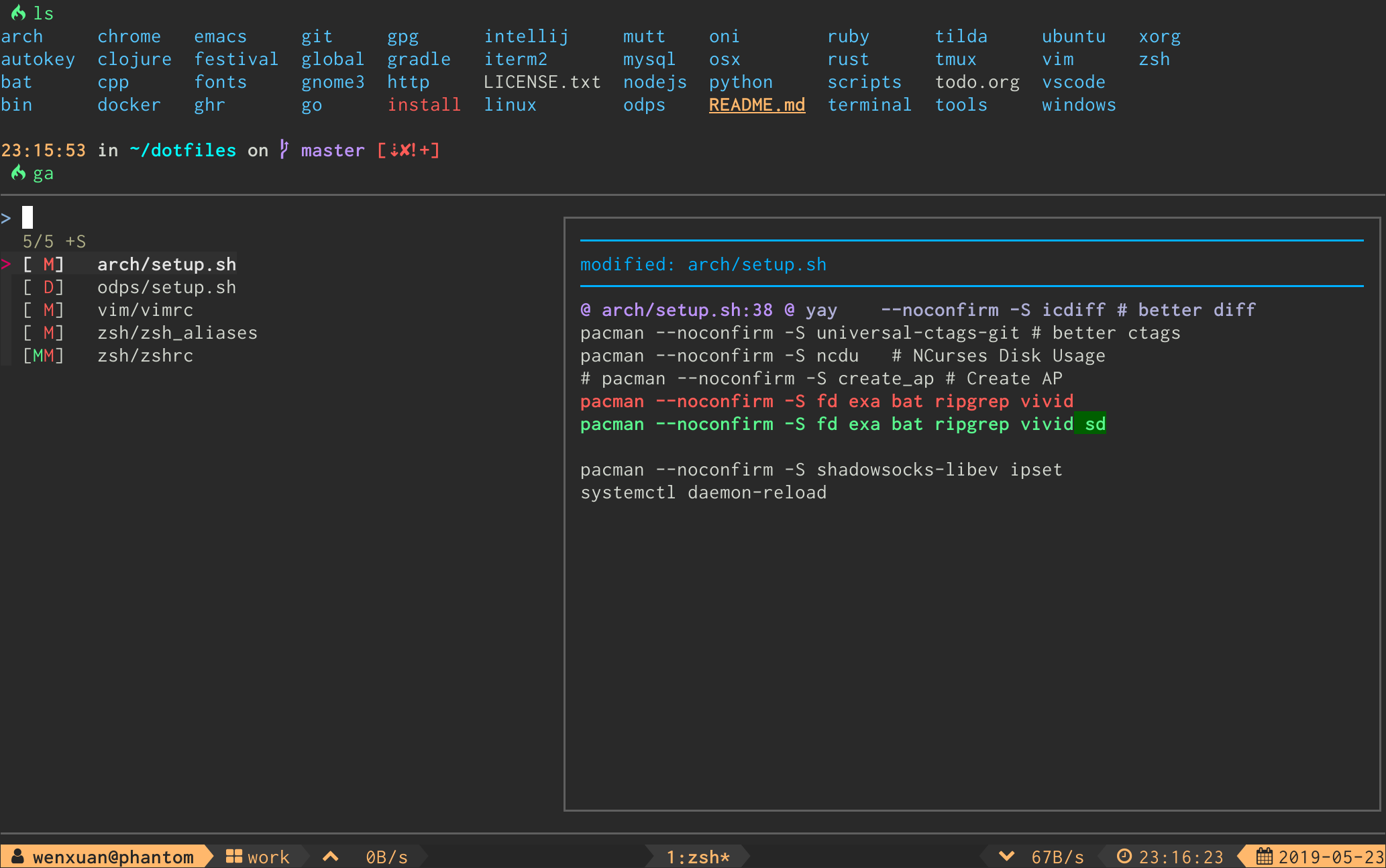
**`ga`** - Interactive `git add` selector:
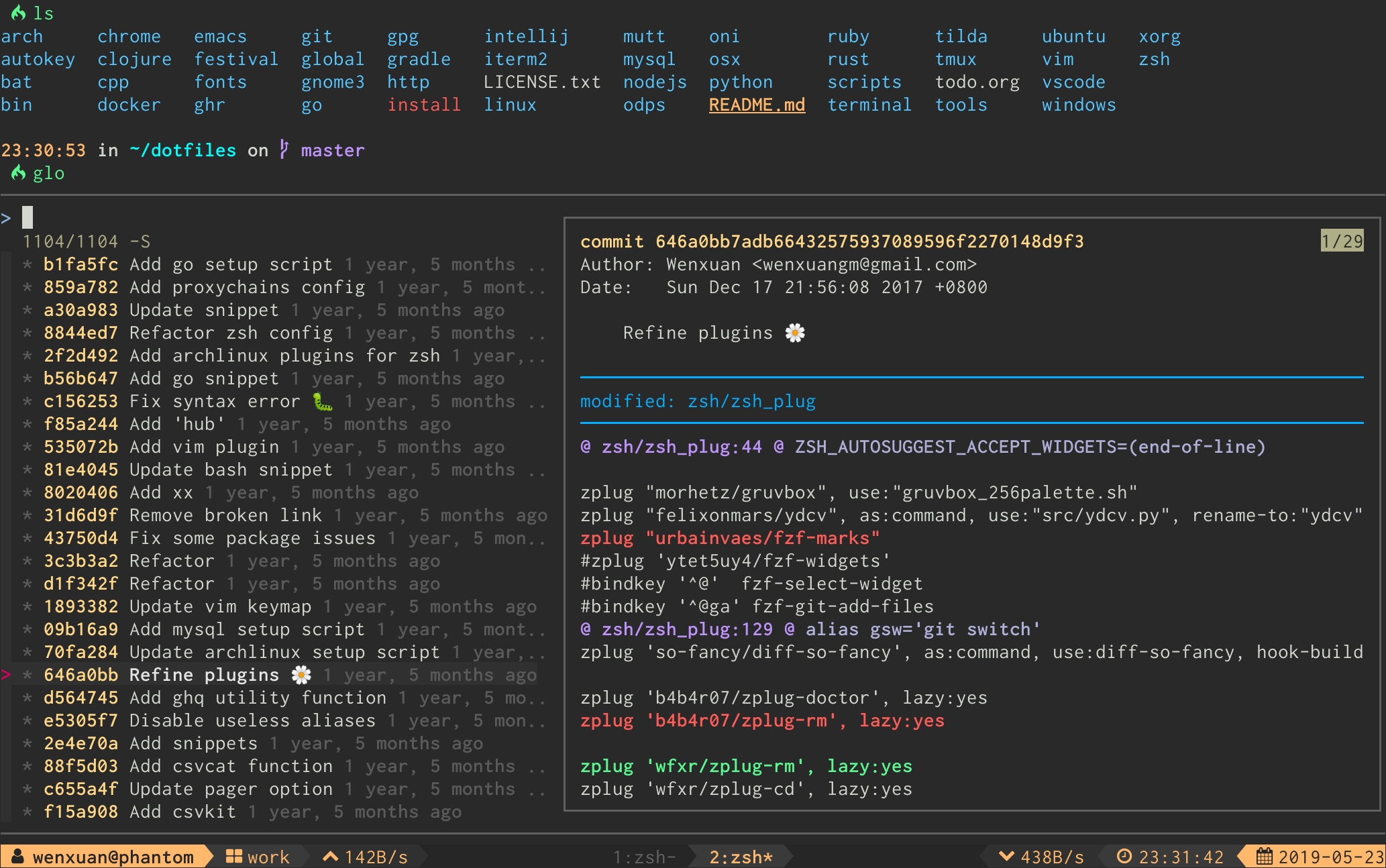
**`glo`** - Interactive `git log` viewer:
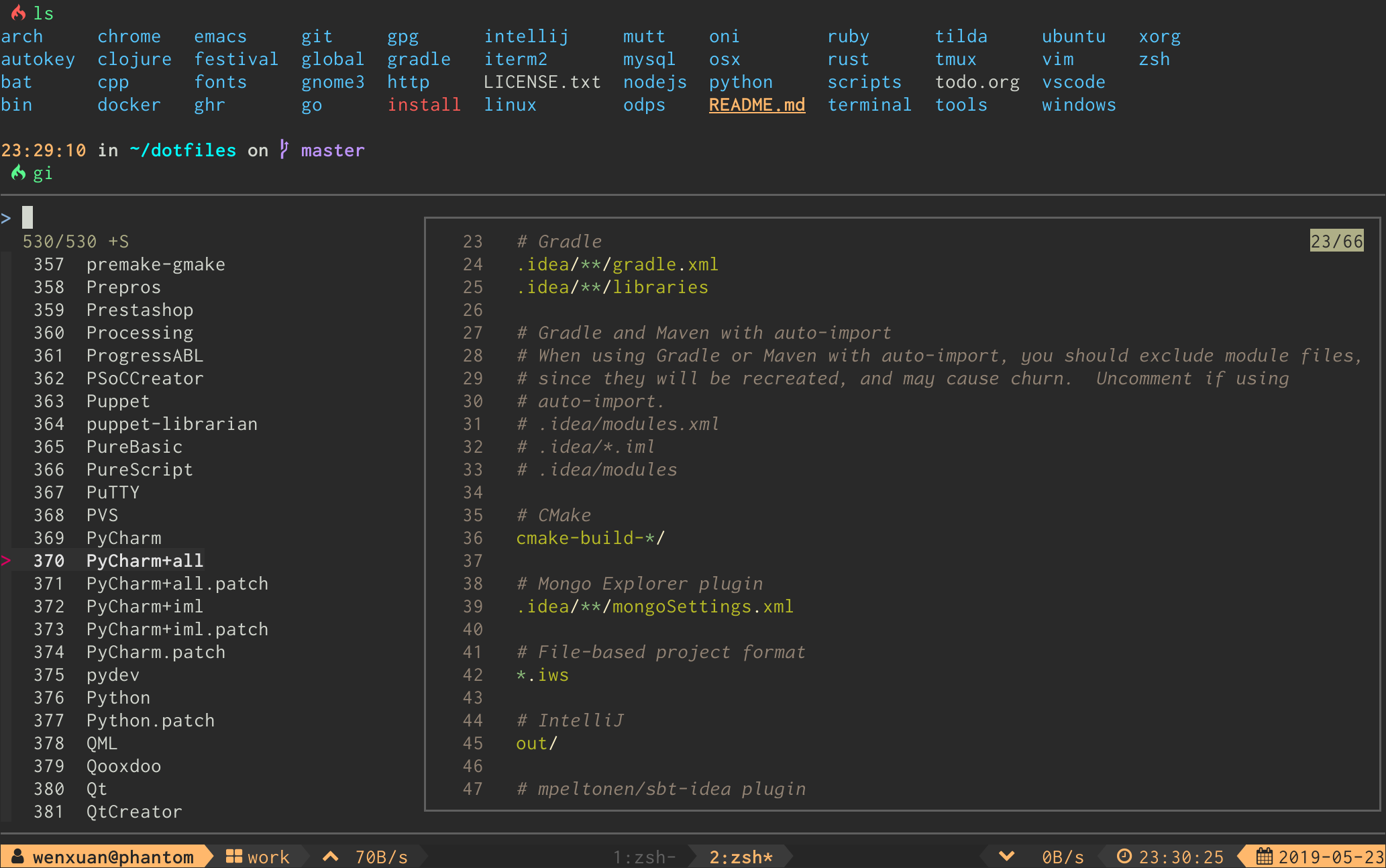
**`gi`** - Interactive `.gitignore` generator:
### Full Command List
| Command | Description |
|----------|-------------|
| `ga` | Interactive `git add` selector |
| `gd` | Interactive `git diff` viewer |
| `gi` | Interactive `.gitignore` generator |
| `glo` | Interactive `git log` viewer |
| `gat` | Interactive `.gitattributes` generator |
| `gso` | Interactive `git show` viewer |
| `grh` | Interactive `git reset HEAD ` selector |
| `grs` | Interactive `git restore ` selector |
| `gcf` | Interactive `git checkout ` selector |
| `gcff` | Interactive `git checkout from ` selector |
| `gcb` | Interactive `git checkout ` selector |
| `gsw` | Interactive `git switch ` selector |
| `gbd` | Interactive `git branch -D ` selector |
| `gct` | Interactive `git checkout ` selector |
| `gco` | Interactive `git checkout ` selector |
| `grc` | Interactive `git revert ` selector |
| `gss` | Interactive `git stash` viewer |
| `gsp` | Interactive `git stash push` selector |
| `gcp` | Interactive `git cherry-pick` selector |
| `grb` | Interactive `git rebase -i` selector |
| `grl` | Interactive `git reflog` viewer |
| `gbl` | Interactive `git blame` selector |
| `gfu` | Interactive `git commit --fixup && git rebase -i --autosquash` selector |
| `gsq` | Interactive `git commit --squash && git rebase -i --autosquash` selector |
| `grw` | Interactive `git commit --fixup=reword && git rebase -i --autosquash` selector |
| `gclean` | Interactive `git clean` selector |
| `gwt` | Interactive `git worktree` selector |
| `gwa` | Interactive `git worktree add` selector |
| `gwd` | Interactive `git worktree remove` selector |
📥 Installation
----------------
### Requirements
- [`fzf`](https://github.com/junegunn/fzf) version `0.60.0` or higher
If your OS package manager bundles an older version of `fzf`, you might install it using [`fzf`'s own install script](https://github.com/junegunn/fzf?tab=readme-ov-file#using-git).
### Shell Package Managers
``` zsh
# for zplug
zplug 'wfxr/forgit'
# for zgen
zgen load 'wfxr/forgit'
# for antigen
antigen bundle 'wfxr/forgit'
# for fisher (requires fisher v4.4.3 or higher)
fisher install wfxr/forgit
# for omf
omf install https://github.com/wfxr/forgit
# for zinit
zinit load wfxr/forgit
# for oh-my-zsh
git clone https://github.com/wfxr/forgit.git ${ZSH_CUSTOM:-~/.oh-my-zsh/custom}/plugins/forgit
# for sheldon.cli
[plugins.forgit]
github = "wfxr/forgit"
rev = "26.01.0" # check https://github.com/wfxr/forgit/releases for latest version
use = ["forgit.plugin.zsh"]
apply = ["source"]
# manually
# Clone the repository and source it in your shell's rc file or put bin/git-forgit into your $PATH
```
### Homebrew
To install using brew
```sh
brew install forgit
```
Then add the following to your shell's config file:
```sh
# Fish:
# ~/.config/fish/config.fish:
[ -f $HOMEBREW_PREFIX/share/forgit/forgit.plugin.fish ]; and source $HOMEBREW_PREFIX/share/forgit/forgit.plugin.fish
# Zsh:
# ~/.zshrc:
[ -f $HOMEBREW_PREFIX/share/forgit/forgit.plugin.zsh ] && source $HOMEBREW_PREFIX/share/forgit/forgit.plugin.zsh
# Bash:
# ~/.bashrc:
[ -f $HOMEBREW_PREFIX/share/forgit/forgit.plugin.sh ] && source $HOMEBREW_PREFIX/share/forgit/forgit.plugin.sh
```
### Arch User Repository
[AUR](https://wiki.archlinux.org/title/Arch_User_Repository) packages, maintained by the developers of forgit,
are available. Install the [forgit](https://aur.archlinux.org/packages/forgit) package for the latest release or
[forgit-git](https://aur.archlinux.org/packages/forgit-git) to stay up to date with the latest commits from the default
branch of this repository.
### Completions
Forgit offers completions for all supported shells. Completions are automatically configured when installing forgit
through Homebrew or the AUR. All other installation methods mentioned above require manual setup for completions.
The necessary steps depend on the shell you use.
#### Bash
- Put [`completions/git-forgit.bash`](https://github.com/wfxr/forgit/blob/main/completions/git-forgit.bash) in
`~/.local/share/bash-completion/completions` to have bash tab completion for `git forgit` and configured git aliases.
- Source [`completions/git-forgit.bash`](https://github.com/wfxr/forgit/blob/main/completions/git-forgit.bash) explicitly to have
bash tab completion for forgit shell functions and aliases (e.g., `gsw ` completes branches).
#### Fish
- Put [`completions/git-forgit.fish`](https://github.com/wfxr/forgit/blob/main/completions/git-forgit.fish) in
`~/.config/fish/completions/` to have fish tab completion for `git forgit` and configured git aliases, as well as shell
command aliases, such as `ga`.
#### Zsh
- Put [`completions/_git-forgit`](completions/_git-forgit) in a directory in your `$fpath`
(e.g., `/usr/share/zsh/site-functions`) to have zsh tab completion for `git forgit` and configured git aliases, as well
as shell command aliases, such as `forgit::add` and `ga`.
If you're having issues after updating, and commands such as `forgit::add` or aliases `ga` aren't working, remove your
completions cache and restart your shell.
```zsh
> rm ~/.zcompdump
> zsh
```
🚀 Usage
---------
### Shell Aliases
You can change the default aliases by defining these variables below before sourcing the forgit shell plugin.
(To disable all aliases, Set the `FORGIT_NO_ALIASES` flag.)
``` bash
forgit_log=glo
forgit_reflog=grl
forgit_diff=gd
forgit_show=gso
forgit_add=ga
forgit_reset_head=grh
forgit_restore=grs
forgit_ignore=gi
forgit_attributes=gat
forgit_checkout_file=gcf
forgit_checkout_file_from_commit=gcff
forgit_checkout_branch=gcb
forgit_switch_branch=gsw
forgit_branch_delete=gbd
forgit_checkout_tag=gct
forgit_checkout_commit=gco
forgit_revert_commit=grc
forgit_clean=gclean
forgit_stash_show=gss
forgit_stash_push=gsp
forgit_cherry_pick=gcp
forgit_rebase=grb
forgit_blame=gbl
forgit_fixup=gfu
forgit_squash=gsq
forgit_reword=grw
forgit_worktree=gwt
forgit_worktree_add=gwa
forgit_worktree_delete=gwd
```
### Git Integration
You can use forgit as a sub-command of git by making `git-forgit` available in `$PATH`:
```sh
# after `forgit` was loaded
PATH="$PATH:$FORGIT_INSTALL_DIR/bin"
```
_Some plugin managers can help do this._
Then, any forgit command will be a sub-command of git:
```cmd
git forgit log
git forgit add
git forgit diff
```
Optionally you can add [aliases in git](https://git-scm.com/book/en/v2/Git-Basics-Git-Aliases):
```sh
git config --global alias.cf 'forgit checkout_file'
```
And use forgit functions via a git alias:
```sh
git cf
```
⚙ Configuration
-----------------
Options can be set via environment variables. They have to be **exported** in
order to be recognized by `forgit`.
For instance, if you want to order branches in `gcb` by the last committed date you could:
```shell
export FORGIT_CHECKOUT_BRANCH_BRANCH_GIT_OPTS='--sort=-committerdate'
```
### Per-command Options
Each forgit command can be customized with dedicated environment variables for git arguments and fzf options:
| Command | Git Options | FZF Options |
|----------|-------------|-------------|
| `ga` | `FORGIT_ADD_GIT_OPTS` | `FORGIT_ADD_FZF_OPTS` |
| `glo` | `FORGIT_LOG_GIT_OPTS` | `FORGIT_LOG_FZF_OPTS` |
| `grl` | `FORGIT_REFLOG_GIT_OPTS` | `FORGIT_REFLOG_FZF_OPTS` |
| `gi` | | `FORGIT_IGNORE_FZF_OPTS` |
| `gat` | | `FORGIT_ATTRIBUTES_FZF_OPTS` |
| `gd` | `FORGIT_DIFF_GIT_OPTS` | `FORGIT_DIFF_FZF_OPTS` |
| `gso` | `FORGIT_SHOW_GIT_OPTS` | `FORGIT_SHOW_FZF_OPTS` |
| `grh` | `FORGIT_RESET_HEAD_GIT_OPTS` | `FORGIT_RESET_HEAD_FZF_OPTS` |
| `grs` | `FORGIT_RESTORE_GIT_OPTS` | `FORGIT_RESTORE_FZF_OPTS` |
| `gcf` | `FORGIT_CHECKOUT_FILE_GIT_OPTS` | `FORGIT_CHECKOUT_FILE_FZF_OPTS` |
| `gcff` | `FORGIT_SHOW_GIT_OPTS`
`FORGIT_CHECKOUT_FILE_GIT_OPTS` | `FORGIT_CHECKOUT_FILE_FROM_COMMIT_LOG_FZF_OPTS`
`FORGIT_CHECKOUT_FILE_FROM_COMMIT_SHOW_FZF_OPTS` |
| `gcb` | `FORGIT_CHECKOUT_BRANCH_GIT_OPTS`
`FORGIT_CHECKOUT_BRANCH_BRANCH_GIT_OPTS` | `FORGIT_CHECKOUT_BRANCH_FZF_OPTS` |
| `gsw` | `FORGIT_SWITCH_BRANCH_GIT_OPTS` | `FORGIT_SWITCH_BRANCH_FZF_OPTS` |
| `gbd` | `FORGIT_BRANCH_DELETE_GIT_OPTS` | `FORGIT_BRANCH_DELETE_FZF_OPTS` |
| `gct` | `FORGIT_CHECKOUT_TAG_GIT_OPTS` | `FORGIT_CHECKOUT_TAG_FZF_OPTS` |
| `gco` | `FORGIT_CHECKOUT_COMMIT_GIT_OPTS` | `FORGIT_CHECKOUT_COMMIT_FZF_OPTS` |
| `grc` | `FORGIT_REVERT_COMMIT_GIT_OPTS` | `FORGIT_REVERT_COMMIT_FZF_OPTS` |
| `gss` | `FORGIT_STASH_SHOW_GIT_OPTS` | `FORGIT_STASH_FZF_OPTS` |
| `gsp` | `FORGIT_STASH_PUSH_GIT_OPTS` | `FORGIT_STASH_PUSH_FZF_OPTS` |
| `gclean` | `FORGIT_CLEAN_GIT_OPTS` | `FORGIT_CLEAN_FZF_OPTS` |
| `gcp` | `FORGIT_CHERRY_PICK_GIT_OPTS` | `FORGIT_CHERRY_PICK_FZF_OPTS` |
| `grb` | `FORGIT_REBASE_GIT_OPTS` | `FORGIT_REBASE_FZF_OPTS` |
| `gbl` | `FORGIT_BLAME_GIT_OPTS` | `FORGIT_BLAME_FZF_OPTS` |
| `gfu` | `FORGIT_FIXUP_GIT_OPTS` | `FORGIT_FIXUP_FZF_OPTS` |
| `gsq` | `FORGIT_SQUASH_GIT_OPTS` | `FORGIT_SQUASH_FZF_OPTS` |
| `grw` | `FORGIT_REWORD_GIT_OPTS` | `FORGIT_REWORD_FZF_OPTS` |
| `gwt` | | `FORGIT_WORKTREE_FZF_OPTS` |
| `gwa` | `FORGIT_WORKTREE_ADD_BRANCH_GIT_OPTS` | `FORGIT_WORKTREE_ADD_FZF_OPTS` |
| `gwd` | `FORGIT_WORKTREE_DELETE_GIT_OPTS` | `FORGIT_WORKTREE_DELETE_FZF_OPTS` |
### Pagers
Forgit will use the default configured pager from git (`core.pager`,
`pager.show`, `pager.diff`) but can be altered with the following environment
variables:
| Pager | Fallbacks to |
|---------------------------|--------------------------------------------------|
| `FORGIT_PAGER` | `git config core.pager` _or_ `cat` |
| `FORGIT_SHOW_PAGER` | `git config pager.show` _or_ `$FORGIT_PAGER` |
| `FORGIT_DIFF_PAGER` | `git config pager.diff` _or_ `$FORGIT_PAGER` |
| `FORGIT_BLAME_PAGER` | `git config pager.blame` _or_ `$FORGIT_PAGER` |
| `FORGIT_IGNORE_PAGER` | `bat -l gitignore --color always` _or_ `cat` |
| `FORGIT_ATTRIBUTES_PAGER` | `bat -l gitattributes --color always` _or_ `cat` |
| `FORGIT_PREVIEW_PAGER` | Normal pager resolution* |
* If your pager is a TUI program (e.g., `diffnav`, `tig`), fzf preview panes will be blank because they run
without a TTY. Set `FORGIT_PREVIEW_PAGER` to a non-interactive pager (e.g., `delta`) to fix this. When set, it
overrides all other `FORGIT_*_PAGER` settings in fzf preview context.
### FZF Options
You can add default fzf options for `forgit`, including keybindings, layout, etc.
(No need to repeat the options already defined in `FZF_DEFAULT_OPTS`)
``` bash
export FORGIT_FZF_DEFAULT_OPTS="
--exact
--border
--cycle
--reverse
--height '80%'
"
```
Per-command fzf options (`FORGIT_*_FZF_OPTS`) are listed in the [per-command options table](#per-command-options) above.
Complete loading order of fzf options is:
1. `FZF_DEFAULT_OPTS` (fzf global)
2. `FORGIT_FZF_DEFAULT_OPTS` (forgit global)
3. `FORGIT_CMD_FZF_OPTS` (command specific)
Examples:
- `ctrl-d` to drop the selected stash but do not quit fzf (`gss` specific).
```sh
export FORGIT_STASH_FZF_OPTS='
--bind="ctrl-d:reload(git stash drop $(cut -d: -f1 <<<{}) 1>/dev/null && git stash list)"
'
```
- `ctrl-e` to view the logs in a vim buffer (`glo` specific).
```sh
export FORGIT_LOG_FZF_OPTS='
--bind="ctrl-e:execute(echo {} |grep -Eo [a-f0-9]+ |head -1 |xargs git show |vim -)"
'
```
### Other Options
| Option | Description | Default |
|--------------------------------|--------------------------------------------------------------------------------------------------------------------------------|-----------------------------------------------|
| `FORGIT_LOG_FORMAT` | git log format | `%C(auto)%h%d %s %C(black)%C(bold)%cr%Creset` |
| `FORGIT_GLO_FORMAT` | override log format for `glo` command | `$FORGIT_LOG_FORMAT` |
| `FORGIT_LOG_GRAPH_ENABLE` | enable log graph display | `true` |
| `FORGIT_COPY_CMD` | command for copying to clipboard | `pbcopy` |
| `FORGIT_PREVIEW_CONTEXT` | lines of diff context in preview mode | 3 |
| `FORGIT_FULLSCREEN_CONTEXT` | lines of diff context in full-screen mode | 10 |
| `FORGIT_DIR_VIEW` | command used to preview directories | `tree` if available, otherwise `find` |
| `FORGIT_CLEAN_LIST_FILES_OPTS` | arguments passed to `git ls-files` together with `--others` to determine which files are shown when invoking `forgit clean` | |
| `FORGIT_WORKTREE_ADD_DIR` | directory where new worktrees are created | `/.wt` |
⌨ Keybindings
---------------
| Key | Action |
| :-------------------------------------------: | ------------------------------------------- |
| Enter | Confirm |
| Tab | Toggle mark and move down |
| Shift - Tab | Toggle mark and move up |
| ? | Toggle preview window |
| Alt - W | Toggle preview wrap |
| Ctrl - S | Toggle sort |
| Ctrl - R | Toggle selection |
| Ctrl - Y | Copy commit hash/stash ID/worktree path1 |
| Ctrl - K / P | Selection move up |
| Ctrl - J / N | Selection move down |
| Alt - K / P | Preview move up |
| Alt - J / N | Preview move down |
| Alt - E | Open file in default editor (when possible) |
| Alt - T | Show commit message (when viewing a commit) |
| Alt - L | Toggle worktree lock/unlock2 |
1 Available when the selection contains a commit hash, stash ID, or worktree path.
2 Available in the worktree browser (`gwt`) and worktree delete selector (`gwd`).
For Linux users `FORGIT_COPY_CMD` should be set to make copy work. Example: `FORGIT_COPY_CMD='xclip -selection clipboard'`.
📦 Optional dependencies
-------------------------
- [`delta`](https://github.com/dandavison/delta) / [`diff-so-fancy`](https://github.com/so-fancy/diff-so-fancy): For better human-readable diffs.
- [`bat`](https://github.com/sharkdp/bat): Syntax highlighting for `gitignore` and `gitattributes`.
- [`emoji-cli`](https://github.com/wfxr/emoji-cli): Emoji support for `git log`.
- [`tree`](https://gitlab.com/OldManProgrammer/unix-tree): Directory tree view for `gclean`.
💡 Tips
--------
- Most of the commands accept optional arguments (e.g., `glo develop`, `glo f738479..188a849b -- main.go`, `gco main`).
- `gd` supports specifying revision (e.g., `gd HEAD~`, `gd v1.0 README.md`).
- Call `gi` or `gat` with arguments to get the wanted `.gitignore`/`.gitattributes` contents directly (e.g., `gi cmake c++`).
⚒️ Contributing
-----------
Contributions are welcome.
For the repository-specific contribution workflow, local validation steps, and commit message guidelines, see [CONTRIBUTING.md](CONTRIBUTING.md).
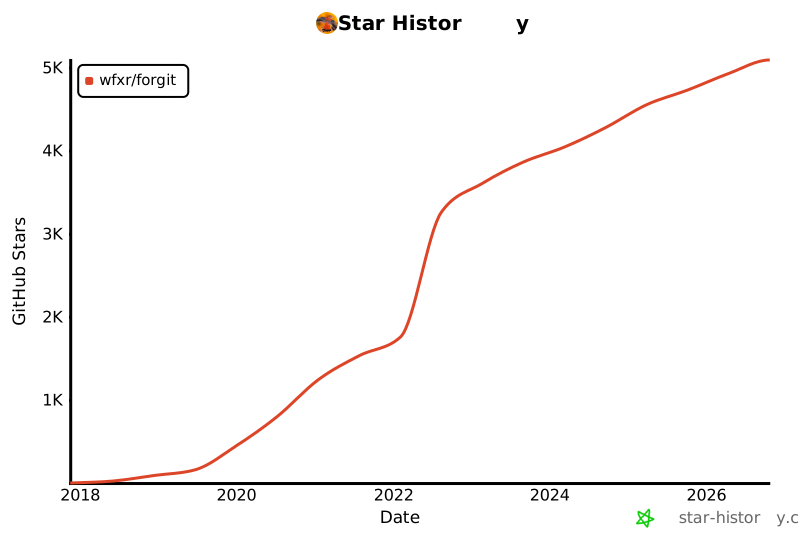
⭐ Star History
----------------
[](https://www.star-history.com/?repos=wfxr%2Fforgit&type=date&legend=top-left)
📃 License
-----------
[MIT](https://wfxr.mit-license.org/2017) (c) Wenxuan Zhang