---
status: live
type: reference
module: dsh-round-table
last_updated: 2026-10-06
---
# 圆桌骑士完整使用指南 / Full usage guide
> 当前源码1.0.0仅调整版本编号,功能沿用已验收0.1.18;1.0.0尚未公开发布,下方安装和截图仍对应0.1.18。 / Source 1.0.0 changes only the version number; accepted behavior, published installation and screenshots remain 0.1.18. Version 1.0.0 is not publicly released.
本文保留0.1.18原双语README的完整操作、状态、恢复、安装及使用边界说明。新用户从[中文首页](../README.md)或[English README](../README.en.md)开始;本页供需要详细配置和排查时阅读。新自由步骤与旧图兼容功能分别说明,截图示例不代表真实Agent执行。
This page preserves the detailed bilingual instructions from the original 0.1.18 README. Start with the short README, and return here for configuration, recovery and limits. Legacy graph controls are distinguished from new free steps; interface examples do not prove real Agent execution.
## 中文详细指南
[返回简明首页](../README.md) | [English guide](#english-guide)
DeepSeek Harness 圆桌会议插件。让已有 Agent 窗口围绕同一个目标讨论,由你选择资料、安排处理顺序、验收结果,再交给独立秘书整理纪要。成员继续使用原窗口和上下文;可从宿主已声明的 Agent 预设新建骑士,无需安装 dsh-flat-teams。
### 安装
圆桌骑士 **0.1.18** 面向官方 Windows 桌面版 **DeepSeek Harness 0.2.0-rc.2** 的 desktop profile。已通过124套常规回归、225项浏览器检查及正式桌面验收。旧 Web rc.6不受本版支持。桌面版本会校验并清理已确认删除的专属秘书全部支持日志代际,避免升级留下的旧日志令秘书重新出现。
`dsh-round-table@0.1.18` 已发布到 [npm](https://www.npmjs.com/package/dsh-round-table)。推荐使用下述桌面插件安装方式;也可从 [v0.1.18 Release](https://github.com/whateverboy2333/dsh-round-table/releases/tag/v0.1.18) 下载 `.tgz`,通过本地 `file:` 地址安装。正式桌面与 Web 宿主不要同时读写同一 DSH_HOME。使用升级前完整数据备份才能回退会话存储格式。
使用与本插件匹配的 DSH 环境:`@deepseek-ai/cordis` **4.0.4**,相关 `@deepseek-ai/dsh-*` 组件 **0.2.0-rc.2**。插件拒绝未知运行时版本;升级 DSH 后应重新验证兼容性。
推荐在桌面版「插件」页选择添加插件,填入 `dsh-round-table@0.1.18`,检查安装目标为 **desktop**。也可使用本地安装包地址,例如 `file:C:/Downloads/dsh-round-table-0.1.18.tgz`。安装完成后从应用菜单或托盘选择**退出**,确认应用已完全结束,再重新打开。仅关闭窗口可能仍在托盘运行,不能代替重启。打开侧栏「圆桌」核对版本与原会议。
如果需要命令行,请使用桌面发行版自带的 CLI。先完全退出桌面版;不要直接照抄 PATH 中的 `dsh`,它可能来自 Hermes 或旧 Web 安装。以下为 Windows 默认安装路径,若安装到其他位置请按实际位置调整:
```powershell
$desktopCli = Join-Path $env:LOCALAPPDATA 'Programs/DeepSeek Harness/resources/runtime/cli/bin/dsh.cmd'
& $desktopCli --version # 本版要求 0.2.0-rc.2
& $desktopCli plugin --profile desktop add 'dsh-round-table@0.1.18'
# 重新打开 DeepSeek Harness 桌面版,不启动 web profile
```
本仓库根目录就是插件源码。内部开发工作区对应 `plugins/dsh-round-table-desktop`;公开仓库保留源码、构建产物及必要构建/包检查脚本,内部验收脚本与业务数据不公开。使用 npm 锁文件,构建并打包后按上方桌面 GUI 安装。
```powershell
cd C:/path/to/dsh-round-table
npm ci
npm run typecheck
npm run build
npm run verify
npm pack
```
运行需要 Node.js **^22.19.0 或 >=24.0.0**;桌面宿主实际使用24.18.1,构建与回归使用22.23.1。源码开发若使用Node 24,建议24.11.0或更新版本,以满足锁定的构建依赖。公开仓库的 `npm run verify` 提供类型和包内容检查;上述124套回归与225项浏览器验收在隔离开发工作区完成,未以正式会议发送或模型调用代替验证。
### 开一场会议
1. 打开「圆桌」,填写标题、目标和背景,选择会议默认工作区。邀请已有窗口,或从宿主已声明的预设新建骑士;新骑士可以分别选择工作区。创建会发送入会简报,普通成员可能回应。也可明确确认创建空会议后再加人。
2. 每场会议自动建立独立的「秘书·会议名」,使用默认工作区。秘书不参加普通讨论,不接收成员任务,圆桌不提供秘书单聊入口。初始化失败时在原会议重试,无需重新建会。
3. 在讨论页写内容。没有选择成员时,「记录到会议」只保存;输入 `@` 后从菜单选人,核对正文、引用和附件,再点击「发送给…」。默认发送普通讨论消息,不创建工作任务、不要求认领或提交成果,也不消耗流程任务次数额度。只在正文写出 `@姓名` 不会自动选人或执行。
4. 查看每位成员的消息接收状态。普通消息通过原窗口的 FIFO 接口排队,不打断正在处理的内容;成员可用 `meeting_reply_message` 回传本次被明确授权的回应,可多次反馈。普通回应不会自动成为正式成果,也不自动公开原窗口其他私聊。正式工作先通过「任务卡生成」由已@原成员提出卡片,核对后明确发布;普通回复和标记结论不自动唤醒其他成员;正式结果满足条件时,既已授权且勾选自动的下游可按规则继续。
5. 打开纪要页,选择「全量」或「自上次以来」,生成草稿。核对来源、系统任务快照及正文后,再决定公开到会议、发送通知给成员,或导出。公开只新增记录,不唤醒成员;通知会向成员原窗口发送内容。可一直保留草稿。
讨论保留主要阅读空间;紧凑会议头提供管理与下一步入口,页面导航与讨论工具分组显示。成员在当前页右侧边栏中查看:成员列表 → 详情 → 会议工作日志,不再跳独立成员页。宽屏并排,窄屏覆盖并可收起,打开边栏保留讨论滚动、搜索与未发送草稿。资料、纪要和设置仍有各自入口;任务卡全文、版本和发布使用「任务卡」弹层。会议列表支持搜索、置顶、待处理提示与归档查看。
列表区分历史待验收、需核实/故障与执行中,可按状态筛选。会议头提供下一步入口;流程完成后默认页面明确标识下一轮草稿,不代表重新执行。纪要先展示摘要、决策、责任与下一步,系统核对和生成证据可展开;历史正文保留。
批量添加预设成员会逐项记录会话身份与创建进度。部分失败后重试只继续未完成步骤,已有成员不会被重复新建或再次简报。建会后成员失败也继续原会议;新建会响应丢失时使用“重试原创建请求”恢复同一会议,不能另起一次创建。旧版未记录请求身份时仍须先核对列表。
### 准备任务、修改与验收
每次打开圆桌从默认380px侧栏开始,原Agent页面与圆桌并排重排;本次可拖拽调整,关闭重开恢复默认尺寸,会议选择与草稿保留。「打开完整工作台」铺满左侧会话栏右边的内容区;「收回侧栏」返回本次的侧栏宽度。关闭或卸载释放原页面的空间。
在讨论输入区 @选择原成员,点击「任务卡生成」。额外正文可留空;只有明确选中的引用和材料随请求输入,成员依据实际收到的本会上下文生成后续工作。每个待办是一张独立的详细Markdown卡,多成员分别返回各自清单;失败时只重试该成员原请求,不重生成成功项。
「任务卡」弹层显示生成成员、责任成员和完整正文。可直接编辑,或只让这张卡的原生成者调整。原稿、用户修改和调整建议保留版本;晚到建议不覆盖正在编辑的文字。先保存并核对责任成员,再勾选要执行的卡片。**确认发布即通知选定责任成员执行**;先将批准版本写入会议目录,再建立任务和投递。生成、编辑和采纳均不执行。新请求不能重发同一卡版本;发布响应丢失保留原批准请求,恢复只使用同一请求。
新会在选择的工作区建立「会议名+稳定标识」目录,包含会议说明、文件索引、材料、任务卡、成果和纪要。改名不改目录身份。原成员可通过只读会议工具跨工作区读取精确批准版本;秘书继续禁工具,由插件读取并核验实际文件快照后注入。缺失、篡改或索引损坏时停止使用相关输入,不凭文件名猜测内容。历史会需在资料页明确关联并保存历史文件,不重投或执行旧任务;归档、删除会议保留用户工作目录。
草稿和待核实请求按当前DSH实例分区。旧手动任务编辑与模板入口已替换;历史要求、结果和日志仍可查看,旧版已确认但结果不明的原请求可核对恢复。存储不可用时不新发无法恢复的任务卡请求。「找回旧草稿」可预览或复制原文,所属未知时不猜测导入。
在讨论工具栏直接点击「导入成员回复」,选择来源成员后主动读取真实 assistant 回复,预览并确认用途:「加入会议」只新增会议记录,「补交任务」只补交选定的未完成任务。来源成员、原回复序号、时间与摘要校验保留;取消不改变会议,导入不通知其他成员,私聊实况不会自动成为正式资料。正式成果也可由成员工具明确回传。
进行中的工作仍可从关联消息发普通澄清或补充;`contextTaskId` 仅关联原任务,不另建任务、不改写冻结要求,也不因等待正式结果而阻止普通问答。成员边栏的「会议工作日志」集中展示本会要求、选定资料、投递、回应、正式成果、关联修改和验收记录;历史离会成员记录保留,日志不自动读取其他私聊。
「要求修改」使用可恢复的同一份意见草稿,可从成员工作日志和进程查看。确认后向原处理成员发送关联修改任务;原结果保留,待办跟随最新修改结果。明确拒绝发送时保留意见并可重新预览;送达不确定时应核对原请求。结果已提交不等于验收通过;旧图验收/退回/修订关口保留,新自由步骤无评审模板预设,正式可用成果可供已授权自动下游使用。已冻结的历史输入不改写。
### 安排会议进程
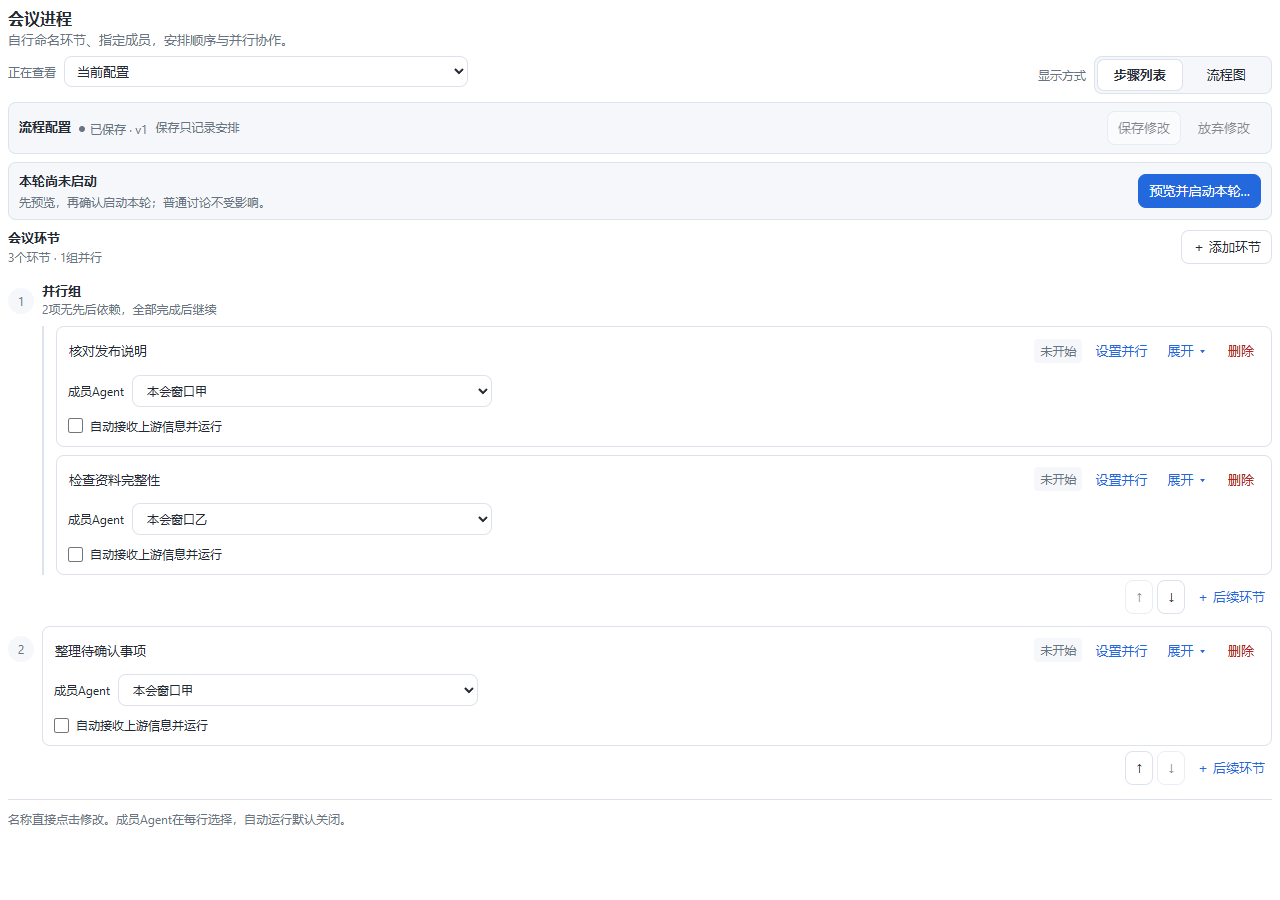
新步骤列表从空白开始:添加环节,直接点击标题命名,在每行选择成员Agent。同一成员可以负责多个环节。任意环节旁的「设置并行」可增加同时进行的独立步骤,所有分支正式完成后再进入下一阶段;支持插入、移动阶段与删除。每个环节标题栏常驻「删除」,无需展开详情;并行分支可逐项删除,删到一项恢复普通步骤,删到零项回到空白。删除修改编辑草稿,保存后更新会议配置。没有预置评审、决定、秘书或返工结构,需要修改时自行添加后续步骤。
进程页将「正在查看」「显示方式」「流程配置」「本轮运行」分组。保存配置/保存修改只记录安排;预览并启动本轮仍需确认。暂停时「继续本轮」只恢复已确认工作,未保存修改不会用于执行。停止与完成在「运行操作」中;历史记录明确只读。整理图形仅在流程图工具条中改变布局。
1. 为环节选择成员,在展开详情填写要求和会议资料,再保存。尚未命名或指定成员也可保存为草稿;启动预览须补齐配置。保存不执行任务。
2. 每个步骤仅提供“自动接收上游信息并运行”,默认关闭。先保存,再预览并确认启动本轮;勾选环节满足条件后接收所走上游的正式输入并运行,未勾选环节须手动预览确认。普通新环节可使用正式提交结果,已配置的验收/人工选路/开始确认关口仍停下;未验收的记录不自动标通过。失败、不确定、成员失效、额度及自动轮次上限处停止。保存未来规则会暂停本轮,核对后明确继续;重启不自动续跑。生成草稿和普通回复不代替批准卡或正式结果。
3. 已有会议的原流程及运行历史保留,步骤列表按实际旧节点只读展示;可查看原流程图,继续使用原图配置。结束本轮后可「新建空白步骤编排」,保存前仅改变本地草稿。新步骤流程图只用于查看依赖,在步骤列表编辑。已开始环节及本轮顺序/并行结构保持冻结,未来字段变更按确认和暂停规则保存。
默认每环节每轮2次尝试、每次运行30次普通投递预留和5次秘书生成发起。可确认追加累计额度;追加不开始任务、不重置已用次数。传输重试和临时点名也计入额度。**执行次数和输入字符数不是 Token 或费用硬上限**,一次成员任务仍可能包含多次模型和工具调用。
在进程页具体环节中补充资料,只暂存到所选环节;自动运行会暂停供核对,明确恢复后才继续。绑定已发布卡片并启动环节是一次新的工作授权,可能再次执行该卡,请核对已有任务。临时点名不完成计划节点。旧图流程的「使用已有结果继续」可明确省略缺失分支;新自由步骤的内部汇合不提供部分继续,须等待全部分支符合条件。「跳过处理并沿用输入」仍须明确说明,跳过不当作成功。
### 资料与纪要
资料页列出本会成功上传的全部文档、图片及历史版本。上传后即归档,是否发送给成员、是否从输入草稿移除引用都不影响归档;同内容的不同文件名分别记录,完全相同的上传重试复用原记录。建会时工作目录暂不可用,按原请求恢复后会补齐此前已上传资料。旧会接入目录仍需明确确认。
普通文件(包括RAR等压缩包)可保留完整原件与文件引用,最大256MB,按512KB分块加载并核验SHA。不自动解压或解析,不把二进制内容塞进模型;正文只输入明确的引用元数据。图片和小文本仍使用原读取协议。未知网络错误可使用同一原文件加载身份重试,大小等确定性限制不提供无效重试。删除小叉只移除草稿引用,原件保留;点击引用可核对版本与下载完整原件。
草稿引用使用原生样式:64px圆角图片缩略、悬停或聚焦小叉,以及蓝色文件图标与名称,放在同一个输入框内。小叉或聚焦附件后Delete/Backspace移除当前引用,正文首位Backspace可撤回最后附件;不删除归档原件。关联来源仍先确认影响,输入中部编辑与IME不误删,图片可就地打开原图。
图片及文档直接拖入圆桌讨论区,无添加按钮。仅圆桌区域接管文件拖拽,进入时复位宿主拖拽遮罩;移到插件外仍由原Agent附件区接收。只读、待核实、模态及其他页面拒绝加载,不回落原会话;文件路径不进入正文。支持格式与大小限制保持,加载仅归档并加入草稿,明确发送后才通知。
Agent只读工具仅向真实、未归档的当前成员、本人的可信创建会议或该会专属秘书开放。普通成员不能通过工具自行加入陌生会议,也不能邀请其他成员;本人可信创建会议的Agent可邀请。历史会议不推断创建者,成员管理通过宿主用户界面完成。入会简报先批准职责与说明版本,再以稳定消息身份排队;送达不明只核对持久回执,不盲目重投。
- 讨论区支持直接拖入文件及粘贴图片,显示缩略图或文件预览,可移除或逐项重试。上传仅归档,不唤醒成员;正文和图片在同一条发送中提交。未完成或失败上传阻止发送,其他草稿内容保持不变。附件单独发送需明确选择发送或仅记录。
- 资料支持 UTF-8 文本、Markdown、代码、diff/patch,以及 PNG/JPEG/WebP。直接解析的图片和文本每份最多2MB,文本最多10万字符;普通完整文件引用最多256MB。同名新内容保留版本和 SHA-256,放行使用选定版本。PDF/Office可保留完整文件引用;如需模型阅读内容,请另行提供文本。
- 图片要求宿主模型适配器声明支持图片;当前 DeepSeek 适配器不支持,会提前拒绝。移除随消息携带的附件可能同时移除正文引用,界面会列明影响并要求确认。
- 纪要默认读取本会已公开资料,包括普通问答;普通回应不计作已完成任务。读取原会话回复需在设置中明确确认,范围限于参会时段;同一会话仍可能包含其他工作,需要判断来源。流程秘书使用本轮冻结的指定资料。
- 系统提供任务数量、成员、提交和验收状态快照,并提示能确定的正文冲突。**这不能证明全部生成内容正确**;建议、决策、遗漏和含糊数量仍需核对。确认保留已知冲突后,公开、通知和导出都会带上冲突说明。
- 增量以最后成功生成的纪要为基线,与是否分享无关;首次增量回退全量。取消或失败不推进游标,来源切换不混用基线;失败来源保留旧游标以便补读。
- 长文本分段处理,没有最近若干条的截断。部分来源失败会提示,全部读取失败则失败;空会议直接生成暂无内容,不调用模型。生成使用默认模型,每次子调用输出预算6000 tokens,输入分段约16000字符,最多128次子代理调用;超过预算明确失败,不保存伪完整纪要。这些生成预算不构成整场会议的费用硬上限。
### 投递与恢复
| 状态 | 含义与下一步 |
|---|---|
| `queued` | 已授权,等待原窗口空闲或前一任务结束 |
| `offline` | 本次尚未投递,原会话恢复失败或状态需核对;在成员边栏查看原因并重试恢复 |
| `delivering` | 正在投递并核对宿主落盘记录 |
| `delivered` | 已确认送达,等待正式结果;不表示已读或完成 |
| `uncertain` | 不能证明送达,先检查原窗口;确认重试可能重复执行 |
| `in_progress` | 成员已认领执行 |
| `completed` / `failed` / `cancelled` | 已提交结果、失败或会议等待已结束;验收是独立状态 |
上表为正式工作任务状态。普通消息单独记录接收状态:已送达只证明原窗口接收,不要求提交工作成果;送达待核实先核对原消息,无法证明时不盲目重投。
确认执行后,插件先核对宿主权威会话和工作区信息;原成员尚未加载时,通过宿主入口恢复同一会话 ID、原上下文、工作区和 Agent 预设,无需先手动打开原窗口。归档或已删除的原会话不会被自动恢复,不创建替代会话;读取失败显示状态未知,不推断删除。忙碌窗口保留排队。成员边栏显示恢复中、失败和原因,可重试恢复;移出成员前列出受影响任务与流程节点,确认后结束本会未完成等待、保留历史,不把缺失成员视为完成。新建骑士仍需核对实际工作区归属后才入会。
暂停放行队列阻止新放行、重试和队列投递;恢复会继续此前已授权的队列。暂停、结束等待、退会和停止流程都不会停止普通成员原窗口。设置中的即时广播/派遣是独立的立即唤醒入口,仍需单独确认。重启后流程暂停,中断的纪要任务标为失败,可手动重试。
### 归档、删除与使用边界
归档保留资料和普通成员会话,结束本会未完成等待与流程,取消纪要生成。恢复后队列保持暂停,不重新打开已结束任务。批量归档确认名单后逐项显示结果,失败项可重试。
永久删除需二次确认,可选择是否通知普通成员。删除会议状态和专属秘书主会话日志,保留普通成员原窗口;取消正在生成的纪要,等待已有写入排空。失败保留删除进度供重试,**没有回收站**。秘书日志删除支持宿主 JSONL 后端;其他入口持有秘书句柄时需重启 profile 后重试。历史一次性子代理日志不额外清除。
- 所有成员需在同一个 DSH 进程。**同一 DSH_HOME 仅运行一个圆桌队列宿主**;不同 profile 名称默认不隔离会话、会议和存储。开发验收使用独立 DSH_HOME。
- 不支持跨机器协作或定时纪要,不承诺跨进程 exactly-once。送达不确定后重试可能重复;成员不回传时保持等待,不能靠私聊推断完成。
- 资料选择控制本轮主动投递内容,原窗口保留上下文。会议文件工具只开放本会已批准版本的只读访问;不会开放任意路径,也不隔离成员原来拥有的上下文和其他文件权限。
- 原生侧栏可能显示秘书。秘书工具限制仅在插件运行期间生效,卸载后不继续约束原生会话权限。
- 场景管理插件可能停用未列入当前场景的第三方插件;圆桌入口消失时,先检查当前 profile/场景的插件启用状态。
讨论正文按Enter执行当前发送/记录按钮,Ctrl/⌘+Enter在光标或选区处换行。Shift+Enter也保留换行;输入法选字、@选人和禁用状态不误提交。
旧运行沿用冻结规则,历史不改。原图逐环节开关仍兼容schema2;自由步骤编排需用户明确新建,保存为schema3,旧插件对此只读、不能投递。旧保存定义会保留在版本记录中,当前插件兼容1/2/3,未知4+只读。
### 界面预览
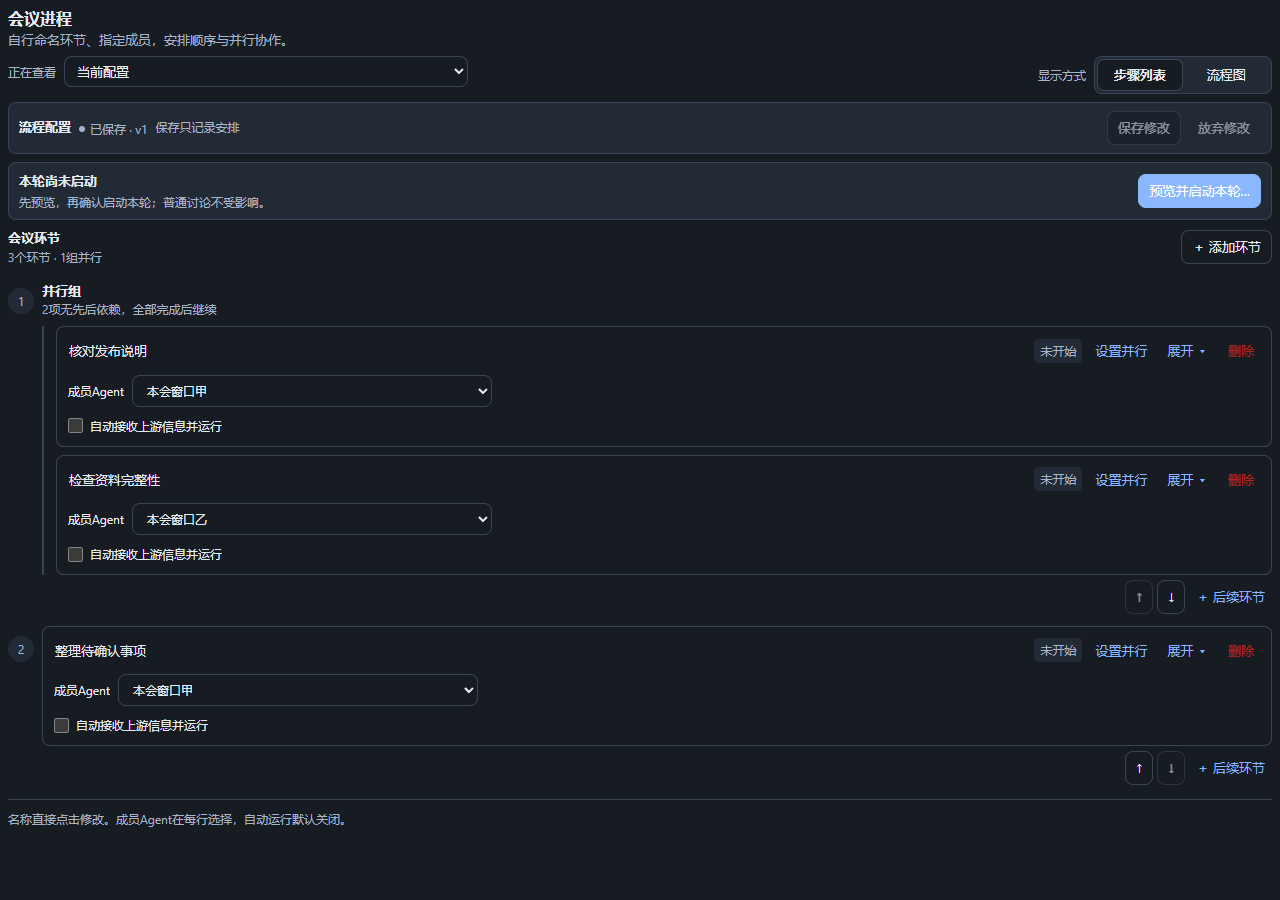
以下为0.1.18生产React界面的亮色与暗色步骤列表,使用合成会议与成员示例;展示界面功能,不代表真实Agent执行结果。
查看暗色步骤列表
### Agent接手与当前文档
先读[维护入口](../CLAUDE.md)、[PRD](PRD.md)、[ENGINEERING](ENGINEERING.md)和[API](产品实现速查.md)。Codex可自动读取根AGENTS.md。main包含最新维护说明;v0.1.18发行标签与安装包保持原始内容,不能因文档补齐重新替换。内部124套/225浏览器记录不随仓库上传,public verify仅类型/包检查。
### 开发参考
构建产物位于 `lib/`,构建会清理旧产物。发布前应运行完整验证并核对实际安装包;本地构建成功不等于已经发布。
[工具与 HTTP API(中英双语)](产品实现速查.md)列出 Agent 工具、管理端点、参数和状态边界。HTTP 管理接口用于宿主用户面,不作为成员 Agent 自行调度流程的工具。
流程图按可用宽高自动适配;Ctrl+滚轮在画布内以鼠标位置为中心缩放,普通滚轮继续滚动。手动缩放后改变窗口大小不会反复重置比例;点击「适配画布」可重新适配。成员菜单使用聊天区浮层,搜索与键盘选人不发送内容。
原成员恢复只调用官方仅恢复接口;执行前持久记录原会话身份。原会话在恢复期间被删除时停止,首次、重试与重启均不新建或接受替代上下文。身份记录位于DSH_HOME/round-table-member-identities,升级备份包含该目录。普通旧草稿成功恢复后收起已处理提醒,原记录及设置入口保留;未处理内容、失败和未知发送仍准确提示。
MIT © whateverboy2333
## English guide
[中文详细指南](#中文详细指南) | [Short README](../README.en.md)
A round-table meeting plugin for DeepSeek Harness. Bring existing Agent sessions into a shared discussion, select evidence, arrange work, review results, and ask a dedicated secretary to draft minutes. Members keep their original sessions and context. You can also create knights from host-declared Agent presets; dsh-flat-teams is not required.
### Installation
Round Table **0.1.18** targets the official Windows **DeepSeek Harness 0.2.0-rc.2** desktop profile. It passed 124 regression suites, 225 browser checks and native desktop acceptance. Legacy Web rc.6 is not supported by this release. Confirmed secretary deletion validates all supported log generations owned by that secretary, preventing old upgrade artifacts from bringing it back.
`dsh-round-table@0.1.18` is published on [npm](https://www.npmjs.com/package/dsh-round-table). Use the desktop installation below, or download the `.tgz` from [v0.1.18 Release](https://github.com/whateverboy2333/dsh-round-table/releases/tag/v0.1.18) and install from a local `file:` URL. Run only one host per DSH_HOME. Rollback requires the complete pre-upgrade data backup because newer session formats may not load in an old host.
The desktop release requires **4.0.4** for `@deepseek-ai/cordis`, **3.18.4** for `@deepseek-ai/schemastery`, and **0.2.0-rc.2** for the related `@deepseek-ai/dsh-*` components. It rejects unknown runtime versions. Recheck compatibility when upgrading DSH.
Use the desktop **Plugins** page to add `dsh-round-table@0.1.18` and check the target is **desktop**. A local archive such as `file:C:/Downloads/dsh-round-table-0.1.18.tgz` remains available as an alternative. After installation, choose **Quit** from the application menu or tray and reopen DeepSeek Harness. Closing a window may leave the app running in the tray. Open Round table and check the version and existing meetings.
For a command-line installation, completely quit the desktop app first and use its bundled CLI. A bare `dsh` on PATH may belong to Hermes or a legacy Web installation. These commands use the default Windows install directory; adjust it if your installation is elsewhere:
```powershell
$desktopCli = Join-Path $env:LOCALAPPDATA 'Programs/DeepSeek Harness/resources/runtime/cli/bin/dsh.cmd'
& $desktopCli --version # This release requires 0.2.0-rc.2
& $desktopCli plugin --profile desktop add 'dsh-round-table@0.1.18'
# Reopen DeepSeek Harness desktop; do not launch a web profile.
```
The repository root is the plugin source. The internal workspace uses `plugins/dsh-round-table-desktop`; this public repository contains source, built artifacts and build/package-check support scripts, while internal acceptance scripts and business data remain private. Build using the npm lockfile and install through the desktop GUI.
```powershell
cd C:/path/to/dsh-round-table
npm ci
npm run typecheck
npm run build
npm run verify
npm pack
```
Runtime requires Node.js **^22.19.0 or >=24.0.0**; the acceptance baseline used desktop Node 24.18.1 and build/regression Node 22.23.1. For source development on Node 24, use 24.11.0 or newer to satisfy the locked build dependencies. The public `npm run verify` checks types and package contents. The reported 124 regression suites and 225 browser checks ran in an isolated development workspace without sending requests to original meetings or invoking real models.
### Start a meeting
1. Open Round table. Enter a title, goal and background, and select the default workspace. Invite existing sessions or create knights from official presets, each with its own workspace. Creation sends member briefings and members may respond. You can explicitly confirm an empty meeting and invite members later.
2. Each meeting creates a dedicated secretary in its default workspace. The secretary does not join ordinary discussion, receive member tasks, or have a chat entry in the panel. If initialization fails, retry in the same meeting.
3. Write in Discussion. With no selected recipients, Record to meeting only saves a record. Type `@` and select from the menu; review text, quotations and attachments before sending. Sending defaults to an ordinary discussion message: it creates no work task, requires no claim or formal result, and consumes no workflow task-attempt budget. A literal `@name` in prose does not select a recipient or execute anything.
4. Check each member's message receipt. Ordinary messages enter the original session through its FIFO interface without interrupting current work. Members can return multiple explicitly authorized updates through `meeting_reply_message`; ordinary replies do not become formal results or import unrelated private history. For formal work, ask the selected original members to generate task cards, review them, and confirm publication. Ordinary replies and marking a conclusion do not wake other members; usable formal results may satisfy already authorized, checked downstream automatic rules.
5. Open Minutes, select Full or Since last, and generate a draft. Check sources, the structured task snapshot and the prose before publishing to the meeting, notifying members or exporting. Publication only adds a record; notifications send content to members' original sessions. You can keep a draft indefinitely.
Discussion keeps the main reading space, with a compact meeting header and separate navigation and discussion tools. Members open in a right sidebar on the current page: roster → details → meeting work log. Wide layouts show both areas; narrow layouts use a closable overlay. Opening it preserves discussion scroll, search and unsent text. Materials, Minutes and Settings retain their own entries; Task cards opens full card text, version history and publication controls. The meeting list supports search, persistent pins, outstanding-item indicators and archives.
The list separates historical results awaiting review, faults requiring verification, and running work, with status filters. The meeting header links to the next action. After a completed run, the editable process is labelled as the next-round draft. Minutes show the summary, decisions, responsibilities and next steps first; generation information and evidence can be expanded, preserving historical prose.
Preset member batches retain each session identity and its creation progress. A retry resumes incomplete stages without recreating successful members or briefing them again. Member failures after meeting creation resume that same meeting. A lost creation response can be recovered by retrying the original request, which returns the same meeting. Legacy progress without a request identity still requires checking the list first.
### Prepare tasks, request changes and review
Select original members with @ in Discussion, then choose Generate task cards. Extra text may be empty. Only explicitly selected quotations and materials are sent. Each member returns independent, detailed Markdown cards, one per item; retries target only the failed member's original request.
View the full text, generator, assignee and versions in Task cards. Edit directly or ask that card's original generator to adjust it. Late suggestions never overwrite live user edits. Save edits, confirm assignees and select the cards to publish. **Confirming publication immediately notifies the chosen assignees to execute**, after the approved immutable versions are written to the meeting directory. Generation, editing and adoption do not execute work. Lost publication responses retain the same approved request and versions for recovery; a fresh ID cannot republish the same card version.
New meetings get a stable title-plus-ID directory in the selected workspace, with instructions, an index, materials, task cards, results and minutes. Read-only member tools work across workspaces and verify exact approved versions. The tool-disabled secretary receives actual verified filesystem snapshots. Missing or modified files and invalid indexes stop affected work; file names alone are not evidence of their contents. Older meetings require explicit directory adoption, which copies history without executing old work. Archiving or deleting a meeting preserves user files.
Drafts and pending requests are scoped to the current DSH instance. The manual task editor and template entry have been replaced. Historical requirements, results and logs remain available, and previously authorized uncertain requests can be verified using their original identities. Old drafts can be previewed or copied without guessing ownership.
Choose Import member replies directly in the discussion toolbar. Select a source member to explicitly read actual assistant replies, then preview and confirm the purpose: Add to meeting creates a meeting record; Fill task result applies only to the selected outstanding task. Source author, original reply sequence, time and digest validation remain recorded. Cancelling changes nothing; importing does not notify other members or automatically publish private history. Members can also explicitly submit formal results through tools.
An in-progress task can still receive ordinary clarification or supplementary messages. `contextTaskId` only links the existing task; it does not create another task, rewrite frozen requirements or block questions while a formal result is pending. The member sidebar work log gathers this meeting’s requirements, selected materials, deliveries, replies, formal results, linked revisions and review history. Former members keep their history; the log does not automatically read other private conversations.
Request changes uses one recoverable notes draft, available from the member work log and Process. Confirmation sends a linked revision to the original member; the old result remains and the outstanding item follows the newest revision. Explicitly rejected sends preserve notes and allow a new preview; uncertain delivery needs verification of the original request. Submission and human acceptance are separate states. Legacy review gates and returned/revised results remain enforced; new free steps have no review-template preset, and usable formal results may satisfy already authorized automatic stages; frozen historical inputs remain intact.
### Arrange the process
The progress toolbar separates the viewed record, display mode, saved configuration and current run. Saving only records the arrangement; starting still requires a preview and confirmation. Continuing a paused manual run resumes already authorized work and ignores unsaved changes. Stop and complete remain under Run operations; history is visibly read-only. Arrange diagram is available beside graph tools and does not execute work.
New step lists start empty. Add a step, edit its title directly, and select a real meeting member in every row. Reuse an Agent across steps. Any stage can expand into independent parallel steps; all formal branch results are required before the next stage. Each card header permanently exposes Delete, including when collapsed. Delete individual branches to shrink a parallel group to one ordinary step, or delete the last step to return to an empty list. Deletion edits the draft; Save updates the meeting configuration. Insert, reorder and delete stages without predefined review, decision, secretary or rework structures.
1. Select members and expand a step to enter requirements and materials. Incomplete drafts can be saved; starting requires valid names, members, a preview and confirmation. Saving does not execute work.
2. Each step has one Automatically receive upstream inputs and run option, off by default. Save, preview and confirm the run first. Selected steps receive formal upstream inputs when ready; unselected steps need manual preview and confirmation. Formal submissions can flow through ordinary new stages while configured review, routing and human confirmation gates still stop. Unreviewed results are never marked accepted automatically. Failures, uncertain delivery, unavailable members, execution budgets and automatic round caps stop progression. Saving future rules pauses the run and requires explicit resumption; restart never resumes automatically. Generated drafts and ordinary replies are not approved cards or formal results.
3. Existing graph definitions and run history remain intact. The list shows their actual nodes read-only with a link to the original graph editor. After ending an active run, explicitly prepare an empty step draft; it only replaces the saved configuration when saved. New steps' graph is a read-only dependency view. Active topology and started fields are frozen, while future field changes retain confirmation and pause/resume rules.
Defaults are two attempts per stage per round, 30 ordinary delivery reservations per run, and five secretary starts. Explicit grants increase cumulative budgets without starting work or resetting usage. Transport retries and temporary requests also consume these budgets. **Execution counts and character estimates are not token or monetary caps**; a member task can involve multiple model and tool calls.
Add materials from the specific Process node; staging inputs pauses an automatic run for review and explicit resumption. Binding an already published card and starting a node is new authorization and can execute it again; check its existing tasks. Temporary requests do not complete planned stages. Legacy graph flows can explicitly continue with selected existing results while omitting missing branches. New free-step internal joins cannot partially continue and must wait for every branch to satisfy the required conditions. Skip processing and reuse input still retains an explicit omission notice; skipped work never counts as success.
Each opening starts from a 380px drawer and makes the original Agent page reflow beside it. Dragging adjusts this opening only; closing and reopening resets the size while keeping meeting selection and drafts. The full workbench fills the area to the right of the session sidebar. Closing or unloading releases the original page space.
### Materials and minutes
Materials lists every successfully uploaded document, image and version in this meeting. Uploading archives the original independently of sending or removing its draft reference. Different names retain separate entries even when their bytes match; exact retries reuse the original record. Retrying the original meeting creation request after its workspace becomes available also fills in previously uploaded materials. Existing meetings still require explicit confirmation to adopt a folder.
Ordinary files, including archives, retain complete originals and references up to 256 MB through 512 KB chunks and SHA verification. They are not extracted, parsed or embedded as binary model input. Images and small text keep their existing input protocol. Network failures resume the same upload identity; permanent validation failures do not offer futile retries. Removing a reference keeps the original; preview checks metadata and offers a complete download.
Draft references use native-style 64px rounded thumbnails with hover/focus removal and blue document names in the same input frame. Remove with the small cross or Delete/Backspace on a focused reference; Backspace at the start of prose can retract the last attachment. Archived originals remain. Inherited sources retain confirmation, ordinary editing and IME do not accidentally remove files, and images open in place.
Drag images or documents directly into the Round table discussion. There is no add-file button. File drags inside this pane belong only to the plugin; entering resets the host drag overlay, while targets outside remain handled by the original Agent. Read-only, pending, modal and other-page drops are rejected without falling through to the host. OS file paths are not inserted into prose. Format and size limits remain; loading archives and stages files without sending or waking anyone.
Agent read tools are limited to authentic, unarchived members, the verified creator of that meeting or its dedicated secretary. Ordinary members cannot join unfamiliar meetings or invite others through tools. A verified Agent creator can invite; legacy meetings never infer an owner, and the host user interface remains the management entry. Member briefings approve the role and instructions before FIFO delivery with a stable message identity. Uncertain delivery only reconciles persisted receipts rather than blindly sending again.
- The discussion composer accepts direct file drag-and-drop and pasted images, with thumbnails, file previews, removal and per-file retry. Upload archives only and never wakes members. Text and images commit in one message. Incomplete or failed uploads block sending while preserving the draft. Attachment-only sends still require an explicit action.
- Materials accept UTF-8 text, Markdown, code, diff/patch and PNG/JPEG/WebP. Images and directly parsed text are limited to 2 MB; ordinary references are limited to 256 MB and text to 100,000 characters. Changed same-name files retain versions and SHA-256; delivery uses the selected version. PDF/Office originals can be retained as file references; provide separate text when model reading is required.
- Image delivery requires a model adapter that advertises image input. The current DeepSeek adapter does not, so delivery is rejected in advance. Removing an attachment carried by a message can also remove its text quotation; the panel explains the effect and asks for confirmation.
- Minutes default to published meeting evidence, including ordinary questions and replies; ordinary replies do not count as completed tasks. Reading original-session replies requires explicit confirmation in Settings and uses membership intervals. Shared sessions may still contain other work, so attribution needs judgment. Workflow secretary stages use their frozen selected materials.
- The system provides task counts, members, submission and review states, and warns about detectable prose conflicts. **It does not certify all generated content**: suggestions, decisions, omissions and ambiguous counts still need review. If you explicitly acknowledge known conflicts, publication, notifications and export retain their notices.
- Incremental minutes use the last successful generation, whether shared or not. The first incremental request falls back to full. Cancellation or failure does not advance cursors; source changes keep separate baselines, and failed sources retain old cursors for a later retry.
- Long text is processed in parts, without a last-N cutoff. Partial source failures are reported; all-source failure fails generation. Empty meetings return an empty-content result without a model call. Generation uses the default model, a 6,000-token output budget per child call, input parts of about 16,000 characters and at most 128 child calls. Budget exhaustion fails explicitly rather than saving falsely complete minutes. These limits are not a meeting-wide monetary cap.
### Delivery and recovery
| State | Meaning and next action |
|---|---|
| `queued` | Authorized; waiting for an idle original session or an earlier task to finish |
| `offline` | Not delivered; original-session restoration failed or needs verification. Inspect the reason and retry restoration in the member sidebar |
| `delivering` | Sending and checking the host's persisted record |
| `delivered` | Delivery confirmed; waiting for a formal result. It does not mean read or complete |
| `uncertain` | Delivery cannot be proved. Check the original session; an explicitly authorized retry may duplicate work |
| `in_progress` | Claimed by the member |
| `completed` / `failed` / `cancelled` | Result submitted, failed, or meeting wait ended; acceptance is a separate state |
The table describes formal work tasks. Ordinary messages have separate receipt states: delivered confirms receipt in the original session without requiring a formal result. Verify uncertain delivery against the original message; unproved delivery is not blindly resent.
After execution is confirmed, the plugin checks authoritative host session and workspace information. An unloaded member is restored through the host entry point using the same session ID, original context, workspace and Agent preset; manually opening its window first is unnecessary. Archived or deleted sessions are not automatically restored or replaced. Read failures remain unknown rather than being treated as deletion. Busy sessions keep work queued. The member sidebar shows restoration progress, failure reasons and retry controls. Removing a member lists affected tasks and workflow nodes for confirmation, then ends unfinished meeting waits while preserving history; missing members do not count as completed. New knights still require verified workspace membership before joining.
Pausing the release queue blocks new releases, retries and queued delivery. Resuming continues previously authorized work. Pausing, ending waits, leaving a meeting and stopping a flow do not stop ordinary member sessions. Immediate broadcast/dispatch in Settings is a separate wake-up action requiring its own confirmation. After restart, flows pause and interrupted minutes jobs fail with manual retry available.
### Archiving, deletion and limits
Archiving keeps materials and ordinary sessions, ends outstanding meeting waits and flows, and cancels minutes generation. Restoring keeps delivery paused and does not reopen ended tasks. Bulk archiving shows a confirmation list, individual receipts and retries for failed items.
Permanent deletion needs a second confirmation, with an optional member notice. It removes meeting state and the dedicated secretary's main session log, while keeping ordinary member sessions. In-flight minutes are cancelled and admitted writes drain first. Failed deletion retains progress for retry. **There is no recycle bin.** Secretary log deletion supports the host JSONL backend; if another entry owns the secretary handle, restart the profile and retry. Historical one-shot child logs are not additionally purged.
- Members must run in the same DSH process. **Run only one round-table queue host per DSH_HOME.** Different profile names do not isolate sessions, meetings or storage by default. Development validation needs a separate DSH_HOME.
- Cross-machine collaboration and scheduled minutes are not supported. No cross-process exactly-once guarantee is made. Retrying uncertain delivery can duplicate work. Without a formal result, the meeting keeps waiting rather than inferring completion from private replies.
- Input selection controls evidence actively sent this round; original session context remains. Meeting file tools grant read-only access to approved versions for this meeting, never arbitrary paths. They do not isolate a member's existing context or other file permissions.
- The native sidebar may still show the secretary. Its tool restrictions apply while the plugin runs and do not remain an access-control policy after uninstalling it.
- Scenario managers may disable third-party plugins absent from the current scenario. If the entry disappears, check the active profile/scenario's plugin state.
In discussion text, Enter invokes the current send/record action and Ctrl/Cmd+Enter inserts a newline at the caret or selection. Shift+Enter also inserts a newline; IME selection, @ selection and disabled states never submit accidentally.
Existing runs keep their frozen rules. Original per-node graphs remain compatible with schema 2; users explicitly prepare new free-step plans, saved under schema 3 and read-only to older plugins. Original definitions remain in version history. This release supports schemas 1/2/3 and treats unknown schema 4+ as read-only.
### Interface preview
The light and dark step lists below use the production React interface from 0.1.18 with synthetic meeting and member examples. They show interface features, not real Agent execution results.

View the dark step list

### Agent handoff and current documentation
Read [CLAUDE](../CLAUDE.md), [PRD](PRD.md), [ENGINEERING](ENGINEERING.md) and [API](产品实现速查.md). Codex can load root AGENTS.md automatically. Main carries current maintenance documentation; the v0.1.18 tag and archives remain unchanged. Internal acceptance evidence is not distributed here, and public verify covers types/package checks only.
### Developer reference
Build artifacts are in `lib/`; the build cleans obsolete output. Before release, run the full verification and inspect the actual installation package. A local build is not a published release.
The [bilingual tools and HTTP API reference](产品实现速查.md) lists Agent tools, management routes, parameters and state boundaries. Management HTTP endpoints serve the host's user panel and are not exposed as member tools for independently scheduling workflows.
The graph fits its available width and height. Ctrl+wheel zooms around the pointer inside the canvas; ordinary wheel scrolling remains available. Manual zoom survives layout changes until Fit canvas is selected. The member picker uses a chat-level floating layer and never sends while searching or selecting.
Member recovery uses the official existing-session-only API. A durable original identity binding prevents deletion races, retries or restarts from accepting a replacement context. Include DSH_HOME/round-table-member-identities in upgrade backups. Successful ordinary legacy-draft recovery closes only its processed reminder; original records and Settings access remain, while failures and uncertain sends keep accurate notices.
MIT © whateverboy2333