# Porting Applications to MAXREFDES178
This section explains the firmware structure of existing AI demo applications in this repository and it is intended to help port and develop new applications to the platform.
To add a new MAXREFDES178# demo to this repository:
1. Copy one of the existing demo directories (i.e. maxrefdes178-CatsDogs) and rename as maxrefdes178-NewDemoName. Make your changes on the new maxrefdes178-NewDemoName directory.
2. Add new demo name definition to maxrefdes178_common\maxrefdes178_definitions.h. Maximum demo name length is **15**.
````C
// Common Demo Name
#define DEMO_STRING_SIZE 15
#define FACEID_DEMO_NAME "FaceID"
#define UNET_DEMO_NAME "UNet"
#define WILDLIFE_DEMO_NAME "WildLife"
#define CATSDOGS_DEMO_NAME "CatsDogs"
#define IMAGECAPTURE_DEMO_NAME "Image Capture"
## Right Side
````
3. Set demo name in max32666_main.c, max78000_audio_main.c and max78000_video_main.c.
````C
snprintf(device_info.max32666_demo_name, sizeof(device_info.max32666_demo_name) - 1, "%s", CATSDOGS_DEMO_NAME);
...
static char demo_name[] = CATSDOGS_DEMO_NAME;
````
4. Edit maxrefdes178-NewDemoName\README.md file for documentation.
Modify the new demo guide.
Add a link to the new demo documentation from this page in the "Other available MAXREFDES178# demo pages" section.
5. Edit .github\workflows\maxrefdes178.yml file for GitHub Actions build.
Add a new demo MAX32666, MAX78000 Video and MAX78000 Audio GitHub Actions build steps. Copy/Paste from existing demo build steps and modify.
Add a new demo release directory to the "Prepare Release" step.
Demo examples running on the Cube Camera include three main components:
1. First MAX78000 for video AI application: The application is executed on the first MAX78000 which is connected to the image sensor. This application initializes the image sensor, captures its image data, and streams it to the MAX32666 using the QSPI for display on the TFT. Additionally, it initializes the CNN and feeds the image sensor data to the CNN to run inferences. Inference results are unloaded and sent to the MAX32666 to be displayed. Preprocessing of image data and optional post-processing of the inference results are performed in this application.
2. Second MAX78000 for audio AI application: This application is developed on the second MAX78000 which is connected to the digital microphone. This application initializes the CNN and I2S digital microphone (or CODEC), collects audio samples, loads the CNN, runs inferences, unloads the results, and sends them to the MAX32666 to be displayed and/or further processed. Preprocessing of audio data and optional post-processing of the inference results are performed in this application.
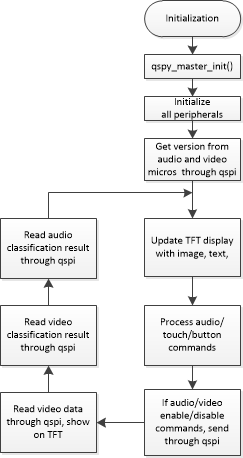
3. MAX32666 for main control, connectivity, interface, and management. This application includes all initialization and control of Power Management, TFT, accelerometer, BLE, and other peripherals.
To have an application running on the Cube Camera, generally, all three components are needed. The provided examples include a framework with the required control code, commands, and state machines for each of the three microcontrollers.
For the fastest route to a working implementation, modify one of the provided demo examples as described below.
## MAX32666 Application (maxrefdes178_max32666):
The following modifications may be needed for a new example application:
**max32666_main.c**
1. Make sure the build version of audio, video and the MAX32666 is identical.
2. In `main()` function of `max32666_main.c`:
* If needed, disable any unnecessary initialization (e.g. BLE, power monitor).
* If only a video (or only an audio) application exists, remove QSPI communication to the non-existent components. A typical QSPI communication with the audio/video core is:
````C
for (int try = 0; try < 3; try++) {
qspi_master_send_video(NULL, 0, QSPI_PACKET_TYPE_VIDEO_VERSION_CMD);
qspi_master_wait_video_int();
qspi_master_video_rx_worker(&qspi_packet_type_rx);
if (device_info.device_version.max78000_video.major || device_info.device_version.max78000_video.minor) {
break;
}
````
3. In the `run_application()` function of `max32666_main.c`:
* If needed, remove QSPI TX and RX to/from non-existent audio or video components, BLE, activity sensor, power accumulator, etc.
* Update the state machine to process the classification result, e.g. `device_status.classification_video.classification` or `device_status.classification_audio.classification`
* Modify button and TFT touch functionality, LED and display information on TFT as needed.
**maxrefdes178_definitions.h**
1. Add/modify `qspi_packet_type_e` commands as required. The QSPI commands define the communication between MAX32666 and audio/video MAX78000.
2. Update LCD and camera width/height and format, if the image capture and display format are different.
## MAX78000 Audio/Video Applications
## (maxrefdes178_max78000_audio, maxrefdes178_max78000_video):
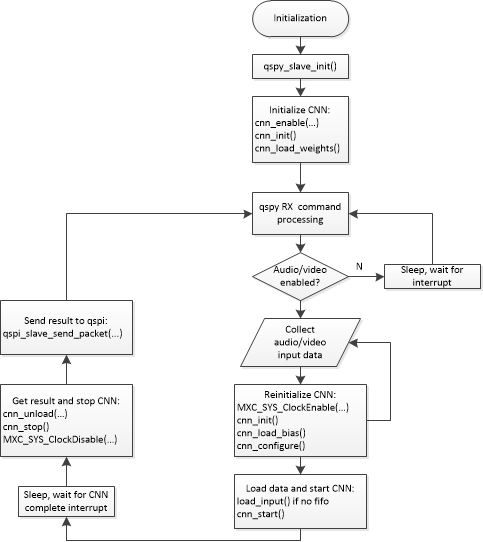
The top-level diagram of the audio/video application is shown below:
The following steps summarize the modifications needed to port a new example:
1. Update `cnn.c`, `cnn.h` and `weights.h` in the src and include folders. These auto-generated files are created by the synthesis tool once the network is trained, quantized and synthesized.
2. Add your application to `max78000_audio_main.c` and `max78000_video_main.c`. Include necessary initialization, and preprocessing of peripherals, microphone or image sensor.
3. Update the QSPI command processing state-machine in the main loop as necessary to communicate with MAX32666.
4. Update the CNN code block to load weights, bias, configuration, and data, start inference, then unload the result in the synthesized auto-generated code of your application.
The following code snippet demonstrates the CNN block:
````C
// Enable CNN clock
MXC_SYS_ClockEnable(MXC_SYS_PERIPH_CLOCK_CNN);
cnn_init(); // Bring state machine into consistent state
//cnn_load_weights(); // Only needed first time, weights will be retained in SLEEP, UPM, BACKUP or STANDBY modes
cnn_load_bias(); //load bias
cnn_configure(); // Configure state machine
// Custom function to load data to CNN memory
load_input(); // Load data to CNN after any required preprocessing. For FIFO cases, move this after cnn_start()
cnn_start(); // start CNN
// Wait for CNN to complete
while (cnn_time == 0) {
__WFI();
}
// read result, the last layer of NN model should be wide=TRUE for CNN to generate 32-bit outputs. Otherwise, will be 8-bit
cnn_unload((uint32_t *)ml_data);
cnn_stop();
// Disable CNN clock to save power
MXC_SYS_ClockDisable(MXC_SYS_PERIPH_CLOCK_CNN);
// run softmax
softmax_q17p14_q15((const q31_t*) ml_data, NUM_OUTPUTS, ml_softmax);
````
**Note: If the FIFO option is used to synthesize your example (`--fifo`, or `--fast-fifo` in `ai8xize.py`), `cnn_start()` should be called first, followed by loading the data to the FIFOs as they become available. The CNN will start automatically when enough data is available.***
5. Populate the classification result in the `classification_result_t` structure to be reported to MAX32666:
````C
typedef enum {
CLASSIFICATION_NOTHING = 0,
CLASSIFICATION_UNKNOWN,
CLASSIFICATION_LOW_CONFIDENCE,
CLASSIFICATION_DETECTED,
CLASSIFICATION_LAST
} classification_e;
// Classification command response
typedef struct __attribute__((packed)) {
float probability; // confidence level
classification_e classification; // status of detection
char result[CLASSIFICATION_STRING_SIZE]; // result of classification
} classification_result_t;
````
6. Populate the statistics in the `max78000_statistics_t` structure to be reported to MAX32666:
````C
// MAX78000 statistics field
typedef struct __attribute__((packed)) {
uint32_t cnn_duration_us;
uint32_t capture_duration_us;
uint32_t communication_duration_us;
uint32_t total_duration_us;
} max78000_statistics_t;
````
7. Report the classification result and statistics back to MAX32666 using the appropriate QSPI commands. For example, for audio results:
````C
// report classification result
qspi_slave_send_packet((uint8_t *) &classification_result, sizeof(classification_result),
QSPI_PACKET_TYPE_AUDIO_CLASSIFICATION_RES);
// report statistics
qspi_slave_send_packet((uint8_t *) &max78000_statistics, sizeof(max78000_statistics),
QSPI_PACKET_TYPE_AUDIO_STATISTICS_RES);
````
8. Send the raw image as needed (video only) to MAX32666: `send_img()`