API workflows, untangled.
Open-source terminal REST client
Write, send, inspect, and automate HTTP requests from readable files without leaving your terminal. Keep every collection versioned beside the code it exercises, ready for the TUI, CLI, scripts, and coding agents.
Fast by default. Made to review. Ready to automate.
Get started · Website · Docs · Changelog · Security
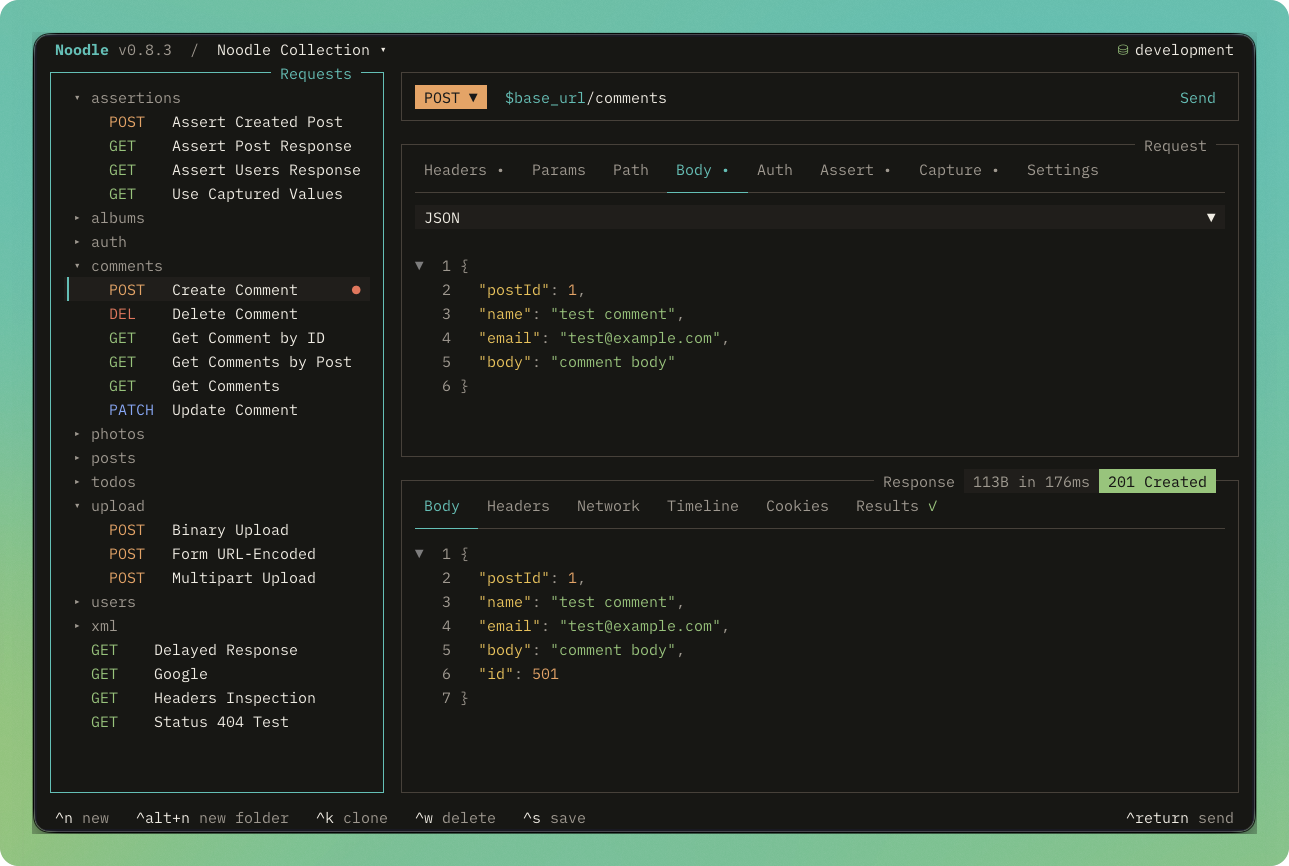 ## Install ```bash curl -LsSf https://noodlerest.dev/install.sh | sh ``` [See every installation option](https://noodlerest.dev/docs/getting-started/installation/) ## Files first Every request is a readable YAML file. Edit it in Noodle or your editor, review it in Git, and keep it beside the code it exercises. ```yaml name: Get User method: GET url: $base_url/users/:userId path_params: - name: userId value: $user_id headers: Accept: application/json ``` Create a collection and open it in the TUI: ```bash noodle collection create my-api noodle request create users/get \ --url https://api.example.com/users/42 \ --collection ./my-api noodle --collection ./my-api ``` ## The whole exchange, without leaving the terminal Compose URLs, parameters, headers, authentication, and bodies from a keyboard-first workspace. Send the request, then inspect the body, headers, cookies, status, timing, and network timeline in the same place. The request Assert and Capture tabs edit response checks and extracted values as structured rows, while request tags live in Settings. Manual sends use a fresh scope each time. Results stays available and gains a value indicator when the send has assertion or capture outcomes. Assert and Capture rows use the same per-row checkboxes as Headers and Params. Disabled declarations remain in the request but are skipped by manual sends, the collection Runner, and CLI runs. In jump mode, `v` opens Assert, `c` opens Capture, and `t` opens Settings. Press F5 or choose Run Collection from the command palette to open a transient collection runner for choosing requests, environment, tag filters, fail-fast behavior, and an optional delay between requests before inspecting ordered results. A folder's context palette opens the same runner scoped to that folder. Noodle supports JSON and XML bodies, JSONPath filtering, redirects, proxies, TLS, mTLS, and request authentication including OAuth 1.0a and OAuth 2.0. ## Environment-aware without leaking secrets Switch between development, staging, and production variables. Secret declarations stay in the file while values live in the operating system credential vault or process environment. Variable names use only letters, numbers, and `_`. Reference them as `$NAME`; write `$$NAME` when the request must contain the literal text `$NAME`. Environment values preserve every character after the first `=`, including trailing spaces. Sensitive values are kept out of environment files, request history, generated code, search results, and exports. ## One collection, more than one way to work Explore interactively in the TUI, run requests from the CLI, automate collection checks, or give coding agents the supported Noodle skill. ```bash noodle request run users/get --collection ./my-api --env staging noodle collection audit ./my-api --json noodle collection run ./my-api --json noodle collection run ./my-api auth/ health users/get --json noodle collection run ./my-api --tag smoke --tag api --exclude-tag destructive --json noodle collection run ./my-api --delay 500 --json noodle agent install ``` Commands support structured JSON output for scripts, CI, and agent workflows. Requests and non-root folders can declare case-sensitive `tags`. Folder tags apply to every descendant request, so `collection run --tag smoke` can execute a dynamic suite without a second collection format. Repeat `--tag` to require every Include tag and repeat `--exclude-tag` to remove requests matching any Exclude tag. Exclusion wins, and `--fail-fast` records the remaining selected request IDs as skipped. `--delay