# dsh-minimal-UI-panels
> [English](./README.md) · [中文](./README.zh-CN.md)





> All-in-one DeepSeek Harness UI panels — one bundle, one loader row: artifacts, memory, terminal and notes **paired two per tab** into right-Sidebar tab types, each with a draggable split inside.
`dsh-minimal-UI-panels` merges three formerly separate DSH plugins into a single package mounted as **one loader row**. The panels are **paired** into right-Sidebar **tab types** (`ctx.sidebarRightTabs`) on `@deepseek-ai/dsh-client-ui-sidebar-right` — `Artifacts + Terminal` and `Memory + Notes` — and each tab stacks its two panels with a draggable divider, so two Sidebar panes side by side show **all four panels at once**. It also ships the host-side tools/routes — plug and play.
> **DSH 0.1.5 changed the architecture**: the third-party-occupiable `details` column is gone, replaced by `rightbar` and owned by the shipped right Sidebar (docking kit + tab-type registry). 0.2.0 completed that migration; 0.3.0 then paired the panels, because one tab per panel could only ever show two of them.
## ✨ Features
| Panel / capability | Description |
|---|---|
| **Paired right-Sidebar tab types** | One tab type = **one pair of panels**, stacked vertically with a draggable divider between them (the split is remembered per pairing; double-click the divider for 50/50). Docking, floating and splitting come from the shipped docking kit, so **two panes side by side show all four panels**. The way in is the strip's add control → the guide page |
| **Artifacts panel** | Scans workspace artifact files, groups/sorts by type/date/size/line count; syntax-highlighted code/config/data previews; inline base64 image previews (4 MiB cap); mp4/m4v/webm/ogv video streaming (Range requests) |
| **Memory panel** | View/add/search/edit memory across three scopes (user/global/workspace); tag grouping; content highlighting |
| **Terminal panel** | A dark-themed bash command runner (`bash -lc`), output collected and returned; common-command hints stay pinned below |
| **Notes panel** | Apple-Notes-style multi-note scratchpad: sidebar list + editor, create/delete, autosave (600 ms debounce), auto-title from the first line, stored at `~/.dsh/notes.json` |
## 📸 Screenshots
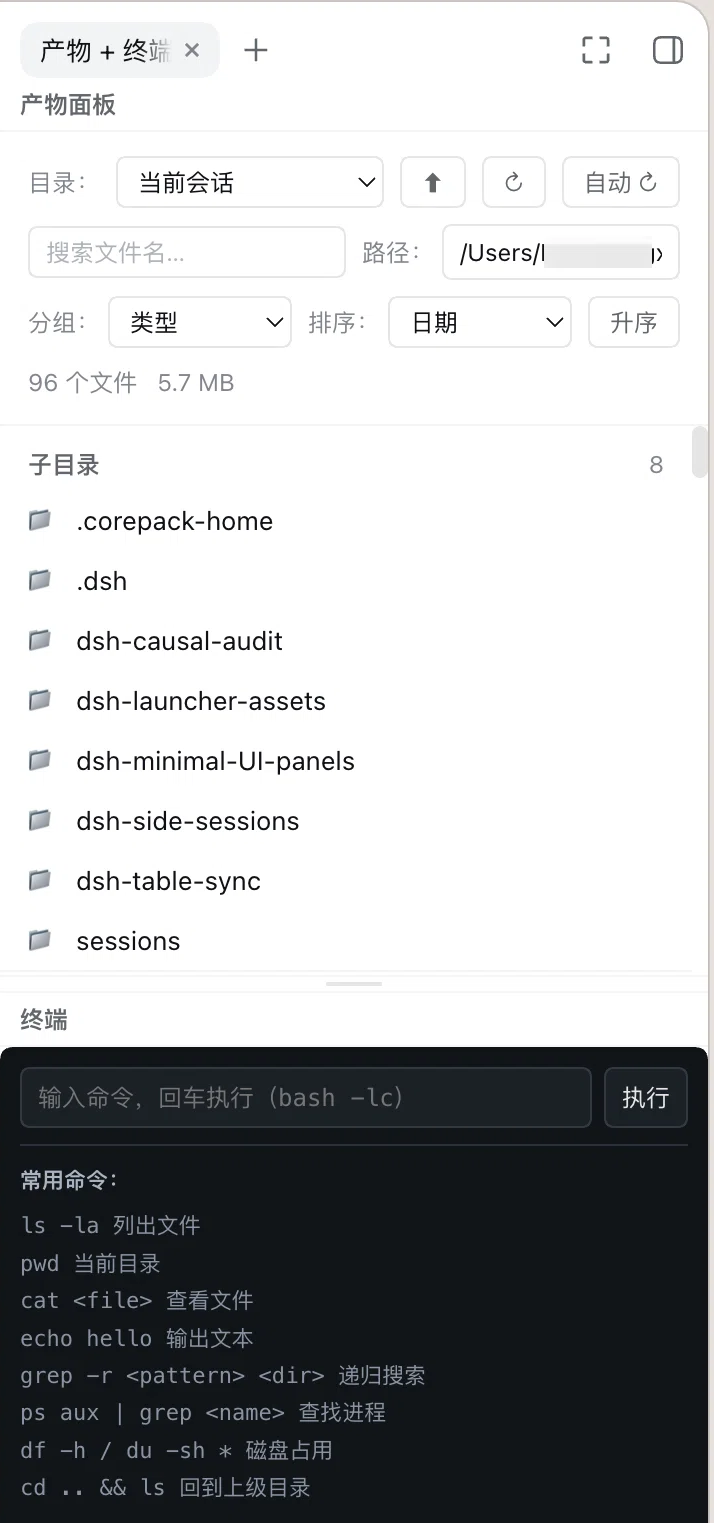
The **Artifacts + Terminal** pairing open in the right Sidebar: the artifacts panel on top, the terminal below, and the draggable divider between them. The chip in the strip is the pairing's tab type.
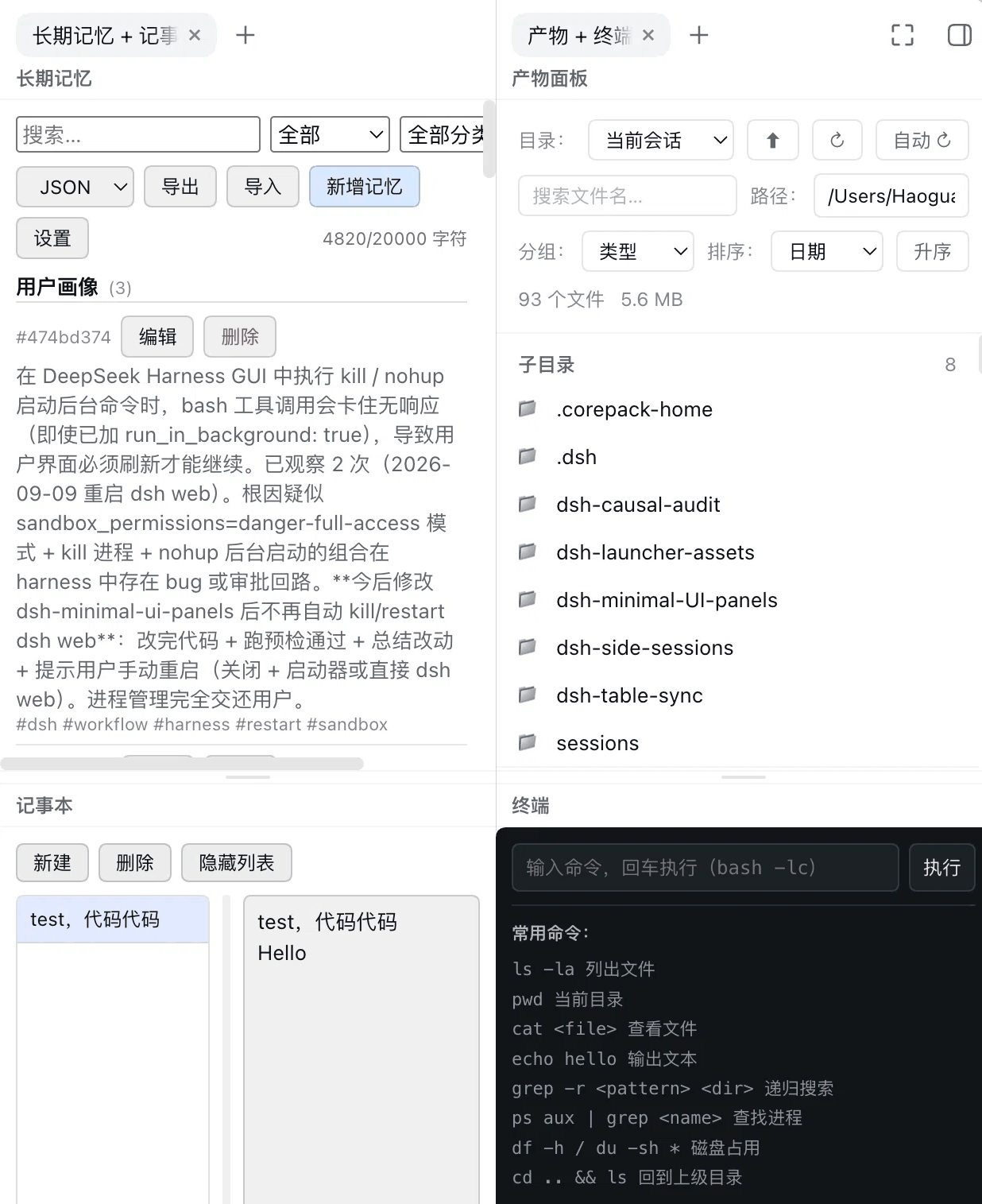
 Drag a tab to the **left or right edge of a pane** and it splits off a second pane — two panes side by side, all four panels on screen at once:
 ## 📦 Install
This plugin mounts as a **local link dependency** (consistent with other DSH local plugins).
> **Requires dsh 0.1.5 or newer, including the 0.2 series.** The panels register as tab kinds of `@deepseek-ai/dsh-client-ui-sidebar-right`, which first shipped in 0.1.5-alpha.1; earlier 0.1.x releases have no `rightbar` at all, so the client bundle cannot resolve that dependency. The `^0.1.0-rc.8` in `peerDependencies` covers only the host services (`dsh-home-paths`, `dsh-tools`) and is **not** the real floor.
### 1. Clone the repo
Pick a directory and clone it:
```bash
git clone https://github.com/windrover/dsh-minimal-UI-panels.git
# → /dsh-minimal-UI-panels
```
### 2. Register it in your DSH profile
Edit `~/.dsh/profiles/web/package.json`. Set `link:` to **your clone path** (`` is wherever you ran the clone):
```jsonc
{
"dependencies": {
"dsh-minimal-ui-panels": "link:/dsh-minimal-UI-panels"
},
"dsh": {
"profile": {
"bundles": [
"@deepseek-ai/dsh-base",
"@deepseek-ai/dsh-web-app",
"dsh-minimal-ui-panels"
]
}
}
}
```
> Replace `` with the absolute path to the cloned folder, e.g. `link:/Users/me/dev/dsh-minimal-UI-panels`.
> The directory may keep its capitalised name (`dsh-minimal-UI-panels`) — **the directory name does not matter**; the identity that counts is `package.json`'s `name`.
### 3. Establish the link
```bash
cd ~/.dsh/profiles/web && pnpm install
```
### 4. Restart dsh web
**Ctrl+C to quit → run `dsh web` again → refresh the browser**. The loader scans profile bundles at startup, so the new code takes effect.
> If you previously mounted the old plugins, remove them from `dsh.profile.bundles` (this package supersedes them); also clean any stale rows in `~/.dsh/cordis.patch.yml` (e.g. `- id: artifacts-panel`) to avoid `patch: entry ... not found` warnings.
## 🖥 Usage
- Open a session → the right Sidebar (the expand button in the conversation header) → the strip's add control → the **guide page** → pick **Artifacts + Terminal** or **Memory + Notes**.
- **All four at once**: drag a tab to the **left or right edge of a pane** to split off a second pane, then open one pairing in each; adjust the split inside a pairing with the divider between its halves (double-click it for 50/50). Widen the Sidebar when the columns feel tight.
- **Terminal**: type a command and press Enter (`bash -lc`); output shows in the lower half; common-command hints stay pinned.
- **Notes**: click **New** to create an entry; drag the sidebar divider to resize; clicking a title auto-hides the list to focus the editor; the toolbar toggle shows/hides the list manually.
- **`/memory`** command (host side): `/memory list|search|get|forget|export`.
- Host-side model tools: `memory_*` (write/recall/list/forget/export/import/correct/batch/diagnose) and `artifacts_list`.
### Where artifacts go
One conversation owns exactly one folder, so its products are findable from the path alone:
```
/sessions/--/
README.md index: what this conversation was about + every artifact
docs/ md, txt, pdf, docx, pptx
data/ csv, tsv, xlsx, json, yaml, sqlite
images/ png, jpg, webp, svg, gif
scripts/ py, sh, js, mjs, ts, ipynb
media/ mp4, mov, mp3, wav
misc/ anything else, plus scratch
```
- The **date is the local day the conversation started** (not the day of each write, not UTC) and the **slug is the session title**, so the folder is readable *and* stable for the session's whole life.
- The **8-character session id** is the stable key: an existing folder for the session is always **reused**, including folders older versions wrote as `-`, so nothing is forked or scattered after an upgrade.
- A **delegated session nests** under its parent at `/subagents/-/`.
- Nothing is **pre-created**: the folder appears when the agent first writes into it, so a question-only session leaves nothing behind.
- The panel **opens on this conversation's folder** (the host answers `/api/artifacts/session-dir`); until that folder exists it stays on the workspace root, and a directory you picked yourself always wins.
- `artifacts_list` with no `dir` scans **this conversation's folder** once it exists (otherwise the workspace root). The panel scans whatever directory you point it at — it never parses folder names, so any layout (including pre-existing folders) keeps listing and previewing.
The host half injects the exact path as the `tool:artifacts-session-dir` prompt section; the rules live in `lib/host/artifact-paths.js` and are pinned by `test/artifacts-naming.test.mjs`.
## 🏗 Architecture
```
dsh-minimal-UI-panels (one loader row / one package)
│
├── lib/index.js ── Host half 【thin composition entry】
│ └── import + invoke in order:
│ ├── lib/host/ltm.js ← original dsh-long-term-memory (verbatim)
│ │ └── store.js / threats.js / llm.js / automation.js
│ ├── lib/host/artifacts.js ← original dsh-artifacts-panel (verbatim)
│ │ └── artifact-paths.js ← per-session folder layout (naming, reuse, subagent nesting)
│ └── lib/host/terminal-notes.js ← original dsh-terminal-notes (verbatim)
│ inject = tools, systemPrompt, commands, settings, agents,
│ webServer, workspaceRegistry, subprocess
│
├── src/ ── Browser-half SOURCE 【edit panel UI here; version-controlled】
│ ├── composite/client.js ← the pairing container: owns EVERY right-Sidebar registration
│ ├── artifacts/client.js ← artifacts panel (contributes a component; registers nothing)
│ ├── long-term-memory/client.js ← memory panel (same, plus the Settings card)
│ └── terminal-notes/client.js ← terminal + notes panels (same)
│
└── lib/client.js ── Browser half 【single merged bundle = scripts/merge-client.mjs; do not edit】
├── function artifacts(react, react_jsx_runtime, panels) ← from src/artifacts/client.js
├── function ltm(react, react_jsx_runtime, panels) ← from src/long-term-memory/client.js
├── function terminalNotes(react, react_jsx_runtime, panels) ← from src/terminal-notes/client.js
├── function composite(react, react_jsx_runtime, panels) ← from src/composite/client.js
│ the three panel fragments only WRITE { Component, ns, titleKey, t } into `panels`;
│ composite READS it to render
└── function apply(ctx) ← main entry: const panels = {} → apply in order (composite LAST)
exports.inject = ["slots", "locale", "sidebarRightTabs"]
Right-Sidebar tab types (ONE PER PAIRING; each then registers a body under its own
id in the sidebar.right.pane.tab seat):
dsh-minimal-ui-panels/artifacts-terminal kind "artifacts-terminal" top: artifacts bottom: terminal
dsh-minimal-ui-panels/memory-notes kind "memory-notes" top: memory bottom: notes
Host tools/routes: memory_*(9) + artifacts_list, /api/artifacts/*, /api/terminal-notes/*
```
Merge pipeline (see `scripts/merge-client.mjs`):
```
src/artifacts/client.js ─┐
src/long-term-memory/client.js ├─ extract factory body → rewrite react/react_jsx_runtime
src/terminal-notes/client.js │ bindings, strip inner exports. statements
src/composite/client.js ─┘ (merged LAST: it reads the `panels` registry the others fill)
│
▼
lib/client.js (single __ModuleLoader__.load bundle)
```
> 📌 **The sources live in this repo**, under `src//client.js`. They
> used to be read from sibling checkouts of the three original plugin repos —
> all of which are now archived on GitHub (read-only, `git push` → 403), leaving
> the source with no version control behind it. An edit made directly in the
> generated `lib/client.js` was destroyed by the next merge and could not be
> recovered from git. Vendoring them here is what makes the browser half
> reproducible from a clone.
> ⚠️ **Key contract: three names must match byte for byte** (here the lowercase `dsh-minimal-ui-panels`)
>
> 1. `insert.name` in `cordis.patch.yml`
> 2. the `__ModuleLoader__.load({ id })` in `lib/client.js`
> 3. `package.json`'s `name`
>
> Why: `dsh-client-modules`' `nearestPackage()` walks up from the module path the Loader row resolved and **only accepts the `package.json` whose `name` strictly equals that specifier**; `arrive()` then asserts `factories.has(row.id)`. A case mismatch anywhere in that chain makes **the entire browser half silently miss `window.__DSH_BOOT__`** while the host half (tools/routes) keeps working — exactly the state that reads as "the plugin is running".
>
> That was the last hidden bug in 0.1.x: `package.json` had already gone lowercase, but `cordis.patch.yml` and the client bundle still said `UI`. The directory's own casing is irrelevant; **`package.json`'s `name` is the source of truth**.
### Why the multi-panel container is gone — and why the panels are paired
The old four plugins had to be merged because they all fought over the one `details` slot. After DSH 0.1.5 moved to `rightbar`, each panel registers **its own tab kind and body key**, so they no longer contend — the container role belongs to the shipped right Sidebar. This package therefore dropped `dsh-details-tabs` (~1100 lines) along with its self-drawn layout persistence and DockRail.
But one tab per panel has a practical ceiling: the Sidebar splits into at most **two panes**, so at most two panels can be on screen, and reaching the others costs a switch. Since 0.3.0 the panels are **paired** — a tab stacks two panels with a draggable divider between them. Two panes side by side then show all four panels, and dragging a divider down to 15% gives the single-panel view back. The pairings live in the `PAIRS` array in `src/composite/client.js`; regrouping is a change to that one array.
## 🌐 Host routes
Unchanged from the originals:
| Method | Path | Description |
|---|---|---|
| POST | `/api/artifacts/scan` | Scan a directory |
| GET | `/api/artifacts/session-dir` | This conversation's artifact folder (`?sessionId=&cwd=`), so the panel opens on it |
| GET | `/api/artifacts/read` | Read file preview |
| GET | `/api/artifacts/media` | Video stream (Range support) |
| POST | `/api/terminal-notes/exec` | Run a bash command |
| GET/POST | `/api/terminal-notes/notes` | List / create notes |
| GET/POST | `/api/terminal-notes/note` | Read / save one note |
| POST | `/api/terminal-notes/note-delete` | Delete a note |
## 🛠 Development & verification
- Always run the precheck after changing code (DSH plugin workflow):
```bash
bash ~/.dsh/dsh-plugin-precheck.sh web --tests
```
It runs: plugin-tree load (`--dump-config`) + `node --check` per plugin + client bundle mock-load contract assertions + this repo's unit tests. **Restart only after it passes**; if you're locked out, use `~/.dsh/dsh-safe-start.sh` for a safe boot.
- This repo's contract test `test/client-contract.test.mjs` goes further than the precheck: it **actually runs `apply(ctx)`** against a stub context and pins the two composite tab types (id/kind/priority/guide entry), the two `sidebar.right.pane.tab` bodies, and then **renders each body** to check that both halves draw their own title, that both panels are seated with `embedded: true` and with their own translator, and that the draggable divider is there:
```bash
node test/client-contract.test.mjs
```
- `test/artifacts-scroll.test.mjs` renders the artifacts panel for real with a minimal hook runtime and drives one preview round trip through its own state: the list offset must come back, and it must come back in a **layout effect** (before paint, so the return does not flash the top and then jump). It also checks that a directory change drops the remembered offset. Rendering the panel is what catches a temporal-dead-zone reference in an effect's dependency array — something `node --check` cannot see:
```bash
node test/artifacts-scroll.test.mjs
```
- `test/artifacts-session-default.test.mjs` renders the panel and pins what it opens on: this conversation's artifact folder when it exists, the workspace root when it does not (a scan of a missing directory is a 404, not an empty list), the same fallback when the host does not serve `/api/artifacts/session-dir` yet, and never overriding a directory the user pinned themselves:
```bash
node test/artifacts-session-default.test.mjs
```
- `test/artifacts-naming.test.mjs` pins the per-session folder layout: the local start date (with the old UTC off-by-one as an explicit counterexample), readable path-safe slugs, reuse of an existing folder including the legacy `-` shape, subagent nesting, the exact prompt text, and `artifacts_list` defaulting to this conversation's folder without creating one:
```bash
node test/artifacts-naming.test.mjs
```
- `test/terminal-exec.test.mjs` covers the host half: it applies the plugin against a mock context, captures the route registered at `/api/terminal-notes/exec` and invokes it, asserting that the spawn asks for `stdin: 'ignore'` (fd 0 on /dev/null), carries an abort signal, and that a command killed at the deadline comes back as a classified `timeout` **with the output it managed to print**:
```bash
node test/terminal-exec.test.mjs
```
- The browser half is a **generated artifact**; its source is `src/`. Edit `src//client.js`, then regenerate:
```bash
node scripts/merge-client.mjs # write lib/client.js
node scripts/merge-client.mjs --check # verify only; exits 1 when stale (fine for CI/precheck)
```
The script extracts each factory body from `src/{composite,artifacts,long-term-memory,terminal-notes}/client.js`, rewrites the react / `react_jsx_runtime` bindings, strips inner `exports.` statements, and passes one shared `panels` registry into every fragment as its third argument (the panel fragments write, `composite` reads). **`composite` must be merged last**, or the registry is empty. **A change made directly in `lib/client.js` is lost on the next run** — the script prints a `would change +N/-M` warning before overwriting, and `--check` never writes at all.
- Data locations: long-term memory `~/.dsh/dsh-memory/{global,user}.jsonl`, workspace `.dsh/memory.jsonl`; notes `~/.dsh/notes.json`.
## 🔒 Notes
- Notes are stored as a single JSON document written with `node:fs` (temp file + rename), not through `ctx.fs`: since DSH 0.2.1 that service is sandboxed and its `workspace-write` policy refuses mutations outside the workspace, which made `~/.dsh/notes.json` unwritable (create/save/delete all 500). The path is fixed plugin state, not model input, and the memory half already persists the same way.
- **The terminal is not an interactive shell**: it runs `bash -lc ` and the child's stdin is `/dev/null`, so commands that *read* stdin (`bash`, `cat`, `read`, `python`, an editor) get EOF and exit instead of hanging the panel. While a command runs, a **Stop button** appears (host route `POST /api/terminal-notes/exec-cancel`, addressing the child by the `runId` the panel generated for that run). Every command also has a **120-second deadline**; past it the command is killed and the output it already printed is returned with the failure. The deadline is the host config `terminalNotes.timeoutMs`. A manual stop and the deadline are **different outcomes** (`cancelled` vs `timeout`), and both keep the output printed so far. For anything interactive or long-running, use the session's own bash tool.
- The panels no longer draw any column width or layout of their own: docking, floating, splitting and sizing all belong to the shipped `dsh-client-ui-sidebar-right` docking kit. The only layout this package owns is the split *inside* a pairing. Upgrading dsh can no longer clobber a layout patch from this package, because there is no longer one to clobber.
- This package's services/routes/tools are registered on the calling fiber's lifecycle; stopping or hot-reloading removes every side effect.