# ROS2 MCP Server
[](https://discord.gg/9aSw6HbUaw)


[](https://hub.docker.com/mcp/server/ros2/overview)
[](https://github.com/wise-vision/mcp_server_ros_2/stargazers)
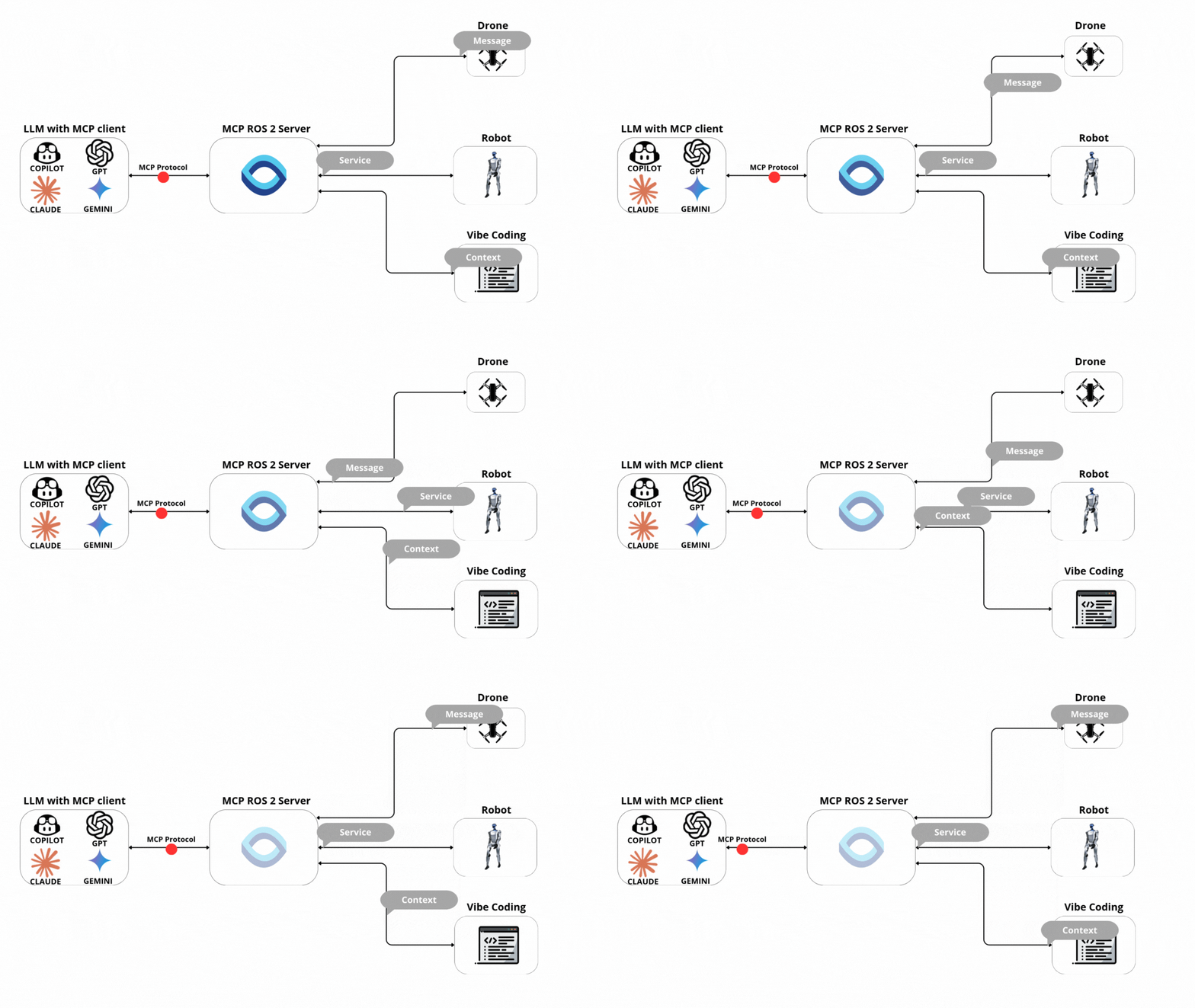
A **Python** implementation of the **Model Context Protocol (MCP)** for **ROS 2**. This server enables AI tooling to connect with **ROS 2** nodes, topics, and services using the **MCP** standard over **stdio**. Designed to be **the easiest** **ROS 2** MCP server to configure.
# ✨ Tools
- List available topics
- List available services
- Lists available actions with their types and request fields
- Call services
- Subscribe to topics to collect messages
- Publish messages to topics
- Echo messages on topics
- Get fields from message types
- Sends an action goal and optionally waits for the result
- Requests the result of an action goal
- Subscribes to feedback messages from an action
- Subscribes to status updates of an action
- Cancels a specific goal or all active goals
- Get messages from [WiseVision Data Black Box](https://github.com/wise-vision/wisevision_data_black_box) ([InfluxDB](https://www.influxdata.com) alternative to [Rosbag2](https://github.com/ros2/rosbag2))
# 🤖 Available Prompts
### 📘 Want to create a custom prompt? [Check the guide here](/docs/CREATE_PROMPT.md)
## 📊 base.ros2-topic-echo-and-analyze
Subscribe to a ROS2 topic, collect messages for a specified duration, and provide statistical analysis of the collected data.
➡️ Can auto-detect topic if only one is available. Analyzes message rates, counts, and statistics on numeric fields.
## 🔄 base.ros2-topic-relay
Subscribe to one ROS2 topic and republish messages to another topic with optional transformations.
➡️ Supports identity relay, rate limiting, and change-based filtering.
## 🏥 base.ros2-node-health-check
Check if expected ROS2 topics and services are available and functioning correctly with optional publication rate monitoring.
➡️ Provides comprehensive health report with status indicators and recommendations.
## 🔍 base.ros2-topic-diff-monitor
Compare two ROS2 topics and report differences in their messages with detailed field-by-field analysis.
➡️ Useful for comparing raw sensor data with filtered/processed versions or verifying topic synchronization.
## ROS2 MCP has Prompts extension with additional prompts [See here](https://github.com/wise-vision/ros2_mcp_prompts)
### 💡 Don’t know what prompts are? [See the MCP spec here](https://modelcontextprotocol.io/specification/2025-06-18/server/prompts#user-interaction-model).
**Note:** To call a service with a custom (non-default) type, source the package that defines it before starting the server.
## 🎯 Why Choose This MCP Server?
**Save hours of development time** with native AI integration for your ROS 2 projects:
## Why this ROS 2 MCP server ⭐
- **⚡ 1-minute setup** - World's easiest ROS 2 MCP configuration
- **0️⃣ Zero-friction setup** - stdio transport, no brokers, no webserver.
- **🔌 Auto type discovery** - a built-in “list interfaces” tool dynamically enumerates available topics and services together with their message/service definitions (fields, types, schema) — so the client always knows exactly what data can be published or called.
- **✨ Nested field support**: Handle complex message structures with ease.
- **🤖 AI-powered debugging** - Let AI help you troubleshoot ROS 2 issues in real time
- **📊 Smart data analysis** - Query your robot's sensor data using natural language
- **🚀 Boost productivity** - Control robots, analyze logs, and debug issues through AI chat
- **💡 No ROS 2 expertise required** - AI translates your requests into proper ROS 2 commands
- **🐋 Dockerized**: Ready-to-use Docker image for quick deployment.
- **🔧 Auto QoS selection**: Automatically selects appropriate Quality of Service settings for topics and services, ensuring optimal communication performance without manual configuration.
**Perfect for:** Robotics developers, researchers, students, and anyone working with ROS 2 who wants to leverage AI for faster development and debugging.
If you find this useful, please ⭐ star the repo — it helps others discover it.
🚀 **Enjoying this project?**
Feel free to contribute or reach out for support! Write issues, submit PRs, or join our [Discord community](https://discord.gg/9aSw6HbUaw) to connect with other ROS 2 and AI enthusiasts.
# 🚀 Drone Mission Using Prompts
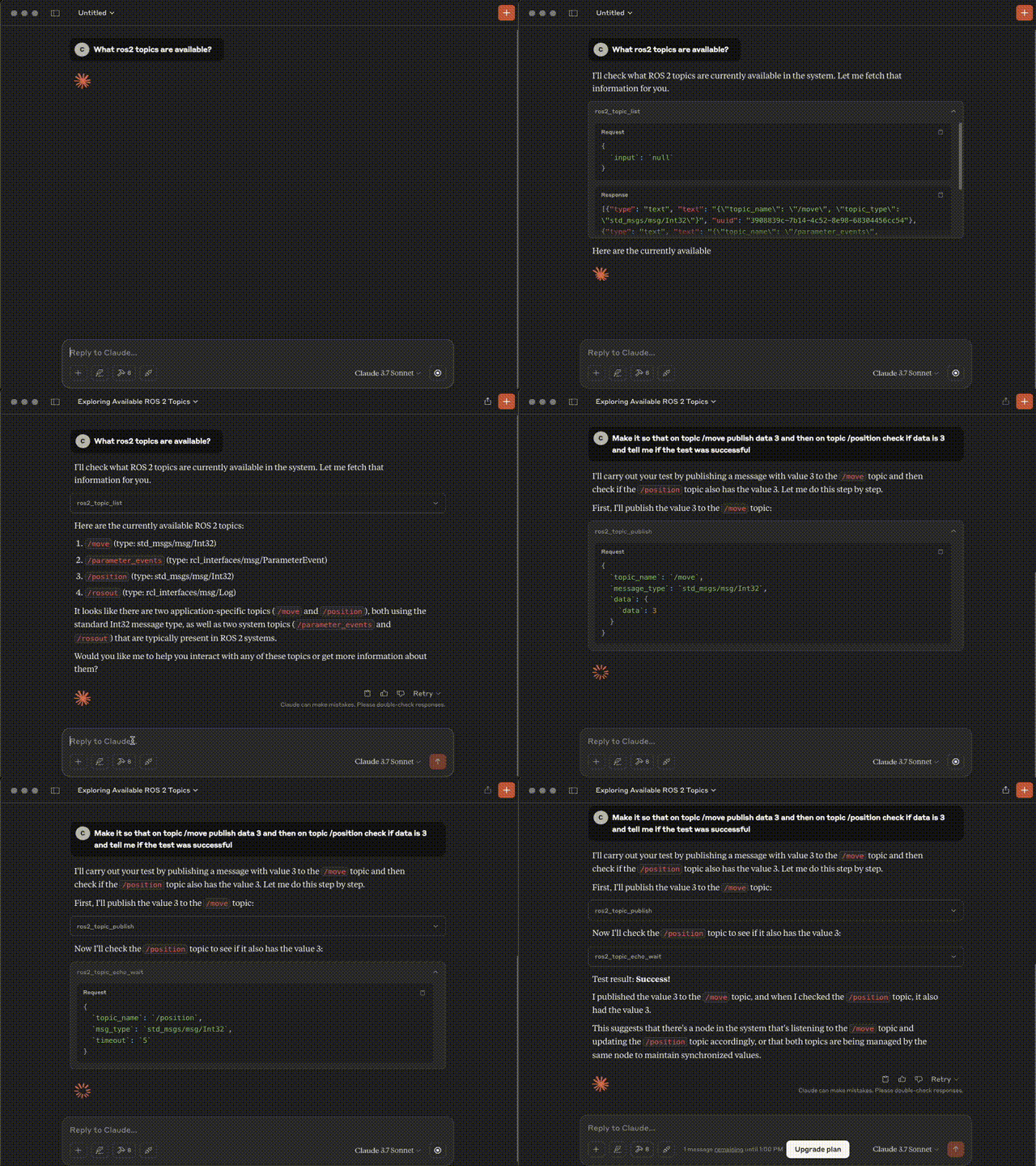
# 🌍 Real-world examples:
# ⚙️ Installation
Follow the [installation guide](installation/README.md) for step-by-step instructions:
- [🧩 Install in Visual Studio Code Copilot](installation/README.md#configure-visual-studio-code-copilot)
- [🤖 Install in Claude Desktop](installation/README.md#configure-claude-desktop)
- [💻 Install in Warp](installation/README.md#configure-warp)
- [🐳 Build Docker Image locally](installation/README.md#build-docker-image-locally)
## 💡 Want to try it in simulation?
[Check out the Gazebo Drone Demo section](docs/DEMO_DRONE.md)
### 🔧 ROS 2 Tools
#### 📋 **Topics**
| Tool | Description | Inputs | Outputs |
|------|-------------|--------|---------|
| **`ros2_topic_list`** | Returns list of available topics | – | `topic_name` (string): Topic name
`topic_type` (string): Message type |
| **`ros2_topic_subscribe`** | Subscribes to a ROS 2 topic and collects messages for a duration or message limit | `topic_name` (string)
`duration` (float)
`message_limit` (int)
*(defaults: first msg, 5s)* | `messages`
`count`
`duration` |
| **`ros2_get_messages`** | Retrieves past messages from a topic (data black box) | `topic_name` (string)
`message_type` (string)
`number_of_messages` (int)
`time_start` (str)
`time_end` (str) | `timestamps`
`messages` |
| **`ros2_get_message_fields`** | Gets field names and types for a message type | `message_type` (string) | Field names + types |
| **`ros2_topic_publish`** | Publishes message to a topic | `topic_name` (string)
`message_type` (string)
`data` (dict) | `status` |
---
#### 🛠 **Services**
| Tool | Description | Inputs | Outputs |
|------|-------------|--------|---------|
| **`ros2_service_list`** | Returns list of available services | – | `service_name` (string)
`service_type` (string)
`request_fields` (array) |
| **`ros2_service_call`** | Calls a ROS 2 service | `service_name` (string)
`service_type` (string)
`fields` (array)
`force_call` (bool, default: false) | `result` (string)
`error` (string, if any) |
#### 🎯 **Actions**
| Tool | Description | Inputs | Outputs |
|------|-------------|--------|---------|
| **`ros2_list_actions`** | Returns list of available ROS 2 actions with their types and request fields | – | `actions[]` (array)
└ `name` (string)
└ `types[]` (array of string)
└ `request_fields` (array) |
| **`ros2_send_action_goal`** | Sends a goal to an action. Optionally waits for the result. | `action_name` (string)
`action_type` (string)
`goal_fields` (object)
`wait_for_result` (bool, default: false)
`timeout_sec` (number, default: 60.0) | `accepted` (bool)
`goal_id` (string\|null)
`send_goal_stamp` (object\|null)
`waited` (bool)
`result_timeout_sec` (number\|null)
`status_code` (int\|null)
`status` (string\|null)
`result` (object\|null) \| `error` (string) |
| **`ros2_cancel_action_goal`** | Cancels a specific goal or all goals for an action | `action_name` (string)
`goal_id_hex` (string, required if `cancel_all`=false)
`cancel_all` (bool, default: false)
`stamp_sec` (int, default: 0)
`stamp_nanosec` (int, default: 0)
`wait_timeout_sec` (number, default: 3.0) | `service` (string)
`return_code` (int)
`return_code_text` (string)
`goals_canceling[]` (array of {`goal_id`, `stamp`}) \| `error` (string) |
| **`ros2_action_request_result`** | Waits for the RESULT of a given goal via GetResult | `action_name` (string)
`action_type` (string)
`goal_id_hex` (string, 32-char UUID)
`timeout_sec` (number\|null, default: 60.0)
`wait_for_service_sec` (number, default: 3.0) | `service` (string)
`goal_id` (string)
`waited` (bool)
`result_timeout_sec` (number\|null)
`status_code` (int\|null)
`status` (string\|null)
`result` (object\|null) \| `error` (string) |
| **`ros2_action_subscribe_feedback`** | Subscribes to feedback messages for an action. Can filter by goal_id. Collects messages for duration or max count. | `action_name` (string)
`action_type` (string)
`goal_id_hex` (string\|null)
`duration_sec` (number, default: 5.0)
`max_messages` (int, default: 100) | `topic` (string)
`action_type` (string)
`goal_id_filter` (string\|null)
`duration_sec` (number)
`messages[]` (array of {`goal_id`, `feedback`, `recv_stamp`}) \| `error` (string) |
| **`ros2_action_subscribe_status`** | Subscribes to an action's status topic and returns collected status frames | `action_name` (string)
`duration_sec` (number, default: 5.0)
`max_messages` (int, default: 100) | `topic` (string)
`duration_sec` (number)
`frames[]` (array of {`stamp`, `statuses[]`}) \| `error` (string) |
# 🐞 Debugging
Since MCP servers run over stdio, debugging can be challenging. For the best debugging
experience, we strongly recommend using the [MCP Inspector](https://github.com/modelcontextprotocol/inspector).
You can launch the MCP Inspector via [ `npm` ](https://docs.npmjs.com/downloading-and-installing-node-js-and-npm) with this command:
```bash
npx @modelcontextprotocol/inspector uv --directory /path/to/ros2_mcp run mcp_ros_2_server
```
Upon launching, the Inspector will display a URL that you can access in your browser to begin debugging.
## 📚 Origins and evolution
We built this server to make AI‑assisted ROS 2 development fast and reliable. Internally, we needed a simple way for agents to discover message types, publish/subscribe to topics, and call services—without boilerplate or flaky networking. That led to a few core design goals:
- Handle all ROS 2 message types (including nested fields) so agents can write and test any code
- Integrate topic pub/sub and service calls to validate behavior end‑to‑end
- Work seamlessly with GitHub Copilot in VS Code and other MCP clients
- Use a simple stdio transport to avoid network complexity
After dogfooding it, we open‑sourced the project to help the broader ROS 2 community build faster with AI. It’s now useful not only for development, but also for controlling robots, running QoS experiments, and analyzing live data and robot/swarm state. The project is actively maintained—features and improvements ship regularly based on user feedback. If this project helps you, please star the repo and share your use case!