# iOS MCP
[中文](README.md) | English
iOS MCP is an [MCP (Model Context Protocol)](https://modelcontextprotocol.io) server that runs on jailbroken iPhones, enabling AI agents (Claude, Codex, Cursor, etc.) to directly control iOS devices.
## Features
| Category | Tools | Description |
|----------|-------|-------------|
| **Touch** | `tap_screen` `swipe_screen` `long_press` `double_tap` `drag_and_drop` | Precise screen coordinate operations with path dragging |
| **Buttons** | `press_home` `press_power` `press_volume_up` `press_volume_down` `toggle_mute` `wake_and_home` | HID physical button simulation, lock/off-screen wake flow |
| **Text Input** | `input_text` `type_text` `press_key` | Pasteboard fast input / HID character-by-character / special keys |
| **Screenshot** | `screenshot` `get_screen_info` | Base64 JPEG screenshot, screen dimensions & orientation |
| **App Management** | `launch_app` `kill_app` `list_apps` `list_running_apps` `get_frontmost_app` `get_app_info` `install_app` `uninstall_app` | Launch/kill apps, install/uninstall apps or DEB packages, query app bundle/container paths and entitlements |
| **Accessibility / Elements** | `get_ui_elements` `get_element_at_point` `tap_element` `wait_for_element` `wait_for_disappear` `ocr_screen` `describe_screen` | UI element tree, element lookup by coordinates, tap elements by text/label, wait for elements to appear/disappear, on-screen OCR text recognition with coordinates, aggregated screen snapshot |
| **Clipboard** | `get_clipboard` `set_clipboard` | Read/write clipboard |
| **Filesystem** | `list_dir` `read_file` `write_file` | Directory listing, file read/write (text and binary) |
| **Logs** | `get_syslog` `get_crash_logs` `read_crash_log` | Live system-wide log of all apps, crash report listing and reading |
| **Device Control** | `get_brightness` `set_brightness` `get_volume` `set_volume` | Brightness and volume |
| **Device Info** | `get_device_info` | Model, iOS version, battery, storage, memory, jailbreak type |
| **URL** | `open_url` | Open URLs or URL schemes |
| **Shell** | `run_command` | Execute shell commands |
**46** MCP tools covering the major iOS device automation and reverse-engineering scenarios.
`install_app` supports `.ipa`, `.tipa`, and `.deb` (case-insensitive extensions). `.tipa` uses the IPA install flow.
For computer-local files, upload through `POST /upload_file` first, then pass the returned device path to `install_app`.
`ocr_screen` and `describe_screen(include_ocr=true)` accept an optional `engine`:
omitted/`"paddleocr"` uses offline PaddleOCR with ONNX Runtime CPU;
`"vision"` uses Apple Vision. Selection is per request, with no automatic engine fallback.
Vision defaults to English on iOS 13; PaddleOCR supports Chinese, English and digits.
See [OCR engines, build instructions and validation](docs/PADDLEOCR.md).
## Runtime Requirements
- Jailbroken iOS device
## Installation
### Supported Environments
| Jailbreak Type | Supported iOS Versions | Package Architecture |
|------|------|------|
| `rootful` | iOS 13 - iOS 18 | `iphoneos-arm` |
| `rootless` | iOS 15 - iOS 18 | `iphoneos-arm64` |
| `roothide` | iOS 15 - iOS 18 | `iphoneos-arm64e` |
### Installation Methods
#### Method 1: Download a package from the Release page
Choose the `.deb` package that matches the architecture listed in the table above.
For manual installation, make sure these dependencies are present:
- `mobilesubstrate/ElleKit`
- `preferenceloader`
#### Method 2: Install directly from Cydia / Sileo
You can also search and install directly from:
- `Cydia`
- `Sileo`
Package name:
- `iOS MCP`
### Recommended checks after installation
1. Restart `SpringBoard`
2. Open the following URL in a browser:
```text
http://DEVICE_IP:8090/health
```
3. If you get the following response, the service is running correctly:
```json
{"status":"ok","server":"ios-mcp","version":"1.2.8","protocolVersion":"2025-11-25","supportedProtocolVersions":["2025-11-25","2025-06-18","2025-03-26"]}
```
## Usage
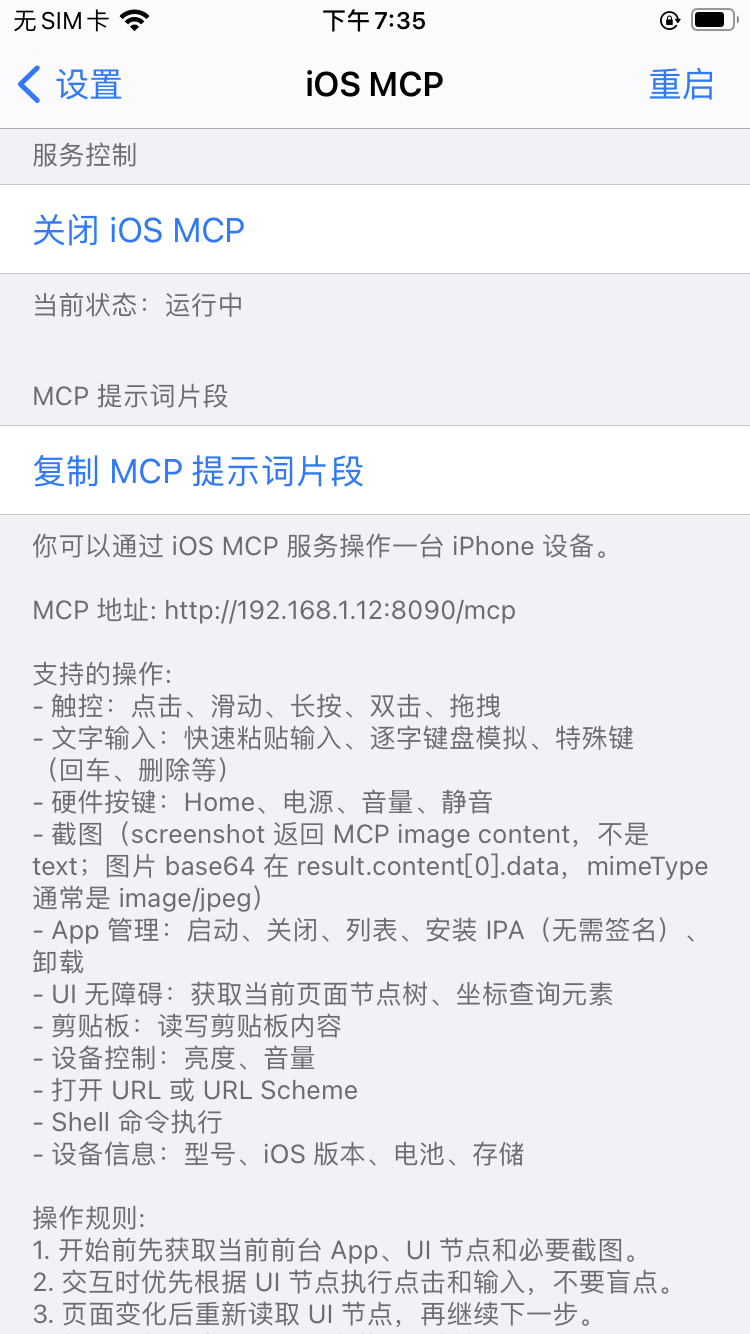
After installation, open **Settings** → **iOS MCP** on your device. Start the server, then tap "Copy / Share MCP Prompt" and paste it into your AI agent's prompt.
The settings page follows the device's preferred language: Simplified Chinese, Traditional Chinese, or English. No manual language selection is needed.
## Security Notes
- The MCP server has no built-in authentication — it is recommended to use it only on local networks
- MCP protocol support defaults to `2025-11-25` and remains compatible with `2025-06-18` and `2025-03-26`; HTTP responses include `MCP-Protocol-Version`
- When the device is locked or the screen is off, the server blocks interactive/mutating tools such as tap, swipe, text input, app launch, and shell commands; observation, screenshot, and wake/recovery tools remain allowed
- The `run_command` tool can execute arbitrary shell commands — use with caution
- `read_file` / `write_file` / `download_file` can read and write device paths within the MCP server process's permission scope, at the same risk level as `run_command` — use only on trusted networks
- `get_syslog` reads the live system-wide log of all apps via `mcp-logreader` (signed with the `com.apple.private.logging.stream` entitlement), which may contain sensitive data — use only on trusted networks
- `mcp-root` provides restricted root privilege elevation for bundled helpers, limited chmod/launchctl, no-argument id, and restricted `dpkg -i|--install|--unpack ` / `dpkg -s|-r|--remove|--purge ` operations; it is not a general sudo replacement
## Community
`iOS MCP` already has an active community of developers and users, with multiple WeChat groups available for discussion.
| WeChat Groups (Group 8 Open) | Official Account |
|---|---|
| Group 1: Full
Group 2: Full
Group 3: Full
Group 4: Full
Group 5: Full
Group 6: Full
Group 7: Full
Group 8: Open | `小陈iOS逆向与安全` |
|  |
 |
> If the Group 8 QR code has expired, add WeChat `witchan028` or follow the official account `小陈iOS逆向与安全` to get the latest group invite.
Feel free to add me on WeChat or follow the official account for updates and the latest group access information.
- WeChat: `witchan028`
- Email: `witchan028@126.com`
## Author
**witchan**
## License
Project-owned code is licensed under the MIT License. See [LICENSE](LICENSE).
If you use, modify, redistribute, or incorporate any substantial portion of the project-owned source code, retain the copyright notice and license text. [NOTICE](NOTICE) provides project attribution and disclaimer information.
This project is provided on an "AS IS" basis, without warranties or conditions of any kind. The author is not responsible for device malfunction, data loss, service interruption, account risk, system damage, security issues, commercial loss, or any other direct or indirect impact caused by using, modifying, redistributing, deploying, or running this project.
Bundled third-party components, including AppSync Unified, appinst, ldid, OpenSSL, libplist, and libzip, remain under their own licenses. See [THIRD_PARTY_NOTICES.md](THIRD_PARTY_NOTICES.md).