# Aseprite AI Artist
### Your coding agent, painting in the Aseprite window you already have open.
Not a generated PNG. Not a file changed behind your back.
The document on your screen, one pixel at a time — and every step is one Ctrl+Z.
[](https://www.npmjs.com/package/@pebbly/aseprite-ai-artist)
[](https://github.com/with-pebbly/aseprite-ai-artist/actions/workflows/ci.yml)
[](LICENSE)
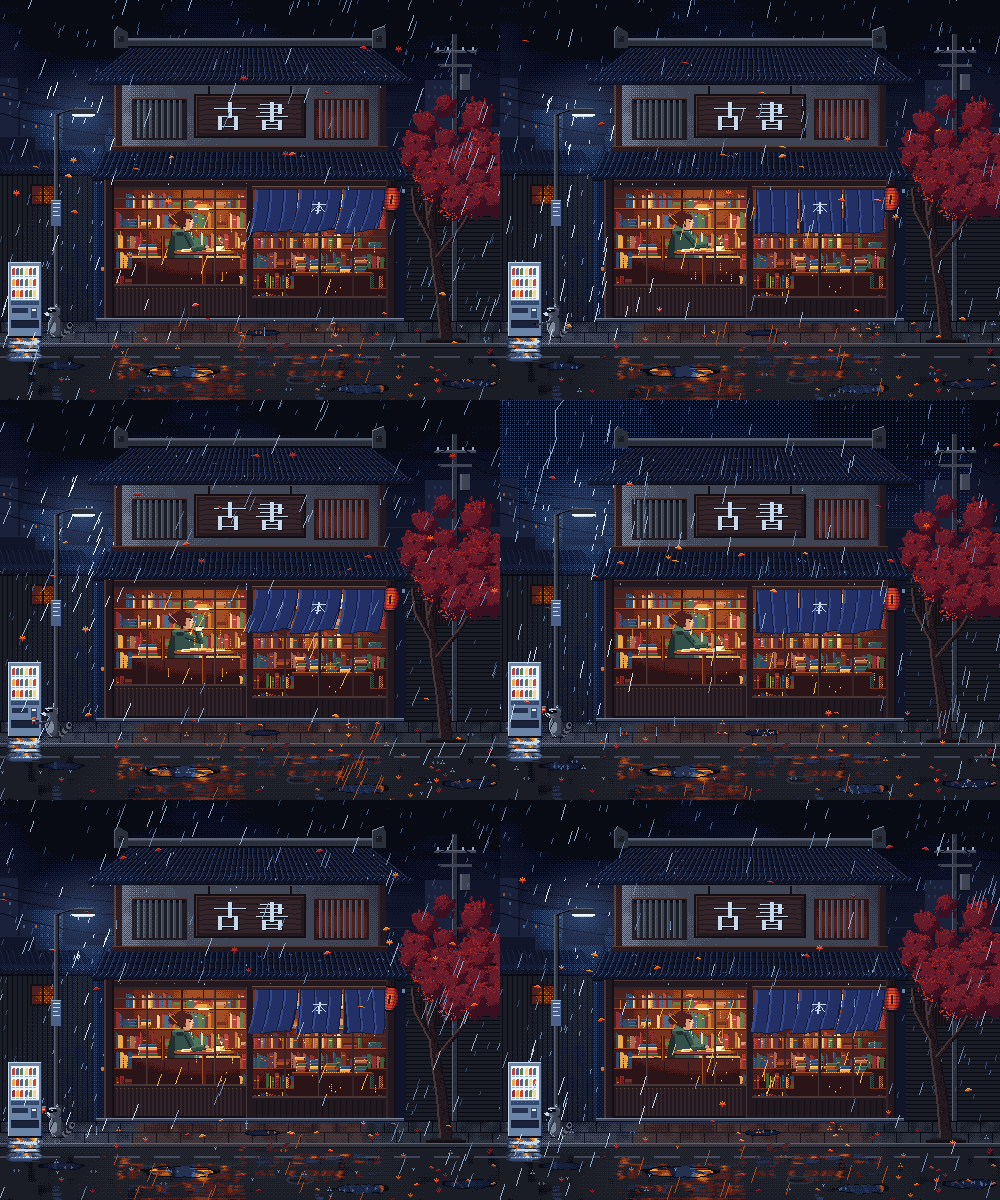
☔ 500×400 · 384 frames at 24 fps · 16 s · 24 layers — drawn by Claude Opus 5.5 through this server.
**[Install](#-install)** · **[How it draws](#-how-it-draws)** · **[Skills](#-skills)** · **[Gallery](https://pixeli.pebbly.space/)**
---
## ✨ What it feels like
> *"Draw me a 32×32 knight in the PICO-8 palette, then give him a 4-frame idle."*
You type that, and watch it happen in Aseprite: a palette, a silhouette, shading,
layers, a breathing idle, a tagged cycle. The agent **looks at its own work**
after every step, and at the end tells you what it compromised on.
You stay in charge. Don't like the helmet? Ctrl+Z, or just say so.
Works with **Claude Code, omp, OpenCode, Codex CLI, Gemini CLI, Cursor, VS Code
and Windsurf**. Best results so far: **Claude Opus 5.5**.
## 🚀 Install
You need [Aseprite](https://www.aseprite.org/) 1.3+ and Node 22.6+ (macOS, Linux
or Windows).
**1. The Aseprite extension** — then quit and reopen Aseprite:
```bash
npx @pebbly/aseprite-ai-artist install-extension
```
**2. Your agent:**
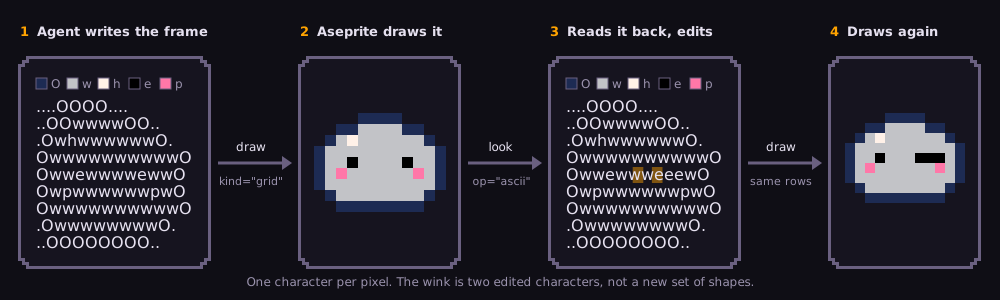 It sees the whole shape while writing it, so silhouettes stay even, limbs keep
their length between frames, and an edit never spills into its neighbours.
Animation is the same trick: copy the last frame's rows, move the arm, draw.
Since 0.6.0 every character stands for one palette entry, the same on every
read, so a big canvas can be read and edited in pieces without the letters
changing meaning between them. A grid can be as large as the canvas.
Early signal, not a measurement: with the same model and prompts, the mage
benchmark went 3 → 4/10 and the road 1 → 3/10; the tree stayed at 2
([compare them](https://pixeli.pebbly.space/benchmarks)).
### 📚 The pixel-art knowledge base
The agent doesn't improvise a hand at 16 px or a horse's walk — it looks them up.
**62 rules · ~400 pixel templates · 2006 palettes** — browse them at
**[pixeli.pebbly.space/knowledge](https://pixeli.pebbly.space/knowledge)** 👀
| 🧍 Craft | 🌍 World |
|---|---|
| `0x` **Core** — loop, palette, shading, outlines | `5x` **Creatures** — quadrupeds, birds, monsters |
| `1x` **Technique** — lines, anti-aliasing, dithering | `6x` **Environments** — skies, water, tiles, buildings |
| `2x` **Colour** — hue-shifted ramps, materials, light | `7x` **Objects & 3D** — perspective, isometric, props |
| `3x` **Characters** — anatomy, faces, hands, clothing | `8x` **Effects & UI** — fire, magic, particles, fonts |
| `4x` **Animation** — idle, walk, jumps, attacks | `9x` **Style** — console eras, tells of generated art |
Every rule gives size budgets, a procedure, common mistakes and grid templates
the agent pastes straight onto the canvas. Any MCP client reads them as
`rules://` resources from [`rules/`](rules/).
🎨 **Palettes:** the console classics plus Lospec's 2000 most-downloaded, each
credited — `preset: "endesga-32"`, or just a word of the name.
### 👀 Review by fresh eyes
New in 0.8.0. The agent that drew a sprite is the worst judge of it — it
knows what it meant, so it sees it. `studio` hands the result to
**pixel-critic**, which first writes a cold read (what the picture shows to
someone who was never told), then a scored critique. A draft ships at 7/10
with nothing blocking; below that the agent fixes the one thing named,
snapshotting first. Each fix goes back to the critic as a blind A/B — old and
new under neutral names — and stays only if it wins, so a round can't quietly
make good art worse.
It costs time (roughly one more critique per round) and its effect on
quality is not yet measured — the thirteen experiment runs behind it are in the
[gallery](https://pixeli.pebbly.space/), next to the benchmark rows.
## 🧰 Skills
`studio` picks these for you. Call one directly when you know the step you want
— as `/aseprite:
It sees the whole shape while writing it, so silhouettes stay even, limbs keep
their length between frames, and an edit never spills into its neighbours.
Animation is the same trick: copy the last frame's rows, move the arm, draw.
Since 0.6.0 every character stands for one palette entry, the same on every
read, so a big canvas can be read and edited in pieces without the letters
changing meaning between them. A grid can be as large as the canvas.
Early signal, not a measurement: with the same model and prompts, the mage
benchmark went 3 → 4/10 and the road 1 → 3/10; the tree stayed at 2
([compare them](https://pixeli.pebbly.space/benchmarks)).
### 📚 The pixel-art knowledge base
The agent doesn't improvise a hand at 16 px or a horse's walk — it looks them up.
**62 rules · ~400 pixel templates · 2006 palettes** — browse them at
**[pixeli.pebbly.space/knowledge](https://pixeli.pebbly.space/knowledge)** 👀
| 🧍 Craft | 🌍 World |
|---|---|
| `0x` **Core** — loop, palette, shading, outlines | `5x` **Creatures** — quadrupeds, birds, monsters |
| `1x` **Technique** — lines, anti-aliasing, dithering | `6x` **Environments** — skies, water, tiles, buildings |
| `2x` **Colour** — hue-shifted ramps, materials, light | `7x` **Objects & 3D** — perspective, isometric, props |
| `3x` **Characters** — anatomy, faces, hands, clothing | `8x` **Effects & UI** — fire, magic, particles, fonts |
| `4x` **Animation** — idle, walk, jumps, attacks | `9x` **Style** — console eras, tells of generated art |
Every rule gives size budgets, a procedure, common mistakes and grid templates
the agent pastes straight onto the canvas. Any MCP client reads them as
`rules://` resources from [`rules/`](rules/).
🎨 **Palettes:** the console classics plus Lospec's 2000 most-downloaded, each
credited — `preset: "endesga-32"`, or just a word of the name.
### 👀 Review by fresh eyes
New in 0.8.0. The agent that drew a sprite is the worst judge of it — it
knows what it meant, so it sees it. `studio` hands the result to
**pixel-critic**, which first writes a cold read (what the picture shows to
someone who was never told), then a scored critique. A draft ships at 7/10
with nothing blocking; below that the agent fixes the one thing named,
snapshotting first. Each fix goes back to the critic as a blind A/B — old and
new under neutral names — and stays only if it wins, so a round can't quietly
make good art worse.
It costs time (roughly one more critique per round) and its effect on
quality is not yet measured — the thirteen experiment runs behind it are in the
[gallery](https://pixeli.pebbly.space/), next to the benchmark rows.
## 🧰 Skills
`studio` picks these for you. Call one directly when you know the step you want
— as `/aseprite: