 |
 |
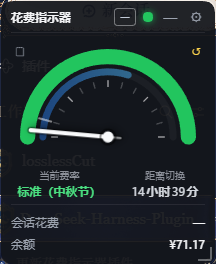 |
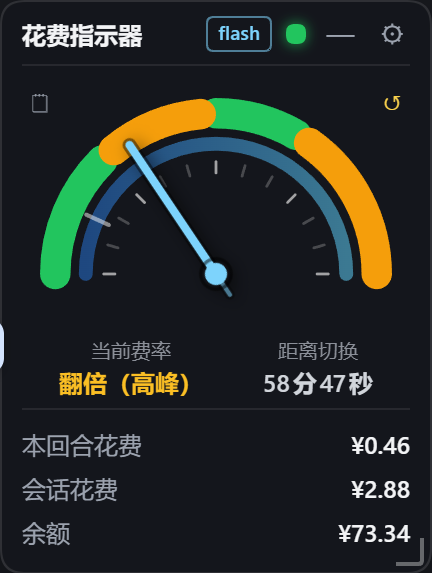
> Left: expanded (weekday peak — green/amber arcs, amber = peak band; the bottom three rows are turn cost / session cost / balance); middle: minimized (rate lamp + countdown ring + cost/balance + model badge); right: a **public holiday** (Mid-Autumn, 9-25) — the whole arc is green and the status reads "Standard (Mid-Autumn Festival)".
## What's new in v1.6.1 – v1.6.8
> Six batches: **v1.6.8** adds the **turn cost** and lets you switch what the compact states show; **v1.6.7** fixes the widget being **unclickable and undraggable in the desktop app** (Electron swallowed the top strip’s mouse input as window dragging); **v1.6.6** brings back the **bar chart in the cost records panel** (buried by the glass backdrop layer since v1.6.0); **v1.6.5** slims down the **minimized capsule**; **v1.6.4** adds **edge snapping (dock as a vertical strip)**; **v1.6.1 – v1.6.3** was one round of **dsh 0.1.7** compatibility work — **compatibility**, **holiday display**, and the **cost display fix**.
| Version | Theme | In one line |
| --- | --- | --- |
| **v1.6.8** | 🧮 Turn cost | The expanded view gains a **turn cost** row (current turn only, under one cent shows `<0.01`); the minimized capsule and the docked strip can be switched between turn cost and session cost in settings |
| **v1.6.7** | 🖱 Interactive in the desktop app | The DSH desktop shell lays a window-drag hot zone across the top of the window with `-webkit-app-region:drag`; a widget parked there has its mouse input consumed as window dragging — unclickable, undraggable |
| **v1.6.6** | 📊 Bar chart regression | The glass backdrop layer and the chart's bars shared the class name `.dsg-bar`: the bars inherited `position:absolute; inset:0`, so 30 of them covered the whole chart area and the last, empty one hid all the others |
| **v1.6.5** | 📏 Slimmer minimized capsule | Minimized size halved and the width now fits its content; the badge's slot class was being wiped by `setModelBadge`, which is why the right side had a blank gap |
| **v1.6.4** | 🧲 Edge snapping | Drag the widget to the left or right edge and it snaps into a **docked vertical strip**; click it or drag it away to restore |
| **v1.6.3** | 💰 Cost display fix | 0.1.7 moved “which session is selected” out of the client `sessions` service, so the cost and the model badge stuck at `—`; now resolved from several sources |
| **v1.6.2** | 🗓 Holiday display | Chinese statutory holidays (and weekend make-up workdays) are billed off-peak: all-green dial, switch instants that skip holidays, and status text that says why |
| **v1.6.1** | 🧩 Compatibility | 0.1.7 dropped `data-dsh-frame` from the app frame — conversation-area geometry and sidebar-collapse detection broke; the frame is now derived by walking up from the columns |
### v1.6.8 · Turn cost + a switchable compact display
**New: the expanded view gains a “Turn cost” row, and the minimized capsule / docked strip can show either the turn cost or the session cost.**
- **Turn cost** — counts the current turn only. On `turn/start` the host resets it to zero and accumulates every charge of that turn from there.
- **Same pricing path as the session cost** — every event is priced at the rate and model in effect at its own timestamp (the exact same `priceAt` call the session cost uses), so the two numbers can never disagree in method.
- **Under one cent shows `<0.01`**, so you never get a column of `¥0.00`. The session-cost row keeps its original `¥X.XX` format.
- **Compact states are a choice** — a new setting, **“Show turn cost in the minimized capsule and strip”**, is off by default, which keeps the previous behaviour (both show the **session cost**). Both compact states follow it together, and hovering the number tells you which one you are looking at.
- **The manual reset is independent** — “Reset session cost” only touches the session cost; the turn cost is unaffected.
- **Replacement and retries are handled** — a repeated sample for the same `turn/step` replaces rather than accumulates (the official projection semantics), and `llm/retry-started` rollbacks are subtracted from the turn cost too.
| State | Shows |
| --- | --- |
| Expanded | Turn cost / session cost / balance — three rows |
| Minimized capsule, setting off (default) | Session cost |
| Minimized capsule, setting on | Turn cost |
| Docked strip | Always matches the minimized capsule |
| Turn cost below ¥0.01 | `<0.01` |
> The **host half** (turn accounting) and the **client half** (the new row and the setting) changed independently. The host half is pinned by DSH’s module cache, so it **needs a DSH restart**; the client half only needs a page refresh.
### v1.6.7 · Unclickable and undraggable in the desktop app (Electron read the mouse as window dragging)
**Fix: in the DSH desktop app (Electron, 0.2), a widget parked at the very top of the window could not be expanded by clicking, and dragging it dragged the whole application window instead.**
The desktop shell lays a **window-drag hot zone** across the top of the window:
```css
[data-windows-titlebar] .frame:before{inset:0 0 auto;
height:var(--dsh-windows-titlebar-height);-webkit-app-region:drag}
```
Chromium treats that band as the window title bar: **mouse input landing inside it is handed to the OS for window dragging and never delivered to the page**. The widget position lives in `dsh-cost-gauge:pos`, and dragging it to the top clamps it to `y = 8` — the whole minimized capsule sat inside that band, so clicks never arrived (nothing expanded) and drags moved the window.
A plain browser (`dsh web`) has no app-region concept and uses ordinary DOM hit-testing, which is why this only ever showed up in the desktop app.
- Added `-webkit-app-region:no-drag;app-region:no-drag;` to `.dsg-root` and `.dsg-records`, carving the widget's own rectangle out of the hot zone.
- The precedent is upstream's own: DSH's `position:fixed` sidebar toggle carries `-webkit-app-region:no-drag` for exactly this reason — a fixed element sitting over the hot zone has to declare `no-drag` itself.
> Pure CSS, client half only — **no DSH restart needed**. The bundle gets a new rev, so **refresh the page once**. Verified against the running desktop host: the old rev returns 404 while the recomposed rev returns 200 carrying both declarations.
### v1.6.6 · The bar chart was buried by the backdrop layer (class-name collision)
**Fix: ever since v1.6.0 the cost records panel's bar chart showed nothing but “最大 ¥…” and the legend — all the bars were gone.**
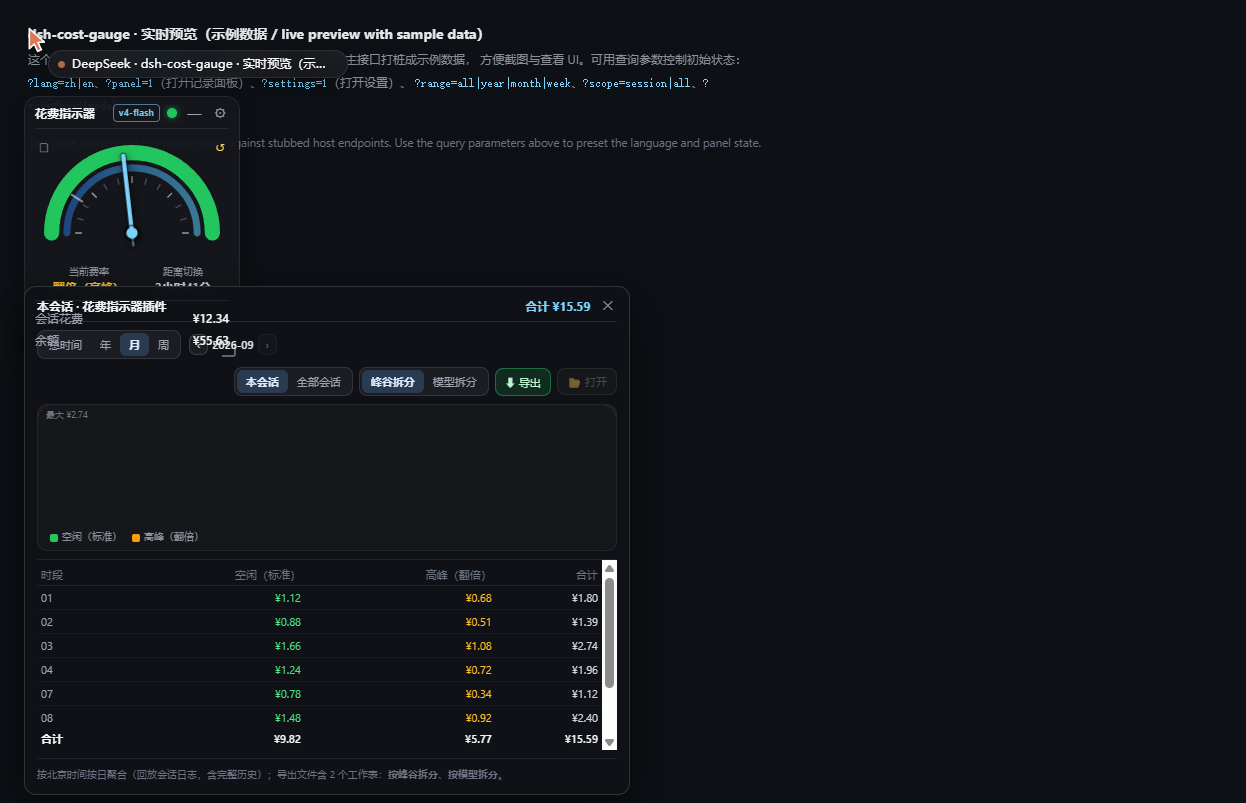
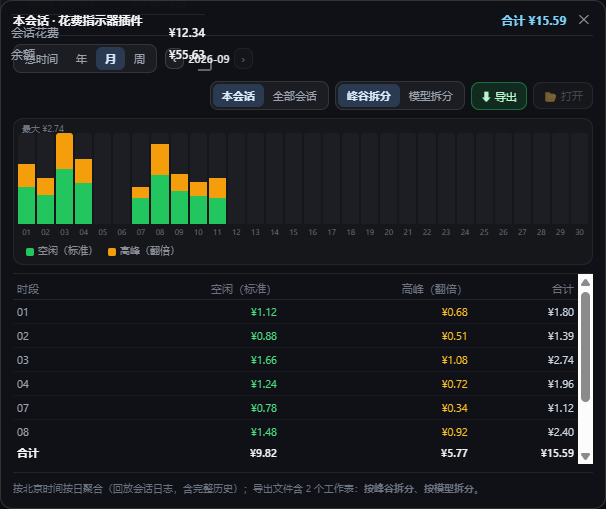 The root cause is **two different things sharing one class name**: the chart's bars (added in v1.3.0) are `.dsg-bar`, and the **backdrop layer** that the glass redesign (v1.6.0) puts behind the title bar and the bottom row is *also* `.dsg-bar`:
```css
/* v1.6.0 backdrop layer (only shown while frosting is on) */
.dsg-bar{position:absolute;inset:0;z-index:1;display:none;pointer-events:none;background:rgba(20,22,28,1); …}
/* v1.3.0 chart bar: later in the sheet, but it only declares a few properties */
.dsg-bar{flex:1;min-width:0;height:100%;display:flex;flex-direction:column;justify-content:flex-end}
```
The later rule wins only for `display` / `height` / `flex`, so the bars **inherited** `position:absolute; inset:0; z-index:1; pointer-events:none` from the backdrop — **each of the 30 bars ended up covering the entire chart area**, later ones painting over earlier ones, and the last day (no usage, no segments) had an opaque background that wiped out everything in front of it. `pointer-events:none` came along too, which is why the bars could not even be hit with the mouse (`document.elementFromPoint` returned the container instead of a bar).
- **Scoped the backdrop to direct children**: `.dsg-root>.dsg-bar{…}` and `.dsg-root.dsg-frosting>.dsg-bar{display:block}`. The backdrop already *is* a direct child of `.dsg-root` (in the markup `
 - **Magnetic preview while dragging**: once the pointer is within **24px** of an edge the widget is pulled to it and only settles there when you let go — no guessing whether it will snap.
- **Left / right edge → vertical strip**: on release it becomes a **36px-wide** strip docked to that edge, stacked top to bottom: status lamp, session cost, balance and model badge. Its **vertical position** stays wherever you dropped it.
- **Top / bottom edge → edge only, no reshape**: top and bottom just snap (a horizontal strip would make no sense).
- **Corners count as left/right**: dropping in a corner is handled as the left or right edge — only those two reshape into a strip.
- **Getting out is easy**: click the strip to expand it in place, back at **the position it had before you dragged it**; or drag the strip toward the middle of the window and it undocks and expands right there.
- **Persisted**: which edge it is docked to, how far down, and where it used to be all live in `localStorage` (`dsh-cost-gauge:dock` / `dsh-cost-gauge:pos`), so a page refresh restores it.
- **Can be turned off**: the settings panel has a new **Edge snapping** switch (on by default); the snap distance can be overridden with `dsh-cost-gauge:snapDist`.
> This is not the same as the **vertical mini** mode from v1.4.0: that one is triggered by **window width** (a narrow window collapses the widget), while this one is triggered by **position** — even a very wide window snaps when you drag the widget to the edge.
> This feature is **front-end only**; the host half (`lib/index.js` / `lib/ledger.js`) was not touched.
### v1.6.3 · Cost display fix
**Fixed: the session cost and the model badge stopped rendering** (since dsh 0.1.7; the header showed nothing but `—`).
dsh 0.1.7 moved "**which session is currently selected**" **out of** the client-side `sessions` service: the list snapshot of `dsh-api-session-controller` now holds only `ids / byId / phase / projectionsBySession` — **there is no `current` field** (the file's own comment says *"Host catalog and local reference allocator; **view selection remains outside the Controller**"*). The selection is now kept **privately** by `dsh-client-ui-workspace` and is **not** provided as a service (0.1.7's client exposes just eight services: `sessions` / `layout` / `resources` / `modules` / `documentPreviews` / `uiRenderer` / `sidebarRightTabs` / `sidebarRight`), so a plugin cannot inject it.
The plugin used to read `ctx.sessions.list.getSnapshot().current`, which is now always `undefined` — so the request degraded to one **without `?session=`**, the host returned only the rate and balance, and the header could show nothing but `—`.
- **Now resolved from several sources** (new `currentSessionId()`, tried in order of reliability, first hit wins):
1. `localStorage['dsh.sessions.current']` — the selection **dsh itself** persists (shaped `{ sessionId }`). `dsh-client-store`'s `attachPersistence` writes it back **synchronously** on every state change, so it is a live signal, not a stale cache.
2. `[data-sidebar-right-session]:not([hidden])` — the rightbar's current-session element, also written by dsh itself.
3. The old snapshot's `.current` — for **0.1.6 and earlier**.
- **All three call sites unified**: polling, the working lamp, and the records panel/export each read `.current` separately; they now all go through `currentSessionId()`.
- **The "working lamp" is fixed too**: `isSessionRunning()` depended on `.current` as well, so the header lamp glow and the minimised blinking for "session running" **had been broken all along** (it never lit).
### v1.6.2 · Holiday display
**Holiday pricing**: Chinese statutory holidays (including make-up workdays) are **billed at the off-peak rate**. Until now the dial judged by **weekday only**, so a holiday landing on a Monday-to-Friday was wrongly shown as **standard/peak**.
- **New `lib/holidays.js`** carrying the **2026** State Council holiday schedule (New Year / Spring Festival / Qingming / Labour Day / Dragon Boat / Mid-Autumn / National Day), distinguishing **statutory holidays** from **weekend make-up workdays** (e.g. Sun 9-20 and Sat 10-10 are normal working days).
- **All-green dial on holidays**: on a holiday (**even a weekday**) the whole arc is green, exactly like a weekend — no amber peak band. This matches the official "holidays are billed off-peak" rule.
- **Rate-switch instants carry over**: the countdown no longer simply jumps to the next 9:00 / 12:00 / 14:00 / 18:00 — it **skips holidays and weekends**. For example 18:30 on the day before Mid-Autumn carries all the way to **Mon 9-28 09:00**, and 19:00 before National Day carries to **10-08 (Thu) 09:00**. The off-peak stretch length driving the countdown ring follows the same rule, so the ring's proportion stays correct.
- **The status text now explains itself**: "standard" on a weekday daytime used to contradict the amber band on the dial. It now reads `Standard (Mid-Autumn Festival)` / `Standard (make-up workday)` / `Standard (off-peak)`.
- **Data-coverage hint**: the settings panel's version line shows `Holiday data: 2026 (State Council notices)`. For a year that is not covered the rate **falls back to weekday-only** and the line turns amber: `⚠ No holiday data for 2027; rate falls back to weekday only`.
> When the 2027 schedule is published, just add one more year table to `lib/holidays.js`; `coveredYears()` picks the new year up in that hint automatically.
### v1.6.1 · Compatibility
Compatibility with **dsh 0.1.7**. That release **removed the `data-dsh-frame` attribute** from the three-column app frame — the frame now only carries *conditional* attributes (`data-sidebar-collapsed` / `data-rightbar-collapsed` / `data-panel-conversation`) that are not rendered at all when false, so the main frame can no longer be selected directly.
- **Fixed: wrong conversation-area geometry** (verified by measurement). `getChatAreaRect()` used to take the frame via `[data-dsh-frame]` and then pick the middle conversation column from its direct children. Under 0.1.7 that attribute is gone, so the function **silently degraded to a global `scrollBody` search**: it measured **998×732**, whereas the real middle column is **1000×808** (76px too short), and its internal `chatPanelEl` stayed `null` — so later lookups for `scrollBody` / the input card were **no longer scoped to the middle column**. This also skewed the glass effect's "overlaps the conversation area" test and the content-band alignment. It now resolves the frame through the new `getFrameEl()` and correctly selects `centerCol`.
- **Fixed: sidebar collapse detection.** The collapse signal is now read from `data-sidebar-collapsed` on the frame (`getFrameEl()` tries the legacy attribute first for 0.1.6 and older, then derives the frame by walking **up from the sidebar / center / right column**). The width fallback changed from `w > 0 && w <= 96` to "**frame is laid out** + column width ≤ 96px": in Windows titlebar mode a collapsed column is **0** wide (the whole column is 0×0, which the width fallback cannot see) and the old check missed it; the layout check distinguishes "really collapsed" from "first frame, not laid out yet".
- **Corrected a manifest field**: `dsh.client.inject` declared `@deepseek-ai/dsh-client-runtime`, which no longer exists in the new dependency tree; it now names `@deepseek-ai/dsh-api-session-controller`, the package that actually provides the client-side `sessions` service. The field is only an **informational** dependency (`dsh-client-modules` silently ignores unknown packages), so the stale value never errored — it was just outdated.
> The host-side accounting (session event reading, V4 session format, model pricing) was checked and **needs no change**: 0.1.7's `dsh-token-meter` extracts usage the same way this plugin does, and the model catalog is still `deepseek-flash` (V4.1-Flash) and `deepseek-v4-pro`.
## What's new in v1.6.0
| Before / after (left: off · right: on — only the part over the chat text changes) |
| --- |
|
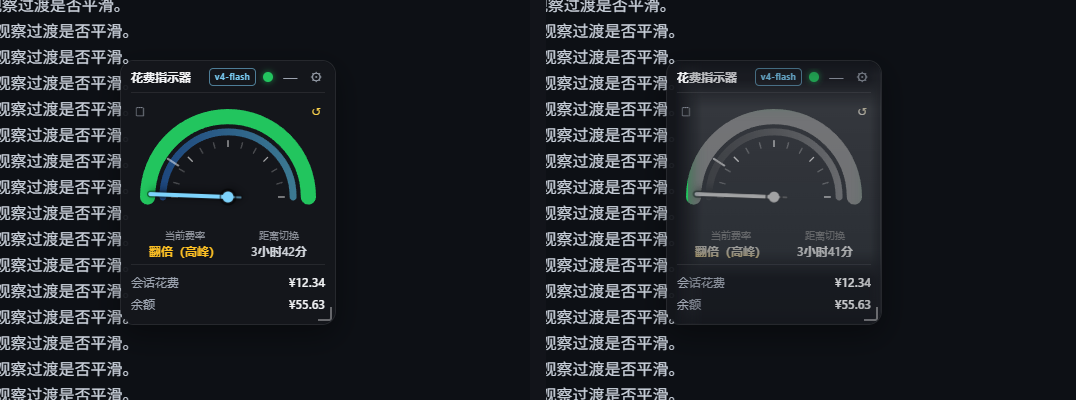 |
- **A new glass treatment**: the part of the widget reaching into the conversation **content column** turns into **grey glass**:
- **title bar / bottom cost & balance rows**: slightly transparent (adjustable);
- **the middle background**: fully transparent — the blurred conversation shows through;
- **the dial and text in the middle**: keep only their **lightness** (hue and saturation dropped = greyscale), and **each colour's opacity equals its lightness** (lightness 80 → opacity 80%), so different colours end up differently transparent.
- **Only the overlapping rectangle is affected**: whatever has not entered the chat column stays exactly as it was (even the dial keeps its colours). Implemented by clipping inside the SVG filter — the transformed result inside the hole and the original outside, feathered by the **Edge fade** setting.
- **Six settings** (all live and remembered):
| Setting | Range | Default | Meaning |
| --- | --- | --- | --- |
| Frost | 0–24px | 9px | blur radius |
| Transparency | 0–100% | 47% | density of the milky veil in the middle |
| Edge fade | 0–40px | 14px | transition width between the normal and the glass area (0 = hard edge) |
| Bar fade | 0–60% | 15% | transparency of the title bar and the bottom rows (**0% = fully opaque**) |
| Content opacity | 0–100% | 100% | multiplier on top of lightness: 100% = strictly by lightness, 0% = invisible (linear, every step does something) |
| Lightness | Rec.709 / HSL / HSV | Rec.709 | which lightness defines the greyscale and the opacity |
- **Fixed**: changing *Content opacity* or switching *Lightness* rebuilt the filter and reset the hole rectangle, so the transform vanished until the next tick (it felt like the slider did nothing). It now applies immediately — and the range was narrowed from 0–200% to **0–100%**.
## What's new in v1.5.3
- **Fixed: session spend could stop updating (out-of-range ledger cursor)**: after a session log is compacted or rewritten its seq space shrinks, while the persisted `cursor` stays in the old space — so `snapshotEvents(cursor, log end)` returns an empty array forever and new events are never folded in (session spend freezes, or stays at ¥0.00 after a reset). The session's ledger entry is now rebuilt from the current log whenever `cursor > session.seq`.
- **Fixed: the dial hand ran backwards after midnight**: the 00:00–06:00 branch of `dialPosOfHour()` had the wrong direction (`90 - 15t`), so the hand turned back after reaching the top. Both halves now sweep left → top → right: night **18:00 left → 24:00 top → 06:00 right**, day 06:00 left → 12:00 top → 18:00 right, with instant jumps at 06:00 and 18:00.
- **Version shown at the bottom of the settings panel**: the host returns `version` (read from `package.json`) in `/state`, and the settings panel shows `dsh-cost-gauge vX.Y.Z` in 10px muted text; the row hides itself when no version is available.
## What's new in v1.5.2
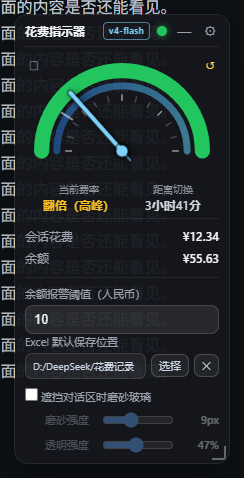
| Settings: frost strength / transparency | Before and after (left: off, right: on) |
| --- | --- |
|
 |
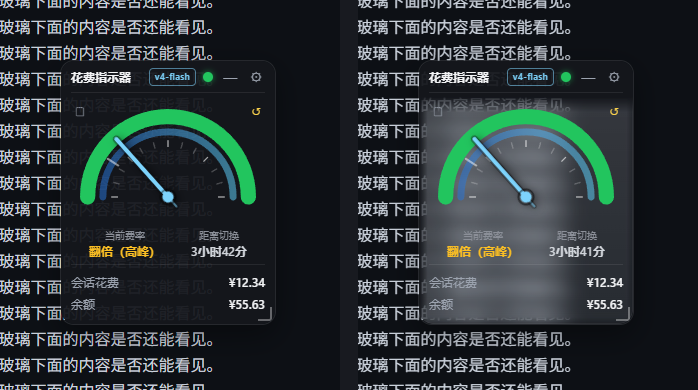 |
- **Adjustable frost strength and transparency** (two sliders in the settings panel, applied live and remembered):
- **Frost** `0–24px` — blur radius, higher is hazier (0 keeps only the translucent tint);
- **Transparency** `0–100%` — higher is more see-through and less milky.
- **The title bar is never frosted**: the frost only applies below it, so the drag handle stays crisp for locating and grabbing the widget.
- **Soft gradient edges instead of a hard line**: the transition width follows the frost strength (5–18px). The hole is built as "horizontal complement ∪ vertical complement" (De Morgan) in the background mask, and the frost layer uses the same shape as its mask, so both fade out together.
## What's new in v1.5.1
| Same spot, side by side: off (left) / frosted (right) |
| --- |
| |
- **The frost is actually visible now**: the layer used to be just 5% white plus `blur(12px)` — blurring a flat dark chat background yields the same flat dark background, so nothing seemed to change. It is now a **milky gradient + slight brightening + inner hairline** (`blur(9px) saturate(1.2) brightness(1.12)`): measured on the same patch the luminance goes **29 → 83**, while the blurred text behind keeps its structure.
- **Can't find the switch?** While the frost is off, covering the conversation text (overlap ≥ 35% of the widget) now shows a **one-time hint**: enable “Frosted glass over the chat area” in settings.
- **Fixed: the widget could get stuck in the top-left corner** — loading in a minimized window / background tab (viewport 0×0) made the viewport clamp compute a position of (0,0) and persist it; the clamp is now skipped when the viewport is 0.
## What's new in v1.5.0
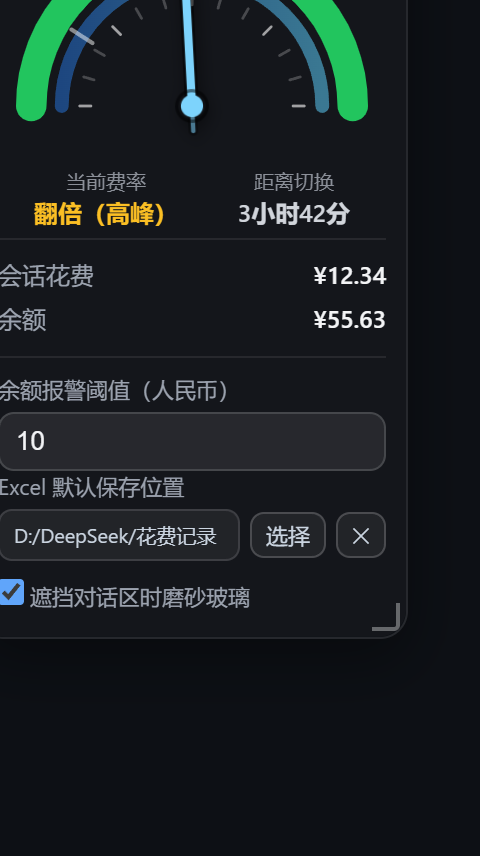
| Settings: the new “frosted glass over the chat” switch |
| --- |
|
 |
- **Auto step-aside when the window is resized**: after you stretch or resize the window, if the widget covers the middle conversation **text column** it moves into the **blank gap between the text column and the sidebar** — centred in that gap and placed in its **lower part** (flush with the bottom of the window; if that would cover the composer it stops 8px above it). Only when the gap is too narrow does it fall back to the sidebar column.
- Priority: **middle text column (never covered) > bottom composer > sidebars**; ties keep "left stays left, right stays right" with the smallest movement.
- Triggered only by **window resizes** (150 ms debounce); it never fights a manual drag and is skipped in the narrow strip mode.
- The gap fits when one side's clearance is ≥ widget width + 16px: at the default 216px that needs a window ≳1658px (middle column ≥ 1378px, sidebar expanded, right bar closed); at the minimum 180px it is about 1458px.
- **Optional frosted glass over the chat** (new setting, **off by default**): when enabled, the part of the widget overlapping the conversation text turns into translucent frosted glass (`backdrop-filter`) so the covered text stays readable — only the genuinely overlapping part is frosted, parking in the blank gap keeps it opaque. Implemented as "punch a hole in the background layer and lay a frost layer over it" (`mask-composite: exclude`).
- **Auto-dock when the sidebar collapses**: when DSH collapses the sidebar (or the viewport is very narrow) the narrow strip docks to the **right of the sidebar**; with the sidebar expanded it docks under the "Sessions / Workspaces" heading, and it returns to its previous spot when narrow mode ends (the dock position is never persisted).
- Narrow strip width 48px → **36px**.
- Internal fix: the "chat content column" used by both behaviours is now derived from `--dsh-chat-content-width` (the centred content band inside the panel) with proper `clamp()/calc()` resolution, falling back to the composer card width and then to the whole middle panel, so the blank gutters are no longer mistaken for conversation content.
## What's new in v1.4.0
| Narrow window → vertical mini |
| --- |
|
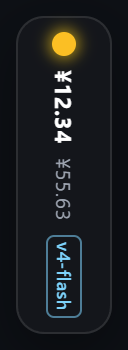 |
- **Viewport-aware vertical mini**: a `ResizeObserver` watches the viewport width; at **779px or less** the gauge switches to a 48px-wide **vertical mini** (top to bottom: status lamp → session cost → balance → model badge, rendered vertically) and **expands again on click**. When the window grows back to **860px or more** the previous expanded/collapsed state is restored.
- **Hysteresis** (enter 780 / exit 860) prevents flicker at the threshold; after you manually expand from the mini strip it stays expanded until the window grows past 860px again.
- Thresholds can be overridden via `localStorage` keys `dsh-cost-gauge:narrowEnter` / `dsh-cost-gauge:narrowExit`.
## What's new in v1.3.0
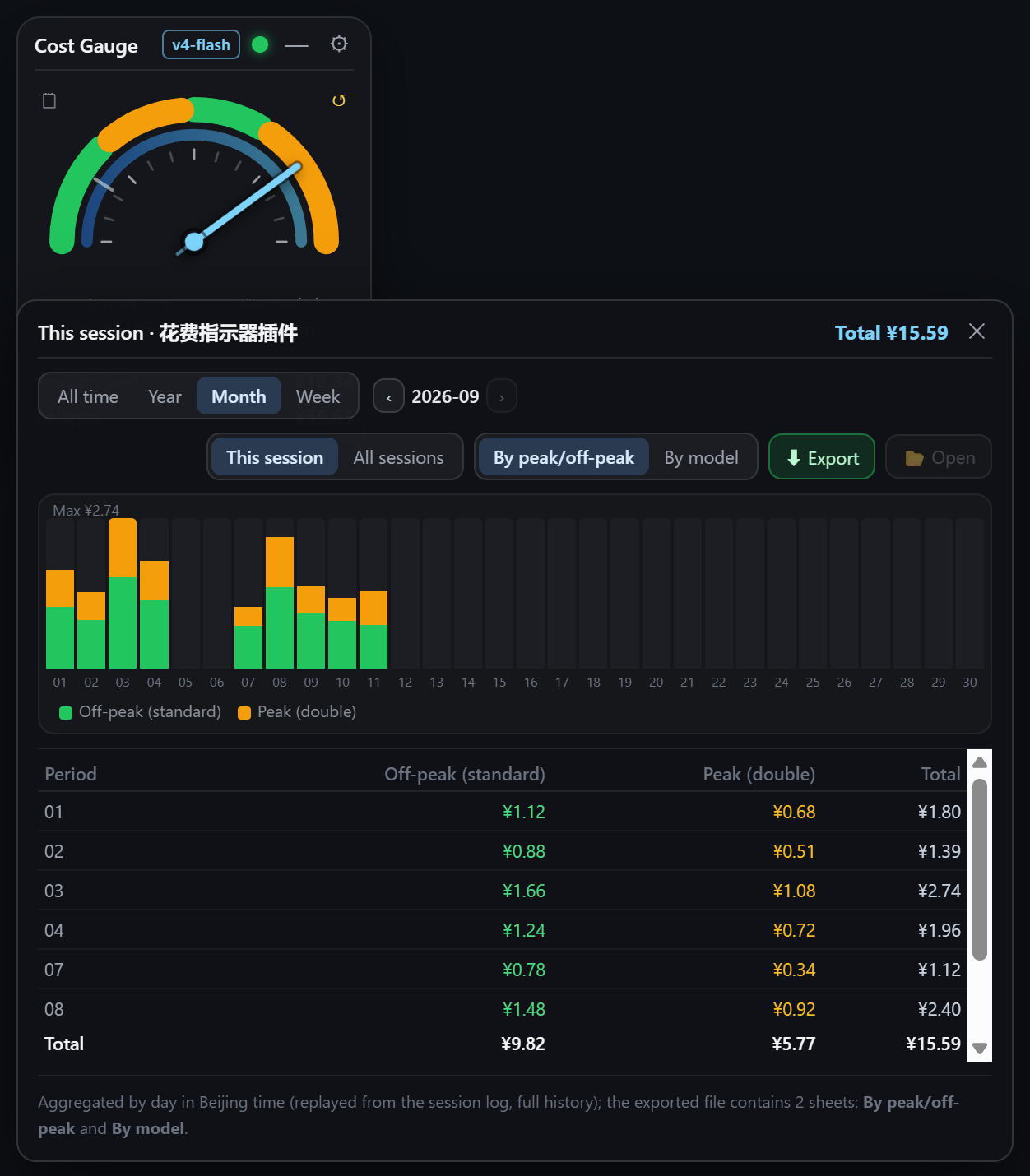
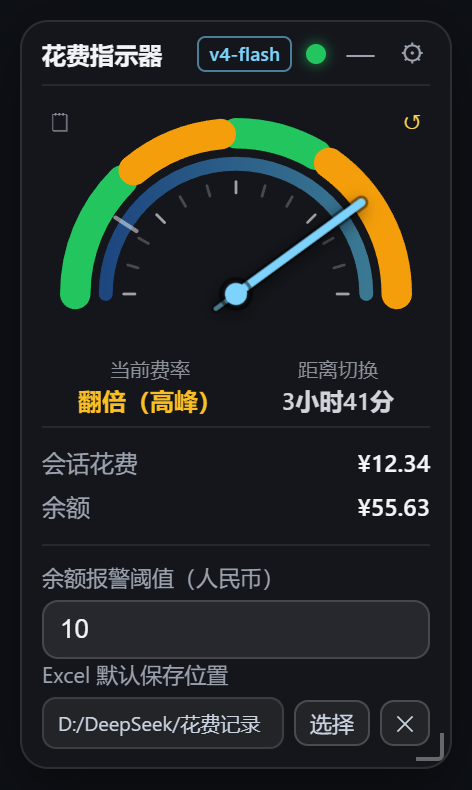
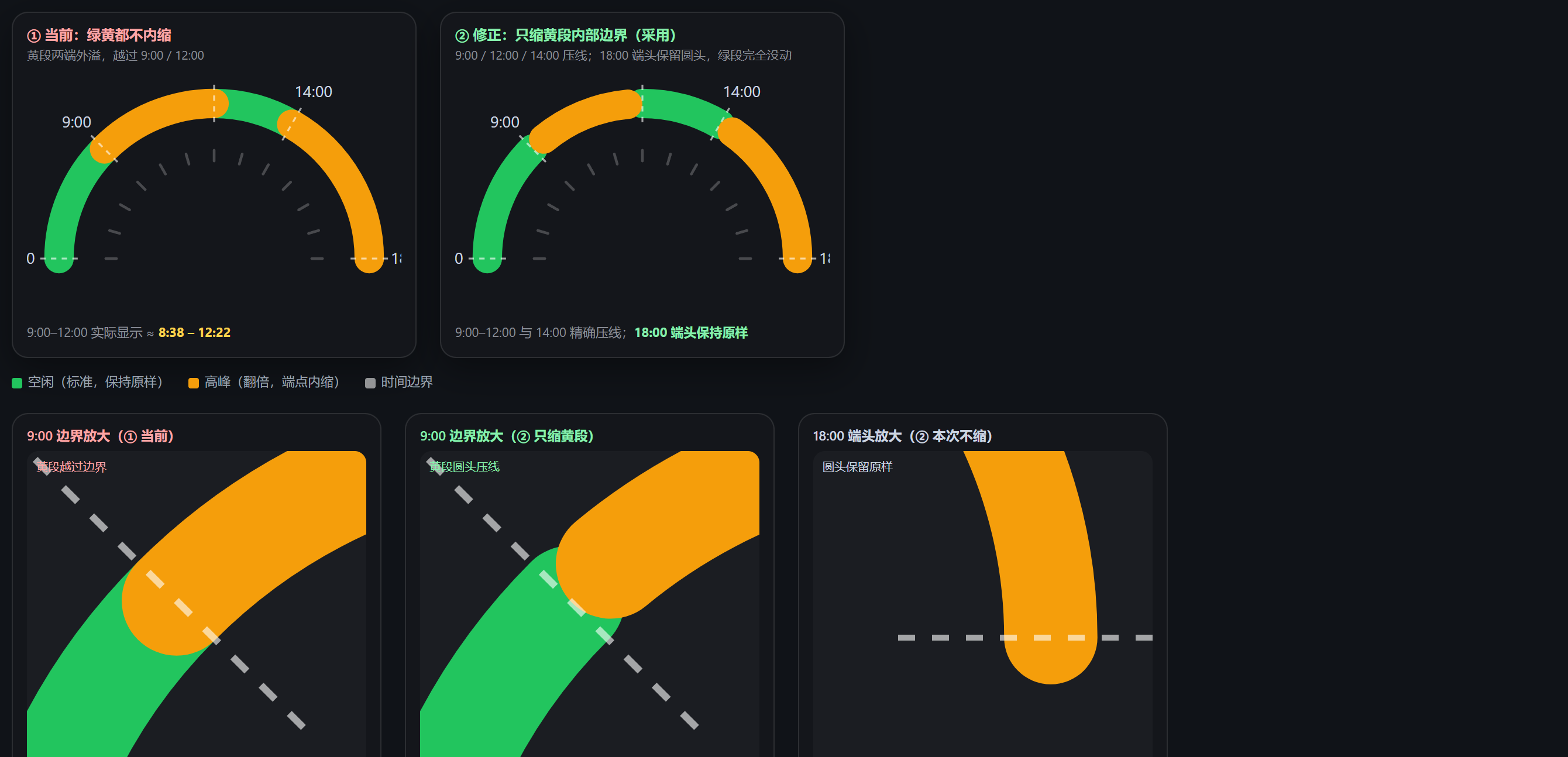
| Spend records panel | Settings | Arc cap fix |
| --- | --- | --- |
|
 |
 |
 |
- **Correct cost math**: the host now replays the session log and prices every usage event at “rate at that moment × model at that moment”, so off-peak usage is charged at the off-peak rate and peak usage at the peak rate, then summed. This fixes the old behaviour where entering the peak window re-priced the whole history (cost doubling).
- **New “Records / Reset” icon buttons** (top-left and top-right of the dial; borderless mini icons with hover hints). The records panel offers `All time / Year / Month / Week` filtering and paging, a **stacked bar chart** (by band or by model) and a detail table that lists **only periods with usage**. Scope switches between `This session` and `All sessions`. The panel is draggable, may cover the gauge, and is pulled back inside the window when out of bounds. Reset is a two-step confirmation that moves the baseline and restarts from ¥0.00 (history is kept).
- **Excel export is now a real `.xlsx`** (OOXML; hand-written minimal zip writer, no dependencies; opens in Excel/WPS with no format warning): two worksheets plus a note row, and **default file name `

**Thanks for your support!** 💙