
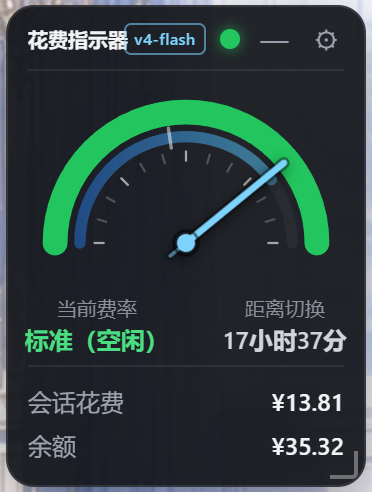
**Thanks for your support!** 💙
 |
|  |
## What's new in v1.6.0
| Before / after (left: off · right: on — only the part over the chat text changes) |
| --- |
|
|
## What's new in v1.6.0
| Before / after (left: off · right: on — only the part over the chat text changes) |
| --- |
| 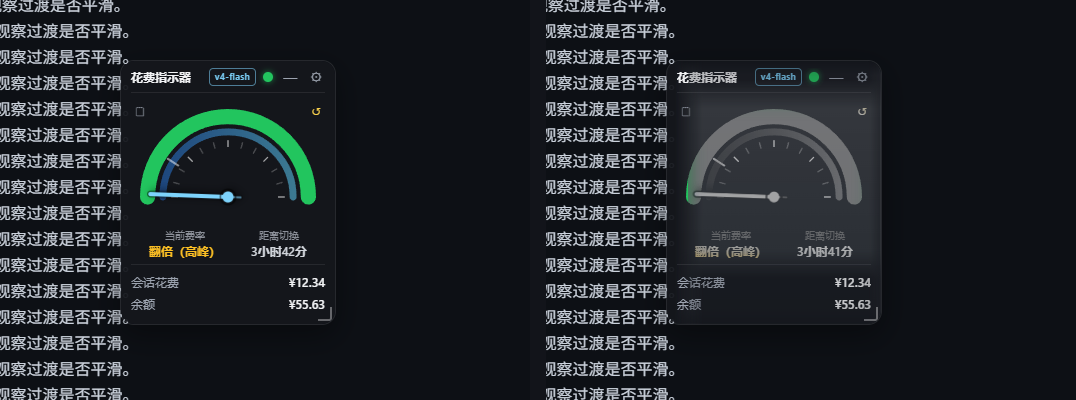 |
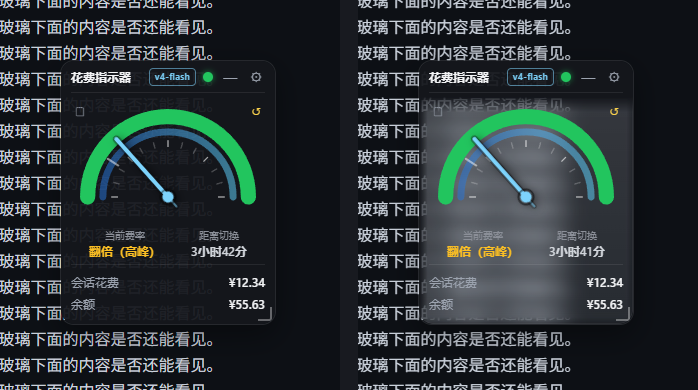
- **A new glass treatment**: the part of the widget reaching into the conversation **content column** turns into **grey glass**:
- **title bar / bottom cost & balance rows**: slightly transparent (adjustable);
- **the middle background**: fully transparent — the blurred conversation shows through;
- **the dial and text in the middle**: keep only their **lightness** (hue and saturation dropped = greyscale), and **each colour's opacity equals its lightness** (lightness 80 → opacity 80%), so different colours end up differently transparent.
- **Only the overlapping rectangle is affected**: whatever has not entered the chat column stays exactly as it was (even the dial keeps its colours). Implemented by clipping inside the SVG filter — the transformed result inside the hole and the original outside, feathered by the **Edge fade** setting.
- **Six settings** (all live and remembered):
| Setting | Range | Default | Meaning |
| --- | --- | --- | --- |
| Frost | 0–24px | 9px | blur radius |
| Transparency | 0–100% | 47% | density of the milky veil in the middle |
| Edge fade | 0–40px | 14px | transition width between the normal and the glass area (0 = hard edge) |
| Bar fade | 0–60% | 15% | transparency of the title bar and the bottom rows (**0% = fully opaque**) |
| Content opacity | 0–100% | 100% | multiplier on top of lightness: 100% = strictly by lightness, 0% = invisible (linear, every step does something) |
| Lightness | Rec.709 / HSL / HSV | Rec.709 | which lightness defines the greyscale and the opacity |
- **Fixed**: changing *Content opacity* or switching *Lightness* rebuilt the filter and reset the hole rectangle, so the transform vanished until the next tick (it felt like the slider did nothing). It now applies immediately — and the range was narrowed from 0–200% to **0–100%**.
## What's new in v1.5.3
- **Fixed: session spend could stop updating (out-of-range ledger cursor)**: after a session log is compacted or rewritten its seq space shrinks, while the persisted `cursor` stays in the old space — so `snapshotEvents(cursor, log end)` returns an empty array forever and new events are never folded in (session spend freezes, or stays at ¥0.00 after a reset). The session's ledger entry is now rebuilt from the current log whenever `cursor > session.seq`.
- **Fixed: the dial hand ran backwards after midnight**: the 00:00–06:00 branch of `dialPosOfHour()` had the wrong direction (`90 - 15t`), so the hand turned back after reaching the top. Both halves now sweep left → top → right: night **18:00 left → 24:00 top → 06:00 right**, day 06:00 left → 12:00 top → 18:00 right, with instant jumps at 06:00 and 18:00.
- **Version shown at the bottom of the settings panel**: the host returns `version` (read from `package.json`) in `/state`, and the settings panel shows `dsh-cost-gauge vX.Y.Z` in 10px muted text; the row hides itself when no version is available.
## What's new in v1.5.2
| Settings: frost strength / transparency | Before and after (left: off, right: on) |
| --- | --- |
|
|
- **A new glass treatment**: the part of the widget reaching into the conversation **content column** turns into **grey glass**:
- **title bar / bottom cost & balance rows**: slightly transparent (adjustable);
- **the middle background**: fully transparent — the blurred conversation shows through;
- **the dial and text in the middle**: keep only their **lightness** (hue and saturation dropped = greyscale), and **each colour's opacity equals its lightness** (lightness 80 → opacity 80%), so different colours end up differently transparent.
- **Only the overlapping rectangle is affected**: whatever has not entered the chat column stays exactly as it was (even the dial keeps its colours). Implemented by clipping inside the SVG filter — the transformed result inside the hole and the original outside, feathered by the **Edge fade** setting.
- **Six settings** (all live and remembered):
| Setting | Range | Default | Meaning |
| --- | --- | --- | --- |
| Frost | 0–24px | 9px | blur radius |
| Transparency | 0–100% | 47% | density of the milky veil in the middle |
| Edge fade | 0–40px | 14px | transition width between the normal and the glass area (0 = hard edge) |
| Bar fade | 0–60% | 15% | transparency of the title bar and the bottom rows (**0% = fully opaque**) |
| Content opacity | 0–100% | 100% | multiplier on top of lightness: 100% = strictly by lightness, 0% = invisible (linear, every step does something) |
| Lightness | Rec.709 / HSL / HSV | Rec.709 | which lightness defines the greyscale and the opacity |
- **Fixed**: changing *Content opacity* or switching *Lightness* rebuilt the filter and reset the hole rectangle, so the transform vanished until the next tick (it felt like the slider did nothing). It now applies immediately — and the range was narrowed from 0–200% to **0–100%**.
## What's new in v1.5.3
- **Fixed: session spend could stop updating (out-of-range ledger cursor)**: after a session log is compacted or rewritten its seq space shrinks, while the persisted `cursor` stays in the old space — so `snapshotEvents(cursor, log end)` returns an empty array forever and new events are never folded in (session spend freezes, or stays at ¥0.00 after a reset). The session's ledger entry is now rebuilt from the current log whenever `cursor > session.seq`.
- **Fixed: the dial hand ran backwards after midnight**: the 00:00–06:00 branch of `dialPosOfHour()` had the wrong direction (`90 - 15t`), so the hand turned back after reaching the top. Both halves now sweep left → top → right: night **18:00 left → 24:00 top → 06:00 right**, day 06:00 left → 12:00 top → 18:00 right, with instant jumps at 06:00 and 18:00.
- **Version shown at the bottom of the settings panel**: the host returns `version` (read from `package.json`) in `/state`, and the settings panel shows `dsh-cost-gauge vX.Y.Z` in 10px muted text; the row hides itself when no version is available.
## What's new in v1.5.2
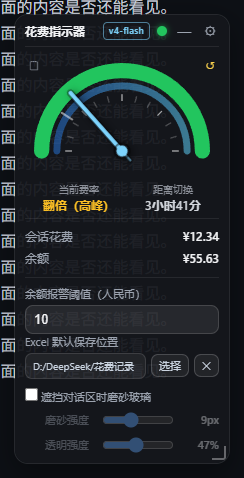
| Settings: frost strength / transparency | Before and after (left: off, right: on) |
| --- | --- |
|  |
|  |
- **Adjustable frost strength and transparency** (two sliders in the settings panel, applied live and remembered):
- **Frost** `0–24px` — blur radius, higher is hazier (0 keeps only the translucent tint);
- **Transparency** `0–100%` — higher is more see-through and less milky.
- **The title bar is never frosted**: the frost only applies below it, so the drag handle stays crisp for locating and grabbing the widget.
- **Soft gradient edges instead of a hard line**: the transition width follows the frost strength (5–18px). The hole is built as "horizontal complement ∪ vertical complement" (De Morgan) in the background mask, and the frost layer uses the same shape as its mask, so both fade out together.
## What's new in v1.5.1
| Same spot, side by side: off (left) / frosted (right) |
| --- |
| |
- **The frost is actually visible now**: the layer used to be just 5% white plus `blur(12px)` — blurring a flat dark chat background yields the same flat dark background, so nothing seemed to change. It is now a **milky gradient + slight brightening + inner hairline** (`blur(9px) saturate(1.2) brightness(1.12)`): measured on the same patch the luminance goes **29 → 83**, while the blurred text behind keeps its structure.
- **Can't find the switch?** While the frost is off, covering the conversation text (overlap ≥ 35% of the widget) now shows a **one-time hint**: enable “Frosted glass over the chat area” in settings.
- **Fixed: the widget could get stuck in the top-left corner** — loading in a minimized window / background tab (viewport 0×0) made the viewport clamp compute a position of (0,0) and persist it; the clamp is now skipped when the viewport is 0.
## What's new in v1.5.0
| Settings: the new “frosted glass over the chat” switch |
| --- |
|
|
- **Adjustable frost strength and transparency** (two sliders in the settings panel, applied live and remembered):
- **Frost** `0–24px` — blur radius, higher is hazier (0 keeps only the translucent tint);
- **Transparency** `0–100%` — higher is more see-through and less milky.
- **The title bar is never frosted**: the frost only applies below it, so the drag handle stays crisp for locating and grabbing the widget.
- **Soft gradient edges instead of a hard line**: the transition width follows the frost strength (5–18px). The hole is built as "horizontal complement ∪ vertical complement" (De Morgan) in the background mask, and the frost layer uses the same shape as its mask, so both fade out together.
## What's new in v1.5.1
| Same spot, side by side: off (left) / frosted (right) |
| --- |
| |
- **The frost is actually visible now**: the layer used to be just 5% white plus `blur(12px)` — blurring a flat dark chat background yields the same flat dark background, so nothing seemed to change. It is now a **milky gradient + slight brightening + inner hairline** (`blur(9px) saturate(1.2) brightness(1.12)`): measured on the same patch the luminance goes **29 → 83**, while the blurred text behind keeps its structure.
- **Can't find the switch?** While the frost is off, covering the conversation text (overlap ≥ 35% of the widget) now shows a **one-time hint**: enable “Frosted glass over the chat area” in settings.
- **Fixed: the widget could get stuck in the top-left corner** — loading in a minimized window / background tab (viewport 0×0) made the viewport clamp compute a position of (0,0) and persist it; the clamp is now skipped when the viewport is 0.
## What's new in v1.5.0
| Settings: the new “frosted glass over the chat” switch |
| --- |
|  |
- **Auto step-aside when the window is resized**: after you stretch or resize the window, if the widget covers the middle conversation **text column** it moves into the **blank gap between the text column and the sidebar** — centred in that gap and placed in its **lower part** (flush with the bottom of the window; if that would cover the composer it stops 8px above it). Only when the gap is too narrow does it fall back to the sidebar column.
- Priority: **middle text column (never covered) > bottom composer > sidebars**; ties keep "left stays left, right stays right" with the smallest movement.
- Triggered only by **window resizes** (150 ms debounce); it never fights a manual drag and is skipped in the narrow strip mode.
- The gap fits when one side's clearance is ≥ widget width + 16px: at the default 216px that needs a window ≳1658px (middle column ≥ 1378px, sidebar expanded, right bar closed); at the minimum 180px it is about 1458px.
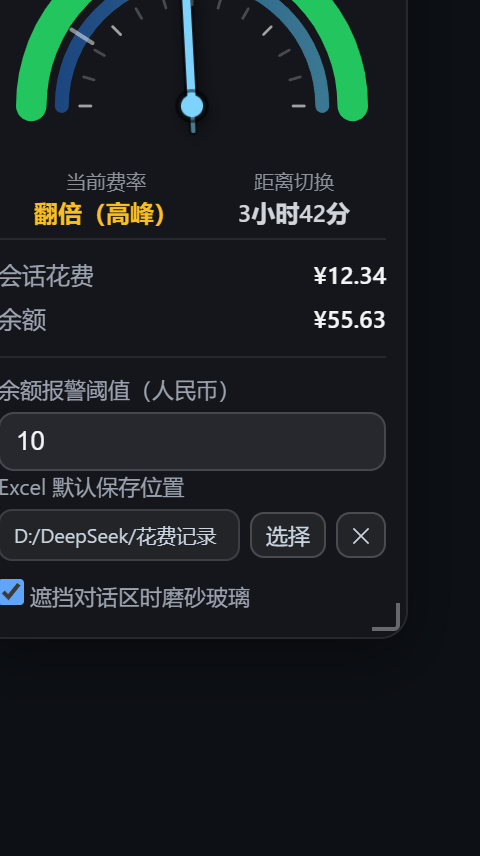
- **Optional frosted glass over the chat** (new setting, **off by default**): when enabled, the part of the widget overlapping the conversation text turns into translucent frosted glass (`backdrop-filter`) so the covered text stays readable — only the genuinely overlapping part is frosted, parking in the blank gap keeps it opaque. Implemented as "punch a hole in the background layer and lay a frost layer over it" (`mask-composite: exclude`).
- **Auto-dock when the sidebar collapses**: when DSH collapses the sidebar (or the viewport is very narrow) the narrow strip docks to the **right of the sidebar**; with the sidebar expanded it docks under the "Sessions / Workspaces" heading, and it returns to its previous spot when narrow mode ends (the dock position is never persisted).
- Narrow strip width 48px → **36px**.
- Internal fix: the "chat content column" used by both behaviours is now derived from `--dsh-chat-content-width` (the centred content band inside the panel) with proper `clamp()/calc()` resolution, falling back to the composer card width and then to the whole middle panel, so the blank gutters are no longer mistaken for conversation content.
## What's new in v1.4.0
| Narrow window → vertical mini |
| --- |
|
|
- **Auto step-aside when the window is resized**: after you stretch or resize the window, if the widget covers the middle conversation **text column** it moves into the **blank gap between the text column and the sidebar** — centred in that gap and placed in its **lower part** (flush with the bottom of the window; if that would cover the composer it stops 8px above it). Only when the gap is too narrow does it fall back to the sidebar column.
- Priority: **middle text column (never covered) > bottom composer > sidebars**; ties keep "left stays left, right stays right" with the smallest movement.
- Triggered only by **window resizes** (150 ms debounce); it never fights a manual drag and is skipped in the narrow strip mode.
- The gap fits when one side's clearance is ≥ widget width + 16px: at the default 216px that needs a window ≳1658px (middle column ≥ 1378px, sidebar expanded, right bar closed); at the minimum 180px it is about 1458px.
- **Optional frosted glass over the chat** (new setting, **off by default**): when enabled, the part of the widget overlapping the conversation text turns into translucent frosted glass (`backdrop-filter`) so the covered text stays readable — only the genuinely overlapping part is frosted, parking in the blank gap keeps it opaque. Implemented as "punch a hole in the background layer and lay a frost layer over it" (`mask-composite: exclude`).
- **Auto-dock when the sidebar collapses**: when DSH collapses the sidebar (or the viewport is very narrow) the narrow strip docks to the **right of the sidebar**; with the sidebar expanded it docks under the "Sessions / Workspaces" heading, and it returns to its previous spot when narrow mode ends (the dock position is never persisted).
- Narrow strip width 48px → **36px**.
- Internal fix: the "chat content column" used by both behaviours is now derived from `--dsh-chat-content-width` (the centred content band inside the panel) with proper `clamp()/calc()` resolution, falling back to the composer card width and then to the whole middle panel, so the blank gutters are no longer mistaken for conversation content.
## What's new in v1.4.0
| Narrow window → vertical mini |
| --- |
| 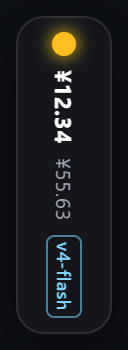 |
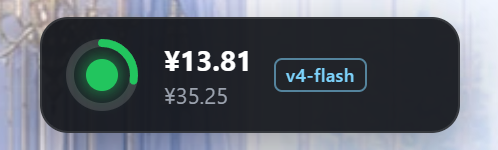
- **Viewport-aware vertical mini**: a `ResizeObserver` watches the viewport width; at **779px or less** the gauge switches to a 48px-wide **vertical mini** (top to bottom: status lamp → session cost → balance → model badge, rendered vertically) and **expands again on click**. When the window grows back to **860px or more** the previous expanded/collapsed state is restored.
- **Hysteresis** (enter 780 / exit 860) prevents flicker at the threshold; after you manually expand from the mini strip it stays expanded until the window grows past 860px again.
- Thresholds can be overridden via `localStorage` keys `dsh-cost-gauge:narrowEnter` / `dsh-cost-gauge:narrowExit`.
## What's new in v1.3.0
| Spend records panel | Settings | Arc cap fix |
| --- | --- | --- |
|
|
- **Viewport-aware vertical mini**: a `ResizeObserver` watches the viewport width; at **779px or less** the gauge switches to a 48px-wide **vertical mini** (top to bottom: status lamp → session cost → balance → model badge, rendered vertically) and **expands again on click**. When the window grows back to **860px or more** the previous expanded/collapsed state is restored.
- **Hysteresis** (enter 780 / exit 860) prevents flicker at the threshold; after you manually expand from the mini strip it stays expanded until the window grows past 860px again.
- Thresholds can be overridden via `localStorage` keys `dsh-cost-gauge:narrowEnter` / `dsh-cost-gauge:narrowExit`.
## What's new in v1.3.0
| Spend records panel | Settings | Arc cap fix |
| --- | --- | --- |
|  |
|  |
|  |
- **Correct cost math**: the host now replays the session log and prices every usage event at “rate at that moment × model at that moment”, so off-peak usage is charged at the off-peak rate and peak usage at the peak rate, then summed. This fixes the old behaviour where entering the peak window re-priced the whole history (cost doubling).
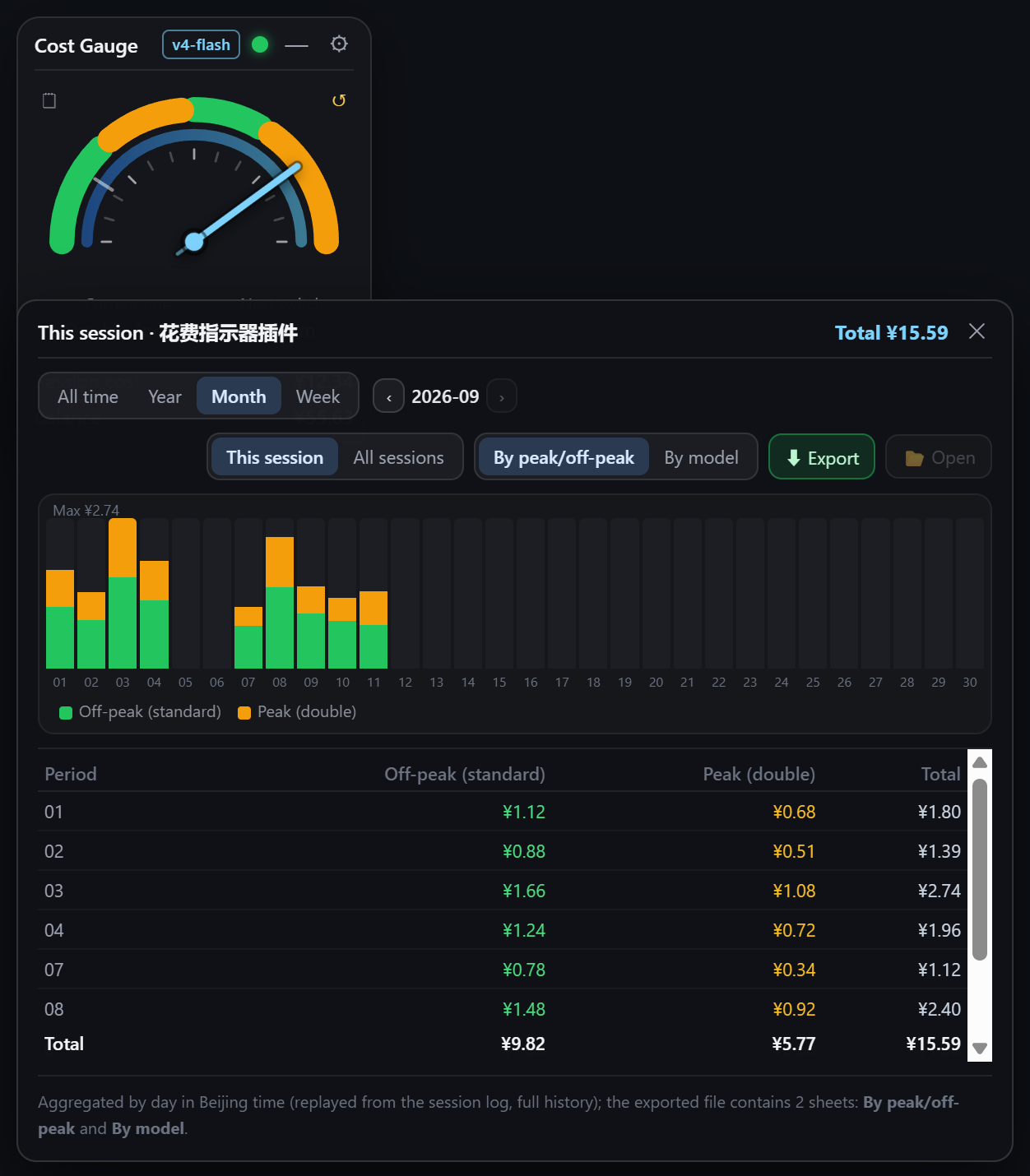
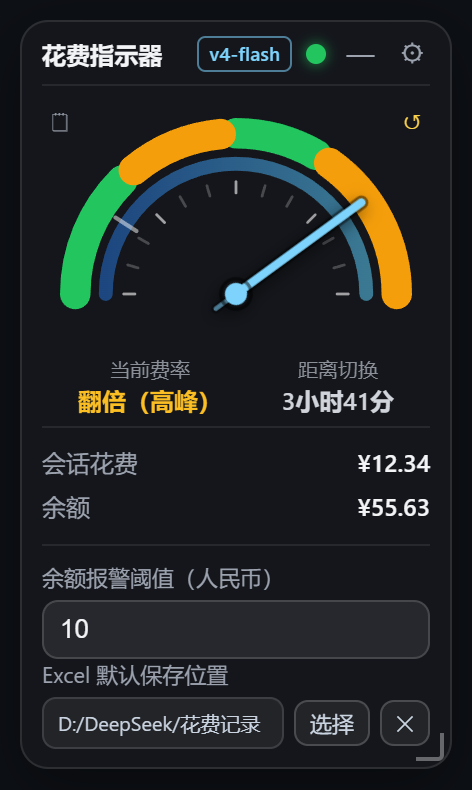
- **New “Records / Reset” icon buttons** (top-left and top-right of the dial; borderless mini icons with hover hints). The records panel offers `All time / Year / Month / Week` filtering and paging, a **stacked bar chart** (by band or by model) and a detail table that lists **only periods with usage**. Scope switches between `This session` and `All sessions`. The panel is draggable, may cover the gauge, and is pulled back inside the window when out of bounds. Reset is a two-step confirmation that moves the baseline and restarts from ¥0.00 (history is kept).
- **Excel export is now a real `.xlsx`** (OOXML; hand-written minimal zip writer, no dependencies; opens in Excel/WPS with no format warning): two worksheets plus a note row, and **default file name `
|
- **Correct cost math**: the host now replays the session log and prices every usage event at “rate at that moment × model at that moment”, so off-peak usage is charged at the off-peak rate and peak usage at the peak rate, then summed. This fixes the old behaviour where entering the peak window re-priced the whole history (cost doubling).
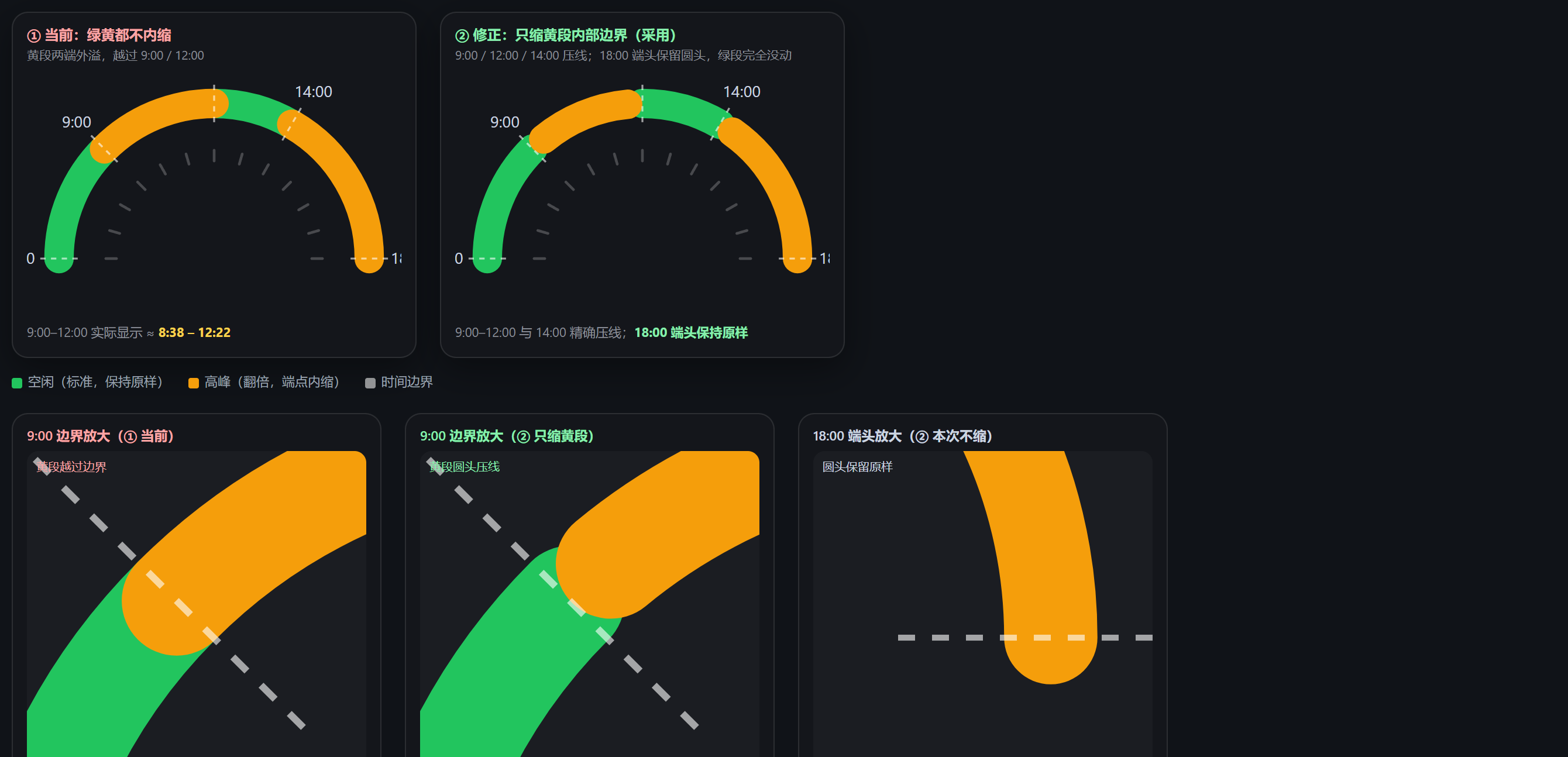
- **New “Records / Reset” icon buttons** (top-left and top-right of the dial; borderless mini icons with hover hints). The records panel offers `All time / Year / Month / Week` filtering and paging, a **stacked bar chart** (by band or by model) and a detail table that lists **only periods with usage**. Scope switches between `This session` and `All sessions`. The panel is draggable, may cover the gauge, and is pulled back inside the window when out of bounds. Reset is a two-step confirmation that moves the baseline and restarts from ¥0.00 (history is kept).
- **Excel export is now a real `.xlsx`** (OOXML; hand-written minimal zip writer, no dependencies; opens in Excel/WPS with no format warning): two worksheets plus a note row, and **default file name `