██╗      ██████╗  ██████╗ ███████╗███████╗ ██████╗       ██████╗██╗     ██╗
██║     ██╔═══██╗██╔════╝ ██╔════╝██╔════╝██╔═══██╗     ██╔════╝██║     ██║
██║     ██║   ██║██║  ███╗███████╗█████╗  ██║   ██║     ██║     ██║     ██║
██║     ██║   ██║██║   ██║╚════██║██╔══╝  ██║▄▄ ██║     ██║     ██║     ██║
███████╗╚██████╔╝╚██████╔╝███████║███████╗╚██████╔╝     ╚██████╗███████╗██║
╚══════╝ ╚═════╝  ╚═════╝ ╚══════╝╚══════╝ ╚══▀▀═╝      -╚═════╝╚══════╝╚═╝
Logseq CLI




Your Logseq graph, from the command line.
Pipe pages. Filter blocks. Query the graph. Work with Logseq the Unix way.
A Unix-composable CLI for the Logseq local HTTP API - built for humans and AI agents alike. NDJSON output, clean stderr, and auto-stdin composition let you wire Logseq into any shell pipeline or agentic workflow without glue code.
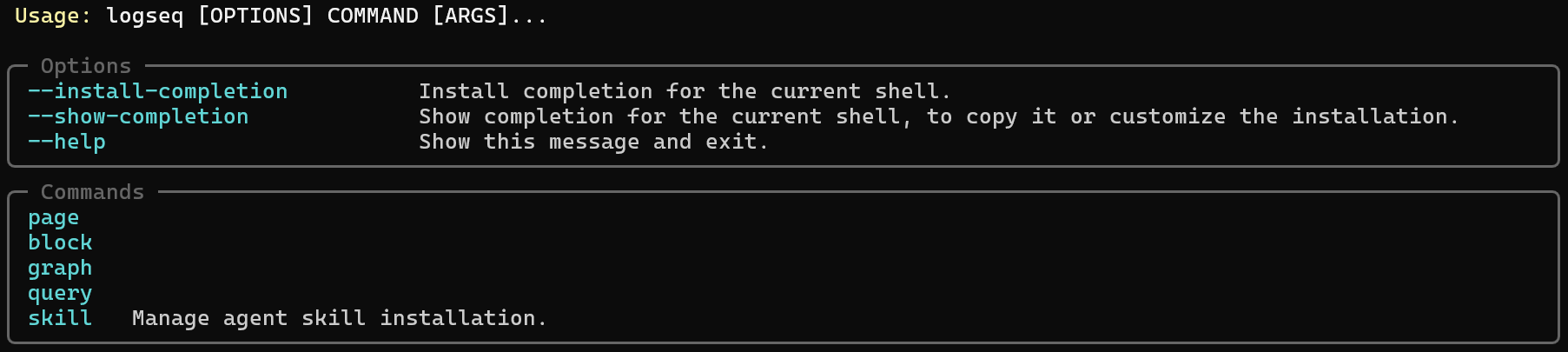
---
## Why This CLI
Most Logseq automation requires either the plugin API (which lives inside Logseq) or direct file manipulation (which bypasses the graph index). This CLI takes a third path: the official local HTTP API, exposed as composable shell commands.
**Designed for humans and AI agents.** Every command emits structured NDJSON that is trivially parseable by `jq`, shell scripts, or an LLM driving an agentic workflow. Errors are always on stderr so stdout stays clean for piping.
| Property | What You Get |
|----------|-------------|
| **NDJSON by default** | Pipe directly into `jq`, `fzf`, or the next command - no parsing glue |
| **Auto-stdin** | Commands read identifiers from upstream NDJSON when no argument is given |
| **`--fields` filtering** | Trim output to specific keys - token-efficient for LLM agents |
| **`--plain` mode** | Human-readable `key: value` pairs for interactive use |
| **Errors on stderr** | stdout is always clean - safe to pipe at every step |
| **Consistent structure** | Every command follows `noun verb` - no surprises |
---
## Requirements
- Python 3.10+
- Logseq Desktop with the HTTP API server enabled
- Windows, macOS, or Linux
---
## Installation
`logseq-cli` is published on PyPI. For most users, `pipx` is the best install: isolated, global, and no virtual environment activation.
Important: every install must be followed by [Set the API token](#2-set-the-api-token). The CLI will not work until that is configured.
### Recommended: install from PyPI with `pipx`
```powershell
# Windows (PowerShell)
py -m pip install --user pipx
py -m pipx ensurepath
pipx install logseq-cli
```
```bash
# macOS / Linux
python3 -m pip install --user pipx
python3 -m pipx ensurepath
pipx install logseq-cli
```
Then configure auth in [Set the API token](#2-set-the-api-token) and verify:
```bash
logseq --help
```
### Alternative: install from PyPI with `pip`
```powershell
# Windows (PowerShell)
py -m pip install --user logseq-cli
```
```bash
# macOS / Linux
python3 -m pip install --user logseq-cli
```
If `logseq` is not found after install, add your user Python scripts directory to `PATH`.
Typical locations:
- Windows: `%APPDATA%\Python\Python310\Scripts`
- macOS: `~/Library/Python/3.11/bin`
- Linux: `~/.local/bin`
### Install from a local checkout
Use this if you want to run from the repo instead of PyPI.
#### `pipx`
```powershell
# Windows (PowerShell)
py -m pip install --user pipx
py -m pipx ensurepath
pipx install .
```
```bash
# macOS / Linux
python3 -m pip install --user pipx
python3 -m pipx ensurepath
pipx install .
```
Then run [Set the API token](#2-set-the-api-token) and verify:
```bash
logseq --help
```
#### Virtual environment
```powershell
# Windows (PowerShell)
py -3.10 -m venv .venv
.\.venv\Scripts\Activate.ps1
pip install -e ".[dev]"
```
```bash
# macOS / Linux
python3 -m venv .venv
source .venv/bin/activate
pip install -e ".[dev]"
```
Then run [Set the API token](#2-set-the-api-token) before using `logseq`.
#### User install
```powershell
# Windows (PowerShell)
py -m pip install --user .
```
```bash
# macOS / Linux
python3 -m pip install --user .
```
If `logseq` is not found after install, add your user Python scripts directory to `PATH`, then run [Set the API token](#2-set-the-api-token).
### Optional: install the agent skill
If you want AI agents to install the bundled `logseq-cli` skill:
```bash
logseq skill install
```
That writes `SKILL.md` into the supported user-level targets:
- `~/.agents/skills/logseq-cli/SKILL.md`
- `~/.claude/skills/logseq-cli/SKILL.md`
You can also install into the current project instead:
```bash
logseq skill install --scope project
```
Related commands:
- `logseq skill status`
- `logseq skill show`
- `logseq skill uninstall`
---
## Configuration
### 1. Enable the Logseq HTTP API
1. Open Logseq Desktop and load your graph.
2. Go to **Settings → Features**.
3. Enable **HTTP APIs server**.
4. Copy the API token shown in that panel.
The server listens at `http://127.0.0.1:12315/api` by default.
### 2. Set the API token
This step is required for every installation method. `logseq-cli` will not work until a token is stored or provided via `LOGSEQ_TOKEN`.
Recommended: store the token in the CLI's user config so it works across future shells and agent runs without shell-specific setup.
```bash
logseq auth set-token
```
The command prompts securely for the token and stores it in a user-level config file. After that, verify:
```bash
logseq auth status
logseq graph info
```
Run `logseq auth set-token` again at any time to replace the stored token with a new one.
#### Environment variable override
If you prefer, the CLI still supports `LOGSEQ_TOKEN` and will use it instead of the stored token for the current process.
---
## Quick Start
Make sure Logseq is running with the HTTP API enabled, then:
```bash
# Print the installed CLI version
logseq version
# Verify the connection
logseq graph info
# List all pages
logseq page list
# Get a specific page
logseq page get "My Page"
# Append a block to a page
logseq block append "My Page" "- New thought"
```
---
## Command Reference
### top-level
| Command | What It Does |
|---------|--------------|
| `version` | Prints the current `logseq` CLI version |
### auth
| Command | Arguments | What It Does |
|---------|-----------|--------------|
| `auth set-token [token]` | | Store or replace the token in the CLI config; prompts securely if `token` is omitted |
| `auth status` | | Show the config path and whether a token is stored |
### page
| Command | Arguments | What It Does |
|---------|-----------|--------------|
| `page list` | `--fields`, `--plain`, `--page`, `--page-size` | List all pages; falls back from `originalName` to `name`, and `uuid` may be `null` when omitted by Logseq |
| `page get [name]` | `--fields`, `--plain` | Get a page by name; auto-stdin reads `.name` |
| `page create ` | `--fields`, `--plain` | Create a new page |
| `page delete [name]` | | Delete a page; auto-stdin reads `.name` |
| `page rename ` | | Rename a page |
| `page refs ` | `--fields`, `--plain` | Linked references to this page |
| `page properties ` | `--plain` | Derived from the first block in the page tree |
| `page journal ` | `--plain` | Create/get a journal page (`YYYY-MM-DD`) |
| `page ns-list ` | `--fields`, `--plain` | Pages under a namespace |
| `page ns-tree ` | `--plain` | Namespace as a nested tree |
### block
| Command | Arguments | What It Does |
|---------|-----------|--------------|
| `block get [uuid]` | `--fields`, `--include-children`, `--plain` | Get a block; auto-stdin reads `.uuid` |
| `block insert ` | `--uuid`, `--sibling`, `--plain` | Insert as child by default; auto-stdin reads `.uuid` |
| `block update ` | `--plain` | Replace a block's content |
| `block remove [uuid]` | | Delete a block; auto-stdin reads `.uuid` |
| `block prepend ` | `--plain` | Insert at the top of a page |
| `block append ` | `--plain` | Insert at the bottom of a page |
| `block move ` | `--sibling`, `--plain` | Move as child by default |
| `block collapse ` | `--expand`, `--toggle` | Collapse, expand, or toggle |
| `block properties ` | `--plain` | Get all block properties |
| `block prop-set ` | | Upsert a block property |
| `block prop-remove ` | | Remove a block property |
| `block insert-batch ` | `--sibling`, `--plain` | JSON array with `content` and optional `children` |
### graph
| Command | What It Does |
|---------|--------------|
| `graph info` | Returns the current graph name and path |
### query
| Command | Arguments | What It Does |
|---------|-----------|--------------|
| `query run ` | `--plain`, `--page`, `--page-size`, `--input` | Run a Datalog query; `--input` is repeatable for parameterized queries |
---
## Piping & Composition
Commands that accept a positional `name` or `uuid` argument will read it from upstream NDJSON when the argument is omitted:
```bash
# List non-journal pages, then fetch each full page object
logseq page list |
jq -c "select(.isJournal == false)" |
logseq page get
# Fetch a block and remove it by piping its UUID forward
logseq block get abc-123 | logseq block remove
# Trim output to specific fields for downstream processing
logseq page list --fields name,uuid
# Run a Datalog query and pipe results into jq
logseq query run "[:find ?name :where [?p :block/name ?name]]" | jq .
```
**Auto-stdin commands:**
| Command | Field read |
|---------|------------|
| `page get` | `.name` |
| `page delete` | `.name` |
| `block get` | `.uuid` |
| `block insert` | `.uuid` (when `--uuid` omitted) |
| `block remove` | `.uuid` |
---
## Output Format
| Mode | What You Get |
|------|-------------|
| **Default (NDJSON)** | One JSON object per line - pipe-safe, `jq`-compatible |
| **`--plain`** | `key: value` pairs - human-readable for interactive use |
| **`--fields name,uuid`** | Output filtered to the specified keys only |
Errors always go to **stderr**. stdout is reserved for data only.
```bash
logseq page list --fields name,uuid
```
```json
{"name": "My Page", "uuid": "abc-123"}
{"name": "Another Page", "uuid": "def-456"}
```
Some Logseq builds return partial page objects from `getAllPages`. In that case, `logseq page list` falls back from `originalName` to `name`, and emits `"uuid": null` when `uuid` is omitted, instead of failing.
---
## API Compatibility Notes
Some Logseq HTTP API methods are absent or non-functional in current builds. This project documents all confirmed-unsupported methods in [`UNSUPPORTED-LOGSEQ-HTTP-METHODS.md`](./UNSUPPORTED-LOGSEQ-HTTP-METHODS.md), including reproduction steps and the exact server error returned.
**Active fallbacks:**
| Command | Fallback Strategy |
|---------|------------------|
| `block append` | Reads the page tree and inserts after the last block |
| `page properties` | Reads the first block in the page tree |
| `page journal` | Creates a `YYYY_MM_DD` page, then resolves the journal entry |
---
## Development
```bash
# Install with dev dependencies
pip install -e ".[dev]"
# Run all tests
pytest --tb=short
# Run a specific test module
pytest tests/test_page.py --tb=short
```
---
## Uninstall
Use the uninstall flow that matches how you installed `logseq-cli`.
### Remove the CLI
```powershell
# `pipx` install (Windows / macOS / Linux)
pipx uninstall logseq-cli
```
```powershell
# `pip` install on Windows
py -m pip uninstall logseq-cli
```
```bash
# `pip` install on macOS / Linux
python3 -m pip uninstall logseq-cli
```
If you installed from a local checkout into a virtual environment, remove `.venv` instead:
```powershell
# Windows
deactivate
Remove-Item -Recurse -Force .\.venv
```
```bash
# macOS / Linux
deactivate
rm -rf .venv
```
If the environment is not active, skip `deactivate`.
### Remove the optional agent skill
```bash
logseq skill uninstall
```
---
## Project Layout
```
src/
logseq_client.py # HTTP client - thin wrapper around httpx.AsyncClient
logseq_service.py # Service layer - async methods over logseq_client
cli/
main.py # Typer app entry point, get_service(), handle_errors()
output.py # format_output(data, fields, plain)
stdin.py # read_stdin_field(field) - reads NDJSON lines from stdin
page.py # page subcommand group
block.py # block subcommand group
graph.py # graph subcommand group
query.py # query subcommand group
tests/
conftest.py
test_page.py
test_block.py
test_graph.py
test_query.py
test_output.py
test_stdin.py
test_errors.py
test_entrypoint.py
```
---
## License
MIT