# Flywheel



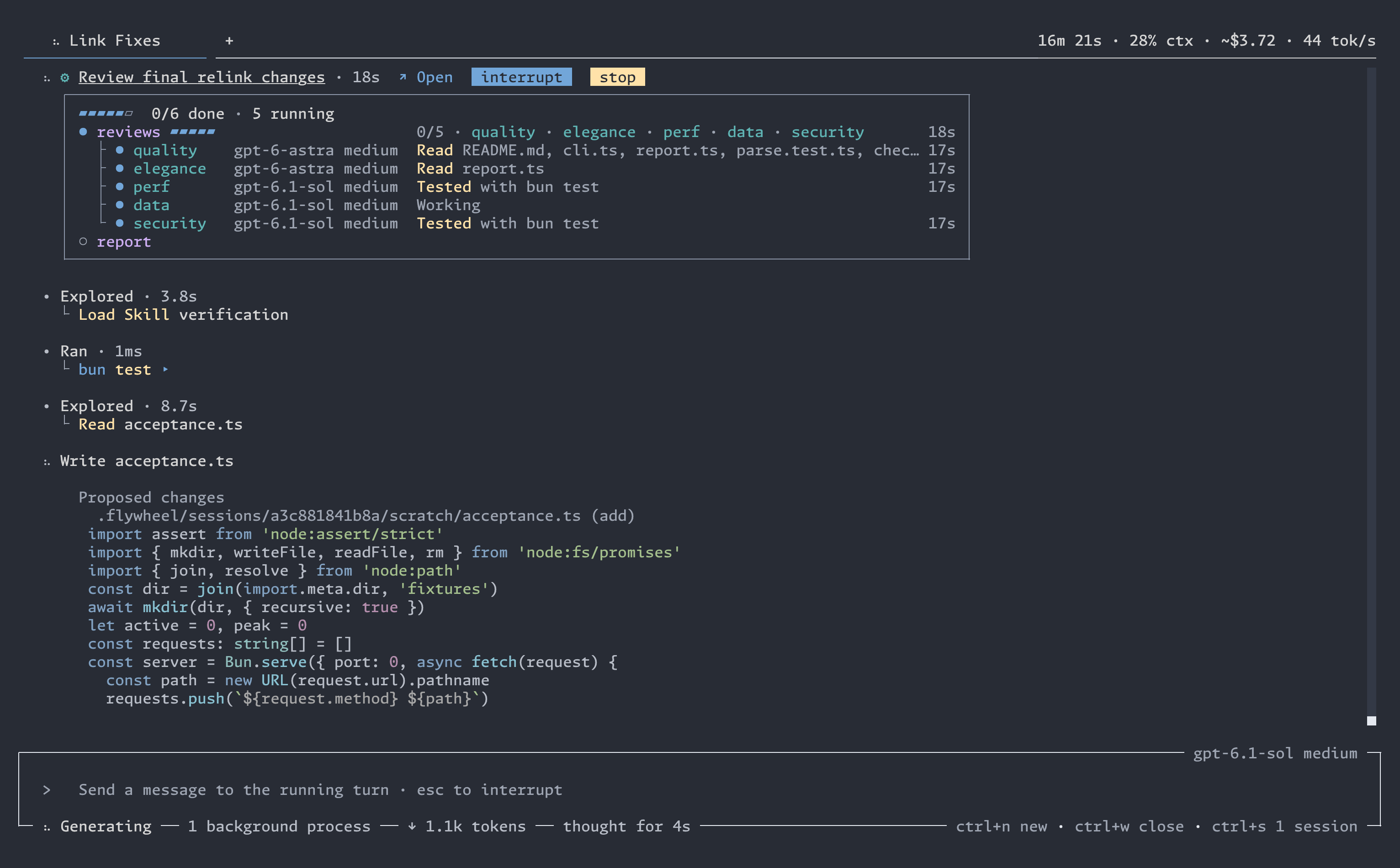
Flywheel is an open-source coding agent for your terminal, your browser, your phone, and VS Code.
## Install
macOS and Linux:
```bash
curl -fsSL https://github.com/wsauret/flywheel/releases/latest/download/install.sh | bash
```
Windows (PowerShell):
```powershell
irm https://github.com/wsauret/flywheel/releases/latest/download/install.ps1 | iex
```
Then run `flywheel` in a project directory. On first launch, the provider picker opens so that you can sign in.
## Why Flywheel
- **Every subscription you pay for, in one pool.** Sign in to Claude, ChatGPT, GitHub Copilot, SuperGrok, and OpenCode Go, with as many paid accounts of each as you have. When one account hits a cap, Flywheel moves to the next one without interrupting your work.
- **Multi-agent workflows that cost less.** Flywheel runs teams of agents that build, review, repair, and verify, on any model. In a head-to-head benchmark against Claude Code using the same model and effort, Flywheel's workflows cost 30% less, took 5% less time, and won twice as many blinded quality comparisons as they lost.
- **One session on every screen.** Start in the terminal, follow along in the desktop browser, then answer a question from your phone. Every client shows the same live sessions.
- **It does what you asked, and no more.** Flywheel is built to deliver what you asked for and to fight scope creep and over-engineering, two of the biggest problems with today's frontier models.
- **The right model for every job.** Instead of one model for everything, set a model and effort for the chat and for each kind of subagent, from any provider. Use a cheap, fast model to search the code and a strong one to review it.
- **Work and personal, kept apart.** Bind each project to a profile. A work repository never spends your personal subscriptions, or the other way around. Make as many profiles as you like, each with its own signed-in providers.
- **Get notified when your agent is blocked.** An agent only stops before completion when it needs your input or approval. Flywheel makes blocked agents easy to spot. In the terminal, the tab title turns yellow and the spinner turns into a `?`. The phone app can send a push notification. Your agents never sit blocked without you knowing.
- **Runs that keep going.** Sessions are durable. They continue after crashes, updates, and restarts. Sessions run in the background: close the terminal, the web client, or the phone app, and your session keeps running. If you run out of quota on all your subscriptions, the work pauses and resumes automatically when your quota returns.
- **It learns as you work.** Flywheel remembers your preferences and turns what you teach it while you steer your sessions into skills that it uses next time.
## Every subscription you pay for, in one pool
Sign in with **Claude, ChatGPT, GitHub Copilot, SuperGrok, or OpenCode Go**, and add several paid accounts of each. Add API keys for **Anthropic, OpenAI, Google, DeepSeek, Baseten, OpenRouter**, or any OpenAI-compatible endpoint.
- When an account hits its usage cap or goes down, Flywheel switches to the next account automatically. You never retry by hand.
- The subscription whose weekly window resets soonest is used first, so that quota about to expire is not wasted.
- Subscriptions serve first. API keys serve only when no subscription can.
- Paid overage starts off, and Flywheel asks once per account before it uses it.
- The Usage view shows each account's reported allowance and reset time, and your usage over time. You choose when it alerts you.
- Set a monthly limit on the GitHub Copilot credits that Flywheel uses, so the rest of your allowance stays for your other tools.
- Switch a chat between Claude, GPT, and other models at any point. The conversation carries over.
- Claude signs in through Anthropic's official Claude Agent SDK. Flywheel never reads, stores, or sends your Claude token.
## Multi-agent workflows that cost less
Describe the work in chat. For a big job, the agent writes a workflow and launches it: a team of agents that build, review, repair, and verify, with independent work running at the same time. It runs on any model from any provider you have.
- A live card shows each phase and each agent. Open any agent to see its work.
- Outside a workflow, the agent can hand a side task to a helper agent. Open the helper to watch it work. A helper can start with the whole conversation instead of a short brief.
- Set a budget of tokens, minutes, or agent attempts for a workflow.
- **Measured against Claude Code.** We compared Flywheel with Claude Code's built-in workflow mode on 11 tasks with 4 runs each, both using Sonnet at medium effort. Flywheel's workflows had **30% lower** API-equivalent cost, took **5% less** time on average, and scored **22 wins, 11 losses, and 11 ties** in blinded quality judging. [The full results](bench/findings/workflow-audit-results.md) give the method, every table, and the caveats.
## One session on every screen
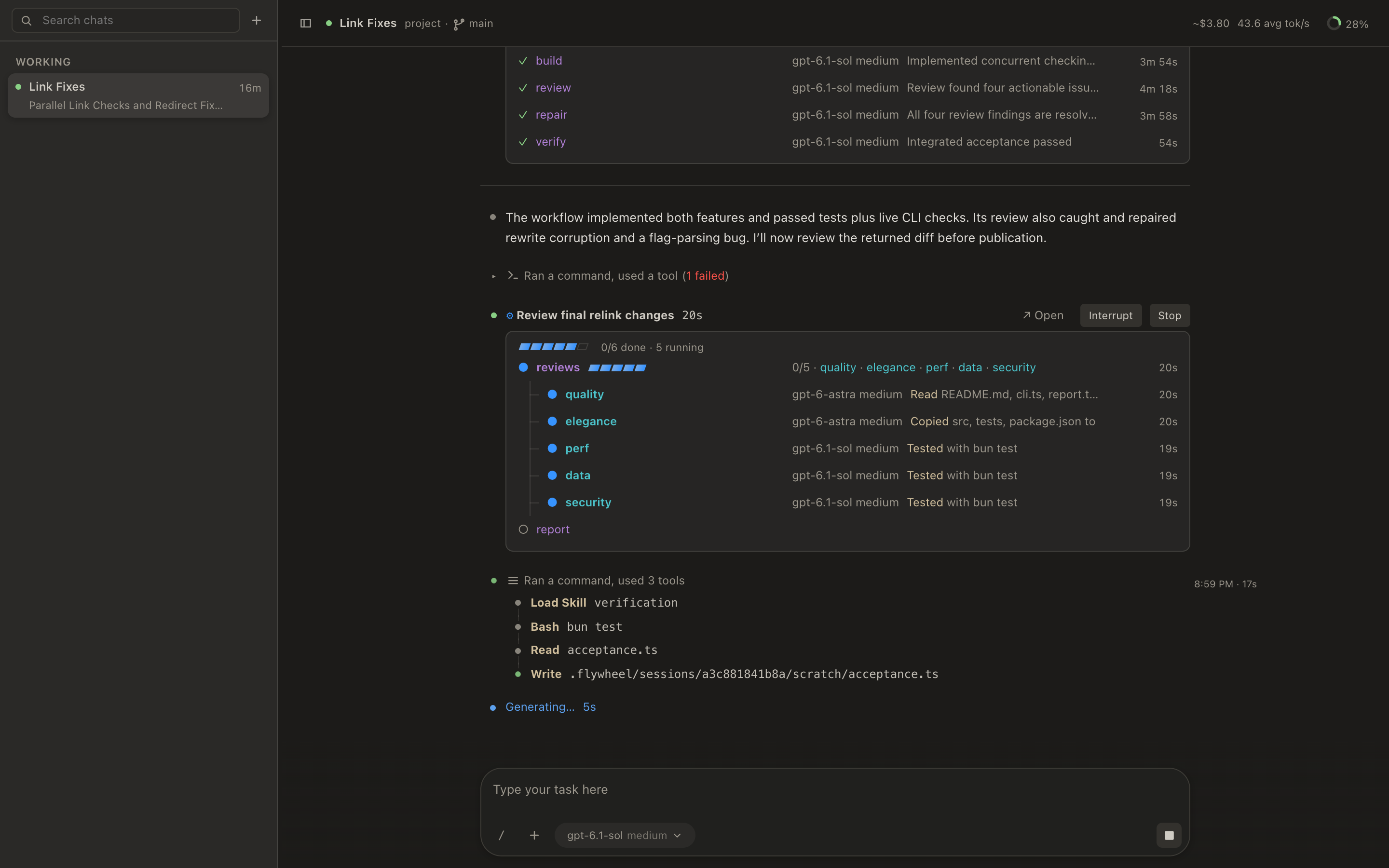
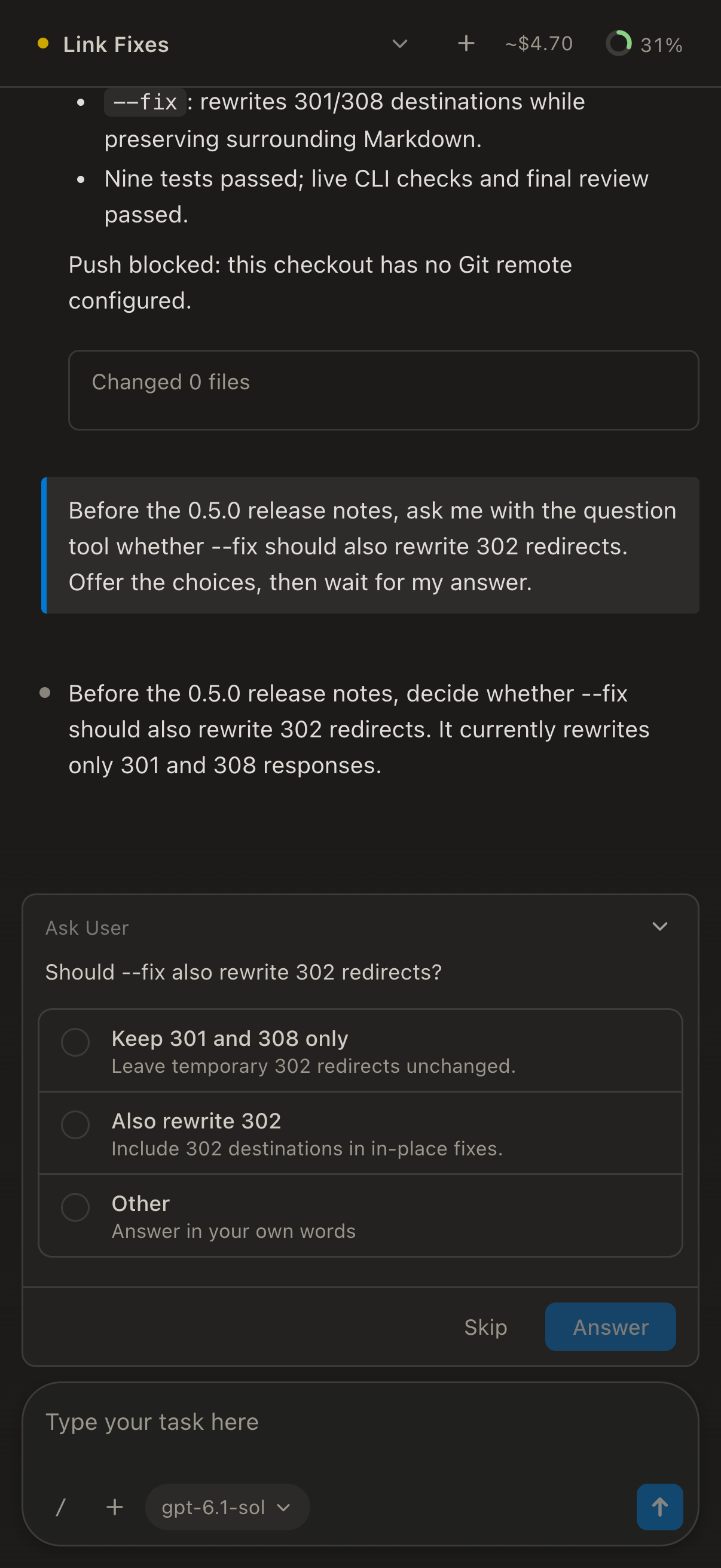
Every client attaches to the same live session. Start a job in the terminal, follow it in the browser, and answer the agent's question from your phone.
- Open [remote.flywl.sh/local](https://remote.flywl.sh/local) in a browser on the computer where Flywheel runs, and the desktop web client opens. It lists every project on that computer, open or asleep, and starts any project that you open. Only your machine can reach it.
- `/remote` pairs your phone with a QR code. No account, no password.
- Your phone connects through a free public relay, with nothing to set up. Every message is sealed end to end, so the relay cannot read it. If you prefer, you can run your own relay on your Cloudflare account.
- Your phone always runs the same client version as your computer, so new features reach it with no app update.
- From your phone, wake a project that is asleep, or clone a repository onto your machine. Your computer stays awake while your phone uses it.
- `flywheel --remote` drives your main machine from a terminal on another computer.
- The VS Code extension installs Flywheel for you, also on every SSH host that you open. It opens Flywheel's diff review in an editor tab, with undo for each file.
## It does what you asked, and no more
Coding agents tend to do more than you asked. Flywheel does not.
- **It keeps to your request.** No features, refactors, or "improvements" that you did not ask for.
- **It does not over-engineer.** You get the simplest design that does the whole job, and no code for problems that cannot happen.
- **It builds what you approved.** Every agent on a job stays on the plan that you agreed to.
- **It proves the work.** An agent says a change is done only after it has seen the change work.
## The right model for every job
Give each role its own model and effort: the chat, workflow agents, the explorer, the implementer, each kind of reviewer, and background work. Mix providers freely, such as a cheap, fast model for searching and a strong model for review. `/model` changes them, and the model picker shows the price of each model and which of your providers serve it.
## Work and personal, kept apart
Make as many profiles as you like, such as Work and Personal. Each has its own signed-in accounts and model choices. Bind each project to one profile. A work repository never spends your personal subscriptions, and a side project never spends your employer's. Each chat keeps the profile it started with. `/profile` switches it.
## Get notified when your agent is blocked
An agent only stops before completion when it needs your input or approval. It asks one clear question and waits, and Flywheel makes sure you see it.
- In the terminal, the tab title turns yellow and the spinner turns into a `?`.
- Turn on notifications on your phone, and it tells you when a chat needs you. It stays quiet otherwise.
- Everything that needs you stays in one Notifications list until you resolve it, also after a restart. The web client can also show a desktop alert.
- Answer from any client: the terminal, the browser, or your phone.
## Runs that keep going
Your work does not depend on any window.
- Close the terminal, the browser, or the phone app. The session keeps running.
- Update Flywheel mid-run. Running builds and tests keep going, and agents continue on the new build.
- Out of quota on every subscription at 2 a.m.? The work pauses, then continues by itself when quota returns.
- After a crash, press Resume. Agents that were mid-task continue where they stopped, and finished work stays finished.
- In a long session, your goal and your decisions survive when the context fills up.
- When a provider refuses a request because of content in the conversation, Flywheel tries to remove that content and continue.
- If a new release cannot start on your machine, Flywheel goes back to the last release that worked.
## It learns as you work
While you work, Flywheel saves your preferences and turns what you teach it into skills that it uses in later sessions. Every skill is a file that you can read, and `flywheel skills why` shows which chats it came from.
## Your terminal, your colors
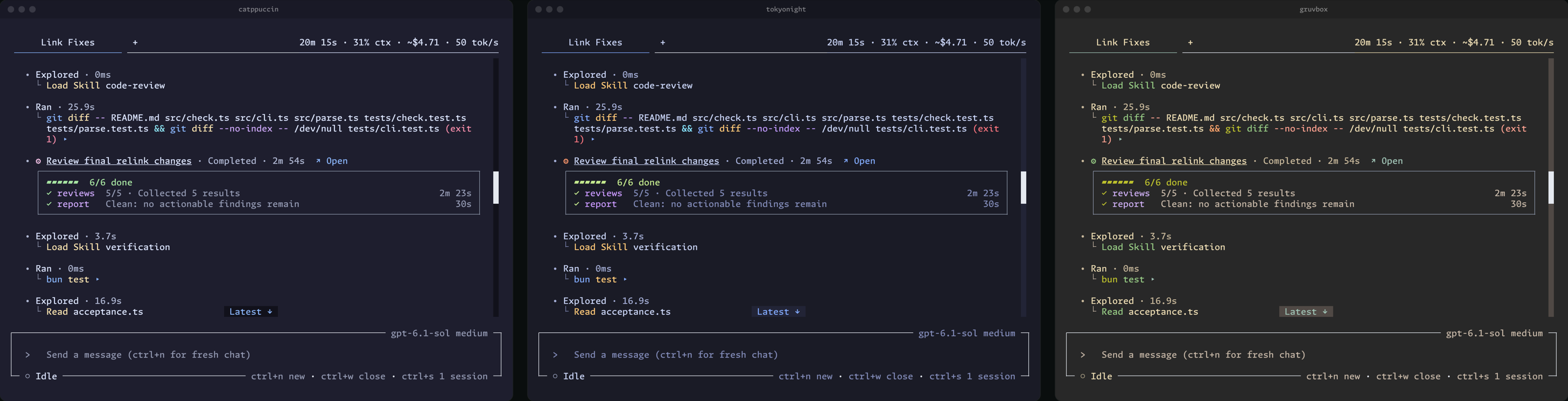
Flywheel ships about 40 themes, from Catppuccin to Gruvbox, and a new theme applies at once, with no restart. `flywheel font install` installs Monaspace, the font that Flywheel is designed around.
## Smaller things that matter
- **Turn anything off.** About 20 capabilities each have one switch. Keep only what you use, and the agent never sees the rest.
- **Many sessions, one window.** Run as many sessions as you want in tabs in one terminal. `ctrl+n` opens a new tab, and `ctrl+s` finds any earlier session.
- **No account, no analytics.** Flywheel collects no usage data. [Privacy](#privacy) lists what it sends.
- **Search every chat.** `/find` searches the text of this chat or of every chat in the project.
- **Measured speed.** `/stats` compares the measured speed of each model and effort.
- **Streaming diffs.** File edits show as diffs while the model's response streams in, so you see each change as it is written, not after.
- **Long chats keep their details.** After a long chat is summarized to make room, the agent can still find and reread the exact earlier text: an error, a file path, or the reason for a decision.
- **Your changes to built-in skills stay yours.** Change a built-in skill, persona, or workflow. When a new version ships, Flywheel asks whether to keep yours, take the new one, or merge the two. It never overwrites your work.
- **Chats can talk to each other.** An agent in one chat can ask or answer another chat or workflow in the same project. You see each message in both transcripts.
- **Bring your MCP servers.** `flywheel mcp import .mcp.json` brings over the MCP servers you set up for Claude Code.
- **Fix it from the lightbulb.** In VS Code, click the lightbulb on an error or warning to send that exact problem to Flywheel, or select code and ask Flywheel to explain it.
## Status and requirements
Flywheel is early software. The version is 0.x, and interfaces, commands, and settings can still change from one release to the next.
- **A model provider:** a subscription to Claude, ChatGPT, GitHub Copilot, SuperGrok, or OpenCode Go, or an API key for Anthropic, OpenAI, Google, DeepSeek, Baseten, OpenRouter, or an OpenAI-compatible endpoint. Flywheel has no model service of its own.
- **No runtime:** the release archive holds everything that Flywheel needs, including the Claude engine. You do not need to install Bun, Node, or any other runtime.
## Platforms
Flywheel ships compiled binaries for macOS (Apple silicon and Intel), Linux (x64 and ARM64, glibc and musl), and Windows (x64 and ARM64). The installer picks the archive for your machine and verifies it. Flywheel then updates itself without interrupting a running session. On Alpine Linux, you need to run `apk add libstdc++ curl` before you run the install command.
## Safety
Flywheel agents work without asking you to approve each step. They run shell commands and edit files with your user account's permissions.
- Guards catch ordinary mistakes, but they are not a sandbox. They do not confine the programs that an agent runs.
- `/changes` shows the session's file edits, with undo for each file. A shell command can also change files outside that record.
- For an untrusted repository, or work where a mistake would be costly, run Flywheel inside a boundary: a container, a virtual machine, a low-privilege account, or a disposable checkout.
## Privacy
Flywheel needs no account and collects no analytics or usage data. For model inference, Flywheel sends your prompts and code only to the model providers that you configure. Agent tools can send content to other destinations, such as an MCP server, a web search service, or a host that a shell command reaches. Project state stays in the project's `.flywheel/` directory, and account settings stay in `~/.flywheel/`. Release builds send an automatic crash report with the error, the version, the platform, and recent diagnostic records. A report holds no conversation or file content. Turn off the Bug reports setting to stop crash reports. [What Flywheel sends over the network](docs/privacy.md) lists every request that Flywheel makes on its own, what it holds, and the controls that exist for it.
## Getting help
Ask questions in the [Q&A discussions](https://github.com/wsauret/flywheel/discussions/categories/q-a). [SUPPORT.md](SUPPORT.md) says where bugs, feature requests, and security reports go.
## Contributing
Read [CONTRIBUTING.md](CONTRIBUTING.md). The design lives in two living documents: architecture intent under `docs/architecture-intent/` and product intent under `docs/product-intent/`. Start with [agency](docs/architecture-intent/agency.md) to see why the system looks the way it does.
Credits for the open-source work that Flywheel adapts are in [THIRD-PARTY-NOTICES.md](THIRD-PARTY-NOTICES.md). Flywheel is licensed under [Apache 2.0](LICENSE).