dsh-hover-approve

Approve without opening the conversation.
An anchored sidebar bubble for DSH Web: sessions waiting for approval, questions, plan reviews or blocked goals — handled right at their list row.

GitHub stars MIT License CI dsh 0.1.0-rc.6

English · 中文

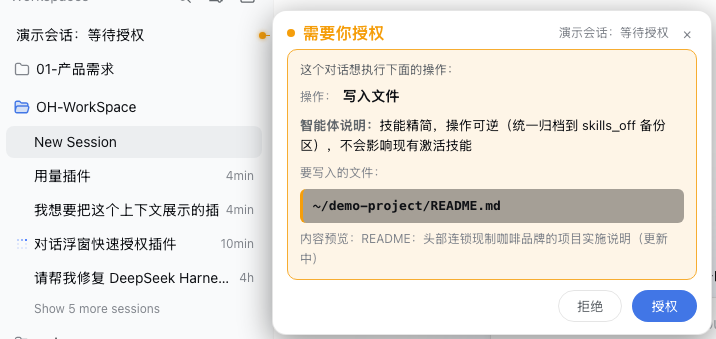
Approval bubble: action, agent note, file highlight, reject/approve

## Why DSH conversations regularly need you to stop and act: **approve a file write, answer a question, confirm a plan, check why a goal got blocked**. The built-in panel makes you open the conversation and scroll to act — switching back and forth breaks your flow. This plugin keeps the interaction **at the session's list row**: a bubble pops up anchored to the row, a tail line and dot point at which session is waiting, and you approve / reject / answer right in the bubble — **no need to open the conversation**. ## Features

🟠 Approval

When a session requests permissions (file write / shell command), the bubble shows the action, the agent note, the target file (highlighted) and the command — with inline Reject / Approve buttons.

🟠 Questions

When an askUserQuestion arrives, the bubble shows the question and options: single-select answers on click, multi-select confirms after checking, recommended option ⭐ highlighted.

🟠 Plan review

plan-review confirmations render as a card with the plan body and Approve / Reject options — answer on click.

🔴 Blocked goals

When a goal enters the blocked phase, the reason (red, prominent) and the objective are shown as a passive notice, with a one-click Open session.

## In action > Real DSH Web UI (bubble anchored to the session row, tail line + dot pointing at the session): ![Approval: action / agent note / file highlight / reject or approve](assets/shot-approval.png) ![Blocked goal: red reason + objective + open session](assets/shot-goal-blocked.png) - **Auto-appears, no hover needed**: anchored to the session row — you always know which session is waiting; - **Complete information**: plain-language action labels (bash → "run terminal command", write → "write file"), highlighted file path, command collapsed to one line (click to expand), agent note shown prominently; - **Dismiss by clicking outside**: click anywhere outside (or the ×) — it stays closed for this round and reappears on the next interaction; - **Follows the list**: bubble and tail track the row on scroll / re-render; concurrent interactions anchor to their own rows, offset horizontally; - **Archived sessions stay quiet**: archived conversations never get a bubble; archiving / unarchiving takes effect immediately (already-shown bubbles close at once). ## Install **Quick install** (recommended): ```bash dsh plugin --profile web add https://github.com/wydddddcool/dsh-hover-approve ``` One command installs the dependency and registers the bundle (applies `cordis.patch.yml` automatically); **restart dsh web** afterwards. You can also install manually in your profile (e.g. `~/.dsh/profiles/web`): ```sh # 1. Add to package.json dependencies: # "dsh-hover-approve": "https://github.com/wydddddcool/dsh-hover-approve" # 2. Add "dsh-hover-approve" to dsh.profile.bundles (applies cordis.patch.yml) pnpm install # 3. Restart dsh web ``` Local development can use a `file:` path dependency; note pnpm copies `file:` deps, so re-sync after editing: `cp /lib/client.js ~/.dsh/profiles/web/node_modules/dsh-hover-approve/lib/client.js` ## Relationship with DSH This is a **community plugin (not an official product)** for DeepSeek Harness Web. It reads session state through the official client injection (`ctx.sessions` / `ctx.workspaces` / `ctx.locale`) and answers through the official `PendingWait.respond()` channel — the **same server-side path and audit trail** as the in-conversation panel. Responses are bound to the `approvalId` captured at display time: if the request is replaced or already handled, sending is refused, so you can never approve something you didn't see. Tested against **dsh 0.1.0-rc.6** (uses `pendingInteraction` / `projectionValues` / `sessions.open` / `PendingWait`). ## Testing ```sh npm install # first time: installs jsdom npm test # 16 cases: four modes, archive filtering, answer encoding, state switching, retry, viewport clamping, teardown ``` CI (GitHub Actions) runs the tests on every push. ## Limitations - The command line only shows when a running call matches `callId` (bash-like tools); other tools show only the action type and note — same as the built-in panel. - Row→session mapping matches by title scoring (exact match first); heavily duplicated titles could mis-anchor in rare cases. - The bubble depends on the built-in list DOM structure (`[role="treeitem"]`). If DSH changes that structure, the bubble may silently stop working (no errors) until adapted. ## License [MIT License](LICENSE). DeepSeek is a trademark of DeepSeek AI; this is an independent community project, not affiliated with or endorsed by DeepSeek.