org.nvim logo: an Org outline with headings and a checkbox, and a unicorn # org.nvim ### Emacs Org mode, rebuilt for Neovim in pure Lua. Outlines · TODOs · Agenda · Capture · Clocking · Spreadsheet tables · Babel · Export [![Neovim 0.11+](https://img.shields.io/badge/Neovim-0.11%2B-57A143?style=for-the-badge&logo=neovim&logoColor=white)](https://neovim.io) [![Pure Lua](https://img.shields.io/badge/100%25-Lua-2C2D72?style=for-the-badge&logo=lua&logoColor=white)](lua/org) [![Release](https://img.shields.io/github/v/release/xheisenbugx/org.nvim?style=for-the-badge&color=blue)](https://github.com/xheisenbugx/org.nvim/releases) [![MIT license](https://img.shields.io/badge/license-MIT-green?style=for-the-badge)](LICENSE) [![Zero dependencies](https://img.shields.io/badge/dependencies-zero-ff69b4?style=for-the-badge)](docs/guide.md#requirements) [![PRs welcome](https://img.shields.io/badge/PRs-welcome-orange?style=for-the-badge)](CONTRIBUTING.md) [![Ko-fi](https://img.shields.io/badge/Ko--fi-support-FF5E5B?style=for-the-badge&logo=ko-fi&logoColor=white)](https://ko-fi.com/xheisenbugx) **[Install](#-install-in-30-seconds)** · **[Tour](#-a-quick-tour)** · **[Features](#-features)** · **[Docs](https://org-nvim.com/)** · **[Guide](docs/guide.md)** · **[Try it in your browser](https://org-nvim.com/playground.html)** · **[Migrating from nvim-orgmode](https://org-nvim.com/manual/org-migrate.html)** · **[FAQ](https://org-nvim.com/manual/org-faq.html)** · **[Changelog](CHANGELOG.md)** · **[Contributing](CONTRIBUTING.md)**


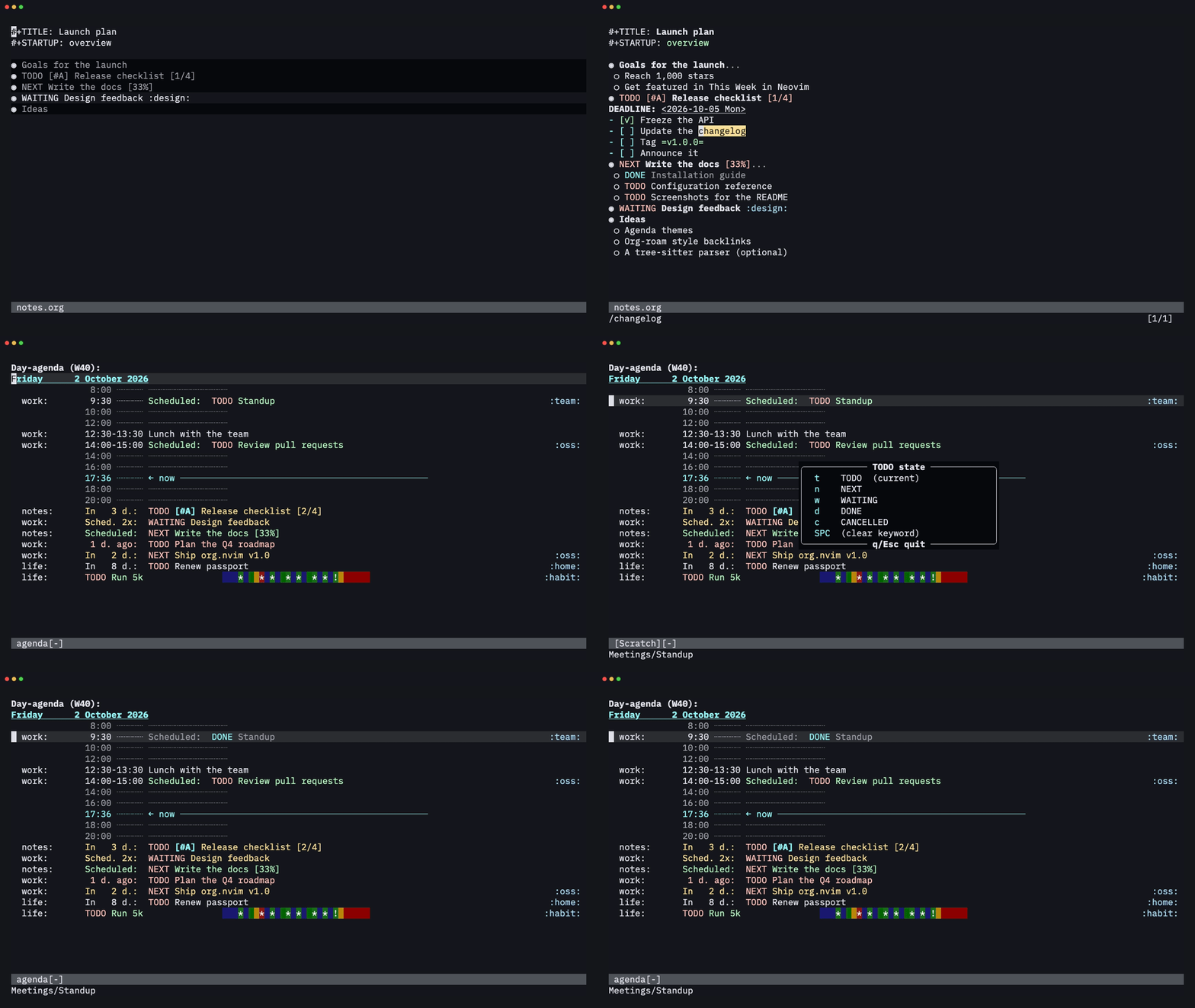
Cycling an outline, ticking a checkbox and marking a task DONE from the agenda
--- Org mode is one of the most loved tools in Emacs. It works as a plain-text outliner, planner, time tracker, spreadsheet, literate-programming notebook and publishing system. **org.nvim puts all of that in Neovim.** It isn't a syntax file with a few keymaps on top. It reimplements Org's behaviour: the agenda, capture templates, repeaters, clock tables, table formulas, Babel and export. - 🪶 **No dependencies.** It's about 170k lines of Lua and needs no tree-sitter parser, external binary or companion plugin. - 🔁 **Works with Emacs.** It reads and writes the same plain-text format, so you can edit a file in Emacs today and in Neovim tomorrow. - 🎨 **Highlighting that matches Emacs.** Headlines, lists, dates, tables, blocks, links and markup are drawn the way Emacs Org draws them, byte for byte, and highlighting is never switched off on long lines. - ⌨️ **Keys that fit Vim.** Context-aware keys fall back to normal Vim behaviour when they don't apply (`>>` still indents, `` still increments). Press `g?` in an org or agenda buffer to see what's available. - 💤 **Ready for LazyVim.** It comes with which-key groups, a blink.cmp source, pickers for snacks.nvim, fzf-lua, Telescope and mini.pick, and a lualine clock, and it works with any other setup too. - ✅ **Tested.** The headless test suite runs 4,800+ tests from 240+ spec files. How does it compare with nvim-orgmode and Neorg? See [why another Org plugin?](docs/guide.md#-why-another-org-plugin). Switching from nvim-orgmode? [Migrating from nvim-orgmode](https://org-nvim.com/manual/org-migrate.html) (`:h org-migrate`) maps its options and keys to org.nvim's, and `:Org migrate_config` converts your setup. **On AI:** org.nvim is written with AI assistance ([Claude Code](https://claude.com/claude-code)). To keep that honest, its behaviour is checked against the Emacs Org source rather than guessed, every feature comes with headless tests, and I review and use every change myself. Bug reports are very welcome, especially where it doesn't match Emacs. --- ## ⚡ Install in 30 seconds With [lazy.nvim](https://github.com/folke/lazy.nvim) / LazyVim: ```lua -- ~/.config/nvim/lua/plugins/org.lua return { "xheisenbugx/org.nvim", main = "org", lazy = false, -- startup cost is small: heavy modules load on first use opts = { org_directory = "~/org", agenda_files = { "~/org/**/*.org" }, default_notes_file = "~/org/refile.org", }, } ``` Not using lazy.nvim? The [guide](docs/guide.md#installation) covers `vim.pack`, rocks.nvim (`:Rocks install org.nvim`), plain Vim packages, a local checkout and blink.cmp completion. Neovim **0.11+** on Linux, macOS or Windows is all it needs; pandoc, LaTeX and Babel's interpreters are optional ([requirements](docs/guide.md#requirements)). Restart Neovim and run `:checkhealth org`. New to Org? Run `:Org tutor`: it lists the lessons of a guided course, like `vimtutor`, each in a copy of its own where every org key works and each exercise gets a ✓ once you have done it (`:Org tutor basics` starts with the first; `:h org-tutor`). Not installed yet? [Try it in your browser](https://org-nvim.com/playground.html): the playground plays every lesson in a real Neovim, exercise by exercise, with captions and a follow-along mode where you press the keys. For a longer tour, [`examples/tutorial.org`](examples/tutorial.org) has exercises for every feature and [`examples/00-index.org`](examples/00-index.org) a file per area; `nvim -u examples/minimal_init.lua examples/tutorial.org` opens it without touching your config or your notes. ## Quick start 1. `mkdir ~/org` and open `~/org/todo.org`. 2. Type `* TODO Buy milk`, press ``, then `os` and `` to schedule it for today. 3. `oa` → `a` opens the weekly agenda. `t` changes the state of the entry under the cursor, and `` jumps to it. 4. `oc` → `t` captures a new task from anywhere. Finish with `` or `:w`. 5. Press `g?` in any org or agenda buffer to list its keymaps. > [!TIP] > All org commands live under `o` by default. If another plugin > already uses it, set `mappings = { prefix = "O" }`. Coming from > Emacs? `C-c C-t`, `C-c C-s`, `C-c C-w`, `C-c C-x C-i` and about 150 more > Org keys work out of the box ([keymaps](docs/guide.md#keymaps)). --- ## 🎬 A quick tour Recorded in a plain Neovim with only org.nvim installed, from the tapes in [`docs/media/tapes`](docs/media/tapes) (config: [`docs/media/demo/init.lua`](docs/media/demo/init.lua)). The box in the bottom-right corner shows the key being pressed. ### Outlines and structure editing `TAB` / `S-TAB` cycle a subtree / the file like Emacs, `M-k` / `M-j` move a subtree, `M-RET` adds a heading at the right level, `M-h` / `M-l` promote and demote, `ohs` sorts and `ohn` narrows. ![Cycling visibility with TAB and S-TAB, then moving a subtree up and down](https://raw.githubusercontent.com/xheisenbugx/org.nvim/media/outline.gif) ![Adding a heading, demoting and promoting it, adding a TODO heading, sorting children and narrowing to a subtree](https://raw.githubusercontent.com/xheisenbugx/org.nvim/media/headings.gif) ### TODOs, checklists and priorities Ticking a checkbox updates the `[2/4]` and `[50%]` cookies of its parents; marking a task DONE can log a `CLOSED:` timestamp. Set the state with `cit` or `oS`, the priority with `o,`. ![Ticking checkboxes, marking a task DONE and giving another one priority A](https://raw.githubusercontent.com/xheisenbugx/org.nvim/media/todo.gif) ### Plain lists `S-Right` / `S-Left` cycle the bullet style, `M-RET` / `M-S-RET` add an item or a checkbox item, `M-Up` / `M-Down` move an item and renumber, and `o-` turns plain lines into a list. ![Cycling bullet styles, adding and indenting items, moving a numbered item, turning lines into a list and adding a checkbox](https://raw.githubusercontent.com/xheisenbugx/org.nvim/media/lists.gif) ### Tags and properties `ot` opens fast tag selection with mutually exclusive groups, `oxe` sets the effort and `op` any property. ![Setting three tags with fast keys, an effort and an OWNER property](https://raw.githubusercontent.com/xheisenbugx/org.nvim/media/tags.gif) ### Dates with a real calendar `os` / `od` open a floating calendar where you can type `fri 14:00`, `+2w` or `w39`; `S-Right`, `` and `` change a date in place, and `` on it opens that day's agenda. ![Scheduling a task from the calendar and typing "fri 14:00" for a deadline](https://raw.githubusercontent.com/xheisenbugx/org.nvim/media/dates.gif) ![Shifting a date by days, changing the hour and minutes in place, then opening the agenda on a date range](https://raw.githubusercontent.com/xheisenbugx/org.nvim/media/timestamps.gif) ### A real agenda `oa` → `a` opens the week (or the day): a time grid, a current-time line, deadline countdowns, overdue items and habit graphs, as in Emacs. Change states, reschedule, clock in, refile, filter and run bulk actions from it. ![The agenda day view: marking a task DONE, then switching to the week view](https://raw.githubusercontent.com/xheisenbugx/org.nvim/media/agenda.gif)
The week view ![The agenda week view](https://raw.githubusercontent.com/xheisenbugx/org.nvim/media/agenda-week.png)
The dispatcher has the other Emacs views too: every TODO (`t`), a tags/property match (`m`) and a word search (`s`). ![The TODO list, a +oss tag match and a word search in the agenda](https://raw.githubusercontent.com/xheisenbugx/org.nvim/media/agenda-views.gif) ### Capture from anywhere `oc` in any buffer, pick a template, type, and finish with `` or `:w`. It's filed under a headline, an outline path or a date tree ([templates](docs/guide.md#capture-templates)). ![Capturing a work task that lands under the Inbox heading of work.org](https://raw.githubusercontent.com/xheisenbugx/org.nvim/media/capture.gif) ### Refile and archive `or` moves a subtree under another heading; `o$` archives it to `_archive` with its context in `ARCHIVE_*` properties. ![Refiling an inbox task into work.org/Projects and archiving a DONE task](https://raw.githubusercontent.com/xheisenbugx/org.nvim/media/refile.gif) ### Spreadsheet tables Tables align themselves, and `#+TBLFM` formulas run on a Calc-compatible evaluator. Rows and columns can be inserted, moved and deleted with the formulas rewritten to follow, sorted and transposed. ![Typing a rough table, evaluating its formulas and recalculating after an edit](https://raw.githubusercontent.com/xheisenbugx/org.nvim/media/tables.gif) ![Inserting a row and a column, moving them, then deleting a column and a row](https://raw.githubusercontent.com/xheisenbugx/org.nvim/media/table-edit.gif) ![Sorting rows by price, adding a Total row with a field formula, then transposing the table](https://raw.githubusercontent.com/xheisenbugx/org.nvim/media/table-tools.gif) ### Code that runs in your notes `` on a source block runs it asynchronously and writes the output back: Python, shell, Lua, Node, Ruby, R, Go, SQLite and more, with `:var`, `:noweb`, `:cache`, `#+CALL`, `:session` REPLs and tangling. `o'` edits a block in its own buffer with the language's filetype. ![Running Python, shell and Lua blocks and inserting their results](https://raw.githubusercontent.com/xheisenbugx/org.nvim/media/babel.gif) ![Editing a Lua block in its own buffer, writing it back and running it](https://raw.githubusercontent.com/xheisenbugx/org.nvim/media/src-edit.gif) ### Clocking, clock tables and column view `oxi` clocks in (the [statusline](docs/guide.md#statusline) shows the total against the effort), `oxr` inserts a clock table that matches Emacs, and `oC` opens column view. ![Clocking in, inserting a clock table, then opening column view](https://raw.githubusercontent.com/xheisenbugx/org.nvim/media/clock.gif) ### Images and LaTeX, right in your notes `oxv` shows image links as images and `oxl` renders LaTeX fragments, with Neovim 0.13's `vim.ui.img` in kitty, Ghostty or WezTerm, or snacks.nvim / image.nvim elsewhere ([where previews work](docs/guide.md#image-and-latex-previews)). ![Previewing the images of an entry and then the whole buffer, scrolling and folding with them](https://raw.githubusercontent.com/xheisenbugx/org.nvim/media/images.gif) ![Rendering an inline formula, a displayed integral and an align environment, then hiding one](https://raw.githubusercontent.com/xheisenbugx/org.nvim/media/latex.gif) ### Jump to any heading `o.` (`C-c C-j`) jumps to a heading of the file, `og` to any heading of your agenda files, through your picker of choice ([pickers](docs/guide.md#pickers)). ![Fuzzy-finding a heading in the file, then with the Emacs key](https://raw.githubusercontent.com/xheisenbugx/org.nvim/media/goto-buffer.gif) ![Jumping to headings in other agenda files](https://raw.githubusercontent.com/xheisenbugx/org.nvim/media/goto-agenda.gif) ### Timers and reminders Relative timers for meeting notes (`0`, `-`), a countdown for the current entry (`;`), and reminders before timed agenda entries with `notifications.enabled`. ![Taking timed meeting notes, pausing and stopping the timer](https://raw.githubusercontent.com/xheisenbugx/org.nvim/media/timers.gif) ![A six-second countdown that ends with a "time out" notification](https://raw.githubusercontent.com/xheisenbugx/org.nvim/media/countdown.gif) ![Reminders for a scheduled call and a deadline, then the same entries in the agenda](https://raw.githubusercontent.com/xheisenbugx/org.nvim/media/reminders.gif) ### Footnotes, org-lint and speed keys `oif` inserts a footnote, `:Org lint` lists a file's problems in the location list, and with `use_speed_commands = true` single letters at the start of a heading run commands, like Emacs's speed keys. ![Inserting a footnote and jumping between reference and definition](https://raw.githubusercontent.com/xheisenbugx/org.nvim/media/footnotes.gif) ![org-lint listing five problems of a file and jumping to one](https://raw.githubusercontent.com/xheisenbugx/org.nvim/media/lint.gif) ![Speed keys moving between headings, changing a TODO state, moving a subtree and listing every key](https://raw.githubusercontent.com/xheisenbugx/org.nvim/media/speed-keys.gif) ### Links and sparse trees `ols` stores a link, `oli` inserts it, `` follows it. `o/` folds the file down to TODOs, a regexp, a tag match or deadlines. ![Storing a link to a heading, inserting it elsewhere, following it and showing the raw links](https://raw.githubusercontent.com/xheisenbugx/org.nvim/media/links.gif) ![A sparse tree of TODO entries, then one for a regexp](https://raw.githubusercontent.com/xheisenbugx/org.nvim/media/sparse.gif) ### Export `oe` opens the export dispatcher: HTML, LaTeX, Beamer, KOMA letter, man page, Markdown, ASCII, Org, iCalendar, ODT and Texinfo are ports of Emacs's back-ends, pandoc handles DOCX and EPUB, and `:Org preview` shows a live HTML preview. ![Exporting an Org file to a Markdown buffer](https://raw.githubusercontent.com/xheisenbugx/org.nvim/media/export-md.gif) ### Your notes, for your AI assistant The `cli` extension's `org mcp` is an MCP server: Claude Code, Claude Desktop and other MCP clients can read your agenda, find and show entries, capture, add headings, mark tasks done, reschedule, refile and clock in, with your own templates and keywords, through the same code as the editor. Results are compact JSON with a ready-to-use target for every heading, and `/mcp__org__plan_day`, `weekly_review` and `triage_inbox` come as prompts. `--read-only` keeps it to reading. ```sh claude mcp add org -- org mcp ``` ### Every key, one press away Press `g?` in any org or agenda buffer to list every keymap there, grouped by topic, with each command's Vim and Emacs keys on one row. ![The g? keymap help float](https://raw.githubusercontent.com/xheisenbugx/org.nvim/media/keymaps.png) --- ## ✨ Features | | Area | Highlights | | --- | --- | --- | | 🌳 | **Outline** | Headline folding with Emacs-style `TAB`/`S-TAB` cycling, `#+STARTUP` and `VISIBILITY` visibility, archived subtrees that stay folded, motions (`]]` `[[` `g{`), text objects (`dar`, `vic`, `ci-`, `daL`, ...), and `.` repeat | | ✂️ | **Structure editing** | A context-aware `M-RET`, promote and demote, move, cut/copy/paste/clone subtrees, sort, narrow, structure templates | | 📋 | **Plain lists** | Every bullet style, checkboxes with a `[-]` partial state, `[2/5]` and `[40%]` statistics cookies, renumbering, `TAB` on a new item to indent it | | ✅ | **TODO** | Multiple keyword sequences, fast selection, `!`/`@` logging, `LOGGING` / `LOG_INTO_DRAWER` properties, repeaters (`+1w`, `++1d`, `.+2d`, `REPEAT_TO_STATE`), `ORDERED` / `NOBLOCKING` dependencies, tag triggers, `#+TYP_TODO` type sequences, priorities | | 🏷️ | **Tags and properties** | Fast tag selection with groups, tag changes over a selection, inheritance, `#+FILETAGS`, property drawers, `Effort`, `_ALL` values cycled with `S-Left`/`S-Right` | | 📅 | **Dates** | A floating calendar that understands `+2w`, `fri 14:00`, `sep 15` and `w39`; `SCHEDULED`/`DEADLINE` with warning and delay periods; ``/`` on any part of a timestamp, minutes rounded to 5; custom timestamp formats (`C-c C-x C-t`) in the buffer and in export; Emacs's `org-duration` units and formats | | 🗓️ | **Agenda** | Day to year views, a time grid, habits, log, clock-report, entry-text and archive modes, the full Emacs match syntax, custom composite commands, tag/category/effort/regexp filters, bulk actions, follow mode, restriction lock, PDF/PostScript export, calendar conversions, moon phases, sunrise/sunset and holidays, the Emacs diary file and every diary sexp of Emacs's calendars | | 📥 | **Capture** | Grouped templates; entry, item, checkitem and table-line types; file, headline, outline-path, date-tree, regexp, ID, clock and function targets; all the common `%`-escapes; `:unnarrowed` captures in the target file, `org-extend-today-until` for dates, Emacs Lisp `%(sexp)` escapes | | 📦 | **Refile and archive** | Refile or copy subtrees or regions, with Emacs-style target specs, outline-path completion in steps and refile logging; archive to a file, heading, date tree or Archive sibling with the `ARCHIVE_*` context properties; refile cache; notes in the `*Org Note*` buffer | | 🔗 | **Links** | `file:` with `::line`, `::*heading`, `::#id` and `::/regex/`; `id:`, `<>`, `<<>>`, coderefs, `shell:` (with an `*Org Shell Output*` buffer), `elisp:`, wildcard `file:*.org` listings, `attachment:`, abbreviations, custom types, concealed display, store/insert last/all links | | ⏱️ | **Clocking** | Clock in/out/cancel/jump, clock history with default and interrupted tasks, Emacs's clock resolution (keep, subtract, got-back) for dangling clocks and idle time, auto clock-out, effort estimates with an overrun alert, a statusline component, `clocktable` blocks matching Emacs output (`:step`, `:formula`, `:sort`, `:lang`…), agenda clock check, relative and countdown timers | | 🧮 | **Tables** | Automatic alignment, column shrinking, row/column/cell editing with formula fixing, copy-down, CSV/TSV import and export, `#+TBLFM` formulas with a Calc-compatible evaluator, a formula editor and debugger, radio tables, orgtbl-mode (including the unicode and table.el translators) and plots (including radar); Calc symbolic algebra (`simplify`, `deriv`, `integ`, `solve`), vectors and matrices, modulo forms, complex numbers, HMS forms, error forms, intervals and units; table.el grid tables (`C-c ~`, `C-c '`, export) | | 🧪 | **Babel** | Asynchronous execution in many languages (with a spinner, placeholder results and cancelling), `:session` as live REPL buffers (shells, Python, Node, Ruby, R, Lua) with `:async`, inline `src_lang{…}` blocks and `call_name()`, `:results`, `:var` references that evaluate blocks (`name(x=1)`, slices, other files, IDs), `:noweb`, `:wrap`, `:cache`, `:file`, `#+CALL`, Library of Babel, tangling, optional evaluation on export, the `C-c C-v` commands, and editing a block in its own buffer with `C-c '`; `emacs-lisp` blocks run in a separate Emacs when one is installed | | 📤 | **Export** | A port of Emacs's export engine (with `#+BIND` and `(eval …)` macros): HTML, LaTeX/PDF, Beamer, KOMA letters, man pages, Markdown, ASCII, Org, iCalendar, ODT and Texinfo/Info back-ends matching Emacs output, GitHub-flavoured Markdown, citations with the CSL processor, publishing projects, every `#+OPTIONS` key, plus DOCX, EPUB and more through pandoc | | 🖼️ | **Images and LaTeX** | Image links and LaTeX fragments previewed in place of the link (`org-link-preview`, `-region`, `-clear`, `-refresh`, `org-latex-preview`) with Neovim 0.13's `vim.ui.img`, or snacks.nvim / image.nvim on older versions; `org-image-actual-width`, `#+ATTR_ORG: :width` / `:align`, images as link descriptions, previews on TAB, `#+STARTUP: linkpreviews latexpreview`, the Emacs LaTeX processes (dvipng, dvisvgm, xelatex, imagemagick) plus tectonic, images in `ltximg/`, preview functions for custom link types, remote http(s) images | | 🧩 | **[Extensions](#-extensions)** | Optional, off until enabled: slideshows (org-present), queries and saved views (org-ql), linked notes (org-roam), grouped agendas (org-super-agenda), Todoist-style quick add, a guided weekly review, pomodoros (org-pomodoro), flashcards with spaced repetition (org-drill), an in-process language server (symbols, hover, cross-file rename; `org lsp` serves it to Helix, VS Code, Zed and Emacs too), language servers inside src blocks (otter.nvim-style), kanban board, timeline, clock heatmap and Today sidebar, code ↔ notes links and literate Neovim config, Hugo blog export (ox-hugo), a structural git merge driver, iCalendar subscriptions, the `org` command line, mermaid/dot/plantuml diagrams, live transclusion (org-transclusion) and a dated journal (org-journal) | | 🎁 | **And more** | Column view, `org-indent` mode, speed keys, footnotes, sparse trees, `org-lint`, entry encryption (`org-crypt`), `org-protocol`, inline tasks, org-num, pretty entities, appointment notifications, attachments (with `org-attach-git`), RSS/Atom feeds (`org-feed`), MobileOrg, IDs, dynamic blocks, BibTeX links (`ol-bibtex`), `org-ctags`, the Org/table/agenda menus and org-mouse, completion, `:checkhealth org`, a [Lua API](docs/guide.md#lua-api) and a [session server](docs/guide.md#session-server) | --- ## 📚 Documentation - **[The guide](docs/guide.md)**: installation in detail, every default key, configuration, capture templates, custom agenda commands, integrations, the Lua API, the differences from Emacs, every extension and the roadmap. - **The manual**: `:h org.nvim` ([`doc/org.txt`](doc/org.txt)); every option is under `:h org-config`. - **[The documentation website](https://org-nvim.com/)**: the manual, the guide, the examples and the parity scorecard, searchable. - **[FAQ](https://org-nvim.com/manual/org-faq.html)** (`:h org-faq`) and **[Migrating from nvim-orgmode](https://org-nvim.com/manual/org-migrate.html)** (`:h org-migrate`, with `:Org migrate_config` to convert your setup). --- ## 📊 Parity with Emacs Org **98.6% of Org 9.8.12's commands, options, Babel languages, link types and export transcoders behave the same in org.nvim** (strict count, October 2026). Emacs itself lists every one of them in Org 9.8.12; each is classified in [`docs/parity/inventory.tsv`](docs/parity/inventory.tsv) and scored by [`docs/parity/score.sh`](docs/parity/score.sh): | Count | Parity | What it counts | | --- | --- | --- | | **Strict** | `▰▰▰▰▰▰▰▰▰▰` **98.6%** | All 2,297 items with a user-visible effect, including the 31 that need Emacs itself (Gnus, BBDB, eshell, TRAMP, CDLaTeX...) | | Without Emacs-only | `▰▰▰▰▰▰▰▰▰▰` 99.9% | The 2,266 of those that can exist outside Emacs | By area (strict): | Area | Parity | What's left | | --- | --- | --- | | 🌳 Outline, structure, TODO, tags, properties, dates | `▰▰▰▰▰▰▰▰▰▰` 98.2% | CDLaTeX, RefTeX and speedbar need Emacs | | 📋 Plain lists | `▰▰▰▰▰▰▰▰▰▰` 100% | — | | 🗓️ Agenda and habits | `▰▰▰▰▰▰▰▰▰▰` 100% | — | | 📥 Capture and date trees | `▰▰▰▰▰▰▰▰▰▰` 100% | — | | 📦 Refile and archive | `▰▰▰▰▰▰▰▰▰▰` 100% | — | | ⏱️ Clocking and timers | `▰▰▰▰▰▰▰▰▰▰` 100% | — | | 🧮 Tables and plots | `▰▰▰▰▰▰▰▰▰▰` 99.6% | Calc's symbolic mode and date format can't be set in `calc_default_modes` | | 🏛️ Column view | `▰▰▰▰▰▰▰▰▰▰` 100% | — | | 🔗 Links | `▰▰▰▰▰▰▰▰▱▱` 81.6% | Links to Emacs applications (Gnus, BBDB, MH-E, rmail) need Emacs | | 📎 Attachments, IDs, footnotes, lint, protocol, crypt | `▰▰▰▰▰▰▰▰▰▰` 100% | — | | 🧪 Babel and source editing | `▰▰▰▰▰▰▰▰▰▰` 98.5% | Common Lisp runs in `sbcl`, not SLIME/SLY; TRAMP, eshell and Clojure's CIDER need Emacs | | 📤 Export and publishing | `▰▰▰▰▰▰▰▰▰▰` 99.9% | BBDB anniversaries in iCalendar need Emacs | | 📚 Citations | `▰▰▰▰▰▰▰▰▰▰` 100% | — | | 📰 Feeds and MobileOrg | `▰▰▰▰▰▰▰▰▰▰` 100% | — | **Known gaps.** This counts commands, options, Babel languages, link types and export transcoders, not every edge case of each, so it measures coverage rather than bug-for-bug equality. Where org.nvim differs from Emacs on purpose (prefix arguments are counts, the cursor sits on a character rather than between two), it is listed in the [known differences from Emacs](https://org-nvim.com/parity/differences.html) (`:h org-differences`). The status and note of every command and option are in the [parity scorecard](https://org-nvim.com/parity/index.html) and [`docs/parity/inventory.tsv`](docs/parity/inventory.tsv). If something behaves differently and isn't listed, [please open an issue](https://github.com/xheisenbugx/org.nvim/issues). **Method.** A command or option counts as done only when org.nvim behaves equivalently and a spec exercises it; output that Emacs produces (buffer text, export, agenda lines) is compared with Emacs run in batch mode. Partial ones count half, and Emacs internals (byte compilation, caches, obsolete aliases) are left out. The full method, and how the numbers changed from round to round, are in the [parity review](docs/parity-review.md#fifth-round-a-measured-inventory). --- ## 🧩 Extensions Optional features modelled on popular third-party Emacs Org packages ship with org.nvim but stay unloaded until you enable them in `extensions`: ```lua require("org").setup({ extensions = { present = true, -- enable with the defaults roam = { directory = "~/roam" }, -- options are merged over its defaults }, }) ``` Each one is ✅ **stable** (used daily, well covered by specs; changes to its options or keys are called out in the release notes) or 🧪 **experimental** (works and is tested, but its options may still change): | ✅ Stable | 🧪 Experimental | | --- | --- | | `ql`, `super_agenda`, `present`, `roam`, `quickadd`, `ics`, `kanban`, `sidebar`, `merge`, `transclusion`, `heatmap` | `review`, `pomodoro`, `drill`, `cli`, `diagrams`, `code`, `literate`, `lsp`, `timeline`, `hugo`, `journal`, `src_lsp` | The [guide](docs/guide.md#-extensions) describes each one with a demo, the [extensions status](https://org-nvim.com/extensions.html) page shows how close each experimental one is to stable, and `:h org-extensions` has every option. --- ## 🤝 Contributing Contributions of all sizes are welcome: bug reports, docs fixes, new link types, Babel languages, exporters, or anything on the [roadmap](docs/guide.md#-roadmap). Each piece of Org lives in its own small module, and there's a fast headless test suite, so it's easy to get started: ```sh git clone https://github.com/xheisenbugx/org.nvim && cd org.nvim make test # run all specs headlessly make test SPEC=tests/spec/agenda_spec.lua # one spec make lint # stylua --check + source lint rules make bench # time the first open and a 50,000-headline agenda ``` [`CONTRIBUTING.md`](CONTRIBUTING.md) explains how the code is organised and how to add a feature. [`CHANGELOG.md`](CHANGELOG.md) lists what changed in each release. ## License org.nvim is released under the [MIT License](LICENSE). ## ⭐ Star history Star history of org.nvim ---
**If org.nvim makes your notes, tasks or agenda better, give it a ⭐.** It helps other Neovim users find it. You can also [buy me a coffee on Ko-fi ☕](https://ko-fi.com/xheisenbugx).