
Data Maskit
Local Privacy Masking & Real-Time Restoration Gateway for LLMs · Automatic Token Masking · Millisecond Typewriter Stream Restoration · 100% Local Processing & Zero Telemetry







简体中文 | English
---
## 💡 Why Maskit?
When using **Cursor, Claude Code, Codex, Pi, OpenCode, ChatGPT, or any AI coding assistant**, sensitive information can easily be transmitted to external LLM providers:
- 🔑 **Credentials & Secrets**: `sk-proj-...`, `ghp_...`, Cloud AccessKeys, JWT Tokens, private keys;
- 🌐 **Internal Infrastructure**: DB connection strings (`mysql://root:Pass123@192.168.1.50:3306/db`), private IP addresses (`10.x`, `172.16.x`, `192.168.x`);
- 👤 **Business Privacy (PII)**: Phone numbers, ID numbers, real names, credit cards, proprietary internal project names.
**Maskit's Mission**: Act as a transparent local privacy gateway between your developer tools and external AI providers — **mask sensitive tokens before requests leave your machine, and restore them in real-time typewriter stream as answers arrive**!
---
## 🔄 Core Architecture & Real-World Comparison
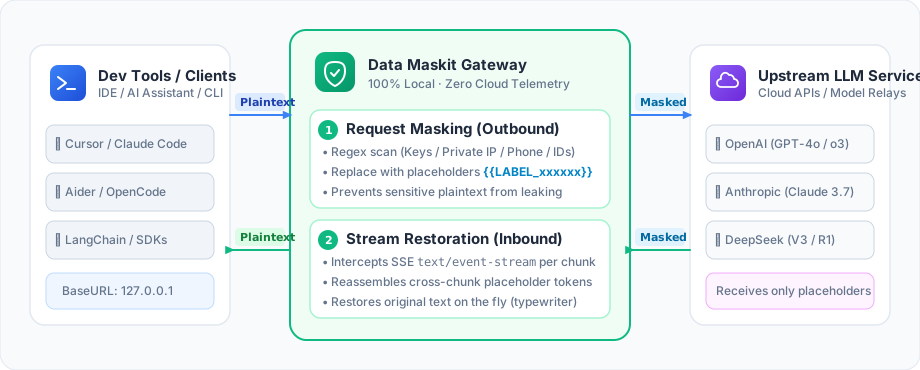
| Stage | Example Content | Practical Effect |
|---|---|---|
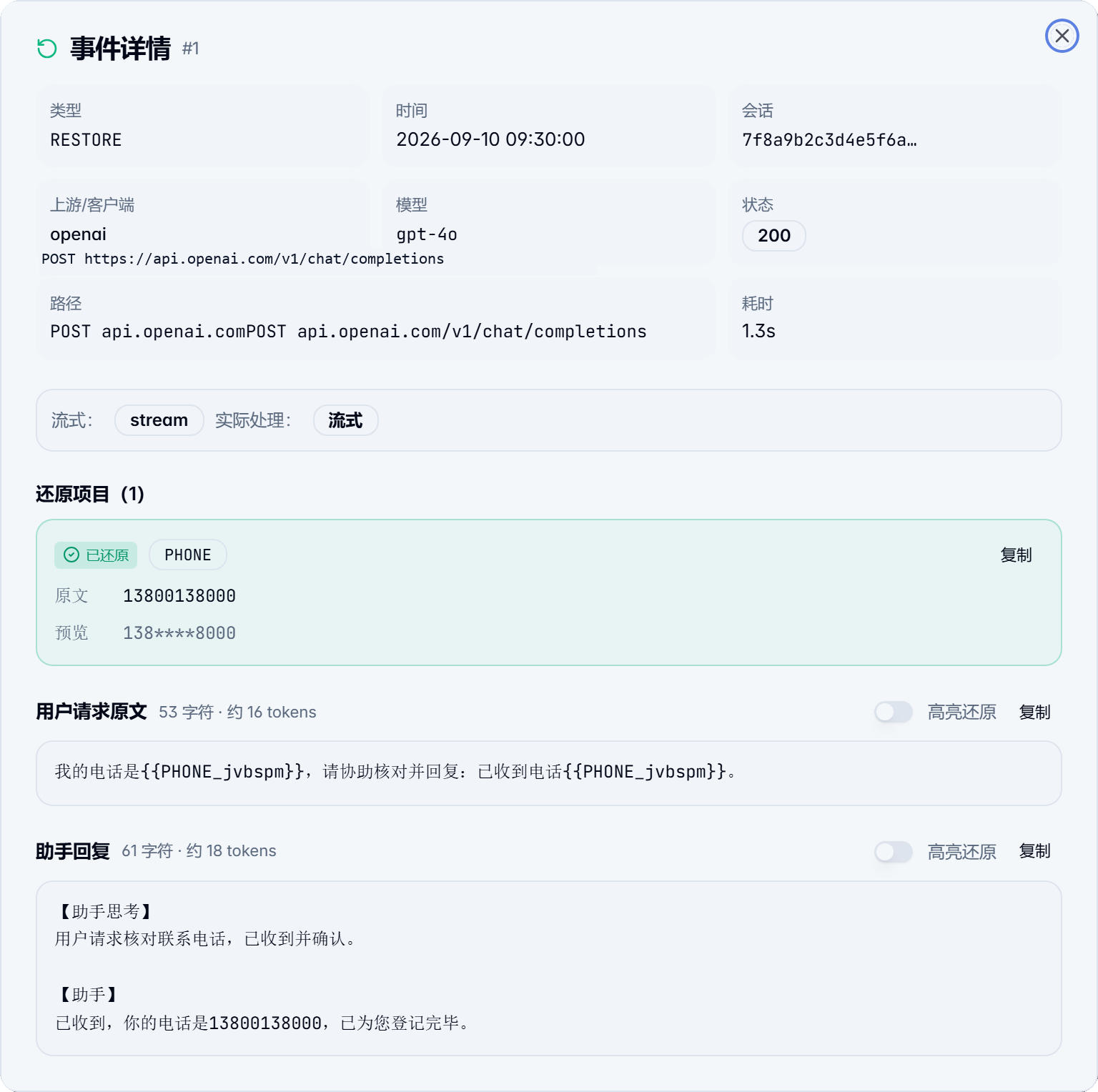
| **What You Typed** | `Connect to DB: mysql://root:Pass123@192.168.1.50:3306/db, contact Alice 13800138000` | Contains database passwords and real phone numbers |
| **What LLM Receives** | `Connect to DB: {{CONNSTR_zkpmqx}}, contact {{TERM_fnqtsw}} {{PHONE_bcdfgh}}` | All sensitive data replaced; **external model never sees raw secrets** |
| **What LLM Answers** | `Check firewall connectivity for {{CONNSTR_zkpmqx}} and verify permissions with {{TERM_fnqtsw}}` | Model reasons, plans, and writes code naturally using placeholders |
| **What You Actually See** | `Check firewall connectivity for mysql://root:Pass123@192.168.1.50:3306/db and verify permissions with Alice` | **Restored in millisecond typewriter stream with zero workflow disruption!** |
🔍 Click to expand: View real-world masking & restoration dialog screenshot (with CoT & highlight mode)
---
## ✨ Highlights & Feature Overview
### 🛡️ 1. Deep Masking with Multi-turn Consistency
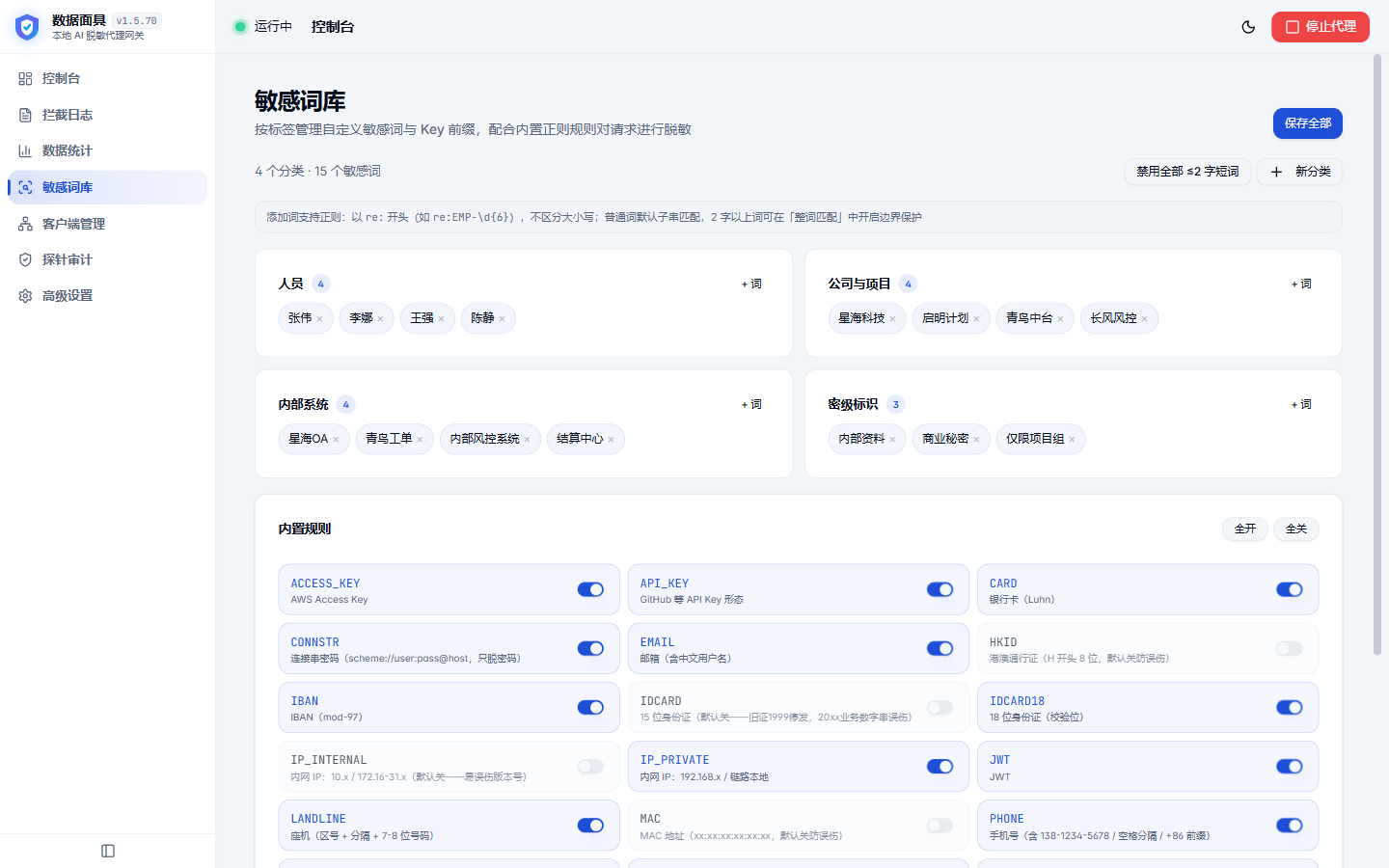
- **19 Built-in Scanner Rules**: API Keys/Tokens, PEM keys, DB connection strings, phone numbers, ID cards, emails, credit cards, private IPs;
- **Custom Wordlists & Regex**: Categorized custom dictionary for names, codenames, and proprietary business terms; full regex support;
- **Sliding-window Placeholder Reuse**: Placeholders remain consistent across long conversations. "Alice" is assigned the exact same token in turn 1 and turn 20, preserving model reasoning consistency.
### ⚡ 2. Millisecond SSE Stream Takeover (Native Typewriter Flow)
- Intercepts `text/event-stream` chunk by chunk;
- Automatically reassembles split tokens across chunk boundaries, **maintaining native typewriter responsiveness without lag**.
### 🔌 3. No Root CA Installation + Native Fallback Passthrough (Never Breaks Your API)
- **Multi-port Reverse Proxy**: Dedicated local ports per model channel (e.g. `18701` for OpenAI, `18703` for Anthropic). Change `base_url` to local port without installing untrusted self-signed root CAs;
- **Fallback Passthrough Guarantee**: If the proxy is stopped or closed, ports automatically fallback to raw transparent passthrough. **Your coding tools will never experience unexpected connection dropouts!**
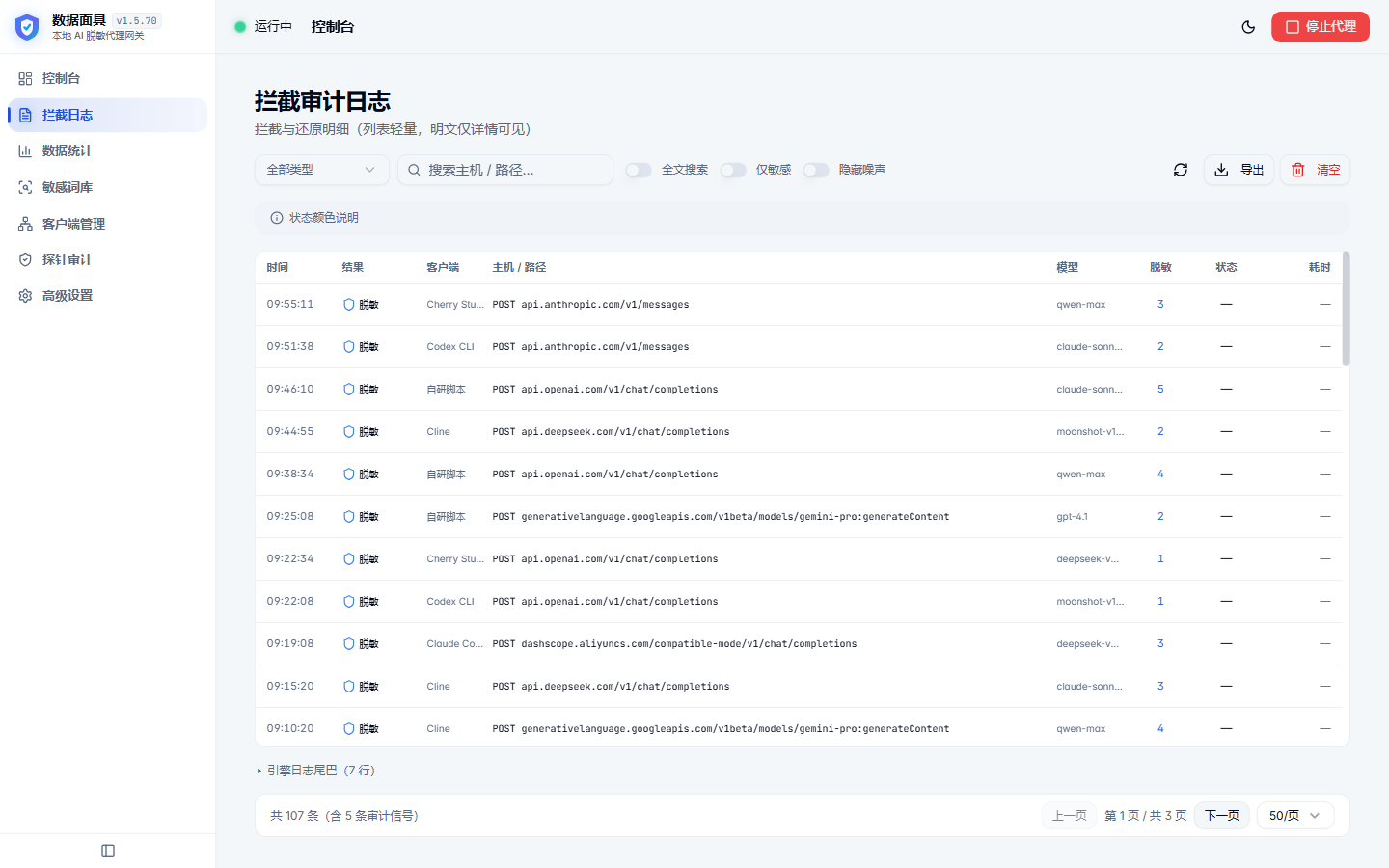
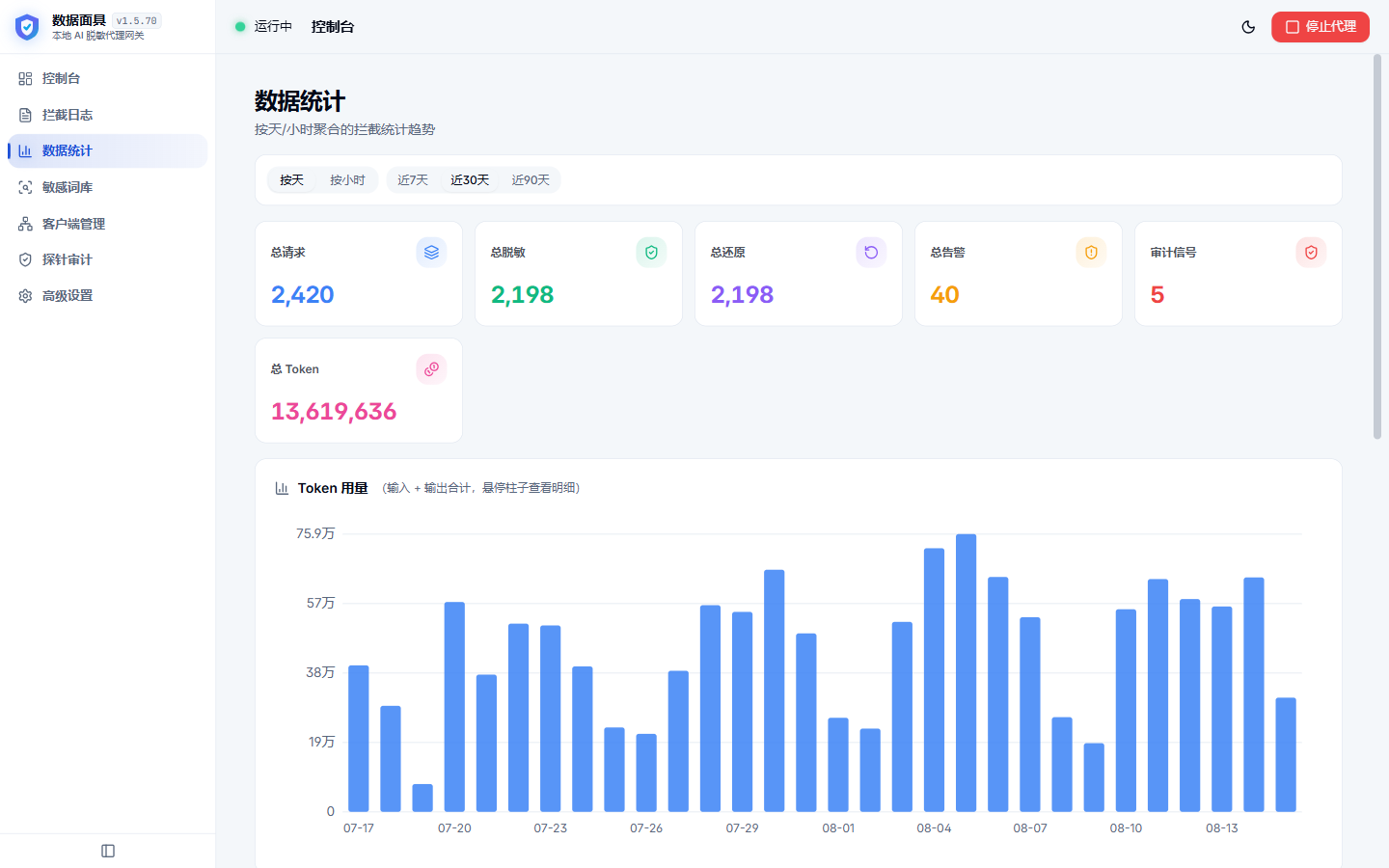
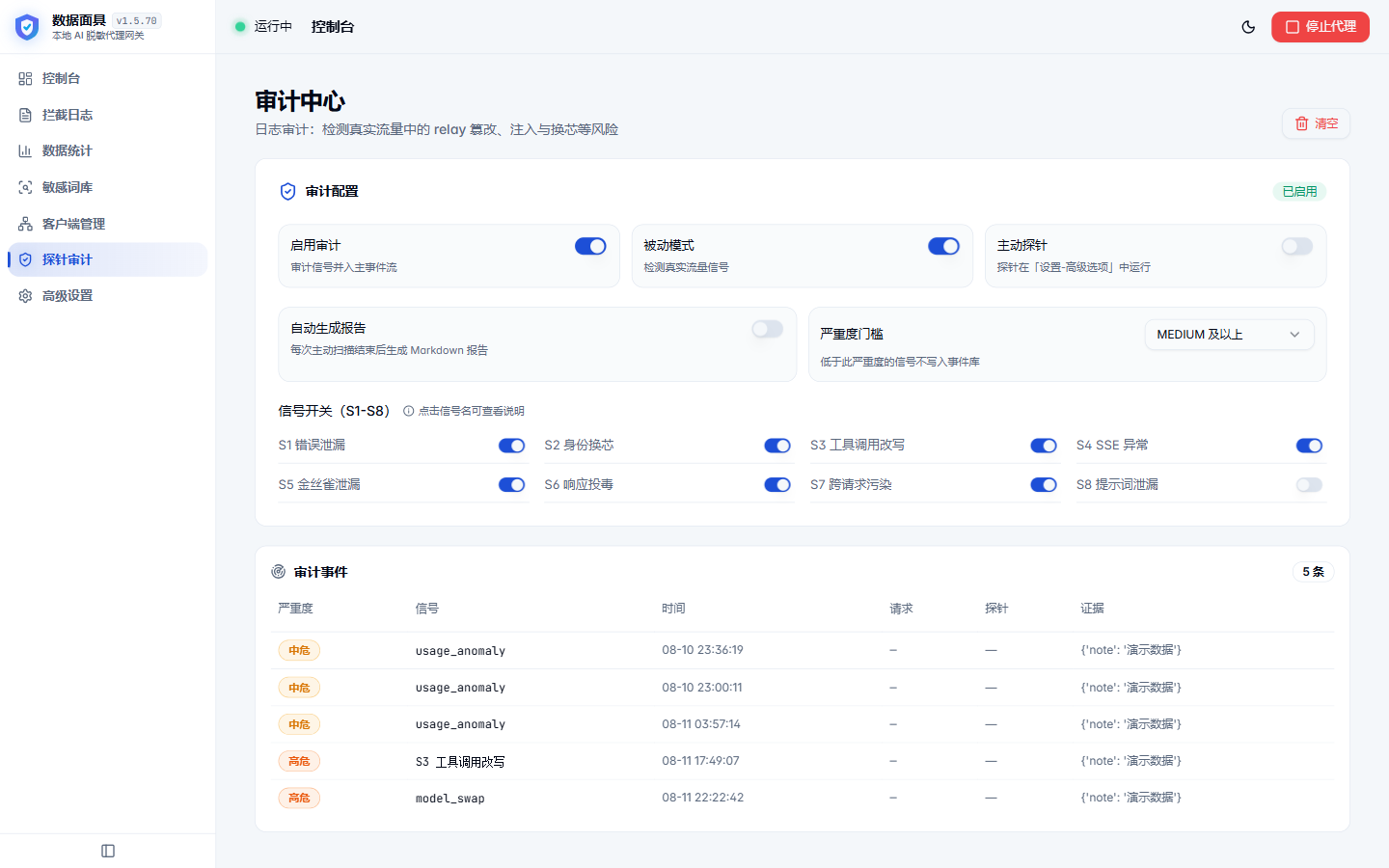
### 📊 4. Real-time Logs, Security Audit & Cost Tracking
- Inspect full request/response diffs with one-click highlight mode;
- Detect prompt leaks, model-swapping, and destructive commands;
- Live token usage & model pricing cost estimation.
### 🔒 5. 100% Local Execution, Zero Telemetry
- All masking and unmasking happen inside your local process. No analytics, tracking SDKs, or cloud telemetry.
---
## 📸 Screenshots
| Dashboard | Client Port Management |
|:---:|:---:|
| 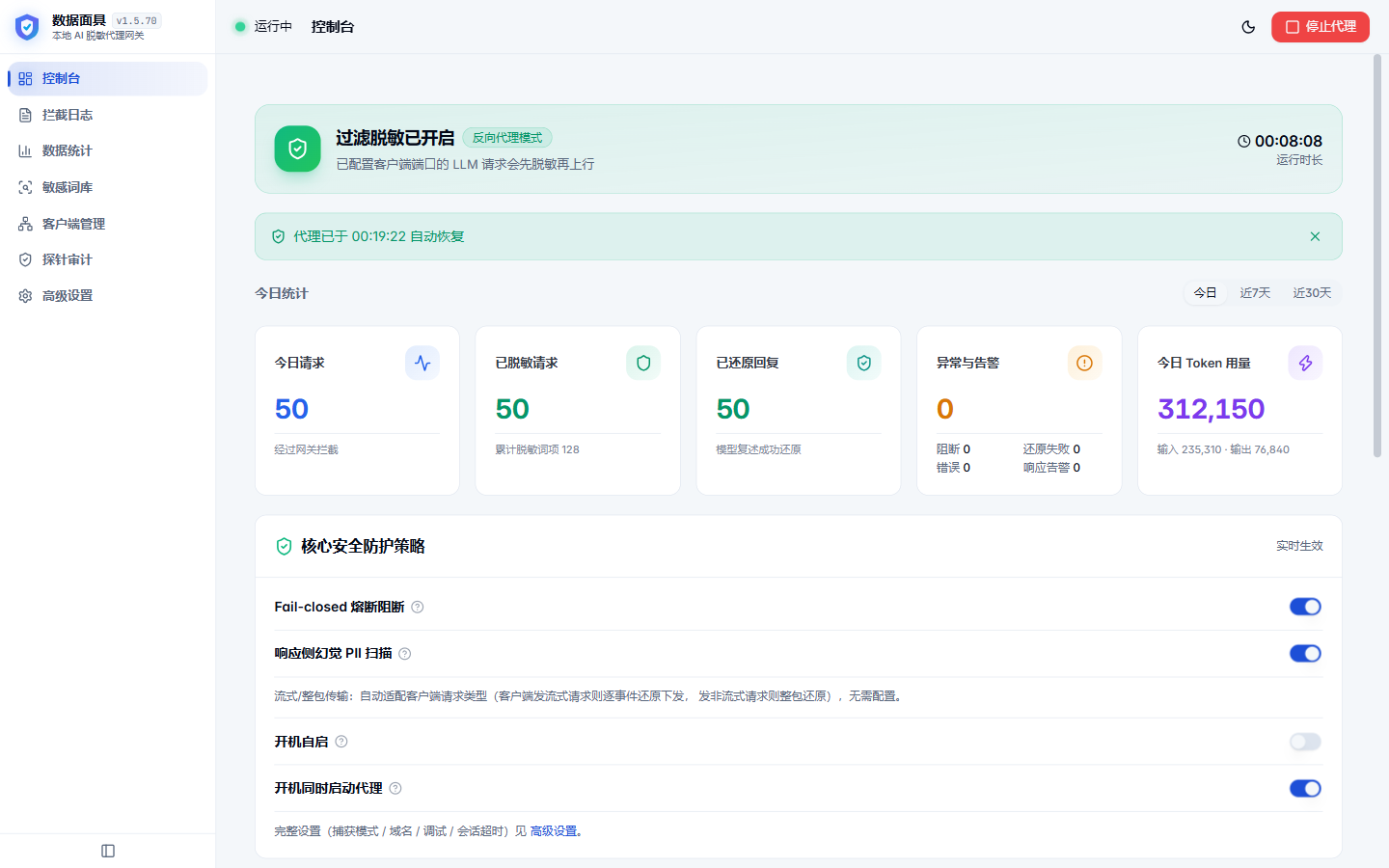 | 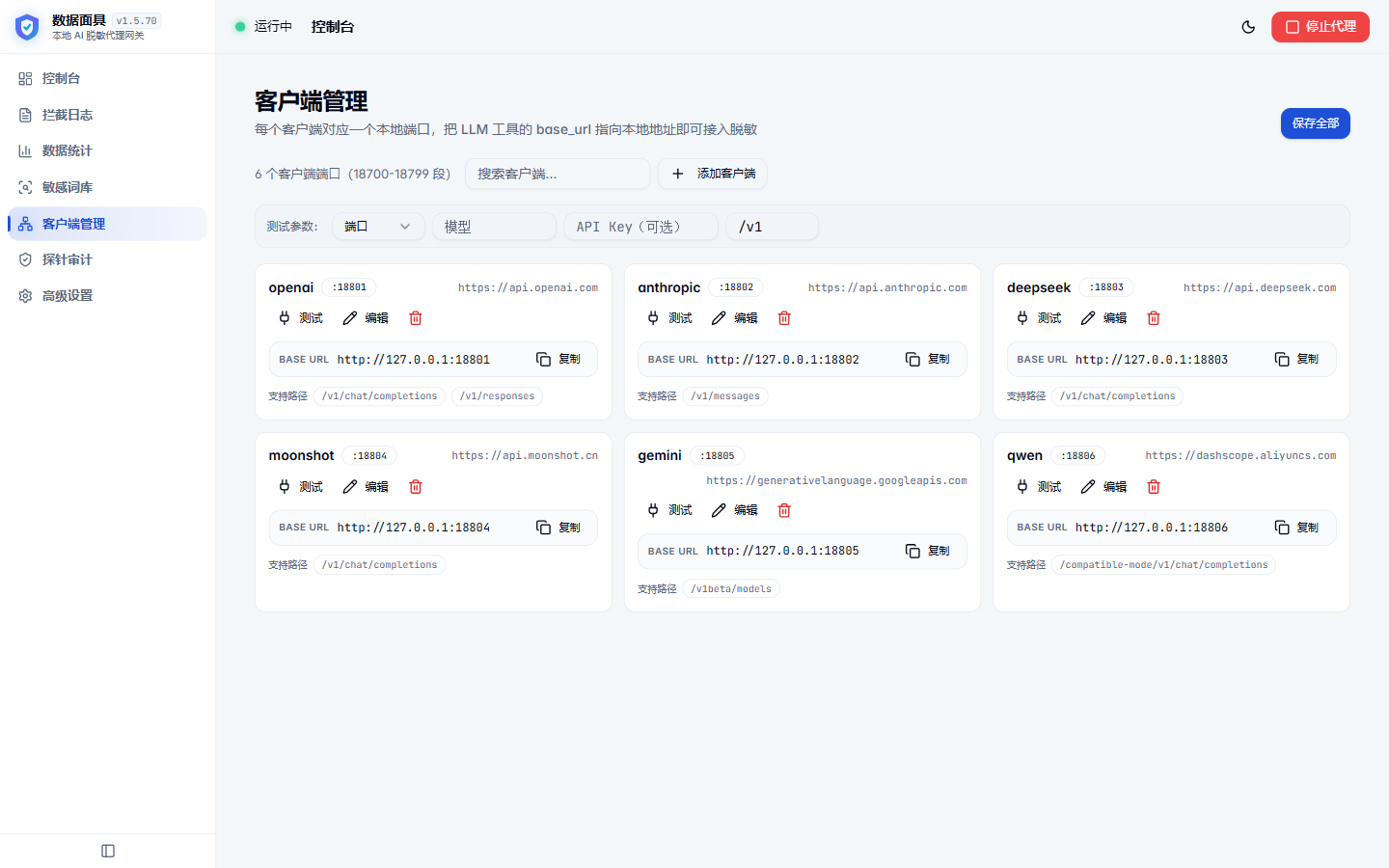 |
| **Real-time Logs** | **Sensitive Words & Regex** |
|  |  |
| **Cost & Token Stats** | **Security Audit** |
|  |  |
---
## 🛠️ Universal Integration Guide (Any Tool with Base URL Support)
Integration is universal: **Simply change your tool's API Base URL to point to Maskit's local port**!
> Default mapping: OpenAI `http://127.0.0.1:18701/v1` | DeepSeek `http://127.0.0.1:18702/v1` | Anthropic `http://127.0.0.1:18703`
### 1. Cursor
Go to `Settings` → `Models`:
- **OpenAI Base URL**: `http://127.0.0.1:18701/v1`
- Enter your API Key (Maskit forwards it securely to upstream).
### 2. Claude Code (with cc-switch)
- In **[cc-switch](https://github.com/farion1231/cc-switch)**, set the Claude channel **Base URL** to:
`http://127.0.0.1:18703`
- Or launch from terminal:
```bash
export ANTHROPIC_BASE_URL="http://127.0.0.1:18703"
claude
```
### 3. Codex / Pi / OpenCode / Aider / CLI Tools
Set environment variables:
```bash
# Linux / macOS
export OPENAI_BASE_URL="http://127.0.0.1:18701/v1"
export OPENAI_API_KEY="your-api-key"
# Windows PowerShell
$env:OPENAI_BASE_URL = "http://127.0.0.1:18701/v1"
$env:OPENAI_API_KEY = "your-api-key"
```
### 4. SDK & Code (Python / Node.js / LangChain)
```python
from openai import OpenAI
client = OpenAI(
base_url="http://127.0.0.1:18701/v1",
api_key="your-api-key"
)
response = client.chat.completions.create(
model="gpt-4o",
messages=[{"role": "user", "content": "Check DB: mysql://root:Pass123@192.168.1.100:3306"}]
)
print(response.choices[0].message.content)
```
### 5. Custom Relay / Aggregator Channels (e.g. One API / New API)
1. In "Clients", click "Add Client";
2. **Target Base URL**: your relay address (e.g. `https://api.your-relay.com`);
3. **Local Port**: assign an unused port (e.g. `18709`);
4. **Masking Paths**: simply enter `/v1` (prefix matching automatically covers `/v1/chat/completions`, `/v1/models`, etc.);
5. Save, then set your AI tool's Base URL to `http://127.0.0.1:18709/v1`!
---
## 🚀 Download & Deployment
### Option A: Desktop Client (Windows / macOS, Recommended for Personal Use)
Download the latest release package for your operating system from **[GitHub Releases](https://github.com/xiaYuTian11/maskit/releases)**:
- **Windows Users**: Download `Maskit__x64-setup.exe` installer. Control from system tray with automated Minisign-verified updates;
- **macOS Users (Apple Silicon M-Series)**: Download `Maskit__aarch64.dmg`, open it, and drag `Maskit.app` into your `Applications` folder.
> 💡 **macOS First Launch Notice**: If macOS Gatekeeper alerts that the app "cannot be opened because Apple cannot check it for malicious software", right-click `Maskit.app` in Finder and select **Open**, or run the following command in Terminal to clear the quarantine flag:
> ```bash
> xattr -cr /Applications/Maskit.app
> ```
---
### Option B: Docker Private Gateway (Recommended for Teams / Servers / NAS)
**No source checkout required.** Pull the official multi-arch image (native `linux/amd64` and `linux/arm64`):
```bash
docker run -d \
--name maskit \
--restart unless-stopped \
-p 127.0.0.1:5801:5801 \
-p 127.0.0.1:18701:18701 \
-v maskit_data:/data \
-e MASKIT_PANEL_TOKEN="change-me-to-a-strong-token" \
ghcr.io/xiayutian11/maskit:latest
```
> 💡 **Port Mapping & Network Guide**:
> - `5801`: **Web Console Port (Required)** for dashboard, rules, and client management;
> - `18701` onwards: **LLM Reverse Proxy Ports (Map on demand)**. For example, 18701 for OpenAI and 18702 for DeepSeek. **Only map the ports you actively use** (e.g. `-p 127.0.0.1:18701-18703:18701-18703` for three upstreams); do not blindly expose a wide port range;
> - **Host Binding**: Bind to `-p 127.0.0.1:5801:5801` when behind Nginx or for local-only use. For direct IP access across a private LAN/intranet without Nginx, drop the `127.0.0.1:` prefix (`-p 5801:5801 -p 18701:18701`);
> - **Console Token**: `MASKIT_PANEL_TOKEN` must be **≥16 ASCII characters** (avoid non-ASCII/CJK characters to prevent falling back to random log tokens).
Open `http://:5801` directly in your browser and enter your configured token in the login dialog (or use `http://:5801/#token=` for quick sign-in; the fragment is never sent in the request and never lands in proxy access logs, and the token is stripped from the URL once loaded).
> **Security Tip & Reverse Proxy (Nginx Config)**:
> Bound to `127.0.0.1` by default to avoid exposing unauthenticated proxy ports to the public internet. If placing behind an Nginx reverse proxy with TLS, **make sure to pass `-e MASKIT_TRUST_PROXY=1` in your docker run command** (so the panel trusts the forwarded `X-Forwarded-Proto: https` header and avoids CSRF/Origin rejections):
> ```nginx
> server {
> listen 443 ssl;
> server_name maskit.example.com;
> # ssl certificates...
>
> # 1. Web Console (Sign-in via Token dialog)
> location / {
> proxy_pass http://127.0.0.1:5801;
> proxy_set_header Host $host;
> proxy_set_header X-Real-IP $remote_addr;
> proxy_set_header X-Forwarded-For $proxy_add_x_forwarded_for;
> proxy_set_header X-Forwarded-Proto $scheme; # Crucial: informs backend that external proto is https
> proxy_set_header X-Forwarded-Host $host;
> }
>
> # 2. Model Proxy Port (e.g. OpenAI; disable buffering for real-time streaming; restrict to private LAN if possible)
> location /openai/ {
> proxy_pass http://127.0.0.1:18701/;
> proxy_set_header Host $host;
> proxy_buffering off;
> proxy_read_timeout 600s;
> }
> }
> ```
---
### Option C: Run from Source
```bash
git clone https://github.com/xiaYuTian11/maskit.git
cd maskit
# 1. Install dependencies
pip install -r requirements.txt
# 2. Build frontend & start engine (skip frontend build if only using console API)
cd frontend && npm install && npm run build && cd ..
python engine/panel.py
# 3. Frontend dev server (Vite hot-reload, recommended)
cd frontend && npm run dev
```
---
## 💬 Community & Support
- **Official QQ Group**: **`489926214`** (Discussion, rule feedback & release updates);
- Forum: **[LINUX DO Community](https://linux.do/t/topic/2884715)**;
- Feedback: [GitHub Issues](https://github.com/xiaYuTian11/maskit/issues) & [GitHub Discussions](https://github.com/xiaYuTian11/maskit/discussions);
- Security Vulnerabilities: see [SECURITY.md](SECURITY.md).
---
## 📜 License
Data Maskit is released under the **[GNU AGPL-3.0](LICENSE)**. Free for personal developers, researchers, and open-source projects. For commercial redistribution or embedding into closed-source products, please comply with AGPL-3.0 terms.
Made with ❤️ by TMW & Contributors.