# Face Data
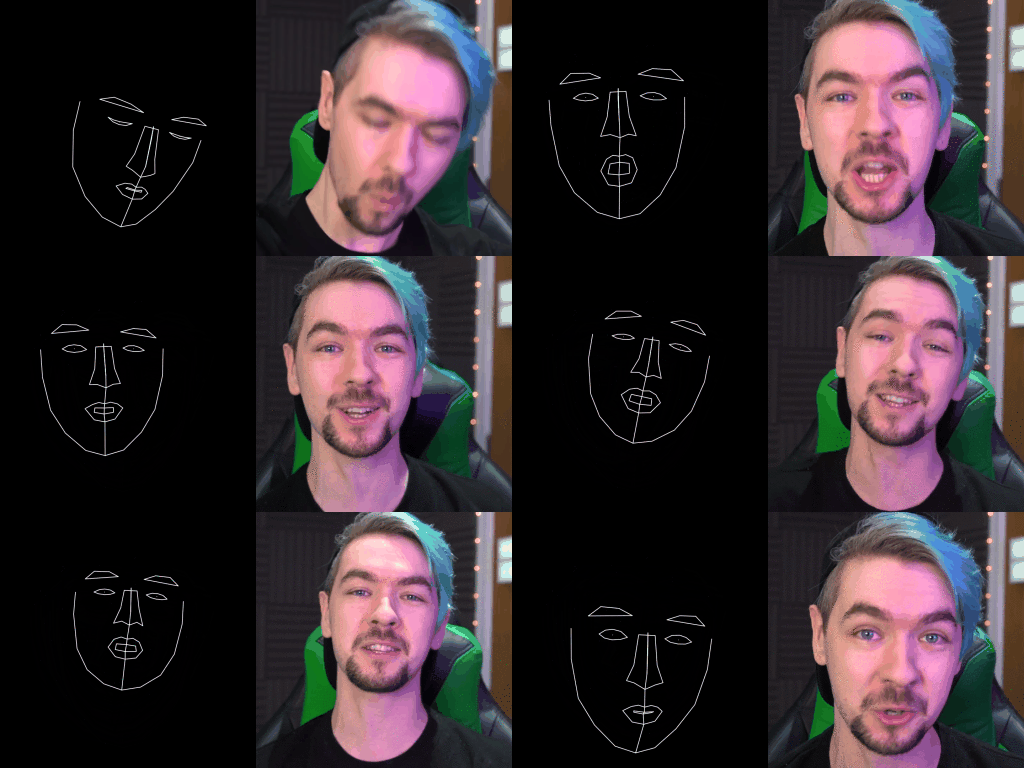
A macOS application used to auto-annotate landmarks from a video. Those landmarks can further be used as training data for Generative Adversarial Networks (GANs).
[](https://doi.org/10.5281/zenodo.5348316)
[](https://github.com/xiaohk/FaceData/blob/master/LICENSE)
## Getting Started
### Installing
You can either download the binary file from [`Rease`](https://github.com/xiaohk/FaceData/releases) or build the source code using Xcode.
### Use

| | Description |
|--------------|--------------------------------------------------------------------------------------------------------------------------------------------------------------------|
| Video Path | Path to the video file, currently only support `.mp4` files. Use `Select File` to generate path using a file browsing panel. |
| Output Path | Path to the output directory, this app will create `origin` and `landmarks` two sub-directories. Use `Select Folder` to generate path using a file browsing panel. |
| Start Second | An integer value indicating from which second to start capturing frames from the video, default is 0 (from the beginning) |
| End Second | This app would not extract frames after this second. Default is the duration of the video. |
| # of Frames | Integer value of how many frames you want to generate. Default is 100 frames. |
| Start | Start the process. |
| Cancel | Stop the process. |
### Output
- Two sub-directories `origin` and `landmark` will be created in the specified output directory.
- `origin` contains the original frames extracted from the video, with file name: `img001.png`.
- `landmark` contains the landmark image drawn based on the corresponding frame in `origin`, with file name: `img001lm.png`.
- If there is no face detected in one original frame, the corresponding file name in `landmark` is `no_face_img001lm.png`.
### Output Images Processing
You will probably want to process the generated images to fit the size restriction for you GANs model. You can refer the Python script `crop.py`.
## Built With
* [Apple Vision Library](https://developer.apple.com/documentation/vision) - Easy to reproduce the landmarks in iOS devices
* [Apple AV Foundation](https://developer.apple.com/av-foundation/) - Also use lower level image format (`CGImage`) to make codes portable to Cocoa Touch