 ## Built-in channels
| Channel | Setup | Messaging and replies |
| --- | --- | --- |
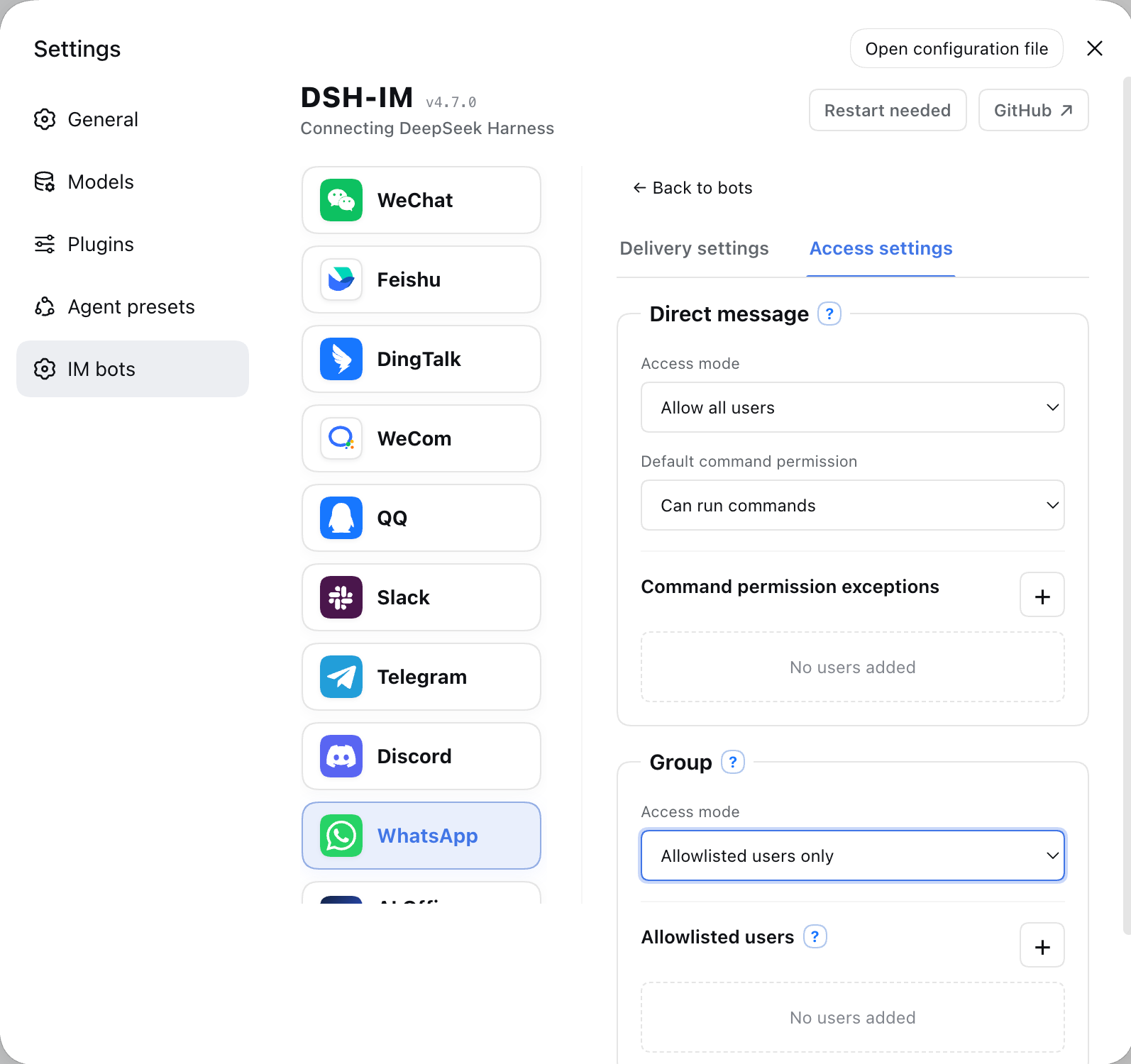
| Feishu | Create a bot by QR code, or bind one with App ID + App Secret | Persistent connection for incoming messages; streaming cards show thinking, tool progress, and replies |
| WeChat | Scan a QR code to bind a WeChat bot | Tencent iLink long polling; shows a typing indicator while Harness works, then sends the final reply in 1,800-character chunks |
| DingTalk | Create a bot by QR code, or bind one with Client ID + Client Secret | DingTalk Stream connection; streaming replies through AI Cards |
| WeCom | Create an intelligent bot by QR code, or bind one with Bot ID + Secret | Official WebSocket connection; native thinking state, tool progress, and streaming replies |
| QQ | Create a bot with mobile QQ QR scanning, or bind one with AppID + AppSecret | WebSocket connection; private chats show typing and receive one Markdown reply, while mentioned group chats receive only the final answer |
| Slack | Create an app from the bundled App Manifest, then enter a Bot Token (`xoxb-`) and App Token (`xapp-`) | Socket Mode connection; direct DM replies, mention-only channel replies, and preferred native streaming API |
| Telegram | Enter a Bot Token generated by @BotFather | Bot API long polling; DMs work by default and groups respond to mentions or replies, while each bot can optionally enable a private-DM allowlist; private chats stream through a Rich Message Draft and persist one rich final, groups and Topics finalize their placeholder in place, and unsupported Rich delivery falls back to ordinary text |
| Discord | Enter a Bot Token generated in the Developer Portal | Gateway v10 connection; direct DM replies; the first mention in a server text or announcement channel creates a native Thread, where follow-up messages no longer need to mention the bot; replies stream through message edits |
| WhatsApp | Scan a QR code with mobile WhatsApp to link a device | WhatsApp Web connection; self-chat only by default, with optional selected-contact and open-response modes; read receipt and typing indicator, with tool progress and incremental answers shown by editing one message at one-second intervals; long replies split automatically and failed edits fall back to a complete text reply |
| iMessage | Sign in to iMessage in macOS Messages.app and grant the local permissions described in the [channel notes](docs/imessage.md) | Native macOS Messages.app transport for text DMs; no BlueBubbles or third-party gateway; one local iMessage identity per macOS user account |
Other IM platforms can be added through the same channel-adapter structure.
The iMessage contribution is documented separately in [the iMessage channel
notes](docs/imessage.md); it uses the native macOS Messages.app and requires no
third-party gateway.
Feishu group chats accept messages from other bots that explicitly mention the current bot by default, with no extra setting. Messages without that mention, mentions of only other members or everyone, self-sent messages, and bot DMs are still ignored, even in all-message mode. Group allowlists and command permissions still apply. The app needs the `im:message.group_at_msg.include_bot:readonly` tenant scope. New apps request it through the QR flow; existing or manually connected apps can use **Complete permissions** or `/repair` in a direct chat, scan the QR code, and complete any publication or approval required by Feishu. See the [Feishu message-event permissions](https://open.feishu.cn/document/server-docs/im-v1/message/events/receive).
Built-in channels with image input support can send JPEG, PNG, and WebP images, plus GIFs sent as image files, with optional captions to Harness. By default, original images can be up to 30 MB each, with up to 20 images per message. Originals are saved in the Session workspace; model copies are resized or compressed to 5 MB each and 20 MB total. Images that still exceed the budget, or are rejected by a non-vision model, are delivered as workspace files. These four limits can be changed under General settings → Attachments → Image input for subsequent messages. Originals follow attachment retention settings. Higher model limits increase request size, latency and model cost, and remain subject to platform and Host limits. iMessage's MVP supports text DMs only. Downloading images or files from Feishu user messages requires the `im:message:readonly` tenant scope, shown on the confirmation page as **Read direct and group messages**; Feishu currently offers no narrower image-only scope for that download endpoint. Apps created through the built-in QR flow request it by default; for existing or manually connected apps, click **Complete permissions** on the IM Bot settings page and scan the QR code to incrementally add that scope, `im:resource` for uploading bot-sent images or files, `application:app_slash_command:read` / `write` for the native command panel, and the card callback.
### Results after a reply timeout
Connected IM channels share deferred task tracking. After a model reply timeout, the plugin keeps checking the original task and delivers its final text to the original chat or thread. Checks resume after a plugin restart or reconnection. `/stop` only stops the matching turn submitted by that chat; changing the bound Session prevents old results from being delivered there. No new setting is required, and normal replies keep their existing flow.
Channel permissions and quotas still apply. Definite send failures allow up to three attempts; uncertain delivery is retained without automatic retries to avoid duplicate messages. Recovery covers final text and terminal notices, without replaying questions, approvals, or file-tool calls. See the [deferred delivery notes](docs/deferred-delivery.md).
### Result-file and image delivery
Built-in channels with file delivery support can return any file readable by Harness as a native channel attachment. Existing files and files created by the current task can both be sent directly. The capability is available to every connected bot by default, with no switch or per-bot allowlist, while existing text, image, streaming, command, and Session behavior remains unchanged. iMessage's MVP does not support files or attachments.
After the model calls the file-return tool, the plugin hands the specified file to the channel's native API. Images prefer native image messages; if a channel does not support or definitively rejects image delivery, the plugin falls back to a file attachment, while an uncertain result never triggers a duplicate fallback. The plugin adds no rules for file origin, creation time, workspace boundary, extension, content, count, size, or lifetime; the file only needs to exist and be readable. A channel may still reject delivery according to its own permissions, quota, file capability, or account tier, and the plugin reports that provider result.
| Channel | Platform requirements |
| --- | --- |
| WeChat | The current binding protocol and conversation must support native file messages; the WeChat API response determines the actual range. |
| Feishu | Feishu's file-upload API requires a non-empty file no larger than the platform's 30 MB limit. The app needs the `im:resource` tenant scope (**Read and upload images or other files**). Apps created through the built-in QR flow request it by default; existing or manually connected apps can add it incrementally through **Complete permissions** or `/repair` in a direct chat, followed by any approval Feishu requires. The Feishu developer console currently has no separate `im:resource:upload` scope. |
| DingTalk | The app needs `qyapi_base`, and the bot must support file messages. The current OAPI and bot capability determine the accepted formats and sizes. |
| WeCom | The app needs media-upload and file-message capability; the WeCom API response determines the actual range. |
| QQ | The bot needs file-message capability and remains subject to QQ's daily upload quota; the bot reports when the quota is exhausted. |
| Slack | The Bot Token needs `files:read`, `files:write`, and `reactions:write`; the Workspace's current policy determines the actual file-size limit. After changing scopes, re-authorize/reinstall the App and reconnect the bot. |
| Telegram | The bot must be allowed to send documents in the current chat; the Bot API response determines the actual range. |
| Discord | Enable **Message Content Intent** in the Developer Portal. The bot needs **Send Messages**, **Create Public Threads**, **Send Messages in Threads**, and **Read Message History**; result-file delivery also requires **Attach Files**. The current account and server capability determine the actual attachment allowance. |
| WhatsApp | The linked session must support Document Messages; the WhatsApp/Baileys response determines the actual range. |
## AI Office Connector
[Read the AI Office Connector guide](docs/AI-Office-Connector.en.md)
## Installation
Install the published stable release from npm (recommended):
```sh
dsh plugin --profile web add -w @xmanrui/dsh-im
```
Restart `dsh web`, refresh the browser, then open **Settings → IM Bot**. The top-level IM Bot entry uses `order: 21` to follow **Agent Presets**, and the Plugins page no longer retains the old entry. Upgrading preserves existing bots, credentials, workspaces, Agent Presets, and Session bindings.
Local `dsh web` and DSH Desktop reuse the current Host's internal services by default: legacy Harness releases use `apiProxy`, while current releases automatically use the Typert Gateway plus the Session and Workspace controllers. No Harness address or loopback HTTP connection is required. Desktop's compatibility, extended-window, and advanced modes do not require browser access or LAN access to be enabled. An explicit channel `harnessBaseUrl` is retained only for legacy remote HTTP/WebSocket Harness endpoints; failed internal calls never silently switch to another Host.
To try the latest code before it is published to npm, use the GitHub-source installer instead:
```sh
npx -y github:xmanrui/dsh-im install
```
A GitHub-source installation fetches and builds a Git dependency directly. With pnpm 10 or newer, the profile may first need an `allowBuilds` entry in `pnpm-workspace.yaml`. Most users should prefer the stable npm release.
After installation, follow the built-in instructions on each channel page to scan a QR code or enter credentials. Secrets and Tokens are sent only to the local Harness Host and stored through its protected credential provider; status responses and bot lists never return them.
If this machine must use a forward proxy to reach Feishu, set `HTTPS_PROXY` to a full HTTP proxy URL before starting `dsh web` (for example, `http://proxy:8080`; lowercase `https_proxy` is also supported, with `HTTP_PROXY` accepted as a fallback), then restart the Host after changing it. Feishu registration and credential verification reuse the SDK's proxy-aware HTTP client, while the message WebSocket explicitly uses that proxy; the WebSocket path does not currently read `ALL_PROXY` or `NO_PROXY`.
If this machine cannot reach the Telegram Bot API directly, use Node.js 22.21 or newer and enable Node's environment proxy support before starting `dsh web`:
```sh
NODE_USE_ENV_PROXY=1 \
HTTPS_PROXY=http://proxy:8080 \
HTTP_PROXY=http://proxy:8080 \
NO_PROXY=localhost,127.0.0.1 \
dsh web
```
Use the proxy URL required by your network and restart the Host after changing it. If Telegram Bot Token binding reports that the Bot API cannot be reached, first check the proxy URL, Node.js version, and `NO_PROXY` configuration.
| Default behavior | Description |
| --- | --- |
| Bot alias | Click the pencil beside a bot name to set an alias. Saving updates the display immediately, without restarting or reconnecting. The original name is retained; choose “Restore original name” or save an empty alias to restore it. Aliases only affect names shown in the local settings page. |
| Bot workspace | Each bot stores its workspace independently. New bots use `$DSH_HOME/im` (`~/.dsh/im` when unset); the directory is created automatically and new sessions appear under Ungrouped. Change it later from the bot card. An explicit `workspace` takes precedence, and `dshHome` overrides the `DSH_HOME` environment variable. |
| Model | Every bot in each IM channel can choose a model directly below its workspace, or follow the Host default. A change applies only to later new Sessions; send `/new` and then an ordinary message in the current chat to use it. |
| Reasoning effort | Explicitly choose an effort supported by the selected model, or follow the model default. Levels, descriptions, and defaults come from DSH. Switching models restores the new model's default effort. Each bot saves its own choice, which applies only to later new Sessions. |
| Agent Preset | Each bot can choose an Agent Preset on its settings card. When none is chosen, new Sessions follow the Host's `agent-presets.default`. A channel-level `config.agentPreset` is only the default for later new bots on that channel. Changing the preset never modifies or clears existing Sessions; if the current chat already has a Session, send `/new` and then a regular message to create one with the new selection. |
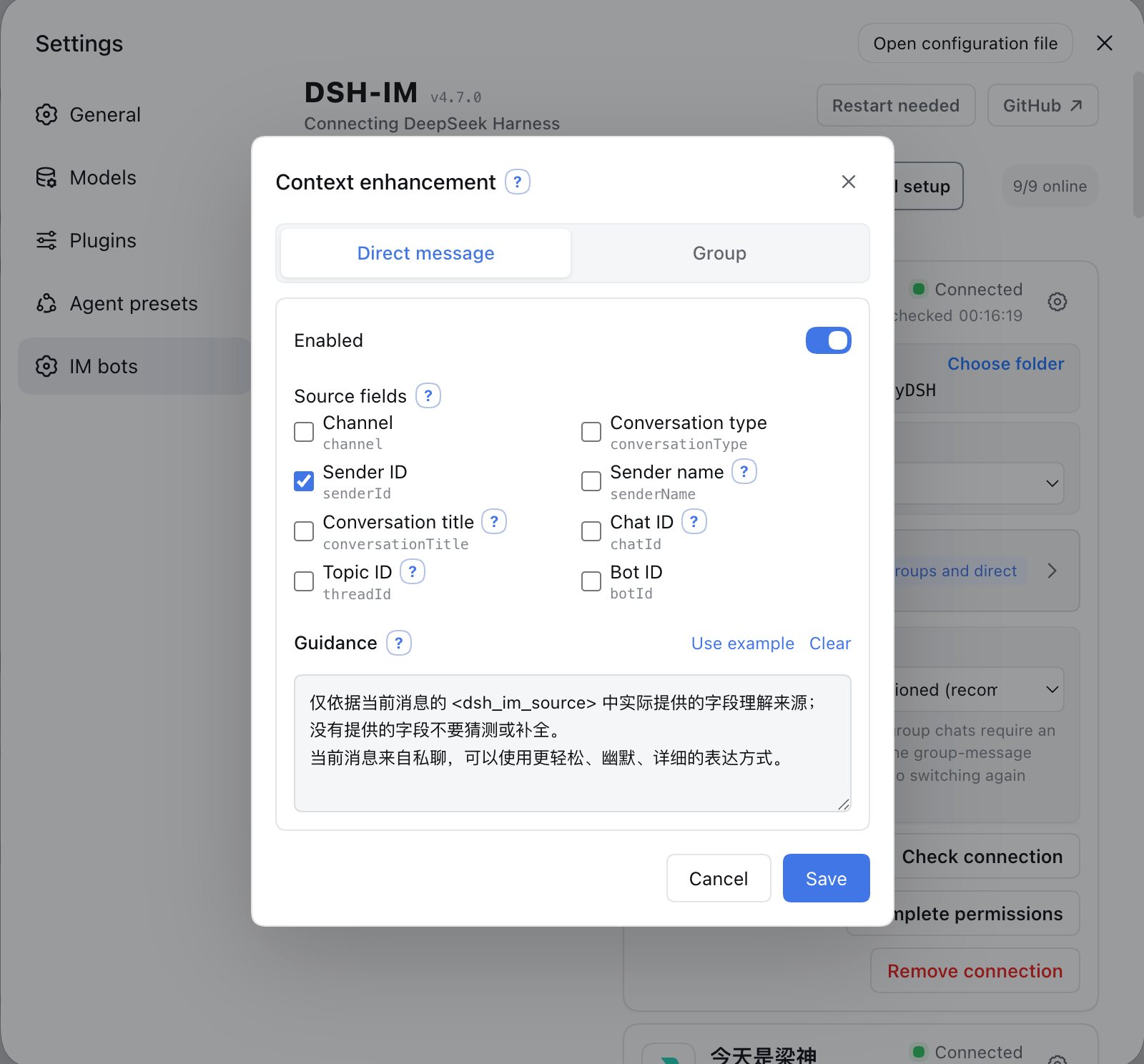
| Context enhancement | Open settings from a bot card to enable groups and DMs independently. Both switches default to off, including for existing bots after an upgrade. |
| Session channel identity | Sessions from the local Host's IM channels and AI Office are marked with their source. The Web Session list and search results display channel logos in place of prefixes such as “WeChat ·”, preserving DSH's automatic title generation and updates. Existing Sessions receive the prefix when next loaded. |
Channel prefixes are appended after DSH produces a title, preserving its complete text and automatic/manual source without pinning automatic titles or making additional model calls. Regeneration, refresh, and restarts do not stack prefixes; actual manual renames retain DSH's normal pinning behavior. This feature uses the current Host's Session events; an explicit remote `harnessBaseUrl` requires the plugin on the destination Host.
Logos are a dsh-im browser enhancement and require no changes to DSH. The adapter preserves original text nodes, clicks, menus, and dragging; copied titles, screen readers, and other surfaces retain the textual channel name. Unrecognized DSH page structures, unsupported browsers, or image-loading failures keep the text prefix. Unloading the plugin restores the original display.
### Proactive delivery
IM channels with proactive delivery support can send text through a stable `botId + targetId` pair. Bot settings support choosing a known conversation or entering a target manually, testing the current route before saving, and copying call parameters. HTTP POST, same-Host plugins, and Connection RPC share the same target configuration and delivery core.
Saved direct-message targets also offer an opt-in **Two-way Session sync** switch. Once enabled, user text submitted from DSH Web/CLI and the final assistant text in that DM's current Session are mirrored back to the DM; ordinary IM prompts and `/steer` are not duplicated. The switch follows the current Session across `/session`, `/new`, and workspace changes. The first version supports text DMs on the current Host only; groups, Topics, Threads, and explicit remote `harnessBaseUrl` connections are unavailable.
See the [Proactive Delivery Guide](PROACTIVE_DELIVERY.en.md) ([简体中文](PROACTIVE_DELIVERY.md)) for setup steps, native fields for each supported channel, complete call examples, management endpoints, error codes, and troubleshooting.
### Client panel integration
Shells can embed the complete IM management panel through the optional `dshImClient` service and hide or restore its settings entry. DSH web keeps Settings → IM bots by default. See the [client integration guide](docs/client-integration.md) for the contract, compatibility requirements and lifecycle example.
### Context enhancement
[Read the context enhancement guide](docs/context-enhancement.md)
### Access modes
[Read the access modes guide](docs/access-modes.md)
## Checking and installing updates
[Read the update-checking and installation guide](docs/checking-and-installing-updates.md)
## Bot commands
| Command | Description |
| --- | --- |
| `/help` | Show the commands and usage supported by the bot. |
| `/menu`, `/m` | Open the Feishu, DingTalk or Enterprise WeChat interactive menu. DingTalk arranges session, workspace, preset and model dropdowns in two columns; selections apply immediately and update the same card. WeCom requires Apply after selecting; open its menu explicitly with `/m` or `/menu`. Entering a direct chat does not open it automatically. Action buttons return their result without sending the menu again. Menus include new session, stop, compact, status and help buttons. |
| QQ `/menu`, `/m` | Open a button and numbered menu for session selection, workspace, mode/preset, model, new session, session list, stop, compact, steering, archived-session visibility, status and help. Lists support pagination; reply with a number when buttons are unavailable. Menus are scoped to the chat and actor and expire after 15 minutes or restart. Ordinary messages exit number selection; questions, approvals and batch input retain priority. |
| `/new` | Unbind the current chat so its next ordinary message starts a new Harness Session. |
| `/status` | Check the connection between the current bot and DeepSeek Harness. |
| `/version` | Show the version of the running dsh-im plugin. |
| `/models` | List every currently configured model with a number. |
| `/model` | Show the model and reasoning effort used by the Session bound to this chat. |
| `/model
## Built-in channels
| Channel | Setup | Messaging and replies |
| --- | --- | --- |
| Feishu | Create a bot by QR code, or bind one with App ID + App Secret | Persistent connection for incoming messages; streaming cards show thinking, tool progress, and replies |
| WeChat | Scan a QR code to bind a WeChat bot | Tencent iLink long polling; shows a typing indicator while Harness works, then sends the final reply in 1,800-character chunks |
| DingTalk | Create a bot by QR code, or bind one with Client ID + Client Secret | DingTalk Stream connection; streaming replies through AI Cards |
| WeCom | Create an intelligent bot by QR code, or bind one with Bot ID + Secret | Official WebSocket connection; native thinking state, tool progress, and streaming replies |
| QQ | Create a bot with mobile QQ QR scanning, or bind one with AppID + AppSecret | WebSocket connection; private chats show typing and receive one Markdown reply, while mentioned group chats receive only the final answer |
| Slack | Create an app from the bundled App Manifest, then enter a Bot Token (`xoxb-`) and App Token (`xapp-`) | Socket Mode connection; direct DM replies, mention-only channel replies, and preferred native streaming API |
| Telegram | Enter a Bot Token generated by @BotFather | Bot API long polling; DMs work by default and groups respond to mentions or replies, while each bot can optionally enable a private-DM allowlist; private chats stream through a Rich Message Draft and persist one rich final, groups and Topics finalize their placeholder in place, and unsupported Rich delivery falls back to ordinary text |
| Discord | Enter a Bot Token generated in the Developer Portal | Gateway v10 connection; direct DM replies; the first mention in a server text or announcement channel creates a native Thread, where follow-up messages no longer need to mention the bot; replies stream through message edits |
| WhatsApp | Scan a QR code with mobile WhatsApp to link a device | WhatsApp Web connection; self-chat only by default, with optional selected-contact and open-response modes; read receipt and typing indicator, with tool progress and incremental answers shown by editing one message at one-second intervals; long replies split automatically and failed edits fall back to a complete text reply |
| iMessage | Sign in to iMessage in macOS Messages.app and grant the local permissions described in the [channel notes](docs/imessage.md) | Native macOS Messages.app transport for text DMs; no BlueBubbles or third-party gateway; one local iMessage identity per macOS user account |
Other IM platforms can be added through the same channel-adapter structure.
The iMessage contribution is documented separately in [the iMessage channel
notes](docs/imessage.md); it uses the native macOS Messages.app and requires no
third-party gateway.
Feishu group chats accept messages from other bots that explicitly mention the current bot by default, with no extra setting. Messages without that mention, mentions of only other members or everyone, self-sent messages, and bot DMs are still ignored, even in all-message mode. Group allowlists and command permissions still apply. The app needs the `im:message.group_at_msg.include_bot:readonly` tenant scope. New apps request it through the QR flow; existing or manually connected apps can use **Complete permissions** or `/repair` in a direct chat, scan the QR code, and complete any publication or approval required by Feishu. See the [Feishu message-event permissions](https://open.feishu.cn/document/server-docs/im-v1/message/events/receive).
Built-in channels with image input support can send JPEG, PNG, and WebP images, plus GIFs sent as image files, with optional captions to Harness. By default, original images can be up to 30 MB each, with up to 20 images per message. Originals are saved in the Session workspace; model copies are resized or compressed to 5 MB each and 20 MB total. Images that still exceed the budget, or are rejected by a non-vision model, are delivered as workspace files. These four limits can be changed under General settings → Attachments → Image input for subsequent messages. Originals follow attachment retention settings. Higher model limits increase request size, latency and model cost, and remain subject to platform and Host limits. iMessage's MVP supports text DMs only. Downloading images or files from Feishu user messages requires the `im:message:readonly` tenant scope, shown on the confirmation page as **Read direct and group messages**; Feishu currently offers no narrower image-only scope for that download endpoint. Apps created through the built-in QR flow request it by default; for existing or manually connected apps, click **Complete permissions** on the IM Bot settings page and scan the QR code to incrementally add that scope, `im:resource` for uploading bot-sent images or files, `application:app_slash_command:read` / `write` for the native command panel, and the card callback.
### Results after a reply timeout
Connected IM channels share deferred task tracking. After a model reply timeout, the plugin keeps checking the original task and delivers its final text to the original chat or thread. Checks resume after a plugin restart or reconnection. `/stop` only stops the matching turn submitted by that chat; changing the bound Session prevents old results from being delivered there. No new setting is required, and normal replies keep their existing flow.
Channel permissions and quotas still apply. Definite send failures allow up to three attempts; uncertain delivery is retained without automatic retries to avoid duplicate messages. Recovery covers final text and terminal notices, without replaying questions, approvals, or file-tool calls. See the [deferred delivery notes](docs/deferred-delivery.md).
### Result-file and image delivery
Built-in channels with file delivery support can return any file readable by Harness as a native channel attachment. Existing files and files created by the current task can both be sent directly. The capability is available to every connected bot by default, with no switch or per-bot allowlist, while existing text, image, streaming, command, and Session behavior remains unchanged. iMessage's MVP does not support files or attachments.
After the model calls the file-return tool, the plugin hands the specified file to the channel's native API. Images prefer native image messages; if a channel does not support or definitively rejects image delivery, the plugin falls back to a file attachment, while an uncertain result never triggers a duplicate fallback. The plugin adds no rules for file origin, creation time, workspace boundary, extension, content, count, size, or lifetime; the file only needs to exist and be readable. A channel may still reject delivery according to its own permissions, quota, file capability, or account tier, and the plugin reports that provider result.
| Channel | Platform requirements |
| --- | --- |
| WeChat | The current binding protocol and conversation must support native file messages; the WeChat API response determines the actual range. |
| Feishu | Feishu's file-upload API requires a non-empty file no larger than the platform's 30 MB limit. The app needs the `im:resource` tenant scope (**Read and upload images or other files**). Apps created through the built-in QR flow request it by default; existing or manually connected apps can add it incrementally through **Complete permissions** or `/repair` in a direct chat, followed by any approval Feishu requires. The Feishu developer console currently has no separate `im:resource:upload` scope. |
| DingTalk | The app needs `qyapi_base`, and the bot must support file messages. The current OAPI and bot capability determine the accepted formats and sizes. |
| WeCom | The app needs media-upload and file-message capability; the WeCom API response determines the actual range. |
| QQ | The bot needs file-message capability and remains subject to QQ's daily upload quota; the bot reports when the quota is exhausted. |
| Slack | The Bot Token needs `files:read`, `files:write`, and `reactions:write`; the Workspace's current policy determines the actual file-size limit. After changing scopes, re-authorize/reinstall the App and reconnect the bot. |
| Telegram | The bot must be allowed to send documents in the current chat; the Bot API response determines the actual range. |
| Discord | Enable **Message Content Intent** in the Developer Portal. The bot needs **Send Messages**, **Create Public Threads**, **Send Messages in Threads**, and **Read Message History**; result-file delivery also requires **Attach Files**. The current account and server capability determine the actual attachment allowance. |
| WhatsApp | The linked session must support Document Messages; the WhatsApp/Baileys response determines the actual range. |
## AI Office Connector
[Read the AI Office Connector guide](docs/AI-Office-Connector.en.md)
## Installation
Install the published stable release from npm (recommended):
```sh
dsh plugin --profile web add -w @xmanrui/dsh-im
```
Restart `dsh web`, refresh the browser, then open **Settings → IM Bot**. The top-level IM Bot entry uses `order: 21` to follow **Agent Presets**, and the Plugins page no longer retains the old entry. Upgrading preserves existing bots, credentials, workspaces, Agent Presets, and Session bindings.
Local `dsh web` and DSH Desktop reuse the current Host's internal services by default: legacy Harness releases use `apiProxy`, while current releases automatically use the Typert Gateway plus the Session and Workspace controllers. No Harness address or loopback HTTP connection is required. Desktop's compatibility, extended-window, and advanced modes do not require browser access or LAN access to be enabled. An explicit channel `harnessBaseUrl` is retained only for legacy remote HTTP/WebSocket Harness endpoints; failed internal calls never silently switch to another Host.
To try the latest code before it is published to npm, use the GitHub-source installer instead:
```sh
npx -y github:xmanrui/dsh-im install
```
A GitHub-source installation fetches and builds a Git dependency directly. With pnpm 10 or newer, the profile may first need an `allowBuilds` entry in `pnpm-workspace.yaml`. Most users should prefer the stable npm release.
After installation, follow the built-in instructions on each channel page to scan a QR code or enter credentials. Secrets and Tokens are sent only to the local Harness Host and stored through its protected credential provider; status responses and bot lists never return them.
If this machine must use a forward proxy to reach Feishu, set `HTTPS_PROXY` to a full HTTP proxy URL before starting `dsh web` (for example, `http://proxy:8080`; lowercase `https_proxy` is also supported, with `HTTP_PROXY` accepted as a fallback), then restart the Host after changing it. Feishu registration and credential verification reuse the SDK's proxy-aware HTTP client, while the message WebSocket explicitly uses that proxy; the WebSocket path does not currently read `ALL_PROXY` or `NO_PROXY`.
If this machine cannot reach the Telegram Bot API directly, use Node.js 22.21 or newer and enable Node's environment proxy support before starting `dsh web`:
```sh
NODE_USE_ENV_PROXY=1 \
HTTPS_PROXY=http://proxy:8080 \
HTTP_PROXY=http://proxy:8080 \
NO_PROXY=localhost,127.0.0.1 \
dsh web
```
Use the proxy URL required by your network and restart the Host after changing it. If Telegram Bot Token binding reports that the Bot API cannot be reached, first check the proxy URL, Node.js version, and `NO_PROXY` configuration.
| Default behavior | Description |
| --- | --- |
| Bot alias | Click the pencil beside a bot name to set an alias. Saving updates the display immediately, without restarting or reconnecting. The original name is retained; choose “Restore original name” or save an empty alias to restore it. Aliases only affect names shown in the local settings page. |
| Bot workspace | Each bot stores its workspace independently. New bots use `$DSH_HOME/im` (`~/.dsh/im` when unset); the directory is created automatically and new sessions appear under Ungrouped. Change it later from the bot card. An explicit `workspace` takes precedence, and `dshHome` overrides the `DSH_HOME` environment variable. |
| Model | Every bot in each IM channel can choose a model directly below its workspace, or follow the Host default. A change applies only to later new Sessions; send `/new` and then an ordinary message in the current chat to use it. |
| Reasoning effort | Explicitly choose an effort supported by the selected model, or follow the model default. Levels, descriptions, and defaults come from DSH. Switching models restores the new model's default effort. Each bot saves its own choice, which applies only to later new Sessions. |
| Agent Preset | Each bot can choose an Agent Preset on its settings card. When none is chosen, new Sessions follow the Host's `agent-presets.default`. A channel-level `config.agentPreset` is only the default for later new bots on that channel. Changing the preset never modifies or clears existing Sessions; if the current chat already has a Session, send `/new` and then a regular message to create one with the new selection. |
| Context enhancement | Open settings from a bot card to enable groups and DMs independently. Both switches default to off, including for existing bots after an upgrade. |
| Session channel identity | Sessions from the local Host's IM channels and AI Office are marked with their source. The Web Session list and search results display channel logos in place of prefixes such as “WeChat ·”, preserving DSH's automatic title generation and updates. Existing Sessions receive the prefix when next loaded. |
Channel prefixes are appended after DSH produces a title, preserving its complete text and automatic/manual source without pinning automatic titles or making additional model calls. Regeneration, refresh, and restarts do not stack prefixes; actual manual renames retain DSH's normal pinning behavior. This feature uses the current Host's Session events; an explicit remote `harnessBaseUrl` requires the plugin on the destination Host.
Logos are a dsh-im browser enhancement and require no changes to DSH. The adapter preserves original text nodes, clicks, menus, and dragging; copied titles, screen readers, and other surfaces retain the textual channel name. Unrecognized DSH page structures, unsupported browsers, or image-loading failures keep the text prefix. Unloading the plugin restores the original display.
### Proactive delivery
IM channels with proactive delivery support can send text through a stable `botId + targetId` pair. Bot settings support choosing a known conversation or entering a target manually, testing the current route before saving, and copying call parameters. HTTP POST, same-Host plugins, and Connection RPC share the same target configuration and delivery core.
Saved direct-message targets also offer an opt-in **Two-way Session sync** switch. Once enabled, user text submitted from DSH Web/CLI and the final assistant text in that DM's current Session are mirrored back to the DM; ordinary IM prompts and `/steer` are not duplicated. The switch follows the current Session across `/session`, `/new`, and workspace changes. The first version supports text DMs on the current Host only; groups, Topics, Threads, and explicit remote `harnessBaseUrl` connections are unavailable.
See the [Proactive Delivery Guide](PROACTIVE_DELIVERY.en.md) ([简体中文](PROACTIVE_DELIVERY.md)) for setup steps, native fields for each supported channel, complete call examples, management endpoints, error codes, and troubleshooting.
### Client panel integration
Shells can embed the complete IM management panel through the optional `dshImClient` service and hide or restore its settings entry. DSH web keeps Settings → IM bots by default. See the [client integration guide](docs/client-integration.md) for the contract, compatibility requirements and lifecycle example.
### Context enhancement
[Read the context enhancement guide](docs/context-enhancement.md)
### Access modes
[Read the access modes guide](docs/access-modes.md)
## Checking and installing updates
[Read the update-checking and installation guide](docs/checking-and-installing-updates.md)
## Bot commands
| Command | Description |
| --- | --- |
| `/help` | Show the commands and usage supported by the bot. |
| `/menu`, `/m` | Open the Feishu, DingTalk or Enterprise WeChat interactive menu. DingTalk arranges session, workspace, preset and model dropdowns in two columns; selections apply immediately and update the same card. WeCom requires Apply after selecting; open its menu explicitly with `/m` or `/menu`. Entering a direct chat does not open it automatically. Action buttons return their result without sending the menu again. Menus include new session, stop, compact, status and help buttons. |
| QQ `/menu`, `/m` | Open a button and numbered menu for session selection, workspace, mode/preset, model, new session, session list, stop, compact, steering, archived-session visibility, status and help. Lists support pagination; reply with a number when buttons are unavailable. Menus are scoped to the chat and actor and expire after 15 minutes or restart. Ordinary messages exit number selection; questions, approvals and batch input retain priority. |
| `/new` | Unbind the current chat so its next ordinary message starts a new Harness Session. |
| `/status` | Check the connection between the current bot and DeepSeek Harness. |
| `/version` | Show the version of the running dsh-im plugin. |
| `/models` | List every currently configured model with a number. |
| `/model` | Show the model and reasoning effort used by the Session bound to this chat. |
| `/model | WeCom Group | Xiaohongshu | |||
|---|---|---|---|---|
| longmanr307@gmail.com |
|
|
|
|






