---
## Introduction
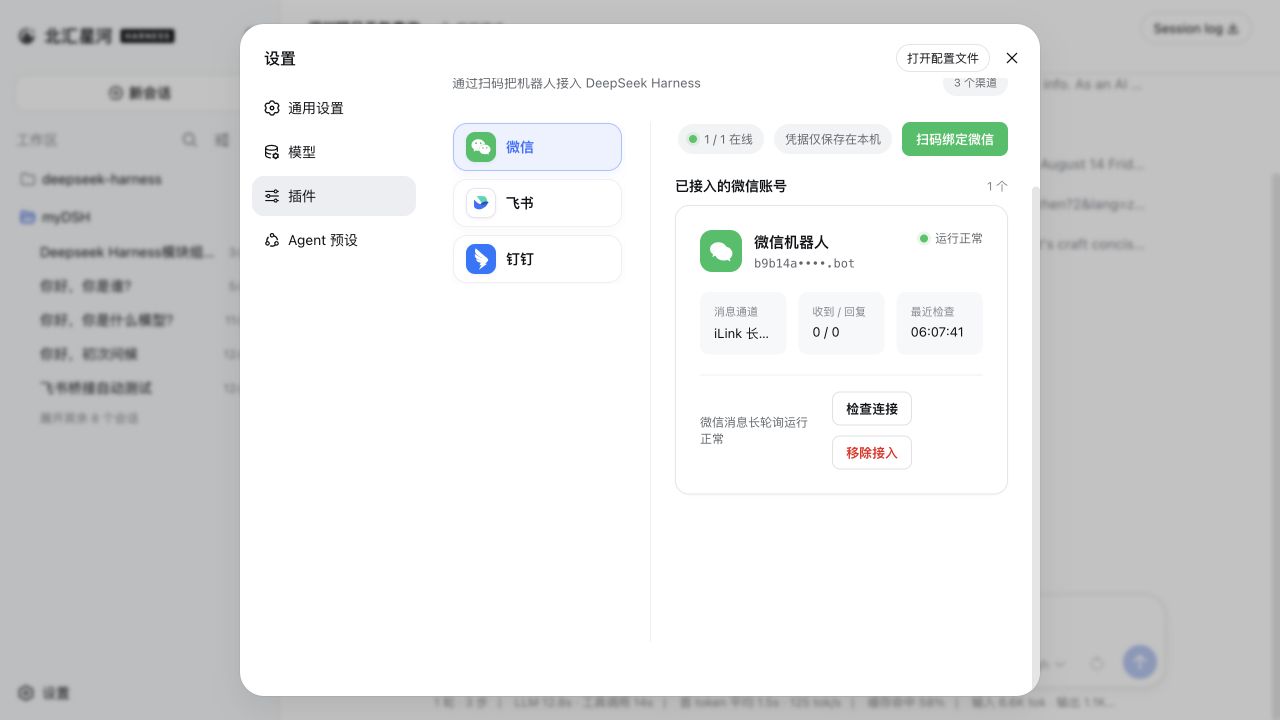
Connect IM bots to DeepSeek Harness by scanning a QR code, using an App Manifest, or entering existing bot credentials. One plugin and one settings entry provide unified management for Feishu, WeChat, DingTalk, WeCom, QQ, Slack, Telegram, Discord, and WhatsApp. **Every channel supports multiple bots**, each with independent connection state, workspace, and session bindings. It also supports switching workspaces and rebinding sessions.
## Interface
## Built-in channels
| Channel | Setup | Messaging and replies |
| --- | --- | --- |
| Feishu | Create a bot by QR code, or bind one with App ID + App Secret | Persistent connection for incoming messages; streaming cards show thinking, tool progress, and replies |
| WeChat | Scan a QR code to bind a WeChat bot | Tencent iLink long polling for sending and receiving messages |
| DingTalk | Create a bot by QR code, or bind one with Client ID + Client Secret | DingTalk Stream connection; streaming replies through AI Cards |
| WeCom | Create an intelligent bot by QR code, or bind one with Bot ID + Secret | Official WebSocket connection; native thinking state, tool progress, and streaming replies |
| QQ | Create a bot with mobile QQ QR scanning, or bind one with AppID + AppSecret | WebSocket connection; native typing and streaming replies in private chats, replies when mentioned in groups |
| Slack | Create an app from the bundled App Manifest, then enter a Bot Token (`xoxb-`) and App Token (`xapp-`) | Socket Mode connection; direct DM replies, mention-only channel replies, and preferred native streaming API |
| Telegram | Enter a Bot Token generated by @BotFather | Bot API long polling; direct private replies, mention-or-reply group handling, and streaming through message edits |
| Discord | Enter a Bot Token generated in the Developer Portal | Gateway v10 connection; direct DM replies, mention-only server replies, and streaming through message edits |
| WhatsApp | Scan a QR code with mobile WhatsApp to link a device | WhatsApp Web connection; read receipt and typing indicator followed by the final answer |
Other IM platforms can be added through the same channel-adapter structure.
All nine built-in channels can send JPEG, PNG, and WebP images, plus GIFs sent as image files, with optional captions to Harness. Each image is limited to 5 MB, and images in one message are limited to 20 MB in total.
## Installation
Install the published stable release from npm (recommended):
```sh
dsh plugin --profile web add -w @xmanrui/dsh-im
```
Restart `dsh web`, then open **Settings → Plugins → IM Bot**.
To try the latest code before it is published to npm, use the GitHub-source installer instead:
```sh
npx -y github:xmanrui/dsh-im install
```
A GitHub-source installation fetches and builds a Git dependency directly. With pnpm 10 or newer, the profile may first need an `allowBuilds` entry in `pnpm-workspace.yaml`. Most users should prefer the stable npm release.
After installation, follow the built-in instructions on each channel page to scan a QR code or enter credentials. Secrets and Tokens are sent only to the local Harness Host and stored through its protected credential provider; status responses and bot lists never return them.
| Default behavior | Description |
| --- | --- |
| Bot workspace | Each bot stores its workspace independently. New bots start with the Host's current working directory, which can later be changed from the bot card. |
| Agent Preset | New Sessions inherit Harness's `agent-presets.default` unless the channel explicitly overrides it. Later changes do not affect existing Sessions. |
## Bot commands
| Command | Description |
| --- | --- |
| `/help` | Show the commands and usage supported by the bot. |
| `/new` | Unbind the current chat so its next ordinary message starts a new Harness Session. |
| `/status` | Check the connection between the current bot and DeepSeek Harness. |
| `/models` | List every currently configured model with a number. |
| `/model` | Show the model used by the Session bound to this chat. |
| `/model  dsh-im