






What are people using it for?
|
Get started | Usage | Usage Examples | How does it work? | Features | Optional Headers | CLI | Cheatsheet
df.jardump.txt:
```httpx
GET /api/customer/123 HTTP/1.1
HTTP/1.1 200 OK
Content-Type: application/json
{
"id": 123,
"fname": "John",
"lname": "Doe",
"email": ["john@example.com", "johndoe@example.com"]
}
```
http://localhost:8080/api/customer/123
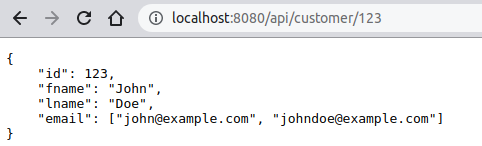
java -jar df.jar --dump dump.txtStart server with built-in OpenAPI client:
java -jar df.jar --openapi-path /api --dump dump.txt
java -jar df.jar --dump dump1.txt dump2.txt dump3.txtStart server with built-in OpenAPI client with custom title:
java -jar df.jar --openapi-path /api --openapi-title 'My REST API v18.2.1' --dump dump.txt
java -jar df.jar --collect /home/john/live.txt --dump dump.txtSpecify JSON data file to populate templates:
java -jar df.jar --data /home/john/data.json --dump dump.txtPrint dump files statistics to stdout as JSON:
java -jar df.jar --print-info --dump dump.txtPrint dump requests to stdout as JSON:
java -jar df.jar --print-requests --dump dump.txtPrint OpenAPI specification to stdout as JSON:
java -jar df.jar --print-openapi --dump dump.txt
404.GET, HEAD, POST, PUT, DELETE etc. * and ? with escape / ) in query string and header values # in dumpsETag supportv3.0.3 supportNO_COLOR environment variable| Option | Default | Description |
|---|---|---|
--host <host name>
|
localhost |
host name, default: localhostSee Also: --port <number>--port-ssl <number>--redirect
|
--port <number>
|
8080 |
HTTP TCP port number, default: 8080See Also: --port-ssl <number>--redirect--host <host name>
|
--port-ssl <number>
|
8443 |
HTTPS TCP port number, default: 8443Create TLS(SSL) connection based on built-in self-signed certificate See Also: --port <number>--redirect--host <host name>
|
--dump <file|url>...
|
Dump text file(s)/URL(s) | |
--db <file|url>...
|
JSON/YAML/CSV memory file to populate templates See Also: --db-export <file>--db-path <path>--no-bak--js <file|url>...X-Handler-JS
| |
--db-export <file>
|
Export memory to JSON file See Also: --db <file|url>...--db-path <path>--no-bak
| |
--db-path <path>
|
Serve live memory file at specified context. With this option you can view or export the memory state in JSON format. See Also: --db <file|url>...--db-export <file>--no-bak
| |
--dir <dir>
|
Forward unmatched requests to specified directory. See Also: --dump <file|url>... | |
--js <file|url>...
|
JavaScript file(s) for script engine context. See Also: X-Handler-JS--db <file|url>...
| |
--openapi-path <path>
|
Serve built-in OpenAPI client at specified context See Also: --openapi-title <text>--print-openapiX-OpenAPI-SummaryX-OpenAPI-DescriptionX-OpenAPI-TagsX-OpenAPI-Parameters
| |
--openapi-title <text>
|
Provide custom OpenAPI specification title See Also: --openapi-path <path>--print-openapiX-OpenAPI-SummaryX-OpenAPI-DescriptionX-OpenAPI-TagsX-OpenAPI-Parameters
| |
--collect <file>
|
Collect live request/response to file | |
--format <json|yaml>
|
json |
Output format for --print-* commands, default: json
|
--status <number>
|
404 |
Status code for non-matching requests, default: 404
|
--max-log-body <number>
|
Max body bytes in console log, default: unlimited See Also: --no-log--no-log-body--no-log-headers
| |
--no-log
|
Disable request/response console logging See Also: --no-log-request-info--no-log-body--max-log-body <number>--no-log-headers
| |
--no-log-request-info
|
Disable request info in console logging See Also: --no-log--no-log-body--max-log-body <number>--no-log-headers
| |
--no-log-headers
|
Disable request/response headers in console logging See Also: --no-log--no-log-request-info--no-log-body--max-log-body <number>
| |
--no-log-body
|
Disable request/response body in console logging See Also: --max-log-body <number>--no-log--no-log-request-info--no-log-headers
| |
--no-cors
|
Disable CORS headers | |
--no-etag
|
Disable ETag header
| |
--no-server
|
Disable Server header
| |
--no-watch
|
Disable watch files for changes | |
--no-color
|
Disable ANSI color output for --print-* commandsANSI color output also can be disabled via NO_COLOR environment variable.See Also: --no-pretty
| |
--no-pretty
|
Disable prettyprint for --print-* commandsSee Also: --no-color
| |
--no-template
|
Disable template processing | |
--no-wildcard
|
Disable wildcard processing. By default wildcard processing is enabled. The asterisk * represents one or more characters, the question mark ? represents a single character, and / represents escape character.
| |
--no-bak
|
Disable backup old memory file before overwrite. The memory file is overwritten every time the server shuts down. See Also: --db <file|url>...--db-export <file>--db-path <path>
| |
--strict-json
|
Enable strict (byte by byte) JSON comparison | |
--redirect
|
Enable redirect HTTP to HTTPS See Also: --port <number>--port-ssl <number>--host <host name>
| |
--help
|
Print help message | |
--print-info
|
Print dump files statistics to stdout as json/yaml See Also: --format <json|yaml>--no-color--no-pretty
| |
--print-requests
|
Print dump requests to stdout as json/yaml See Also: --format <json|yaml>--no-color--no-pretty
| |
--print-openapi
|
Print OpenAPI specification to stdout as json/yaml See Also: --openapi-path <path>--openapi-title <text>--format <json|yaml>--no-color--no-pretty
|
| Header | Description |
|---|---|
X-Delay 

|
Request or response delay (in milliseconds). Examples:Two seconds request delay: ```httpx GET / HTTP/1.1 X-Delay: 2000 ``` Two seconds response delay: ```httpx HTTP/1.1 200 OK X-Delay: 2000 ``` |
X-Content-Source
|
The URL of the externally hosted content. The content from the URL will be sent as the response body. Supported protocols: http:, https:, file:, data:.If the URL provides its own content type and there is no Content-Type header in the dump, the original Content-Type header received from the URL will be sent along with other response headers.
This header is useful when you want to send content hosted on a remote server or just send binary data as a response body. Examples: Get a response body from a remote server: ```httpx HTTP/1.1 200 OK Content-Type: application/json X-Content-Source: http://example.com/api/car/1234.json ``` Get a response body from a file: ```httpx HTTP/1.1 200 OK Content-Type: image/jpeg X-Content-Source: file:///home/john/photo.jpeg ``` Get a response body from a data URI: ```httpx HTTP/1.1 200 OK Content-Type: image/gif X-Content-Source: data:image/gif;base64,R0lGODlhAQABAIAAAP... ``` |
X-OpenAPI-Summary
|
OpenAPI request summary text. Example: ```httpx GET /api/customer{id} HTTP/1.1 X-OpenAPI-Summary: Get customer information ```See Also: X-OpenAPI-DescriptionX-OpenAPI-TagsX-OpenAPI-Parameters
|
X-OpenAPI-Description
|
OpenAPI request description text. Example: ```httpx GET /api/customer{id} HTTP/1.1 X-OpenAPI-Summary: Get customer information X-OpenAPI-Description: This API extracts customer info from db ``` See Also: X-OpenAPI-SummaryX-OpenAPI-TagsX-OpenAPI-Parameters
|
X-OpenAPI-Tags
|
OpenAPI request comma-separated tag list. Example: ```httpx GET /api/customer{id} HTTP/1.1 X-OpenAPI-Summary: Get customer information X-OpenAPI-Description: This API extracts customer info from db X-OpenAPI-Tags: Work with customer, Buyers, Login info ``` See Also: X-OpenAPI-SummaryX-OpenAPI-DescriptionX-OpenAPI-Parameters
|
X-OpenAPI-Parameters
|
OpenAPI request parameters information. Example: ```httpx GET /api/customer{id} HTTP/1.1 X-OpenAPI-Summary: Get customer information X-OpenAPI-Description: This API extracts customer info from db X-OpenAPI-Tags: Work with customer, Buyers, Login info X-OpenAPI-Parameters: name=cust_id;description=Customer ID, name=rdate;description=Review Date ``` See Also: X-OpenAPI-SummaryX-OpenAPI-DescriptionX-OpenAPI-Tags
|
X-Forward-To
|
Forward client request to specified origin. Acts as a forward proxy. Example: ```httpx HTTP/1.1 X-Forward-To: http://example.com:8080 ``` |
X-Handler-CGI
|
CGI (Common Gateway Interface) program. Example: ```httpx HTTP/1.1 200 OK X-Handler-CGI: /home/john/myprog.sh param1 param2 ``` See Also: X-Handler-XGIX-Handler-JS
|
X-Handler-XGI
|
XGI (Extended Gateway Interface) program. XGI program is very similar to CGI, but unlike CGI, the XGI program reads from stdin not only the body of the request but also the first line and the headers. In response XGI program writes status line, headers and response body into stdout. All CGI environment variables are also available to XGI program. Example: ```httpx HTTP/1.1 X-XGI: /home/john/myprog.sh param1 param2 ``` See Also: X-Handler-CGIX-Handler-JS
|
X-Handler-JS
|
JavaScript response handler function. The JavaScript functions are taken from the context files listed in the --js <file|url>... option.The following objects are provided as handler function parameters:
X-Handler-JS header allows you to modify persistent data.Examples: JavaScript function modify memory data: ```httpx DELETE /customers/{id} HTTP/1.1 200 OK X-Handler-JS: deleteCustomer Content-Type: application/json {"id": "${request.parameters.id[0]}"}; ``` ```js function deleteCustomer(request, response, data) { const id = request.parameters.id[0]; delete data.customers[id]; } ``` JavaScript function modify memory data and provide response status, headers and body: ```httpx DELETE /customers/{id} HTTP/1.1 X-Handler-JS: deleteCustomer ``` ```js function deleteCustomer(request, response, data) { const id = request.parameters.id[0]; if (data.customers[id] === undefined) { response.status = 404; response.body = {error: true, message: 'ID not found'}; } delete data.customers[id]; response.status = 200; response.headers['Content-Type'] = 'application/json'; response.body = {error: false, message: null}; } ``` See Also: --js <file|url>...--db <file|url>...X-Handler-CGIX-Handler-XGI
|