
Welcome to DeepfakeHTTP Cheatsheet!

Table of Contents


Hello, World!

  1. Prepare file dump.txt: ```httpx GET /api/customer/123 HTTP/1.1 HTTP/1.1 200 OK Content-Type: application/json { "id": 123, "fname": "John", "lname": "Doe", "email": ["john@example.com", "johndoe@example.com"] } ```
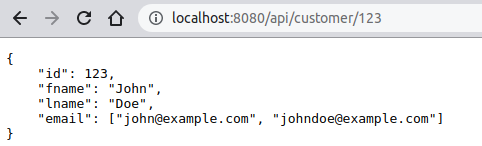
  2. Start server: ``` java -jar df.jar --dump dump.txt ```
  3. Navigate to:
    http://localhost:8080/api/customer/123
  4. Get response: ```json { "id": 123, "fname": "John", "lname": "Doe", "email": ["john@example.com", "johndoe@example.com"] } ```

⚡️ Hacks and Tips:
  • DeepfakeHTTP also supports HEAD, POST, PUT, DELETE etc. methods
  • Don't miss a single carriage return between headers and body!
💡 See Also:

Comments in dump

```httpx # Client request GET /api/customer/123 HTTP/1.1 . # Server response HTTP/1.1 200 OK Content-Type: application/json { "id": 123, "fname": "John", "lname": "Doe", "email": ["john@example.com", "johndoe@example.com"] } . # Some comments at the end (ater "." character) # More comments... ```
⚡️ Hacks and Tips:
  • Comments are not part of output.
  • Comment your dums with # character.
  • Only single lines comments are supported.
  • If you need comment after the body, use period (full stop) character . to mark end of body.
  • Don't miss a single carriage return between headers and body!
💡 See Also:

Process form data

  1. Prepare file dump.txt: ```httpx GET /form1.html HTTP/1.1 . # Fake HTML file :) HTTP/1.1 200 OK


    POST /action_page.php HTTP/1.1 Content-Type: application/x-www-form-urlencoded . # Fake PHP response :) HTTP/1.1 200 OK Content-Type: text/html Hello ${request.parameters.fname[0]} ${request.parameters.lname[0]}! ```
  2. Start server: ``` java -jar df.jar --dump dump.txt ```
  3. Navigate to:
    http://localhost:8080/form1.html
  4. Fill in input fields. Eg.: John Doe
  5. Get response: ```text Hello John Doe! ```

⚡️ Hacks and Tips:
  • DeepfakeHTTP supports GET, HEAD, POST, PUT, DELETE etc. methods
  • Don't miss a single carriage return between headers and body!
💡 See Also:

Process form data with parameters matching

  1. Prepare file dump.txt: ```httpx GET /form2.html HTTP/1.1 HTTP/1.1 200 OK


    Only the first name John and the last name Doe are supported.
    Expected result is: Hello John Doe!,
    or HTTP status 404 Not found
    when first name is not John or last name is not Doe.

    POST /action_page2.php HTTP/1.1 Content-Type: application/x-www-form-urlencoded fname=John&lname=Doe HTTP/1.1 200 OK Content-Type: text/html Hello ${request.parameters.fname[0]} ${request.parameters.lname[0]}! ```
  2. Start server: ``` java -jar df.jar --dump dump.txt ```
  3. Navigate to:
    http://localhost:8080/form2.html
  4. Fill in input fields. Eg.: John Doe
  5. Expected response: ```text Hello John Doe! ```
  6. Fill in input fields. Eg.: Lora Corban
  7. Expected result:
    Request failed with status: 404 Not found

⚡️ Hacks and Tips:
  • DeepfakeHTTP supports GET, HEAD, POST, PUT, DELETE etc. methods
  • Don't miss a single carriage return between headers and body!
💡 See Also:

Match headers

  1. Prepare file dump.txt: ```httpx GET /api/customer/5 HTTP/1.1 Accept-Language: ru;* HTTP/1.1 200 OK Content-Type: application/json { "id": 5, "name": "Джон Доу" } GET /api/customer/5 HTTP/1.1 HTTP/1.1 200 OK Content-Type: application/json { "id": 5, "name": "John Doe" } ```
  2. Start server: ``` java -jar df.jar --dump dump.txt ```
  3. Navigate to:
    http://localhost:8080/api/customer/5
  4. Expected result: ```json { "id": 5, "name": "John Doe" } ```
  5. Change browser's preferred language to Russian
  6. Navigate to:
    http://localhost:8080/api/customer/5
  7. Expected result: ```json { "id": 5, "name": "Джон Доу" } ```

⚡️ Hacks and Tips:
  • If headers was provided in the request, they will be included in match algorithm
  • If body was provided in the request, it will be included in match algorithm
  • DeepfakeHTTP supports wildcards (* and ?) in request query string and headers
  • Esacape character for wildcards is /
  • DeepfakeHTTP supports OpenAPI-styled parameters in path
  • DeepfakeHTTP supports templates in request line, headers and body
💡 See Also:

Request parameters in template

  1. Prepare file dump.txt: ```httpx GET /api/customers/{id}/profile?mode=* HTTP/1.1 HTTP/1.1 200 OK Content-Type: application/json { "id": "${request.parameters.id[0]}", "mode": "${request.parameters.mode[0]}", "fname": "John", "lname": "Doe" } ```
  2. Start server: ``` java -jar df.jar --dump dump.txt ```
  3. Navigate to:
    http://localhost:8080/api/customers/123/profile?mode=open
  4. Get response: ```json { "id": "123", "mode": "open", "fname": "John", "lname": "Doe" } ```

⚡️ Hacks and Tips:
  • Parameters are always treated as strings.
  • Multivalued query parameters: ?mode=open&mode=tmp${request.parameters.mode[1]}tmp.
  • Multivalued path parameters: /{id}/car/{id}/123/car/tesla${request.parameters.id[1]}tesla.
  • Don't miss a single carriage return between headers and body!
💡 See Also:

Multivalued request parameters

  1. Prepare file dump.txt: ```httpx GET /api/customers/{id}/profile/{id}/info?mode=open&mode=* HTTP/1.1 HTTP/1.1 200 OK Content-Type: application/json { "id1": "${request.parameters.id[0]}", "id2": "${request.parameters.id[1]}", "mode1": "${request.parameters.mode[0]}", "mode2": "${request.parameters.mode[1]}", "name": "John Doe" } ```
  2. Start server: ``` java -jar df.jar --dump dump.txt ```
  3. Navigate to:
    http://localhost:8080/api/customers/123/profile/abc/info?mode=open&mode=tmp
  4. Get response: ```json { "id1": "123", "id2": "abc", "mode1": "open", "mode2": "tmp", "name": "John Doe" } ```

⚡️ Hacks and Tips:
  • Parameters are always treated as strings.
  • Query parameters can contain wildcards *, ?: ?mode=*&virus=covid-???mode=open&virus=covid-19.
  • Don't miss a single carriage return between headers and body!
💡 See Also:

OpenAPI-styled parameters in path

  1. Prepare file dump.txt: ```httpx GET /api/customers/{id}/profile HTTP/1.1 HTTP/1.1 200 OK Content-Type: application/json { "id": "${request.parameters.id[0]}", "fname": "John", "lname": "Doe" } ```
  2. Start server: ``` java -jar df.jar --dump dump.txt ```
  3. Navigate to:
    http://localhost:8080/api/customers/123/profile
  4. Get response: ```json { "id": "123", "fname": "John", "lname": "Doe" } ```

⚡️ Hacks and Tips:
  • Parameters are always treated as strings.
  • Multivalued path parameters: /{id}/car/{id}/123/car/tesla${request.parameters.id[1]}tesla.
  • Query parameters also supported: ?mode=open${request.parameters.mode[0]}open.
  • Don't miss a single carriage return between headers and body!
💡 See Also:

External data and request parameters in template

  1. Prepare external data file customers.json: ```json [ {"fname": "John", "lname": "Doe", "email": ["john@example.com", "johndoe@example.com"]}, {"fname": "Lora", "lname": "Corban", "email": ["lora@example.com", "loracorban@example.com"]}, {"fname": "Ted", "lname": "Brown", "email": ["tedbrown@example.com"]} ] ```
  2. Prepare file dump.txt: ```httpx GET /api/customers/{id}/profile?mode=* HTTP/1.1 HTTP/1.1 200 OK Content-Type: application/json { "id": "${request.parameters.id[0]}", "mode": "${request.parameters.mode[0]}", "fname": "${data.customers[1].fname}", "lname": "${data.customers[1].lname}" } ```
  3. Start server: ``` java -jar df.jar --dump dump.txt --db customers.json ```
  4. Navigate to:
    http://localhost:8080/api/customers/123/profile?mode=open
  5. Get response: ```json { "id": "123", "mode": "open", "fname": "Lora", "lname": "Corban" } ```

⚡️ Hacks and Tips:
  • Parameters are always treated as strings.
  • The data file can be organized as an object or an array.
  • You can select a random record from the data file.
  • DeepfakeHTTP supports JSON, YAML and CSV data files.
  • By default, data files are watched for changes. Use --no-watch option to disable watching.
  • Don't miss a single carriage return between headers and body!
💡 See Also:

Random data in template

  1. Prepare external data file customers.json: ```json [ {"fname": "John", "lname": "Doe", "email": ["john@example.com", "johndoe@example.com"]}, {"fname": "Lora", "lname": "Corban", "email": ["lora@example.com", "loracorban@example.com"]}, {"fname": "Ted", "lname": "Brown", "email": ["tedbrown@example.com"]} ] ```
  2. Prepare file dump.txt: ```httpx GET /api/customers/{id}/profile HTTP/1.1 HTTP/1.1 200 OK Content-Type: application/json { "id": "${request.parameters.id[0]}", "name": "${random(data.customers).fname + ' ' + random(data.customers).lname}" } ```
  3. Start server: ``` java -jar df.jar --dump dump.txt --db customers.json ```
  4. Navigate to:
    http://localhost:8080/api/customers/123/profile
  5. Get response: ```json { "id": "123", "name": "Ted Brown" } ```

⚡️ Hacks and Tips:
  • The data file can be organized as an object or an array.
  • You can select record from the data file by index.
  • DeepfakeHTTP supports JSON, YAML and CSV data files.
  • By default, data files are watched for changes. Use --no-watch option to disable watching.
  • Don't miss a single carriage return between headers and body!
💡 See Also:

Provide favicon as binary data

  1. Prepare file dump.txt: ```httpx GET /favicon.ico HTTP/1.1 HTTP/1.1 200 OK X-Content-Source: data:image/vnd.microsoft.icon;base64,AAABAAEAEBAAAAEAGABoAwAAFgAAACgAAAAQAA AAIAAAAAEAGAAAAAAAAAMAABILAAASCwAAAAAAAAAAAAASVuwSVuwSVuwSVuwAif8Aif8Aif8A if8Aif8Aif8Aif8Aif8SVuwSVuwSVuwSVuwSVuwSVuwAif8Aif8Aif8Aif8Aif8Aif8Aif8Aif 8Aif8Aif8Aif8Aif8SVuwSVuwSVuwAif8Aif8Aif8Aif8Aif8Aif8Aif8Aif8Aif8Aif8Aif8A if8Aif8Aif8SVuwSVuwAif8Aif8Aif8Aif8Aif8Aif8Aif8Aif8Aif8Aif8Aif8Aif8Aif8Aif 8SVuwAif8Aif8Aif8Aif8Aif8AAwYAAwYAAwYAAwYAAwYAAwYAif8Aif8Aif8Aif8Aif8Aif8A if8Aif8Aif8AAwYAAwYAif8Aif8Aif8Aif8AAwYAAwYAif8Aif8Aif8Aif8Aif8Aif8Aif8Aif 8Aif8Aif8Aif8Aif8Aif8Aif8Aif8Aif8Aif8Aif8Aif8Aif8Aif8Aif8Aif8Aif8Aif8Aif8A if8Aif8Aif8Aif8Aif8Aif8Aif8Aif8Aif8Aif8Aif8Aif8Aif8Aif8Aif8Aif8Aif8Aif8Aif 8Aif8Aif8Aif8Aif8Aif8Aif8Aif8Aif8Aif8Aif8Aif8Aif8Aif8Aif8Aif8Aif8Aif8Aif8A if8Aif8Aif8Aif8Aif8Aif8Aif8AAwYAif8AAwYAAwYAif8Aif8Aif8AAwYAAwYAif8Aif8AAw YAif8Aif8Aif8Aif8Aif8AAwYAAwYAif8Aif8Aif8Aif8Aif8AAwYAAwYAAwYAif8Aif8Aif8S VuwAif8Aif8Aif8Aif8Aif8Aif8Aif8Aif8Aif8Aif8Aif8Aif8Aif8Aif8SVuwSVuwAif8Aif 8Aif8Aif8Aif8Aif8Aif8Aif8Aif8Aif8Aif8Aif8Aif8Aif8SVuwSVuwSVuwAif8Aif8Aif8A if8Aif8Aif8Aif8Aif8Aif8Aif8Aif8Aif8SVuwSVuwSVuwSVuwSVuwSVuwAif8Aif8Aif8Aif 8Aif8Aif8Aif8Aif8SVuwSVuwSVuwSVuzwDwAAwAMAAIABAACAAQAAAAAAAAAAAAAAAAAAAAAA AAAAAAAAAAAAAAAAAAAAAACAAQAAgAEAAMADAADwDwAA ```
  2. Start server: ``` java -jar df.jar --dump dump.txt ```
  3. Navigate to:
    http://localhost:8080
  4. Get response:
    The favicon is displayed next to the title of the web page in the browser tab.

⚡️ Hacks and Tips:
  • Serve any media type by using X-Content-Source response header.
  • With X-Content-Source response header you can use also http://, https://, file://, and data:// URLs.
  • Don't miss a single carriage return between headers and body!
💡 See Also:

Response with binary data

  1. Prepare file dump.txt: ```httpx GET /Albert_Einstein.jpeg HTTP/1.1 HTTP/1.1 200 OK Content-Type: image/jpeg X-Content-Source: data:image/jpeg;base64,/9j/4AAQSkZJRgABAQEAZABkAAD/2wBDAAMCAgICAgMCAgIDAwMDB AYEBAQEBAgGBgUGCQgKCgkICQkKDA8MCgsOCwkJDRENDg8QEBEQCgwSExIQEw8QEBD/2wBDAQMDA wQDBAgEBAgQCwkLEBAQEBAQEBAQEBAQEBAQEBAQEBAQEBAQEBAQEBAQEBAQEBAQEBAQEBAQEBAQE BAQEBD/wgARCABkAGQDASIAAhEBAxEB/8QAHAAAAQQDAQAAAAAAAAAAAAAABwADBQYCBAgB/8QAG AEAAwEBAAAAAAAAAAAAAAAAAAECAwT/2gAMAwEAAhADEAAAAQc28x055ZuyQoi/2nep0jfskWwfV YwD2CqR7eGL2U2krSxlLbG6VRP0ayelplnK4qmX6s0hI3fG9Z5G0LrTcKdXilTk5SrJqruRhDZLO sdEfM5X7YOfDZa3G/ZRHLQ4Pouc1BZLFu5NZMONj9d2UtdcdKaTJVpiBnoVIvayHowqz0nG6mVkQ LzPqZuKgZktjoBoJxYH5+uyksI26hhhz0/F88+y99MKVr4ymmnM9C8xW+gueOnfQrI00Occnkx76 ljvN2Wk+o5UR+SUNplJBSj0tAbpLMc8SCzYpazDpKT/xAAmEAACAwACAgEEAgMAAAAAAAACAwEEB QAGERIUEBMVMQciISRB/9oACAEBAAEFAiiPp6zPPSZX8N0jioOmAZoq4eNognQU9An7CTHeOEwp4 JT4Lx5/fFyE8Qn2Z+LqSheZYlEZ1mpCrLK6zRXYGlmkIHM+eD+iKOePflasisvr/WlmpGOpQxn+J POjmhmrMW53xz0KUfHvVyq2eD+lrmw32qpigQjb6nq5FgS9RJ9mpV58ypcC159rySbFWvA0OyJhF uY8SPPuiEEQCOVjo2b+I7FzmU/jXl362XPF9f6e59+Yrcen2VaAox9uswjbHpI/ryREJBN6i5q8u h9/8t0i39nO2btuZl7o1nw63UbYKDZeGvW2ZG43bSuSiPHB8exEXnrXXyt1NzPDPyaoli49fPp6i G9YBYqrOz12dL/L7LdWyFiWHuZTxHkzM8iJ9eqW2OyexXa2R2PX08e7SwGjQseQle2yGVrJm2r1o c+pm38uuOb2arWqWLyYTb/U/cIh69pfjopfAupFGdXeL4jmXcOYvlAZxLj4PbtkKAq3lsX2ztFO6 1lk2s/7zps13zqddtZO4GdYUV9uhSuZLnhzZn1xO2XU51YjI5hrPSSIuLWZCQ+pcwrkU9DR0As71 uP9/FqP09HYrH6927dXzbDntsu8fRCJbKxgBsL4I8IeZ+ky5Uxal3szhpV6M9w/kJa7jGMcz6JTL ShawA3/ANj8mXrHJHnj1LD7Ztwvf7ZuX1+sc9Y56xz15VSAi3+qoXB8/8QAGREAAwEBAQAAAAAAA AAAAAAAARARACAw/9oACAEDAQE/AfAaY6YcXVBxR11DkB3x/8QAHBEAAgMBAQEBAAAAAAAAAAAAA AECEBEhMRJB/9oACAECAQE/ATDEqaNr0fEa2JmjWOoypR6ZU4729aPURk36PhumX8n6SkfRrMESk bUUarl5Sv8A/8QAOxAAAgECAwQHBgQEBwAAAAAAAQIDABEEEiETMUFRBRAiMkJSYRQVI3GBkTOhs cEkQ2KCIFNUktLh8P/aAAgBAQAGPwLRjW81v1pRm3Vm/epJ11ZezEeCOfEedFNkMRi955Jf9/Wm2 0MEAI7O2xWVj8hQjxMQI4OGDZf7hvqxNWvWprfWtW5Vv7Q+1BT+lKkEI2rjMxrIq/7aYwsyOfEaM E8KNm/mZdad8Li0JtZl0F/pRnihyxDfbUL/ANVbrNWUa1tcRllnbSOM90f1N6ChK+ZydSbWzfKrC JgTyYUFBkNhzFZ7sLcxei+hDcRxNZ8o7POmxmHAH+dGdFcc/Q08DeE/l17PQX8RNgvqaIgi2igd9 tCaZsW+QJa5Olr0uGw+OhZ92VSb/nQtxNGTESxR24ubVtcNPE63y5opBvq4Ojbz/wAqL7xlpmntk 3Vs98Y0X0/8Kt1Ovn0vUOHzaZgWrHGY2w0bgt2uQr+FC/Da+7u+opMVA4ZOBFSe1wLKAcxz7qZMP LFLM3aybXT6CoIbFQ3Y11pUS99d9ApCxkPZOm+rOlnQd1h4ayEWI6iaGduyG1+1T5Z9kJpgWI3kc hUp6Iw5jwSDLD2to0h4XuePHgK6QbN8KTFOYB4VXjb60HXHRwxTNs+7mMY5nnWIwOHh22GjY5MRL oz24hhprUTysWkgyknzVHGx0J++lMhlszbr0JVQCUbwNx9RyPpW08XmGn0Iq1Fj3aaS9QYw9xkKE WpkgyiSciGCNNCzHjWHwVh8Hv8A9XOl2wIY6o9XGGhc+i2v+1NtkI2i6kHT7VExbRNflSQ7wylkZ dcg83yoYPEhM7aiSPjrb71cp+Itmv5hxrU69R0051g+jIPxGXX5V0bBiY7wYfWWbgWbS39v717Jh TneQW7C5iPoKfAQyNisOYxNa1mjO61juNCWNw6ML3qQLTC9szFftSYthkdkbUrvWwFr/Ove2GPx2 dOww7pHYdPTQ/lWA2vdMmR77jcC9TRruVyBVwa7TE1h8ZH/AKdVPp2qkOJWPFlymh1u59KzKyQoE CiOAWXXjpSx4eUCa+Z835Xp8NI5YMSVFtAeIFTSsN16VzYBuzc8LmsJgvaIssC27OuZdLWqOXpMx 7OO0zup1ktqulYbEtiVZRacRrqS1t3pwppCBdjfriixQzQZ/Z51v4X7p+9e7MPjZNlJHt018N6v7 0lVTGARSYbATmSSTweWo4+kEdZVjMzk6dnhUmIPFbheZO6oeh01mSIbT5nfV2Ym2mprZ7RsvK+lD M17VcLR6l2jWim+E/pfcfobV0Lj3e3tWCkw8mvj5feth/LEuVvpqak6UxMbbOR9oB5h4fpW3X8WU LhrfM0vRuGG1fD2fLwz+HN+tPPPIXkc3Zjx6/SsosKv1+7JH+NC/tGEc+cb1+tZJMJPhY2P8TK6Z bJ5V5k0Fw0EccCr+lGDoYiWSIFRL4EbmOZppZXLu5uzE6k9duHGsgG6t9XJ6wVJBGtDC+0AoByr3 ZNjCsFrsE0L/M/4SAN1XHi1okk76//EACYQAQACAgIBBAIDAQEAAAAAAAEAESExQVFhcYGRobHwE MHh0fH/2gAIAQEAAT8h2qF5ngzdRui9Ki6nNEvl5lIci1j+0NakPdiekzUxWoWuZZrvtCLiiJPLb j3hnHh06HCemWXpk5jGmU2D/ACElq8dxpUvCbnqVwmOzm6y9yC4y0aqVSe3Fj/rHUDoveVvuWY03 cj0iBraWfgfeJzTtyOT9VqWKcmIMN+6fPQXeMFypAPKHKfRzgh1kWfgGsQy6jOCfEDcCX/VCCzHd L3rMNpg+LovV+tR6GbmnHruVeDd6xMnp+yXW8GPY/ECfmhPm1pI34CLQ01tzsOvDmB0GK3K3o2Z4 9YTC3e8ObOfUlcdlyxArGQi31lDYQXT0w78VG6DXSC1wDD6zHRNuet9n4qOE078FYu/evcnEkv5N 4zyYVPHnI9ncRU5PRfoXklwThe9RlCSwvQL6wEtCZa+LZxuMYdRFjMG8cVX/IuIbrY8BVRwSGy2D FvLj5uYzsVvb/5DFrVw3EmEjUW33mWqk4hWAQfV6lqdEXOP8QyR8GxfqYvoloTNuh13F3oBcUCg8 eh6GVRlQTbEaS5O44yvC8iqUNsHtOV35tMfvvA4YimuQv4hcA1Tt6jn5VP9v2rEOABYDo/QfMSyM jMUtHXfUeY3Zb5YOQ5Z1HPP2+0R8VgQUpM0F5lFgo4bXkMozTQz6POIZS/H9l0b6jjvDBprw9Jgp TZceiDNBE4GLBu0QmDS7A+Dj5JellPC9I/eYHYcsR3wRS3KWwOTj8N5uexFhUHADj1TJENGDzsY9 g6kFlgPg3iUNgAcI8ypF0vKVLDFYeLReL5ptRPIdDzC9FPcTYOVWO7RAo0Q9gev5mVvNnA4ltoEd kVS+wF4hVmlrd7C+JZyEUhFZ063KqdGE8nP/MTBSKk+TeZfBAE+mHZ7zE4o3qOumydsz6F78Qobi ybAnYH3KGGqI1kHx3wzJSvFs10C+XDLVhrHLEylTOBmFr4HCr8xBbwzI4HzcbO/mtrdX195gGiCj jzf+wrHJw0xvttqKixRj9RqUv3ZhP2MLKQCxoNEDR6m+kvzUAeCatr7lQYQ1oK7w/sj2g+OtlKv7 JQBdKxKomU/Ms2GPLqHpPmMI4xpaf4Lh/hWdR9Bw5ojZps5TH+F3dfuWLA8VfzHtpqcrCTErgPuF PjfvEIvtNxXZtFWcZnE/wAtAQtvctrwlxFg6LjBoXJW1YEqBwNdiesOYVzEMF9RIVvXBCAeYKhQC ORigZqvLvZLNaeeOtyeNfweZhVzK2FswSMz4mJhyUStnlP/2gAMAwEAAgADAAAAEPH7HDtDglbzS fD2KaVMl8qjVlcT86XJLnfzs8xN/ZTn/wCPx78L/8QAHBEBAQEBAQEAAwAAAAAAAAAAAQARECExI EFx/9oACAEDAQE/ELb70J+8GsCA2Ny+LN4Xz7HiUln29njCQHke2WjhfzCpDOIb39jLxx5Zv4s8/ 8QAHBEBAAMBAQEBAQAAAAAAAAAAAQARITEQQVFh/9oACAECAQE/EGF58MNlekbPlD2dh5GvZSrl4 RiEo4nYl/yOhvJpTKFe+CuEaBFcMZiwqSuH7KQjTR9mdWJRlaRPQ2XzDsfx7BCjsamTst1iDGPZx f751DkOT//EACMQAQEAAwEAAwACAwEBAAAAAAERACExQVFhcYGhkdHwwbH/2gAIAQEAAT8QOuygL u/WTQZdHYxKcC37fz7wMKovTef4n+MYJYUEN9/X+8N2qUliWyIvhp7jxpYaxVW+ig/AXeE1VWW9V SPghLMaM7pD0LAqj0RDBU/qmVsT6mCnq6OLLQ+CzC9Tfy4xTWLI+/jAGSlU19z41i4VlW2w1wv7c c2XeK/42OMzNJLt4ch87UxSRxdCdFNTf0RPjOreqSVAF20PlZ3GWhUTr1b/AJWuPK0CjdiiJ8De9 8y1NB39Dcon5tbPMJXLS91cZ7vLDP8AgYJ4UWr37PnOodQEXW1x7xeaLQuiRQV/Jkj5gVd1Eb6ty B/BfV8an+XPcNAJWRdP/c8+TAfqzw3H7MtnZoKHo6T4a52ZvngmffeAmh3R09HHTwEZQOoVrSWt7 g+hctFRSviifXuN0caMEP1hfTXSBJjC2vZyrhc/X0PCQWk4EsaY2oYSEDaquwPaDEpAKjnYDM9E/ MdN4tHQeM3gS5JP4VR3c/M1maChsLjGxVM7ANf/AKdCEHO0iMtTbbsYvrfmLOg6LckbR0q78Ewb6 YrMkHpSDdEPjGZBCLi8wR/bcD4RyWhYT5hfrFulEaUcX2q7+bmrvPUyV1FFfkwz51RHiK718ZfGG lDuvzfOawypEaqNWsTZT7yk3awa6f0CbIOOEUBk0pNwLXuzuOgEJQdwZ37zIHbEOxpNUNxf4y3KG qiNd04fOYK6CvJ8fX+8QS6ZkosWrP5P/bwwN4PQ2nzxgHQuWvQ3RsTRWe9Texwe0ChG0OFtdY9iN vkYHCeYaWJPdPwSgdP94U+cISH0yTsgk3jP4lCd0TdQFeVw7adWAoFREVfxi50wtHRvbqn9dxeRL UeqPEexBJiZ1Lhp9L1mW7MtTSI6R+MNlCQ+zj/P+MbIL08kU/kS4OAwFIV58umADeF/Ihi2g3CU3 HCgOtXkB119+LcoQ0VDkRhFoN806w5FQF3dCfkDFZc2iJaJWF9Ir077irUAyJ6v179uIlZB2myQQ 8UwyRWUmwfYNukg7mB20R7ximqa7STzKWS0G9h/qY4gx0Hk+frH/IIGMdFf5w3wi+umzhIaz5hG0 nbxDfV/DCZ9CNESK9KgmzEIFBjIhAFGCv5w10EIagfx9/MIGVx0I81ZTGJAJtGDHz7cmAg3a4NCQ UofVxPFm1Lti1nHyG4HO1BcI+w2L4zZWzhVpX3AyvQQSNxB8FI/GvPcAGLX9kyI71r7MLAq1ZqkB EVAMNrpNvAHydJAaq9cXBlHB8ZtAtHqpEncKzaw5quLN3tHxmvscAgISdXFjVGTQ34BT4rG0ufki dX2jxhLcM0LQH+yULug0ZiCgsXyU0hVp0GNdo4pS6/o/vPgNOA9kwsgoaJIPRKXEfOOFLtNWPyDa HS5Db4YDkgmnPUXKmsMBtVV5Yq203lE8J2HQVX0CfmVoL+OgAeqB+4gSSWhqFP2vnWNGy0TQFVAN B8YHLuyX9kx1Cdrw4Y4EtAsWBiknunIqYCJ8kNH6nanKzZQYaa2QY/Dv4wVGsCV2pL1/hrmPBiNE d3UMC2pJe4wAPCCLQ7OPwMqp2IlzV77naFguUbuYSq/ReBo8yHvDAk3grR6U2vPzBi71RsBsFMAY VIC4aw5jVFQTfZkKoCxNjeD0fD5x1QLPIMekoJTrDTmWDMlrwDTy7cirMRF5h9DcnbrEE1aYVDar 7iromL6jhhKUFZ9Y4lCHVV4TxCOVqzEDB/8PrEK6kGtnhkyVyuXCt8h1FEfETGbq3hfVDdychWLF StP5R8hx1FQ5DBu7PzB6OOMKh0xNLpFtQO/m4lxoBNDfPTGFGikeGf/2Q== ```
  2. Start server: ``` java -jar df.jar --dump dump.txt ```
  3. Navigate to:
    http://localhost:8080/Albert_Einstein.jpeg
  4. Get response:

⚡️ Hacks and Tips:
  • Serve any media type by using X-Content-Source response header.
  • With X-Content-Source response header you can use also http://, https://, file://, and data:// URLs.
💡 See Also:

Generate PDF document and populate it with request parameters

  1. Prepare file dump.txt: ```httpx GET /customers/{id}/purchases/{date}/report?format=pdf HTTP/1.1 HTTP/1.1 200 OK Content-Type: application/pdf %PDF-1.3 1 0 obj << /Type /Catalog /Outlines 2 0 R /Pages 3 0 R >> endobj 2 0 obj << /Type /Outlines /Count 0 >> endobj 3 0 obj << /Type /Pages /Count 2 /Kids [ 4 0 R 6 0 R ] >> endobj 4 0 obj << /Type /Page /Parent 3 0 R /Resources << /Font << /F1 9 0 R >> /ProcSet 8 0 R >> /MediaBox [0 0 612.0000 792.0000] /Contents 5 0 R >> endobj 5 0 obj << /Length 1074 >> stream 2 J BT 0 0 0 rg /F1 0027 Tf 57.3750 722.2800 Td ( Customer ID: ${request.parameters.id[0]}) Tj ET BT /F1 0010 Tf 69.2500 688.6080 Td ( Date: ${request.parameters.date[0]} ) Tj ET BT /F1 0010 Tf 69.2500 664.7040 Td ( Lorem ipsum dolor sit amet consectetur adipiscing elit sed do eiusmod tempor incididunt ut labore ) Tj ET BT /F1 0010 Tf 69.2500 652.7520 Td ( et dolore magna aliq ua. Ut enim ad minim veniam quis nostrud exercitation ullamco laboris nisi. ) Tj ET endstream endobj 6 0 obj << /Type /Page /Parent 3 0 R /Resources << /Font << /F1 9 0 R >> /ProcSet 8 0 R >> /MediaBox [0 0 612.0000 792.0000] /Contents 7 0 R >> endobj 7 0 obj << /Length 676 >> stream 2 J BT 0 0 0 rg /F1 0027 Tf 57.3750 722.2800 Td ( Customer ID: ${request.parameters.id[0]}) Tj ET BT /F1 0010 Tf 69.2500 688.6080 Td ( Date: ${request.parameters.date[0]} ) Tj ET BT /F1 0010 Tf 69.2500 664.7040 Td ( More text... ) Tj ET endstream endobj 8 0 obj [/PDF /Text] endobj 9 0 obj << /Type /Font /Subtype /Type1 /Name /F1 /BaseFont /Helvetica /Encoding /WinAnsiEncoding >> endobj 10 0 obj << /Creator (DeepfakeHTTP \(https://github.com/xnbox/DeepfakeHTTP)) /Producer (DeepfakeHTTP) /CreationDate (D:20210925043107) >> endobj xref 0 11 0000000000 65535 f 0000000019 00000 n 0000000093 00000 n 0000000147 00000 n 0000000222 00000 n 0000000390 00000 n 0000001522 00000 n 0000001690 00000 n 0000002423 00000 n 0000002456 00000 n 0000002574 00000 n trailer << /Size 11 /Root 1 0 R /Info 10 0 R >> startxref 2714 %%EOF ```
  2. Start server: ``` java -jar df.jar --dump dump.txt ```
  3. Navigate to:
    http://localhost:8080/customers/123456/purchases/2018-07-29/report?format=pdf
  4. Get response:
  5. View generated document

⚡️ Hacks and Tips:
  • Parameters are always treated as strings.
  • Serve any media type by using X-Content-Source response header.
  • With X-Content-Source response header you can use also http://, https://, file://, and data:// URLs.
💡 See Also:

Generate OpenAPI JSON/YAML spec from dump

  1. Prepare file dump.txt: ```httpx GET /api/customers/{id}/profile?mode=* HTTP/1.1 X-OpenAPI-Summary: Customer profile X-OpenAPI-Description: Customer profile info X-OpenAPI-Tags: Customers, Info HTTP/1.1 200 OK Content-Type: application/json { "id": "${request.parameters.id[0]}", "mode": "${request.parameters.mode[0]}", "fname": "John", "lname": "Doe" } ```
  2. Print OpenAPI spec JSON to stdout: ``` java -jar df.jar --print-openapi --openapi-title 'Acme-CRM REST API v1.2.3' --dump dump.txt ```

⚡️ Hacks and Tips:
  • Use --format yaml option to print OpenAPI spec in YAML format.
  • Use --no-color option to disable ANSI colors.
  • Use --openapi-path <path> option to serve built-in OpenAPI client.

Basic Authentication

  1. Prepare file dump.txt: ```httpx GET /auth HTTP/1.1 Authorization: Basic QWxhZGRpbjpvcGVuIHNlc2FtZQ== HTTP/1.1 200 OK Content-Type: text/html Hello Aladdin! GET /auth HTTP/1.1 HTTP/1.1 401 Unauthorized WWW-Authenticate: Basic realm="Aladdin's secret page" ```
  2. Start server: ``` java -jar df.jar --dump dump.txt ```
  3. Navigate to:
    http://localhost:8080/auth
  4. In browser's authentication dialog type:
    User: Aladdin
    Password: open sesame
  5. Get response: ``` Hello Aladdin! ```

⚡️ Hacks and Tips:
  • Don't miss a single carriage return between headers and body!
Couldn't find an example for your use case? Create a new issue!