PlaybookMCP Logo

A collaborative MCP server for sharing playbooks between agents

MCP enabled Status
## 📋 Motivation & Overview Modern programming tools like Cursor, Windsurf, Augment Code, and Cline all feature powerful "agent modes" that can automatically complete complex tasks based on natural language instructions: - Updating package dependencies and addressing CVE vulnerabilities - Performing routine code refactoring across multiple files - Adding unit tests for new or existing functionality - Standardizing code formatting and fixing linting issues However, these capabilities face a critical limitation: **context sharing**. ### The Problem - Each team member uses different tools (Cursor, Cline, etc.) - Natural language "playbooks" exist only in individual environments - No centralized way to share, version, or collaboratively improve these playbooks - Playbook silos form as team members develop their own agent instructions ### The Solution: playbookmcp playbookmcp converts GitHub repository-based playbooks into an MCP Server that all mainstream programming tools support. This enables: - **Collaborative editing** of playbooks through standard GitHub workflows - **Version control** for your team's playbooks - **Immediate sharing** of new capabilities across the entire team For example, when engineer Alice adds a new playbook for "Updating dependency versions across the monorepo," commits it to the playbook repo, and pushes, engineer Bob immediately gains access to this capability in his preferred coding tool. ## 🔍 Design
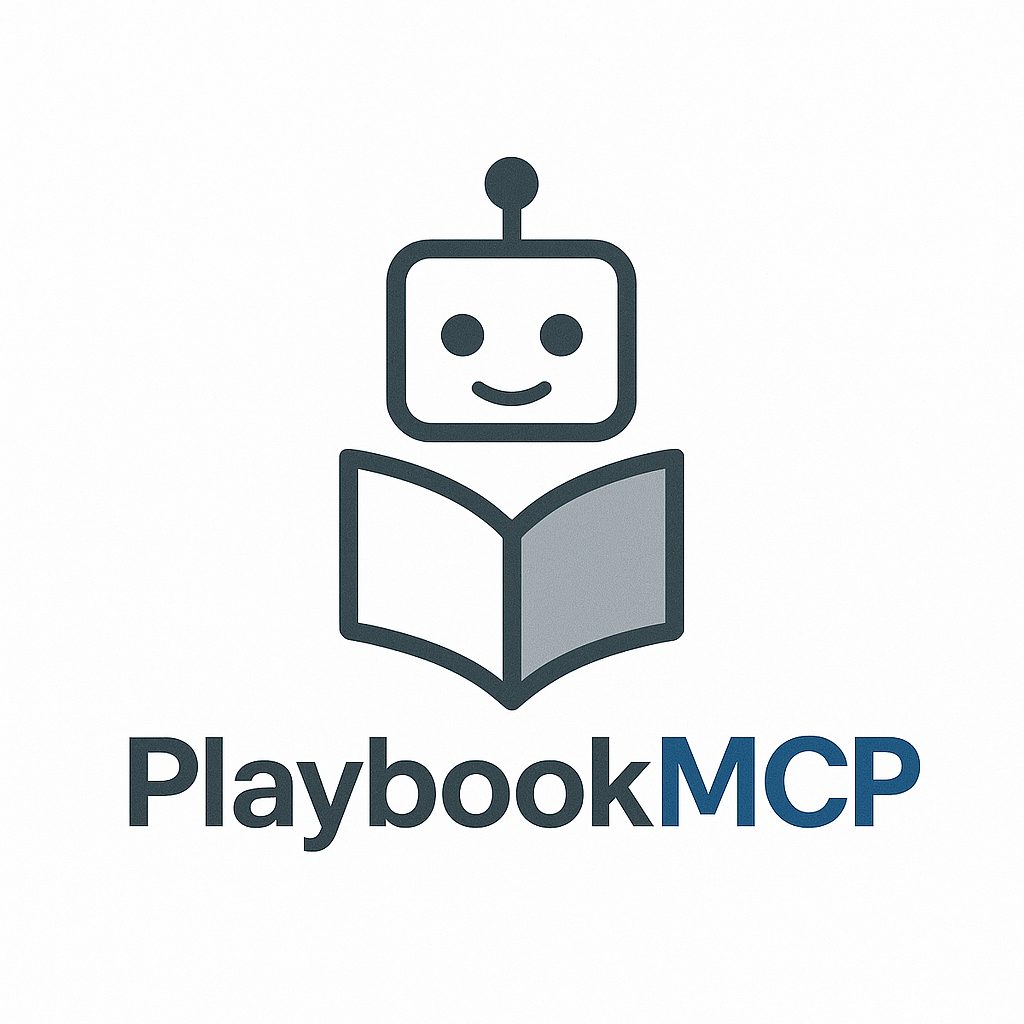
Design diagram
Your team can continuously enrich the knowledge base by editing the playbook-repo (typically a GitHub repository), enabling AI to automatically complete various tasks. For playbook repository structure details, see [docs/playbook.md](docs/playbook.md). ## 🚀 How to Use ### Setup #### Basic Configuration To use playbookmcp with a remote playbook repository: ```json { "mcpServers": { "playbookmcp": { "command": "npx", "args": [ "-y", "playbookmcp@latest", "--playbook-repo", "" ] } } } ``` #### Local Development For testing with a local context directory: ```json { "mcpServers": { "playbookmcp-local": { "command": "npx", "args": [ "-y", "playbookmcp@latest", "--playbook-path", "" ] } } } ``` #### PlaybookMCP Development For developing PlaybookMCP itself: ```json { "mcpServers": { "playbookmcp-dev": { "command": "node", "args": [ "build/index.js", "--playbook-path", "" ] } } } ``` You can also use `inspector` to inspect the MCP resources: ```bash npx @modelcontextprotocol/inspector node build/index.js --playbook-repo ``` ### Chat with Your Code-Agent Below is an example configuration in Cursor: ```json { "mcpServers": { "playbookmcp": { "command": "npx", "args": [ "-y", "playbookmcp@latest", "--playbook-repo", "git@github.com:xuezhaojun/PlaybookMCP-demo.git" ] } } } ``` The first command must be `pb_start` to initiate interaction: ``` pb_start Say Hi to playbookmcp. ``` Or more specific: ``` use MCP tool pb_start Say hi to playbookmcp. ``` Your code-agent will then add a comment on this [issue](https://github.com:xuezhaojun/PlaybookMCP-demo/issues/2).