# dsh-fish-theme
**Whale-girl palettes · two-layer watermarks · terminal-inspired dark theme**
A theme plugin for the [DeepSeek Harness](https://github.com/deepseek-ai) Web UI
[中文](README.md) · **English**
---
## Preview
| Main screen | Settings panel |
|---|---|
| 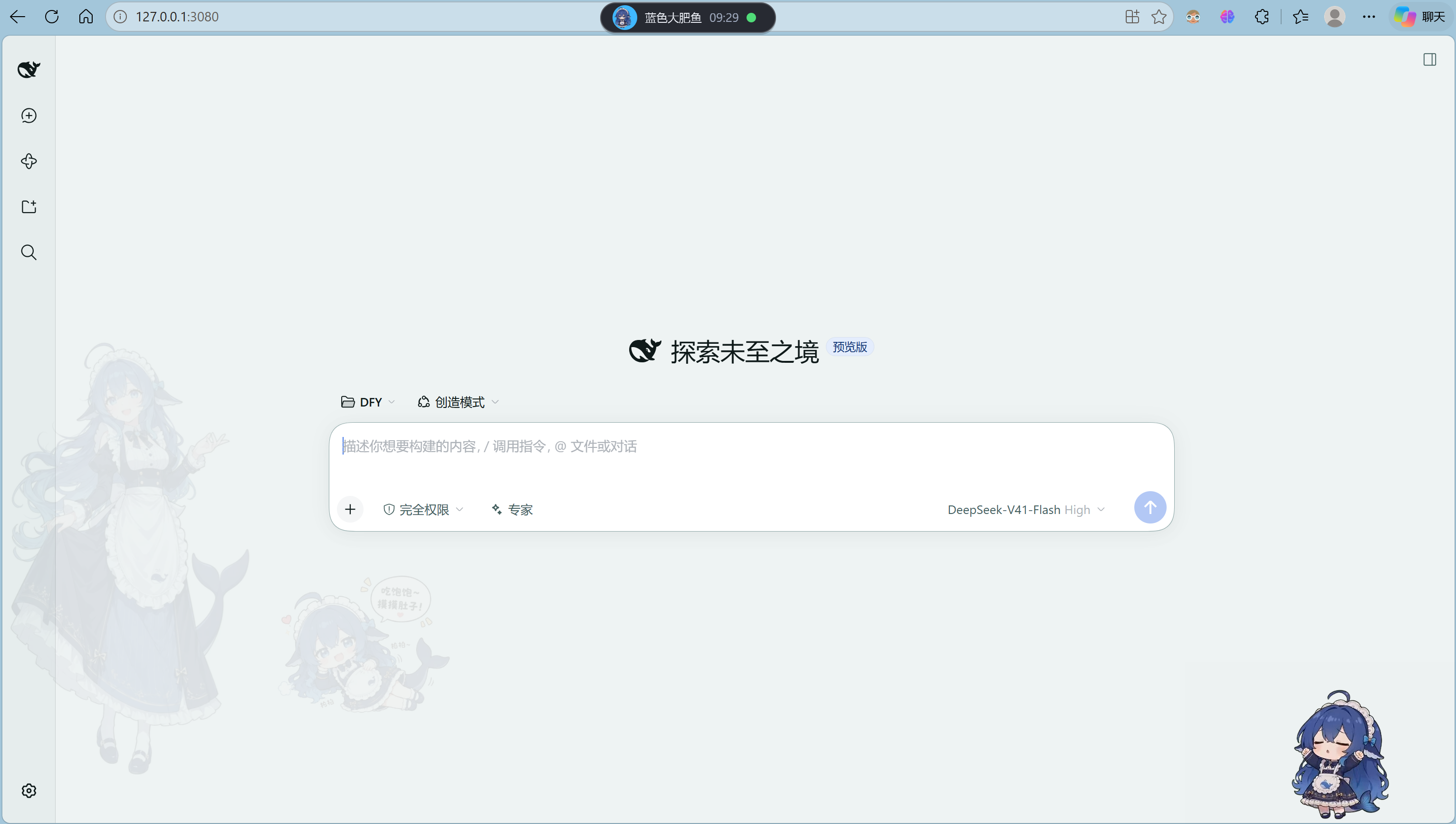 |  |
Left: the **fixed** watermark (standing maid illustration) runs down the left edge,
the **switchable** watermark sits at the lower left of the content column (「吃饱饱」
is selected here), and the little character at the **lower right** is the desktop
pet — see [Companion project](#companion-project).
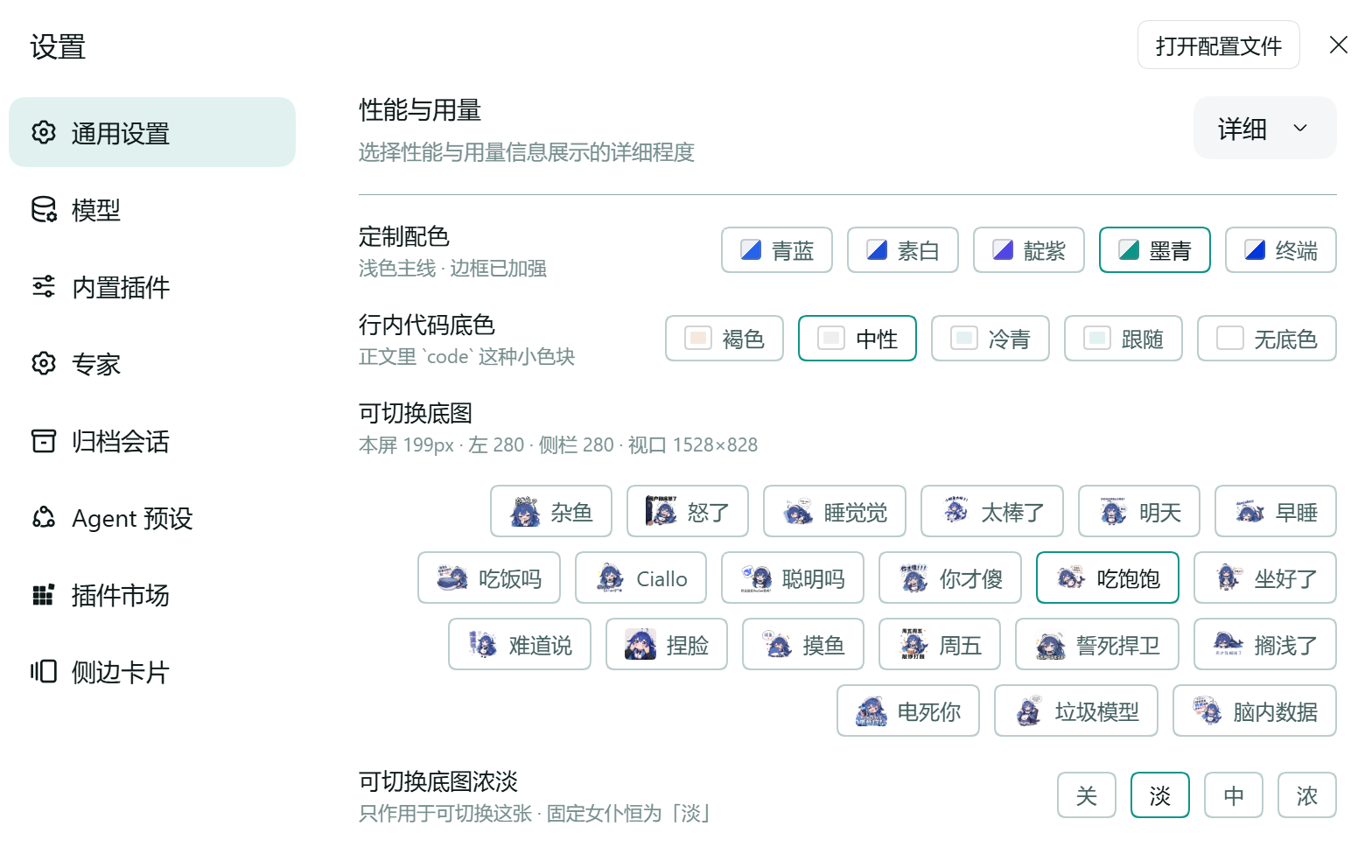
Right: the four option rows under Settings → General, with the 21-image picker.
> Both screenshots are **light mode** (the *teal* palette). The **terminal palette
> only shows its black code panels and amber keywords in dark mode.**
>
> 🌙 **In dark mode, set the switchable watermark's strength to 浓 (strong).** The
> fixed layer uses `multiply`, a blend designed for a white ground — on a dark
> background "dark × art" stays dark, so the watermark fades to nearly nothing.
> Some images in the switchable layer work the same way, so 浓 is the safer
> setting across the board.
## What this is
A skin for the DSH Web UI. It does three things:
1. **Repaints the whole colour token set** — five palettes, each defining light and
dark values for every token
2. **Stacks two background watermarks** — one fixed, one switchable
3. **Recolours code syntax** — nine token classes, using Windows Terminal's palette
Your choices are **remembered**; leaving and re-entering Settings no longer resets them.
## Features
### Palettes (5)
| Name | Character |
|---|---|
| 青蓝 · azure | Cool blue, the default |
| 素白 · crisp | No colour cast, the most neutral |
| 靛紫 · indigo | Violet |
| 墨青 · teal | Blue-green |
| **终端 · terminal** | **Modelled on Windows Terminal: a pure-black code panel and amber keywords in dark mode** |
### Background watermarks (two independent layers)
Each layer owns its own pseudo-element (`body::after` / `body::before`), because a
single element's `opacity` applies to **all** of its background layers — separate
elements are the only way to give them separate strengths.
| Layer | Content | Adjustable |
|---|---|---|
| **Fixed** | Standing maid illustration, left edge | ❌ Locked to 淡 (faint); deliberately not user-facing |
| **Switchable** | Any of 21 stickers | ✅ Image + strength (off / faint / medium / strong) |
> 🌙 **In dark mode, set the strength to 浓 (strong)** — see the note under Preview.
> The fixed layer stays at 淡 and is likewise very faint on a dark background; that
> is a known trade-off, made so it can never be nudged out of place.
**Why the blend modes differ.** A white-ground illustration uses
`mix-blend-mode: multiply` to erase the ground and leave only the line work. A
transparent sticker must **not** use multiply — it would crush light colours into
mud — so it composites normally instead. Each image's `kind` is decided by
**measuring its transparent coverage**, never by eye.
**Position is measured at runtime.** The switchable layer's left offset is read
from the page's inline `grid-template-columns`, which carries the sidebar's real
width (the sidebar is draggable, 264–420px). It therefore re-lays-out when you
release a sidebar drag, instead of being pinned to a hardcoded 280px.
### Inline code background (5)
`褐色 · brown` (default — sampled from the active palette's `warn` hue, which on the
terminal palette is the very amber the keywords use) · `中性 · neutral` · `冷青 · cyan` ·
`跟随 · follow accent` · `无底色 · none`
### Two concrete things the terminal palette does
**① Syntax recolouring.** Shiki's colours are **not theme tokens** — they are plain
CSS custom properties (`--shiki-token-*`) declared in `ui-theme/src/styles/shiki.css`.
The theme's 29 tokens contain **no code-colouring entries at all**, so overriding
those custom properties is the only option. It uses the **exact same selectors** as
the shipped sheet (`:root` / `body[data-ds-dark-theme]`) and wins on injection order,
with no `!important`.
The nine token classes come from Windows Terminal's **Campbell** scheme — the default
PowerShell 7 colours on Windows 11:
| token | dark value | ANSI name |
|---|---|---|
| `keyword` | `#FFC53D` | amber (Campbell's brightYellow is only 34% saturated and reads as grey on black; swapped for a 76% amber) |
| `string` | `#16C60C` | brightGreen |
| `string-expression` | `#13A10E` | green |
| `constant` | `#3B78FF` | brightBlue |
| `function` | `#61D6D6` | brightCyan |
| `parameter` | `#E74856` | brightRed |
| `comment` | `#767676` | brightBlack |
| `punctuation` | `#CCCCCC` | white |
| `link` | `#3B78FF` | brightBlue |
**② The code panel earns its contrast.** Page charcoal `#23272F` against a pure-black
code block `#000000` gives a perceptual lightness difference of **ΔL\* 15.6** (the
original design managed 5.3). A 4px blue accent runs down the left edge, plus a 1px
inner border — both drawn with `box-shadow` so the panel's geometry never shifts.
> A lesson worth recording: **WCAG contrast ratio cannot measure the difference
> between two adjacent dark surfaces.** That change moved WCAG from 1.11:1 to
> 1.40:1 (26%), while the perceived difference was **194%** — near-blacks sit in the
> steep part of the transfer curve, where a ratio cannot see them.
## Companion project
**[dsh-pet-indesktop](https://github.com/MerZlin/dsh-pet-indesktop)** ports the blue
fat-fish desktop pet to Windows / Linux / macOS, based on
[PC2005-cloud/dsh-pet](https://github.com/PC2005-cloud/dsh-pet), with extra
interactions. See its own README for installation.
Why they pair: **the same whale-girl character, with complementary jobs.** This theme
dresses the interface; the pet is the one that moves around your desktop. Run both and
your whole working environment is blue fat fish (it is the character at the lower right
of the main screenshot above).
## Installation
**Option 1 · plugin marketplace** — paste the repository URL into the DSH plugin
marketplace.
**Option 2 · dependency spec** — hand this to the DSH plugin installer
(`plugin_manager`, action `install_bundle`, with the spec as `target`):
```text
github:xuyixi992/dsh-fish-theme
```
**Restart DSH once after installing** — the host half registers 22 image routes, and
that happens at startup.
## Where the settings are
**Settings → General → 定制配色.** Four rows: palette / inline code background /
switchable watermark / switchable watermark strength.
## Swapping in your own watermark images
1. Drop the image into `images/`, named `.webp`
2. Add `` to `IMAGE_IDS` in `index.js`
3. Add `{ id: '', name: 'Label', kind: '…' }` to `SWITCHABLES` in `client.js`
`kind` picks how the ground is removed — **choose it from the measured transparent
coverage**:
| `kind` | Condition | Effect |
|---|---|---|
| `alpha` | more than 10% transparent pixels | Plain compositing; use for transparent stickers |
| `cutout` | opaque with near-white corners | `multiply` erases the white ground |
| `scene` | anything else (full-bleed, no removable ground) | Radial mask feathers the edges |
## Diagnostics log
The host console is not reachable from a session, so every step is appended to:
```text
%TEMP%\dsh-fish-theme-host.log (Linux/macOS: $TMPDIR/dsh-fish-theme-host.log)
```
**Deliberately not inside the package directory** — installed from a git URL the
package lives inside pnpm's store, where writing is unreliable; and a published
package should not litter its own sources with logs.
## Copyright and license
Author **ECXU** ·
**This is a dual-licensed project. The code and the artwork are not the same thing.**
| Scope | License |
|---|---|
| Source (`client.js` / `index.js` / `cordis.patch.yml` / `package.json` and the rest) | **MIT** — see [LICENSE](LICENSE) |
| Everything under `images/` | **CC BY-NC-SA 4.0** — see [images/LICENSE](images/LICENSE) |
### Artwork attribution (required by the license — do not remove)
- Original character design **上善无形** ·
- DeepSeek maid redesign **ZipZipPipe** ·
- Collected from **蓝色大肥鱼档案馆 / EDMOK** ·
The images under `images/` are fan art, **non-commercial**, and any adaptation must
carry the same license. This is an unofficial fan project; it represents no official
position, and all rights in the artwork remain with its creators.
### If you want to drop the artwork
Empty `SWITCHABLES` in `client.js` (or keep only your own drawings) and delete the
corresponding files from `images/` — the code alone can then be published under plain
MIT.
## Known limitations
- The watermarks are **absolutely positioned decoration**: they take no part in layout
and never block text selection (`pointer-events: none`)
- A sidebar drag or a window resize triggers a re-layout; **other layout changes do not**
- The remembered selection lives in **localStorage**, keyed to the origin DSH was
opened on. Change the port or hostname and the memory does not follow (just pick
again). The DSH client service catalog exposes **no persisted-state store**, so this
is the only storage available to a client-only plugin
- Watermark images are sized by **height** with a cap; an unusually wide image may end
up wider than you expect