# 🤖 MetaBot
### Run Codex and Kimi Code from Feishu/Lark, Telegram, WeChat, or the Web
_A self-hosted personal agent workspace. Claude Code remains available for compatibility._
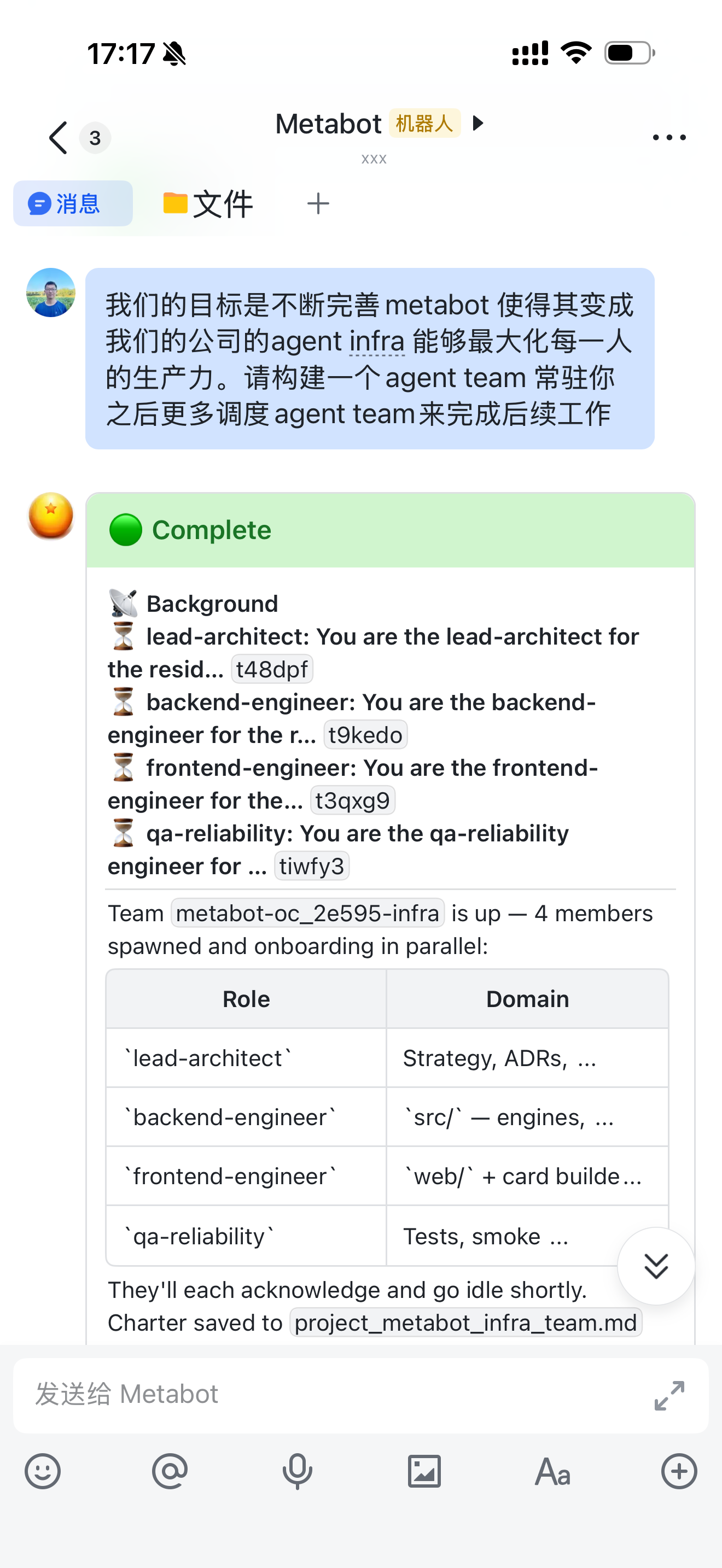
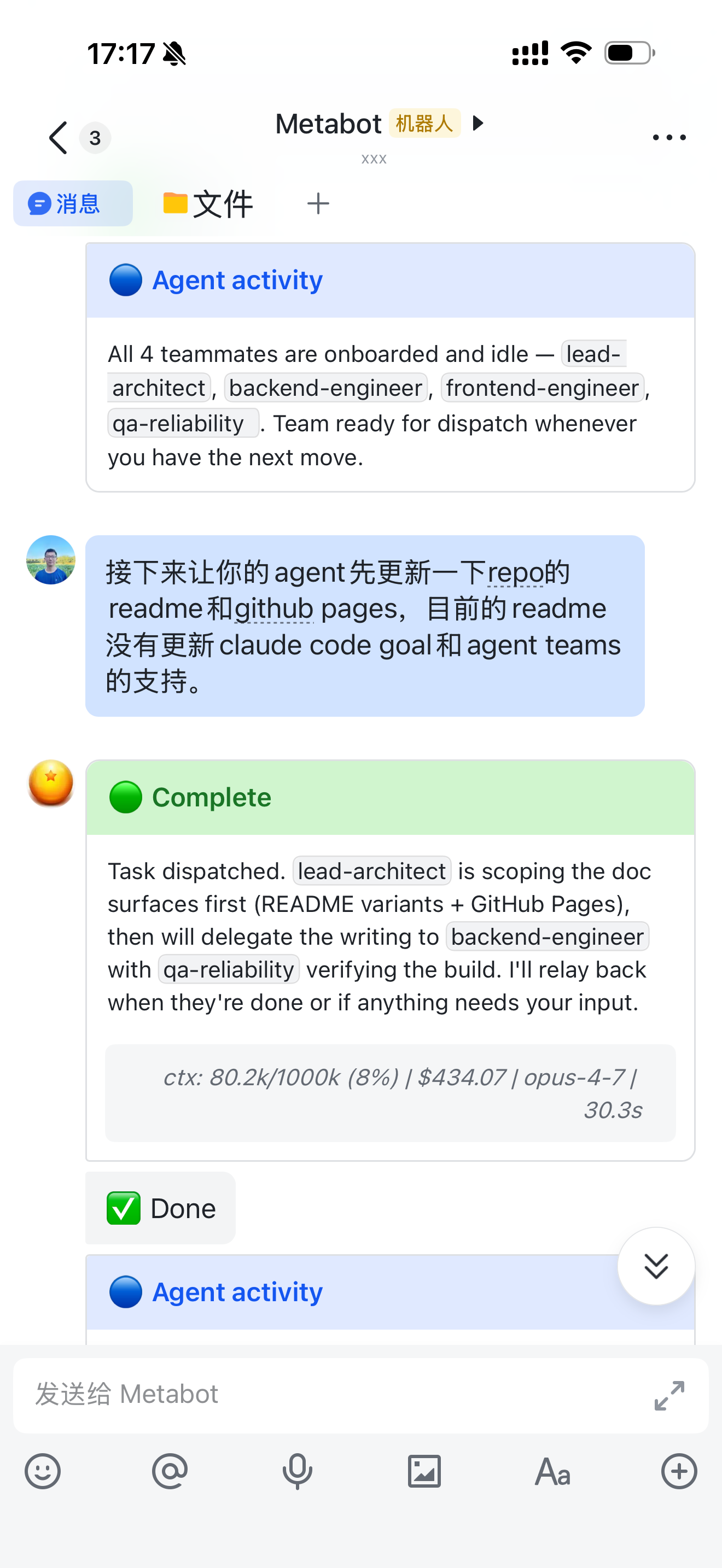
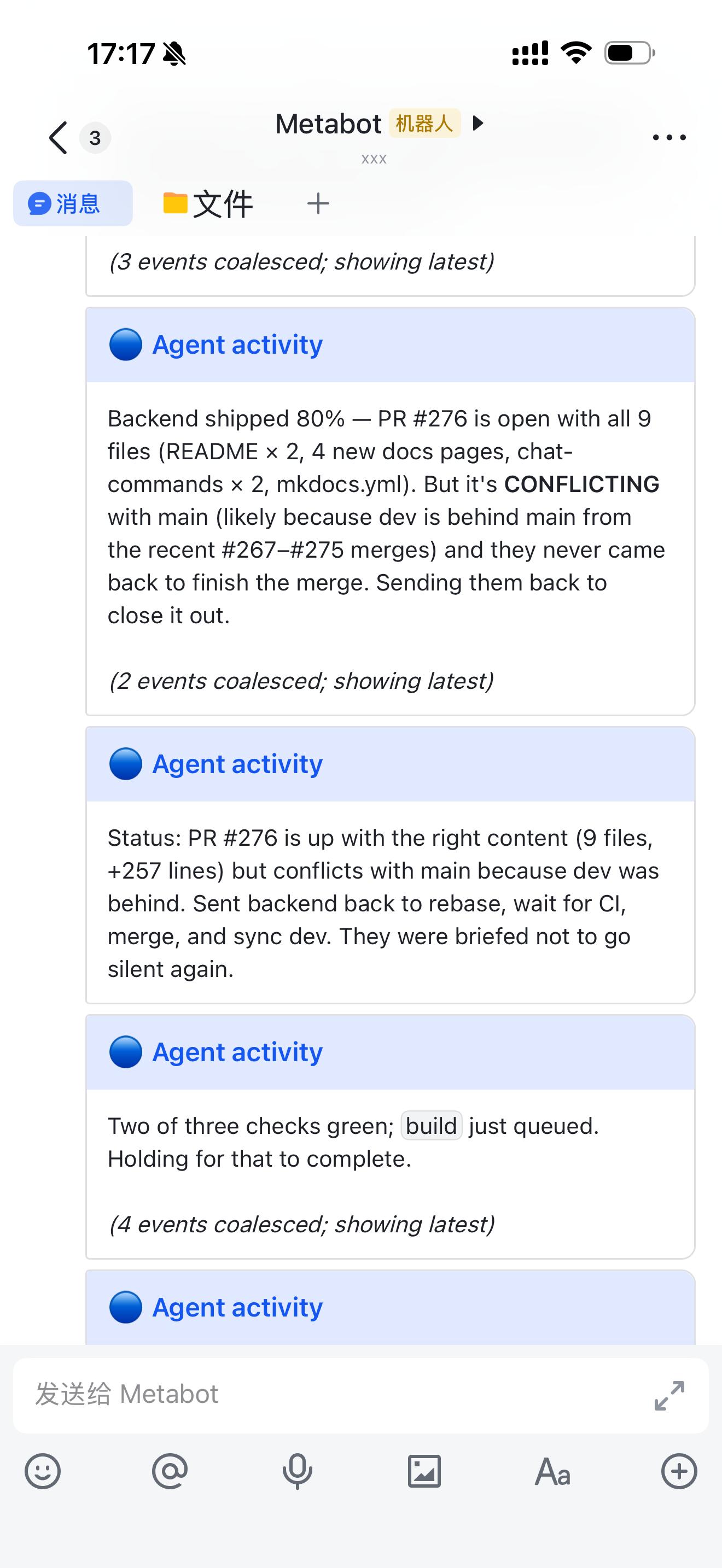
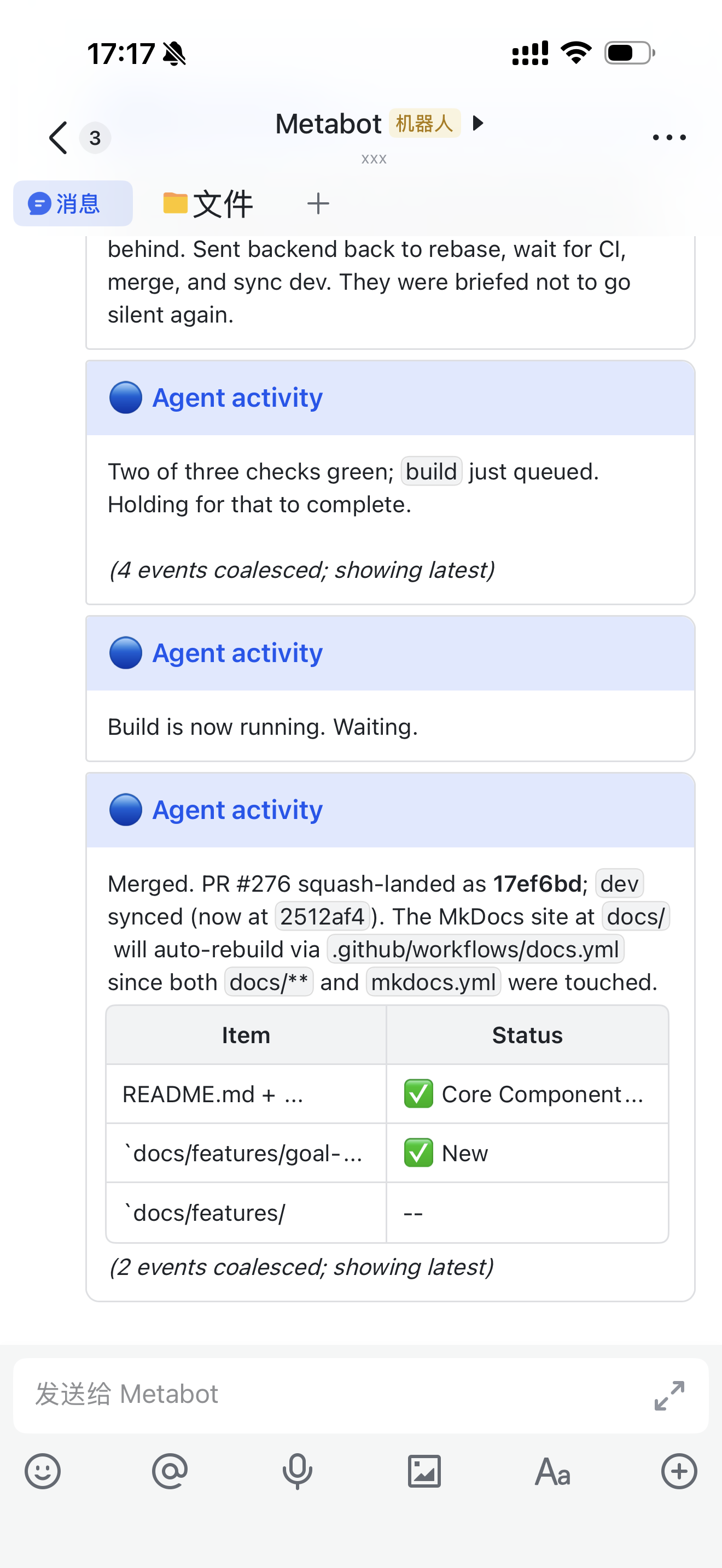
Feishu mobile · Spawn a team · Dispatch work · Follow progress · Merge the PR
```bash
curl -fsSL https://github.com/xvirobotics/metabot/releases/latest/download/install.sh | bash
```
The signed-checksum installer deploys the complete personal edition in about five minutes: local Core, token-only Web UI, IM Bridge, CLI, skills, and PM2 services.
## Personal Edition
MetaBot runs on your machine and does not require corporate SSO, OIDC, a VPN, or an employee directory.
- The local Core and personal console default to `http://localhost:9200`.
- There is one Web frontend: Core Console. The former Bridge URL at `http://localhost:9100/web/` redirects to `http://localhost:9200/chat` and is no longer built or maintained separately.
- The installer generates a Bearer token, stores it at `~/.metabot-core/token` with mode `0600`, and never prints it into logs.
- Core data stays under `~/.metabot-core/`; Bridge state stays under `~/.metabot/`.
- Release assets are checksum-verified before extraction.
- Existing external Core deployments remain supported with `METABOT_INSTALL_CORE=0`.
See [Installation](docs/getting-started/installation.md) for custom paths, source installs, updates, Windows status, and external-Core setup.
The default install directory is `~/metabot`. Override it with
`METABOT_HOME=/opt/metabot bash install.sh`; source checkouts and Release
installs retain separate update paths so `metabot update` never guesses blindly.
## Engines
Codex is the default engine. Kimi Code is a first-class alternative. Claude Code is retained so existing Claude-based bots and workspaces continue to run.
| Engine | Connects through | Authentication | Current OSS behavior |
| ----------------------------- | --------------------------------------------------------- | ---------------------------------------------------- | ------------------------------------------------------------------------------------------------------ |
| **Codex CLI** | `codex exec --json` and `codex exec resume` | `codex login` or OpenAI-compatible API configuration | JSONL streaming, tools, session resume, `/model`, `/effort`, bridge-managed goals and background tasks |
| **Kimi Code 0.27+** | Official local Server API used by Kimi's own web frontend | `kimi login` | Durable Sessions, live snapshots, questions, stop/resume, tools, subagents, and goals |
| **Claude Code compatibility** | Claude CLI / Agent SDK compatibility path | `claude login` or Anthropic-compatible API | Existing Claude sessions, skills, and workspaces remain usable |
The public Codex adapter currently uses `codex exec`; Codex app-server and Feishu mid-turn steering for Codex/Kimi remain gated on the later shared reliability foundation.
Install or authenticate an engine from a standalone terminal:
```bash
npm install -g @openai/codex
codex login
npm install -g @moonshot-ai/kimi-code@latest # Kimi Code 0.27+
kimi login
```
Each bot selects an engine in `bots.json`; if omitted, the engine defaults to `codex`. See [Multi-Bot Configuration](docs/configuration/multi-bot.md) and [Environment Variables](docs/configuration/environment-variables.md).
Engine workspace conventions remain native:
| Content | Codex | Kimi Code | Claude compatibility |
| ------------------ | ---------------- | ----------------- | ------------------------------- |
| Instructions | `AGENTS.md` | `AGENTS.md` | `CLAUDE.md` compatibility entry |
| Skills | `.codex/skills/` | `.agents/skills/` | `.claude/skills/` |
| Subscription state | Codex profile | `~/.kimi-code/` | Claude credentials |
The installer mirrors MetaBot's bundled skills into the active engine paths;
your existing locally modified skills are preserved.
## Quick Start
Prerequisites: **Node.js >= 22.19**, Git, and credentials for at least one engine and one chat channel.
1. Run the one-line installer above.
2. Choose Codex or Kimi Code and complete its login in a separate terminal.
3. Connect Feishu/Lark, Telegram, or WeChat when prompted.
4. Verify the services and open the local console:
```bash
metabot status
metabot health
```
Open `http://localhost:9200`, paste the token from `~/.metabot-core/token`, and select your bot.
Core Console Chat shows streamed responses, live tool activity, output-file
cards, interactive Agent questions, run cancellation, and browser or
Bridge-backed speech input. Agents, Memory, Skills, T5T, Teams, and CLI Access
share the same token-authenticated console.
| Channel | Best for | Setup |
| --------------- | ------------------------------------------------------- | ------------------------------------------------------------ |
| **Feishu/Lark** | Workspaces, streaming cards, files, group routing | [Feishu App Setup](docs/getting-started/feishu-app-setup.md) |
| **Telegram** | Fast personal setup; no public IP required | [Quick Setup](docs/getting-started/quick-setup.md) |
| **WeChat** | Personal WeChat through ClawBot; currently gray testing | [WeChat Guide](docs/features/wechat.md) |
| **Web** | Browser chat, Core, Memory, Teams, and settings | `http://localhost:9200` |
Feishu uses a persistent WebSocket; Telegram and WeChat use long polling. None requires an inbound public port.
In Feishu groups, normal messages route to the exact bot that was @mentioned.
The group owner can select mention-only or all-message mode per bot and group
with `@Bot /group-reply ...`; bare commands and commands addressed to another
bot are ignored. Unmentioned files remain available for the next @Bot prompt
in mention-only mode. See [Chat Commands](docs/usage/chat-commands.md#group-reply-modes).
## Minimal Dual-Bot Configuration
`bots.json` can mix engines and workspaces in one Bridge process:
```json
{
"feishuBots": [
{
"name": "codex-dev",
"engine": "codex",
"feishuAppId": "cli_xxx",
"feishuAppSecret": "...",
"defaultWorkingDirectory": "/home/me/project-a"
},
{
"name": "kimi-reviewer",
"engine": "kimi",
"feishuAppId": "cli_yyy",
"feishuAppSecret": "...",
"defaultWorkingDirectory": "/home/me/project-b",
"kimi": { "thinking": true }
}
]
}
```
Each bot has its own channel credentials, engine, workspace, and sessions. Bots can still collaborate through Agent Teams and the Agent Bus.
## What You Get
- **Mobile coding** — edit code, run tests, inspect tools, and follow long tasks from chat.
- **Agent Teams** — spawn focused teammates, assign parallel work, and keep durable task/run state. [Guide](docs/features/agent-teams.md)
- **MetaMemory** — searchable knowledge shared across sessions with optional Feishu Wiki sync. [Guide](docs/features/metamemory.md)
- **T5T and goals** — durable project checkpoints plus supervised multi-turn execution. [Chat Commands](docs/usage/chat-commands.md)
- **Skill Hub** — install and publish reusable agent skills through the single `metabot` CLI.
- **Unified Core Console** — token-authenticated Chat, Agents, Memory, Skills, T5T, Teams, CLI Access, and diagnostics, with no second Bridge Web UI to maintain.
- **Channels and media** — text, rich posts, images, files, audio, smart batching, and exact @Bot routing.
- **Peers, scheduling, and voice** — optional capabilities for larger personal setups. [Feature docs](docs/)
## Essential Commands
| Command | Purpose |
| ---------------------------------------------- | ---------------------------------------------------------------------- |
| `/model` | Show or switch the current engine/model |
| `/effort low\|medium\|high\|xhigh\|max\|ultra` | Set Codex reasoning effort for this chat |
| `/status` | Show the current session and model |
| `/reset` | Start a fresh session |
| `/stop` | Stop the active task |
| `/goal ` | Keep working across turns until complete, blocked, or capped |
| `/background ` | Run a supported background task while the chat continues |
| `@Bot /group-reply mention\|all\|status` | Control one Feishu bot's reply mode in one group |
| `metabot update` | Update a package-managed personal edition to the latest GitHub Release |
| `metabot update --package --version 1.3.0` | Install exactly the immutable v1.3.0 Release package |
See [Chat Commands](docs/usage/chat-commands.md), the [CLI Reference](docs/reference/cli-metabot.md), and the [REST API](docs/reference/api.md) for the complete surfaces.
## Documentation
- Start: [Installation](docs/getting-started/installation.md) · [Quick Setup](docs/getting-started/quick-setup.md) · [Troubleshooting](docs/troubleshooting.md)
- Product: [Core Console](docs/features/web-ui.md) · [Multi-Bot and Engines](docs/configuration/multi-bot.md) · [MetaMemory](docs/features/metamemory.md) · [Agent Teams](docs/features/agent-teams.md)
- Reference: [Chat Commands](docs/usage/chat-commands.md) · [CLI](docs/reference/cli-metabot.md) · [REST API](docs/reference/api.md) · [Environment Variables](docs/configuration/environment-variables.md)
- Operations and development: [Architecture](docs/concepts/architecture.md) · [Production](docs/deployment/production.md) · [Contributing](CONTRIBUTING.md)
## Update and Development
For a normal package-managed personal edition, `metabot update` defaults to the
latest GitHub Release. Pin an immutable version when reproducibility matters;
source checkouts retain an explicit Git path:
```bash
metabot update # latest GitHub Release
metabot update --package --version 1.3.0 # exactly v1.3.0
metabot update --git # source checkout
```
Package updates verify `SHA256SUMS`, validate the complete personal-edition
manifest and its version, and reject a pinned-version mismatch. The overlay
preserves `.env`, `bots.json`, `data/`, `logs/`, `~/.metabot/`, and
`~/.metabot-core/`; only the package-owned `~/.metabot/default.env` may be
refreshed with new safe defaults.
For development:
```bash
git clone https://github.com/xvirobotics/metabot.git ~/metabot
cd ~/metabot
npm ci --include=dev
npm test
```
Use Node.js >= 22.19. See [Contributing](CONTRIBUTING.md) before opening a PR.
## Security
MetaBot agents can read, write, and execute code in their configured workspace. Keep Core and Bridge tokens private, restrict IM bot visibility, and expose local ports only through your own authenticated reverse proxy or private network.
## About and License
MetaBot is built by [XVI Robotics](https://xvirobotics.com) and released under the [MIT License](LICENSE).