中文 | English
# Hand-drawn Style & Layout Prompter for AI Image Generation
> **Struggling to describe art styles? Trouble structuring visual layouts? Simply pick an index number to generate highly recognizable AI image prompts.**
This repository curates **280 distinct hand-drawn illustration styles** (`001`–`280`), **134 composition layout patterns** (`SC-*` Social Cards, `IG-*` Infographics, `SB-*` Comic Storyboards, `IP-*` IP Design), and **36 curated classic monochrome colors** (`C-01`–`C-36`).
Whether you are crafting social media post covers, educational infographics, architectural comparisons, or multi-panel narrative comics, you no longer need to memorize obscure art history terminology or struggle with complex compositions. **Simply choose a style number, layout ID, and theme color, supply your topic, and instantly get verified, high-fidelity bilingual prompts ready to paste into Midjourney, DALL-E 3, Flux, Stable Diffusion, or any other image generator.**
> [!NOTE]
> ### 📢 Open Source & Attribution Notice
> **You are welcome to freely use, modify, and commercialize this project.**
> The only small request: if this project helps you, or if your project is based on secondary development of this work, **please retain author yang0 and the original repository link** ([https://github.com/yang0/handraw-style](https://github.com/yang0/handraw-style)). Thank you for your support and respect for open source!
> [!TIP]
> ### 📚 Official Feishu Knowledge Base is Live
> 🔗 **[👉 Click to Access Feishu Knowledge Base ↗](https://ecmn3m3i17.feishu.cn/wiki/space/7689222460876524523?ccm_open_type=lark_wiki_spaceLink&open_tab_from=wiki_home)**
>
> 1. 🖼️ **Quick Visual Gallery**: Instant mobile & desktop browsing of all 280 illustration styles and 136 layouts
> 2. ❓ **Skill FAQ & Prompt Cheat Sheet**: Setup walkthroughs, troubleshooting tips, and ready-to-use prompt patterns
> 3. 💡 **Entrepreneurship & Monetization**: Continuously updated real-world case studies and revenue strategies shared by the community
---
## 🌟 Core Pain Points & Solutions
| Creator Pain Point | How This Library Solves It |
| :--- | :--- |
| **Vague style descriptions lead to style drift** | **Numbered Indexing**: 280 systematically categorized illustration styles, eliminating guess-and-pray prompting. |
| **Monotonous composition; hard to format complex graphics** | **136 Layout Compositions**: 21 Social Cards, 35 Infographics, 68 Comic Storyboards, 12 IP Design ready out-of-the-box. |
| **Chaotic color palettes lack a cohesive tonal mood** | **36 Curated Monochrome Colors**: Klein Blue, Sage Green, Hermes Orange, Payne's Grey, etc., setting pure and sophisticated tones with one click. |
| **Text disconnects from art; awkward typography placement** | **Dual-Mode Workflow**: Seamlessly toggle between "Pure-Image Mode" (pure illustration) and "Graphic-Text Mode" (unified visual-textual composition). |
| **Models ignore style keywords or lack style fidelity** | **Tiered Model Adaptation & Fallback**: Calibrated keyword activation for native models; automatic Reference Image Fallback (4-grid sheets) for all third-party models. |
| **Boring article covers with disconnected visuals** | **Article Cover Designer**: Automatically extracts ~200-word core summary & audience persona, matches styles & colors, prioritizes visual metaphor, and delivers bold titles with clean editorial layout. |
| **Inconsistent article illustrations & tedious formatting** | **Article Illustration Planner & Backfill**: Visual editorial judgment for 2–5 high-value inflection points, unified single style & color across the piece, automated batch image generation, and precision Markdown insertion. |
---
## 🎯 Target Audiences & Use Cases
- **Content Creators & Influencers**: Social media covers (Xiaohongshu, Instagram, X/Twitter), newsletter hero images, viral quote cards.
- **Newsletter & In-Depth Article Writers**: Automatic ~200-word argument extraction, high-converting cover design, cohesive multi-illustration planning, and automated Markdown insertion.
- **Knowledge & Tech Bloggers**: Comparison lists, architecture pyramids, step-by-step processes, and high-engagement infographics.
- **Comic & Story Creators**: 4-panel strips, emotional webtoons, storyboard drafts, children's storybook illustrations.
- **Visual & Brand Designers**: Rapid concept sketching, creative campaign posters, character design prototypes.
---
## Installation
You can install this skill directly into your AI coding assistant (Codex, Claude Code, Cursor, WorkBuddy, OpenCode):
> **"Install this Skill for me: https://github.com/yang0/handraw-style"**
The assistant will automatically clone the repository and configure all styles, layout templates, and reference assets.
---
## How to Use This Skill
### 1. Smart Recommendation Mode (Zero Friction: No IDs Required)
If you don't want to browse through indexes, **simply describe what you want to illustrate**! The Skill analyzes your theme's mood, domain, and context, then **automatically pairs the best-matching hand-drawn style with an optimal classic monochrome theme color** (including an aesthetic rationale):
- *Zero-parameter prompt*: `Generate a prompt for a healing illustration of a cat sunbathing on a windowsill, pick the style and theme color for me (can combine)`
> 💡 *Recommended Pairing*: Style `#018 · Minimal Deadpan Dialogue Cartoon` + Color `C-26 · Persimmon Orange` (Rationale: warm, comforting, and relaxed atmosphere), outputting production-ready bilingual prompts immediately.
- *Completion*: If you specify only a style (e.g., `Style 276, Theme: Future of AI`), the Skill auto-recommends a harmonious color (e.g., `C-01 Klein Blue`). If you specify only a color, it auto-recommends a fitting style.
### 2. Precise Manual Selection Mode (Choose Specific IDs)
1. Open the [Style Visual Sheet (STYLES_en.md)](STYLES_en.md), [Layout Visual Sheet (LAYOUTS_en.md)](LAYOUTS_en.md), or [Classic Monochrome Colors Sheet (COLORS_en.md)](COLORS_en.md) to browse visual sheets and pick your desired numbers;
2. Note your chosen ID, such as style `041`, layout `SC-001`, or theme color `C-01`;
3. Send your prompt command to the Skill, for example:
- **Style only**: `Style: 041, Theme: First milk tea of autumn`
- **Layout + Style**: `Layout: SC-001, Style: 041, Theme: First milk tea of autumn`
- **With Theme Color**: `Layout: SC-001, Style: 041, Color: C-01, Theme: First milk tea of autumn`
4. Receive clean, copyable bilingual prompts with precise style definitions, layout geometry, and unified color palette;
5. Copy and paste into Midjourney, DALL-E 3, Stable Diffusion, Flux, or any image generator to create your artwork.
### 3. AI Poster Design Mode (Structured Prompts, Native Integrated Layout)
Need to design festival campaign visuals, key art, or editorial social media posters? Simply tell the Skill your poster theme!
- **Prompt Command**: `请帮我出海报提示词, 主题:秋分` (or `Generate a poster prompt for me, Theme: Autumn Equinox`)
- **Intelligent Synergy**: The Skill analyzes the concept and pairs the best-matching hand-drawn style (e.g., `#268 · Contemporary Literati Ink Cartoon`) with classic theme colors (e.g., `Dominant: C-26 Persimmon Orange + Accent: C-03 Prussian Blue`). It outputs clean, structured prompts across **8 core design dimensions** (Theme, Scene, Audience, Density, Mood, Palette, Editorial Style, Hand-Drawn Style) with typography-composition integration guidelines.
- **Real Generation Showcase**: Passing the prompt directly to an image generation model (e.g., GPT Image 2/2.5) yields seamless native typographic layout and artistic metaphor fusion—large-character calligraphy title, poetic couplet inscriptions, seal stamps, balanced day-and-night imagery, and relaxed literati ink brushwork:
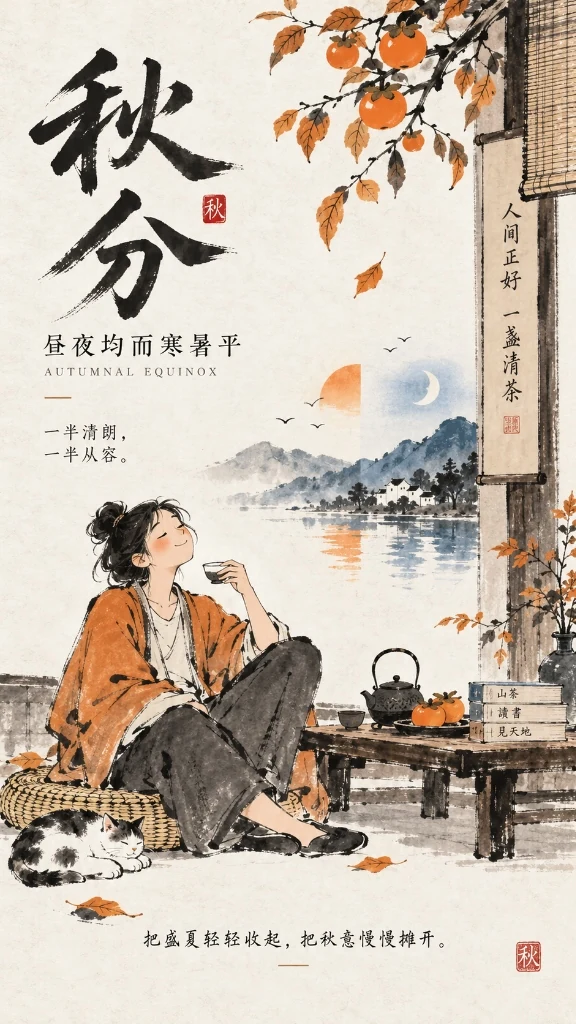
Real Generation Case: Style #268 Contemporary Literati Ink Cartoon + C-26 Persimmon Orange (Dominant) / C-03 Prussian Blue (Accent)
👉 Click to view the full poster design prompt
```text
主题:秋分·昼夜均而寒暑平
业务场景:二十四节气传统文化海报、文创书店/茶饮节日宣发主视觉、社媒节气签
受众:传统文化爱好者、文艺青年、生活美学追求者、大众社媒读者
内容密度:低
情感基调:松弛闲适、温润拙朴、平衡从容、金秋诗意
主题色:主色为柿子橙(Persimmon Orange),点缀色为普鲁士蓝(Prussian Blue)
editorial风格:Contemporary Literati Ink Cartoon Editorial 风格
画风:风格名称:#268 · Contemporary Literati Ink Cartoon。参考作者/风格名称:当代人文水墨漫画。核心风格特征:现代生活人物、动物和日常小场景;白色或微暖纸面、大面积留白;毛笔和墨线快速画人物;线条松弛、粗细不一、枯湿自然、允许断笔和不闭合轮廓;人物高度概括、比例略笨拙,以姿态和动作表达情绪;人物是画面的主要视觉主体;场景保留少量必要元素;墨色为主,少量朱红、赭石、石绿、湖蓝局部点染;书法题字和朱红印章自然嵌入留白;整体拙朴、松弛、幽默、闲适;现代生活速写与中国写意笔墨结合。【如果主题直白包含画面元素那就按主题出图,文案由你来升华,但是不要直接描述画面。 如果主题比较概念化,那么文案和主题尽量保持一致,如果文案较长由你提炼,由你先设计画面隐喻(人类和非人类都行)再出图 。 文字参与构图,图文一体】
```
### 4. Pro Tips: The Universal Poster Mindset (Treat Infographics as High-Density Posters)
Feeling constrained by pre-canned infographic layouts? **Don't let rigid grids trap your imagination!**
The essence of an infographic is an information-dense visual poster. Simply tell the Skill your **time slots, core metrics, steps, and usage scenarios**; the model natively weaves timeline nodes, scenery illustrations, and typography into a cohesive editorial layout:
- **Travel Itineraries**: *Chiang Mai 5-Day Roaming (Day 1 Itinerary)* (Timed routes + landmarks + Northern Thai cuisine & tips)
- **Outdoor Gear Guides**: *Ultralight Mountain Camping Packing Guide* (3 core systems knolling lay flat + 8kg limit, workwear style)
- **Lifestyle Skills**: *Beginner Pour-Over Coffee Guide* (1:15 ratio + 3-stage pulse pouring timeline + flavor wheel)
💡 **[👉 Click to read the full Tutorials & Pro Tips Guide (TUTORIALS_en.md)](TUTORIALS_en.md)** (Covers the Universal Poster Mindset, Dynamic Recommendation, Triad Assembly, Dual-Mode Switching, and Multi-Model Tiering with complete copyable prompts).
### 5. Article Cover Design Mode (Summary Extraction, Audience Persona, Visual Metaphor Cover)
Finished an article and need a high-CTR, tasteful cover? Simply send your draft to the Skill!
- **Target Scenarios**: WeChat Official Account covers (recommended `2.35:1` or `21:9`), X/Twitter article covers (`5:2`), Xiaohongshu covers (`3:4`), etc.
- **Prompt Command**: `Please design a cover for this article: [paste article text or provide local file path d:\path\to\article.md]` (optionally specify platform or preferred style/color).
- **Automated Workflow**:
1. **Core Summary Extraction**: Distills a ~200-word essence of key arguments, causal logic, and takeaways;
2. **Audience Persona Inference**: Evaluates knowledge depth and motivation to construct target reader profile;
3. **Style & Color Pairing**: Recommends the optimal match from 280 hand-drawn styles and 36 classic monochrome palettes (e.g., `#018 Minimal Deadpan Dialogue Cartoon` + `C-01 Klein Blue`);
4. **Native Metaphor Directive**: Injects the proven editorial instruction—*"Design a visual metaphor first, then generate the image. Ensure the main title is bold and prominent, with few or no small text. Pick the rest of the design for me."* allowing the image model to compose clean, high-impact visuals natively;
5. **Dual-Track Delivery Guidance**:
- **Track A (Manual Generation)**: Copy the generated bilingual prompts into your favorite image tool;
- **Track B (Fully Automated)**: Simply reply **"Auto generate cover"**, and the Skill will call the image generation tool to produce the cover visual directly.
### 6. Article Illustration Planner & Auto-Backfill Mode (Visual Planning, Cohesive Art, Markdown Assembly)
Walls of text cause reader fatigue and drop-offs; yet hunting for stock photos leads to disjointed art styles and frustrating formatting. This mode offers an end-to-end editorial pipeline: **"Editorial Point Selection → Unified Style & Color → Batch Generation → Automated Markdown Insertion"**:
- **Prompt Command**: `Please plan and generate illustrations for this article: [paste article text or provide local file path d:\path\to\article.md]`
- **Automated Workflow**:
1. **Visual Editorial Judgment**: Rejects robotic paragraph-by-paragraph illustration. Understands narrative tension and conceptual complexity to pinpoint 2–5 high-value inflection points (thesis statement, abstract metaphor, structural diagram, climax, or concluding takeaway);
2. **Unified Single-Style & Single-Color Harmony**: Locks the entire article to a single hand-drawn style (e.g., `#276 Contemporary Literati Ink`) and color palette (e.g., `C-01 Klein Blue`), formatted in an editorial standard `4:3` aspect ratio (with customizable whitespace: normal / moderate / generous);
3. **Structured Plan & Prompts**: Specifies exact insertion anchor points, illustration purpose, image type (`editorial illustration`, `conceptual diagram`, `metaphorical illustration`, etc.), visual concept, and ready-to-use bilingual prompts;
4. **Dual-Track Delivery Closed Loop**:
- **Track A (Manual Generation & Backfill)**: Generate images with your preferred tool, then paste them or provide local paths; the Skill automatically inserts them after the correct anchor paragraphs in Markdown;
- **Track B (Fully Automated Generation & Insertion)**: Simply say **"Auto generate and insert"**; the Skill sequentially generates all illustrations and triggers its built-in Python insertion engine to produce the completed, formatted Markdown document (e.g., `article_illustrated.md`).
---
## Two Prompt Modes, Instant Switching
Any number and theme can seamlessly toggle between two modes without changing your style:
- **Pure-Image Mode (纯图模式)**: Let the theme dictate pure pictorial content without in-image text. Ideal for pure illustrations, wallpapers, book covers, and concept art.
*Example*: `Pure-image mode, Style: 041, Theme: First milk tea of autumn`
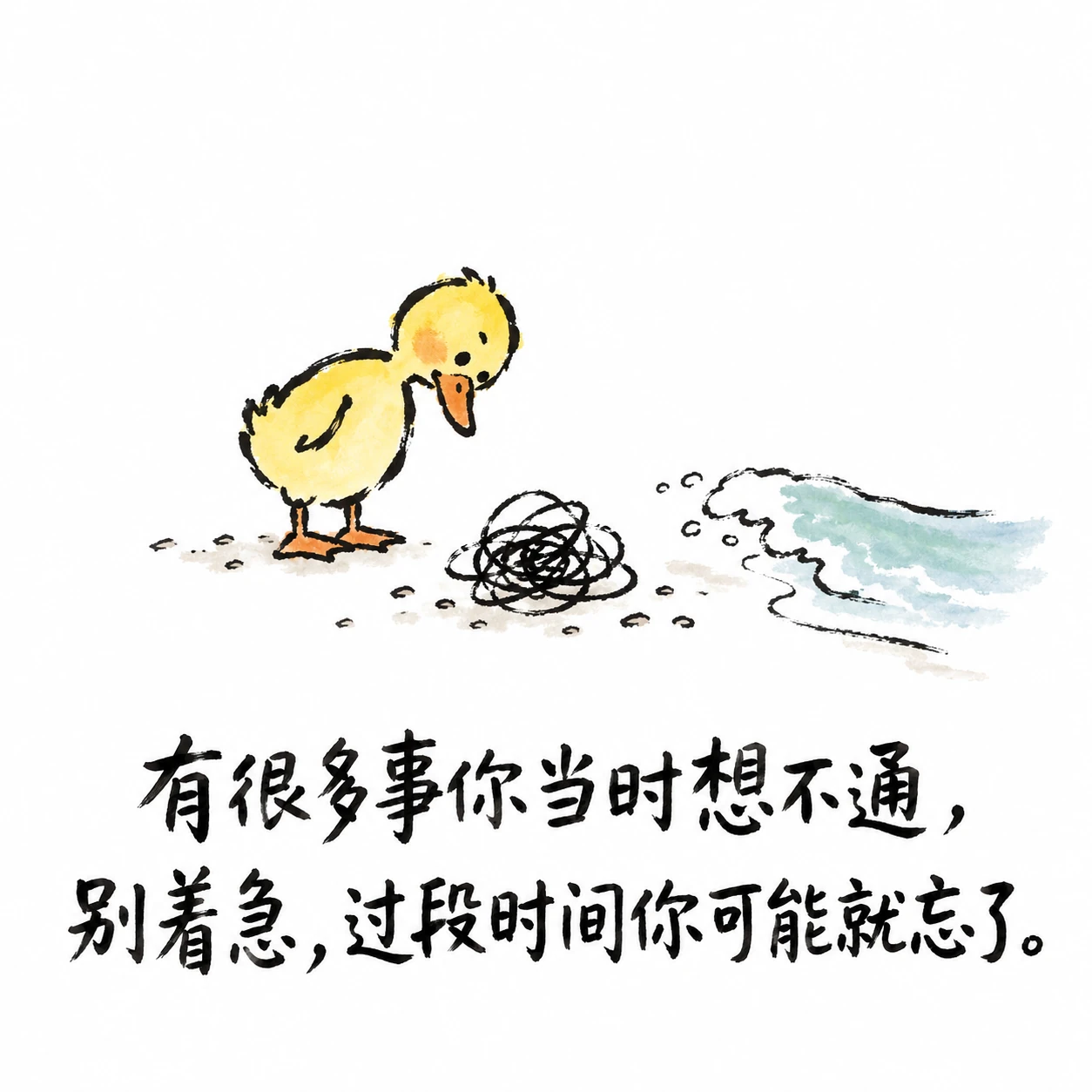
- **Graphic-Text Mode (图文模式)**: Preserves your copy text and guides the AI to design metaphors and integrate typography harmoniously into the visual composition. Ideal for quote posters, meme graphics, and social cards.
*Example*: `Graphic-text mode, Style: 267, Theme: There are many things you couldn't figure out back then. Don't worry, give it some time and you might just forget about them.`
Switch modes anytime by typing *"switch to pure-image mode"* or *"switch to graphic-text mode"*. Defaults to pure-image mode when unstated.
### Graphic-Text Mode Demonstration
The illustration below shows text integrated harmoniously with the visual composition (this is a conceptual demonstration and not tied to any single number):
---
### Model Adaptation Mechanism
By default, the Skill crafts copyable prompts. When you explicitly request image generation, it optimizes the output based on verified model capabilities:
- **Explicitly Calibrated Models (e.g., `gpt-image-2`)**: Full activation hierarchy for all 280 styles: Style/Author Name → Positive Core Traits → Reference Image only when traits alone cannot reliably trigger the style, avoiding unnecessary image passing that might over-constrain the composition.
- **Third-Party & General Models (Midjourney, Flux, Stable Diffusion, Imagen, Gemini, etc.)**: Employs the rock-solid **Reference Image Fallback** strategy. The Skill provides a 1024x1024 4-grid standard reference image or file path, ensuring 100% faithful reproduction of linework, texture, and color palette without prompt drift.
- **Open for Community Benchmarks**: Capability definitions reside in `skills/handdraw-style-prompter/references/model_capabilities.json`. Pull requests for other model evaluations are warmly welcomed!
---
## Three Quick Examples
```text
Style: 041, Theme: First milk tea of autumn
Style: 210, Theme: Little boy lighting firecrackers in the snow
Style: 193, Theme: Tang Dynasty Night Banquet
```
---
## Featured Styles Preview
Here is a contact sheet preview of featured hand-drawn illustration styles (001–016):
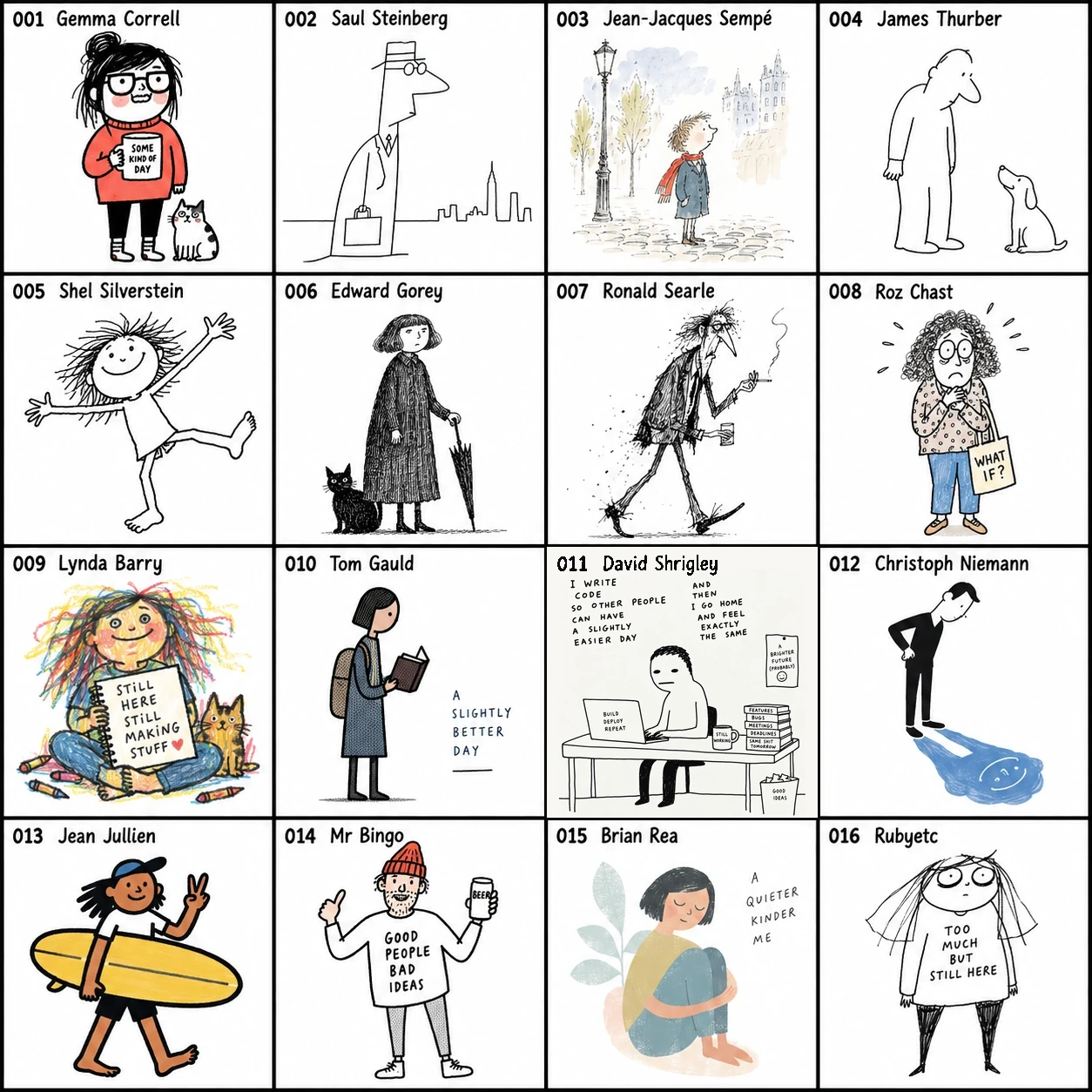
- 🖼️ **[👉 Browse All Style Sheets (001–280 Full Visual Contact Sheets)](STYLES_en.md)**
- 📄 **[View Detailed Style Metadata (280 Styles Table & Core Traits)](styles_200_reorganized.md)**
- 💻 *(For offline interactive search and enlargement, open `skills/handdraw-style-prompter/gallery/index.html` in your local browser)*
---
## Layout Compositions Showcase
In addition to 280 illustration styles, this library includes **134 composition layout patterns**, covering social cards, data infographics, multi-panel storyboards, and IP design. Combine any style with any layout with a single command.
### 1. Social Cards (21 Layouts)
Ideal for Xiaohongshu, Instagram, quote cards, signature showcases, and social media carousels. Includes top-bottom split, text-driven cards, two-column contrasts, signature showcase grids, and sticky notes.
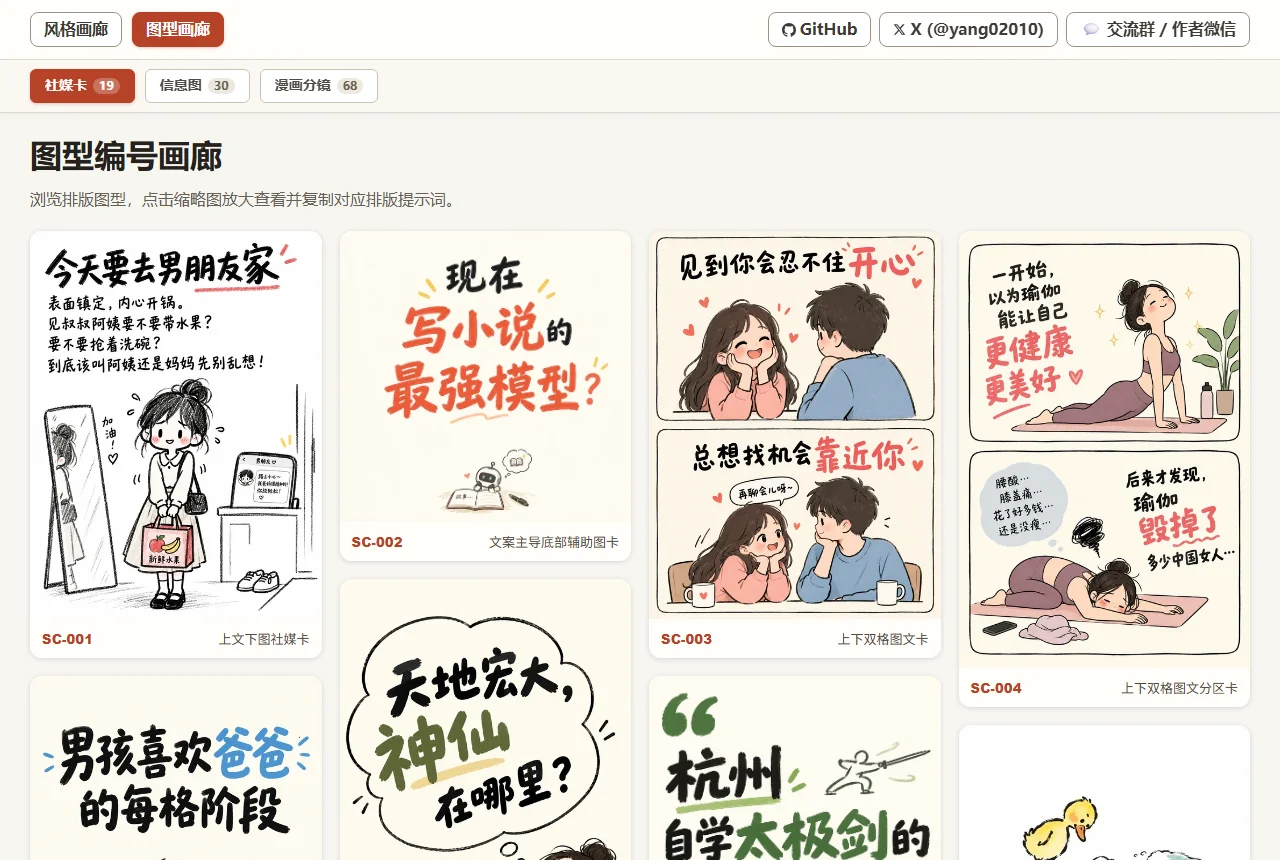
👉 **[View All Social Card Layouts (21 Visuals & Prompts)](LAYOUTS_en.md#social-cards)**
---
### 2. Infographics (35 Layouts)
Ideal for knowledge breakdowns, comparison checklists, step-by-step processes, and structured data visuals. Includes hierarchy pyramids, central icons, matrices, and multi-column comparison tables.
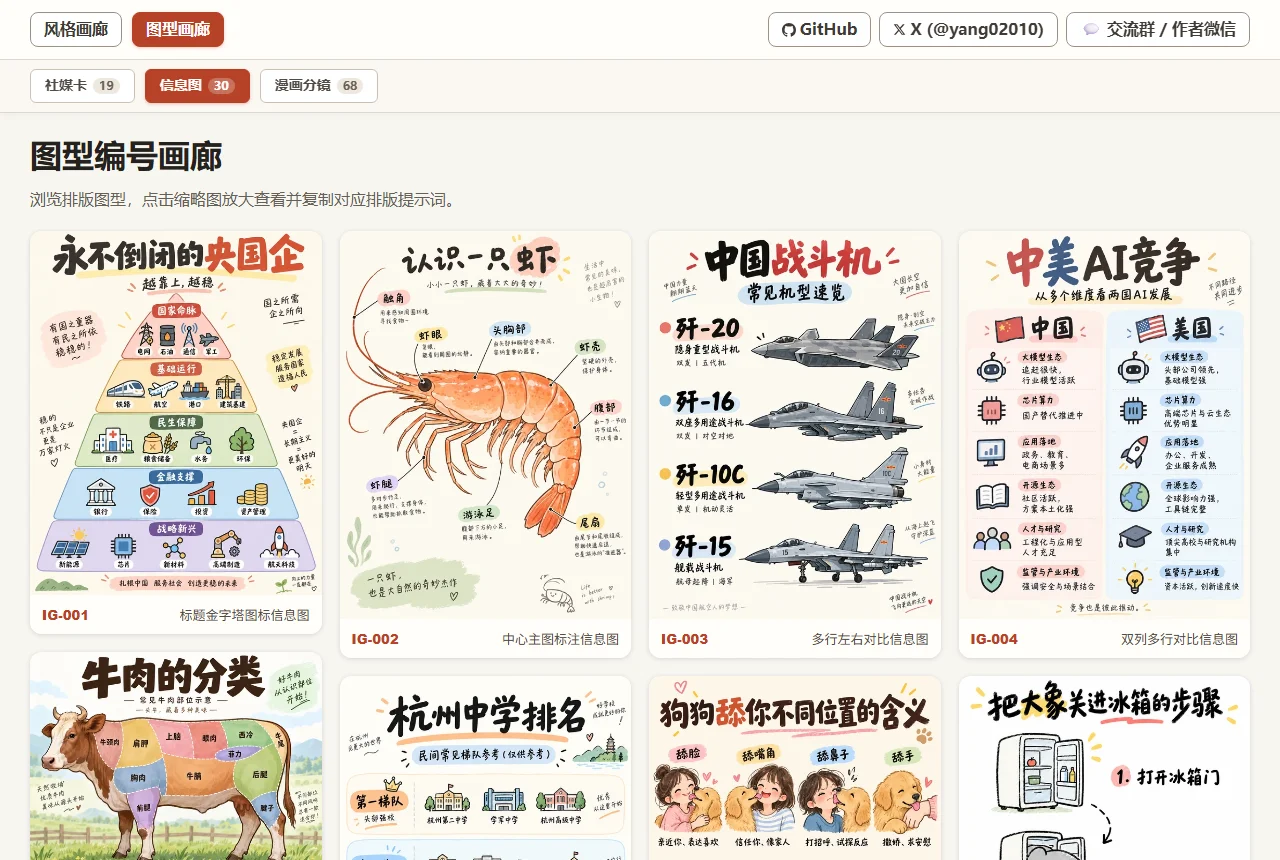
👉 **[View All Infographic Layouts (35 Visuals & Prompts)](LAYOUTS_en.md#infographics)**
---
### 3. Comic Storyboards (68 Layouts)
Ideal for multi-panel narratives, webtoons, emotional storylines, and cinematic pacing. Includes standard 4-panel grids, dramatic wide-angle focus, diagonal cuts, and manga storyboards.
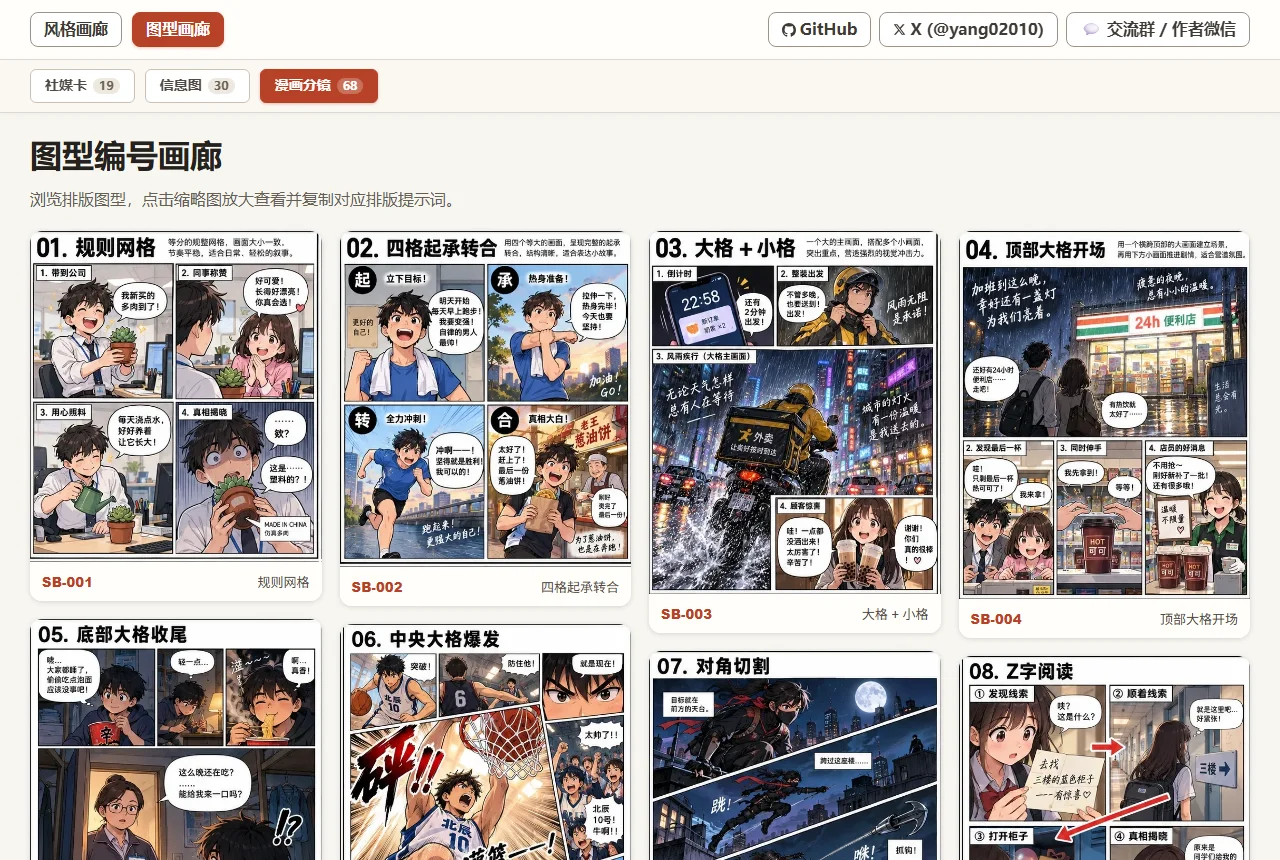
👉 **[View All Comic Storyboard Layouts (68 Visuals & Prompts)](LAYOUTS_en.md#comic-storyboards)**
---
### 4. IP Design (12 Layouts)
Ideal for brand mascot planning, character design manual, emotional positioning, and commercial derivatives.
👉 **[View IP Design Layouts (12 Visuals & Prompts)](LAYOUTS_en.md#ip-characters)**
---
- 💡 **[👉 Enter Full Layout Visual Sheet to Browse All 136 Layouts & Prompts ↗](LAYOUTS_en.md)**
- 💻 *(For offline interactive search and category filtering, open `skills/handdraw-style-prompter/gallery/layouts.html` in your local browser)*
---
## Classic Monochrome Colors Showcase (36 Colors)
This library curates **36 classic monochrome theme colors** (numbered `C-01` ~ `C-36`, covering Classic Blue, Fresh Green, Vintage Red & Classical, Romantic Pink & Purple, Warm Sun & Earth, and Classic Neutral Tones).
No matter what illustration style or layout composition you choose, specifying a theme color instantly establishes a cohesive visual tone. You can also copy individual color prompts with one click in the offline gallery.
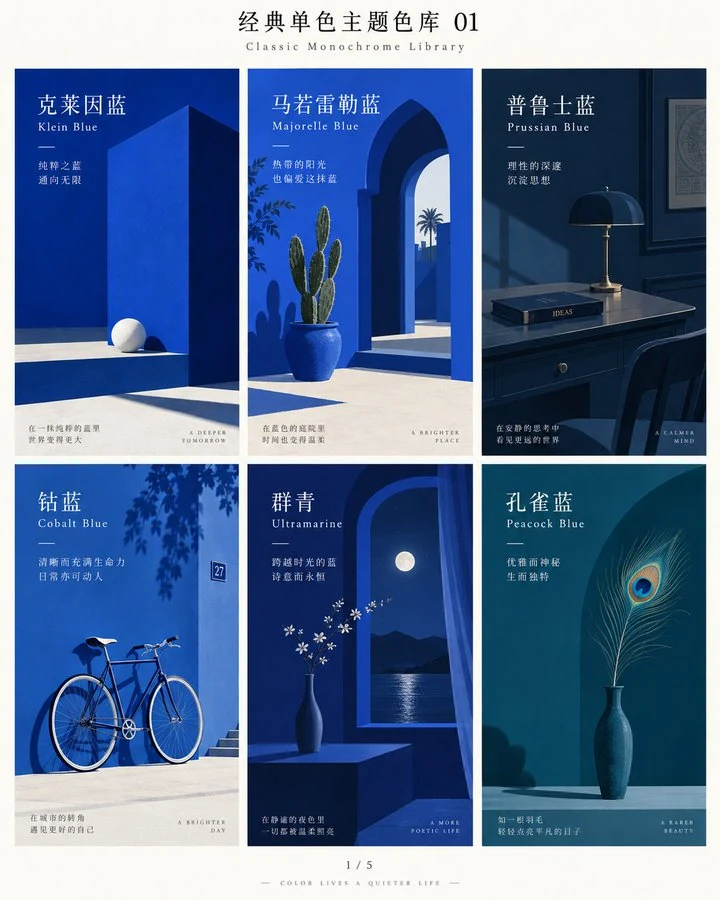
- 🎨 **[👉 Enter Classic Monochrome Colors Visual Sheet to Browse All 36 Colors & Prompts ↗](COLORS_en.md)**
- 💻 *(For offline interactive search and one-click copy, open `skills/handdraw-style-prompter/gallery/colors.html` in your local browser)*
---
## Author & Community
- 📚 **Feishu Knowledge Base**: [Access Knowledge Base (Visual Gallery / FAQ / Monetization Case Studies) ↗](https://ecmn3m3i17.feishu.cn/wiki/space/7689222460876524523?ccm_open_type=lark_wiki_spaceLink&open_tab_from=wiki_home)
- **Creator Monetization Community / Author WeChat**: Please prioritize joining the group; if full, try adding personal WeChat. Note: **handdraw**:
| ① Join Group Chat (Priority) | ② Personal WeChat (Fallback) |
| :---: | :---: |
|  |
|  |
- **X (Twitter)**: [@yang02010](https://x.com/yang02010)
- **GitHub**: [yang0/handraw-style](https://github.com/yang0/handraw-style)
---
## 📄 License
This project is licensed under the MIT License with an explicit attribution requirement. **You are welcome to freely use, modify, and commercialize.**
The only request: if this project is helpful to you, or if your project is based on secondary development of this work, please retain credit to author **yang0** and the original repository link: [https://github.com/yang0/handraw-style](https://github.com/yang0/handraw-style).
See [LICENSE](LICENSE) for full terms.
|
- **X (Twitter)**: [@yang02010](https://x.com/yang02010)
- **GitHub**: [yang0/handraw-style](https://github.com/yang0/handraw-style)
---
## 📄 License
This project is licensed under the MIT License with an explicit attribution requirement. **You are welcome to freely use, modify, and commercialize.**
The only request: if this project is helpful to you, or if your project is based on secondary development of this work, please retain credit to author **yang0** and the original repository link: [https://github.com/yang0/handraw-style](https://github.com/yang0/handraw-style).
See [LICENSE](LICENSE) for full terms.