# localapp
### Find and reopen forgotten localhost tools.
*LaunchPad for localhost tools on your Mac: dev servers, AI-built scripts, and Claude Code, Codex, or Cursor artifacts remembered and re-openable.*
[](https://www.npmjs.com/package/@yaobii/localapp)
[](https://nodejs.org)
[](#install)
[](./LICENSE)
[](https://github.com/yaobii-lab/localapp/issues)
**English** · [简体中文](./README.zh-CN.md)
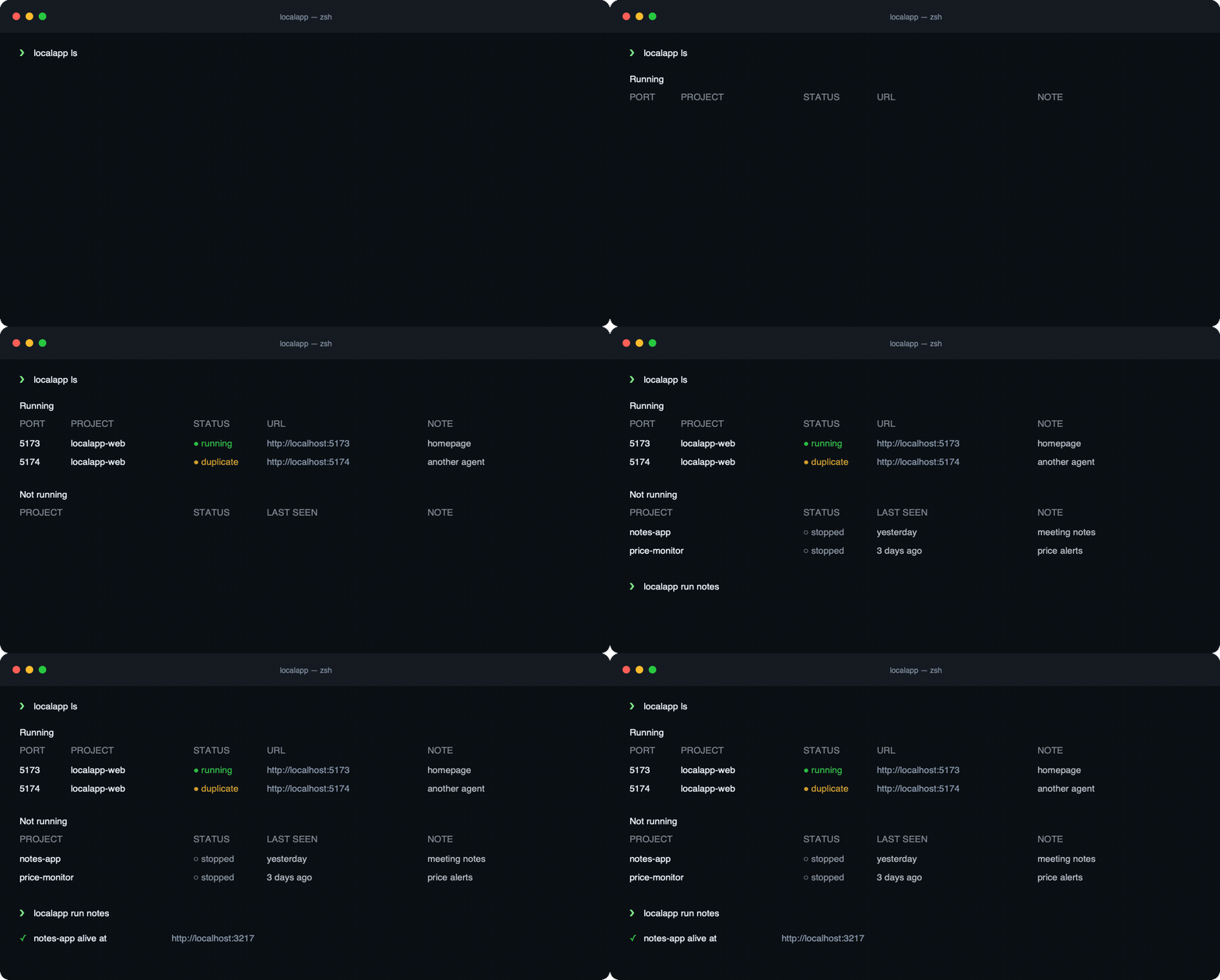
Forgot which folder started `localhost:5173`? LocalApp tells you and reopens it.
## Install
```bash
npm install -g @yaobii/localapp
# or run without installing:
npx @yaobii/localapp ls
```
Requires **macOS** and **Node 20+**.
## Why you want this
- ↩️ **Open any local webtool with one command.** LocalApp remembers the command and directory, so `localapp run notes-export` brings the tool back weeks later.
- 🤖 **Connect coding agents automatically.** `localapp setup` teaches Claude Code and Codex to inspect LocalApp first, launch through it, and reuse a healthy server.
- 🤝 **Hand live services between agents.** Every agent sees the same project, port, URL, and whether the service is still running—instead of starting its own copy.
- 🧭 **Keep localhost understandable as agents come and go.** LocalApp adds project meaning to live system data while leaving your scripts and environment under your control.
## The problem
You vibe a tiny local webtool one Sunday — a price monitor, a CSV labeler, a one-off RSVP page. The artifact ships. It runs on `localhost:3000`. A week later you want it again. Where did it live? Which folder? What command starts it? You've already forgotten.
Or you run two coding agents in parallel. By Friday your Mac has ports `5173`, `5174`, `7110`, `8765` all listening — and neither you nor the next agent can say which one is real, which project owns it, or which is safe to stop.
Both are the same problem at different speeds: **the process keeps running, but the meaning evaporates** — shell closed, context compacted, brain moved on. `5173` decays into a meaningless number nobody dares touch; that Sunday tool decays into a folder you can't find.
Today an agent answers *"what's running?"* with a `lsof + ps + grep + curl` loop — several calls and still a guess. localapp returns the resolved answer in **one call**: port → project → source → whether it is still alive. And `localapp open ` brings any forgotten artifact back from the dead.
## Connect your coding agents
Install or update LocalApp and connect supported coding agents with one confirmation:
```bash
npx @yaobii/localapp@latest setup
```
If LocalApp is already installed, manage agent integrations directly:
```bash
localapp init # detect Claude Code, Codex, and Cursor
localapp init --status # complete, missing, or conflicted
localapp init --dry-run # preview without writing
localapp init --agent claude,codex --yes # target agents non-interactively
localapp init --uninstall # remove only LocalApp-owned content
```
`setup` checks that the installed `localapp` command works before updating agent instructions. It keeps your existing instructions and stops if a LocalApp-generated rule contains your edits.
Claude Code and Codex connect automatically. Cursor requires one manual step in **Cursor Settings → Rules**; LocalApp tells you when it detects Cursor.
## Reopen what evaporated
Rebooted and your service is gone? You don't remember the exact command. localapp does:
```bash
localapp run memory # fuzzy match against everything on your shelf
# (or the equivalent: localapp open memory)
#
# Already alive? It just prints the URL. Gone? It replays the recorded
# recipe (command + cwd) in the background and returns. Add --foreground
# to keep logs attached and stop it with Ctrl-C. If the environment has rotted
# (venv, deps, env vars), it says so plainly and hands control back —
# it will not try to fix your environment.
```
## Shelve without running
You vibe-coded a tool last Sunday and don't want to start it right now — but in two weeks you'll want to use it again, and you'll have forgotten what folder it lives in:
```bash
cd ~/projects/notes-app
localapp add --note "meeting notes" -- npm run dev
# ✓ added notes-app to shelf
# Open with: localapp run notes-app
```
`add` records the recipe (command + cwd + branch + note) without spawning anything. The next `localapp ls` shows it under *Not running*, ready to be brought back up.
## Launch without stacking ports
```bash
localapp run --note "checkout redesign" -- npm run dev
# If a healthy server for this project already exists, reuse it and print its URL.
# Otherwise start it, detect the port, and register it.
```
Already have something running you didn't launch through localapp? Annotate it in place, without restarting:
```bash
localapp adopt 8765 --note "patch panel"
```
## Why it works
localapp reads OS truth (`lsof`) and only **annotates** it — adding the one layer the kernel can't reconstruct: which project, which agent, why. That has one decisive property:
> An agent that ignores localapp doesn't break it. Its server simply shows up as an un-annotated port. The view is never blind, and never goes stale.
Agents reach for it the same way they reach for `rg` or `jq`: it's the cheaper path to an answer they already need — not a policy they have to remember to obey.
## Commands
| Command | What it does |
|---|---|
| `localapp ls` | List services on your shelf. `--all` for every project, `--running` / `--stopped` / `--status ` to filter, `--json` for agents. |
| `localapp run ` | Take a registered service off the shelf and resurrect it. Already alive? Just prints the URL. Same as `localapp open `. |
| `localapp run --note "…" -- ` | Start (or reuse) a new dev service, register it on the shelf. |
| `localapp add --note "…" -- ` | Shelve a service without starting it — for tools you'll want to resurrect later. |
| `localapp adopt --note "…"` | Annotate an already-listening port without restarting it. |
| `localapp status ` | Explain one port's listener, LocalApp record, and next action. Use `--json` for agents. |
| `localapp init [options]` | Connect coding agents; check status, preview changes, choose agents, or remove LocalApp instructions. |
| `localapp setup [options]` | Install or update LocalApp, then connect detected agents. |
Run `localapp --help` for per-command options.
## FAQ
### How do I find which project owns `localhost:5173`?
Run `localapp status 5173`. LocalApp reads the live listener from macOS, checks its LocalApp record, and explains the project, command, URL, and next action when it can.
### How do I reopen a forgotten local dev server?
Use `localapp run ` or `localapp open `. If the service is still healthy, LocalApp prints the URL. If it is stopped, LocalApp replays the saved command in the saved directory.
### How is LocalApp different from `lsof`?
`lsof` tells you which process owns a port. LocalApp keeps that OS truth and adds project meaning: name, cwd, command, note, source, URL, and whether the service is healthy.
### How is LocalApp different from `pm2`?
`pm2` manages long-running processes. LocalApp is a lightweight shelf for local web tools and dev servers. It reads live state on demand and does not try to supervise, restart, or deploy your app.
### Can Claude Code, Codex, or Cursor reuse the same dev server?
Yes. `localapp setup` connects supported coding agents so they can inspect LocalApp first, reuse a healthy server, and avoid starting duplicate localhost services.
## What this is not
- **Not a deployment platform.** It never touches `package.json`, framework config, Dockerfiles, or Vercel/Railway/Netlify settings.
- **Not an AI app builder.**
- **Not a daemon or process supervisor.** It reads live runtime state on demand and sends nothing off your machine. Reading is less invasive than intercepting.
## Community
LocalApp recognizes and supports the [LINUX DO](https://linux.do) community.
## License
[MIT](./LICENSE) © yaobii