Hyper-Extract Logo

**智能知识提取 CLI** **一行命令,将文档转化为结构化知识。** [📖 English Version](./README.md) · [中文版](./README_ZH.md)

Trendshift

PyPI版本 Python版本 开源协议 文档 GitHub Stars


> **"Stop reading. Start understanding."** > *"告别文档焦虑,让信息一目了然"*
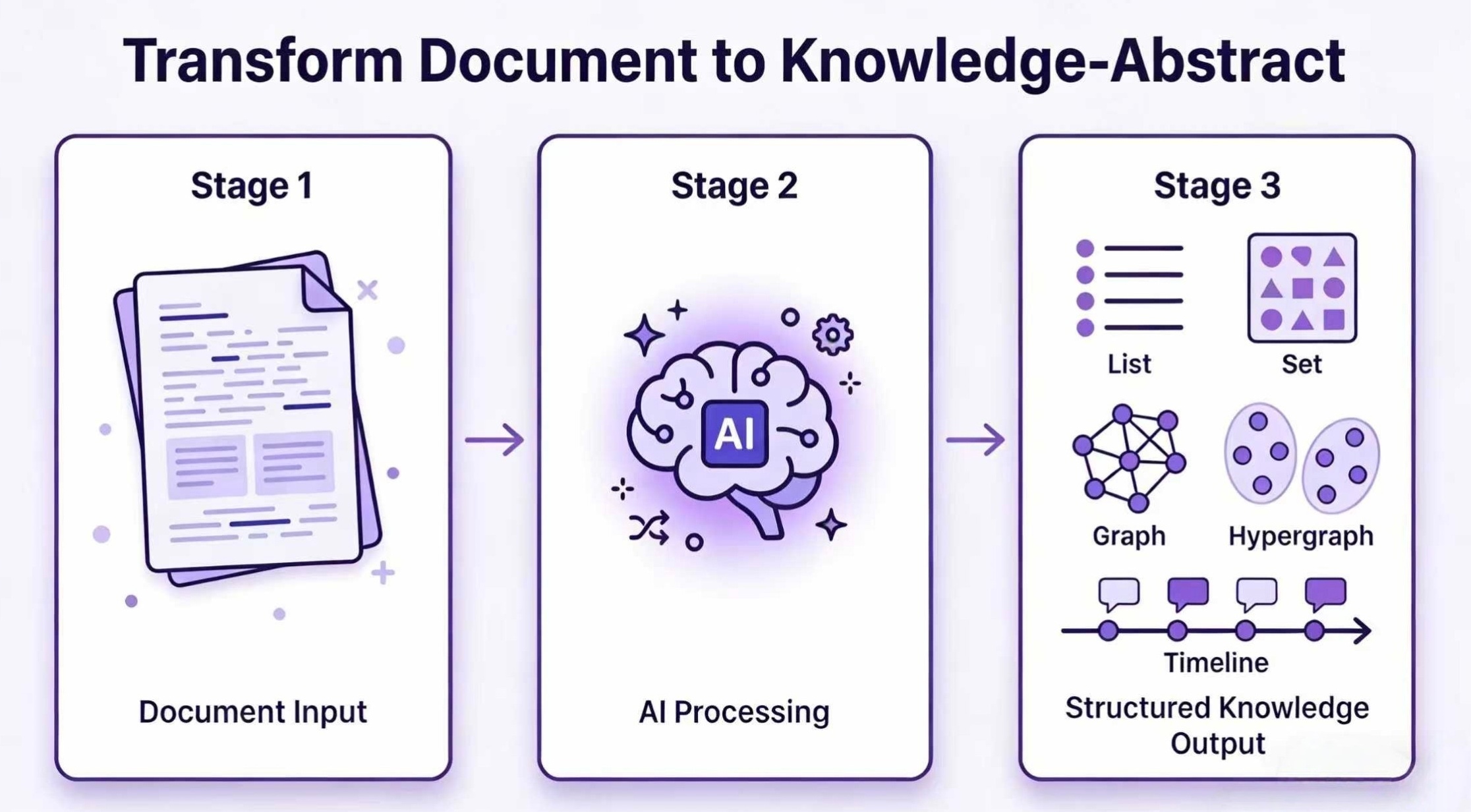
Hero & Workflow
## 📰 最新动态 - **🔌 MCP 服务器** — 通过 `he-mcp` 在 Claude Desktop 和 IDE 智能体中查询你的知识摘要。*(PR #40)* - **🧠 Anthropic Claude 支持** — 直接调用 `claude-opus-4-8`、`claude-sonnet-4-6`、`claude-haiku-4-5` 作为 LLM 提供商。*(PR #38)* - **📝 Obsidian 导出** — 将任意图谱导出为 Obsidian 知识库,Markdown 笔记通过 `[[双向链接]]` 关联。*(PR #37)* - **🧹 `he clean` 命令** — 一条命令清理知识摘要的索引或整个 KA。*(PR #39)* - **🔧 稳定性修复** — 多 chunk 嵌入采用真实均值、限制 OpenAI 兼容接口的批处理大小、修复多词 `llm_*` 合并策略。*(PRs #35、#36、#41)* 完整更新日志请参阅 [GitHub releases](https://github.com/yifanfeng97/hyper-extract/releases)。 Hyper-Extract 是一个智能的、由大语言模型(LLM)驱动的知识提取与演进框架。它极大地简化了将杂乱不堪的文本转化为持久化、强类型的**知识摘要(Knowledge Abstracts)**的过程。无论从基础的**集合(Collection/List)和**结构化模型(Model),还是到高阶复杂的**知识图谱(Knowledge Graph)**、**超图(Hypergraph)**,甚至是**时空图谱(Spatio-Temporal Graph)**,它都能轻松拿捏。 ## ✨ 核心亮点 | | | |:---|:---| | 🔷 **8 种知识结构** | 从简单的列表到复杂的图谱、超图、时空图谱 | | 🧠 **10+ 提取引擎** | GraphRAG、LightRAG、Hyper-RAG、KG-Gen 等开箱即用 | | 📝 **80+ YAML 模板** | 零代码提取,覆盖金融、法律、医疗、中医、工业、通用 6 大领域 | | 🔄 **增量演进** | 随时喂入新文档,自动扩展和精炼知识库 | | 📤 **Obsidian 导出** | 将提取的图谱导出为 Obsidian 知识库——以 `[[双向链接]]` 关联的 Markdown 笔记 | ## 🎯 它能做什么?
📄 科研人员 — 将论文转为知识图谱
丢进去一篇 20 页的学术论文,一键生成关键概念、作者、引用的交互式图谱。 ```bash he parse paper.pdf -t general/academic_graph -o ./paper_kb/ he show ./paper_kb/ ```
🏦 金融分析师 — 从财报中提取实体关系
自动识别非结构化报告中的公司、高管、财务指标及其关系。 ```bash he parse earnings.md -t finance/earnings_graph -o ./finance_kb/ he search ./finance_kb/ "关键风险因素有哪些?" ```
🔒 本地部署 — vLLM 数据不出境
通过 vLLM 本地运行 Qwen3.5-9B + bge-m3,数据绝不离开本机。 ```python from hyperextract import create_client llm, emb = create_client( llm="vllm:Qwen3.5-9B@http://localhost:8000/v1", embedder="vllm:bge-m3@http://localhost:8001/v1", api_key="dummy", ) ```
## 🚀 支持的平台与模型 Hyper-Extract 依赖大语言模型的结构化输出能力(`json_schema` 或 Function Calling)。 | 平台 | 已验证模型 | |----------|-----------------| | **OpenAI** | gpt-4o, gpt-4o-mini, gpt-5 | | **Anthropic** | claude-opus-4-8, claude-sonnet-4-6, claude-haiku-4-5 | | **阿里云百炼** | qwen-plus, qwen-turbo, deepseek-r1 | | **本地 vLLM** | Qwen3.5-9B (GPTQ-Marlin) | **嵌入模型**(语义搜索)支持任意 OpenAI 兼容端点:`text-embedding-3-small`、`text-embedding-v4`(百炼)、`bge-m3`(本地 vLLM)。 > **Anthropic 说明:** Claude 仅用于 **LLM**(设置 `ANTHROPIC_API_KEY`)。Anthropic 没有嵌入接口,请搭配 OpenAI 兼容的嵌入模型使用: > ```python > from hyperextract import create_client > llm, emb = create_client(llm="anthropic", embedder="openai:text-embedding-3-small") > ``` > 需安装额外依赖:`pip install 'hyperextract[anthropic]'`。 > 📖 完整指南:[Provider 系统与本地模型支持](https://yifanfeng97.github.io/Hyper-Extract/latest/zh/concepts/provider-system/) ## ⚡ 30 秒快速上手 ```bash # 安装 uv tool install hyperextract # 配置 API Key he config init -k YOUR_OPENAI_API_KEY # 从文档提取知识 he parse examples/zh/sushi.md -t general/biography_graph -o ./output/ -l zh # 查询 he search ./output/ "苏轼有哪些重要的作品?" # 可视化 he show ./output/ # 导出为 Obsidian 知识库(Markdown 笔记 + [[双向链接]]) he export obsidian ./output/ -o ./vault/ ```
🐍 Python API(点击展开)
```bash uv pip install hyperextract ``` ```python from hyperextract import Template ka = Template.create("general/biography_graph") with open("examples/zh/sushi.md") as f: result = ka.parse(f.read()) result.show() ``` > 🔗 更多示例:[examples/zh](./examples/zh/)
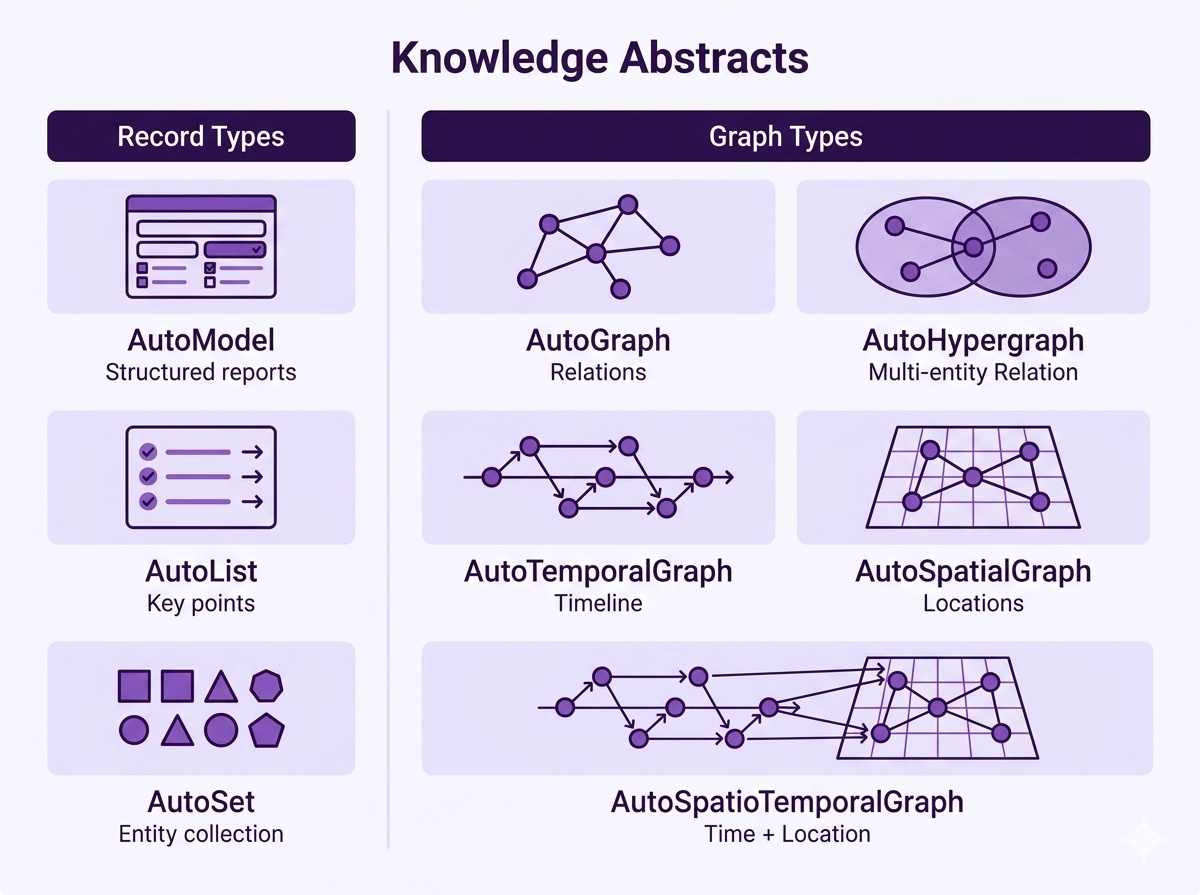
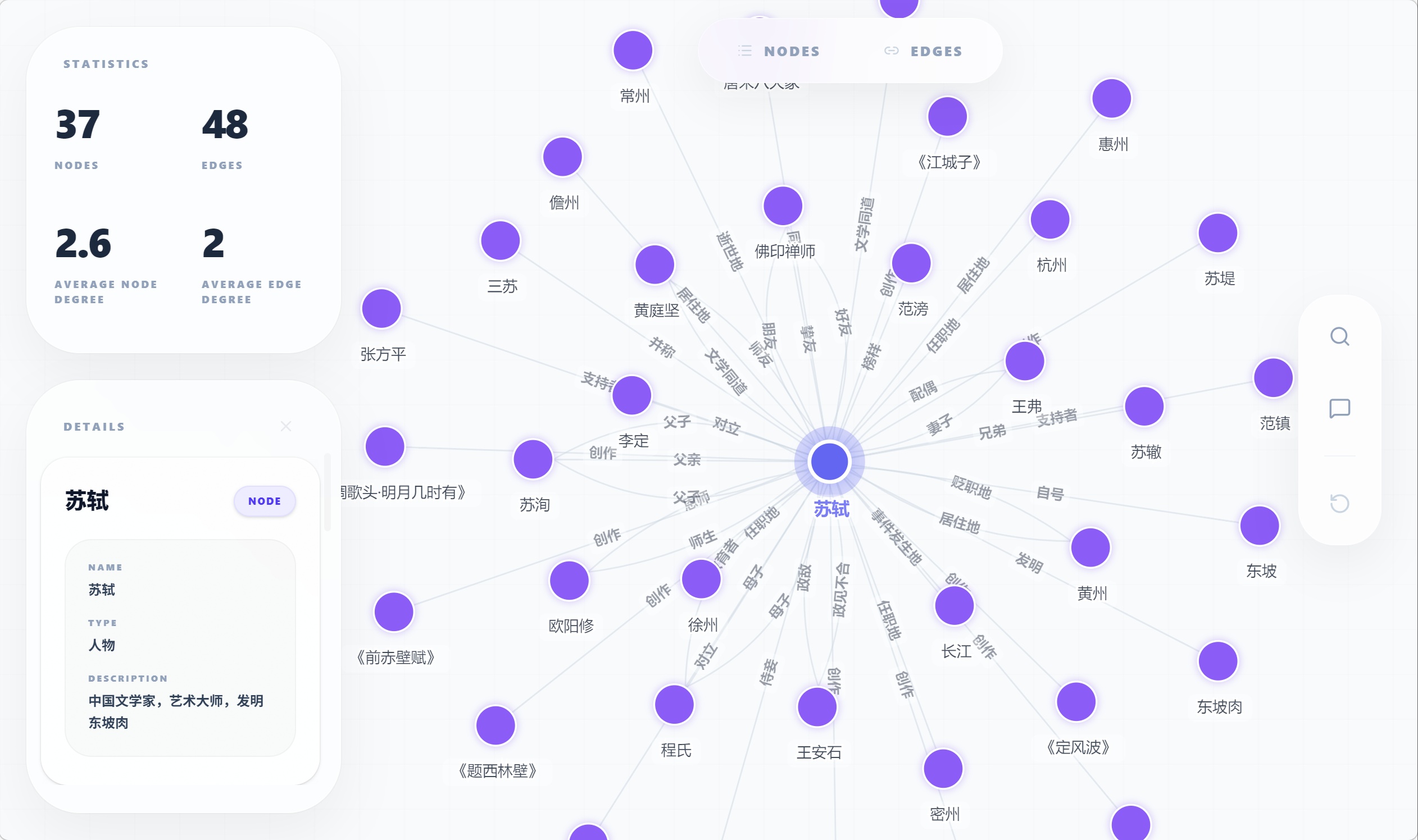
## 📈 为什么选择 Hyper-Extract? | 特性 | GraphRAG | LightRAG | KG-Gen | ATOM | **Hyper-Extract** | | :------ | :------: | :------: | :----: | :--: | :---------------: | | 知识图谱 | ✅ | ✅ | ✅ | ✅ | ✅ | | 时序图谱 | ✅ | ❌ | ❌ | ✅ | ✅ | | 空间图谱 | ❌ | ❌ | ❌ | ❌ | ✅ | | 超图 | ❌ | ❌ | ❌ | ❌ | ✅ | | 领域模板 | ❌ | ❌ | ❌ | ❌ | ✅ | | 交互式 CLI | ✅ | ❌ | ❌ | ❌ | ✅ | | 多语言 | ✅ | ❌ | ❌ | ❌ | ✅ | ## 🧩 支持的知识结构 从简单到复杂 —— 为你的数据选择最合适的结构: 知识结构矩阵 **示例 — AutoGraph 可视化效果:** AutoGraph 可视化
📋 底层架构与模板(点击展开)
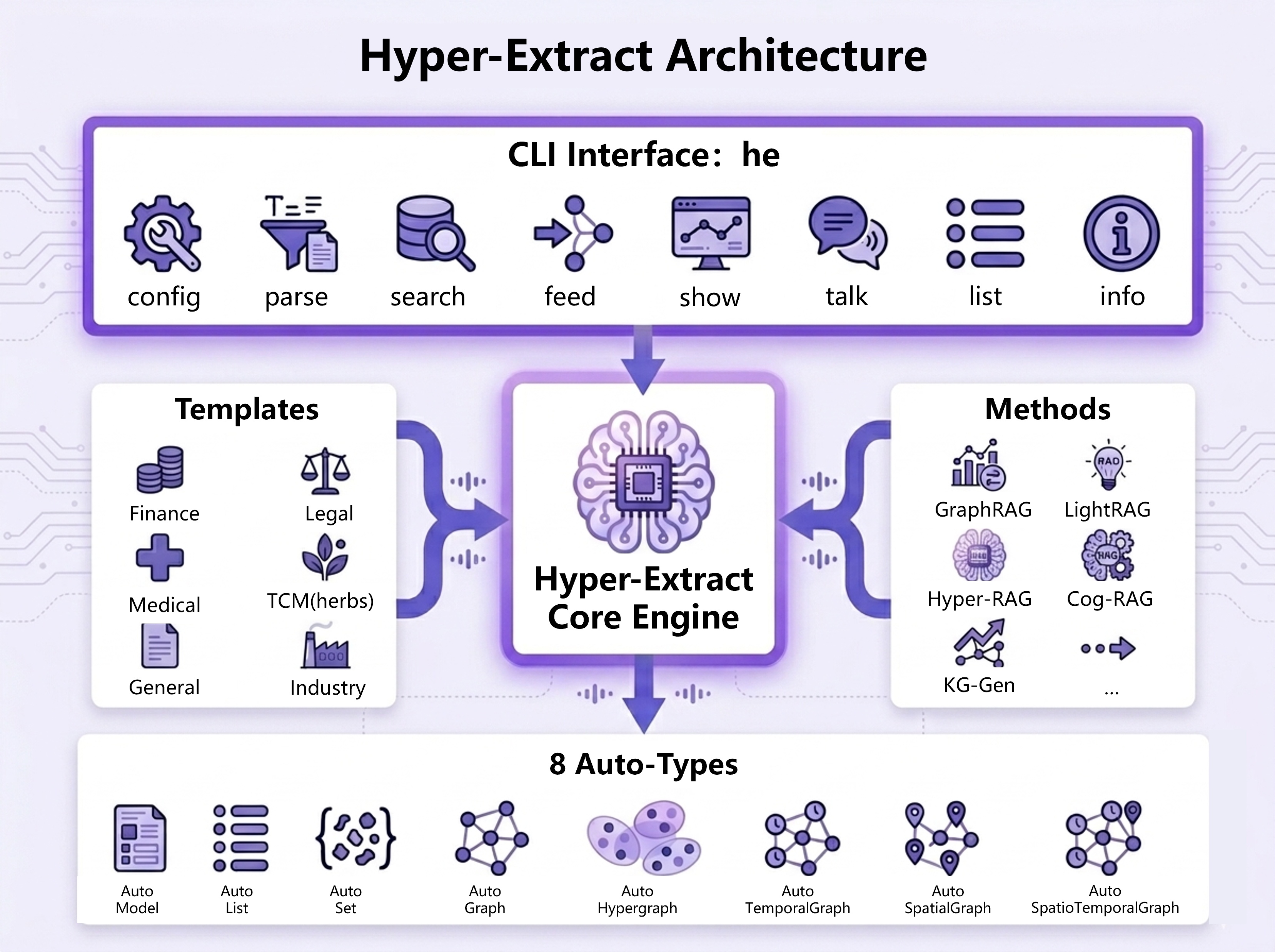
Hyper-Extract 采用**三层架构**: - **Auto-Types** — 8 种强类型数据结构(模型、列表、集合、图谱、超图、时序图、空间图、时空图) - **Methods** — 提取算法:KG-Gen、GraphRAG、LightRAG、Hyper-RAG、Cog-RAG 等 - **Templates** — 覆盖 6 大领域的 80+ 预设模板,零代码配置 系统架构 **模板示例(Graph 类型):** ```yaml language: zh name: 知识图谱 type: graph tags: [general] description: '从文本中提取实体及其关系。' output: entities: fields: - name: name type: str - name: type type: str - name: description type: str relations: fields: - name: source type: str - name: target type: str - name: type type: str identifiers: entity_id: name relation_id: '{source}|{type}|{target}' ``` - [浏览全部 80+ 模板](./hyperextract/templates/presets/) - [创建自定义模板](./hyperextract/templates/DESIGN_GUIDE_ZH.md)
## 📚 文档与资源 | 资源 | 链接 | | :------- | :--- | | 完整文档 | [yifanfeng97.github.io/Hyper-Extract](https://yifanfeng97.github.io/Hyper-Extract/latest/zh/) | | CLI 指南 | [命令行界面](https://yifanfeng97.github.io/Hyper-Extract/latest/zh/cli/) | | Provider 系统 | [模型兼容性与本地部署](https://yifanfeng97.github.io/Hyper-Extract/latest/zh/concepts/provider-system/) | | 模板画廊 | [80+ 预设模板](./hyperextract/templates/presets/) | | 示例代码 | [可运行示例](./examples/) | ## 🔌 MCP 服务器 通过 [Model Context Protocol](https://modelcontextprotocol.io) 将知识摘要暴露给支持 MCP 的助手(Claude Desktop、IDE 智能体)——只读 + 导出。 ```bash pip install 'hyperextract[mcp]' he-mcp # stdio MCP 服务器 ``` 工具:`list_templates`、`info`、`search`、`ask`(RAG)、`export_obsidian`。完整指南:[MCP 服务器文档](https://yifanfeng97.github.io/Hyper-Extract/latest/zh/mcp/)。 ## 🤝 参与贡献与协议 热烈欢迎社区提交 [Issues](https://github.com/yifanfeng97/hyper-extract/issues) 和 [PRs](https://github.com/yifanfeng97/hyper-extract/pulls)。 项目基于 **Apache-2.0** 协议开源。 ## 🔒 安全认证 本项目已通过 [MseeP.ai](https://mseep.ai/app/yifanfeng97-hyper-extract) 安全审计。 ## ⭐ Star 历史趋势 [![Star History Chart](https://api.star-history.com/svg?repos=yifanfeng97/hyper-Extract&type=Date)](https://star-history.com/#yifanfeng97/hyper-Extract&Date)