dsh-dingtalk-connector — DingTalk AI Tables × DeepSeek Harness

---

Read and write DingTalk AI Tables from DeepSeek Harness

让钉钉 AI 表格的数据,流进 DeepSeek Harness

MIT License Node >= 22.19 DeepSeek Harness DingTalk AI Tables

requires dws >= 1.0.6 dws is Apache-2.0 10 tools

简体中文 · English

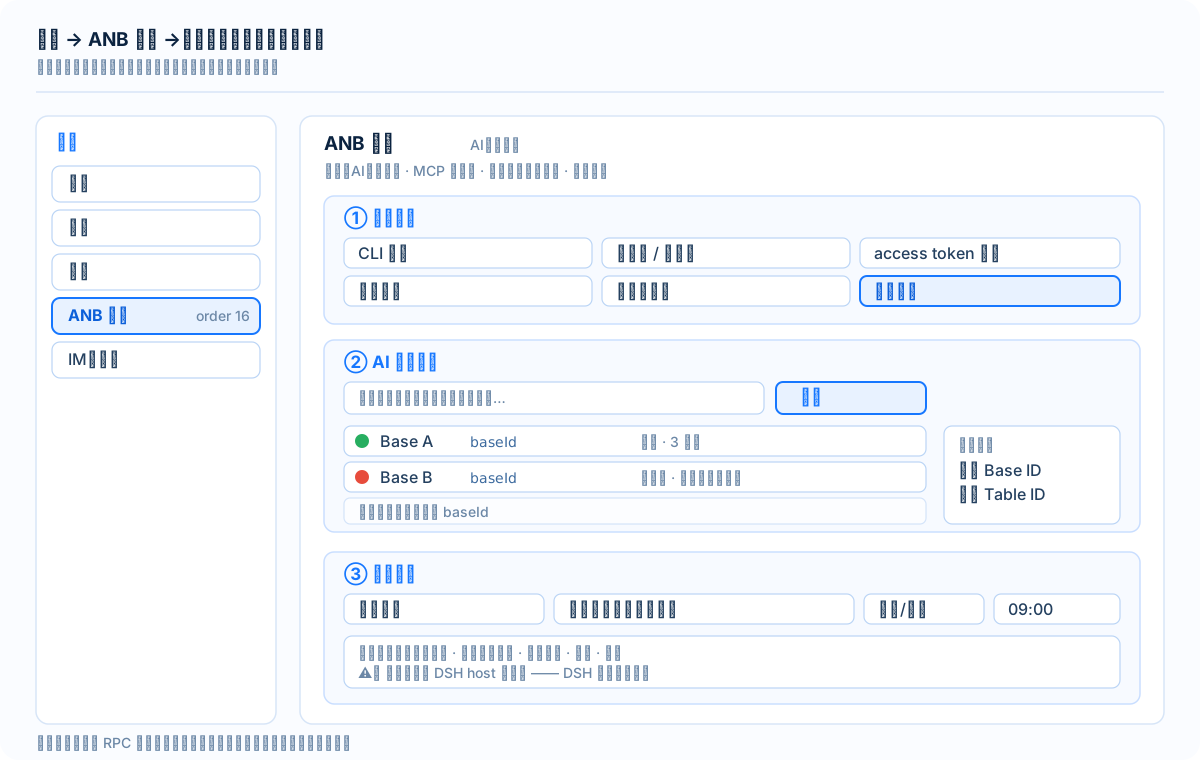
--- ## Overview A DSH plugin that connects **DingTalk AI Tables** (multi-dimensional tables / aitable) to DeepSeek Harness. Once installed you get **10 `dingtalk_aitable_*` tools** plus a **"ANB 工具 → 钉钉文档" panel** — discover Bases, inspect tables, query records by condition, batch-write rows, export BOM-prefixed CSVs readable by Excel, and **schedule recurring exports**. **Architecture**: this plugin wraps the official DingTalk `dws` CLI (`dingtalk-workspace-cli`) and runs `dws aitable ...` commands. It is **isomorphic** to DingTalk's own OpenClaw connector — that connector also does not talk to the REST API directly; it injects `DWS_CLIENT_ID` / `DWS_CLIENT_SECRET` and calls `dws` (**measured**, 2026-09-14, by reading its repository). **Design stance**: **read-first with a write gate**. Writes and deletes are off by default, and every delete needs a per-call confirmation. We would rather add one confirmation step than leave "model hallucination × over-broad permissions" as a viable combination. > **⚠️ This is not a self-contained plugin** — it depends on the external `dws` CLI. > Read [docs/安装与前置条件.md](docs/安装与前置条件.md) first (Chinese): there are **three dependency layers > (Node / dws / DingTalk-side authorization) and all three are mandatory**. ## Screenshots Settings → ANB 工具 → 钉钉文档 — structural diagram > The image above is a **structural diagram, not a screenshot**. Settings → **ANB 工具** (shell order 16) → > the **"钉钉文档"** tab (order 10 inside the shell) contains three areas: > **account binding / AI Table list / scheduled export**. > Real screenshots are still pending — see [docs/images/README.md](docs/images/README.md) for the shot list > and the redaction requirements. ## Capabilities | Capability | Tool | Write gate | |---|---|---| | Self-check (version / auth / commands / RPC endpoint) | `dingtalk_aitable_diagnose` | — | | Base files: list / search / get / create / update / delete | `dingtalk_aitable_base` | delete needs both locks | | Tables: get (with fields) / create / update / delete | `dingtalk_aitable_table` | delete needs both locks | | Fields: get / create / update / delete | `dingtalk_aitable_field` | delete needs both locks | | Records: query by ID or condition (full pull supported) | `dingtalk_aitable_record_query` | — | | Records: batch create / update / delete | `dingtalk_aitable_record_write` | write / delete gate | | Controlled passthrough (any registered subcommand) | `dingtalk_aitable_raw` | dangerous ops need both locks | | Base discovery + **readability probe** | `dingtalk_aitable_scan` | — | | Full CSV export (**BOM-prefixed**, overwrites same name) | `dingtalk_aitable_export_csv` | — | | Scheduled export jobs: create / list / remove / toggle / run-now | `dingtalk_sync_job` | — | **Both locks** = `allowDelete: true` (config) **and** `confirm: true` (per call, meaning consent was given). ## Read these three first > These three are the most commonly misunderstood. Read them before the details. > 1. **The scheduler lives inside the DSH host process** — it does not run while DSH is closed, and it > recomputes the next firing time on restart. It is **not** a cloud scheduler. > 2. **"Enumerate all Bases" is impossible on DingTalk's side** — `base list` only returns recently visited > Bases, `base search` returns ~4 items per call, and its `hasMore: true` is a **false positive** > (cursor paging does not work). Discovery therefore yields "candidates ∪ manual entries" and is > **not exhaustive**. > 3. **Write and delete gates are both off by default** — and deletes additionally need `confirm=true` > every single time. > Every technical claim in this README is either **measured on a real machine**, **quoted from official > documentation**, or explicitly marked as **inferred (推测)**. Claims carry the date they were obtained. --- ## Why wrap `dws` instead of calling REST directly An earlier version called the AI Table REST API directly. It was abandoned: endpoint paths had to be inferred, and token refresh, pagination and error codes had to be reimplemented. Wrapping the official CLI removed all endpoint uncertainty and delegated auth/pagination to the vendor. --- ## Prerequisites > **Full version (platform matrix, extraction dependencies, org-level blocking, one-shot verification > checklist)**: [docs/安装与前置条件.md](docs/安装与前置条件.md) (Chinese). Below is the quick-reference form. **Three dependency layers — all mandatory**: | Layer | Requirement | |---|---| | ① Host runtime | **Node ≥ 22.19** (this plugin); DSH `0.1.2-alpha.4` – `0.1.5-alpha.1` | | ② `dws` CLI | `npm i -g dingtalk-workspace-cli`, **version ≥ 1.0.6** (measured baseline `v1.0.61`) | | ③ DingTalk side | Authorization **+** the "AI Table record read/write" scope **+** the app added as a Base collaborator (editable) **★most commonly missed** | ### 1. Install `dws` (on your machine) ```sh npm i -g dingtalk-workspace-cli dws --version # must be >= 1.0.6; measured baseline v1.0.61 npm root -g # note the prefix — on Windows you need it for dwsEntry ``` > ⚠️ `dws` is **not a pure JS package** — it ships a `postinstall` hook that **downloads and extracts a > platform-native binary** (about 25 MB). It supports Windows / macOS / Linux on both x64 and arm64. > Extraction depends on the platform: `powershell.exe` on Windows, `tar` or `unzip` on macOS / Linux. ### 2. Authorize (pick one) **Option A — device flow (interactive)** ```sh dws auth login # scan with the DingTalk app; tokens auto-refresh dws auth status # confirm you are logged in ``` **Option B — reuse your DingTalk app credentials (headless; recommended for servers)** ```sh export DWS_CLIENT_ID= export DWS_CLIENT_SECRET= dws auth login ``` Credential precedence: `--token` > `DWS_CLIENT_ID`/`DWS_CLIENT_SECRET` > OAuth encrypted store. ### 3. Grant permissions (**easy to miss; you will get 403 without this**) 1. **DingTalk developer console** → your app → Permission management → enable **AI Table record read/write** → **publish** so the change takes effect. 2. **The target Base** → share/collaborate → add that app as a collaborator with **edit** rights. > Both steps are required. If `dws` reports `permission denied` / 403, this is the cause 9 times out of 10. --- ## Install ```sh # from npm dsh plugin --profile web add @yiyunet/dsh-dingtalk-connector # or from a local checkout dsh plugin --profile web add "" # verify the config layer shows up, then restart dsh web dsh --profile web --dump-config ``` A helper CLI is bundled: ```sh npx @yiyunet/dsh-dingtalk-connector install [--profile web] npx @yiyunet/dsh-dingtalk-connector doctor ``` --- ## Configuration (`cordis.patch.yml`) | Key | Default | Meaning | |---|---|---| | `dwsCommand` | `dws` | Executable name on `PATH` | | `dwsEntry` | — | **Recommended on Windows**: absolute path to the dws JS entry. When set, the plugin spawns `node` directly and **never goes through a shell**, so quotes and `&` / `\|` inside record text are safe | | `timeoutMs` | `60000` | Per-command timeout | | `clientIdEnv` / `clientSecretEnv` | `DWS_CLIENT_ID` / `DWS_CLIENT_SECRET` | Credential env var names | | `allowWrite` | **false** | Gate for `create` / `update` | | `allowDelete` | **false** | Gate for `delete` (separate, and each call still needs `confirm=true`) | | `maxBatch` | `30` | Max records per batch | | `exportRoot` | — | Optional. Confines CSV output to one directory | | `defaultExportDir` | — | Optional. Directory pre-filled in the panel when you pick a table | | `scanConcurrency` | `4` | Concurrency for readability probing | ### About `dwsEntry` (a Windows security detail) On Windows a `.cmd` must be started through a shell, and the shell interpolates metacharacters in arguments — record text containing quotes or `&` / `|` could be injected. The plugin **hard-rejects** such calls (returns `ARG_UNSAFE` with guidance). The definitive fix is to point `dwsEntry` at dws's JS entry: ```yaml dwsEntry: '/dingtalk-workspace-cli/bin/dws.js' ``` Use `npm root -g` to find the actual prefix on your machine. --- ## The ten tools | Tool | Purpose | Gate | |---|---|---| | `dingtalk_aitable_diagnose` | **Self-check**: dws version / auth status / registered commands | none | | `dingtalk_aitable_base` | Base file: list / search / get / create / update / delete | delete needs both locks | | `dingtalk_aitable_table` | Table: get (**must pass `tableIds` to get fields**) / create / update / delete | delete needs both locks | | `dingtalk_aitable_field` | Field: get / create / update / delete | delete needs both locks | | `dingtalk_aitable_record_query` | **Read records** (by id or by filter; `all=true` for full pull) | none | | `dingtalk_aitable_record_write` | Write records: create / update / delete | write / delete gates | | `dingtalk_aitable_raw` | Controlled passthrough to any registered subcommand | destructive commands need both locks | | `dingtalk_aitable_scan` | Discover candidate Bases + **readability probing** | none | | `dingtalk_aitable_export_csv` | Full export to CSV (**BOM**, Chinese field names as headers, overwrites same name) | none (optionally bounded by `exportRoot`) | | `dingtalk_sync_job` | Scheduled export jobs: create / list / remove / enable / disable / run-now | none | **Dual lock** = `allowDelete: true` (config) **and** `confirm: true` (per call, meaning the user agreed). --- ## Settings panel The panel lives in **Settings → ANB 工具**, as a tab in that shell (shell order 16, this tab order 10). The **ANB 工具** shell is **bundled inside this package** — it is *not* a separate package you have to install: installing any ANB-series plugin brings the shell with it. With several ANB plugins installed there is still **only one shell** (a runtime singleton) — the first one to start registers it and the others yield; if the owner is disabled, the next ANB plugin takes over and the tab bar lists every panel in order. | Area | Contents | |---|---| | **Account binding** | CLI version, org / user, token expiry, credential source, write-gate state; a device-flow login session with QR code, deep link and raw output | | **AI Table list** | Keyword scan → candidate discovery + **readability probing** → expand a Base to see its tables → pick one → copy Base ID / Table ID | | **Scheduled export** | Selected table + output path + daily/weekly + time → create job; the job table shows next/last run and supports run-now / toggle / delete | ### Engineering form (no build step needed to *use* it) `lib/client.js` is a build artifact produced by `npm run build`: esbuild bundles `plugin-src/client/impl.mjs` into an IIFE, and the hand-written loader wrapper `plugin-src/client/index.mjs` is appended after it, producing the official module shape: ```js window.__ModuleLoader__.load({ id: '', factory: (require) => { /* ... */ } }) ``` - The platform's frozen module table provides `require('react')`. - Client → host: `ctx.connection.rpc.call('/api', 'dsh-dingtalk-connector', { method, payload }, signal)` - Host endpoint: `ctx.connection.fetch.register({ path: '/api/dsh-dingtalk-connector', methods: ['POST'], ... })` ### ⚠️ Architectural constraint: `connection` must be injected **scoped** The `connection` service exists **only in the web plane**. Declaring it in the plugin's top-level `inject = ['tools', 'connection']` would make the whole plugin stay `inactive` in headless/tui profiles — the ten tools would disappear with it. The correct form puts the web-only half into a child fiber: ```js export const inject = ['tools'] // only what is truly required ctx.inject(['connection'], (rpcCtx) => { // optional dependency: runs only when available const dispose = registerConnectorRpc(rpcCtx, { ... }) rpcCtx.effect(function* () { yield () => dispose?.() }, 'rpc endpoint') }) ``` Self-proof of panel availability: `dingtalk_aitable_diagnose` returns an `rpcEndpoint` field; `registered: true` means the endpoint is mounted. ### Multi-account | Capability | Command | Note | |---|---|---| | List bound accounts | `dws profile list --format json` | one profile = one `corpId + userId`; **multiple accounts are supported** | | Remove one binding | `dws auth logout --profile ` | precise selector logs out exactly one account; the panel asks for confirmation | | Scan to bind | `dws auth login --device --recommend --format json` | panel button; output is streamed, account list refreshes on completion | #### Two measured facts (avoid misdiagnosis) **① dws does not print a QR code.** It only gives a link, an authorization code, and a deep link with `user_code`. **The QR code is drawn by this plugin** (host-side `qrcode`, rendered as an SVG data URL). **No third-party QR service is ever called** — the auth link never leaves your machine. If rendering fails, the panel degrades to showing the deep link and code. **② On a machine already signed in to DingTalk, the device flow may complete without scanning.** This is not "auto-approval" — it is the *local DingTalk login state* letting the flow pick the currently selected account and organization directly. Consequence: the "probe output for 8s" button is **not side-effect free**; if the org has enabled CLI access, probing may actually add an account. #### ⛔ Known blocker: organization has not enabled CLI personal-data access ``` CLI data access is not enabled for this organization ``` An **organization admin** must enable "Allow members to access their personal data via CLI" in the DingTalk open platform. This is an organizational action, not a technical configuration. --- ## Workflow: scan → pick → schedule ``` ① dingtalk_aitable_scan(keywords="report,sales", withTables=true) → candidate Bases + readability result each ② dingtalk_aitable_export_csv(baseId, tableId, outputPath="/abs/path/out.csv") → export once and open it in Excel to confirm headers and encoding ③ dingtalk_sync_job(action="create", baseId, tableId, outputPath="/abs/path/out.csv", frequency="daily", time="09:00", label="daily sales") → exports every day at 09:00, overwriting the same file ④ dingtalk_sync_job(action="list") # next trigger time and last result dingtalk_sync_job(action="run-now", id="") ``` **⚠️ Three semantics you must know** 1. **The timer lives inside the DSH host process.** It does not run while DSH is stopped; on restart the next trigger is recomputed. This is an accepted, documented trade-off. 2. **"Enumerate all Bases" is impossible on the DingTalk side.** `base list` returns only recently visited Bases; `base search` returns ~4 per call and its `hasMore: true` is a **false positive** (the cursor is useless). The scan result is therefore "candidates ∪ manual entries" — **not exhaustive**. 3. **CSV must start with a BOM.** The file begins with `\uFEFF`; that is the only condition under which Excel reads UTF-8 Chinese correctly. The plugin reads the first three bytes back to prove it landed. --- ## Standard workflow (from official docs) ``` 1. dws aitable base search --query "keyword" → get baseId 2. dws aitable base get --base-id → get tableId 3. dws aitable table get --base-id --table-id → get fieldId ★ required before writing 4. dws aitable record query --base-id --table-id 5. dws aitable record create --records '[{"cells":{"fldXXX":"value"}}]' ``` ### Cell value formats (official) | Field type | Write | Read back | |---|---|---| | text | `"string"` | `"string"` | | number | `123` | `"123"` | | singleSelect | `"Option name"` or `{"id":"xxx"}` | `{"id":"x","name":"..."}` | | multipleSelect | `["A","B"]` | `[{"id":"x","name":"A"}]` | | date | `"2026-03-13"` | ISO string | | checkbox | `true`/`false` | `true`/`false` | | user | `[{"userId":"xxx"}]` | `[{"corpId":"x","userId":"x"}]` | | url | `{"text":"label","link":"https://..."}` | same as write | | richText | `{"markdown":"**bold**"}` | same as write | > In `filters`, prefer the **option id** for singleSelect (get it from `field get`); writing accepts the name. --- ## Troubleshooting | Signal | Meaning | Action | |---|---|---| | `command not found: dws` | CLI not installed | `npm i -g dingtalk-workspace-cli` | | `请先执行 dws login` | Not authorized | `dws auth login` | | `AUTH_TOKEN_EXPIRED` / `USER_TOKEN_ILLEGAL` | Token expired | `dws auth login` again | | `permission denied` / 403 | Insufficient permission | Enable AI Table permission in the console **and** add the app as a Base collaborator | | `RECOVERY_EVENT_ID=` | Failure snapshot persisted | Follow the `dws recovery plan/execute/finalize` loop | | `ARG_UNSAFE` | Argument contains shell metacharacters | Configure `dwsEntry` to bypass the shell | | `PAGING_TRUNCATED` | Page limit reached | Continue with the returned cursor or raise `page-limit` | --- ## Security and boundaries - **Write gates are off by default**; deletion additionally requires a per-call `confirm=true`. - **Credentials go through environment variables only**, never through command-line arguments (arguments are visible in the process list). - **Arguments are passed as an array**, never concatenated into a shell string; setting `dwsEntry` removes the shell entirely, otherwise arguments are strictly validated. - **Client-side code never hardcodes export paths**: the default directory comes from the host (`defaultExportDir`). - Inherent risks from the official connector also apply: **model hallucination, uncontrolled execution, prompt injection**. The official guidance is to avoid deploying directly in enterprise production; this plugin lowers exposure with **read-first defaults and write gates**. - This plugin is an **unofficial** community integration and is not affiliated with or endorsed by DingTalk or DeepSeek. --- ## Development ```sh npm install # installs esbuild (dev) and qrcode (optional) npm run build # plugin-src/ → lib/ (host: copied with a banner; client: esbuild + loader wrapper) npm test # node --test on pure functions (scheduler / csv / jobs / command registry) npm run verify # eight publish-contract assertions npm run check # build && test && verify ← what CI runs ``` **Never edit `lib/` directly** — it is generated. The single source of truth is `plugin-src/`. ### Publish-contract assertions (`npm run verify`) 1. Required files present (sources, build output, public docs) 2. **No `@deepseek-ai/dsh-*` in any dependency section or the lockfile** — DSH runtime packages use module-local Symbols, so a second physical copy breaks host lookup 3. Client bundle registers the correct loader id 4. Client bundle registers the settings-panel contract (id / order / label) 5. Client bundle contains no top-level ESM syntax (it is a build artifact) 6. **The RPC endpoint name matches across host source, client source and client bundle** 7. No personal absolute paths or credential assignments anywhere in the tree 8. **`files` whitelist is self-consistent** — every entry exists on disk, every file referenced by a lifecycle script (e.g. `postinstall`) is inside the whitelist, and every declared entry point (`main` / `exports` / `bin`) is inside the whitelist. *Why this matters:* with a local `link:` install the `files` field has **no effect at all**, so a missing entry is invisible on the dev machine and only blows up for whoever installs the published tarball. --- ## Documentation The root README covers **how to use it**; `docs/` covers **why it works this way and what was verified**. | Document | Contents | |---|---| | [docs/安装与前置条件.md](docs/安装与前置条件.md) | ★ **Start here** — the three dependency layers, platform matrix, verification checklist (Chinese) | | [docs/发布与版本管理.md](docs/发布与版本管理.md) | Publishing to GitHub and version-bump/release workflow, with a pre-publish checklist (Chinese) | | [docs/README.md](docs/README.md) | Documentation index (find a doc by question) | | [docs/adr/0001-从手搓REST改为包装dws.md](docs/adr/0001-从手搓REST改为包装dws.md) | ADR: why the v0.1 hand-rolled REST client was abandoned | | [docs/实测/](docs/实测/) | Per-run verification records (what actually broke, what was confirmed) | | [CONTEXT.md](./CONTEXT.md) | Terminology and **forbidden phrasings** | | [CHANGELOG.md](./CHANGELOG.md) | Change history, including the v0.1 → v0.2 architecture reversal | --- ## Checking for and installing updates ```sh # current version npm view @yiyunet/dsh-dingtalk-connector version # upgrade the plugin dsh plugin --profile web add @yiyunet/dsh-dingtalk-connector@latest dsh plugin --profile web remove @yiyunet/dsh-dingtalk-connector # uninstall # upgrade the external dws dependency (it is a separate package, not bundled) npm i -g dingtalk-workspace-cli@latest dws --version ``` > **Note**: `dws` is an **external prerequisite** and is not managed by this plugin. > If behaviour changes while the plugin version did not, **check `dws --version` first**. --- ## Contact - **Bug reports / feature requests**: [open an issue](https://github.com/yiyunet/dsh-dingtalk-connector/issues/new/choose). Include the **DSH version** and the **plugin version** — that makes a fix much faster. - **Security**: do not open a public issue — this plugin handles DingTalk credentials and organizational data access. See the "Security and boundaries" section above. > The template asks for versions and OS. Before pasting logs or screenshots, > **remove DingTalk credentials, phone numbers and org names**. --- ## Contributors ✨ Thanks to everyone who helps this project grow! This project follows the [All Contributors](https://allcontributors.org/en/reference/specification/) specification, recognising code, documentation, tests, issue reports, ideas and other contributions. The roster is managed by [`.all-contributorsrc`](./.all-contributorsrc). --- ## License and disclaimer - **License**: [MIT](./LICENSE) © 2026 yiyunet - **Unofficial**: this is an **unofficial community integration**, not affiliated with or endorsed by DingTalk or DeepSeek. - **External dependency**: `dws` (`dingtalk-workspace-cli`) is published by DingTalk and licensed under **Apache-2.0**; copyright belongs to its authors. See [THIRD_PARTY_NOTICES.md](./THIRD_PARTY_NOTICES.md). Third-party components: see [THIRD_PARTY_NOTICES.md](./THIRD_PARTY_NOTICES.md). Terminology and precise wording: see [CONTEXT.md](./CONTEXT.md).