# 🚀 Time MCP Server: Giving LLMs Time Awareness Capabilities
[](https://smithery.ai/server/@yokingma/time-mcp) 

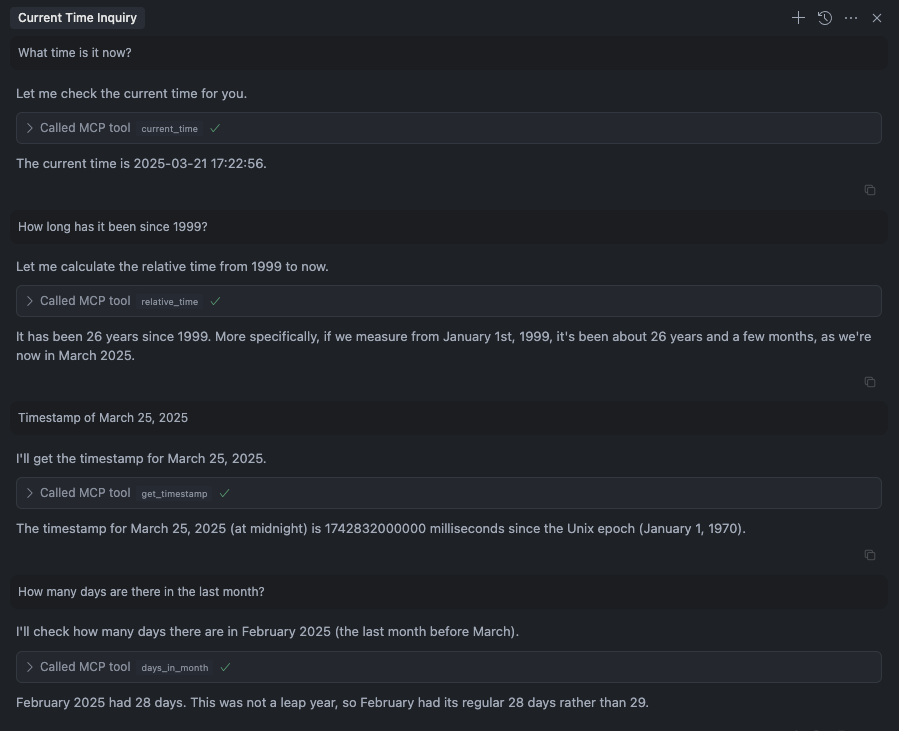
 A Model Context Protocol (MCP) server implementation that allows LLMs to have time awareness capabilities.
## Tools
- `current_time`: Get current time (UTC and local time)
- `relative_time`: Get relative time
- `get_timestamp`: Get timestamp for the time
- `days_in_month`: Get days in month
- `convert_time`: Convert time between timezones
- `get_week_year`: Get week and isoWeek of the year
## Installation
### Installing via Smithery
To install time-mcp for Claude Desktop automatically via [Smithery](https://smithery.ai/server/@yokingma/time-mcp):
```bash
npx -y @smithery/cli install @yokingma/time-mcp --client claude
```
### Manually install (Optional)
```shell
npm install -g time-mcp
```
### using npx
```shell
npx -y time-mcp
```
## Running on Claude Code
To add time-mcp to Claude Code, use the following command:
```bash
claude mcp add time-mcp -- npx -y time-mcp
```
To verify the installation:
```bash
claude mcp list
```
You should see time-mcp listed with a ✓ Connected status.
### Usage in Claude Code
Once installed, you can use time-mcp tools in your conversations with Claude Code. For example:
- "What time is it now?"
- "Convert 2:00 PM from New York to Tokyo time"
- "How many days are in this month?"
- "What week of the year is it?"
The time-mcp server will automatically provide accurate time information to Claude.
## Running on Cursor
Your `mcp.json` file will look like this:
```json
{
"mcpServers": {
"time-mcp": {
"command": "npx",
"args": ["-y", "time-mcp"]
}
}
}
```
## Running on Windsurf
Add this to your `./codeium/windsurf/model_config.json` file:
```json
{
"mcpServers": {
"time-mcp": {
"command": "npx",
"args": ["-y", "time-mcp"]
}
}
}
```
## License
MIT License - see [LICENSE](./LICENSE) file for details.
A Model Context Protocol (MCP) server implementation that allows LLMs to have time awareness capabilities.
## Tools
- `current_time`: Get current time (UTC and local time)
- `relative_time`: Get relative time
- `get_timestamp`: Get timestamp for the time
- `days_in_month`: Get days in month
- `convert_time`: Convert time between timezones
- `get_week_year`: Get week and isoWeek of the year
## Installation
### Installing via Smithery
To install time-mcp for Claude Desktop automatically via [Smithery](https://smithery.ai/server/@yokingma/time-mcp):
```bash
npx -y @smithery/cli install @yokingma/time-mcp --client claude
```
### Manually install (Optional)
```shell
npm install -g time-mcp
```
### using npx
```shell
npx -y time-mcp
```
## Running on Claude Code
To add time-mcp to Claude Code, use the following command:
```bash
claude mcp add time-mcp -- npx -y time-mcp
```
To verify the installation:
```bash
claude mcp list
```
You should see time-mcp listed with a ✓ Connected status.
### Usage in Claude Code
Once installed, you can use time-mcp tools in your conversations with Claude Code. For example:
- "What time is it now?"
- "Convert 2:00 PM from New York to Tokyo time"
- "How many days are in this month?"
- "What week of the year is it?"
The time-mcp server will automatically provide accurate time information to Claude.
## Running on Cursor
Your `mcp.json` file will look like this:
```json
{
"mcpServers": {
"time-mcp": {
"command": "npx",
"args": ["-y", "time-mcp"]
}
}
}
```
## Running on Windsurf
Add this to your `./codeium/windsurf/model_config.json` file:
```json
{
"mcpServers": {
"time-mcp": {
"command": "npx",
"args": ["-y", "time-mcp"]
}
}
}
```
## License
MIT License - see [LICENSE](./LICENSE) file for details.