


# Bio
Try the hosted version [here](https://bio.valyu.ai) 🙌
Then fork and get building...
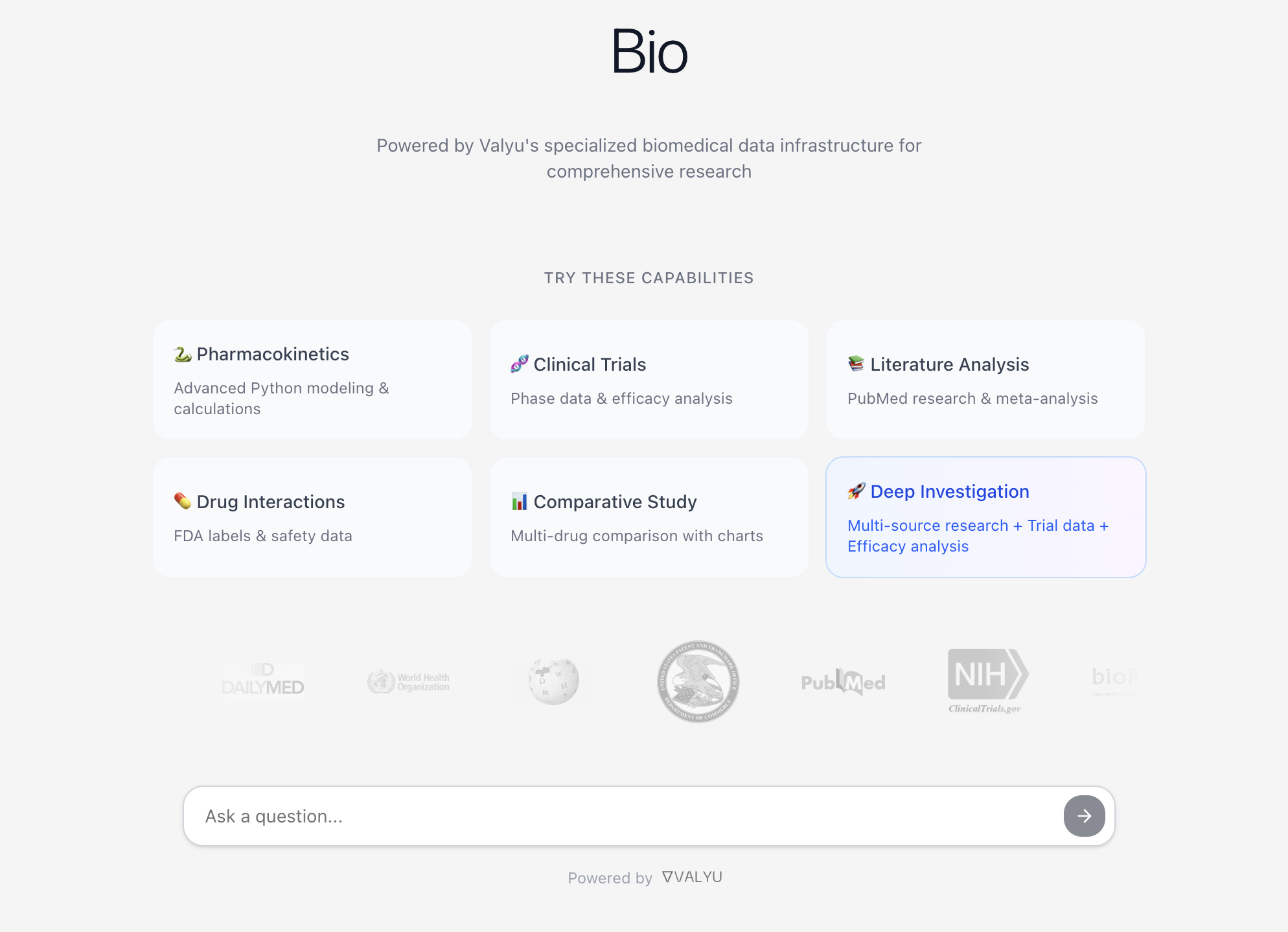
> **Enterprise-grade biomedical research behind a chat interface** - Access PubMed, clinical trials, FDA drug labels, and run complex Python analyses through natural language. Powered by specialized biomedical data APIs.
## Why Bio?
Traditional biomedical research and data is fragmented across dozens of databases and platforms. Bio changes everything by providing:
- **Comprehensive Medical Data** - PubMed articles, ClinicalTrials.gov data, FDA drug labels, and more
- **One Unified Search** - Powered by Valyu's specialized biomedical data API
- **Advanced Analytics** - Execute Python code in secure Daytona sandboxes for statistical analysis, pharmacokinetic modeling, and custom calculations
- **Interactive Visualizations** - Beautiful charts and dashboards for clinical data
- **Real-Time Intelligence** - Web search integration for breaking medical news
- **Local AI Models** - Run with Ollama or LM Studio for unlimited, private queries using your own hardware
- **Natural Language** - Just ask questions like you would to a colleague
## Key Features
### Powerful Biomedical Tools
- **PubMed & ArXiv Search** - Access to millions of scientific papers and biomedical research
- **Clinical Trials Database** - Search ClinicalTrials.gov for active and completed trials
- **FDA Drug Labels** - Access comprehensive drug information from DailyMed
- **Drug Information** - Detailed medication data, warnings, and contraindications
- **Interactive Charts** - Visualize clinical data, drug efficacy, patient outcomes
- **Python Code Execution** - Run pharmacokinetic calculations, statistical analyses, and ML models
### Advanced Tool Calling
- **Python Code Execution** - Run complex biomedical calculations, statistical tests, and data analysis
- **Interactive Charts** - Create publication-ready visualizations of clinical data
- **Multi-Source Research** - Automatically aggregates data from multiple biomedical sources
- **Export & Share** - Download results, share analyses, and collaborate
## Quick Start (Self-Hosted)
Self-hosted mode is the recommended way to run Bio. It provides a complete local environment with:
- **No authentication required** - Auto-login as dev user
- **Local SQLite database** - No external database setup needed
- **Unlimited queries** - No rate limits
- **Ollama/LM Studio support** - Use local LLMs for privacy and unlimited usage
### Prerequisites
- Node.js 18+
- pnpm (`npm install -g pnpm`)
- Valyu API key (get one at [platform.valyu.ai](https://platform.valyu.ai))
- [Daytona](https://www.daytona.io) API key - used for secure sandboxed Python code execution (get one at [app.daytona.io](https://app.daytona.io))
- [Ollama](https://ollama.com) or [LM Studio](https://lmstudio.ai) installed (optional but recommended)
### Installation
1. **Clone the repository**
```bash
git clone https://github.com/yorkeccak/bio.git
cd bio
```
2. **Install dependencies**
```bash
pnpm install
```
3. **Set up environment variables**
Create a `.env.local` file in the root directory:
```env
# Enable Self-Hosted Mode
NEXT_PUBLIC_APP_MODE=self-hosted
# Valyu API Configuration (Required)
VALYU_API_KEY=your-valyu-api-key
# Daytona Configuration (Required for Python execution)
DAYTONA_API_KEY=your-daytona-api-key
DAYTONA_API_URL=https://api.daytona.io
DAYTONA_TARGET=latest
# Local LLM Configuration (Optional - for unlimited, private queries)
OLLAMA_BASE_URL=http://localhost:11434 # Default Ollama URL
LMSTUDIO_BASE_URL=http://localhost:1234 # Default LM Studio URL
# OpenAI Configuration (Optional - fallback if local models unavailable)
OPENAI_API_KEY=your-openai-api-key
```
4. **Run the development server**
```bash
pnpm dev
```
5. **Open your browser**
Navigate to [http://localhost:3000](http://localhost:3000)
You'll be automatically logged in as `dev@localhost` with full access to all features.
## Self-Hosted Mode Guide
### What is Self-Hosted Mode?
Self-hosted mode provides a complete local environment without any external dependencies beyond the core APIs (Valyu, Daytona). It's perfect for:
- **Local Development** - No Supabase setup required
- **Offline Work** - All data stored locally in SQLite
- **Testing Features** - Unlimited queries without billing
- **Privacy** - Use local Ollama models, no cloud LLM needed
- **Quick Prototyping** - No authentication or rate limits
### How It Works
When `NEXT_PUBLIC_APP_MODE=self-hosted`:
1. **Local SQLite Database** (`/.local-data/dev.db`)
- Automatically created on first run
- Stores chat sessions, messages, charts, and CSVs
- Full schema matching production tables
- Easy to inspect with `sqlite3 .local-data/dev.db`
2. **Mock Authentication**
- Auto-login as dev user (`dev@localhost`)
- No sign-up/sign-in required
- Unlimited tier access with all features
3. **No Rate Limits**
- Unlimited chat queries
- No usage tracking
- No billing integration
4. **LLM Selection**
- **Ollama models** (if installed) - Used first, unlimited and free
- **LM Studio models** (if installed) - Alternative local option with GUI
- **OpenAI** (if API key provided) - Fallback if no local models available
- See local models indicator in top-right corner with provider switching
### Setting Up Ollama (Recommended)
Ollama provides unlimited, private LLM inference on your local machine - completely free and runs offline!
**Quick Setup:**
1. **Download Ollama App**
- Visit [ollama.com](https://ollama.com) and download the app for your OS
- Install and open the Ollama app
- It runs in your menu bar (macOS) or system tray (Windows/Linux)
2. **Download a Model**
- Open Ollama app and browse available models
- Download `qwen2.5:7b` (recommended - best for biomedical research with tool support)
- Or choose from: `llama3.1`, `mistral`, `deepseek-r1`
- That's it! Bio will automatically detect and use it
3. **Use in Bio**
- Start the app in self-hosted mode
- Ollama status indicator appears in top-right corner
- Shows your available models
- Click to select which model to use
**Terminal Setup (Advanced):**
```bash
# Install Ollama
brew install ollama # macOS
# OR
curl -fsSL https://ollama.com/install.sh | sh # Linux
# Start Ollama service
ollama serve
# Download recommended models
ollama pull qwen2.5:7b # Recommended - excellent tool support
ollama pull llama3.1:8b # Alternative - good performance
```
### Setting Up LM Studio (Alternative)
LM Studio provides a beautiful GUI for running local LLMs - perfect if you prefer visual interfaces over terminal commands!
1. **Download LM Studio** from [lmstudio.ai](https://lmstudio.ai)
2. **Download Models** - Search for `qwen/qwen3-14b` or `google/gemma-3-12b`
3. **Start the Server** - Click LM Studio menu bar icon -> "Start Server on Port 1234..."
4. **Configure Context Window** - Set to at least 8192 tokens (16384+ recommended)
### Managing Local Database
**View Database:**
```bash
sqlite3 .local-data/dev.db
# Then run SQL queries
SELECT * FROM chat_sessions;
SELECT * FROM charts;
```
**Reset Database:**
```bash
rm -rf .local-data/
# Database recreated on next app start
```
## Example Queries
Try these powerful queries to see what Bio can do:
- "What are the latest clinical trials for CAR-T therapy in melanoma?"
- "Find recent PubMed papers on CRISPR gene editing safety"
- "Calculate the half-life of warfarin based on these concentrations"
- "Search for drug interactions between metformin and lisinopril"
- "Analyze Phase 3 clinical trial data for immunotherapy drugs"
- "Create a chart comparing efficacy rates of different COVID-19 vaccines"
**With Local Models (Ollama/LM Studio):**
- Run unlimited queries without API costs
- Keep all your medical research completely private
- Perfect for sensitive patient data analysis
- Choose your preferred interface: terminal (Ollama) or GUI (LM Studio)
## Architecture
- **Frontend**: Next.js 15 with App Router, Tailwind CSS, shadcn/ui
- **AI**: OpenAI GPT-5.2 with function calling + Ollama/LM Studio for local models
- **Data**: Valyu API for comprehensive biomedical data
- **Code Execution**: Daytona sandboxes for secure Python execution
- **Visualizations**: Recharts for interactive charts
- **Real-time**: Streaming responses with Vercel AI SDK
- **Local Models**: Ollama and LM Studio integration for private, unlimited queries
## Deploy to Vercel
The quickest way to get Bio running in production:
1. **Fork this repository** to your GitHub account
2. **Create a new project** on [vercel.com](https://vercel.com) and import your fork
3. **Add environment variables** in Vercel project settings (Settings > Environment Variables):
- `NEXT_PUBLIC_APP_MODE` = `self-hosted`
- `VALYU_API_KEY` = your Valyu API key
- `DAYTONA_API_KEY` = your Daytona API key
- `OPENAI_API_KEY` = your OpenAI API key (required for cloud deployment since local models aren't available)
4. **Deploy** - Vercel handles the rest
[](https://vercel.com/new/clone?repository-url=https%3A%2F%2Fgithub.com%2Fyorkeccak%2Fbio&env=NEXT_PUBLIC_APP_MODE,VALYU_API_KEY,DAYTONA_API_KEY,OPENAI_API_KEY&envDescription=API%20keys%20needed%20for%20Bio&envLink=https%3A%2F%2Fgithub.com%2Fyorkeccak%2Fbio%23quick-start-self-hosted)
## Security
- Secure API key management
- Sandboxed code execution via Daytona
- No storage of sensitive medical data
- HTTPS encryption for all API calls
- HIPAA-compliant architecture (when self-hosted)
## License
This project is licensed under the MIT License - see the [LICENSE](LICENSE) file for details.
## Contributing
Contributions are welcome! Here's how to get started:
1. Fork the repository
2. Create a feature branch (`git checkout -b feature/your-feature`)
3. Make your changes
4. Run `pnpm dev` and test locally
5. Commit your changes and push to your fork
6. Open a Pull Request against `main`
For bugs or feature requests, [open an issue](https://github.com/yorkeccak/bio/issues) or start a [discussion](https://github.com/yorkeccak/bio/discussions).
## Acknowledgments
- Built with [Valyu](https://platform.valyu.ai) - The unified biomedical data API
- Powered by [Daytona](https://daytona.io) - Secure code execution
- UI components from [shadcn/ui](https://ui.shadcn.com)
---
Made with love for biomedical researchers
Twitter -
LinkedIn -
GitHub