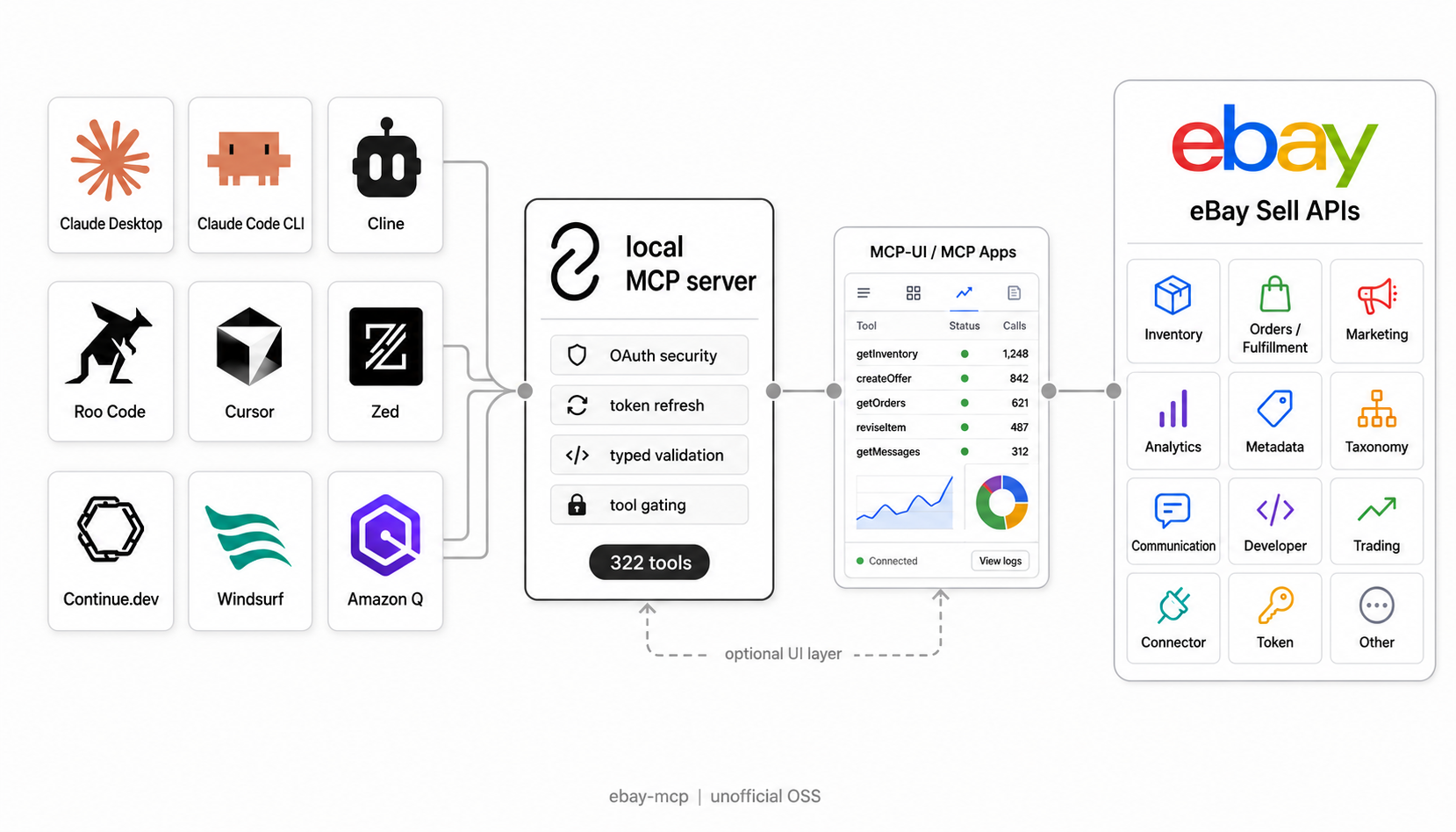
The eBay MCP server — give Claude, Cursor, and any AI assistant full access to eBay's Sell APIs. 379 tools for inventory, orders, marketing, and analytics, running locally with your own keys.
Unofficial, open-source project — not affiliated with, authorized, or endorsed by eBay Inc.












---
**eBay MCP** is a local [Model Context Protocol](https://modelcontextprotocol.io) server that connects AI assistants — [Claude Desktop](https://claude.ai/download), [Claude Code](https://code.claude.com/docs/en/overview), [Cursor](https://cursor.com/), [Cline](https://cline.bot/), [Windsurf](https://windsurf.com/), [Zed](https://zed.dev/), [Continue.dev](https://docs.continue.dev/), [Roo Code](https://roocode.com/), and [Amazon Q Developer](https://aws.amazon.com/q/developer/) — directly to **[eBay's Sell APIs](https://developer.ebay.com/api-docs/sell/static/overview.html)**. It exposes **379 tools** spanning **100% of the eBay Sell, Commerce and Developer APIs it tracks** (356 unique endpoints) for inventory management, order fulfillment, promoted-listings marketing, analytics, and developer tooling. Everything runs on your machine over STDIO or local HTTP — **no cloud relay**, and your eBay credentials never leave your computer.
> **Disclaimer:** Unofficial, third-party project — **not affiliated with or endorsed by eBay Inc.** Provided "as is" without warranty. You are responsible for complying with [eBay's API License Agreement](https://developer.ebay.com/join/api-license-agreement) and [data-handling requirements](https://developer.ebay.com/api-docs/static/data-handling-update.html), keeping your credentials secure, and staying within rate limits. Test in sandbox before production. See [LICENSE](LICENSE).
## Table of contents
- [Features](#features)
- [Capability map](#capability-map)
- [eBay MCP vs. the raw eBay API](#ebay-mcp-vs-the-raw-ebay-api)
- [One-click AI setup](#one-click-ai-setup)
- [Quick start](#quick-start)
- [Demo](#demo)
- [Configuration](#configuration)
- [Available tools](#available-tools)
- [Interactive UI (MCP Apps) — beta](#interactive-ui-mcp-apps)
- [Usage examples](#usage-examples)
- [Scope and safety](#scope-and-safety)
- [Logging & troubleshooting](#logging--troubleshooting)
- [FAQ](#faq)
- [Contributing](#contributing)
- [Resources](#resources)
- [License](#license)
- [Contributors](#contributors)
## Features
- **379 eBay API tools** — 100% coverage of the eBay Sell APIs across inventory, orders, marketing, analytics, metadata, taxonomy, and developer tooling.
- **9 AI clients, auto-configured** — Claude Desktop, Cursor, Zed, Cline, Continue.dev, Windsurf, Roo Code, Claude Code CLI, and Amazon Q Developer.
- **OAuth 2.0 built in** — full user-token management with automatic refresh, and smart fallback from user tokens (10k–50k req/day) to client credentials (1k req/day).
- **Resilient by default** — automatic retry with exponential backoff on `429` rate limits, and consistent, loud error surfacing.
- **Type-safe** — [TypeScript](https://www.typescriptlang.org/) end to end, [Zod](https://zod.dev/)-validated tool inputs, and [OpenAPI](https://www.openapis.org/)-generated types.
- **Local-first & private** — runs over STDIO or local HTTP; your credentials and data never leave your machine.
- **Sandbox and production** — switch environments with a single variable.
- **One-command setup** — `npm run setup` configures credentials, OAuth, and your MCP client, with a browser auto-opened for the OAuth flow.
- **Well tested** — 1,000+ automated tests run in CI on every change through [GitHub Actions](https://docs.github.com/en/actions).
## Capability map
Use this map when deciding which tool family to expose, or when asking an assistant what it can do. The family names match `EBAY_MCP_TOOLS`, so you can run with all tools, dynamic discovery, or only the families needed for a specific workflow.
| Family | What it unlocks | Good first request |
| --- | --- | --- |
| `account` | Business policies, fulfillment policies, payment policies, return policies, sales tax, subscriptions, programs, rate-table shipping costs, payout settings, combined shipping rules, and user preferences (Account API v2) | "Show my eBay fulfillment policies." |
| `finances` | Payouts, payout summaries, transactions, transfers, seller funds, billing activity, and order earnings | "Summarize my payouts from the last 30 days." |
| `inventory` | Inventory items, offers, inventory locations, item groups, bulk offer flows, and SKU/location mapping | "List my active inventory items and their available quantity." |
| `feed` | Asynchronous order, inventory, and customer-service-metric report tasks, recurring schedules, and feed file upload/download | "Create an order report task for the last 10 days." |
| `stores` | eBay Store details, store categories (add, rename, move, delete), and category task status | "Show my eBay Store category tree." |
| `fulfillment` | Orders, shipping fulfillments, refunds, payment disputes, and dispute evidence | "Show unfulfilled orders from the last 7 days." |
| `logistics` | Shipping quotes, label purchase, shipments, and label download (limited-release Logistics API) | "Get shipping rate quotes for this order." |
| `browse` | Active listing search and item details (Browse API) for market research | "What similar items are listed right now?" |
| `marketing` | Promoted Listings campaigns, ads, promotions, bidding, and marketing reports | "List my active promoted listing campaigns." |
| `analytics` | Traffic reports, seller standards, and customer-service metrics | "Show my seller standards profile." |
| `communication` | Buyer-seller messaging, negotiations, notifications, and feedback | "Show recent buyer messages that need a response." |
| `metadata` / `taxonomy` | Category trees, aspects, item conditions, return-policy metadata, tax jurisdictions, vehicle compatibility, shipping carriers/services/locations, handling times, expired categories, bulk aspect export, and charitable organizations | "Find required item aspects for this category." |
| `other` | Identity, VeRO, translation, and international shipping support APIs | "Show my current seller identity details." |
| `developer` / `token-management` | Rate limits, signing keys, OAuth URLs, token refresh, and diagnostics | "Check my eBay API rate limits." |
| `trading` | Legacy XML listing create, revise, relist, and end operations for fixed-price listings and auctions | "Create a fixed-price listing draft from this SKU." |
| `connector` | ChatGPT connector search/fetch tools over the eBay MCP catalogue | "Search the eBay tool catalogue for order tools." |
### Listing preflight: required item specifics
Before calling `ebay_create_or_replace_inventory_item`, `ebay_create_offer`, or
`ebay_get_listing_fees`, fetch the live requirements for the selected category:
`ebay_get_default_category_tree_id` → `ebay_get_category_suggestions` →
`ebay_get_item_aspects_for_category`
The aspects response identifies required and recommended item specifics. Put every
required aspect on the inventory item before creating its offer. Requirements vary by
category and marketplace, so re-run the lookup when either changes; do not rely on
examples or a fixed global fallback value.
### Auction offers
`ebay_create_offer`, `ebay_update_offer`, and `ebay_bulk_create_offer` accept both
listing formats through the same Inventory model:
| Field | `FIXED_PRICE` | `AUCTION` |
| --- | --- | --- |
| `pricingSummary.price` | Listing price | Optional Buy It Now price, at least 30% above the opening bid |
| `pricingSummary.auctionStartPrice` | — | Opening bid |
| `pricingSummary.auctionReservePrice` | — | Optional; must exceed the opening bid and carries an eBay fee |
| `listingDuration` | `GTC` | Day count such as `DAYS_7` (never `GTC`) |
| `availableQuantity` | Any | Omit or `1` — an auction sells a single unit |
| Best Offer | Allowed | Allowed where the category supports it, but not together with a Buy It Now price |
| `quantityLimitPerBuyer` / `eBayPlusIfEligible` | Allowed | Not allowed |
| `listingStartDate` | Only when a scheduled start was explicitly requested (eBay may charge a fee) | Same |
Check `ebay_get_listing_type_policies` for the formats and durations a category allows,
then `ebay_get_listing_fees` before `ebay_publish_offer`. Bodies that mix the two formats
are rejected locally, before any request reaches eBay.
#### Auctions on the Trading (XML) path
The legacy tools take the same switch as a top-level `format` argument (`FIXED_PRICE` by
default). `ebay_create_listing`, `ebay_revise_listing`, `ebay_end_listing`, and
`ebay_relist_item` with `format: "AUCTION"` use the auction-capable calls (`AddItem`,
`ReviseItem`, `EndItem`, `RelistItem`) instead of the `*FixedPriceItem` family, and
`ebay_create_listing` adds `ListingType: "Chinese"` to the `Item` for you:
| Trading `Item` field | `FIXED_PRICE` | `AUCTION` |
| --- | --- | --- |
| `StartPrice` | Listing price | Opening bid (required on create) |
| `ReservePrice` | Not allowed | Optional; must exceed `StartPrice` (a reserve carries an eBay fee) |
| `BuyItNowPrice` | Not allowed | Optional; at least 30% above `StartPrice` |
| `ListingDuration` | `GTC` (the only fixed-price duration eBay accepts) | Day count such as `Days_7` (required on create; never `GTC`) |
| `Quantity` | Any | Omit or `1` |
| `BestOfferDetails.BestOfferEnabled` | Allowed | Allowed where the category supports it, but not together with `BuyItNowPrice` |
| `ebay_end_listing` reason `SellToHighBidder` | Not allowed | Ends an auction with bids |
Mixed payloads are rejected locally. When the format of an existing item is unknown, read
its `ListingType` with `ebay_get_listing` first (`Chinese` = auction).
### Photos and videos from local files
An offer cannot be published without at least one picture. The media tools upload local
files through eBay's Media API and return what the Inventory API needs:
| Tool | What it does |
| --- | --- |
| `ebay_upload_images` | Uploads pictures to eBay Picture Services (`createImageFromFile`) and returns the EPS URLs in order for `product.imageUrls` |
| `ebay_upload_video` | Runs the video lifecycle (`createVideo` → `uploadVideo` → `getVideo`) and returns the `videoId` for `product.videoIds` |
| `ebay_get_video` | Re-checks a video that was still `PROCESSING` |
| `ebay_attach_media_to_inventory_item` | Reads the item, uploads the files, and rewrites only `product.imageUrls` / `product.videoIds` — never publishes, and leaves the item untouched if any upload fails unless `allowPartial` is set |
Local file access is off until you allow it: set `EBAY_MCP_MEDIA_DIRS` (path-delimited
directories) and/or `EBAY_MCP_MEDIA_ROOT` (one directory that also resolves
`media://` references). Symlinks are resolved before the containment
check; anything outside the allowed directories is refused before any upload. Supported:
JPG, PNG, GIF, BMP, TIFF, WEBP, AVIF, HEIC up to 12 MB; MP4/MOV up to 150 MB. Unused
uploads expire on eBay's side; they become permanent once a listing uses them.
### Image URLs and documents
These eight tools are also in the `inventory` family:
| Tool | What it does |
| --- | --- |
| `ebay_create_image_from_url` | Sends an HTTPS source URL to eBay and returns `imageId`, `location`, and the complete `image` response with EPS URLs |
| `ebay_create_document` | Stages a listing document using `documentType` and `languages` |
| `ebay_create_document_from_url` | Creates a listing document directly from `documentUrl` (HTTPS) and metadata |
| `ebay_upload_document` | Uploads a local file to a staged `documentId` |
| `ebay_get_document` | Returns listing document status and metadata |
| `ebay_upload_post_order_document` | Uploads a file with `documentUsageType`, `entityType`, and `entityId`; returns `documentId` and `location` |
| `ebay_download_post_order_document` | Returns an embedded PDF MCP resource, with base64 bytes; does not write local files |
| `ebay_remove_post_order_document` | Deletes a submitted post-order document |
For a listing manual, call `ebay_create_document` with
`{"documentType":"USER_GUIDE_OR_MANUAL","languages":["ENGLISH"]}`, then
`ebay_upload_document` with the returned `documentId` and
`"path":"media://manual.pdf"`. Alternatively, call `ebay_create_document_from_url`
with the same metadata and `"documentUrl":"https://example.com/manual.pdf"`.
Use `ebay_get_document` to check for `ACCEPTED` before associating the ID with a
listing. These calls require user consent for `sell.inventory`, including the read.
Listing documents accept PDF, JPEG/JPG and PNG up to **10 MiB (10,485,760 bytes)**.
Post-order documents additionally accept BMP and GIF, with a **5 MiB (5,242,880 bytes)**
limit. Local uploads use the same media allowlist above, with extension and file
signature checks. Animated/multi-page PNG is unsupported; use PDF for multi-page
content. eBay enforces usage-specific PDF page limits.
For a return label, call `ebay_upload_post_order_document` with
`{"path":"media://label.pdf","documentUsageType":"RETURN_SHIPPING_LABEL","entityType":"RETURNS","entityId":"YOUR_RETURN_ID"}`.
The initial state is `SUBMITTED`; publication requires a separate eBay GraphQL
mutation, outside these tools. Submitted downloads are owner-only; published
downloads require authorization in the post-order flow. Published documents cannot
be deleted, and expired documents are unavailable.
Post-order tools require an eligible keyset and user consent for
`https://api.ebay.com/oauth/api_scope/commerce.post_order.document`.
Add it to your existing `EBAY_OAUTH_SCOPES` list and repeat OAuth setup/consent.
The variable replaces the requested scope list, so retain the other scopes you need.
Token refresh does not grant additional scopes. This scope is recognized but is
not added to default consent requests. All Media API POST operations are subject
to eBay's user-level limit of 50 requests per five seconds; rate-limit errors are
returned to the caller.
See eBay's [Media API overview](https://developer.ebay.com/api-docs/commerce/media/static/overview.html)
and [release notes](https://developer.ebay.com/api-docs/commerce/media/static/release-notes.html).
### Finances, feeds, stores, and shipping labels
These families cover the rest of the Sell APIs: Finances, Feed, Stores, Logistics, and Account
v2, plus the Metadata shipping, Taxonomy, and Charity endpoints that were missing:
| Family | What it adds |
| --- | --- |
| `finances` | Read-only payouts, payout and transaction summaries, transactions, transfers, seller funds, billing activity, and order earnings |
| `feed` | Order, inventory, and customer-service-metric report tasks; LMS and Seller Hub upload tasks; recurring schedules and templates; input and result files |
| `stores` | eBay Store details and store category changes (add, rename, move, delete) with task polling |
| `logistics` | Shipping quotes, postage purchase, shipments, cancellation, and PDF labels |
| `account` | Account API v2 rate tables, split payouts (mainland China sellers), combined shipping rules, and user preferences |
| `metadata` / `taxonomy` | Shipping carriers, services, locations, and handling times; expired categories; the bulk aspect export; charity organization lookup |
**Asynchronous changes.** Feed tasks and store category changes return a `taskId` read from
eBay's `Location` header (feed schedules return a `scheduleId`). Poll `ebay_get_feed_task` or
`ebay_get_store_task` until the task finishes, then fetch any result file. eBay allows one store
category change in flight at a time.
**Files in and out.** Downloads (feed input, result, and schedule files, shipping labels, and the
Taxonomy aspect export) come back as embedded MCP resources with base64 bytes; nothing is written
to disk. A file over **25 MiB** fails with an error as soon as its size is known, without reading
the rest. The aspect export for large marketplaces such as `EBAY_US` exceeds that limit, so use
`ebay_get_item_aspects_for_category` per category there. `ebay_upload_feed_task_file` reads a local
`.xml`, `.csv`, `.zip`, or `.gz` file of up to 15 MiB (eBay's data file limit) through the same
`EBAY_MCP_MEDIA_DIRS` / `EBAY_MCP_MEDIA_ROOT` allowlist as the media tools.
**Money moves.** `ebay_create_shipment_from_shipping_quote` buys postage and charges the seller's
billing agreement; `ebay_cancel_shipment` refunds it while the label is unused.
**Optional scopes.** Two scopes are recognized but never requested by default:
- `https://api.ebay.com/oauth/api_scope/sell.finances.earnings.read` for the three order-earnings
tools.
- `https://api.ebay.com/oauth/api_scope/sell.logistics` for every Logistics tool; the API is limited
release.
Eligible keysets add the scope to `EBAY_OAUTH_SCOPES`, keeping the other scopes they need, and
repeat OAuth consent.
**Digital signatures (EU/UK sellers).** eBay requires
[Digital Signatures](https://developer.ebay.com/develop/guides/digital-signatures-for-apis) on every
Finances API call and on `issueRefund` for sellers domiciled in the EU or UK; without them eBay
answers `403 Missing x-ebay-signature-key header`. To enable signing:
1. Run `ebay_create_signing_key` (ED25519 is recommended) and keep the response — eBay never shows
the private key again.
2. Set `EBAY_SIGNING_KEY_JWE` to its `jwe` and `EBAY_SIGNING_PRIVATE_KEY` to its `privateKey`
(the base64 value as returned, or a PEM key), then restart the server.
Those calls then carry the `x-ebay-signature-key`, `Content-Digest`, `Signature-Input`, and
`Signature` headers (RFC 9421). Other calls are never signed, and nothing changes while the two
variables are unset. Behind `EBAY_MCP_API_BASE_URL`, calls are signed for the eBay host and path
they reach (`api.ebay.com` or `apiz.ebay.com`), so the proxy must forward eBay's `Host` header and
the original eBay path.
## eBay MCP vs. the raw eBay API
Both talk to the same eBay endpoints — the difference is everything you'd otherwise build yourself.
| | **eBay MCP Server** | **Raw eBay REST API** |
| --- | --- | --- |
| Interface | Natural language through your AI assistant | Hand-written HTTP requests and JSON parsing |
| OAuth & token refresh | Built in, with automatic refresh | You implement and maintain it |
| Rate-limit handling | Automatic retry with exponential backoff | Manual `429` handling and backoff |
| Input validation | Zod schemas + TypeScript types on every tool | None — you validate your own payloads |
| Setup | One wizard (`npm run setup`) | Per-call auth, headers, and marketplace wiring |
| AI client support | 9 clients auto-configured | Not applicable |
| API coverage | 379 tools across 100% of the Sell APIs, ready to call | Build each request from the docs |
| Hosting | Runs locally, no cloud relay | Your own infrastructure |
## One-click AI setup
> **Let your AI assistant set this up for you.** Copy the prompt below and paste it into Claude, ChatGPT, or any AI assistant with MCP support.
Click to copy the AI setup prompt
```
I want to set up the eBay MCP Server for my AI assistant. Please help me:
1. Install the eBay MCP server:
npm install -g ebay-mcp
2. I need to configure it for [Claude Desktop / Cursor / Cline / Zed / Continue.dev / Windsurf / Claude Code CLI / Amazon Q] (choose one)
3. My eBay credentials are:
- Client ID: [YOUR_CLIENT_ID]
- Client Secret: [YOUR_CLIENT_SECRET]
- Environment: [sandbox / production]
- Redirect URI (RuName): [YOUR_REDIRECT_URI]
Please:
- Create the appropriate config file for my MCP client
- Set up the environment variables
- Help me complete the OAuth flow to get a refresh token for higher rate limits
- Test that the connection works
If I don't have eBay credentials yet, guide me through creating a developer account at https://developer.ebay.com/
```
## Quick start
### 1. Get eBay credentials
1. Create a free [eBay Developer Account](https://developer.ebay.com/).
2. Generate application keys in the [Developer Portal](https://developer.ebay.com/my/keys).
3. Save your **Client ID** and **Client Secret**.
### 2. Install
```bash
npm install -g ebay-mcp # from npm (recommended)
```
Or from source:
```bash
git clone https://github.com/YosefHayim/ebay-mcp.git
cd ebay-mcp && npm install && npm run build
```
### 3. Run the setup wizard
```bash
npm run setup
```
The wizard configures your eBay credentials, sets up OAuth (for higher rate limits), auto-detects and configures your MCP client, and saves everything automatically.
### 4. Verify with a read-only request
Restart your MCP client and ask:
> "Check my eBay API rate limits."
That should call `ebay_get_rate_limits` or `ebay_get_user_rate_limits` and confirms the server, credentials, and MCP client wiring without changing seller data.
### 5. Use
Start managing eBay through your AI assistant. Begin with read-only questions, then move to mutating inventory, order, or campaign tools after you have confirmed the target environment is sandbox or production.
📸 Visual setup walkthrough (eBay Developer Portal)
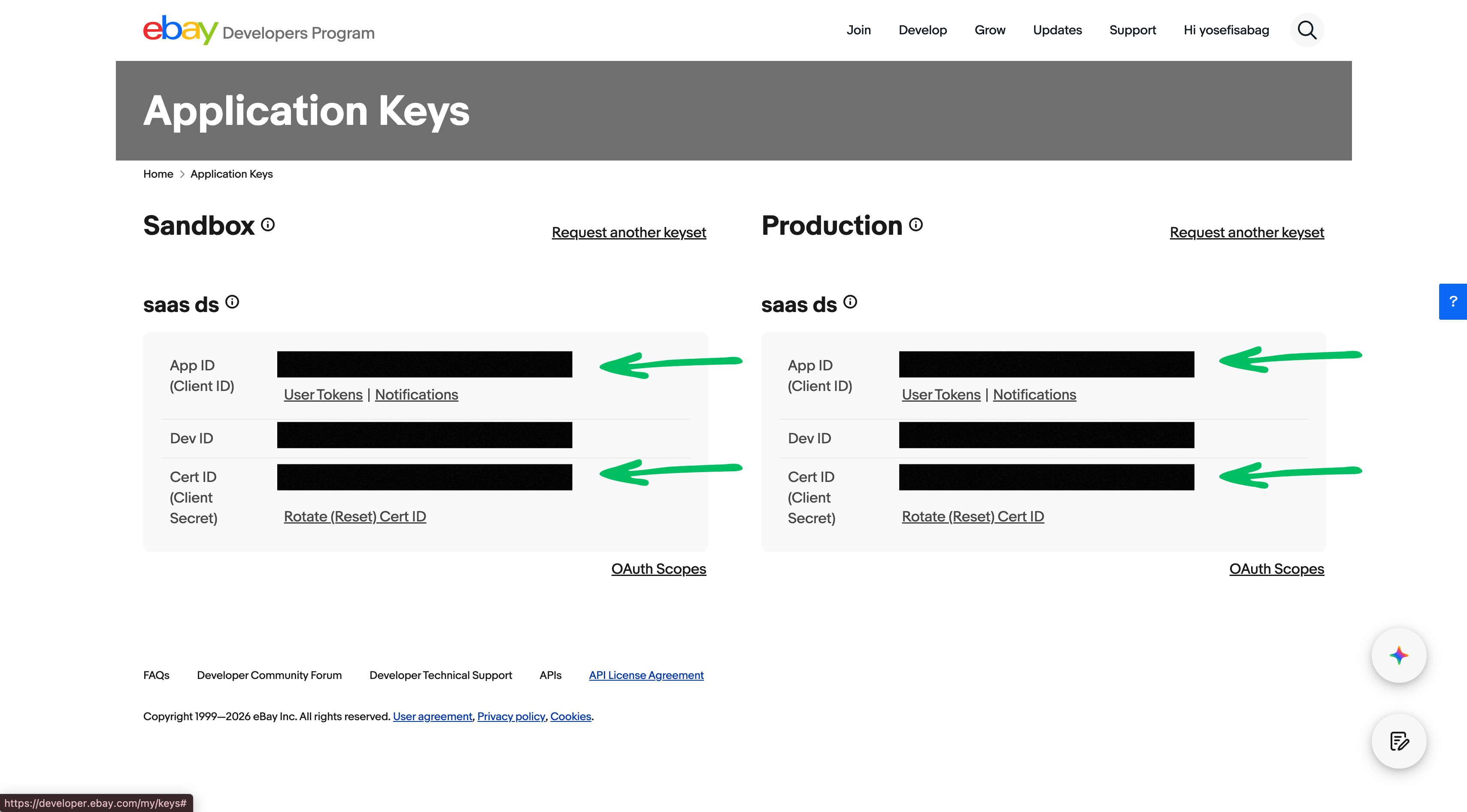
The setup wizard (`npm run setup`) handles OAuth automatically. Here's where to find your credentials in the eBay Developer Portal:
**Step 1** — In the [Developer Portal](https://developer.ebay.com/my/keys), copy your **App ID (Client ID)** and **Cert ID (Client Secret)**:
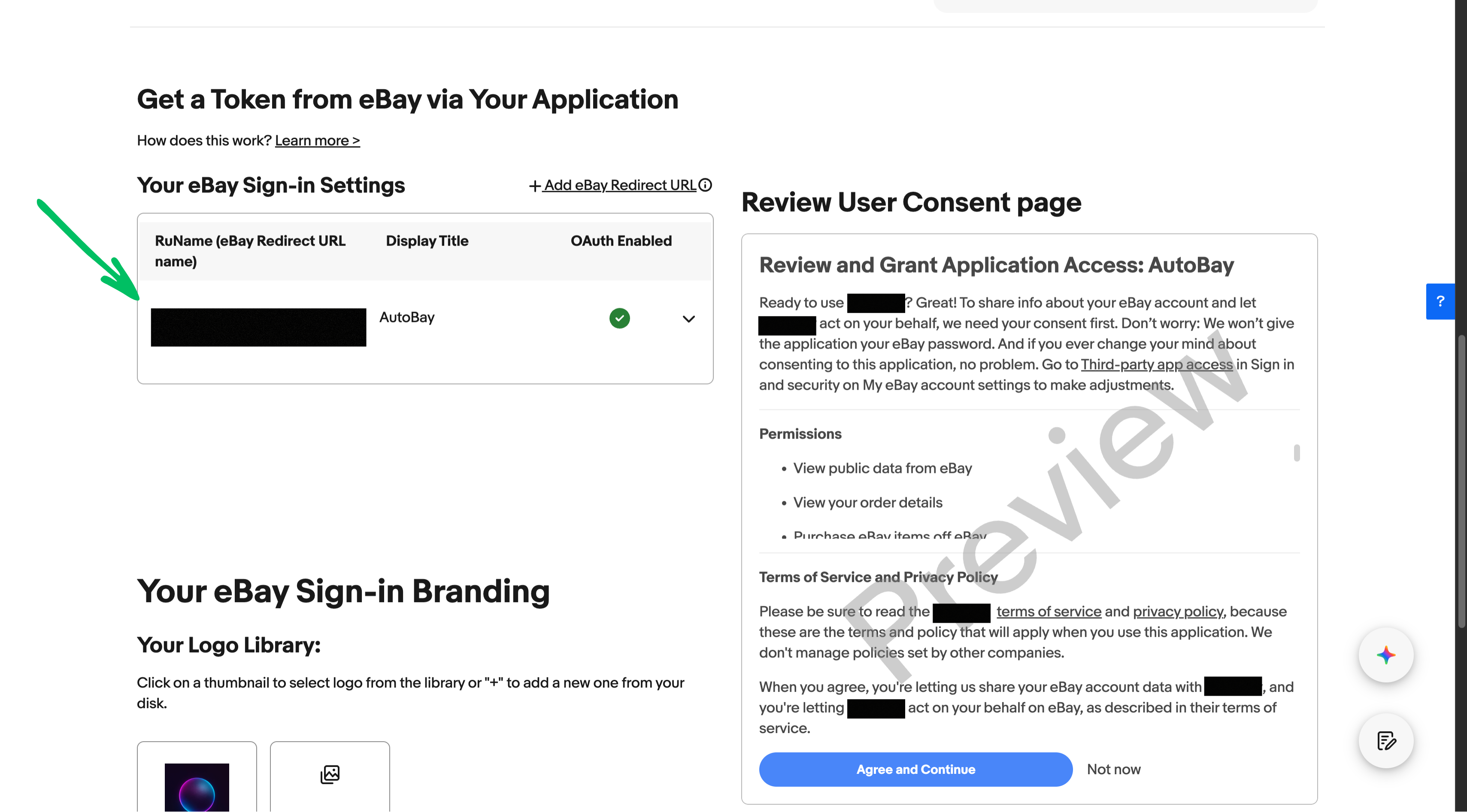
**Step 2** — In your app's **User Tokens** settings, copy the **RuName** (eBay Redirect URL):
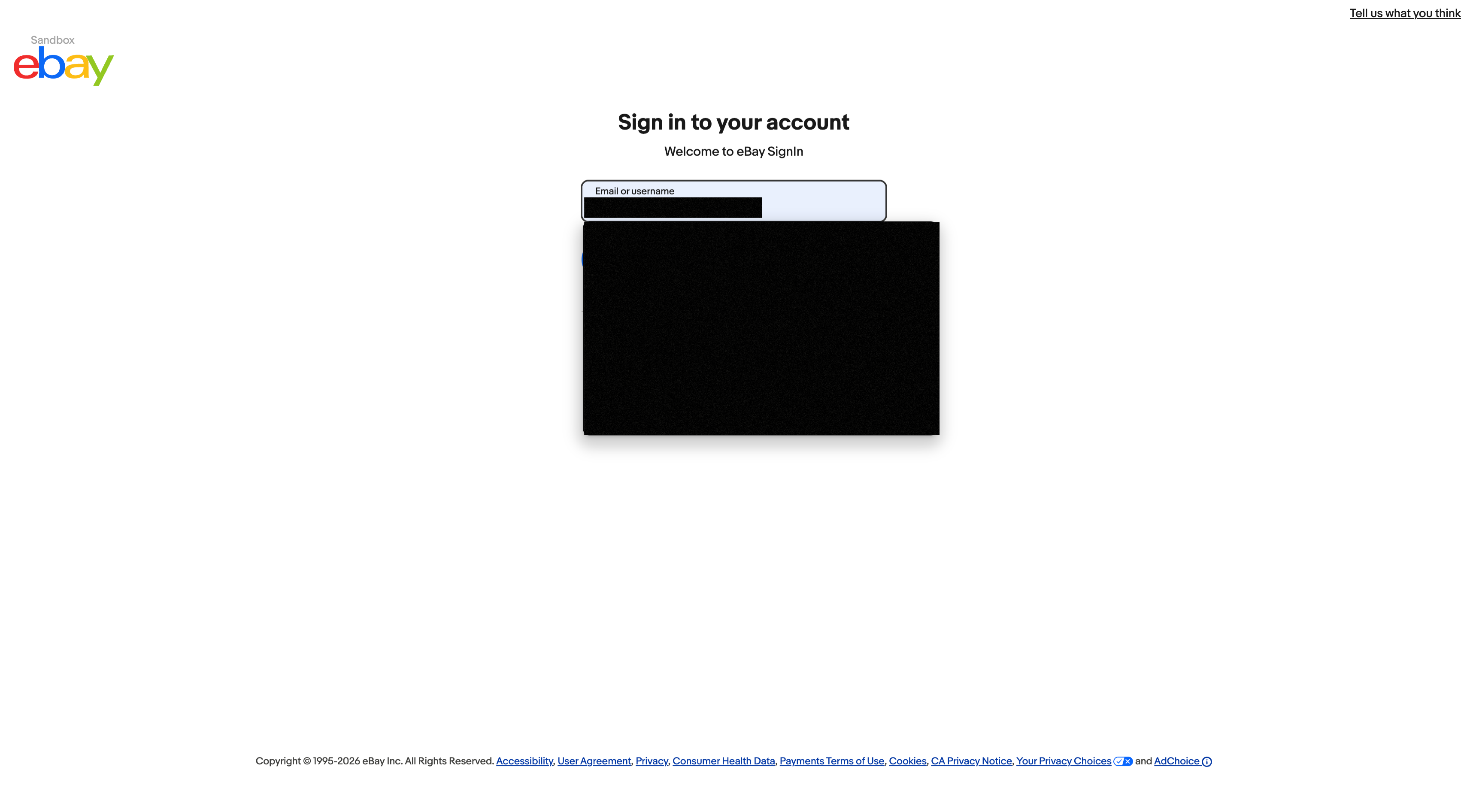
**Step 3** — Run `npm run setup`. It opens your browser for OAuth login and guides you through eBay sign-in:
**Step 4** — Paste the authorization code from the callback URL when prompted:
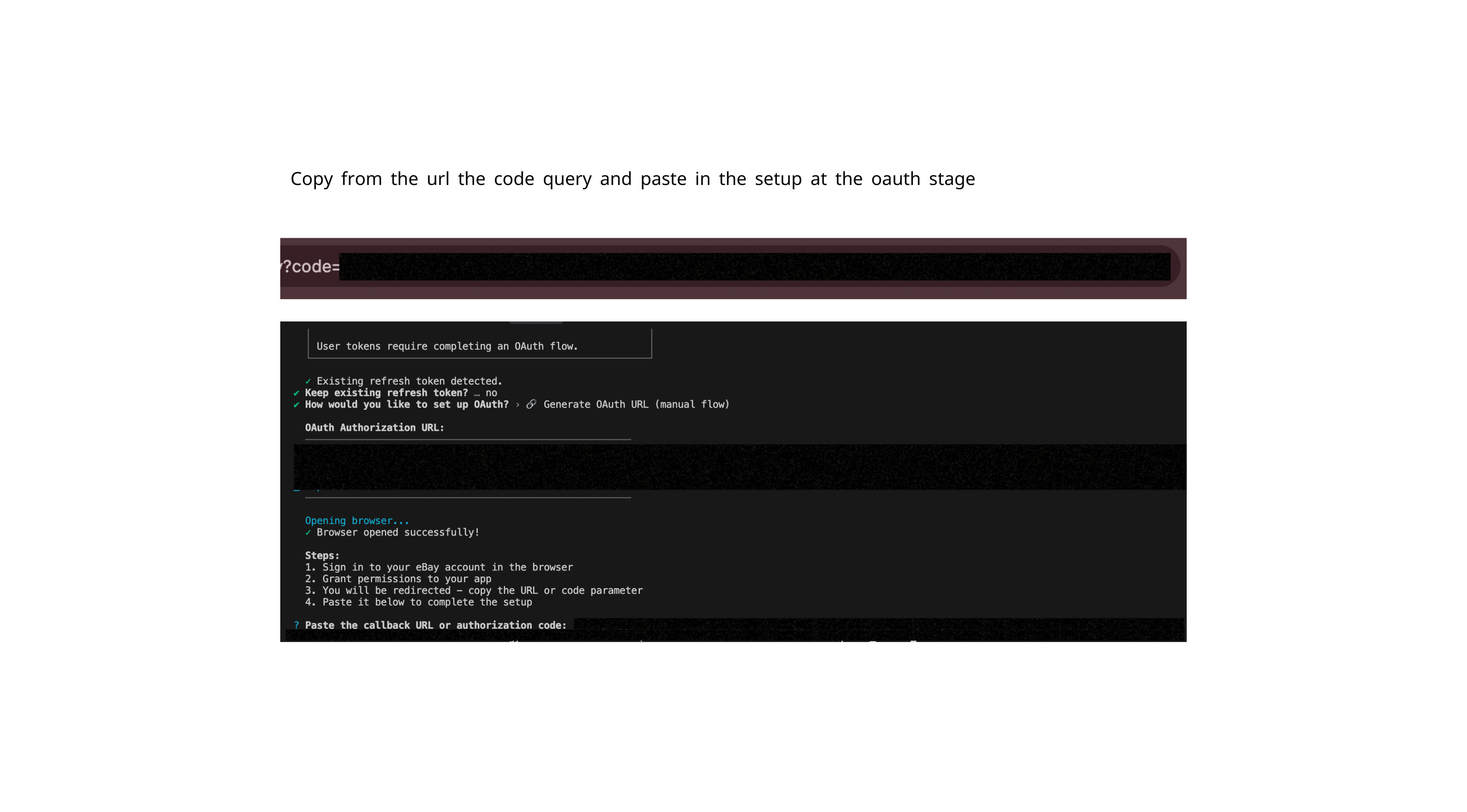
The wizard exchanges the code for tokens, saves them, and configures your MCP client. You now have user-token authentication (10k–50k requests/day instead of the default 1k/day).
## Demo
See the eBay MCP Server in action with Claude Desktop:
https://github.com/user-attachments/assets/0173c8df-221c-4943-a4ce-cd20bce79f4b
## Configuration
Environment variables, tool exposure, auth & client compatibility
> `npm run setup` writes the `.env` for you; the variables below are for reference.
```bash
EBAY_CLIENT_ID=your_client_id
EBAY_CLIENT_SECRET=your_client_secret
EBAY_ENVIRONMENT=sandbox # or "production"
EBAY_REDIRECT_URI=your_runame
EBAY_MARKETPLACE_ID=EBAY_US # default marketplace (overridable per tool)
# EBAY_SITE_ID=0 # Trading API site override; defaults from EBAY_MARKETPLACE_ID
EBAY_CONTENT_LANGUAGE=en-US # default request content language
EBAY_USER_REFRESH_TOKEN=your_token # for higher rate limits
# EBAY_SIGNING_KEY_JWE= # Digital Signatures for EU/UK sellers (jwe from ebay_create_signing_key)
# EBAY_SIGNING_PRIVATE_KEY= # privateKey from the same response (base64 PKCS#8 or PEM)
EBAY_MCP_UI=on # interactive MCP Apps views (beta); "off" forces plain JSON
EBAY_MCP_TOOLS=all # tool exposure: "all", "dynamic", or a family list (see below)
EBAY_READ_ONLY=false # when true, only register read-only tools (gets/lists/searches)
# Local photo/video upload (optional — off until a directory is allowed):
# EBAY_MCP_MEDIA_DIRS=/srv/media # path-delimited directories the media and feed upload tools may read
# EBAY_MCP_MEDIA_ROOT=/srv/media # root for media:// references (also allowed)
# HTTP deploy (optional — Docker / Railway / self-hosted):
# MCP_HOST=0.0.0.0 # default is 0.0.0.0 when PORT is set
# MCP_PORT=3000 # preferred over platform PORT
# MCP_AUTH_TOKEN=secret # static Bearer for HTTP MCP (skips OAuth verifier)
# MCP_CORS_ORIGINS=https://app.example.com # browser origins allowed cross-origin (comma-separated); default: loopback origins only
```
### Tool exposure (`EBAY_MCP_TOOLS`)
By default all tools are advertised to the agent at once. On a long conversation that catalogue is a meaningful slice of the context window, so two opt-in modes let you shrink it:
| Value | Behavior | Works on |
| --------------------------- | ----------------------------------------------------------------------------------------------------------------------------------------------------- | --------------------------------------- |
| `all` _(default, or unset)_ | Every tool advertised at startup. | every host |
| `dynamic` | Only three discovery tools are visible (`list_ebay_tools`, `enable_ebay_tools`, `disable_ebay_tools`). The agent searches the catalogue and loads only the tools it needs; they then appear natively. | hosts that honor `tools/listChanged` (e.g. Claude) |
| `inventory,fulfillment,…` | Registers **only** the named families (listed below), frozen for the session. | every host (incl. ChatGPT, Cursor) |
The family list is literal — you get exactly what you name. ChatGPT connectors need the `connector` family (its `search`/`fetch` tools); add it explicitly, e.g. `EBAY_MCP_TOOLS=connector,inventory`. An unknown family name fails fast at startup with the valid list. Valid families: `connector`, `token-management`, `account`, `finances`, `inventory`, `feed`, `stores`, `fulfillment`, `logistics`, `marketing`, `analytics`, `metadata`, `taxonomy`, `communication`, `browse`, `other`, `developer`, `trading`.
### Authentication & rate limits
| Mode | Daily limit | Best for | Setup |
| -------------------------------- | --------------- | ----------------------- | --------------------------------- |
| **Client credentials** (default) | 1,000 req/day | Development, testing | Automatic with Client ID + Secret |
| **User token** (recommended) | 10k–50k req/day | Production, high volume | OAuth via `npm run setup` |
User-token limits vary by account tier (Individual 10k · Commercial 25k · Enterprise 50k+). On a `429`, the server retries with exponential backoff and surfaces the error. Monitor usage in the [Developer Portal](https://developer.ebay.com/my/api_usage).
### MCP client compatibility
Auto-configured by `npm run setup`. Requires [Node.js](https://nodejs.org/en) ≥ 24 and MCP protocol 1.0+ over STDIO (default) or HTTP.
| Client | Platform | Config path |
| ---------------------- | --------------------- | ---------------------------------------------------------------------------- |
| **Claude Desktop** | macOS, Windows, Linux | `~/Library/Application Support/Claude/claude_desktop_config.json` |
| **Cursor IDE** | macOS, Windows, Linux | `~/.cursor/mcp.json` |
| **Zed Editor** | macOS, Windows, Linux | `~/.config/zed/settings.json` |
| **Cline** | VS Code extension | `~/...globalStorage/saoudrizwan.claude-dev/settings/cline_mcp_settings.json` |
| **Continue.dev** | VS Code, JetBrains | `~/.continue/config.json` |
| **Windsurf (Codeium)** | macOS, Windows, Linux | `~/.codeium/windsurf/mcp_config.json` |
| **Roo Code** | VS Code extension | `~/...globalStorage/rooveterinaryinc.roo-cline/settings/mcp_settings.json` |
| **Claude Code CLI** | Terminal | `~/.claude.json` |
| **Amazon Q Developer** | AWS | `~/.aws/amazonq/mcp.json` |
## Available tools
379 tools by category (100% Sell API coverage)
**379 tools**, 100% Sell API coverage, organized by category. Each link points to the tool definitions and handlers in [`src/tools/categories/`](src/tools/categories/):
| Category | What you can do |
| --- | --- |
| [Connector](src/tools/categories/connector.ts) | ChatGPT connector search/fetch tools over the eBay MCP catalogue |
| [Account](src/tools/categories/account.ts) | Business, fulfillment, payment, and return policies; programs; subscriptions; sales tax; rate tables, payout settings, combined shipping rules, and user preferences ([`accountV2.ts`](src/tools/categories/accountV2.ts), Account API v2) |
| [Finances](src/tools/categories/finances.ts) | Payouts, transactions, transfers, seller funds, billing activity, order earnings |
| [Inventory](src/tools/categories/inventory.ts) | Inventory items, offers, locations, item groups, bulk operations, SKU/location mapping, and local photo/video upload ([`media.ts`](src/tools/categories/media.ts), Media API) |
| [Feed](src/tools/categories/feed.ts) | Order, inventory, and customer-service-metric feed tasks; schedules and templates; feed file upload/download |
| [Stores](src/tools/categories/stores.ts) | eBay Store details, store categories, category tasks |
| [Fulfillment](src/tools/categories/fulfillment.ts) | Orders, shipping, refunds, disputes, payment-dispute evidence |
| [Logistics](src/tools/categories/logistics.ts) | Shipping quotes, label purchase, shipments, label download (limited release) |
| [Marketing](src/tools/categories/marketing.ts) | Promoted-listings campaigns, ads, promotions, bidding, bulk operations |
| [Analytics](src/tools/categories/analytics.ts) | Traffic reports, seller standards, customer-service metrics |
| [Communication](src/tools/categories/communication.ts) | Buyer–seller messaging, negotiations, notifications, feedback |
| [Metadata](src/tools/categories/metadata.ts) | Return policies, sales-tax jurisdictions, automotive compatibility, shipping carriers/services/locations, handling times |
| [Taxonomy](src/tools/categories/taxonomy.ts) | Category trees, item aspects, item conditions, expired categories, bulk aspect export, and charitable organizations ([`charity.ts`](src/tools/categories/charity.ts), Charity API) |
| [Other](src/tools/categories/other.ts) | Identity, VeRO, translation, and international shipping support APIs |
| [Trading (legacy XML)](src/tools/categories/trading.ts) | Fixed-price and auction listing create, revise, relist, end |
| [Developer](src/tools/categories/developer.ts) | Rate limits, signing keys, client registration |
| [Token Management](src/tools/categories/tokenManagement.ts) | OAuth URL generation and token management |
**Example tools:** `ebay_get_inventory_items`, `ebay_get_offers_by_skus`, `ebay_get_orders`, `ebay_create_offer`, `ebay_get_campaigns`, `ebay_get_oauth_url`.
For the complete machine-readable index, see [llms.txt](llms.txt).
## Interactive UI (MCP Apps)
Interactive table, card, chart & stat views (beta)
> **Beta** — this feature is new and evolving alongside the MCP Apps spec, and host support is still rolling out. It is opt-in and falls back to plain JSON, so it never breaks existing clients. Toggle it with `EBAY_MCP_UI` (see [Configuration](#configuration)).
On hosts that support [MCP Apps](https://modelcontextprotocol.io), common read tools render their results as interactive views instead of raw JSON — a sortable **table**, a detail **card**, a **chart**, or a **stat grid** — using the host's own theme. Everywhere else, the exact same tools return plain JSON, so nothing breaks. It is built on the official [MCP Apps SDK (`@modelcontextprotocol/ext-apps`)](https://github.com/modelcontextprotocol/ext-apps), the extension that lets MCP servers ship interactive UI to conversational clients.
- **Opt-in and host-gated.** Views are advertised only to clients that announce the MCP Apps capability (e.g. Claude). Hosts without it (e.g. Cursor) silently get JSON.
- **Kill-switch.** Set `EBAY_MCP_UI=off` to force plain JSON everywhere, even on capable hosts.
- **Token-cheap.** Each view's HTML is fetched once by the host out of band (never into the model's context); the model only ever sees a one-line summary plus the structured data it would have received anyway.
- **Read-only.** Views only ever trigger read tools (drill into a row, page, refresh) — they never mutate your eBay data.
15 core-workflow tools opt in today, across four archetypes:
| Archetype | Tools |
| --- | --- |
| **Table** | `ebay_get_orders`, `ebay_get_shipping_fulfillments`, `ebay_get_offers`, `ebay_get_inventory_items`, `ebay_get_inventory_locations`, `ebay_get_payment_dispute_summaries` |
| **Card** | `ebay_get_order`, `ebay_get_offer`, `ebay_get_inventory_item`, `ebay_get_payment_dispute`, `ebay_get_seller_standards_profile` |
| **Chart** | `ebay_get_traffic_report`, `ebay_get_customer_service_metric` |
| **Stat** | `ebay_get_rate_limits`, `ebay_get_user_rate_limits` |
The views build into self-contained HTML with `pnpm build` (or `pnpm build:mcp-apps`); they ship in the published package and load with no network access of their own.
## Usage examples
Common tasks, phrased as you'd ask your AI assistant:
- **Set up OAuth** — *"Help me set up OAuth for my eBay account."* → generates an authorization URL via `ebay_get_oauth_url`, then configures the refresh token. Unlocks 10k–50k req/day.
- **Manage inventory** — *"Show me all my active listings."* → `ebay_get_inventory_items` returns SKUs, quantities, and status.
- **Add photos to a listing** — *"Attach the three photos in ~/listings/megadrive to SKU MD-001."* → `ebay_attach_media_to_inventory_item` uploads them to eBay Picture Services and updates `product.imageUrls` (with `EBAY_MCP_MEDIA_DIRS` allowing that folder).
- **Run an auction** — *"List this SKU as a 7-day auction starting at $9.99 with a $25 reserve."* → `ebay_create_offer` with `format: "AUCTION"`, `auctionStartPrice`, `auctionReservePrice`, and `listingDuration: "DAYS_7"`, then `ebay_publish_offer`. On the legacy path, `ebay_create_listing` with `format: "AUCTION"` and a Trading `Item` (`StartPrice`, `ReservePrice`, `ListingDuration: "Days_7"`).
- **Look up offers** — `ebay_get_offers` returns offers for one required SKU. To enumerate offers across the inventory, call `ebay_get_inventory_items` first, then call `ebay_get_offers` once per SKU.
- **Manage fulfillment policies** — *"Create a shipping policy, then update its handling time."* → `ebay_create_fulfillment_policy` creates the reusable policy ID and `ebay_update_fulfillment_policy` replaces its settings.
- **Process orders** — *"Get all unfulfilled orders from the last 7 days."* → `ebay_get_orders` with date and fulfillment-status filters.
- **Create campaigns** — *"Create a promoted-listing campaign for electronics."* → `ebay_create_campaign` and related marketing tools.
- **Bulk operations** — *"Apply a 10% discount to all 'Vintage Watches' items."* → `ebay_get_inventory_items` + `ebay_update_offer` across matches.
## Scope and safety
- **Unofficial project.** This is not an eBay product and does not grant any additional API rights beyond your own eBay Developer account.
- **Local server, live APIs.** The MCP server runs on your machine, but tools still call eBay's sandbox or production APIs over the internet.
- **Mutating tools can change seller data.** Inventory, fulfillment, marketing, account, feed, stores, and Trading tools may create, revise, refund, end, or otherwise update eBay records, and `ebay_create_shipment_from_shipping_quote` purchases postage. Test in sandbox first.
- **Tool exposure is configurable.** Use `EBAY_MCP_TOOLS=dynamic` or a family list when you want a smaller, workflow-specific tool surface.
- **Interactive views are read-only.** MCP Apps views can page, refresh, and drill into read tools, but they do not mutate eBay data.
- **Compliance remains yours.** Keep credentials secure, monitor rate limits, and follow eBay's API terms and data-handling rules.
## Logging & troubleshooting
- **Logging** — Winston-based, written to stderr (MCP-safe) with optional file output.
- **Troubleshooting** — server not appearing, auth errors, rate limits, empty results. Start with `npm run diagnose`.
## FAQ
What is the eBay MCP server?
A local [Model Context Protocol](https://modelcontextprotocol.io) server that exposes **379 tools** covering **100% of the eBay Sell, Commerce and Developer APIs it tracks** (356 endpoints) to AI assistants — inventory, order fulfillment, marketing, analytics, and developer tools.
Is this an official eBay product?
No. This is an unofficial, third-party open-source project. It is **not affiliated with, authorized, or endorsed by eBay Inc.**
Which AI assistants and MCP clients are supported?
Nine clients are auto-configured by `npm run setup`: Claude Desktop, Cursor, Zed, Cline, Continue.dev, Windsurf, Roo Code, Claude Code CLI, and Amazon Q Developer. Any MCP-compatible client can connect.
Can I use it with Claude, ChatGPT, or Cursor?
Yes. It works with Claude Desktop and Claude Code out of the box, with Cursor and other MCP-enabled IDEs, and with any assistant that supports the Model Context Protocol. The one-click setup prompt above works with ChatGPT and other assistants too.
Why don't I see the interactive tables and charts?
Interactive [MCP Apps](#interactive-ui-mcp-apps) views only appear on hosts that announce the capability (e.g. Claude); other clients get the same data as plain JSON. Also confirm you have not set `EBAY_MCP_UI=off` and that the views are built (`pnpm build` runs `build:mcp-apps`).
How many eBay APIs and tools does it cover?
379 tools across 356 unique endpoints — 100% of the eBay Sell, Commerce and Developer APIs it tracks.
Is it free and open source?
Yes. It is released under the [MIT license](LICENSE).
Does it run locally or in the cloud?
It runs entirely on your machine over STDIO (or local HTTP). There is no cloud relay — your eBay credentials never leave your computer.
What do I need to get started?
Node.js ≥ 24, a free [eBay Developer Account](https://developer.ebay.com/) (Client ID + Client Secret), then run `npm run setup`.
What are the eBay API rate limits?
Client credentials (the default) allow about 1,000 requests/day. Authenticating with a user token via OAuth raises this to 10,000–50,000 requests/day depending on your account tier.
Does it support both sandbox and production?
Yes. Switch with the `EBAY_ENVIRONMENT` variable (`sandbox` or `production`).
Are my credentials and data secure?
Credentials are stored locally in your `.env` file and used only to call eBay directly.
How is this different from calling the eBay API directly?
You interact in natural language through your AI assistant. OAuth token management, automatic retries with backoff, and type-safe Zod validation are built in. See the [comparison table](#ebay-mcp-vs-the-raw-ebay-api) above.
Can it upload my photos and videos?
Yes. `ebay_upload_images`, `ebay_upload_video`, and `ebay_attach_media_to_inventory_item` read local files (absolute paths or `media://` references) and upload them through eBay's Media API, returning EPS image URLs and video IDs for `product.imageUrls` / `product.videoIds`. `ebay_upload_feed_task_file` uploads local feed files the same way. Filesystem access is opt-in: nothing is readable until `EBAY_MCP_MEDIA_DIRS` or `EBAY_MCP_MEDIA_ROOT` names the directories. See [Photos and videos from local files](#photos-and-videos-from-local-files).
Does it support auction listings?
Yes, through the REST Inventory offer tools: create the offer with `format: "AUCTION"`, an `auctionStartPrice`, an optional `auctionReservePrice`, and a day-count `listingDuration`, then publish it. See [Auction offers](#auction-offers). The legacy Trading API tools take the same switch: `ebay_create_listing` with `format: "AUCTION"` sends `AddItem` with `ListingType` Chinese, an opening-bid `StartPrice`, and a day-count `ListingDuration`.
Does it support eBay's legacy Trading API (XML)?
Yes. Listing create, revise, relist, and end operations are supported through the Trading API tools, for fixed-price listings (`AddFixedPriceItem` family, the default) and for auctions (`format: "AUCTION"` → `AddItem`, `ReviseItem`, `EndItem`, `RelistItem`).
How do I get higher rate limits?
Complete the OAuth flow with `npm run setup` to authenticate with a user token (10k–50k requests/day instead of the default 1k).
What is it built with?
TypeScript and Node.js (ESM), using the official MCP SDK, Zod schemas for tool inputs, Effect for typed async errors, and OpenAPI-generated types.
How do I update to the latest version?
Run `npm install -g ebay-mcp@latest` (or `npm update -g ebay-mcp`).
Does it work offline?
No. "Runs locally" means the server process runs on your machine — it still needs an internet connection and valid credentials to reach eBay's live APIs.
## Contributing
Contributions welcome. Fork → branch → add tests → run the checks below → commit with [Conventional Commits](https://www.conventionalcommits.org/) → open a PR.
```bash
pnpm typecheck && pnpm typecheck:mcp-apps # TypeScript (server + MCP Apps views)
pnpm check:ci # Biome lint + format
pnpm test && pnpm test:integration # Vitest unit + integration
pnpm build # Build to build/
```
To run the CI gate locally in Docker before pushing, use [act](https://nektosact.com): `act workflow_dispatch -W .github/workflows/ci.yml`. The root `.actrc` picks the runner image and keeps the pnpm store outside the workspace.
## Resources
Project docs:
- [llms.txt](llms.txt) — a compact project summary for AI agents.
- [Releases](https://github.com/YosefHayim/ebay-mcp/releases) and the [Issue Tracker](https://github.com/YosefHayim/ebay-mcp/issues).
Official specs and tooling:
- [eBay Developer Portal](https://developer.ebay.com/), [Sell API docs](https://developer.ebay.com/api-docs/sell/static/overview.html), [API License Agreement](https://developer.ebay.com/join/api-license-agreement), [Data Handling Requirements](https://developer.ebay.com/api-docs/static/data-handling-update.html), and [API Status](https://developer.ebay.com/support/api-status).
- [Model Context Protocol](https://modelcontextprotocol.io/) and the [MCP Apps SDK](https://github.com/modelcontextprotocol/ext-apps).
- [Node.js](https://nodejs.org/en), [npm package](https://www.npmjs.com/package/ebay-mcp), [TypeScript](https://www.typescriptlang.org/), [Zod](https://zod.dev/), [Effect](https://effect.website/docs), [Biome](https://biomejs.dev/), [Vitest](https://vitest.dev/), and [GitHub Actions](https://docs.github.com/en/actions).
- [Claude Code](https://code.claude.com/docs/en/overview) and [llms.txt](https://llmstxt.org/).
## License
MIT — see [LICENSE](LICENSE).
## Contributors
Thanks to everyone who has helped make this project better! 🎉
 ---
---

**[Support this project](https://www.buymeacoffee.com/yosefhayim)** · Created by [Yosef Hayim Sabag](https://github.com/YosefHayim)
eBay MCP server · Model Context Protocol for eBay Sell APIs · connect Claude, Cursor, and any AI assistant to eBay inventory, orders, marketing, and analytics.